Web scraping for AI agents means giving an autonomous agent the ability to search the web, fetch pages, and extract clean, structured data it can act on, typically exposed as tools via the Model Context Protocol (MCP). In my experience, there are two ways to get there.
You can run a local-first open-source stack like wigolo on your own machine, or you can call a managed scraping API with a hosted MCP server.
In this guide, we explore how to stand up wigolo as a local-first stack and wire it into an agent over MCP; how a managed API and a hosted MCP server handle the same jobs at scale; what each one costs; and how to decide which route a given workload needs.
Key takeaways:
- An AI agent needs four things from the web: search, fetch with JavaScript rendering, crawl, and extraction into LLM-ready JSON, wired in over MCP.
- Feeding raw HTML to a model wastes tokens. I measured one product page at 9,308 bytes of HTML, or 81 bytes as typed JSON.
- Two routes exist: a local-first stack that is private and costs nothing per query, or a managed API and MCP server that handle proxies and anti-bot at scale.
- Local-first is strong for privacy and low-to-mid-volume, but every request exposes your IP address, which is exactly where hard targets push back.
- A managed scraping API like ScrapingBee runs a hosted MCP server alongside search, rendering, and AI extraction, so an agent gets managed web access with no infrastructure to run.
What is wigolo?
wigolo is an open-source, local-first web intelligence stack (search, fetch, crawl, and research capabilities) for AI coding agents. It gives an agent 10 tools over MCP, runs entirely on your own machine, and costs nothing per query because the ranking models and browser engine run on your hardware. It is currently in public beta and licensed AGPL-3.0-only.
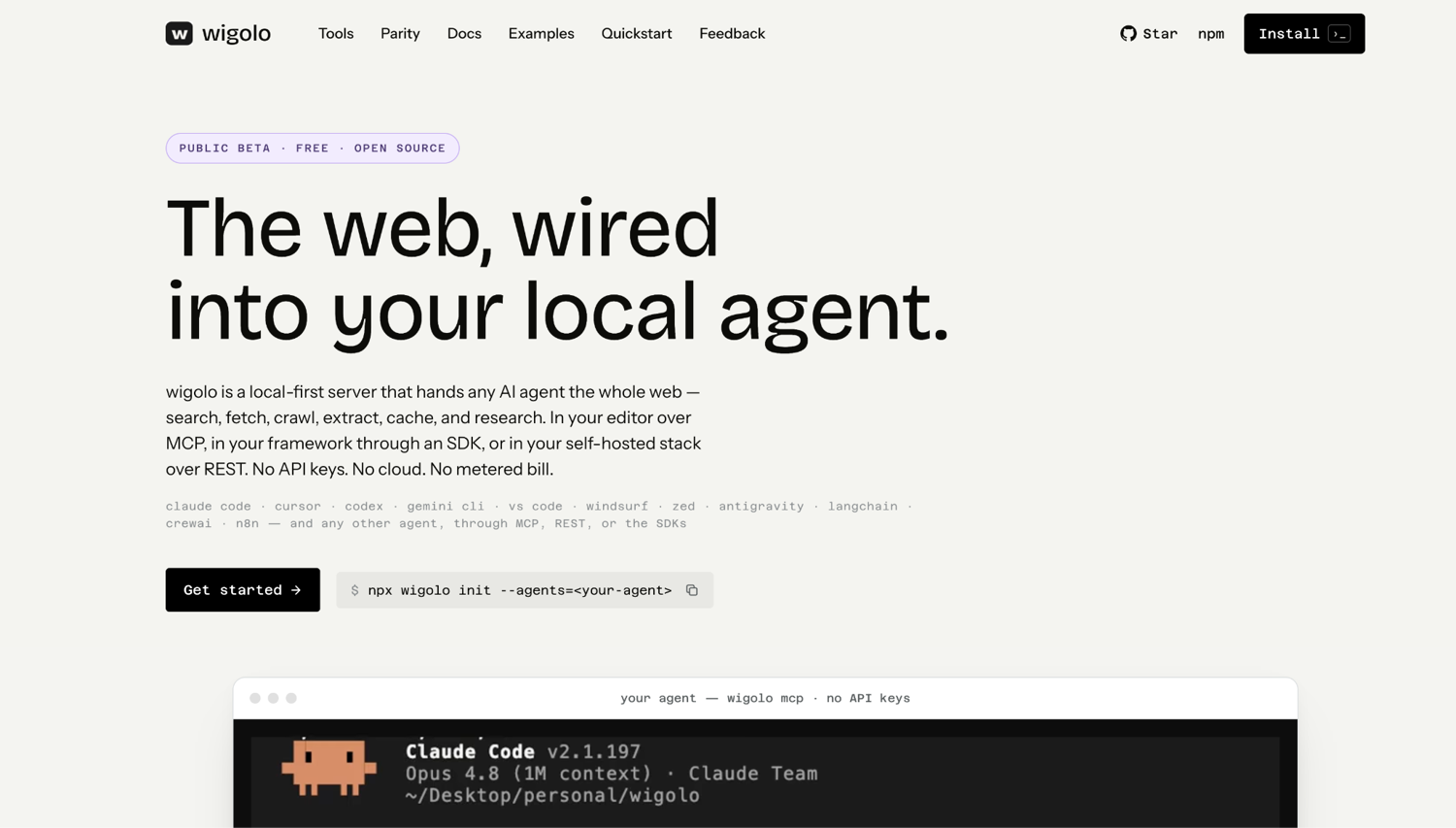
I installed it and ran it against live queries, and the short version is that it does what it says. The longer version, including where it strains, comes in this guide.
Why AI agent web scraping breaks
Everything wigolo gives an agent answers one hard limit: a model is frozen at its training cutoff. Ask it about a library released last month, a price that changed this morning, or a version number that moved in the last release, and it will invent something plausible rather than admit it does not know.
That is the whole reason web access exists as an agent capability. But wiring it up naively breaks in three expensive ways, and only one of them is obvious. Getting blocked is the one everybody expects. The other two, token bloat and silent failures, are quieter and do more damage, because they do not announce themselves.
Token bloat in raw HTML
The lazy way to give an agent a page is to fetch the HTML and dump it into the context window. It works in the sense that the model can see the content. It also drags in the navigation menu, the cookie banner, the footer links, three analytics scripts, and every class name on every div.
Here is what that looks like measured rather than asserted. I pulled one product page from a public test site two ways. Raw HTML came back at 9,308 bytes. The same page, same request, asked instead to return structured data, came back at 81 bytes. That is roughly a hundredfold reduction on a small, tidy page, and small, tidy pages are the best case.
Silent failures
An anti-bot system does not usually slam the door with a 403. Often it returns HTTP 200 with a perfectly well-formed page that happens to contain a challenge, a "please enable JavaScript" notice, or nothing at all.
Your scraper sees a success code and a non-empty body, so it passes the content along. The agent reasons over it. If you are populating a retrieval index, that junk gets embedded and sits there, quietly poisoning answers long after the run finished.
This is one of the things wigolo handles well. When it cannot read a bot-protected page, it returns a labeled blocked_by_challenge failure instead of passing the challenge shell off as content. Failed engines and stale cache entries are also surfaced in the response.
Blocking
A recent analysis of web scraping costs and accuracy divides the web into rough tiers based on how hard it is to read. About 65–70% of pages are returned with a simple HTTP request. Another 20–25% need JavaScript rendering, which the same analysis puts at roughly 25 times the cost of a plain fetch.
The 5–8% behind real anti-bot systems cost about 100 times as much as a simple request, and the hardest tier still fails more than once in ten, even with good infrastructure.
The four things an AI agent needs from the web
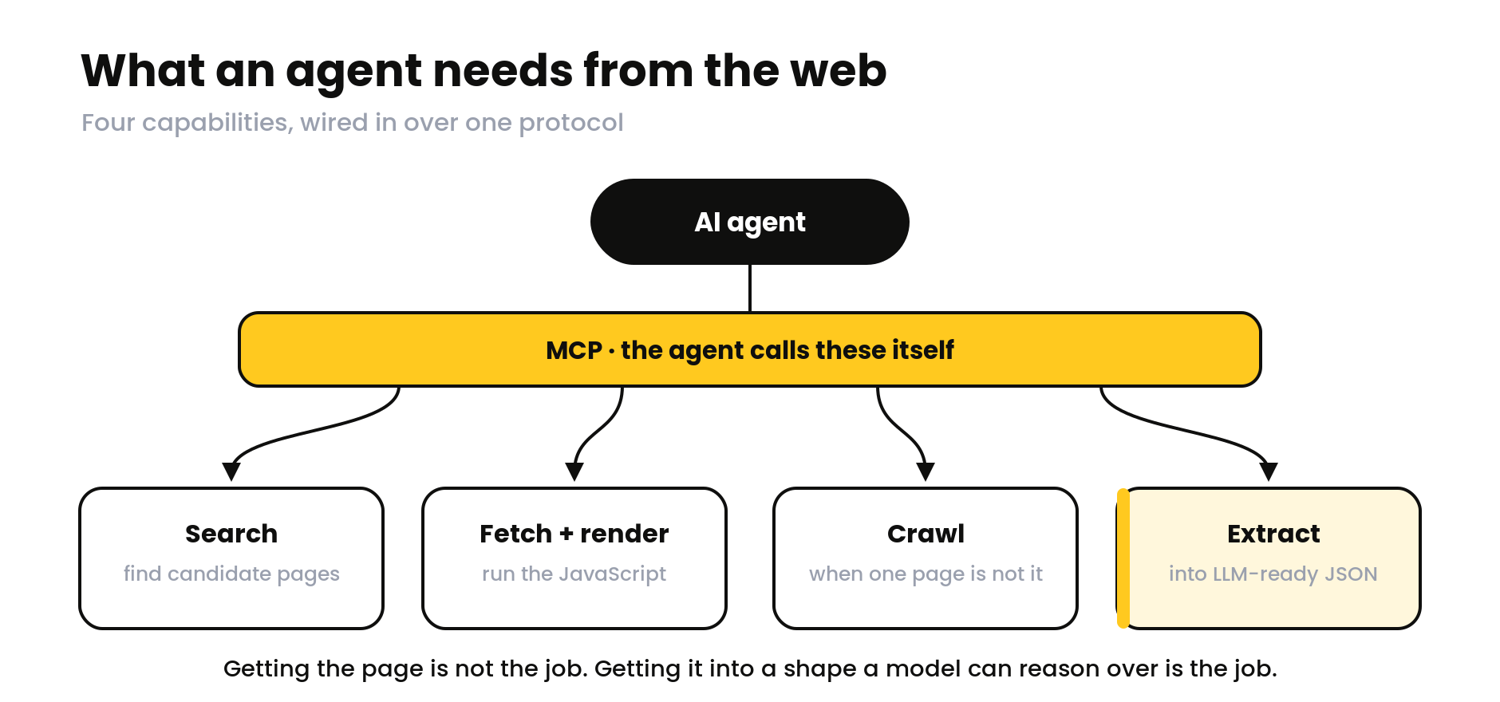
Those failure modes are really a checklist in disguise. Strip away the tooling, and everything wigolo gives an agent, and everything a managed API gives one, comes down to the same four jobs:
- Search finds candidate pages. Without it, the agent can only look at URLs you hand it, which makes it a fetcher rather than a researcher.
- Fetch with rendering turns a URL into content. The rendering half matters more than people expect, because a large share of the modern web returns an empty shell to anything that does not execute JavaScript.
- Crawl covers the case where one page is not the answer. Documentation sites, product catalogs, anything where the useful information is spread across a path rather than sitting at a single address.
- Extract is where most naive setups fall down. Getting the page is not the job. Getting the page into a shape a model can reason over without burning your context budget is the job.
Two things make all four work in practice. Staying unblocked, because a tool that returns 403s is not a tool. And wiring the whole set into the agent over MCP, so the model can call them itself instead of waiting for you to paste results into a prompt.
How to run local-first web scraping for an AI agent with wigolo
Local-first means the whole stack runs on your machine. The search adapters, the ranking models, the browser engine, the cache. Nothing leaves the box.
wigolo is the tool getting attention for this right now, though it is not the only option. Crawl4AI is the more established project by a wide margin, with over 75,000 stars compared to wigolo's few thousand, and it is a solid choice if you want something with more mileage.
What makes wigolo worth a closer look is that it is built around MCP from the start, so the agent integration is built into the product rather than a wrapper someone added later.
I set it up and ran it against live queries. Let's get into the process.
1. Understand what wigolo runs on your machine
The ten tools are search, fetch, crawl, extract, cache, find_similar, research, agent, diff, and watch. That is a wider surface than most agent web tools ship with, and the last four are the interesting ones:
- research decomposes a question and synthesizes a cited answer
- agent runs an autonomous plan-search-fetch-extract loop
- diff and watch track what changed on a page since the agent last looked
Everything lives under ~/.wigolo. Cache, embeddings, models, config. Telemetry is opt-in and off by default, which I confirmed in the health check. For teams with data residency constraints, no query text leaves the machine unless you deliberately wire up a cloud model for synthesis.
One correction worth making, since it circulates in write-ups about the tool. wigolo's README advertises 18 direct adapters, but that is the catalog, not the fan-out for any given query. When I ran a general-vertical search, it dispatched four engines.
The breadth is real and spread across verticals, but that number describes what is available, not what runs.
2. Install wigolo and wire it into your agent
Installation is a single command and, on a supported Node version, is genuinely quick:
npm install -g wigolo
Mine pulled 385 packages in 21 seconds.
wigolo requires Node 20 or newer; in practice, you want one of the LTS releases.
I first tried this on Node 26, and the install died partway through building a native SQLite dependency:
prebuild-install warn install No prebuilt binaries found (target=26.4.0 runtime=node arch=arm64 platform=darwin)
make: *** [Release/obj.target/sqlite3/gen/sqlite3/sqlite3.o] Error 1
gyp ERR! node -v v26.4.0
This was because no prebuilt binary exists for that runtime yet and the fallback compile failed. Dropping to Node 22 fixed it immediately. wigolo's own troubleshooting notes call this out, so if you are on a very new Node and the install stalls, that is almost certainly why.
Next comes the first run, which downloads the parts that make it work offline: a cross-encoder reranker, an embeddings model, and browser engines for the pages that need rendering.
wigolo warmup --all
Budget around 7 minutes and 1.5 GB of disk space. Mine pulled Xenova/ms-marco-MiniLM-L-6-v2 for reranking and BGE-small-en-v1.5 for embeddings, plus Chromium, Firefox, and WebKit. That download is the price of the $0-per-query claim (the ranking work the paid services bill you for happens on your hardware instead).
Wiring it into an agent like Claude Code
Wiring it into an agent is one more line.
For Claude Code:
claude mcp add wigolo --scope user -- npx wigolo
Any other MCP client takes the same idea in its own config format: register npx -y wigolo as the command, and the ten tools appear to the model.
Before trusting it, you can run the health check:
wigolo doctor
That prints a per-component report showing the data directory location, which search engines are live, whether the models are cached, and whether telemetry is enabled. Mine confirmed that everything lives under ~/.wigolo and that telemetry is opt-in and disabled by default.
This is worth verifying yourself rather than taking it on trust, especially since the privacy story is why you chose the tool.
3. Learn what wigolo returns
This is the part I could not find in the README, and the part that determines whether a tool is genuinely built for agents or just wraps a search API.
Run a search and ask for JSON:
wigolo search "what is model context protocol" --json
The response comes back in three parts:
- results with the ranked pages
- evidence with quotable passages
- citations the agent can reference by ID
The evidence entries are the interesting ones:
{
  "title": "What is Model Context Protocol (MCP)? A guide | Google Cloud",
  "url": "https://cloud.google.com/discover/what-is-model-context-protocol",
  "section_heading": "MCP versus RAG",
  "excerpt": "Both Model Context Protocol (MCP) and RAG improve LLMs with outside information, but they do this through different ways and serve distinct purposes...",
  "citation_id": "cdc3341bdde6",
  "source_span": { "start": 4310, "end": 4667 }
}
That source_span is a byte offset into the source document. The agent is not holding a paraphrase or a snippet someone generated; it is holding an exact range it can point back to. For anything where a wrong citation is expensive, that is a meaningful difference from a tool that hands back a summary and asks you to trust it.
Every result also carries a score you can inspect rather than a number you have to accept:
"evidence_score": {
  "final": 0.9831250904067476,
  "components": {
    "base_rrf": 0.19093749999999998,
    "domain_quality": 1,
    "lexical_alignment": 1,
    "recency_boost": 1,
    "engine_consensus": 1,
    "rare_terms": 1.4,
    "cross_encoder": 0.9325003616269903
  },
  "explanation": "base=0.191, domain=1.00, lex=1.00, engines=1, xenc=0.93"
}
The explanation line is a small thing that says a lot about who the tool was built for. When a result ranks oddly, you can read why in one line instead of filing an issue.
Lastly, fetching a page shows the routing behavior:
wigolo fetch "https://books.toscrape.com/" --json
{
"url": "https://books.toscrape.com/",
"title": "Books to Scrape - Sandbox",
"markdown": "1. [](...)\n\n ### A Light in the...\n\n £51.77\n\n In stock\n...",
"fetch_method": "http",
"http_status": 200,
"cached": false,
"response_time_ms": 1577
}
fetch_method: "http" is the detail worth noticing. wigolo escalates to a real browser only when it sees a reason to, like a challenge response or an empty single-page application (SPA) shell, and this page gives it no reason.
It stayed on plain HTTP and finished in 1.5 seconds. A setup that launches Chromium for every URL would have spent several seconds and a few hundred megabytes of RAM to reach the same markdown.
4. Know where local-first web scraping strains
Everything above applies to running this locally. Here is the other side, and I would rather you get it from the tool's own output than from a vendor's framing.
Your IP address is the whole proxy pool
wigolo's health check labels one of its search engines with a note that it "may intermittently 403 (IP reputation / rate-limit)". The self-hosting documentation is blunter: "some challenge-protected sites score IP reputation, so a datacenter IP won't clear walls a home connection would."
That is the local-first ceiling the project itself states. On easy targets it never comes up. For defended ones, no amount of clever fetching changes the fact that every request originates from a single address.
"No API keys" has three exceptions
Search, fetch, crawl, extract, cache, and find-similar are genuinely keyless. But GitHub code search requires a WIGOLO_GITHUB_TOKEN, and both Brave engines remain disabled until you provide a BRAVE_API_KEY.
Separately, research and agent need a language model to write their synthesized output. You can point those at a free Gemini key or keep it fully local with Ollama, but without one they hand back raw evidence for your agent to assemble rather than a finished answer.
The engine count is a catalog, not a fan-out
My general-vertical query dispatched four engines. The adapter list is much longer, and spans code, docs, news, images, and academic papers, which is real breadth, but any single query uses a slice of it.
It is public beta, and it behaves like it
During one search, the content extractor threw on a relative URL and printed a stack trace mid-run:
Failed to parse URL: TypeError: Invalid URL
  code: 'ERR_INVALID_URL', input: '/discover/what-is-model-context-protocol'
The search still completed and returned good results, so this was cosmetic rather than fatal. But an agent parsing stdout would have seen it, and that is the kind of rough edge a beta label exists to warn you about.
The license deserves some thought
wigolo is AGPL-3.0-only. Using it at work, company-wide, carries no obligation. The clause only activates if you modify it and run the modified version as a network service, at which point you have to publish those changes. For a local dev tool that is a non-issue, but it is worth knowing before it ends up inside a product you ship.
None of this makes local-first the wrong choice. It makes it a choice with a shape: excellent where the targets are cooperative and the volume is human-scale, strained where they are not. Which raises the obvious question: what does the other route buy you?
How to use a managed web scraping API and MCP server at scale
A managed route answers exactly one question: who runs the infrastructure. The four building blocks do not change. Somebody still has to search, fetch, render, and extract. The difference is whether the proxy pool, the browser fleet, and the anti-bot arms race live in your stack or someone else's.
ScrapingBee is the example I will use here, partly because it is the platform this guide is published on, which you should factor in, and partly because I can verify the numbers rather than quote a pricing page to you.
1. Map ScrapingBee to the four building blocks
The pieces line up against the same four capabilities from earlier.
Search
Search is the Google Search API, which returns parsed JSON rather than a page of HTML you have to scrape yourself. A query returns organic_results along with metadata on the counts of results and ad placements.
There is also a lighter fast_search mode for cases where you want candidates quickly and do not need the full SERP structure. If you are weighing up which search API to give an agent, we have a separate comparison of search APIs for AI agents that goes into more detail than this section should.
Fetch and render
Fetch and render is the HTML API with render_js=true, which runs a hosted headless browser and returns the rendered page after JavaScript has finished executing. Same job as wigolo's browser escalation, running on someone else's hardware.
Stay unblocked
Staying unblocked is where the routes genuinely diverge:
- premium_proxy=true moves the request onto residential IPs
- stealth_proxy=true goes further for targets with serious anti-bot infrastructure
This capability is difficult to replicate locally because it is not a code problem. It is an inventory problem.
Extract
Extraction is ai_query, which takes a plain-English description of what you want and returns typed JSON. That is the call behind the 81-byte response earlier in this guide.
Wiring it into an agent runs through a hosted MCP server, which is the part that takes the most work off your plate. There is no server process to keep alive, no local models to warm up, and no machine that has to stay awake for the agent to have web access.
I ran the handshake against it while writing this, and at the time of writing it identifies as ScrapingBee 2.0.1, speaking MCP protocol version 2025-06-18, exposing 18 tools to the model.
Those 18 break down into the ones you would expect and a few you might not. Search covers fast_search and get_google_search_results. Fetching covers get_page_text, get_page_html, get_screenshot, and get_file. Extraction is extract_page_data.
The rest are vertical shortcuts for Amazon, Walmart, and YouTube, including a transcript fetcher, plus ask_chatgpt and ask_gemini for model-backed answers and get_scrapingbee_usage for checking your own credit balance. Useful if your agent works those sources, ignorable if it does not.
One gap you should know is that there is no crawl tool over MCP. Multi-page crawling runs through the ScrapingBee CLI instead, which we will use later in this guide.
2. Know what each call costs before you wire it in
Managed access is metered, and an agent is very good at spending money while you are not watching.
These are the costs I measured directly from response headers:
| Call | Credits |
|---|---|
| HTML API, no rendering | 1 |
| render_js=true | 5 |
| premium_proxy=true, no rendering | 10 |
| premium_proxy=true + render_js=true | 25 |
| stealth_proxy=true (JS forced) | 75 |
| ai_query / ai_extract_rules | +5 on top of the above |
| Google Search API (default light request) | 10 |
Read that as an architecture guide. It prices the same shape the analysis earlier described: easy pages are nearly free, and the hardest targets cost dozens of times more to reach.
Do the arithmetic for an agent rather than a script, because the shape is different. A research loop that fans out across ten sources, renders each one, and extracts structured data from all of them spends 110 credits per question at standard rates: 10 for the search that finds the sources, then 10 each for a rendered fetch with AI extraction.
Route those same ten through stealth proxies and the same question costs 810. Neither number is alarming on its own. Both matter when an agent runs unattended in a loop.
The practical move is to escalate rather than default. Start plain, add rendering when the page needs it, and reserve stealth for the targets that refuse you. That habit is worth more than any per-credit discount, and it is the same instinct that makes local-first work well on easy targets.
ScrapingBee includes 1,000 free credits with no credit card required, which is enough to properly test an agent loop before deciding whether the economics work for your use case.
How to give your AI agent web access
Giving an agent web access takes two things: a tool server it can call, and code that turns pages into data the model can reason over. Everything below is the managed route, because I can hand you working code.
If you want the local-first equivalent, wigolo wires in the same way. The only difference is that you run the server. Let's dive into the process.
1. Wire the MCP server into your agent
You start by wiring the MCP server into your agent. MCP is how the agent discovers your tools. Point an MCP-capable client at a server, and the tools show up as things the model can call on its own.
For a hosted server, the config is one block.
In Claude Code, Cursor, or any client using the same format:
{
  "mcpServers": {
    "scrapingbee": {
      "command": "npx",
      "args": [
        "-y",
        "mcp-remote",
        "https://mcp.scrapingbee.com/mcp?api_key=YOUR_API_KEY"
      ]
    }
  }
}
The mcp-remote bridge exists because most clients communicate with MCP via stdio, whereas the server speaks HTTP. It translates between them.
Restart the client and the tools appear. When I connected, the server identified itself as ScrapingBee 2.0.1 (the version at the time of writing) and exposed 18 tools: fast_search and get_google_search_results for search; get_page_text, get_page_html, get_screenshot, and get_file for fetching; extract_page_data for structured extraction; and a set of Amazon, Walmart, and YouTube helpers alongside ask_chatgpt, ask_gemini, and get_scrapingbee_usage.
The local-first equivalent is a single command, because the server runs on your machine:
claude mcp add wigolo --scope user -- npx wigolo
Same protocol, same discovery, different owner of the uptime problem.
2. Search the web for the agent
Search is what turns an agent from a fetcher into a researcher. The call returns parsed JSON rather than a SERP you have to scrape yourself:
import json, urllib.parse, urllib.request, urllib.error


class _NoRedirect(urllib.request.HTTPRedirectHandler):
    def redirect_request(self, *args, **kwargs):
        return None


_opener = urllib.request.build_opener(_NoRedirect)


def resolve(link):
    """Google returns redirect paths like /goto?url=... Follow one hop to the real URL."""
    if not link.startswith("/"):
        return link
    req = urllib.request.Request("https://www.google.com" + link,
                                 headers={"User-Agent": "Mozilla/5.0"})
    try:
        return _opener.open(req, timeout=15).headers.get("Location") or ""
    except urllib.error.HTTPError as e:
        return e.headers.get("Location") or ""
    except Exception:
        return ""


def search(query, limit=3):
    url = "https://app.scrapingbee.com/api/v1/store/google?" + urllib.parse.urlencode({
        "api_key": API_KEY,
        "search": query,
        "nb_results": limit,
    })
    with urllib.request.urlopen(url, timeout=90) as r:
        cost = int(r.headers.get("Spb-cost") or 0)
        results = json.loads(r.read()).get("organic_results", [])
    urls = [resolve(item["url"]) for item in results[:limit]]
    return [u for u in urls if u], cost
That gives the agent a ranked list of candidate URLs to work through, plus the credits the search itself costs, so the loop can keep a running total.
One detail worth knowing: the search API returns each result as a Google redirect path rather than a direct link, so resolve follows a single hop to recover the real URL before the agent fetches it. That hop returns a 302 with the destination in the Location header, so it costs nothing and adds about a quarter of a second.
3. Fetch a page and get LLM-ready JSON
This is the step that decides your token bill.
Two parameters do the work:
- render_js runs the page in a real browser so JavaScript-built content appears
- ai_query describes what you want back in plain English
Let's see how:
def extract(url, question):
    api = "https://app.scrapingbee.com/api/v1/?" + urllib.parse.urlencode({
        "api_key": API_KEY,
        "url": url,
        "render_js": "true",
        "ai_query": question,
    })
    with urllib.request.urlopen(api, timeout=90) as r:
        return json.loads(r.read())
Pointed at a product page with the prompt "Return JSON with the book title, price as a number, and whether it is in stock as a boolean", that returns:
{
    "title": "A Light in the Attic",
    "price": 51.77,
    "in_stock": true
}
That's 81 bytes, against 9,308 bytes for the same page as raw HTML. The agent gets a number to compare and a boolean to filter on, with no parsing step in between and no navigation chrome eating context.
For a more in-depth version of this pattern, we have a full guide to AI web scraping with Python.
4. Crawl a site when one page is not enough
Some questions need a section of a site rather than a single URL: documentation, changelogs, product categories.
The ScrapingBee CLI handles that without you writing a crawler:
pip install scrapingbee-cli
export SCRAPINGBEE_API_KEY=YOUR_API_KEY
Then point it at a starting URL with patterns that keep it scoped:
scrapingbee crawl "https://books.toscrape.com/" \
  --max-pages 3 \
  --max-depth 1 \
  --include-pattern "catalogue" \
  --exclude-pattern "reviews" \
  --return-page-markdown true \
  --download-delay 1 \
  --output-dir ./books_crawl
That run produced three markdown files and a manifest.json describing them. Markdown, rather than HTML, matters here for the same reason it did above: the agent reads the content.
Two flags deserve your attention here:
- --max-pages is your spending cap
- --download-delay is basic manners
Keep volume low, respect the target's robots.txt and terms, and do not point this at a site you have no business crawling.
5. Escalate to stealth proxies and verify what came back
For hard targets, you can add the proxy tier the page requires:
params = {
    "api_key": API_KEY,
    "url": url,
    "render_js": "true",
    "stealth_proxy": "true",   # 75 credits, use it only when you must
}
Escalate rather than default. Plain first, rendering when the page needs it, stealth only when a target genuinely refuses you.
Then add the check almost every tutorial skips.
A 200 response with a body is not proof you got the page, and an agent has no way to tell the difference on its own:
def looks_like_real_content(text, min_chars=200):
    if not text or len(text) < min_chars:
        return False
    lowered = text.lower()
    markers = ("enable javascript", "checking your browser",
               "verify you are human", "access denied", "captcha")
    return not any(marker in lowered for marker in markers)
Six lines, and they are the difference between an agent that fails loudly and one that quietly poisons your index. More tactics for staying readable are in our guide on web scraping without getting blocked.
6. Put it together in a minimal agent loop
Here is the whole thing: search, fetch, verify, extract, and hand the model clear evidence. Retries back off on transient failures and give up immediately on permanent ones, because retrying a 404 never helped anyone.
import json, os, sys, time, urllib.parse, urllib.request, urllib.error

API_KEY = os.environ["SCRAPINGBEE_API_KEY"]
HTML_API = "https://app.scrapingbee.com/api/v1/"
GOOGLE_API = "https://app.scrapingbee.com/api/v1/store/google"


def _get(url, timeout=90, tries=3):
    for attempt in range(1, tries + 1):
        try:
            with urllib.request.urlopen(url, timeout=timeout) as r:
                return r.read(), r.headers
        except urllib.error.HTTPError as e:
            if e.code in (400, 401, 404) or attempt == tries:
                raise
        except Exception:
            if attempt == tries:
                raise
        time.sleep(2 ** attempt)


class _NoRedirect(urllib.request.HTTPRedirectHandler):
    def redirect_request(self, *args, **kwargs):
        return None


_opener = urllib.request.build_opener(_NoRedirect)


def resolve(link):
    """Google returns redirect paths like /goto?url=... Follow one hop to the real URL."""
    if not link.startswith("/"):
        return link
    req = urllib.request.Request("https://www.google.com" + link,
                                 headers={"User-Agent": "Mozilla/5.0"})
    try:
        return _opener.open(req, timeout=15).headers.get("Location") or ""
    except urllib.error.HTTPError as e:
        return e.headers.get("Location") or ""
    except Exception:
        return ""


def search(query, limit=3):
    url = GOOGLE_API + "?" + urllib.parse.urlencode({
        "api_key": API_KEY,
        "search": query,
        "nb_results": limit,
    })
    body, headers = _get(url)
    cost = int(headers.get("Spb-cost") or 0)
    results = json.loads(body).get("organic_results", [])
    urls = [resolve(item["url"]) for item in results[:limit]]
    return [u for u in urls if u], cost


def looks_like_real_content(text, min_chars=200):
    if not text or len(text) < min_chars:
        return False
    lowered = text.lower()
    markers = ("enable javascript", "checking your browser",
               "verify you are human", "access denied", "captcha")
    return not any(marker in lowered for marker in markers)


def research(question, extraction_prompt, max_sources=2):
    print(f"question: {question}\n")
    urls, spent = search(question, limit=max_sources)
    print(f"  search returned {len(urls)} urls ({spent} credits)")

    evidence = []
    for url in urls:
        try:
            api = HTML_API + "?" + urllib.parse.urlencode({
                "api_key": API_KEY, "url": url,
                "render_js": "true", "ai_query": extraction_prompt,
            })
            body, headers = _get(api)
            text = body.decode("utf-8", "replace")
            spent += int(headers.get("Spb-cost") or 0)

            if not looks_like_real_content(text, min_chars=20):
                print(f"  skip {url} (failed content check)")
                continue

            try:
                data = json.loads(text)
            except json.JSONDecodeError:
                data = {"raw": text.strip()[:500]}

            evidence.append({"source": url, "data": data})
            print(f"  ok   {url}")
        except urllib.error.HTTPError as e:
            print(f"  fail {url} (HTTP {e.code}: {e.reason})")
        except Exception as e:
            print(f"  fail {url} ({type(e).__name__})")

    return evidence, spent


if __name__ == "__main__":
    question = sys.argv[1] if len(sys.argv) > 1 else "model context protocol specification"
    evidence, spent = research(
        question,
        "Return JSON with the page title and a one-sentence summary of the page.",
        max_sources=2,
    )
    print(f"\ncollected {len(evidence)} sources, {spent} credits")
    print(json.dumps(evidence, indent=2))
Running it against "model context protocol specification", asking for a title and one-sentence summary per source:
question: model context protocol specification

  search returned 2 urls (10 credits)
  ok   https://modelcontextprotocol.io/specification/2026-07-28
  ok   https://github.com/modelcontextprotocol

collected 2 sources, 30 credits
Two sources, structured and attributed, for 30 credits. The model never sees a byte of HTML. It gets titles, summaries, and the URL each one came from, which is what it needs to answer with citations instead of vibes.
Scale the max_sources number, and the cost scales with it, which brings the whole thing back to the question this guide keeps circling.
Local-first or managed web scraping for AI agents? How to choose
There is no universally right answer here, and anyone telling you otherwise is selling something.
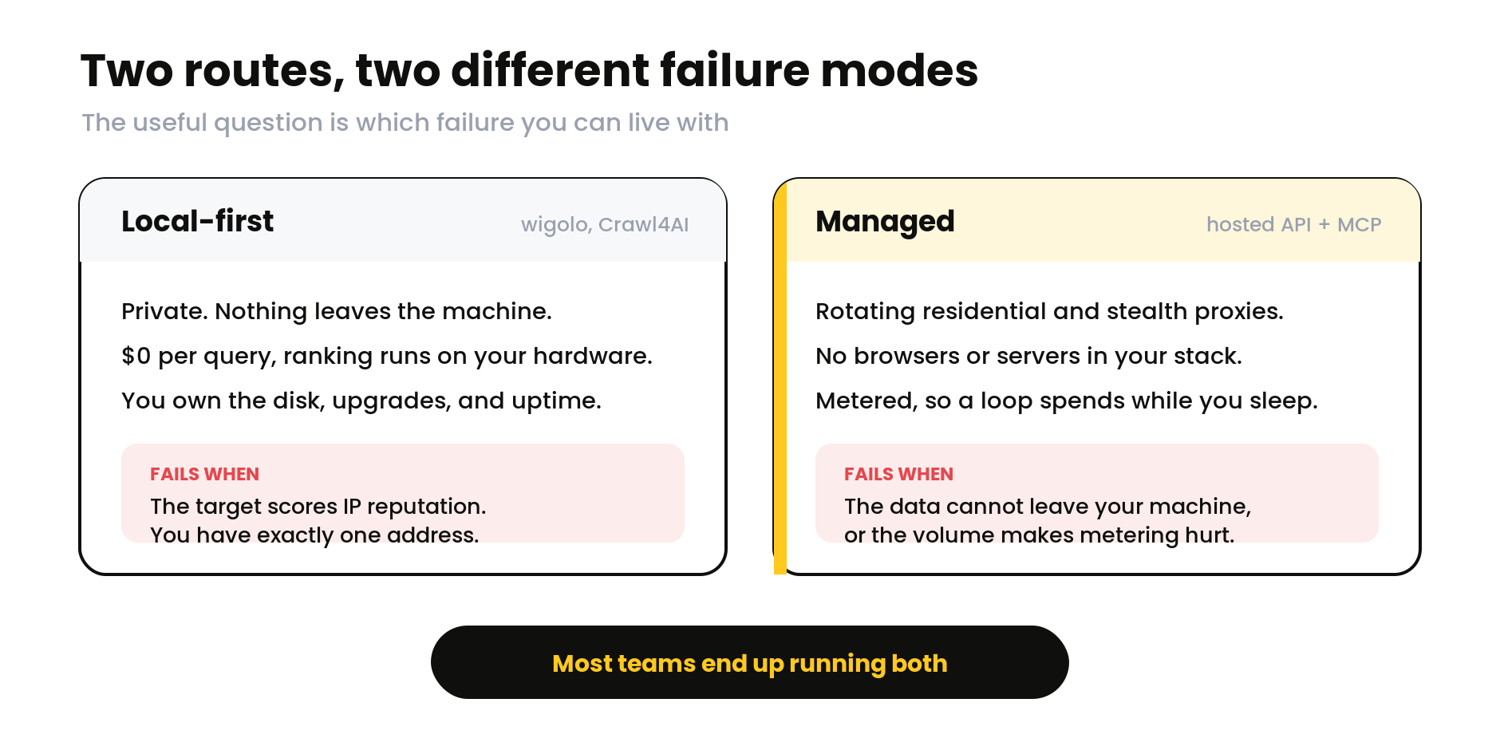
The two routes solve those four problems differently, and neither is universally better.
| Capability | Local-first (wigolo, Crawl4AI) | Managed (ScrapingBee) |
|---|---|---|
| Search the web | Multi-engine across code, docs, general, images, news, and papers verticals, reranked on-device, $0 per query | fast_search and the Google Search API, structured JSON in one call |
| Fetch and render JS | Tiered router escalates to a local headless browser when it detects a challenge or an SPA shell | HTML API with render_js, a hosted headless browser |
| Stay unblocked | Runs from your own IP address, no proxy pool | Rotating premium and stealth proxies, geotargeting |
| Crawl a site | Local crawl with BFS, DFS, or sitemap traversal, robots.txt respected | ScrapingBee CLI crawl, Markdown output |
| Extract LLM-ready data | Tables, metadata, JSON-LD, or a custom JSON Schema, on-device | ai_query returns typed structured JSON |
| Wire into the agent | A local MCP server you run and maintain | A hosted MCP server, nothing to run |
The two routes fail in different places, so the useful question is which failure you can live with:
- Local-first: Choose local-first when the data must not leave your machine. That covers regulated work, client data, and internal tooling. The tradeoff is that you own the maintenance, the disk, and the upgrade path. With wigolo, check the AGPL terms first if you plan to modify it and run it as a service.
- Managed web scraping: Choose managed when you are hitting defended targets. Rotating residential and stealth proxies are an inventory problem, and no amount of local cleverness substitutes for addresses you do not have. Pick it when you need reliability, or when you simply want browsers and proxy pools out of your stack so your team can work on the thing that uses the data.
Most teams end up running both. That is the honest answer. Local-first handles internal fetching, documentation lookups, and the easy majority of the web where a plain request works and costs nothing. Managed handles the defended minority where an agent would otherwise return 403s and challenge pages.
Give your AI agent managed web access with ScrapingBee
You have now seen everything an agent needs to work with the web: search that returns structured results, fetching that survives JavaScript, extraction that hands the model JSON instead of markup, crawling that stays in scope, and the proxy tiers and content checks that keep the whole thing honest. If you are building that yourself, none of it is the product you set out to build.
ScrapingBee handles the access layer so your agent code stops carrying it:
- Hosted MCP server: connect an agent with one URL, no server to run or keep alive.
- JavaScript rendering: a real browser fleet behind render_js, no local Chromium to manage.
- Premium and stealth proxies: residential and anti-bot routing for targets that refuse plain requests.
- AI extraction: describe the fields you want and get typed JSON back, not raw HTML.
- Search built-in: Google Search API and a lighter, faster mode, returning parsed results.
Start with 1,000 free API credits, no credit card, and point your agent at a target that has been giving it trouble.
Frequently asked questions on web scraping for AI agents
Do I need a proxy to let an AI agent scrape the web?
For easy, public pages, no. A local stack fetching from your own address handles them fine. For sites with anti-bot protection, which is a large share of the commercial web, yes, or you will collect 403s and CAPTCHA pages. Managed scraping APIs rotate residential and stealth proxies for you. A local-first tool uses your own address, which works at low volume against cooperative targets but stops working against defended ones.
How do I give my AI agent web access over MCP?
Connect an MCP-capable client such as Claude Code or Cursor to a web tool server. With a hosted option, you add a URL containing your API key, usually via npx mcp-remote, and the search, fetch, and extract tools appear to the agent automatically. With a local stack like wigolo, you run the server yourself, registering it with a command such as claude mcp add wigolo --scope user -- npx wigolo. Either way, the agent discovers the tools and calls them on its own.
Why does my agent get blocked or return junk data?
Two causes, and the second is worse because it is silent. Anti-bot systems often return a challenge page with an HTTP 200 status and a non-empty body, so your scraper reports success while the agent ingests nothing useful. Separately, JavaScript-heavy pages return an empty shell unless you render them. Fix both by enabling JavaScript rendering, escalating to stealth proxies on hard targets, and verifying you received real content before it reaches the model.

Ismail is a Senior Managing Editor and Senior AI Workflow Engineer. For a decade, he has turned the trickiest corners of web scraping, Python, content marketing, and AI infrastructure into guides readers keep open in a second tab. He builds the tools before he documents them, breaks them, and reports back with the scars.