A CAPTCHA solver is a tool or service that completes CAPTCHA challenges and returns a valid response to the target website. When automated scraping workflows hit security gates like reCAPTCHA or hCaptcha, developers use these solvers to process visual, audio, or token challenges programmatically.
A developer's natural instinct is to answer the challenge; however, that's not always the ideal way to retrieve data.
In this guide, you will get an in-depth look at CAPTCHA solvers: how they work, their limitations, how to stop CAPTCHAs from triggering in your automation workflow, and how to retrieve clean data through a managed scraping API.
Key Takeaways
- A CAPTCHA solver is a tool or service that solves CAPTCHA challenges, whether through AI and ML models, humans, or a mixture of both.
- The three main types of CAPTCHA solvers are OCR and computer vision, human CAPTCHA solvers, and hybrid services.
- Apply CAPTCHA solvers to CAPTCHA types like text/image CAPTCHA, reCAPTCHA, hCaptcha, Cloudflare Turnstile, and enterprise CAPTCHA systems.
- Integrate CAPTCHA solvers mainly through APIs, browser extensions, or cloud browsers.
- Downsides of CAPTCHA solvers include imperfect success rates, increased latency, cost, and maintenance.
- Use a dedicated scraping API like ScrapingBee to stop battling CAPTCHAs and focus on retrieving clean, structured data for your automations and AI pipelines.
What Is a CAPTCHA Solver?
A CAPTCHA solver is a tool or service that completes CAPTCHA challenges, whether through AI and ML systems, humans, or a combination of both, and returns a response to the target website for validation. The response is usually a short-lived token, and sometimes it's the direct answer to the challenge. A CAPTCHA solver can run directly inside your scraping script or be outsourced to a service, which matters most when you are solving millions of challenges in large-scale web scraping.
How a CAPTCHA solver works
A CAPTCHA solver works by lifting the challenge parameters off the page, sending them to a solving engine, and returning a response the target website can validate. Your scraper delegates the solving step, gets an answer back, and submits that answer through the site's normal verification flow.
The same five stages hold across almost every automated CAPTCHA solving setup:
- Detect the challenge. Your script checks the rendered page for a reCAPTCHA iframe, an hCaptcha widget, or a Cloudflare interstitial before it tries to parse anything.
- Read the widget parameters. The common parameters are the sitekey and the page URL. Some challenge types also need the rendered Document Object Model (DOM) state, proxy details, or a user agent that matches the session.
- Send the parameters to the solver. Your script creates a task via an API call, then waits for the result. This can add lag depending on how long the response takes, which is why timeout handling matters.
- Submit the response. If the response is a token, as it commonly is, the token goes into the field the page expects, such as
#g-recaptcha-responsefor reCAPTCHA or[name="h-captcha-response"]for hCaptcha, and your script submits the form. - Wait for server-side validation. The site verifies the response with the provider and either serves the page or challenges you again.
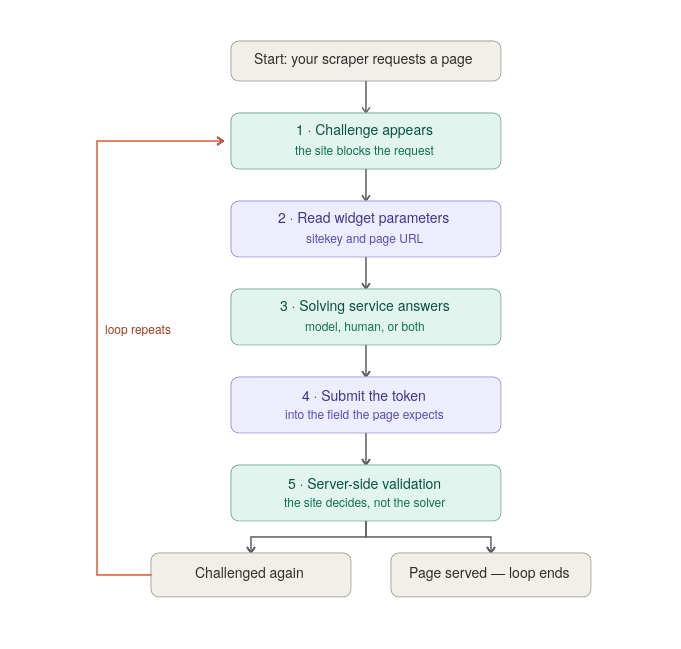
Lifecycle of a CAPTCHA response token, from solving to server-side verification.
Note that with a CAPTCHA solver you don't have full control of your automation run: the solver sets how long step three takes, and the site sets how long the answer stays good. For a working Python implementation of this exact loop, our guide to bypassing reCAPTCHA and hCaptcha when web scraping has a tested script for both challenge types.
What a CAPTCHA solver gives you back
- Direct answers. For older sites, a CAPTCHA solver returns typed characters or a set of selected image grid cells. Sites accept these directly, but they're no longer the default on the open web.
- Verification tokens. For reCAPTCHA and hCaptcha, commonly seen across the web, the solver returns a long opaque string that's fed into the field the page expects. Here are the factors that decide whether the token grants you access:
- Short time to live (TTL). The token expires quickly, for example within two minutes for reCAPTCHA and five minutes for Cloudflare Turnstile, and lifetimes vary by provider. Either way, a correct token that arrives after its window has closed is a failed request.
- Context binding. Depending on the provider and how the site has configured it, the token can be bound to the session, the originating IP, or other context it was generated for. For example, if the binding is enforced on the originating IP, a token that is otherwise valid gets rejected if you solve on one IP and submit from another.
- Behavioral analysis. The site can accept the token and still re-challenge, throttle, or block you based on IP reputation, request pacing, or fingerprint signals it collected in parallel.
The Main Types of CAPTCHA Solvers
There are three main types of CAPTCHA solvers. This table provides an overview of how each one works:
| CAPTCHA solver type | How it produces an answer | Handles reCAPTCHA and hCaptcha? | Example services | Limitation |
|---|---|---|---|---|
| OCR and computer vision | Models read distorted text or classify image grids | Yes, for the visual challenge step | CapSolver, AZcaptcha | Breaks when the challenge format changes |
| Human-powered solving | A human worker sees the challenge and answers it | Yes, and best on unfamiliar types | Anti-Captcha, 2Captcha worker network | Latency measured in seconds, cost scales linearly |
| Hybrid, human-in-the-loop | Model first, human fallback on low confidence | Yes, and it is widely offered | 2Captcha, Death By Captcha | Inherits both cost models and both failure modes |
OCR and computer-vision solvers
An OCR-based CAPTCHA solver uses optical character recognition to read distorted text, and object detection or vision-language models to pick the right cells out of an image grid. A machine learning CAPTCHA solver like CapSolver runs this path with no human in the loop at all, which is why its solve times are fast. It operates on a cost-per-solve basis.
Weakness: The models need retraining every time a provider changes its challenge format, and they mostly fail on challenge types they have never seen.
Human-powered CAPTCHA solving services (CAPTCHA farms)
The solving service routes the challenge to a real person, who solves it and returns the answer, typically within a few seconds. For example, the Anti-Captcha service states plainly that human workers solve 100% of its CAPTCHAs. This approach tends to hold up better on unusual or awkward challenges, since a person is answering a test designed for people.
Weakness: It's prone to high latency that you can't engineer away in your scraping flows.
Hybrid, human-in-the-loop services
Here, an automated pass handles the easy volume, and low-confidence cases escalate to a human queue. The 2Captcha service describes exactly this routing, with models taking the bulk tasks and workers picking up what the models are unsure about.
Weakness: Average latency looks fine, but your tail latency does not, because the slowest requests are the ones that escalated to human workers.
What CAPTCHA Solvers Can and Can't Handle
Here's an overview of how CAPTCHA solvers handle various CAPTCHA types:
| CAPTCHA | What it's checking | What a solver returns | What decides whether you get through |
|---|---|---|---|
| Text / Image CAPTCHA | Whether you can read distorted content | The characters or the selected cells | Recognition accuracy |
| reCAPTCHA v2 | Web interaction plus a visible challenge; powered by Google | A response token | Token validity and session context |
| hCaptcha | Web interaction plus a visible challenge; powered by Intuition Machines | A response token | Token validity and session context |
| reCAPTCHA v3 | A risk score, no visible challenge | A response token | The score and action Google returns when the site verifies the token, and whether that action matches what the page expected |
| Cloudflare Turnstile | Device and behavior signals | A token | Whether Siteverify returns success, based on signals collected during the session |
| Enterprise systems (DataDome, Arkose, GeeTest) | Layered risk pipeline | Varies by provider and support | Varies by provider and support |
reCAPTCHA v2 and hCaptcha
reCAPTCHA v2 is a CAPTCHA service by Google that asks users to click checkboxes or complete image identification tasks in a grid, like the popular traffic light challenge, supposedly to protect web pages from bots and automated abuse.
hCaptcha is a CAPTCHA service by Intuition Machines that asks users to click "I am human" checkboxes or complete image identification tasks in a grid to protect web pages from bots and automated abuse.
reCAPTCHA and hCaptcha solver services return a response token after solving the challenge. The site sends that token to the provider's verification endpoint, which confirms whether it is valid for that session before the site grants access. Examples are CapSolver, 2Captcha, and NoCaptcha AI.
reCAPTCHA v3 and Cloudflare Turnstile
reCAPTCHA v3 monitors web interaction behavior and gives a risk score based on how the session behaved, with no visible challenge for the user to solve. The CAPTCHA solver still returns a response token, which the site sends to Google's verification endpoint to read the score that determines whether the request is allowed through.
The score runs from 0.0 to 1.0, and each site owner sets its own threshold, so a score that passes on one site can be blocked on another. Google suggests 0.5 as a starting pass threshold, not a fixed rule, and recommends checking that the returned action, like login or checkout, matches the one the page expected.
Unlike reCAPTCHA v3, Turnstile does not return a numeric score. The browser receives a token, which the site sends to Cloudflare's Siteverify API. Siteverify returns a success or failure result along with fields such as the hostname and action. A solver can hand you a token that still fails validation, because the result depends on the signals Turnstile collected about the session, not on the token alone.
Enterprise and specialized challenges
Enterprise CAPTCHA services use advanced measures to limit bots and browser automation. CAPTCHA solvers like 2Captcha or CapSolver that attempt to bypass them have to combine AI and ML systems, human-in-the-loop, and browser integrations. On top of the lower odds of success, this reduces speed, increases latency, and comes with higher cost.
Common Use Cases for CAPTCHA Solvers
- Web scraping and data collection at scale. This is a common category in practice. For example, e-commerce price and stock monitoring, market intelligence work like tracking competitor pricing, and AI applications that need live web data.
- Quality assurance and testing your own properties. If your checkout flow includes a CAPTCHA, your end-to-end tests have to get past it. Note that for routine test runs, the provider's test keys and sandbox modes are the right tool, since they return predictable pass or fail responses without paying a solver to beat your live CAPTCHA.
- Accessibility tooling. Some people who cannot complete visual challenges use solver browser extensions, which is why Anti-Captcha offers a plugin aimed at visually impaired users, and hCaptcha maintains an accessibility cookie program.
How CAPTCHA Solvers Are Integrated: API, Browser Extension, or Cloud Browser
API integration. The browser automation script, whether for Puppeteer, Playwright, or Selenium, detects a CAPTCHA challenge and extracts the necessary page parameters, like the sitekey and page URL. It then sends them via a REST API to a CAPTCHA solver service, which solves the challenge and returns the required response, and your script injects it into the page form. It's the automation standard for tasks like high-volume web scraping, backend server pipelines, and custom enterprise solutions.
If you are dealing with old-school text/image-based CAPTCHAs and you don't want to pay for a service, you can go the hard way and write a script using Python libraries like pytesseract, or train a specialized convolutional neural network (CNN) using PyTorch or TensorFlow. Note that this won't work for modern systems, and you would also be responsible for maintenance.
Browser extensions. An extension installed in Chrome or Firefox runs in the background, using an API key from a CAPTCHA solver provider. The extension auto-solves and auto-submits tokens for CAPTCHA challenges natively in the DOM, so there is no need for a manual CAPTCHA solving script. It's best for manual web browsing, QA testing, and light local automation. An example of this is the CapMonster Cloud browser extension.
Cloud browser sessions. These are managed services that run isolated, remote browser instances such as Browserless or Hyperbrowser. Some cloud-browser providers offer built-in CAPTCHA solving, and many handle fingerprinting, stealth profiles, and proxy allocation without any local infrastructure to maintain.
Here's a quick glance at the various types of CAPTCHA integrations:
| Integration | Where solving happens | Best for | What you maintain | Main trade-off |
|---|---|---|---|---|
| API | Remote service, called from your script | High-volume scraping, backend pipelines, enterprise jobs | Detection logic, parameter extraction, token injection, retries | You'll write and maintain most of the code |
| Browser extension | In the browser, injected into the DOM | Manual browsing, QA testing, light local automation | An API key and the extension | Needs a real browser session; doesn't scale well in headless environments |
| Cloud browser | Inside the hosted browser session | Distributed automation without local infrastructure | A session config and a provider bill | Least control; per-session cost, vendor-dependent |
Is Using a CAPTCHA Solver Legal?
Whether CAPTCHA solving is legal depends on your jurisdiction, what you access, and what you do with the data afterward. Remember to engage a lawyer for anything serious. Here are a few things to note:
- Publicly accessible data. In April 2022, in an interim ruling, the Ninth Circuit affirmed a preliminary injunction in the hiQ v. LinkedIn case, allowing hiQ to continue scraping public profiles. However, in November 2022, the district court found that hiQ had breached LinkedIn's user agreement through its scraping and its use of fake accounts, and in December a consent judgment ordered $500,000 in damages, permanently barred hiQ from scraping LinkedIn, and required it to destroy the scraped data. Whether any given scrape is lawful is fact-specific. The safe mental model is that the more your workflow looks like getting around a gate rather than reading an open page, the more exposure it carries.
- Terms of service (ToS). Check the ToS of the target site. A target site's terms may restrict scraping, automated access, or attempts to bypass technical controls. Review those terms before using a solver.
- Personal data. If the data includes personal data, privacy laws such as the GDPR may govern its collection and use, depending on who is processing it and where the processing occurs. The EDPB's draft 2026 web-scraping guidelines provide additional, non-final guidance.
What CAPTCHA Solving Costs You
- Imperfect success rates. Providers commonly advertise high success rates, and real-world rates can drop when a provider ships a challenge update. Even a 95% success rate implies 1 request in 20 fails, which is 50 failed attempts per thousand pages and 50,000 per million before retries. Whether those become permanent gaps depends on your retry and fallback handling.
- Latency. Anti-Captcha displays a live solving-speed figure, around 5 seconds at the time of writing, and CapSolver quotes under 5 seconds for reCAPTCHA v2 and under 3 seconds for reCAPTCHA v3. Those are good numbers for a solver and poor numbers for an HTTP request, which is a problem for flows that output to users directly or feed agent pipelines.
- Cost. The real cost at scale is hard to forecast. Per-1,000 solve pricing is easy to read but hard to budget for because you don't control how often you get challenged. As of 28 August 2026, solving reCAPTCHA v2 is listed at $0.80 per 1,000 CAPTCHAs by CapSolver, $1 to $2.99 by 2Captcha, and $0.95 to $2 by Anti-Captcha. Cloudflare Turnstile is listed at $1.20, $1.45, and $2, respectively.
- Maintenance. When CAPTCHA providers change their challenges, your integration may need updating, so budget for recurring engineering time.
The Better Default: Stop the CAPTCHA from Appearing
If a site is challenging you, it has already classified your session as suspicious. Solving the challenge leaves that classification untouched. Change the inputs that produced the classification and the challenge rate drops. Here are common factors that trigger suspicious classifications:
- Request volume in a short window. Sites set request thresholds, and crossing one can push your session onto a stricter path where more requests get challenged.
- Low-trust session context. A fresh session with no cookies and no referrer header gives a site little history to judge you on, which can contribute to a lower-trust assessment.
- Incomplete page loads. Fetching HTML without the scripts, images, and stylesheets a browser would normally request can look inconsistent with real browser behavior, depending on what the site measures.
- Repetitive, low-variation request patterns. Identical headers, identical ordering, and identical timing across thousands of requests is a pattern real browsing rarely produces.
- Unnaturally regular timing between actions. Real people pause, misclick, and re-read, so machine-perfect intervals can stand out from typical browser activity.
The signals and their importance vary by site and anti-bot provider, so treat these as contributing factors rather than fixed rules. For the full walkthrough of these signals and how to configure around them, see our guide to web scraping without getting blocked.
CAPTCHA Solving, Preventing, or Outsourcing: How to Choose
Here's a table with simple guidelines to choose the right approach for CAPTCHA solving:
| Approach | What you maintain | Latency added | Cost model | Best when | Breaks when |
|---|---|---|---|---|---|
| Solver API bolted onto your own browser stack | Browser, proxies, solver integration, retries | High | Per challenge | You control a narrow, known flow | Volume rises, or the challenge provider ships a change |
| Human solving service | Browser and proxies, plus queue management | Highest | Per challenge | Odd or unsupported challenge types | The workflow is latency-sensitive |
| Self-hosted stealth browser setup for solving | Fingerprints, IP pools, pacing, monitoring | Medium | Infrastructure plus engineering time | You have the team and want full control | Fingerprint mismatches or unnatural timing get detected |
| Cloud browser with solving built in (outsourcing) | Your automation script and session config | Medium | Per session or per minute | You need real browser interaction, not infrastructure | Volume rises, or you need deeper fingerprint control |
| Managed scraping API | An HTTP call | Low | Per request | You need the web data, not the challenge | On rare sites that need authenticated, multi-step interaction |
When You Still Need a CAPTCHA Solver
- Authenticated and multi-step sessions. When you must log in and operate inside an application, not just read openly accessible pages.
- Testing your own CAPTCHA implementation. When you run automated tests to check the strength of your site's CAPTCHA. For routine end-to-end tests, use the provider's test keys rather than a solver.
- Accessibility. When standard CAPTCHAs block users with disabilities, like visually impaired users, or when screen readers fail to identify distorted text or images.
- Security and research. When CAPTCHA providers, researchers, or ML and AI systems probe challenges to expose vulnerabilities and harden the challenges themselves.
- Niche or unusual targets. When you are dealing with rare sites that no managed API service supports.
When a Managed Scraping API Is the Better Fit
If all you need is the page itself, without worrying about JavaScript rendering, proxy rotation, automation blocking, and CAPTCHA challenges, then a managed scraping API is the right call. It handles the rendering, proxies, and anti-bot layer for you, so you don't run a solver API, a browser extension, or a parallel cloud-solving service alongside your scraper.
The ScrapingBee API handles headless rendering, proxy rotation, and other anti-bot measures in one request. You get live web data back in clean markdown or structured JSON, potentially reducing the need for a separate parsing step, which you can feed directly into your AI application pipeline or any other automation.
Start with ScrapingBee's free tier: 1,000 API credits and no card needed.
CAPTCHA Solving FAQs
What is a CAPTCHA solver in simple terms?
A CAPTCHA solver is a service that completes a verification challenge for you and hands back an answer the website can check. It either types out what a challenge shows or returns a token the site verifies behind the scenes. Your script submits that answer the same way a browser would.
Are CAPTCHA solvers legal?
It depends on your jurisdiction, what you access, and what you do with the data. In the hiQ v. LinkedIn scraping case, hiQ paid $500,000 and was permanently barred not for scraping public data but for breaking the terms it had agreed to. Automating past an access control carries more exposure than reading an open page, so check the terms of service and take legal advice on anything commercial.
What is the best CAPTCHA solver?
The best CAPTCHA solver depends on the challenge type and what you're trying to do. Established solving services handle token-based challenges like reCAPTCHA and hCaptcha well. Ultimately, a managed scraping API is the ideal option when your focus is the data.
Can AI solve CAPTCHAs?
Yes, for most visual challenges. Modern vision models read distorted text and classify image grids at accuracy levels comparable to people, and services like CapSolver run entirely on that approach. This is precisely why CAPTCHA providers moved to behavioral scoring to tell humans and bots apart.
How does a CAPTCHA solver API work in a scraper?
Your script posts the sitekey and page URL to the service, waits for a result, then writes the returned token into the page's hidden response field before submitting. Make sure the whole loop finishes inside the token's expiry window to improve your chances of success.
Can a solver get past reCAPTCHA v3, Cloudflare, or enterprise CAPTCHA services?
Not reliably. These systems score the whole session instead of grading one answer, so a technically valid token generated inside a low-trust session still gets rejected. Using a managed scraping API helps by handling the access layer, so your requests are less likely to be classified as suspicious in the first place.