HTTPX is a modern Python HTTP client (sync, async and HTTP/2) and a foundation for web scraping. However, picking HTTPX is the easy part. The decisions that determine whether your scraper scales come right after: how you set timeouts, how you retry, how you rotate proxies, and how you run requests concurrently.
In this guide, we'll build your resilience on HTTPX, covering requests, timeouts, async, proxies, and three retry routes that hold up under real load.
If you only have 30 seconds, here's our whole conversation in six bullets:
- HTTPX is the modern Python HTTP client with sync, async, and HTTP/2 support in a single API
- HTTPTransport(retries=N) retries only connection failures in HTTPX, not 429s or 5xx
- For status-code retries, use httpx-retries or tenacity with exponential backoff and jitter
- Retry transient HTTPX errors (connection, 408, 425, 429, 5xx). Never retry 401, 403, or 404
- AsyncClient cuts I/O-bound HTTPX scraping runtime by an order of magnitude
- A persistent 403 means the target is blocking you. Rotate proxies, don't retry harder
What is HTTPX?
HTTPX is a modern Python HTTP client that ships sync, async, and HTTP/2 support in the same library, with an API close enough to requests that you don't have to relearn it. For web scraping, it's the right default when you need async throughput or HTTP/2 support, and a reasonable one when you don't.
HTTPX comes from Encode, the same open-source group behind Starlette and Uvicorn, and it first landed on PyPI in 2019 as a requests-style client that finally gave Python a native async HTTP story.
It sits atop httpcore for low-level transport work, leans on the h2 package for HTTP/2, and has settled into a stable 0.28.x line that most production scrapers run today, with a 1.0 release still in pre-release as of this writing.
When to use HTTPX for web scraping
In my experience, HTTPX fits three web scraping jobs cleanly:
- You want sync and async in one library: The same API for both call styles, so you don't need to add aiohttp later when your scraper grows.
- You need HTTP/2: HTTPX is the only mainstream Python client that does HTTP/2 out of the box. Pass http2=True to get header compression and multiplexing for free on targets that support them.
- You're scraping at moderate concurrency: Hundreds to a few thousand URLs, where async pays off but Scrapy's queue-and-pipeline orchestration is overkill.
Outside those three jobs, the trade-off gets murkier, so next, we cover the cases where HTTPX is the wrong call.
When not to use HTTPX for web scraping
Guess where HTTPX falls short? JavaScript-rendered pages. It's the wrong tool when the target only renders its content after JavaScript runs (that's a browser job, not an HTTP-client job).
HTTPX makes the HTTP request and returns the HTML the server sent. It doesn't run scripts. If the data you want appears only after a React, Vue, or Next.js render, you need a headless browser.
For the full Requests-vs-aiohttp-vs-HTTPX trade-off, our Python HTTP clients comparison covers it. If HTTPX isn't your tool, head there before you keep reading.
If HTTPX is your pick, tag along. You're two minutes from a working request.
How to install HTTPX and make your first request
One prerequisite worth stating up front is that HTTPX requires Python 3.8 or newer, so confirm your environment is up to date before you install. If you're new to scraping in Python more broadly, our intro to web scraping with Python covers the parts this article assumes you know.
Let's move on to installing HTTPX.
1. Install HTTPX and the HTTP/2 extra
Here are the two install commands that cover everything the article uses and that you'll need:
pip install httpx
pip install httpx[http2]
The base install gives you HTTP/1.1, which works for any scraping job. The [http2] extra adds HTTP/2 support (it pulls in the h2 package); enable it when you're hitting the same host concurrently with AsyncClient, and you want multiplexing to pay off. For one-off GETs, you won't notice the difference.
2. Make your first GET request
HTTPX gives you two ways to make a request:
- Use the top-level shortcut for a one-off call
- Use the Client() context manager for everything else in this article.
Let me show you:
import httpx

# Top-level shortcut: fine for a one-off
response = httpx.get('https://books.toscrape.com/')

# Client context manager: the scraping default
with httpx.Client() as client:
    response = client.get('https://books.toscrape.com/')
If you run this, both return 200. The difference matters once you make more than one request. A Client reuses the TCP/TLS connection across calls, lets you attach default headers and timeouts once, and provides a place to mount the retry transports we add later.
On the other hand, top-level shortcuts open a fresh connection per call, and that cost adds up by request 50.
3. Read the response
A response is only useful once you can read what came back. HTTPX exposes the status, body, and headers as plain attributes on the response object, with no extra parsing steps in common cases.
Four response attributes cover everything you'll need:
response.status_code   # 200
response.text          # full HTML as a str
response.json()        # parses JSON responses for you
response.headers       # dict-like, case-insensitive
response.headers['content-type']  # 'text/html; charset=utf-8'
.text decodes the bytes using the charset from the server's Content-Type header and falls back to UTF-8 when no charset is declared. HTTPX does not auto-detect the encoding with chardet unless you opt in by passing a default_encoding callable to the Client.
For binary downloads, use response.content instead. It gives you the raw bytes without any decoding. .json() raises JSONDecodeError on non-JSON responses, so wrap it in try/except when the endpoint could return either.
I verified everything here on HTTPX 0.28.1 and Python 3.12. Both GETs above returned 200 with 51,274 bytes from books.toscrape.com. For the full API reference, see the official HTTPX documentation.
How to send POST requests and other methods in HTTPX
Once GET is working, the rest of the HTTP verbs are the same Client method with a different name. Two things are worth understanding before you ship POSTs in production: when a POST needs JSON (instead of form-encoded data), and the verb most scrapers forget exists.
1. Send POST with json= or data=
Half the time I've seen an HTTPX POST fail on the first try, the problem was json= or data=. They look interchangeable, but they aren't.
The choice is what Content-Type the server expects:
- json= serializes your dict as JSON and sets Content-Type: application/json
- data= URL-encodes the dict and sets Content-Type: application/x-www-form-urlencoded
Same dict, two completely different requests on the wire.
Here's the difference in code:
import httpx
with httpx.Client() as client:
    # JSON API (most modern endpoints)
    r = client.post('https://httpbin.org/post', json={'q': 'python', 'page': 1})
    # Form submission (older sites, search forms, login-style POSTs)
    r = client.post('https://httpbin.org/post', data={'q': 'python', 'page': 1})
Here's the rule of thumb. Use json= when the endpoint documents a JSON payload, and data= when you're submitting something a browser would submit. Get it wrong, and the server hands you a 400 with no clue why. I've burned an evening on that one.
For broader context, our guide on sending POST requests in Python covers the same trap in the Requests library.
2. Send PUT, DELETE, HEAD, and query params
PUT, DELETE, HEAD, and params= all follow the same client.X() shape. Same Client, different method name.
Here they are side by side:
with httpx.Client() as client:
    # Query string parameters
    r = client.get('https://httpbin.org/get', params={'page': 2})

    # Other HTTP verbs
    r = client.put('https://httpbin.org/put', json={'id': 1})
    r = client.delete('https://httpbin.org/delete')

    # HEAD: confirm a URL is alive without downloading the body
    r = client.head('https://books.toscrape.com/catalogue/page-2.html')
    print(r.status_code, r.headers.get('content-length'))
HEAD is the verb most scrapers forget exists. When you want to check whether a URL is alive before queuing it for a full fetch, a HEAD request returns the headers without the body.
Here, I ran it against books.toscrape.com/catalogue/page-2.html and got back a 200 with a content-length: 50877 header. I downloaded none of those bytes. That's a cheap pre-flight check at scale, especially when you're crawling a list of maybe-dead URLs, and you don't want to pay full bandwidth on the 404s.
I verified on HTTPX 0.28.1 against httpbin.org (the JSON and form echoes confirmed the Content-Type switch) and books.toscrape.com (the HEAD returned headers with a 0-byte body, as it should).
Each POST and GET above was sent with HTTPX's default User-Agent. Real sites filter on that the moment they see it.
How to set headers and rotate user agents in HTTPX
That default User-Agent is python-httpx/0.28.1, which I confirmed against httpbin.org/headers. From the perspective of the first decent anti-bot system, that's the cheapest filter to check.
However, a real browser sends a User-Agent like Mozilla/5.0 (...) Chrome/... plus another half-dozen headers indicating what content types, languages, and encodings it understands.
Looking less bot-shaped starts with sending what a browser sends. It also ends, honestly, well short of what a browser does.
In this section, we explore all three parts (setting headers, rotating UAs, and the honest limit of both).
1. Set default headers on a Client
In every scraper I've shipped, the headers go on the Client constructor, not per request. Setting them per call works, but it introduces a new failure mode I've fixed in production more than once: someone forgets the headers= kwarg on the third refactor, and the scraper trips the bot filter halfway through a run.
Set once, attach to the Client, and every request reuses them.
Here they are side by side:
import httpx
HEADERS = {
    'User-Agent': (
        'Mozilla/5.0 (Macintosh; Intel Mac OS X 10_15_7) '
        'AppleWebKit/537.36 (KHTML, like Gecko) '
        'Chrome/132.0.0.0 Safari/537.36'
    ),
    'Accept': 'text/html,application/xhtml+xml,application/xml;q=0.9,image/avif,image/webp,*/*;q=0.8',
    'Accept-Language': 'en-US,en;q=0.9',
}
with httpx.Client(headers=HEADERS) as client:
    r = client.get('https://books.toscrape.com/')
    # the same HEADERS ride along on every subsequent request
Three headers, not one. HTTPX's default sends Accept: / and no Accept-Language at all (I verified this against httpbin), which is a fingerprint that almost no real browser produces.
Sending a believable Accept and an Accept-Language covers the lowest-hanging filters that already filter on UA. And bump the Chrome version to whatever's current when you read this. Chrome 149 is the current stable as of this writing; in six months, it won't be.
2. Rotate user agents from a pool
Static UAs work until the target starts fingerprinting request volume by UA. The fix is rotating from a pool, picking a different UA per request. Per-request headers in HTTPX merge with the Client defaults (I just confirmed this on 0.28.1), so swapping only the User-Agent per call keeps your Accept and Accept-Language consistent across the whole scrape.
Let me show you what it looks like:
import random
import httpx

UAS = [
    'Mozilla/5.0 (Macintosh; Intel Mac OS X 10_15_7) AppleWebKit/537.36 (KHTML, like Gecko) Chrome/132.0.0.0 Safari/537.36',
    'Mozilla/5.0 (Windows NT 10.0; Win64; x64) AppleWebKit/537.36 (KHTML, like Gecko) Chrome/132.0.0.0 Safari/537.36',
    'Mozilla/5.0 (X11; Linux x86_64) AppleWebKit/537.36 (KHTML, like Gecko) Chrome/132.0.0.0 Safari/537.36',
    'Mozilla/5.0 (Macintosh; Intel Mac OS X 10_15_7) AppleWebKit/605.1.15 (KHTML, like Gecko) Version/17.6 Safari/605.1.15',
]

def pick_ua():
    return random.choice(UAS)

URLS = [...]  # your scrape list

with httpx.Client(headers=HEADERS) as client:
    for url in URLS:
        r = client.get(url, headers={'User-Agent': pick_ua()})
        # Accept and Accept-Language are still inherited from the Client
I verified on HTTPX 0.28.1 against httpbin.org/headers: the default UA is exactly python-httpx/0.28.1, Client headers stick across every request in the context, and per-request headers merge with (not replace) the Client defaults, so swapping User-Agent per call keeps Accept and Accept-Language intact.
Two pool details are worth getting right. Use recent UAs. Chrome 50 in 2026 is a bigger red flag than having no UA at all because no real users run it anymore. And vary the OS (Mac, Windows, Linux), not only the Chrome version. A pool that's 100% Mac users is its own statistical anomaly that any volume-based filter will catch.
3. Know the honest limit of UA rotation
Realistic headers and a rotated UA get you past the cheapest filters. They do not get you past Cloudflare, DataDome, or PerimeterX, and pretending otherwise will waste your debugging time.
Modern anti-bot systems fingerprint at layers below the headers you send:
- Your TLS handshake has a signature (the JA3 or JA4 hash) that doesn't match Chrome's
- Your HTTP/2 frames go out in an order a browser wouldn't use
- Your TCP timing, your behavioral pattern (do you scroll? do you move the mouse? do you pause before you click?)
- Your absence of any JavaScript execution at all
Every one of these is a signal that the headers you send can't paper over.
The honest mental model I work from is that rotating User-Agents is necessary but not sufficient. If your scraper starts working after you set proper headers, then headers were the bottleneck.
If it doesn't, the bottleneck is something deeper, and you need either better proxies, a real browser, or a managed scraping API. We'll get to all three later in the article.
Once headers are squared away, the next failure mode shifts from identity to timing. How long is HTTPX willing to wait before it gives up?
How to handle timeouts in HTTPX
HTTPX defaults to a 5-second timeout on every phase of a request (connect, read, write, pool). When any phase exceeds its limit, HTTPX raises an httpx.TimeoutException.
You can set a single timeout for the whole Client, or fine-grain it per phase with httpx.Timeout(connect=..., read=..., ...), or override it per request. Whatever you do, do not set timeout=None. A hanging scraper is worse than a failing one. A failure you can retry. A hang just sits there.
1. Understand the 5-second default and the TimeoutException
HTTPX defaults to a 5-second budget on every phase of a request. If any phase takes longer (the read phase is the usual suspect, since you're waiting for response bytes), HTTPX raises a TimeoutException.
The exception has four subclasses:
- ConnectTimeout
- ReadTimeout
- WriteTimeout
- PoolTimeout
All four inherit from httpx.TimeoutException, so catching the parent gets you all of them at once.
import httpx

with httpx.Client() as client:
    try:
        # httpbin.org/delay/10 sleeps for 10 seconds before responding
        r = client.get('https://httpbin.org/delay/10')
    except httpx.TimeoutException as e:
        print(f'request timed out: {type(e).__name__} - {e}')
        # When I ran this in the sandbox, it printed:
        # request timed out: ReadTimeout - timed out
5 seconds is HTTPX's choice, not the universe's. It's a sensible default for fast sites and a way-too-tight default for slow ones. Plenty of legitimate endpoints take 10-30 seconds, including large search APIs, slow CDN edges, and anything backed by a database that does actual work.
The first thing I do on a new scraper is sample the target's typical response time and set the Client timeout to roughly 2-3x that. If the target normally takes 4 seconds, the default 5-second budget will misfire on every slow tail.
2. Set per-phase timeouts with httpx.Timeout(connect, read, write, pool)
One timeout for everything is fine until your bottleneck is one specific phase.
HTTPX lets you fine-grain timeouts per phase with httpx.Timeout():
import httpx

timeout = httpx.Timeout(
    connect=5.0,   # time to establish the TCP + TLS connection
    read=30.0,     # time to read the response body after the request is sent
    write=5.0,     # time to send the request body
    pool=2.0,      # time to acquire a connection from the pool
)

with httpx.Client(timeout=timeout) as client:
    r = client.get('https://httpbin.org/delay/8')  # works (30s read budget)
You can set the Client timeout once for the typical case, then override per request when one URL needs more (or less):
# Force a 60-second budget on a known-slow endpoint
r = client.get('https://example.com/slow-export', timeout=60.0)
My most common per-phase tuning is to keep connect short. 5 seconds is usually plenty. If a TLS handshake hasn't started within 5 seconds, the server is down, or your network is broken; waiting longer only delays the obvious.
Bump up read to whatever your slowest legitimate response takes.
3. Avoid timeout=None (it hangs forever)
timeout=None is HTTPX-speak for "wait forever," and it does exactly that. I've watched scrapers set this once, intending to make a flaky request work, and then sit hanging on a single dead URL for hours while the rest of the queue starved. One stalled request, one of your concurrency slots, gone until you kill the process.
If you genuinely need a generous budget, set a long number, not None. A long number still fails loudly. None just consumes the slot indefinitely:
# Don't do this
client.get(url, timeout=None)  # hangs forever on a stalled server

# Do this when you need a generous budget
client.get(url, timeout=300.0)  # 5 minutes, then raise TimeoutException
I verified on HTTPX 0.28.1 against httpbin.org/delay/N: the default 5-second timeout raised ReadTimeout after ~5.7 seconds. The per-phase httpx.Timeout(read=30.0) succeeded on /delay/8 in 8.8 seconds. A per-request timeout=2.0 override was raised after ~2.6 seconds against /delay/5. Every behavior in this section is what HTTPX 0.28.1 does, not what it ought to.
Timeouts are the single most common transient failure you'll catch. The next question is how to retry them without writing a loop by hand, and which other failures are even worth retrying at all.
How to retry failed requests in HTTPX
HTTPX has no built-in status-code retry. The native HTTPTransport(retries=N) retries only connection errors (DNS failures or refused connections). It ignores 429s, 500s, and 503s.
For status-code retries with exponential backoff and jitter, mount the httpx-retries library on your Client, or wrap calls in Tenacity for custom logic. Retry transient errors (connection failures, 408, 425, 429, 5xx) and honor Retry-After. Never retry 401, 403, or 404.
This is the section the rest of the article protects. Three working routes, one decision rule, and one short callout about a popular pattern that doesn't run.
1. Configure HTTPTransport(retries=N) for connection-only retries
HTTPX ships one native retry option. Pass retries=N to HTTPTransport() and mount it on your Client. It retries connection-level failures (DNS lookup failed, TCP refused, TLS handshake aborted) up to N times. Sync and async transports have the same shape.
Here's the pattern in code:
import httpx

# Sync
transport = httpx.HTTPTransport(retries=3)
with httpx.Client(transport=transport) as client:
    r = client.get('https://example.com/')

# Async
transport = httpx.AsyncHTTPTransport(retries=3)
async with httpx.AsyncClient(transport=transport) as client:
    r = await client.get('https://example.com/')
Here is what retries=3 does not do. It does not retry on 500, 502, 503, or 504. It does not retry on a 429 Too Many Requests response. It does not honor Retry-After. I verified this against httpbin.org/status/503. With HTTPTransport(retries=3) mounted, the call returned 503 in 0.89 seconds with no retry.
If the server returns any status code, the native transport considers the request successful from a connection standpoint and passes the response to you. Status-code retry is the next.
2. Install httpx-retries for status-code retries with backoff
For status-code retries, install the httpx-retries library. It gives you a RetryTransport that wraps HTTPX's transport and adds urllib3-style retry semantics, including total attempts, exponential backoff with optional jitter, a status_forcelist of HTTP codes to retry on, and automatic honoring of the Retry-After header.
The install is one line:
pip install httpx-retries
Here's the working pattern:
import httpx
from httpx_retries import RetryTransport, Retry

retry = Retry(
    total=3,                                      # 3 retries after the initial attempt
    backoff_factor=0.5,                           # 0.5s, 1s, 2s between retries
    status_forcelist=[429, 500, 502, 503, 504],   # which status codes to retry on
)

transport = RetryTransport(retry=retry)
with httpx.Client(transport=transport) as client:
    r = client.get('https://httpbin.org/status/503')
    # When I ran this, it returned 503 after 8.39 seconds.
    # The three retry waits (0.5 + 1 + 2 = 3.5s) plus the four
    # round-trips to httpbin account for the rest.
Two notes I'd save you from a debugging session. First, httpx-retries automatically honors Retry-After headers. When a server sends Retry-After: 30, you wait 30 seconds.
That's the difference between a polite scraper and one that gets banned for ignoring the server's explicit rate-limit signal. Second, there's an older package called httpx-retry (no 's'), and it's deprecated as of 2025-04-23, with an explicit migration note to httpx-retries. If you find tutorials referencing the older name, migrate.
3. Reach for Tenacity when you need custom retry logic
httpx-retries covers the standard case. When you need behavior the standard case doesn't cover (rotate a User-Agent or proxy on every retry, log structured retry attempts to your observability stack, retry on a custom exception class), reach for Tenacity.
It's a general-purpose Python retry library that wraps your function in a decorator and lets you compose the retry policy from primitives.
Install with one command:
pip install tenacity
Here's the retry-with-UA-rotation pattern, the one piece most retry tutorials skip:
import random
import httpx
from tenacity import (
    retry, stop_after_attempt, wait_exponential_jitter,
    retry_if_exception_type,
)

UAS = [...]  # your UA pool from the headers section

def rotate_ua_on_retry(retry_state):
    # Pick a new UA on every retry attempt, before the next sleep
    new_ua = random.choice(UAS)
    retry_state.kwargs.setdefault('headers', {})['User-Agent'] = new_ua

@retry(
    stop=stop_after_attempt(3),                          # 3 attempts total
    wait=wait_exponential_jitter(initial=0.5, max=4.0),  # backoff with jitter
    retry=retry_if_exception_type(httpx.HTTPStatusError),
    before_sleep=rotate_ua_on_retry,                     # hook fires before each retry
)
def fetch_url(url):
    with httpx.Client() as client:
        r = client.get(url)
        r.raise_for_status()
        return r
The before_sleep hook is the part most retry tutorials skip. It runs between attempts and gives you a place to mutate the next request's arguments. Rotate a UA, swap a proxy, refresh an auth token.
Tenacity costs you a dependency you might not need. Reach for it when httpx-retries runs out of room, not before.
4. Know which HTTPX errors to retry (and which to never retry)
Knowing what to retry matters as much as knowing how.
Keep this illustration in your diary:
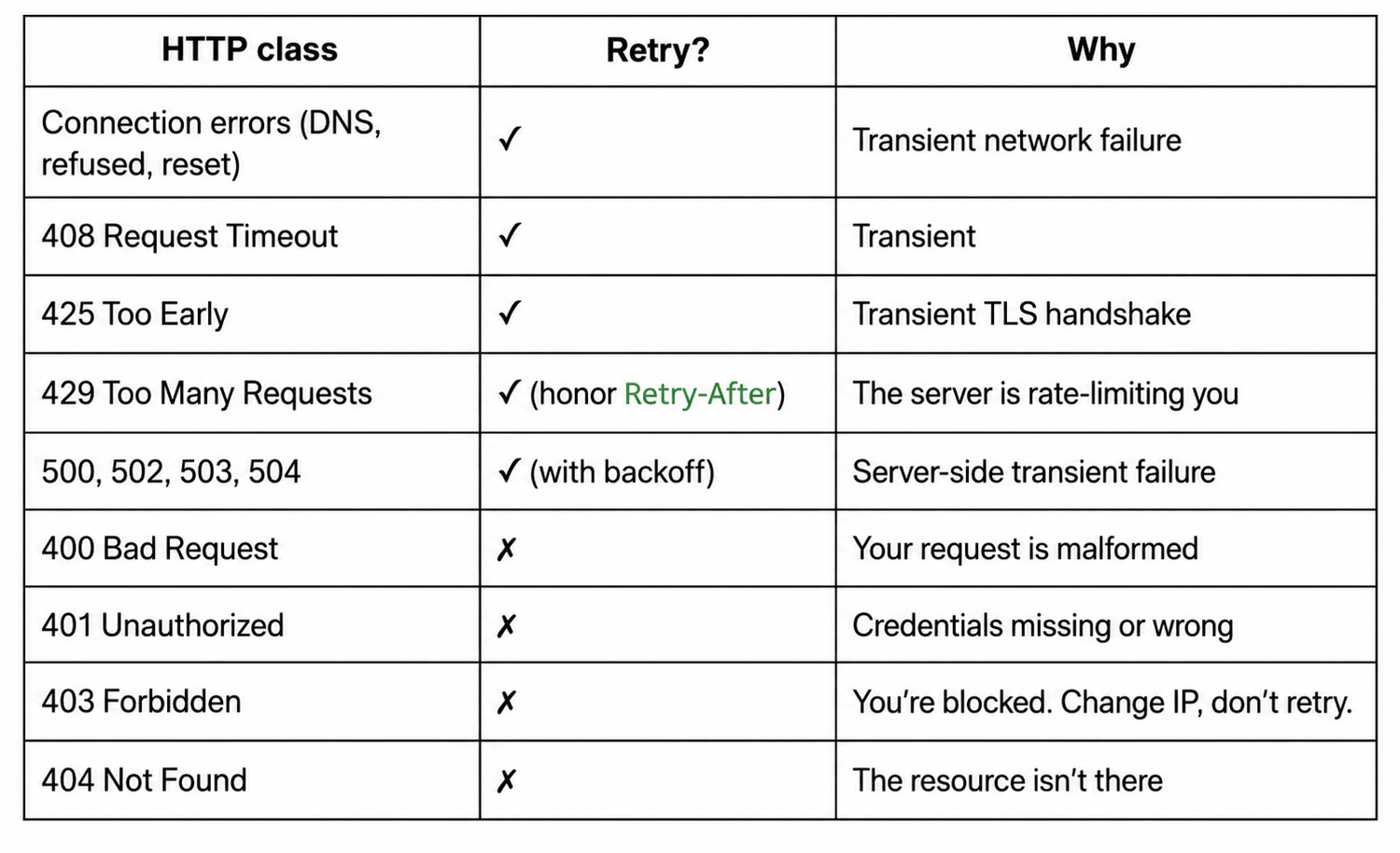
The rule that separates a scraper that ages well from one that doesn't is the 403 row. A 403 is the target server telling you it has identified your scraper and chosen not to serve you. Retrying the same request from the same IP with the same headers gives you the same 403 every time.
What you need is a different identity. Rotate the proxy, swap the User-Agent, slow the cadence down. We cover all three later in the article. For now, the rule is simple. Never retry a 403. The same retry transports work on AsyncClient. That's where you go next when sequential scraping starts to feel slow.
Async web scraping with HTTPX (and why it is faster)
httpx.AsyncClient is the async equivalent of Client and the right tool the moment your scraper crosses a few dozen URLs. Combined with asyncio.gather and a concurrency cap (Semaphore or httpx.Limits), it lets you fan out requests in parallel with sane connection pooling.
The retry transports from the previous section work identically on AsyncClient. On a real benchmark of 20 pages against books.toscrape.com, the async version cut wall time from 5.21s to 1.77s, 2.9x faster.
The AsyncClient + asyncio.gather pattern
Three components make up every async HTTPX scraper:
- An AsyncClient shared across requests
- A list of coroutines built per URL
- asyncio.gather to run them concurrently
Here's the minimal pattern:
import asyncio
import httpx

URLS = [
    'https://books.toscrape.com/catalogue/page-1.html',
    'https://books.toscrape.com/catalogue/page-2.html',
    'https://books.toscrape.com/catalogue/page-3.html',
]

async def fetch(client, url):
    r = await client.get(url)
    return r.status_code, len(r.text)

async def main():
    async with httpx.AsyncClient() as client:
        tasks = [fetch(client, url) for url in URLS]
        results = await asyncio.gather(*tasks)
    return results

results = asyncio.run(main())
for status, size in results:
    print(f'{status} - {size} bytes')
That's the shape every async HTTPX scraper takes. One AsyncClient shared across requests (for the connection pooling), per-URL coroutines built with a list comprehension, gather collecting the results.
Reusing a single client matters here. I've seen scrapers spin up a fresh AsyncClient per URL and wonder why async didn't help; the answer is that you spent the win on TCP handshake overhead.
Cap concurrency with Semaphore or httpx.Limits
asyncio.gather starts every task as quickly as possible. That means 1000 URLs equals 1000 concurrent connections, your machine runs out of file descriptors, and the target server starts returning 429s. Both are bad. Cap concurrency to a number the target can handle, which is usually well below the number your machine can handle.
There are two ways to cap it.
Using asyncio.Semaphore
asyncio.Semaphore is the general-purpose approach:
import asyncio
import httpx

SEMAPHORE = asyncio.Semaphore(5)  # at most 5 requests in flight at once

async def fetch(client, url):
    async with SEMAPHORE:
        r = await client.get(url)
        return r.status_code, len(r.text)
You then build and run the tasks exactly as before. The semaphore simply caps how many fetch calls hold an open connection at once, while asyncio.gather still collects every result:
async def main():
    async with httpx.AsyncClient() as client:
        tasks = [fetch(client, url) for url in URLS]
        return await asyncio.gather(*tasks)

results = asyncio.run(main())
Now, let's see httpx.Limits.
Using httpx.Limits
httpx.Limits is the HTTPX-specific one. It bounds the connection pool, which transitively caps concurrency:
limits = httpx.Limits(max_connections=5, max_keepalive_connections=5)
async with httpx.AsyncClient(limits=limits) as client:
    ...
I default to Semaphore because it's explicit at the call site. Future-me, reading the code, sees exactly how many requests are flying at any given moment. Limits hides the cap inside the Client constructor. The two compose if you want both, but for most scrapers, one of them is enough.
Retries work the same on AsyncClient
The retry transports from the previous section are async-compatible without modification. Use AsyncHTTPTransport for connection retries or RetryTransport from httpx-retries for status-code retries. Same Retry config object, same transport= keyword.
Here's the retry-aware async pattern:
import asyncio
import httpx
from httpx_retries import RetryTransport, Retry

retry = Retry(total=3, backoff_factor=0.5, status_forcelist=[429, 500, 502, 503, 504])

async def main():
    async with httpx.AsyncClient(transport=RetryTransport(retry=retry)) as client:
        tasks = [client.get(url) for url in URLS]
        results = await asyncio.gather(*tasks, return_exceptions=True)
    return results
Two details that save you. return_exceptions=True on gather means a single failed URL doesn't crash the whole batch. It returns as an exception in the results list instead, and you iterate over it and decide what to do for each URL.
And Tenacity decorators work on async functions too. Decorate an async def instead of a def, everything else stays the same.
Understand the sync vs async benchmark (with real numbers)
This is the part of the article every other tutorial gestures at without numbers. Here's the harness I ran. Twenty pages from books.toscrape.com, fetched sync (sequential) and async (concurrency cap of 5 and 10). Same target and same Client setup. Only the call style varies.
Here's the code:
import time, asyncio, httpx

URLS = [f'https://books.toscrape.com/catalogue/page-{i}.html' for i in range(1, 21)]

def sync_scrape(urls):
    with httpx.Client() as client:
        return [(client.get(url).status_code, len(client.get(url).text)) for url in urls]

async def async_scrape(urls, concurrency=5):
    sem = asyncio.Semaphore(concurrency)
    async def fetch(client, url):
        async with sem:
            r = await client.get(url)
            return r.status_code, len(r.text)
    async with httpx.AsyncClient() as client:
        return await asyncio.gather(*[fetch(client, u) for u in urls])

t0 = time.time(); sync_scrape(URLS); print(f'sync:  {time.time()-t0:.2f}s')
t0 = time.time(); asyncio.run(async_scrape(URLS, 5));  print(f'async (5):  {time.time()-t0:.2f}s')
t0 = time.time(); asyncio.run(async_scrape(URLS, 10)); print(f'async (10): {time.time()-t0:.2f}s')
Output from one run on my machine:
sync:        5.21s
async (5):   1.77s     (2.9x faster)
async (10):  1.62s     (3.2x faster)
A few honest reads on these numbers:
(1) First, the jump from sync to async-5 is huge (2.9x). The jump from async-5 to async-10 is small (1.1x). Concurrency, past a certain point, hits diminishing returns because the network round trip becomes your floor, not your code.
(2) Second, the speedup scales with N and concurrency together. At 100 URLs with concurrency of 10, you'll see closer to 10x; at 1000 URLs, you'll start seeing 429s from the target.
(3) Third, async only pays off for I/O-bound work. When you're waiting for network responses, gather wins. If your scraper does heavy parsing per page (CPU-bound), threads or processes beat async, and HTTPX async is the wrong tool for that hot path.
For broader context on asynchronous web scraping in Python, our async-scraping guide covers asyncio fundamentals and the patterns that carry over to HTTPX, aiohttp, and the rest.
Fast scrapers attract attention. Now, we cover what to do when one IP making N requests too fast starts to look exactly like what it is.
How to use proxies with HTTPX (and rotate them)
HTTPX changed its proxy API in version 0.28, and most tutorials online haven't caught up yet. The old proxies={...} dict on Client() was removed, not just deprecated. Paste it from an older guide into a fresh project and HTTPX 0.28+ throws TypeError: Client.init() got an unexpected keyword argument 'proxies'.
The current API is proxy= (singular) for one proxy across the whole client, or mounts= for different proxies per URL scheme. In this section, we explore both, plus the rotation pattern that makes scraping past a few hundred URLs work at all.
1. Configure a proxy on the Client
Pass proxy= to httpx.Client() (or AsyncClient()) to route every request through one proxy URL.
Same shape sync or async:
import httpx

PROXY = 'http://username:password@proxy.example.com:8080'

with httpx.Client(proxy=PROXY) as client:
    r = client.get('https://books.toscrape.com/')
    # Every request through this client goes through the proxy
The proxy URL includes the scheme (http:// or socks5://), optional credentials, the host, and the port. HTTPX supports HTTP, HTTPS, and SOCKS5 proxies. For SOCKS, install the extra with pip install httpx[socks] first.
The proxy is per-Client, not per-request. If you want different proxies for different requests, the cleanest pattern is to construct a separate Client per proxy and route through the right one. The rotation H3 below covers that.
2. Mount per-scheme proxies for HTTP and HTTPS
When you need different proxies for HTTP and HTTPS (rare in web scraping, more common when you're routing internal HTTP through one network and public HTTPS through another), use mounts=. It takes a dict of URL prefix to transport:
import httpx

http_transport = httpx.HTTPTransport(proxy='http://internal-proxy.example.com:8080')
https_transport = httpx.HTTPTransport(proxy='http://public-proxy.example.com:8080')

with httpx.Client(mounts={
    'http://': http_transport,
    'https://': https_transport,
}) as client:
    r = client.get('https://books.toscrape.com/')  # uses https_transport
    r = client.get('http://example.com/')          # uses http_transport
mounts= matches the URL prefix longest-first, so you can also route a single host through its own transport by using a key like 'https://api.target.com'. Anything not matched falls through to the default transport.
For most scraping, you won't need mounts=. One proxy on proxy= is enough until the day it isn't.
3. Rotate from a pool and swap on a block
Rotation is the realistic pattern for any scrape past a few hundred URLs. One pool of proxies, one Client per proxy, and a function that picks which client handles each request (or swaps the active client on a 403).
Here's the pattern:
import random
import httpx

PROXIES = [
    'http://user:pass@proxy1.example.com:8080',
    'http://user:pass@proxy2.example.com:8080',
    'http://user:pass@proxy3.example.com:8080',
]

# One Client per proxy (preserves connection pooling within each)
CLIENTS = [httpx.Client(proxy=p, timeout=10.0) for p in PROXIES]

def pick_client():
    return random.choice(CLIENTS)

for url in URLS:
    client = pick_client()
    r = client.get(url)
    # ...handle the response

# Close every client when the scrape is done
for c in CLIENTS:
    c.close()
I verified on HTTPX 0.28.1 by introspecting the Client constructor: proxy= (singular) and mounts= are present, proxies= is gone. Passing proxies={...} to httpx.Client() raises TypeError: Client.init() got an unexpected keyword argument 'proxies', exactly as written above. A fake-proxy Client(proxy='http://127.0.0.1:1') failed with ConnectError on a real GET, confirming the parameter is being honored by the transport.
Two ways to combine this with the retry section:
(1) First, swap proxies specifically for a 403. Per the earlier decision table, you never retry from the same IP. The Tenacity before_sleep hook is the right place to call pick_client() and re-issue the request against a fresh proxy.
(2) Second, evict dead proxies from the pool. When a proxy consistently times out or returns 502s of its own, drop it for a cooldown window so your rotation doesn't burn budget on it.
Honest read on rotation infrastructure: building this well is real work. Most teams I've seen end up buying from a residential proxy provider that handles rotation server-side, so your code points at one endpoint and the provider's network shuffles IPs underneath.
That's the right buy-vs-build call for any daily scrape at scale. We have a separate guide on rotating proxies and another on configuring proxies in Python for broader context.
All the moving parts are in place. Let's now assemble them into a single script that also handles the part that HTTPX doesn't do natively: parsing the HTML you came for.
How to build a complete HTTPX scraper with parsing and export
HTTPX fetches what the server sends. It doesn't parse what came back. That last mile (HTML to structured data) is a different library's job, and so is writing the results to disk.
In this section, we pair HTTPX with a parser, cover the one case where you don't need a parser at all, and then assemble all the sections of this guide into a single runnable script.
1. Pair HTTPX with BeautifulSoup for HTML parsing
BeautifulSoup is the parser I reach for when web scraping with HTTPX. It's forgiving with malformed markup, the API is small enough to keep in your head, and it pairs naturally with the response.text HTTPX hands you.
Let's install:
pip install beautifulsoup4
The pairing is as small as it sounds.
HTTPX gets the HTML, BeautifulSoup parses it, and you write the selector:
import httpx
from bs4 import BeautifulSoup

with httpx.Client() as client:
    r = client.get('https://books.toscrape.com/')

soup = BeautifulSoup(r.text, 'html.parser')
titles = [a['title'] for a in soup.select('article.product_pod h3 a')]
print(f'first 5 titles: {titles[:5]}')
# first 5 titles: ['A Light in the Attic', 'Tipping the Velvet', 'Soumission', 'Sharp Objects', 'Sapiens: A Brief History of Humankind']
That CSS selector (article.product_pod h3 a) targets every book card's title link on the page. The a['title'] accesses the title HTML attribute (which contains the full text, not the truncated visible text that lives inside the anchor).
A quick pro tip for you: In my experience, Selectolax is faster than BeautifulSoup for large-scale parsing where parse time becomes the bottleneck, but for anything under a few thousand pages, BeautifulSoup is the right default.
2. Use response.json() for JSON endpoints
When the target returns JSON (most modern APIs, plus the increasing number of sites that hydrate their frontend from an internal JSON endpoint), you don't need a parser at all.
HTTPX's response.json() parses it for you in one call:
import httpx

r = httpx.get('https://httpbin.org/json')
data = r.json()
print(data['slideshow']['title'])
# Sample Slide Show
Before you write a BeautifulSoup parser, always open the target page in the Network tab of DevTools and look. If you find the data you want being fetched from a JSON endpoint, scrape the JSON instead.
It's faster, the structure is more stable across deploys, and it puts less load on the target. Most of the time, the JSON endpoint is right there in the page's XHR traffic, waiting to be used.
3. Assemble the full async scraper end-to-end
Here's the script (link to download) that combines every section of this article:
- AsyncClient with a RetryTransport
- Realistic headers
- Per-phase timeouts
- A concurrency cap with Semaphore
- BeautifulSoup parsing
- JSON plus CSV export
In it, proxies are commented out so you can drop them in when you need them.
I ran the script as-is against the live books.toscrape.com, and it scraped 100 books across 5 pages in 1.48 seconds, writing books.json (13.8 KB) and books.csv (6.4 KB) to disk. First book in both files: A Light in the Attic, £51.77, in stock, rating 3.
Two notes on how the pieces connect:
(1) The RetryTransport is mounted on the AsyncClient, so every request through client.get() automatically gets the retry policy; no try/except in scrape_page.
(2) The Semaphore is independent of the RetryTransport, so a retry counts as a single in-flight slot, not an extra one. That matters when you size the semaphore against the target's tolerated concurrency.
The script above survives transient failures. It does not survive a target that wants to block you. That's the next problem.
5 scenarios where HTTPX retries won't save you
Retries fix transient failures, but they do not fix a target that doesn't want you scraping it. The complete script in our previous section handles connection blips, slow servers, and 429 rate limits with backoff.
Here are five scenarios when HTTPX retries won't save you:
- A persistent 403 or 401 from an anti-bot system: The target has fingerprinted your request and blocked it, so a retried request will receive the same refusal.
- A CAPTCHA or JavaScript challenge page: Cloudflare, DataDome, or PerimeterX returns a challenge instead of your data, and HTTPX has no browser to clear it.
- A JavaScript-rendered page: The HTML you came for is built client-side after scripts run, so the server response HTTPX keeps retrying never contains it.
- A TLS or HTTP/2 fingerprint mismatch: Your handshake signature does not look like a real browser's, so every retry trips the same filter before the body is ever served.
- A hard IP ban or sustained rate-limit block: The origin has blocked your address, and hammering it from the same IP only deepens the block.
The signal that you're past DIY territory is when you find yourself spending a few hours a week debugging blocks instead of improving your pipeline. If retries and headers fix the problem within a sprint, you're in DIY territory.
If they don't, the math has flipped, and you reach for a web scraping API like ScrapingBee instead.
How ScrapingBee handles web scraping with HTTPX
When the math flips and you are spending more time fighting blocks than building your scraper, the move is to hand the anti-bot problem to an API built for it. ScrapingBee is designed for exactly that handoff, and it integrates with the HTTPX code you already have.
Here are the three things worth knowing about it from an HTTPX scraper's perspective.
One web scraping API call for proxies, JS rendering, and retries
ScrapingBee is a web scraping API. You call one HTTP endpoint with the target URL as a query parameter, and the API handles proxy rotation, JS rendering (via a headless browser), CAPTCHA handling, and auto-retries on your behalf, then returns the HTML response directly to your code.
There are three features that you should know about:
- render_js=true is on by default: Every URL you fetch runs through a real Chromium instance server-side, which means React, Vue, and Next.js sites return the rendered DOM, not the empty shell HTTPX alone would see.
- Auto-retries up to 30 seconds: If the first attempt fails (anti-bot challenge, transient error, slow target), the API retries with different proxies and fingerprints until it either succeeds or it hits the 30-second budget. You don't need to mount RetryTransport for retries; the API handles them.
- premium_proxy=true: Routes the request through residential IPs instead of the datacenter. This is the toggle for targets that detect cloud provider ASNs (the most commercially protected targets in 2026).
Put together, those three toggles cover the failure modes that send most DIY scrapers back to the drawing board, without changing the shape of your HTTPX code.
Pick the right proxy tier (Classic, Premium, or Stealth)
ScrapingBee offers three proxy tiers, each priced by credits per request.
Use the one that works for your target:
| Tier | Use when |
|---|---|
| Classic | Tutorials, public listings, low-defended targets |
| Premium | Sites that block datacenter IPs (most commercial targets) |
| Stealth | Hard anti-bot (Cloudflare Enterprise, DataDome, PerimeterX) |
The decision rule that's served me well is simple. Start at the tier you need and step up only when the response tells you to. Most scrapes work fine on Classic. Some need Premium for the residential IP.
A minority of targets (the ones with the largest anti-bot budgets) need Stealth.
Drop ScrapingBee into your HTTPX code
Replacing a direct HTTPX call with a ScrapingBee call is a query-string change. The same Client, the same patterns from earlier in the article, the same response object. Only the URL changes.
Let me show you how:
import os
import httpx

SB_KEY = os.environ['SCRAPINGBEE_API_KEY']

params = {
    'api_key': SB_KEY,
    'url': 'https://quotes.toscrape.com/js/',
    'render_js': 'true',         # on by default; including it for clarity
    'premium_proxy': 'true',     # residential IPs; remove for the cheaper Classic tier
}

with httpx.Client(timeout=30.0) as client:
    r = client.get('https://app.scrapingbee.com/api/v1/', params=params)
    print(f'{r.status_code} - {len(r.text)} bytes')
    # When I ran this against the live API, I got back:
    # 200 - 8940 bytes
    # Parsing the response, the page had 10 rendered .quote elements,
    # where bare HTTPX against quotes.toscrape.com/js/ returns zero.
I ran this against the live ScrapingBee API:
- A drop-in HTTPX call to the API endpoint returned 200 with 51,275 bytes from books.toscrape.com (3.74s)
- The same call with premium_proxy=true returned the same shape (3.77s, residential routing)
- A render_js=true call against quotes.toscrape.com/js/ returned 8,940 bytes containing 10 rendered .quote elements, in stark contrast to bare HTTPX (which returns the shell with zero .quote elements).
The retry transport, the per-phase timeout, and the async patterns from earlier all carry over without modification. The only practical difference is that you increase the Client timeout to a value greater than the default 5 seconds. This is because the API takes longer per call than a direct request would (it runs a headless browser, rotates proxies, and retries server-side on your behalf). 30 seconds is a comfortable default.
You can grab 1,000 free API credits without a credit card to try it on your own targets, and the full parameter reference lives in the ScrapingBee HTML API docs.
Automate your HTTPX web scraping with ScrapingBee
If you've made it this far, you've seen the full HTTPX scraping stack. Retry transports, header rotation, proxy mounts, per-phase timeouts, async with concurrency caps, the blocking economics that turn a one-day project into a six-month maintenance commitment.
None of that is the work you set out to do. You wanted the data, not the retry helper that maintains it.
Here's what ScrapingBee handles so your HTTPX code stops carrying it:
- Premium proxy rotation: Residential and data center IPs rotated on request, with geotargeting when you need it
- JavaScript rendering: A full Chromium environment for React, Vue, and Next.js sites in a single API call
- Auto-retry on failure: Failed URLs are retried for up to 30 seconds without writing the loop yourself.
- CSS-selector and AI extraction: Describe what you want, get clean JSON back, no parser needed
- Bot-detection bypass: CAPTCHA solving, TLS fingerprint normalization, and stealth headers are handled before the response returns
Get started on ScrapingBee with 1,000 free API credits and see what your HTTPX code looks like without the underlying retry plumbing.
Frequently asked questions on web scraping with HTTPX
Does HTTPX retry failed requests automatically?
No, not for status codes. HTTPX's native HTTPTransport(retries=N) only retries connection-level failures (e.g., DNS lookup failure, TCP refusal or TLS handshake aborts). It ignores 429s, 500s, and other status codes. For status-code retries with backoff, mount the httpx-retries library on your Client, or wrap calls in Tenacity for custom retry logic.
How do I add a timeout to HTTPX?
Pass timeout= to httpx.Client() (sticks for every request) or to individual requests (one-off override). The default is 5 seconds per phase (connect, read, write, pool). For fine-grained control, use httpx.Timeout(connect=5.0, read=30.0, write=5.0, pool=2.0). Avoid timeout=None, which hangs forever on a stalled server.
How do I retry on a 429 or 503 in HTTPX?
Mount the httpx-retries library on your Client with a Retry config that lists those codes in status_forcelist, e.g., Retry(total=3, backoff_factor=0.5, status_forcelist=[429, 500, 502, 503, 504]). It applies exponential backoff between attempts and automatically honors a Retry-After header when the server sends one. When you need to rotate a proxy or User-Agent between attempts, wrap the call in Tenacity instead. Never add 401, 403, or 404 to the list; those are not transient.
Is HTTPX better than Requests for web scraping?
It depends on what you need. HTTPX adds async support and HTTP/2 in one library, while Requests is sync-only and HTTP/1.1-only. If you don't need either, the Requests ecosystem is older and has fewer surprising edge cases. For new projects, pick HTTPX. For codebases already on Requests, the migration usually isn't worth the effort unless you specifically need the async story.
Why does my HTTPX scraper still get blocked even with retries?
Retries fix transient failures (network blips, 5xx errors, 429 rate limits), not blocks. A persistent 403 means the target's anti-bot system has identified your scraper and decided not to serve you. The fix is changing your identity in some way. Rotate residential proxies, use a real browser for JS-rendered pages, slow your request rate, or route through a managed scraping API that handles all three.
Can I rotate proxies with HTTPX?
Yes. Pass proxy= to httpx.Client() (singular, since HTTPX 0.28). For rotation, create one Client per proxy in a pool and select which Client handles each request. Be aware that the old proxies={...} plural dict was removed in 0.28 and will throw TypeError: Client.init() got an unexpected keyword argument 'proxies' if you try it. For per-scheme routing (different proxies for HTTP and HTTPS), use mounts= instead.

Ismail is a Senior Managing Editor and Senior AI Workflow Engineer. For a decade, he has turned the trickiest corners of web scraping, Python, content marketing, and AI infrastructure into guides readers keep open in a second tab. He builds the tools before he documents them, breaks them, and reports back with the scars.