Realtor.com is the second-largest real estate listing website in the US, housing millions of properties. Extracting this treasure trove of information is essential for deep market research, investment analysis, and spotting undervalued properties before your next purchase. However, Realtor's strict anti-bot measures make manual data collection nearly impossible.
This tutorial will show you exactly how to scrape real estate data from search results pages using Python and Selenium, while successfully bypassing the bot detection used by realtor.com.
TL;DR
To successfully scrape real estate data from Realtor.com, you need to set up a Python environment using Selenium and undetected-chromedriver to mimic human behavior and evade basic bot detection. By navigating to a target search URL, you can use XPath selectors to isolate property listing cards (li[data-testid='result-card']) and extract specific data points like price, beds, baths, and addresses using their respective data-label attributes.
Since search results are split across multiple pages, you must also automate the extraction of the "Next Page" URL to handle pagination. For large-scale scraping where strict CAPTCHAs become an issue, the most efficient method is to utilize a web scraping API like ScrapingBee to automatically handle proxy rotation and headless browser rendering.
Key Takeaways
- Anti-bot measures are strict: Realtor.com utilizes aggressive bot protection and CAPTCHAs. Simple HTTP request libraries (like
requestsorurllib) will quickly get blocked, making headless browsers or scraping APIs a necessity. - Listing data is often inconsistent: Not every property listing will have all data points (e.g., some may lack square footage or plot size). Your scraping script must use conditional statements to check if an element exists before extracting it to prevent the code from breaking.
- URL structures are predictable: Instead of automating the search bar (which can trigger auto-suggest UI bugs), it is much easier to hardcode your target city and state directly into the search URL (e.g.,
/realestateandhomes-search/Cincinnati_OH/). - Scaling requires infrastructure: While Selenium is great for small scripts, extracting real estate data at scale requires managing proxy pools and dealing with constant IP bans—a process best outsourced to specialized scraping tools.
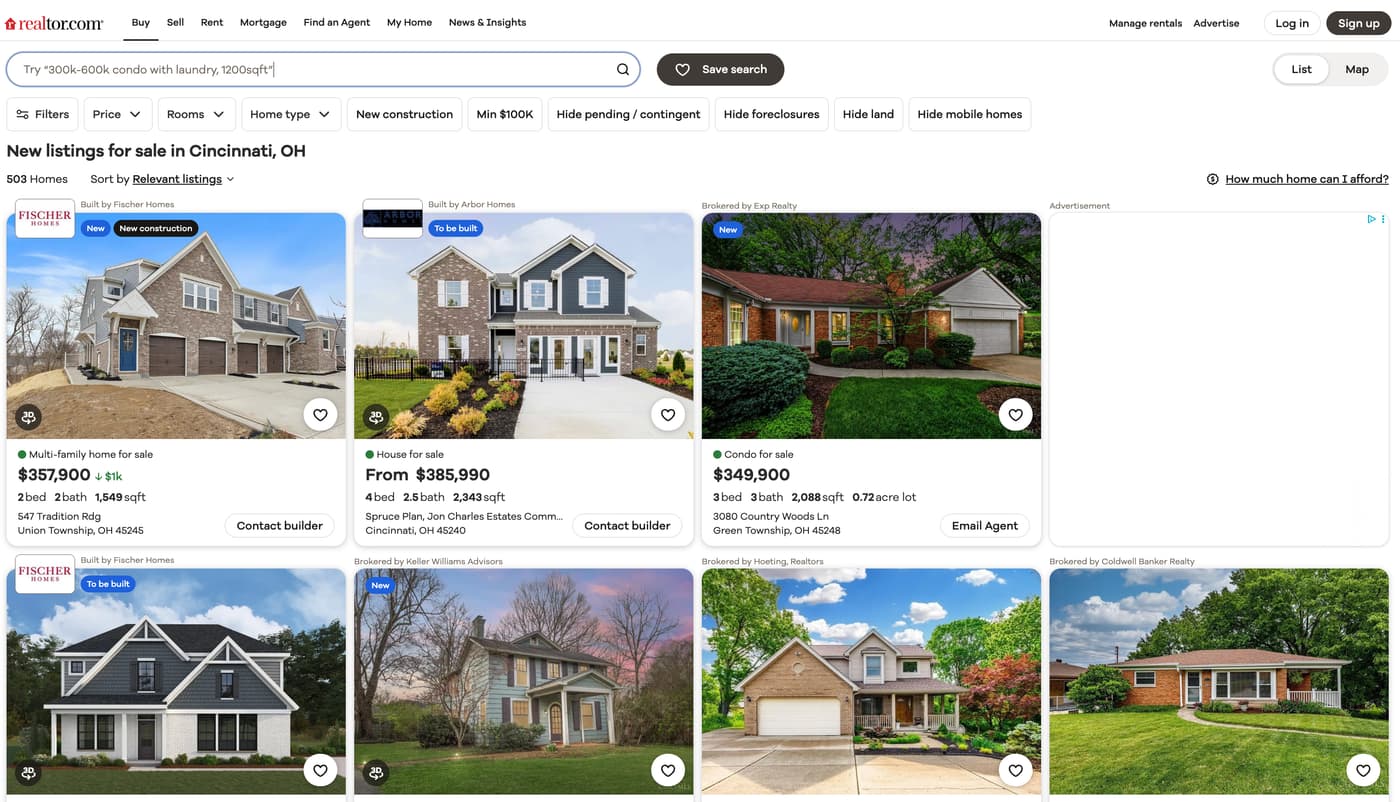
You can go and explore the search results page of realtor.com by going to this link. You will be scraping data from this page.
💡Interested in scraping Real Estate data? Check out our guide on How to scrape Zillow with Python
Why Extract Real Estate Data?
The most common use case is market research and price tracking. Real estate firms and developers identify purchase, sale, and development targets by gathering and analyzing data that can influence property value. Data on market performance, economic trends, demographics, and asset-level details, including average property prices in specific zip codes, are often critical for making these data-driven decisions.
Investors use real estate data to inform their holdings and assess opportunities to divest or capture value. Tracking prices in specific zip codes where prices are trending upward and identifying listings priced below the trend line, presents a competitive advantage.
Real estate agencies track details such as recently expired listings, properties with unusually long days on market, or those with multiple price reductions to generate leads or build a list of potential clients to reach out to.
Setting up the prerequisites
This tutorial will use Python 3.10.0 but it should work with most of the recent Python versions. Start by creating a separate directory for this project and create a new Python file within it:
$ mkdir realtor_scraper
$ cd realtor_scraper
$ touch app.py
You will need to install the following libraries to continue:
You can install both of these via the following PIP command:
$ pip install selenium undetected-chromedriver
Here is why we need these specific libraries:
- Selenium: Provides the core APIs needed to programmatically open, control, and extract data from a Chrome browser.
- undetected-chromedriver: A specialized patch for Selenium that hides your automation flags. This is crucial for evading Realtor.com's basic bot-detection mechanisms, which would otherwise block a standard Selenium script immediately.
Fetching realtor search results page
Let's fetch the realtor search results page using undetected-chromedriver and selenium:
import undetected_chromedriver as uc

driver = uc.Chrome(use_subprocess=True)
driver.get("https://www.realtor.com/realestateandhomes-search/Cincinnati_OH/show-newest-listings")
Save this code in app.py and run it. It should open up a Chrome window and navigate it to the realtor.com search results page. I like to run the code snippets in a Python shell to quickly iterate on ideas and then save the final code to a file. You can follow the same pattern for this tutorial.
This tutorial is going to scrape search results for Cincinnati, OH. You can scrape results for a different city and state by modifying the URL and replacing the city and state with your desired one. For instance, Redmond, WA will result in this URL:
https://www.realtor.com/realestateandhomes-search/Redmond_WA/show-newest-listings
We hardcode the target URL rather than automating the homepage search bar for two main reasons:
- Bypassing Auto-Suggest Bugs: Typing into the search bar triggers Realtor's auto-suggest dropdown, which frequently intercepts clicks and breaks automation scripts.
- Predictable URL Patterns: Realtor's URL structure is highly predictable (
/realestateandhomes-search/[City]_[State]/). You can easily scale your scraper just by swapping out the city and state strings in the URL.
Deciding what to scrape
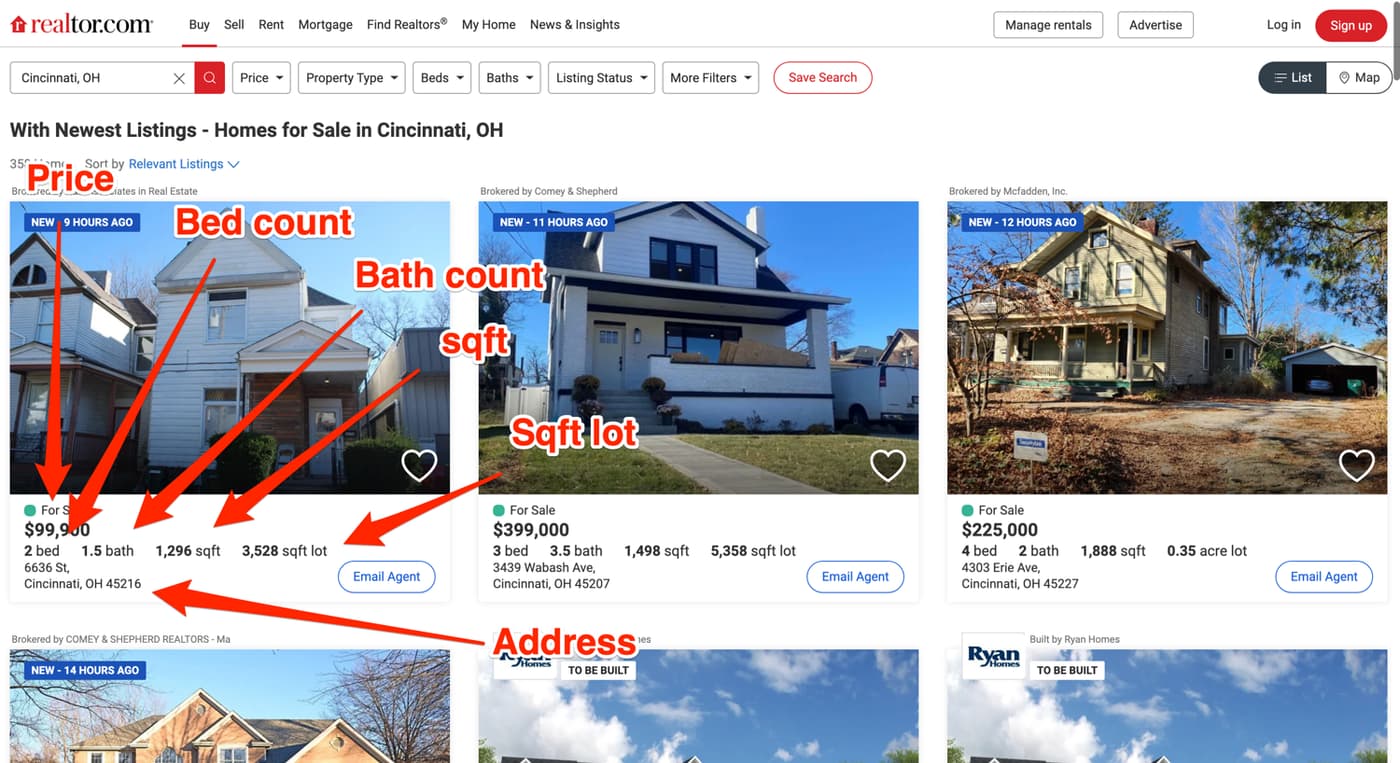
It is very important to have a clear idea of which data you want to extract from the website. This tutorial will focus on extracting the price, bed count, bath count, sqft, sqft lot amount, and the address associated with easy property listing.
The final output will be similar to this:
[
    {
        'address': '6636 St, Cincinnati, OH 45216',
        'baths': '1.5bath',
        'beds': '2bed',
        'price': '$99,900',
        'sqft': '1,296sqft',
        'plot_size': '3,528sqft lot'
    },
    {
        'address': 'Shadow Hawk 4901 Shadow Hawk Drive, Green '
        'Township, OH 45247',
        'baths': '2bath',
        'beds': '3bed',
        'price': 'From$472,995',
        'sqft': '1,865sqft',
        'plot_size': ''
    },
    # Additional properties
]
Below you can see an annotated screenshot showcasing where all of this information about each property is located:
Scrape real estate listings with Python
You will be using the default methods (find_element + find_elements) that Selenium provides for accessing DOM elements and extracting data from them. Additionally, you will be relying on XPath for locating the DOM elements.
Before you can start writing extraction code, you need to spend some time exploring the HTML structure of the page. You can do that by opening up the web page in Chrome, right-clicking any area of interest, and selecting Inspect. This will open up the developer tools panel and you can click around to figure out which tag encapsulates the required information. This is one of the most common workflows used in web scraping.
As you can see in the image below, each property listing is nested within an li tag with the data-testid attribute of result-card:
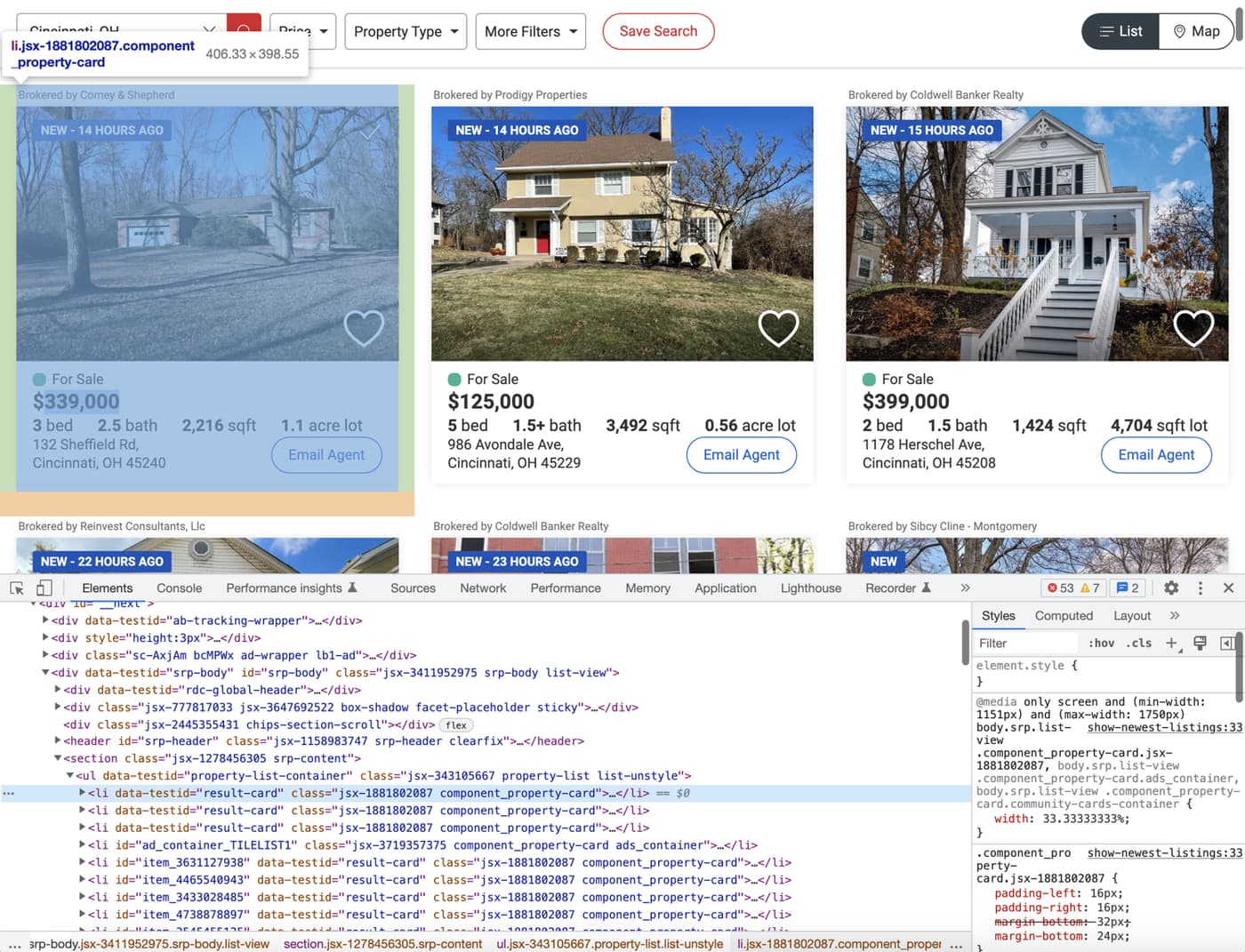
You can use this information along with the XPATH selector to extract and collect all the individual listings inside a list. Afterward, you can extract individual information from each listing. To extract all listings you can use the following code:
from selenium.webdriver.common.by import By

# ...

properties = driver.find_elements(By.XPATH, "//li[@data-testid='result-card']")
Here is a breakdown of how our XPath selector isolates the listings:
//li: Instructs Selenium to scan the entire HTML document and extract all list item (li) tags.[@data-testid='result-card']: Acts as a filter, ensuring we only capture thelitags that wrap an actual property result card.- (Note: While this tutorial uses XPath, Selenium also fully supports CSS selectors for similar extractions).
Scraping individual listing data
Now that you have successfully scraped all the listings, you can loop over them and scrape individual listing data. Go ahead and explore the price and try to figure out how you can extract it.
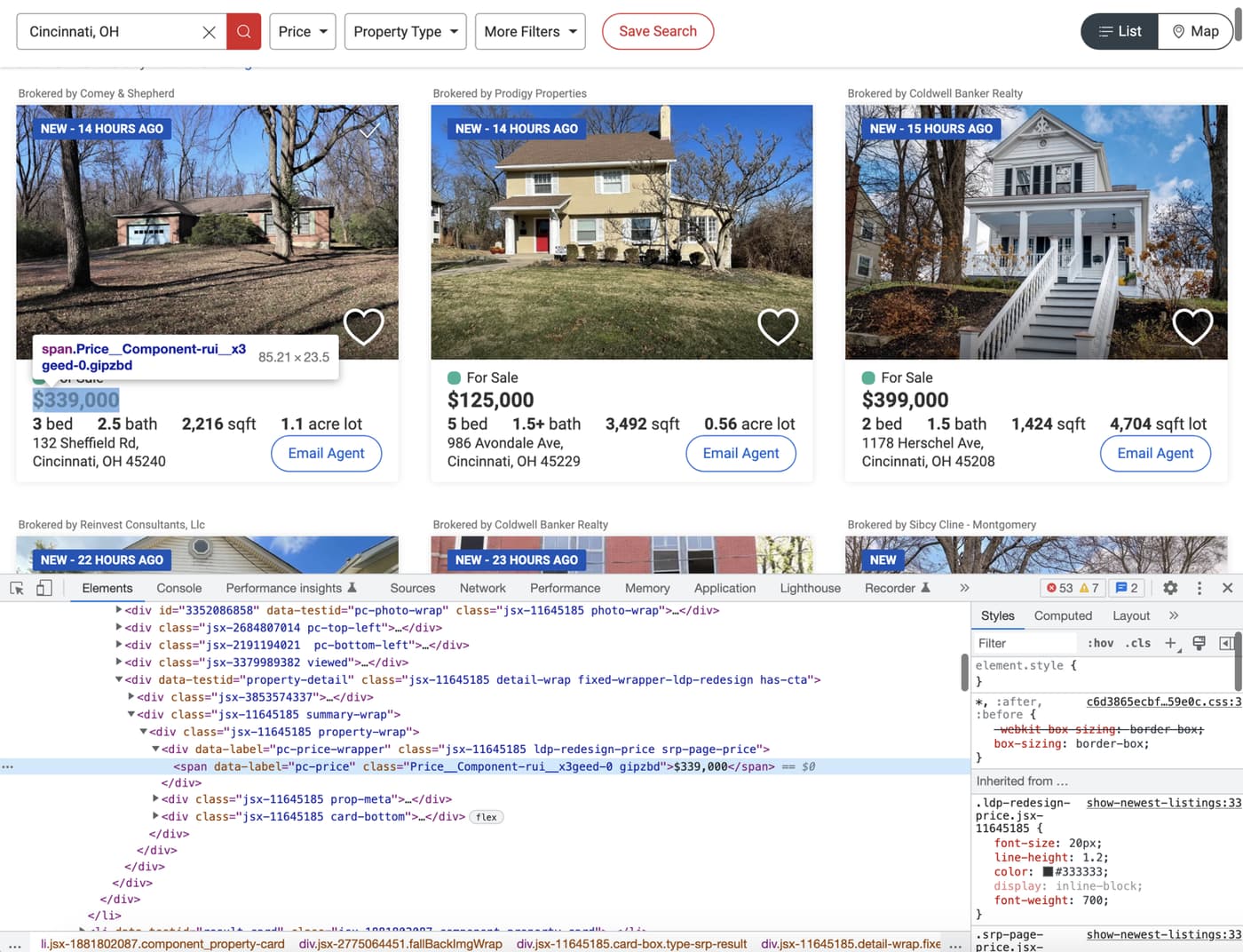
Based on the image above, it seems like you can extract the price by targetting the span with the data-label attribute of pc-price. This is exactly what the following code does:
for property in properties:
    property_data = {}
    property_data['price'] = property.find_element(By.XPATH, ".//span[@data-label='pc-price']").text
- The leading period (
.): Notice the XPath expression starts with.//. This ensures Selenium only extracts spans nested within the current property div. Without the period, it would default to returning the first matching span on the entire webpage. - The target attribute (
[@data-label='pc-price']): This directs the scraper to the exact HTML attribute containing the pricing data. - Extracting the value (
.text): By chaining the.textattribute to thefind_elementmethod, we strip away the HTML tags and return only the visible pricing text.
Next up, explore where the bed, bath, sqft, and plot size information is located in the DOM.
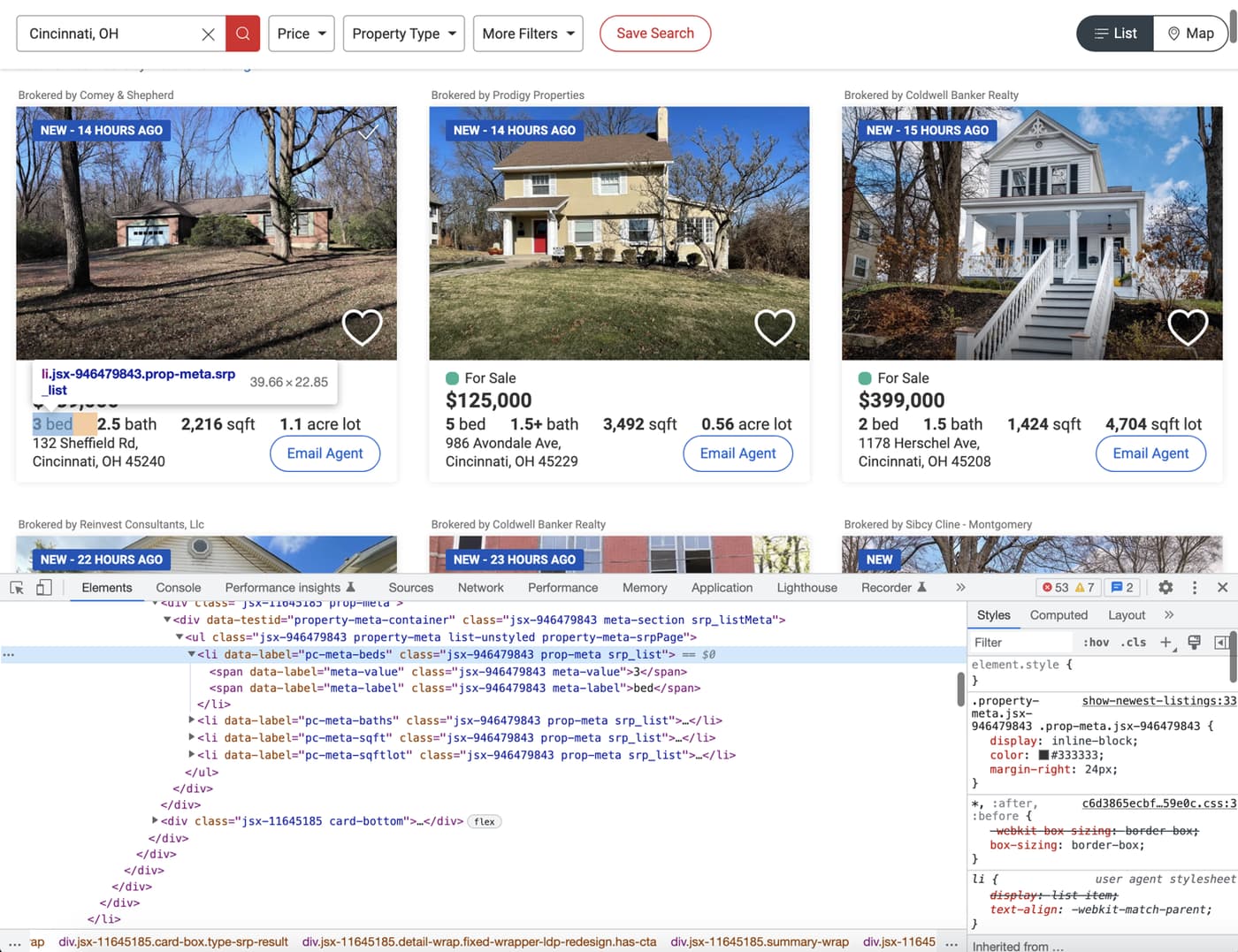
The image above shows that all of these bits of information are stored in individual li tags with distinct data-label attributes. But one thing to note here is that every property does not contain all four of these data points. You need to structure your extraction code appropriately so that it doesn't break:
for property in properties:
    property_data = {}
    property_data['price'] = property.find_element(By.XPATH, ".//span[@data-label='pc-price']").text
    if property.find_elements(By.XPATH, ".//li[@data-label='pc-meta-beds']"):
  	  property_data['beds'] = property.find_element(By.XPATH, ".//li[@data-label='pc-meta-beds']").text
    if property.find_elements(By.XPATH, ".//li[@data-label='pc-meta-baths']"):
	    property_data['baths'] = property.find_element(By.XPATH, ".//li[@data-label='pc-meta-baths']").text
    if property.find_elements(By.XPATH, ".//li[@data-label='pc-meta-sqft']"):
    	property_data['sqft'] = property.find_element(By.XPATH, ".//li[@data-label='pc-meta-sqft']").text
    if property.find_elements(By.XPATH, ".//li[@data-label='pc-meta-sqftlot']"):
    	property_data['plot_size'] = property.find_element(By.XPATH, ".//li[@data-label='pc-meta-sqftlot']").text
Because real estate listings are inconsistent (e.g., missing square footage or plot size), we must use conditional checks:
- Checking for existence: We use the plural
find_elementsmethod first. If the specific tag does not exist for that property, Selenium returns an empty list (which equates toFalse). - Preventing crashes: Wrapping the extraction in an
ifstatement ensures our script simply skips the missing data point instead of throwing an error and crashing the entire scraper.
Finally, flex your detective muscles and try to figure out how to extract the address. Hint: It is not any different from what we did earlier for other data points.
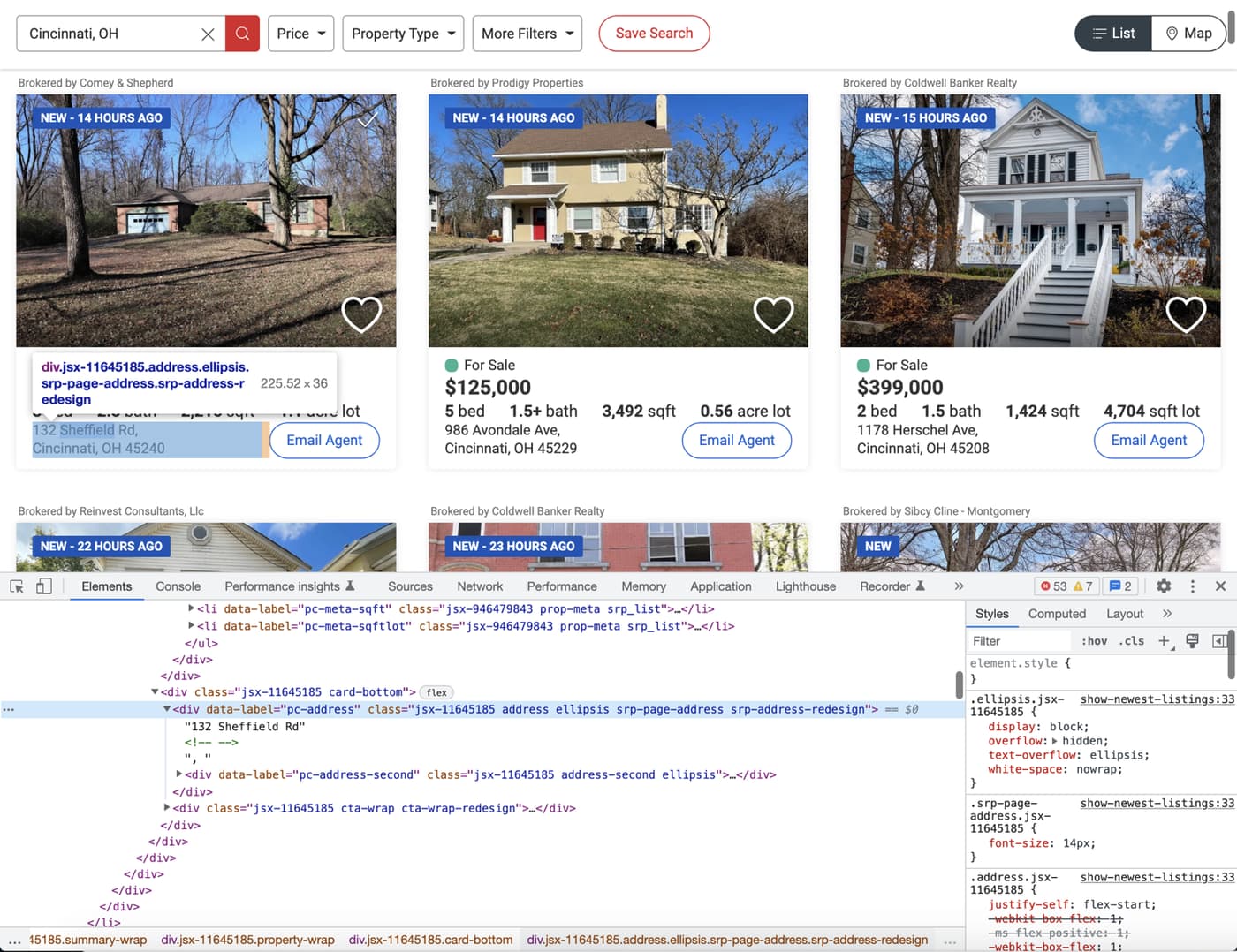
The following code will do the trick:
for property in properties:
		# ...
    if property.find_elements(By.XPATH, ".//div[@data-label='pc-address']"):
        property_data['address'] = property.find_element(By.XPATH, ".//div[@data-label='pc-address']").text
Making use of pagination
You might have observed that the search result pages are paginated. There are pagination controls toward the bottom of the page:

You can modify your code easily to make use of this pagination. Instead of using the individually numbered links, you can simply rely on the Next link. This link will contain a valid href if there is a next page available.
This is what the HTML structure looks like for the Next link:
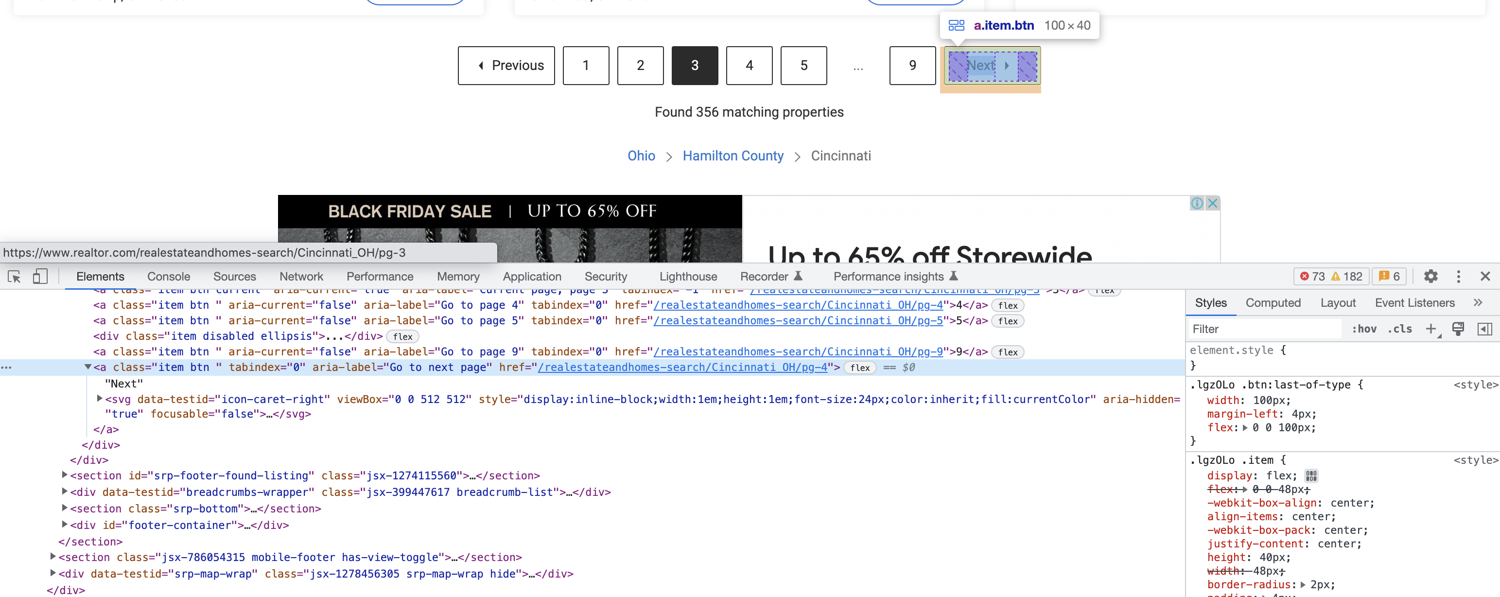
You can extract the href from this anchor tag using the following code:
next_page_url = driver.find_element(By.XPATH, "//a[@aria-label='Go to next page']").get_attribute('href')
Here is how we handle moving to the next page of results:
.get_attribute('href'): Instead of extracting text, this method pulls the actual hyperlink attached to the "Next Page" button.- Direct Navigation vs. Clicking: We pass this URL directly to
driver.get()rather than simulating a physical click on the button. Direct navigation is much more reliable and avoids triggering complex background XHR (AJAX) requests that can stall the scraper.
Complete code
You will have to restructure your code a little bit to make use of pagination. It will look something like this at the end:
import undetected_chromedriver as uc
from selenium.webdriver.common.by import By

# https://stackoverflow.com/questions/70485179/runtimeerror-when-using-undetected-chromedriver
driver = uc.Chrome(use_subprocess=True)

driver.get("https://www.realtor.com/realestateandhomes-search/Cincinnati_OH/show-newest-listings")

all_properties = []

def extract_properties():
    properties = driver.find_elements(By.XPATH, "//li[@data-testid='result-card']")

    for property in properties:
        property_data = {}
        property_data['price'] = property.find_element(By.XPATH, ".//span[@data-label='pc-price']").text
        if property.find_elements(By.XPATH, ".//li[@data-label='pc-meta-beds']"):
            property_data['beds'] = property.find_element(By.XPATH, ".//li[@data-label='pc-meta-beds']").text
        if property.find_elements(By.XPATH, ".//li[@data-label='pc-meta-baths']"):
            property_data['baths'] = property.find_element(By.XPATH, ".//li[@data-label='pc-meta-baths']").text
        if property.find_elements(By.XPATH, ".//li[@data-label='pc-meta-sqft']"):
            property_data['sqft'] = property.find_element(By.XPATH, ".//li[@data-label='pc-meta-sqft']").text
        if property.find_elements(By.XPATH, ".//li[@data-label='pc-meta-sqftlot']"):
            property_data['plot_size'] = property.find_element(By.XPATH, ".//li[@data-label='pc-meta-sqftlot']").text
        if property.find_elements(By.XPATH, ".//div[@data-label='pc-address']"):
            property_data['address'] = property.find_element(By.XPATH, ".//div[@data-label='pc-address']").text
        all_properties.append(property_data)


if __name__ == "__main__":
    extract_properties()
    while True:
        next_page_url = driver.find_element(By.XPATH, "//a[@aria-label='Go to next page']").get_attribute('href')
        if "http" in next_page_url:
            driver.get(next_page_url)
        else:
            break
        extract_properties()
    print(all_properties)
Bypassing captcha using ScrapingBee
If you continue scraping, you will eventually encounter this captcha screen:
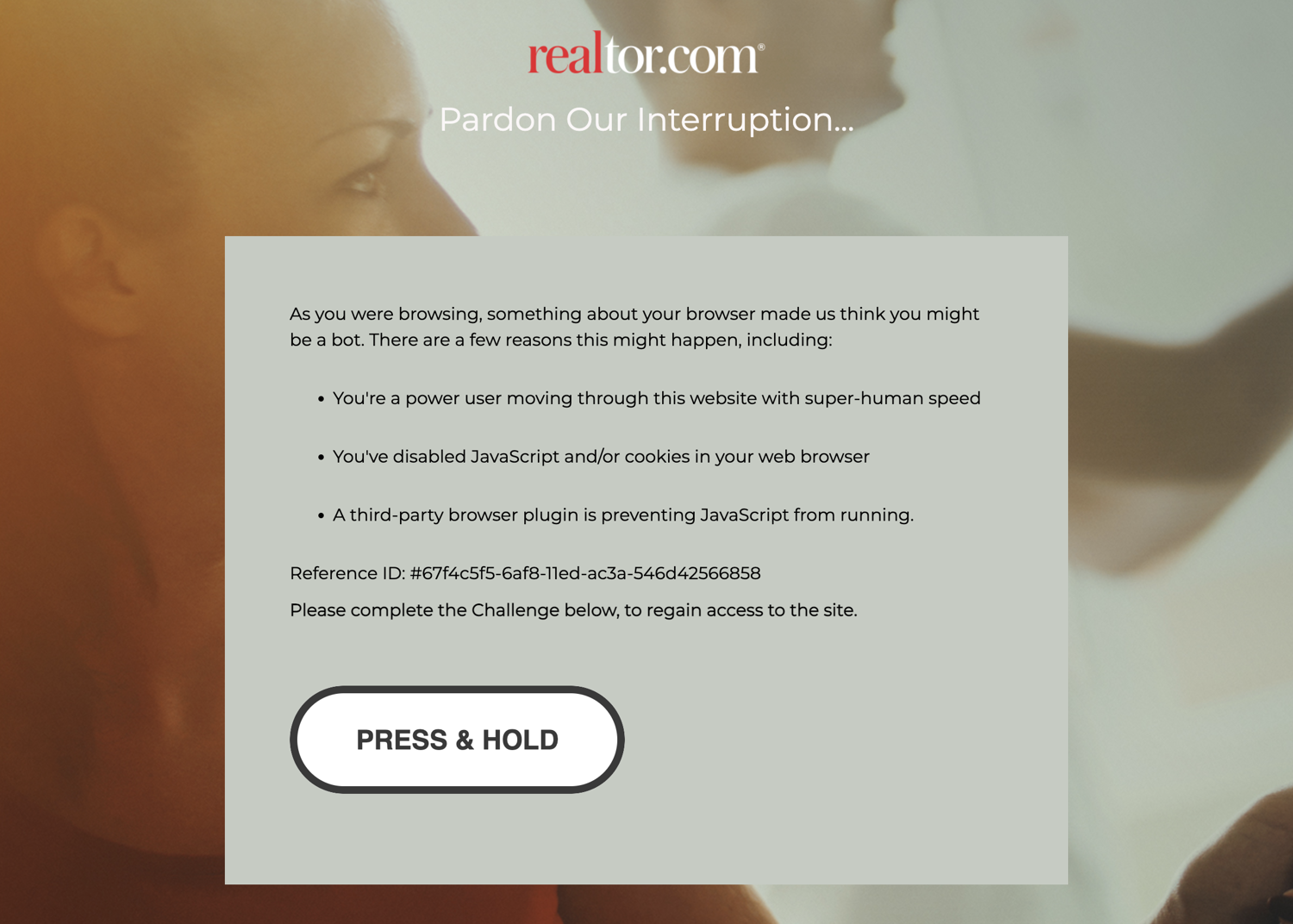
undetected_chromedriver already tries to make sure you don't encounter this screen but it is extremely difficult to fully bypass it. One option is to solve the captcha manually and then continue the scraping but there is no guarantee how frequently you will encounter this screen. Thankfully there are some solutions available and one such solution is ScrapingBee - Realtor API.
You can use ScrapingBee to extract information from whichever page you want and ScrapingBee will make sure that it uses rotating proxies and solves captchas all on its own. This will let you focus on the business logic (data extraction) and let ScrapingBee deal with all the grunt work of not getting blocked.
Let's look at a quick example of how you can use ScrapingBee. First, go to the terminal and install the ScrapingBee Python SDK:
$ pip install scrapingbee
Next, go to the ScrapingBee website and sign up for an account:
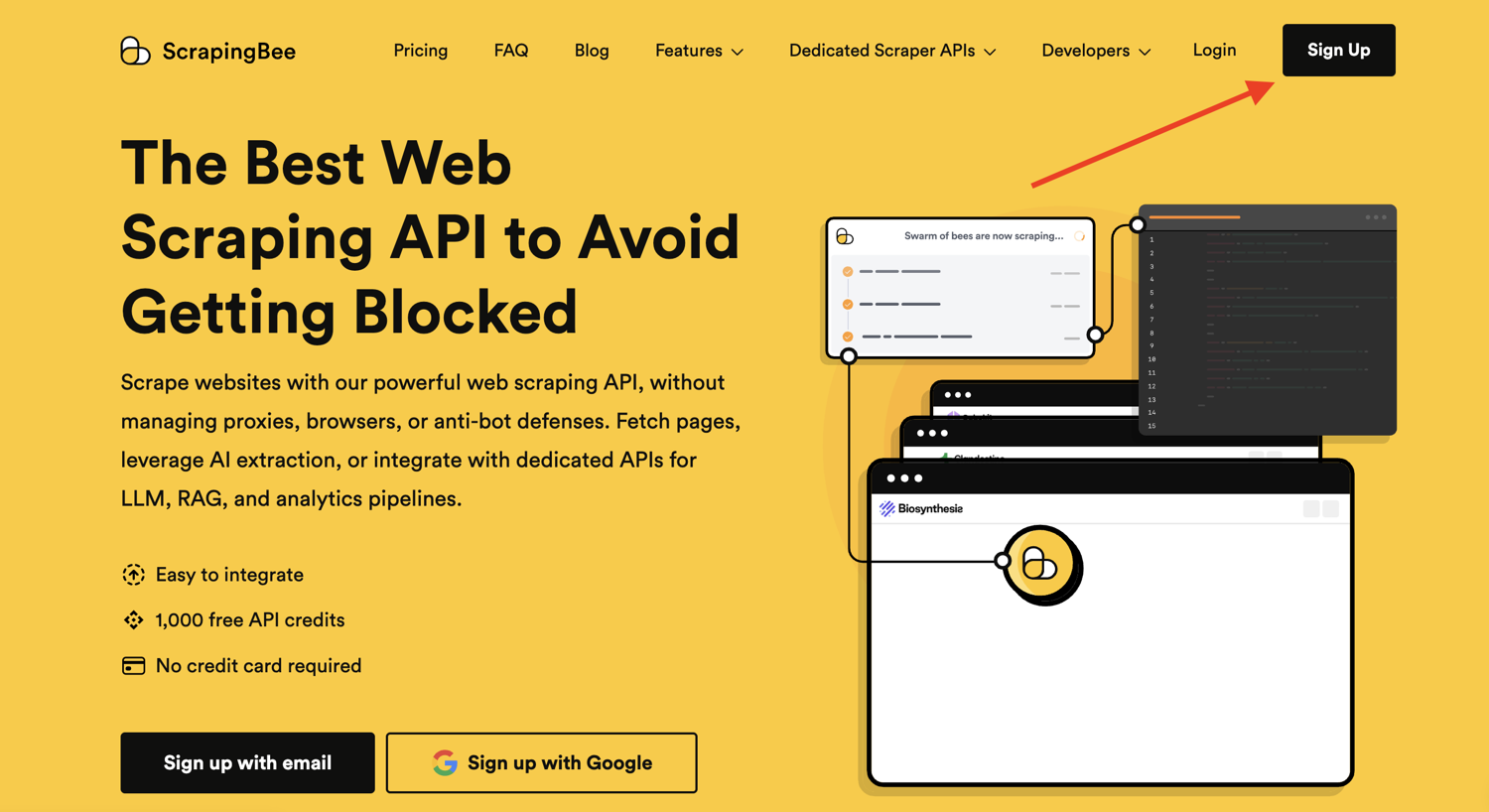
After successful signup, you will be greeted with the default dashboard. Copy your API key from this page and start writing some code in a new Python file:
Let me show you some code first and then explain what is happening:
from pprint import pprint
from scrapingbee import ScrapingBeeClient

client = ScrapingBeeClient(api_key='YOUR_API_KEY')

url = "https://www.realtor.com/realestateandhomes-search/Cincinnati_OH/show-newest-listings"

response = client.get(
    url,
    params={
        'extract_rules': {
            "properties": {
                "selector": "li[data-testid='result-card']",
                "type": "list",
                "output": {
                    "price": {
                        "selector": "span[data-label='pc-price']",
                    },
                    "beds": {
                        "selector": "li[data-label='pc-meta-beds']",
                    },
                    "baths": {
                        "selector": "li[data-label='pc-meta-baths']",
                    },
                    "sqft": {
                        "selector": "li[data-label='pc-meta-sqft']",
                    },
                    "plot_size": {
                        "selector": "li[data-label='pc-meta-sqftlot']",
                    },
                    "address": {
                        "selector": "div[data-label='pc-address']",
                    },
                }
            },
            "next_page": {
                "selector": "a[aria-label='Go to next page']",
                "output": "@href"
            }
        }
    }
)

if response.ok:
    scraped_data = response.json()
    pprint(scraped_data)
Don't forget to replace YOUR_API_KEY with your API key from ScrapingBee. The selectors in the code above might look similar to the XPath expressions you were using with only a few minor differences. This code makes use of ScrapingBee's powerful extract rules. It allows you to state the tags and selectors that you want to extract the data from and ScrapingBee will return you the scraped data. You will not have to run a full Selenium + Chrome process on your machine and instead offload that processing to ScrapingBee's servers.
ScrapingBee also executes JavaScript by default and will run the extraction rules after the page fully loads and all scripts have been successfully executed. This is very useful as more and more SPAs (Single Page Applications) are popping up each day. The extractor rules are also nested to resemble the workflow we used before where we extracted individual property divs and then extracted the information from those divs. You can modify the code further and make recursive requests to ScrapingBee as long as next_page returns a valid URL. You can read the ScrapingBee docs to learn more about what is possible with the platform.
If you run the code above, the output will be similar to this:
{
    'next_page': '/realestateandhomes-search/Cincinnati_OH/pg-2',
    'properties': [{
            'address': '6636 St, Cincinnati, OH 45216',
            'baths': '1.5bath',
            'beds': '2bed',
            'price': '$99,900',
            'sqft': '1,296sqft',
            'plot_size': '3,528sqft lot'
        },
        {
            'address': '3439 Wabash Ave, Cincinnati, OH 45207',
            'baths': '3.5bath',
            'beds': '3bed',
            'price': '$399,000',
            'sqft': '1,498sqft',
            'plot_size': '5,358sqft lot'
        },
        # Additional properties
    ]
}
Note: ScrapingBee will make sure that you are charged only for a successful response which makes it a really good deal.
Is it Legal to Scrape Real Estate Data?
Property details, such as prices, square footage, and days on market, are factual data points that are publicly available on Realtor.com and to any web user. Collecting this kind of information at scale is legal in most jurisdictions.
That said, when scraping this publicly available data, it's critical that your interests do not include Personally Identifiable Information (PII) of real estate agents. Contact information, including name, phone numbers, and license details, falls under PII, and collecting these data points, especially for commercial use, is strictly regulated by privacy laws like GDPR.
Obeying a website's robots.txt rules is also crucial. While scraping public data can be legal, Realtor.com's terms of service prohibit any actions that could overload its servers or misuse its resources. So, always keep request rates low.
To be on the safe side, make sure to follow web scraping best practices.
How to Scrape Realtor - FAQs
How do I bypass CAPTCHAs when scraping real estate websites?
Use rotating residential proxies and specialized scraping APIs like ScrapingBee that handle JavaScript rendering and CAPTCHA clearing automatically.
Can I use BeautifulSoup to scrape Realtor.com?
While BeautifulSoup is great for parsing HTML, Realtor.com relies heavily on JavaScript and anti-bot measures. You will need a tool like Selenium, Playwright, or a web scraping API to load the page first.
What is the best language for real estate data scraping?
Python is widely considered the best language due to its rich ecosystem of data extraction libraries like Selenium, Scrapy, and BeautifulSoup.
How do I handle pagination when extracting realtor property data?
Locate the "Next Page" button's HTML element, extract its href attribute, and configure your scraper to loop through the requests until the "Next" button is no longer present.
Is there an official API for Realtor.com?
Realtor.com does not offer a public API for free data extraction. Developers typically have to rely on custom web scrapers or third-party real estate APIs.
Conclusion
This tutorial just showed you the basics of what is possible with Selenium and ScrapingBee. If your project grows in size and you want to extract a lot more data and want to automate even more stuff, you should look into Scrapy. It is a full-fledged Python web scraping framework that features pause/resume, data filtration, proxy rotation, multiple output formats, remote operation, and a whole load of other features.
You can wire up ScrapingBee with Scrapy to utilize the power of both and make sure your scraping is not affected by websites that continuously throw a captcha.
We hope you learned something new today. If you have any questions please do not hesitate to reach out. We would love to take care of all of your web scraping needs and assist you in whatever way possible!
Before you go, check out these related reads:

Yasoob is a renowned author, blogger and a tech speaker. He has authored the Intermediate Python and Practical Python Projects books ad writes regularly. He is currently working on Azure at Microsoft.