Web scraping dynamic content with Python gets tricky when the page you see in the browser is not the page your scraper receives.
Prices, reviews, stock levels, and search results often appear only after JavaScript runs, which is why tools like requests and BeautifulSoup can come back with half-empty pages.
In this guide, we'll show you how to handle that gap with ScrapingBee's JavaScript rendering API, including waits, clicks, infinite scroll, and structured extraction.
TL;DR
Traditional Python parsers like BeautifulSoup often fail on modern websites because they only read the initial static HTML, completely missing vital data loaded later via JavaScript. To successfully scrape this dynamic content, you must use a headless browser to fully render the DOM and simulate real user actions, like clicking buttons or scrolling. Instead of building and maintaining this resource-heavy infrastructure yourself, specialized API wrappers like ScrapingBee handle the JavaScript rendering, browser management, and proxy rotation for you—delivering clean, structured data directly to your code.
Key Takeaways:
- Dynamic sites use JS to load data: Traditional static scrapers fail here because they only parse the initial, unrendered HTML.
- Headless browsers simulate users: You must use tools that can render JavaScript and perform actions like clicking or scrolling to load the necessary content.
- APIs streamline the workflow: Instead of managing resource-heavy browsers and proxy rotations yourself, API wrappers handle the heavy lifting of web scraping at scale.
How to Scrape Dynamic Web Pages in Python (5 Steps)
Here are the key steps for breaking down how dynamic web scraping works with our API in just five steps:
- Open DevTools and inspect the data loading section.
- Run your API through a headless browser ("render_js=true", enabled by default).
- Use a js_scenario to wait for the element you want.
- Add scripted actions like scrolls and clicks to load more content.
- Extract what you need with extract_rules to get a structured JSON file.
What "Dynamic" Means and How to Spot It
Web scraping dynamic content is a lot harder because targeted pages don't deliver all content in the initial HTML. They use client-side rendering to pull data with background XHR/Fetch requests. As you scroll, new chunks load through infinite scroll or click-to-load mechanisms, usually requesting you to sign in or accept cookies before granting access to the desired information.
JavaScript-driven DOM mutations assemble the page in the browser instead of prebuilt static markup. Booking.com, one of the biggest travel marketplaces, is a dynamic content aggregator that requires you to click a button before scrolling the page, while the scrolling of the page loads additional hotel listing cards.
Here is how you can check if the page is dynamic by testing the same example:
- Open DevTools (F12 or Ctrl + Shift + I)
- Open the Command Menu (Ctrl + Shift + P), type "Disable JavaScript" and click enter
- Search for JSON responses or DOM changes after load
Before disabling JavaScript, once I open the "Network" tab and select "Fetch/XHR" I can see GraphQL fetch requests as I scroll the page:
After disabling JavaScript, the page stops and does not load more than 25 hotel listing cards:
The Fastest Path: ScrapingBee + Python Setup
During the development of our SDK for Python web scraping, our goal is to bring the comfort of data extraction to everyone. If you want to scrape website python efficiently and start strong, there is no better choice than building a scraper with the help of our HTML API.
Before we continue, make sure you have Python 3.6+ installed on your system. Once you have it, go to your Terminal window or Command Prompt and use its package manager pip to install our development kit:
pip install scrapingbee
Alternatively, if you have uv, you can also use the following command:
uv add scrapingbee
Note: You can also install the pandas library to build convenient DataFrames from collected data.
Core Recipe - Render JavaScript and Wait for Content
Let's take a look at the section of code used to access Google Play product reviews. Here we import our Python SDK at the start of the script, then define a GET API call and JavaScript execution instructions. For example, if we look at a random Google Play page, we can see that it does not load all reviews:
Fortunately, we can use a dictionary variable to define instructions for JavaScript Rendering before the HTML data extraction. For example, here we add one "wait" command for the page to load, while "wait_for_and_click" will expand the reviews section by clicking the button once it appears based on its CSS selector.
from scrapingbee import ScrapingBeeClient

sb_client = ScrapingBeeClient(api_key='YOUR_API_KEY')

def google_play_store_app_data(app_id):
    # instructions to open the reviews pop-up
    js_reviews = {
        'instructions': [
            {'wait': 5000},
            {
                # CSS selector discovered through manual inspection of the Google Play page with DevTools
                'wait_for_and_click': 'button.VfPpkd-Bz112c-LgbsSe.yHy1rc.eT1oJ.QDwDD.mN1ivc.VxpoF[aria-label="See more information on Ratings and reviews"]'
            }
        ]
    }

    response_reviews = sb_client.get(
        f'https://play.google.com/store/apps/details?id={app_id}',
        params = {
            "custom_google": "true",
            "premium_proxy": "true",
            "js_scenario": js_reviews,
            'country_code': 'us'
        },
        retries = 2
    )

    if response_reviews.status_code != 200:
        return "Failed to retrieve the page."
    else:
        return "Retrieval successful"

print(google_play_store_app_data(app_id='com.ludo.king'))
After a successful attempt at reaching and scraping JavaScript Rendered web pages. Let's break down the additional parameters attached to our API call:
- "custom_google" – A special parameter for consistent access to Google sites
- "premium_proxy" – Routes connections through high-quality residential proxies
- "country_code" – Provides a specific geolocation for proxy connections.
Note: The render_js parameter for enabling JavaScript rendering is not in the params list because it is enabled by default. Use "render_js": "false" if you need to disable it.
Handling Infinite Scroll in One Call
The "js_scenario" instructions parameter is perfect for web scraping dynamic pages because it enables infinite scrolling until the headless browser reaches the end of the page. At the end of this specific scroll feature, you can also choose a button to click. Here is an adjusted "js_reviews" variable that incorporates this command:
js_reviews = {
    'instructions': [
        {'wait': 5000},
        {
            # Scroll the page until the end
            "infinite_scroll": {
                # Maximum number of scrolls, 0 for infinite
                "max_count": 0,

                # Delay between each scroll, in ms
                "delay": 1000,
            }
        }
    ]
}
Clicking, Filling, and Timing
Through the tools within our API for web scraping javascript, our goal is to give you an intuitive method for interacting with JS elements on the page in many different ways. For example, besides "wait" and "click" actions, you can also fill out forms or scroll the page for a specific number of pixels:
js_reviews = {
    'instructions': [
        {"scroll_y": 1000}, # Scroll the screen in the vertical axis, in px
        {"fill": ["#input_1", "value_1"]} # Fill some input
    ]
}
Extract Clean Data With extract_rules
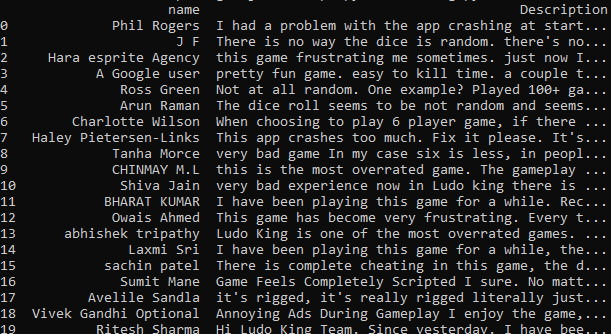
Let's extract information from Google Reviews with our first example of JavaScript Scenario instructions. Here is our "extract_rules" dictionary, which separates reviews by picking the main CSS selector for data extraction that corresponds to each container, and then gets the name plus the review itself:
extract_rules = {
    "Products": {
        "selector": "div.RHo1pe",
        "type": "list",
        "output": {
             "name": "div.X5PpBb",
             "Description": "div.h3YV2d"
        }
    }
}
Then, add it to our list of parameters in the GET API call.
response_reviews = sb_client.get(
    f'https://play.google.com/store/apps/details?id={app_id}',
    params = {
        "custom_google": "true",
        "wait_browser": "networkidle2",
        "premium_proxy": "true",
        "js_scenario": js_reviews,
        'country_code': 'us',
        'extract_rules': extract_rules
    },
    retries = 2
)
After running the script, we can see that a clean extraction has been successful:
If you want to get straight to advanced web scraping solutions, check out our page on AI web scraping.
Reliability at Scale – Proxies, Headers, Retries
As you probably already noticed, our GET API call uses high-quality proxies and accepts geolocation parameters, letting you pick a preferred web access point. Adding "premium_proxy=true" and country code adjustments with a simple retry logic keeps the connection flexible and adaptive to server-side errors. Our API is more than just a proxy with Python Requests, as it also supports JavaScript rendering and takes care of device fingerprint randomization.
Pagination, Cursors, and Alternative API Endpoints
Understanding python web scraping dynamic content depends on how you approach pagination. There are two ways to approach the data, depending on your target webpage:
| JSON exists behind XHR/Fetch | Call the JSON endpoint directly with headers and cookies from DevTools. Faster and cheaper than rendering. |
| No JSON endpoint or heavy interactivity | Full render + wait_for_and_click next-page button or infinite_scroll. |
Note: DevTools help you confirm where data comes from and copy request headers
Screenshots, SERPs, and Other Handy Tools
Alongside other methods of extraction, you can add a parameter to the GET API call to take a picture utilizing our screenshot API. You can use it to extract content via AI analysis tools and collect insights from QA, sections, or Search Engine Results Pages (SERP), and other similar sources. And if you also need to scrape visual assets directly from Google Images, our Google Image Scraper API provides automated image extraction with full JS rendering and proxy rotation.
response = sb_client.get(
    f'https://play.google.com/store/apps/details?id={app_id}',
    params = {
        # set screenshot: true to take screenshot
        "screenshot": "true",

        # optionally specify a selector to take screenshot of just that element
        # "screenshot_selector": 'div.h3YV2d',

        # or screenshot the full page with auto scrolling till the bottom
        # "screenshot_full_page": "true",

        "custom_google": "true",
        "wait_browser": "networkidle2",
        "premium_proxy": "true",
        "js_scenario": js_reviews,
        'country_code': 'us',
        "json_response": True,
    },
    retries = 2
)

if response.ok:
    # you get the screenshot as a base64 encoded string in the response json
    screenshot_b64 = response.json()['screenshot']

    # convert the base64 string to bytes
    # this needs you to "import base64" earlier in the code
    screenshot_bytes = base64.b64decode(screenshot_b64)

    # write the bytes to a file
    with open("./screenshot.png", "wb") as f:
        f.write(screenshot_bytes)
If extraction is successful, the following section will save the result in a .png file:
if response.ok:
    with open("./screenshot.png", "wb") as f:
        f.write(response.content)
Note: If you need both the screenshot of the page and its HTML content, use "screenshot=True" and "json_response=True"
Costs, Quotas, and When to Turn Off JS
JS rendering costs more than static HTML extractions. Add a "render_js=false" parameter for pages that already return HTML or when you have found a JSON endpoint. You can also structure URLs in batches and benchmark both modes on a sample to identify the better solution for your use cases.
If you're running low on credits or your free trial is about to expire, check out the ScrapingBee pricing page.
End-to-End Example: Interact with JS and save to CSV
Here is a copy-paste-ready Python script that waits for a button to appear and clicks it to access Google Play reviews. After extracting the data and storing it in a JSON format, the script stores the collected DataFrame in a CSV file:
from scrapingbee import ScrapingBeeClient
import pandas as pd

sb_client = ScrapingBeeClient(api_key='YOUR_API_KEY')

def google_play_store_app_data(app_id):
    # instructions to open the reviews pop-up
    js_reviews = {
        'instructions': [
            {'wait': 2000},
            {
                'wait_for_and_click': 'button.VfPpkd-Bz112c-LgbsSe.yHy1rc.eT1oJ.QDwDD.mN1ivc.VxpoF[aria-label="See more information on Ratings and reviews"]',
            },
        ]
    }

    extract_rules = {
        "Products": {
            "selector": "div.RHo1pe",
            "type": "list",
            "output": {
                 "name": "div.X5PpBb",
                 "Description": "div.h3YV2d"
            }
        }
    }

    response_reviews = sb_client.get(
        f'https://play.google.com/store/apps/details?id={app_id}',
        params = {
            "custom_google": "true",
            "wait_browser": "networkidle2",
            "premium_proxy": "true",
            "js_scenario": js_reviews,
            'country_code': 'us',
            'extract_rules': extract_rules
        },
        retries = 2
    )

    result = response_reviews.json()
    df = pd.DataFrame(result['Products'])
    df.to_csv("Google_play.csv", index=False)
    print(df)

    if response_reviews.status_code != 200:
        return "Failed to retrieve the page."
    else:
        return "Retrieval successful"


print(google_play_store_app_data(app_id='com.ludo.king'))
After running the script, here is our result:
Common Errors and Fixes
| KeyError: 'Products' | The selector didn't match any review elements, so no data was returned. | Inspect the page with DevTools and update "selector": "div.RHo1pe" to the correct review container. |
| Click action does nothing / 20 results only | The script clicks but doesn't scroll the modal, so only visible reviews load. | Add "scroll_to_bottom": "div[role='dialog']" or use infinite_scroll |
| Invalid API key or 403 status | API key missing, wrong, or exceeding quota. | Check your key in ScrapingBee dashboard and confirm plan limits. |
Alternative Python Libraries for Dynamic Scraping
If you would like to scrape dynamic web content with just free and open source tools, there are also the following tools that are commonly used:
- Selenium: The highly popular, dependable framework for browser automation that can be used with several programming languages. It is great for testing and has a legacy spanning a couple of decades, but it is pretty resource heavy and the code can feel verbose.
- Playwright: A modern browser automation framework built by Microsoft. Officially supports Python, with fast performance and async support. It's great for scraping, with scraping scripts requiring lesser lines of codes compared to alternatives.
- Puppeteer: A web automation framework built by Google that primarily works with Chrome and NodeJS. For Python, there is no official support, only an unofficial port named Pyppeteer is available. Best suited for Chrome specific tasks.
While these tools handle the browser automation bit of scraping well enough, you might have to find and configure other components like a proxy server independently, unlike with the ScrapingBee API where you just specify everything you need in the JSON request.
Overcoming Anti-Bot Protections & Captchas
Scraping dynamic web pages typically triggers different kinds of anti-bot systems on the target website, such as CAPTCHAs, IP blocking, and browser fingerprinting. CAPTCHAs typically show up because you're using data center IPs or sending too many too many requests from the same IP.
Both of these can be resolved by rotating your traffic through a pool of residential proxies so your traffic looks like natural human traffic to the website. Browser fingerprinting typically catches the common web automation frameworks such as Selenium, Playwright, and Puppeteer as these are primarily made for testing automation and hence send out signals that they are automated browsers, intentionally or otherwise.
To mask your automated browser features and appear like a normal human user, you need to use stealth plugins with these frameworks or use specialist anti-detect browsers.
Best Practices, Ethics, and Compliance
Here is a quick list of tips that should help you adopt the best dynamic scraping practices while keeping out of trouble:
- Respect robots.txt and the site's terms of service. Only scrape pages that are publicly allowed.
- Rate-limit your scraping. This avoids server strain and reduces your risk of being blocked.
- Avoid scraping personal or sensitive data. Always consider user privacy and local laws.
- Cache repeat requests when possible. This lowers API usage and improves speed.
- Log and monitor your scraping jobs. It helps catch failures and track changes on target sites.
Keep Learning: Python Web Scraping Tutorials
Python is the world's most popular coding language and a go-to option for most data collection tools. Make sure to check out our Python scraping tutorials or test alternative solutions supported by our API.
Conclusion
With just a few lines, you can start using our JS rendering and proxy rotation tools for scraping dynamic web pages and return a structured JSON with CSS selectors in "extract_rules". Our web scraping API provides one of the easiest and fastest implementations of automated data collection. Sign up today and unlock vast data sources with clever use of algorithmic automation!
Web Scraping Dynamic Content With Python – FAQs
How do I know if a site needs JavaScript rendering?
If content is missing in View Source, appears after a delay, or loads via XHR/Fetch in Network, the webpage content will be unavailable without a headless browser, enabled by default via the "render_js" variable.
What's the difference between wait and wait_for in js_scenario?
The wait instructions stop the scraper for a fixed time, while "wait_for" blocks further extraction until the appearance of a chosen CSS/XPATH selector.
Can ScrapingBee handle infinite scroll without loops in my code?
Yes. Add the "infinite_scroll" parameter in your js_scenario dictionary to auto-scroll until no new items load on the page. Don't forget that this parameter does not work with the "stealth_proxy" feature!
When should I disable render_js to save credits?
We recommend disabling static pages, or when you can hit the data through the JSON/XHR endpoint directly.
How do I avoid getting blocked on dynamic sites?
Don't neglect the security and efficiency of your scraper connections. Our API incorporates rotating proxies, honor rate limits, randomize timing, and uses realistic headers to lower IP bans when accessing targeted websites.
Can BeautifulSoup scrape dynamic websites?
No, BeautifulSoup only parses the HTML document and helps you extract structured data out of it if the data you need is in the HTML. In a dynamic website the data you need is not at all present in the initial HTML response to the URL.
What is the best Python library for scraping dynamic content?
Popular browser automation frameworks such as Selenium, Playwright, and Puppeteer typically do the job decently but scraping crucially depends on the overall setup such as using proxies, avoiding rate limits and so on. Using a library that connects to a scraping API saves time on setting up all of these components.
How do you extract data from a JavaScript rendered page?
To extract data from a JavaScript rendered page, you can use an automated browser that lets the JavaScript code do its thing, click buttons and/or scroll the page automatically. Then you check if all the network requests have completed, which means the data has loaded and finally proceed to extract the data from the live page.
Is Selenium better than an API for dynamic web scraping?
Selenium works great for an initial proof of concept scraper or an occasional one-time task, but for scaling the operation any further it is more reliable to use an API that automatically handles the browser management and proxy rotation.
How do I bypass captchas when scraping dynamic web pages?
The best way to bypass CAPTCHAs is to reduce the probability of triggering them, i.e., by appearing like regular human traffic. This is best done using premium residential proxies (instead of data center IPs) and stealth browser plugins which try to mask the fact that you're using an automated browser.

Kevin worked in the web scraping industry for 10 years before co-founding ScrapingBee. He is also the author of the Java Web Scraping Handbook.