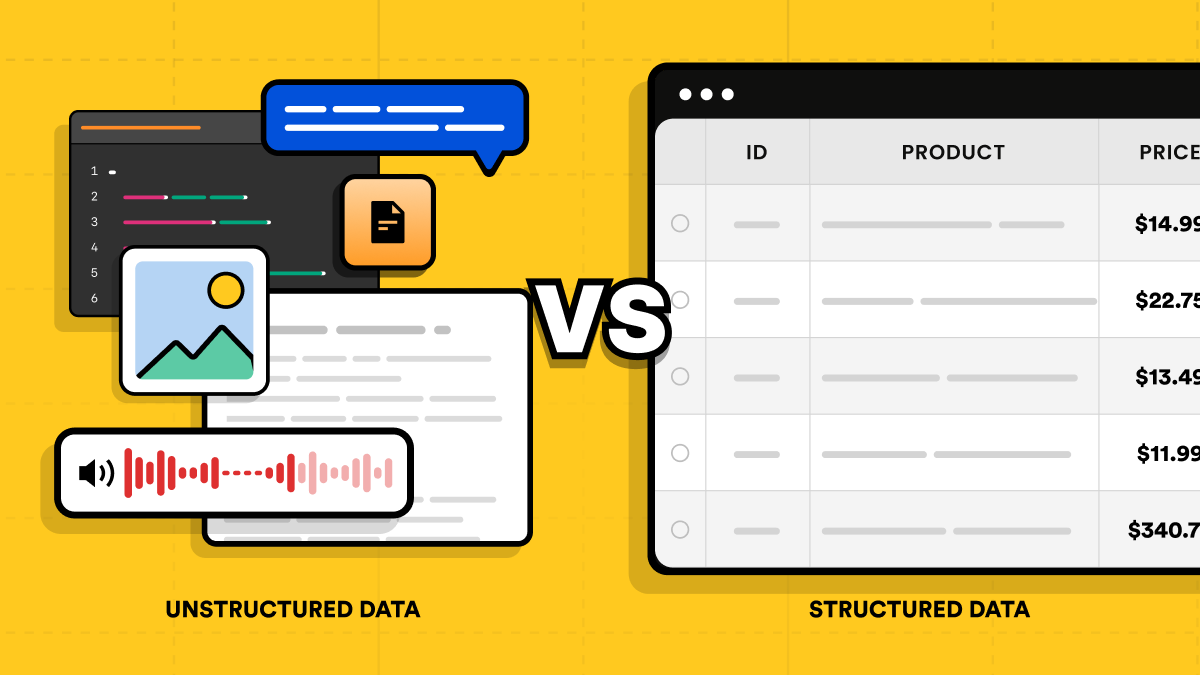
The difference between structured vs unstructured data comes down to organization: structured data follows a consistent field-based model with defined fields, types, and relationships, while unstructured data doesn't follow a predefined field-based model for the information you want to analyze. A customer table is structured. The free-form text of a support ticket, a product photo, or a call recording is unstructured.
The structured vs unstructured data distinction matters most when you collect, store, or query data. Web data adds a twist: much of it starts as semi-structured HTML. This guide covers what separates the three types, then shows how to produce structured records from a web page with Python code.
Quick answer (TL;DR)
Structured data uses consistent, defined fields and types, and you typically query it with SQL and business intelligence (BI) tools. Unstructured data doesn't follow a predefined field-based model, so analyzing it often takes extra processing, such as text extraction, natural language processing (NLP), computer vision, or feature extraction, depending on the question. Semi-structured data such as JSON and XML sits between the two. Unstructured data doesn't have to be converted into records before you can search or use it.
What is structured data?
Structured data is data organized into consistent, defined fields with known types and relationships. That makes it easy to query with field-based tools such as SQL.
A defined schema isn't necessarily permanent. It describes what's consistent within a dataset or schema version, and teams add columns all the time. Rows and columns are the most common representation, but not the only one.
Common types include relational tables, spreadsheets, CSV files, transactional records, and sensor readings logged into fixed fields. Those sensor readings are structured, but the raw sensor or imagery stream they came from isn't necessarily structured.
Structured data examples
What makes data structured is the field, not the value:
- A customer table with
name,email, andphonecolumns - An orders table with an
order_datefield - A transactions table with
amountandcurrencyfields - Inventory records with
skuandquantityfields - CRM records with defined customer and account fields
A date or currency amount on its own isn't structured. "We shipped it on March 3 for about $40" contains both, buried in a sentence. The values become structured when they sit in order_date and amount fields that every record shares.
What is unstructured data?
Unstructured data is data that doesn't follow a predefined field-based model for the information you want to analyze. That describes how the information is organized, not whether the file has a format.
Unstructured doesn't mean "no format." A JPEG, an MP3, and a scanned PDF all follow well-defined file formats. Their contents are still treated as unstructured, because the information you care about (what's in the photo, what the caller said) isn't stored in consistent, named fields.
Unstructured content can preserve context that gets lost when you reduce it to fields, like a customer's tone. Whether that helps depends on the task.
Teams often store unstructured content in a data lake: a central repository that holds raw data in its native format until someone processes it.
Unstructured data examples
These examples are described at the component level, because many objects mix structured and free-form parts:
- Images and video
- Audio recordings
- Prose-heavy or scanned PDFs and Word documents
- The free-form body of emails and support tickets
- The message text of social posts
- Raw sensor and imagery streams
- Human-readable prose inside a web page
- Chat transcripts and open-ended survey responses
Emails, logs, and web pages as whole objects contain structural markers, so they're commonly treated as semi-structured, even though their free-form content can be unstructured.
Semi-structured data: the middle ground
Semi-structured data uses organizational markers such as keys, tags, attributes, or metadata, but doesn't necessarily follow the same rigid field structure across every record. Two JSON documents from the same API might share most keys, while one has an extra nested object.
Common examples of semi-structured data:
- JSON documents and API responses
- XML files and feeds
- YAML configuration files
- Log events, which range from fixed-field records to JSON events to free-form messages
- NoSQL documents in databases such as MongoDB
- Emails as whole messages, with structured headers (From, To, Date) and a free-form body
- HTML and web pages at the document level
HTML is generally classified as semi-structured because tags and attributes provide machine-readable organization. Much of the human-readable content inside those elements can still be free-form prose. Web extraction selects information from that semi-structured document and maps it into a consistent, field-based record.
"Semi-structured" means flexible. It doesn't mean schemas are impossible: JSON can be validated against JSON Schema, and XML against XML Schema (XSD). The format just doesn't require one. If you work with XML feeds, see how to parse XML with Python.
Structured vs unstructured data: key differences
| Structured | Semi-structured | Unstructured | |
|---|---|---|---|
| Schema | Consistent, defined fields and types for the dataset | Keys, tags, or attributes; fields can vary between records | No consistent field-based record model for the content being analyzed |
| Format | Rows and columns, or another consistent field-based representation | JSON, XML, YAML, HTML, log events | Free-form text, media, and documents |
| Common storage choices | Relational databases and data warehouses | Document databases, JSON columns, object storage | Object storage and data lakes |
| Tools and queries | SQL, spreadsheets, BI tools | Parsers, JSON path queries, SQL JSON functions | Search, NLP, computer vision, machine learning (ML), multimodal models |
| Ease of analysis | Already organized into known fields, so filtering, aggregation, and reporting are straightforward | Queryable by key or path; often flattened into tables for reporting | Often requires additional processing, depending on the analysis |
The difference between structured and unstructured data matters most in three places:
- Schema. Structured pipelines commonly use schema-on-write, validating data against a model as it's loaded. Less structured sources commonly use schema-on-read, applying an interpretation at query time. These are processing approaches, not definitions of the categories.
- Storage. The storage row shows common choices, not rules. PostgreSQL can store JSON, modern warehouses handle semi-structured and unstructured data, and a CSV in object storage is still structured.
- Processing. Structured data is ready for questions like "total revenue by currency last month." Unstructured data usually needs a processing step first, such as transcription for audio or embeddings for semantic search.
Structured vs unstructured data examples side by side
| Structured | Unstructured |
|---|---|
| Product catalog records in a SQL table | Product review text and customer photos |
| An orders table containing order totals | Support email bodies discussing those orders |
| CRM fields for each account | Sales-call recordings and transcripts |
| Survey ratings stored as numeric fields | Open-ended survey responses |
| Image metadata stored in defined fields (size, camera, capture date) | The image pixels and what they depict |
The orders table tells you how much a customer spent. The support email tells you why they're unhappy.
How to turn web pages into structured records
Fetching a web page gets you semi-structured HTML, not records. Getting records you can load into a table takes three steps:
- Scraping collects the content. You fetch the page.
- Extraction defines the record. Rules select the information you need and map it into named fields.
- Validation makes the records dependable. You check and normalize the extracted values for your intended use.
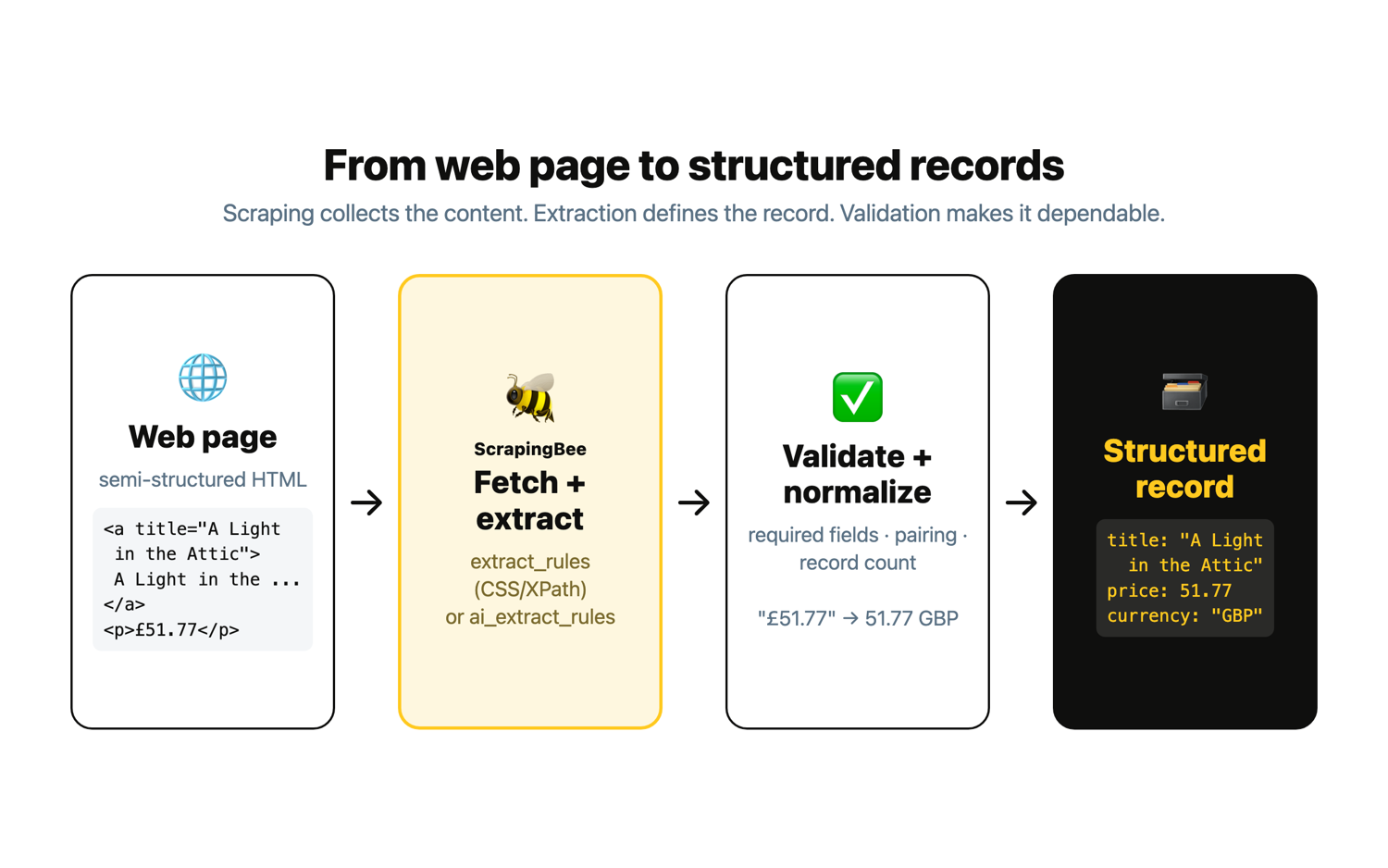
I'll use the ScrapingBee web scraping API for fetching and extraction, and plain Python for validation. The target is Books to Scrape, a public sandbox built for scraping practice, whose home page lists 20 books with a title and price each. The site is static, so every request sets render_js=false. JavaScript rendering is on by default and costs 5 credits, so turning it off keeps the CSS request at 1 credit.
You'll need Python and the requests library:
pip install requests
You'll also need a ScrapingBee API key, which you'll find in your dashboard after signing up. The free trial linked at the end of this guide covers every example here, and running all of them costs 14 credits.
The scripts read your API key from the SCRAPINGBEE_API_KEY environment variable and send it in the Authorization: Bearer header. Set it in your shell before running them:
export SCRAPINGBEE_API_KEY="your-api-key"
Passing the key as an api_key query parameter is deprecated, so keep it in the header. Save every script in this section in the same folder and run them from there, because the later scripts import functions from the earlier ones.
Extract records with CSS selectors (extract_rules)
For predictable pages, deterministic selectors are the right tool. ScrapingBee's extract_rules parameter takes CSS or XPath selectors and returns the matching values as JSON fields. The ScrapingBee data extraction documentation covers the full rule syntax. For a refresher on selectors, see using CSS selectors for web scraping or practical XPath for web scraping.
The important detail is nesting. You could write two flat rules, one for a list of titles and one for a list of prices, then zip them together. That works until one book is missing a price. Then every later price shifts onto the wrong title, and nothing errors. With nested rules, the outer selector matches each article.product_pod card and the inner rules read the title and price from inside it, so each record carries its own pair. The "type": "list" setting matters here: without it, the rule returns only the first matching card instead of all 20.
Save this as extract_css.py:
"""Turn a book listing page into structured records with extract_rules.

Nested CSS rules return one record per book, so each title stays paired
with its own price.
"""
# pip install requests
import json
import os

import requests

API_KEY = os.environ["SCRAPINGBEE_API_KEY"]

rules = {
    "books": {
        "selector": "article.product_pod",
        "type": "list",
        "output": {
            "title": {
                "selector": "h3 a",
                "output": "@title",
            },
            "price": ".price_color",
        },
    }
}

def fetch_books():
    response = requests.get(
        "https://app.scrapingbee.com/api/v1/",
        headers={"Authorization": f"Bearer {API_KEY}"},
        params={
            "url": "https://books.toscrape.com/",
            "render_js": "false",
            "extract_rules": json.dumps(rules),
        },
        timeout=30,
    )
    response.raise_for_status()
    return response.json()

if __name__ == "__main__":
    data = fetch_books()
    print(f"{len(data['books'])} books")
    print(json.dumps(data["books"][:3], indent=2, ensure_ascii=False))
The title rule reads the title attribute ("output": "@title") instead of the link text. On this site, the visible link text truncates long titles with an ellipsis, while the attribute holds the full title.
When extract_rules is set, ScrapingBee returns the extracted fields as JSON instead of the page HTML. When I ran it with python extract_css.py, I got back all 20 books (first three shown):
20 books
[
  {
    "title": "A Light in the Attic",
    "price": "£51.77"
  },
  {
    "title": "Tipping the Velvet",
    "price": "£53.74"
  },
  {
    "title": "Soumission",
    "price": "£50.10"
  }
]
ScrapingBee reports what each request cost in the Spb-Cost response header, which you can read with response.headers["Spb-Cost"]. For this request, it was 1 credit. Notice the price is still a display string, "£51.77", not a number. That's valid JSON, but not analysis-ready yet.
This removes the need to run an HTML parser yourself for this step. You still own the selectors, though. If the site renames price_color, the rule stops matching until you update it.
Extract records with AI (ai_extract_rules)
For messy pages, or pages whose layout changes often, ai_extract_rules lets you describe fields in plain language instead of writing selectors. You still define the record shape explicitly with JSON-formatted extraction rules (a list of books, each with a title and price), so the output contract matches the CSS version.
Save this as extract_ai.py:
"""Extract the same book records with ai_extract_rules.

The rules name every field in the record instead of relying on a single
natural-language prompt. AI extraction adds 5 credits and is
non-deterministic, so validate what comes back.
"""
# pip install requests
import json
import os

import requests

API_KEY = os.environ["SCRAPINGBEE_API_KEY"]

ai_rules = {
    "books": {
        "description": "all books listed on the page",
        "type": "list",
        "output": {
            "title": "the book title",
            "price": "the displayed book price",
        },
    }
}

def fetch_books_ai():
    response = requests.get(
        "https://app.scrapingbee.com/api/v1/",
        headers={"Authorization": f"Bearer {API_KEY}"},
        params={
            "url": "https://books.toscrape.com/",
            "render_js": "false",
            "ai_extract_rules": json.dumps(ai_rules),
        },
        timeout=90,
    )
    response.raise_for_status()
    return response.json()

if __name__ == "__main__":
    data = fetch_books_ai()
    print(f"{len(data['books'])} books")
    print(json.dumps(data["books"][:3], indent=2, ensure_ascii=False))
When I ran it with python extract_ai.py:
20 books
[
  {
    "price": "£51.77",
    "title": "A Light in the Attic"
  },
  {
    "price": "£53.74",
    "title": "Tipping the Velvet"
  },
  {
    "price": "£50.10",
    "title": "Soumission"
  }
]
I compared all 20 AI-extracted records against the CSS output, and they matched exactly on this run. That's a good result, not a guarantee. AI extraction is non-deterministic, so another run or a messier page can return a missing field, a paraphrased title, or a mismatched price. Validate important fields against the page.
AI extraction also costs more. As of October 2026, it adds 5 credits on top of the base request, and the Spb-Cost header confirmed 6 credits for this call. According to the docs, leaving JavaScript rendering on would raise the CSS request to 5 credits and the AI request to 10.
ScrapingBee's ai_query parameter is a different tool. It takes a single natural-language question and returns a free-form answer, without field definitions. When I asked it for "titles and prices of the books on this page," it happened to return a JSON list, but the shape and key names were the model's choice. For records that feed a pipeline, ai_extract_rules is the better fit because you define the fields.
Validate and normalize the extracted records
Valid JSON isn't the same thing as validated data. A response that parses doesn't prove every field is present, that titles and prices are correctly paired, or that prices are numbers you can sum.
This script runs four checks on the records from extract_css.py:
- Required fields are present. Every record needs a non-empty title and price.
- Titles and prices are spot-checked. The nested rules keep each pair together. Two known title and price pairs, which I checked against the page's HTML, catch a selector that starts pointing at the wrong element.
- The record count matches the page. The page lists 20 books, so any other count signals a selector or page change.
- Prices are normalized. Display strings such as "£51.77" become a
Decimalamount plus a GBP currency code.
Save it as validate.py in the same folder as extract_css.py:
"""Validate extracted book records and normalize prices.

Valid JSON is not the same as validated data. This checks the records
returned by extract_css.py and converts display prices such as "£51.77"
into a numeric amount plus a currency code.
"""
# pip install requests
import json
import re
from decimal import Decimal

from extract_css import fetch_books

PRICE_PATTERN = re.compile(r"^£(\d+\.\d{2})$")
EXPECTED_COUNT = 20  # books.toscrape.com lists 20 books per page

# Spot checks verified against the page's HTML.
KNOWN_PRICES = {
    "A Light in the Attic": Decimal("51.77"),
    "Soumission": Decimal("50.10"),
}

def normalize(record):
    title = (record.get("title") or "").strip()
    price_text = (record.get("price") or "").strip()
    if not title or not price_text:
        raise ValueError(f"missing field: {record}")

    match = PRICE_PATTERN.match(price_text)
    if not match:
        raise ValueError(f"unexpected price format: {price_text!r}")

    return {
        "title": title,
        "price": Decimal(match.group(1)),
        "currency": "GBP",
    }

def validate(records):
    if len(records) != EXPECTED_COUNT:
        raise ValueError(f"expected {EXPECTED_COUNT} records, got {len(records)}")

    clean = [normalize(r) for r in records]

    by_title = {r["title"]: r["price"] for r in clean}
    for title, price in KNOWN_PRICES.items():
        if by_title.get(title) != price:
            raise ValueError(f"{title!r} is paired with {by_title.get(title)}, expected {price}")

    return clean

if __name__ == "__main__":
    books = validate(fetch_books()["books"])
    print(f"{len(books)} records passed validation")
    print(json.dumps(books[:2], indent=2, default=str))
Running python validate.py fetches the page again (1 more credit) and prints:
20 records passed validation
[
  {
    "title": "A Light in the Attic",
    "price": "51.77",
    "currency": "GBP"
  },
  {
    "title": "Tipping the Velvet",
    "price": "53.74",
    "currency": "GBP"
  }
]
The price is now a Decimal. It prints as a string only because JSON has no decimal type. I also fed normalize() a couple of bad records to test the failure path: a price without the pound sign raised ValueError: unexpected price format: '51.77', and an empty title raised missing field. Failing loudly is the point. A pipeline that quietly stores a wrong price is worse than one that stops.
The same validate() function works on the AI output, since both scripts return the same record shape. There, the checks matter even more, because no selector guarantees where each value came from. Save this as validate_ai.py in the same folder:
"""Run the same validation on the ai_extract_rules records."""
from extract_ai import fetch_books_ai
from validate import validate

books = validate(fetch_books_ai()["books"])
print(f"{len(books)} AI-extracted records passed validation")
When I ran python validate_ai.py, all 20 records passed:
20 AI-extracted records passed validation
When structured or unstructured data matters for your pipeline
Which form you need depends on what you'll do with the data. Structured records are convenient for field-based filtering, aggregation, reporting, and joins. Unstructured content preserves free-form language, media, and context, but may need extra processing depending on your goal. Neither is universally faster or richer; that depends on the task, the system, and the implementation.
Here's how that plays out in common web data use cases:
- Price and product monitoring. You want structured records: product, price, currency, availability, timestamp. Extract them, validate them, and compare them over time.
- Competitive research. Collect free-form content such as product descriptions or changelogs, then structure only the information your analysis needs, such as launch dates or pricing tiers.
- AI and retrieval-augmented generation (RAG) pipelines. Use both. Structured metadata (source URL, title, publish date) supports filtering, attribution, and reporting, while retrieved text passages give the model context. The text doesn't need to be flattened into tables first. For the collection side, see how to scrape all text from a website for LLM training.
Turn web pages into structured records with ScrapingBee
Useful web data often starts as semi-structured HTML. ScrapingBee handles fetching, anti-bot infrastructure, and extraction, returning the fields you define as machine-readable JSON from one API call, and you keep ownership of validation. Sign up for ScrapingBee to try the examples in this guide with 1,000 free API credits, no credit card required.
Structured and unstructured data: FAQs
Is a PDF structured or unstructured?
PDF is a file format, not a data category. Its contents are commonly treated as unstructured when they consist of prose, scans, or mixed layouts without a consistent field schema. A PDF can also contain structured elements, such as named form fields or tables, that can be extracted into records.
Is SQL considered structured or unstructured data?
SQL is a query language, not a type of data. It's most closely associated with structured tables in relational databases. Modern SQL engines can also query JSON, nested data, and data stored outside traditional relational tables.
Is Excel considered structured or unstructured data?
Data organized into consistent, labeled rows and columns in a spreadsheet is structured. Free-form notes or prose typed into cells don't become structured just because they're stored in Excel. If you want to pull web data straight into a spreadsheet, see how to web scrape in Excel.
What are examples of unstructured data?
Examples include images, audio recordings, video, free-form documents, chat and support-ticket transcripts, open-ended survey responses, and call transcripts. The key distinction is that the information you want to analyze isn't organized into a consistent set of predefined fields.
Is JSON structured or unstructured data?
JSON is commonly classified as semi-structured. Keys and nesting provide machine-readable organization without requiring every document to follow the same fixed table structure. JSON can still be validated against an explicit schema, such as JSON Schema. Because two JSON records from the same source may not contain identical fields, teams often convert JSON into more consistent tables for certain kinds of analysis.