Serverless simply means running code without managing the server yourself. In AWS, Lambda is Amazon's serverless compute service, and it lets you run small pieces of code only when they are needed.
With AWS Lambda, you can write a function, choose what triggers it, and AWS handles the infrastructure behind it. Lambda functions can be triggered by different events, including:
- HTTP requests via API Gateway
- scheduled jobs via EventBridge
- messages in SQS
- file uploads to S3
- events from other AWS services
In this guide, we will build and deploy a web scraper on AWS Lambda using Python, AWS SAM, BeautifulSoup, S3, and ScrapingBee. We will also include a Java 21 Lambda version for teams that prefer the JVM.
Key takeaways
- AWS Lambda works best for short, scheduled, or event-driven scraping jobs, not long-running crawlers.
- A good Lambda scraping architecture separates triggers, scraping logic, storage, monitoring, and secrets.
- For simple, static pages, begin with Python using libraries like requests and BeautifulSoup, and only introduce browsers or heavier tools if needed.
- AWS SAM makes the setup repeatable by defining Lambda functions, schedules, permissions, S3 buckets, and API routes in code.
- Lambda has limits you must design around, including the 15-minute runtime, package size, memory, payload size, and concurrency.
- For JavaScript-rendered pages, blocked requests, proxies, or anti-bot handling, use a scraping API like ScrapingBee instead of managing the full proxy/browser stack yourself.
- Store scraped output in S3 or another durable system, and keep API keys in SSM Parameter Store or Secrets Manager.
- Java 21 is still a valid Lambda option for JVM teams
- Lambda can be very cheap for static scraping, but costs rise quickly with headless browsers, long runtimes, high memory, proxies, and extra AWS services.
When AWS Lambda is (and isn't) the right scraping tool
AWS Lambda is a good fit for web scraping when the job is short, repeatable, and easy to split into smaller tasks. Instead of running a server all day, you can trigger a Lambda function only when there is work to do, let it scrape the page, save the result, and shut down.
Lambda also works well when you have many independent URLs to process. Instead of running one large crawler that tries to scrape everything at once, you can put URLs into an SQS queue and let Lambda process them in small batches.
Common use cases for Lambda include price monitoring, simple ETL jobs, content checks, and scheduled scrapes that run every few hours or every few days.
Lambda becomes a weaker choice when the job needs to run for a long time, keep a browser session alive, or handle a target with heavy anti-bot protection. In those cases, you may need Step Functions, Fargate, EC2 Spot, AWS Batch, a proxy setup, or a scraping API.
| Good fits | Poor fits |
|---|---|
| Scraping a static product-listing page on a schedule | A crawler that needs to run for hours |
| Processing one URL, or a small batch of URLs, from SQS | A logged-in browser session that must stay alive between requests |
| Calling a scraping API and writing the response to S3 | A high-volume always-on crawler (ECS, Fargate, EC2 Spot, or AWS Batch would be cheaper) |
| Retrying failed URLs independently without rerunning the whole crawl | A crawler that handles blocks, captcha handling, or browser fingerprint management |
The architecture in 2026
A Lambda scraper should not be designed as one bulky function that tries to do everything at once. A better way to think about the architecture is to split it into four parts:
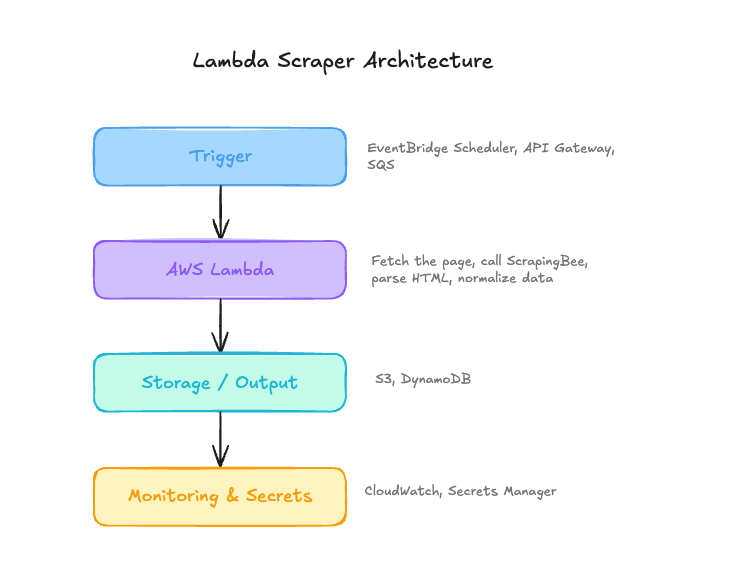
The trigger decides when the scraper runs. Lambda handles the scraping logic. The output layer stores or forwards the result. Monitoring and secrets keep the scraper observable and safe to operate.
There are three common Lambda scraping patterns worth knowing.
Pattern 1: Scheduled scrape
This is the simplest setup for jobs like price checks, content monitoring, market tracking, or scraping a small set of pages every few hours.
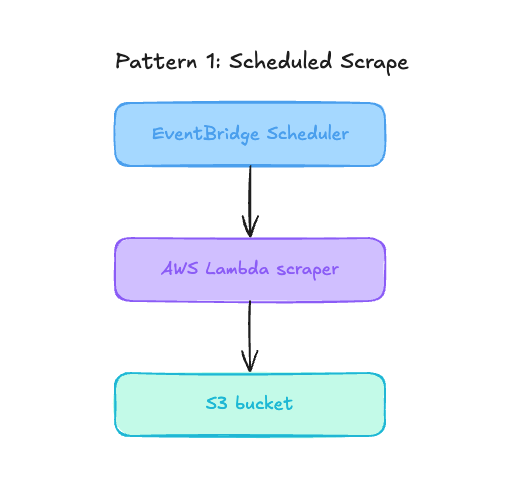
EventBridge Scheduler invokes the Lambda function, the function fetches the page, extracts the data, writes the result to S3, and exits.
This pattern is easy to deploy because it has only a few moving parts. It is also easy to reason about because each run is separate. If a scheduled scrape fails, you can inspect that single run in CloudWatch, fix the issue, and rerun the function.
Pattern 2: Queue-based scrape
Instead of making one Lambda function crawl every page in a single run, a producer sends URLs into SQS and Lambda processes them in smaller batches.
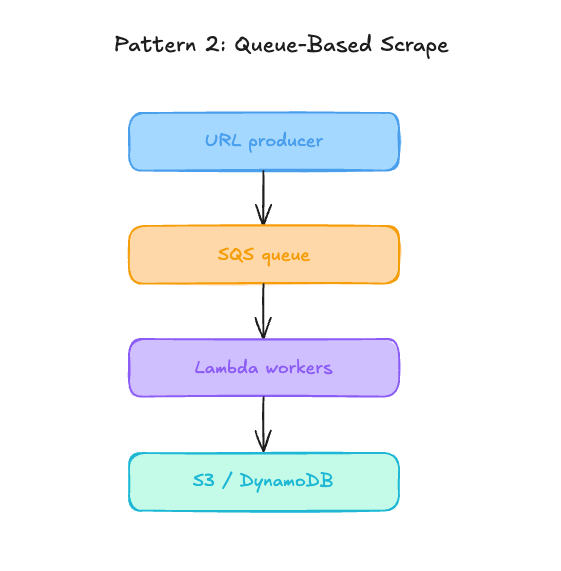
This is usually the safer production pattern for larger scraping jobs. SQS gives you buffering, retries, and better control over concurrency. If one URL fails, you can retry that message without restarting the entire scrape. If the queue grows, Lambda can scale out workers. If the target website slows down, you can limit concurrency instead of overwhelming the target
Pattern 3: Workflow scrape
Step Functions is useful when the scraping job has branches, retries, enrichment steps, or a clear sequence of stages.
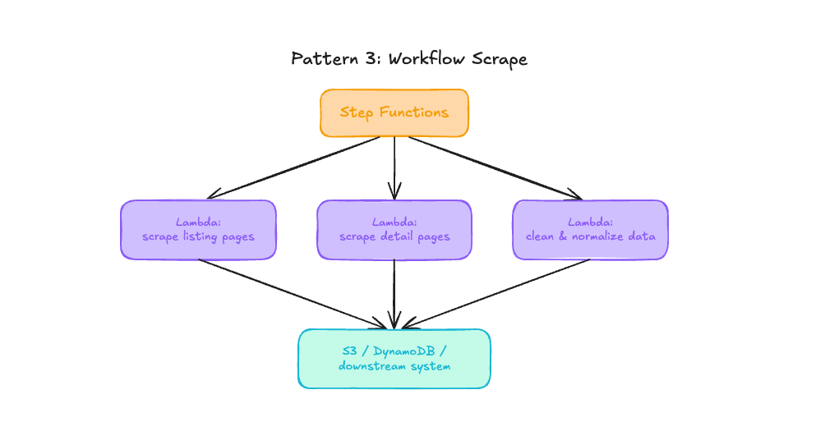
For example, one Lambda function can fetch listing pages, another can scrape detail pages, and another can clean or store the final records.
This also helps when one Lambda function starts doing too much. If the handler is turning into a full application, split the work into smaller functions and let Step Functions coordinate the flow.
Lambda limits you need to design around
Lambda is not designed to run like a crawler that stays alive for hours, so there are a few limits you need to keep in mind. AWS publishes current Lambda quotas in the Lambda quotas documentation.
These are the main limits that affect web scraping:
| Limit | Value |
|---|---|
| Maximum runtime | 900 seconds, or 15 minutes |
| Memory | 128 MB to 10,240 MB |
| /tmp storage | 512 MB to 10,240 MB |
| Default regional concurrency | 1,000 concurrent executions |
| ZIP package size | 50 MB zipped, 250 MB unzipped |
| Container image size | 10 GB uncompressed |
| Synchronous request and response payload | 6 MB each |
Note: New AWS accounts have reduced concurrency and memory quotas. AWS raises these quotas automatically based on your usage.
The most important limits for scraping workloads are the 15-minute maximum runtime, package size, memory allocation, and concurrency.
Building a Python scraper on Lambda: the static HTML path
We will start with the simplest useful version of the scraper by fetching a static HTML page, parsing it with BeautifulSoup, and returning structured data.
This is the best place to start because it keeps the Lambda package small and avoids the extra weight of a browser runtime. This way, you do not need Playwright, Chromium, or a container image yet.
To demo this, we will use Books to Scrape for scraping practice. The scraper will extract book titles, prices, availability, ratings, and product URLs.
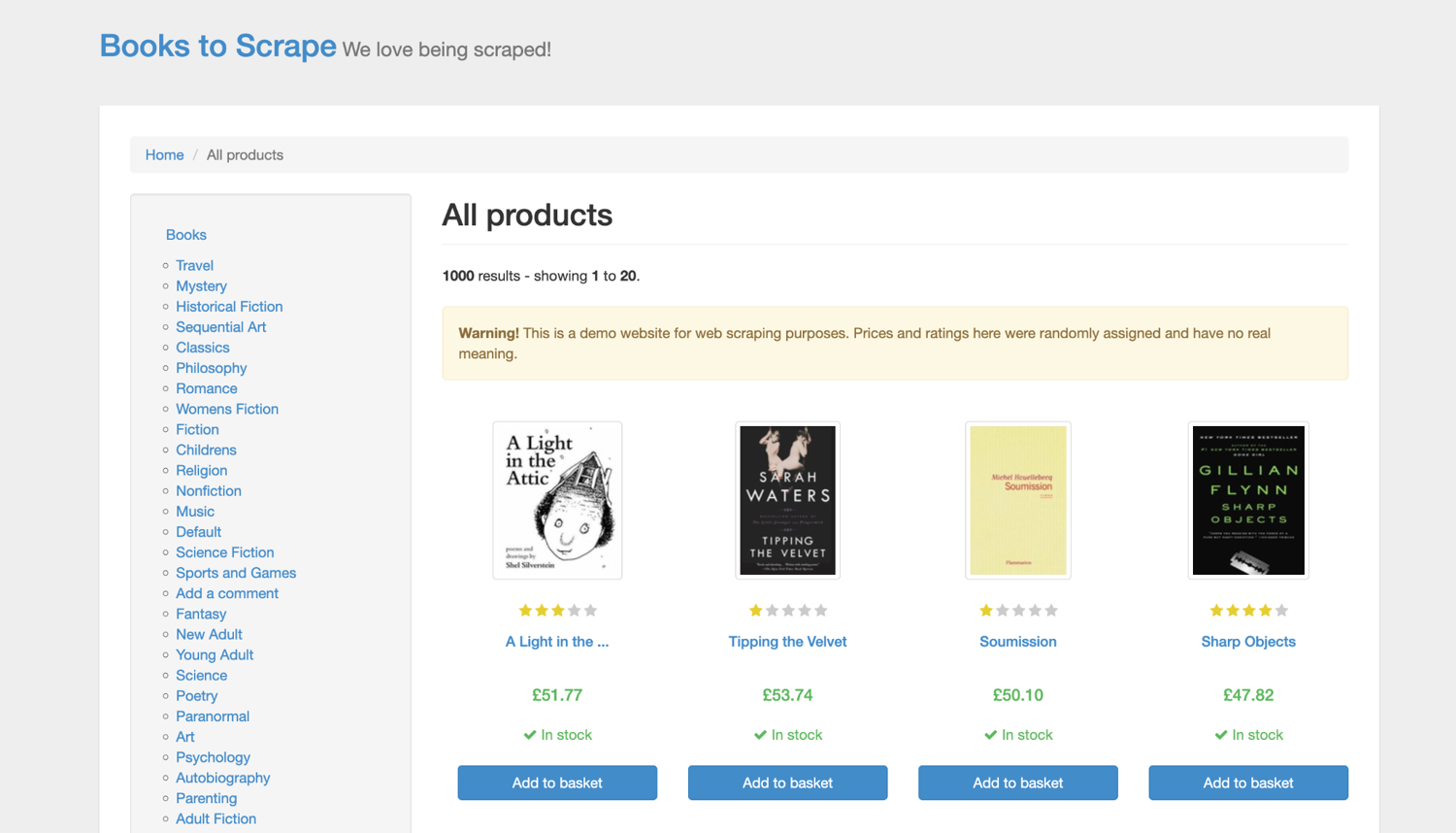
If you are new to scraping, start with our Python web scraping 101 guide before adding Lambda. And if your scraper needs to submit forms or call multiple endpoints, this guide on Python POST requests is worth checking out.
Prerequisites
To follow along, make sure you have these core prerequisites in place:
- Python 3.13 installed
- Java 21 and Maven
- An AWS account
- AWS CLI
- AWS SAM CLI
- Docker
- A ScrapingBee account
On macOS, you can install the main dependencies with Homebrew:
brew install awscli aws-sam-cli python@3.13 openjdk@21 maven
Check that the tools are available:
aws --version
sam --version
python3.13 --version
java --version
mvn --version
You also need Docker running locally because SAM uses containers for local Lambda builds and invocations.
OrbStack also works on macOS. Start your container runtime before running SAM commands, then check Docker:
docker version
Next, configure an AWS CLI profile for deployment:
aws configure --profile serverless-scraping
Use credentials with enough permissions to create the AWS resources in this project, then verify the profile:
aws sts get-caller-identity --profile serverless-scraping
Then, for Python, create a virtual environment:
python3.13 -m venv .venv
. .venv/bin/activate
Now that the virtual environment is activated, we can safely install our project dependencies without affecting the global Python installation.
python -m pip install --upgrade pip
python -m pip install requests beautifulsoup4 boto3
Here, boto3 is the official AWS SDK for Python. We use it inside our Lambda function to interact with AWS services programmatically. This gives you the same core Python libraries we will use in the Lambda functions.
Why AWS SAM instead of Serverless Framework?
We will use AWS SAM for this project because it keeps the deployment close to AWS itself. SAM lets us define Lambda functions, schedules, permissions, S3 buckets, and API endpoints in one template.yaml file, then deploy everything through CloudFormation.
Serverless Framework is still a valid tool, especially for teams that already use it, but SAM is a cleaner fit because the whole stack is AWS-native. It also avoids some of the recent friction introduced in Serverless Framework v4, which now requires login and has licensing changes that may not suit every workflow.
SAM also makes the setup repeatable. Instead of creating a Lambda function in the AWS Console, then manually adding permissions, schedules, and storage, we can easily automate that via code.
Building the static HTML scraper
Let's create a lambda function that will fetch the Books to Scrape homepage, parse each book listing on the page, and return a JSON response with the book title, price, availability, rating, and URL.
Before writing the handler, create the folder for this function:
mkdir -p functions/static_books
mkdir events
mkdir tests
This keeps the static scraper separate from the other functions we will add later. Now create the dependency file for this function:
touch functions/static_books/requirements.txt
Add these dependencies to functions/static_books/requirements.txt:
beautifulsoup4>=4.12,<5
requests>=2.32,<3
The dependencies are intentionally small. requests handles the HTTP request, while BeautifulSoup parses the HTML. For a static page like Books to Scrape, we do not need a browser runtime.
Next, create the Lambda handler file:
touch functions/static_books/app.py
Rather than writing everything in a single handler, we will build the file step by step.
Step 1: Define defaults and reuse an HTTP session
Start app.py with the imports, default values, and HTTP session.
import json
import os
from typing import Any
from urllib.parse import urljoin

import requests
from bs4 import BeautifulSoup


DEFAULT_URL = "https://books.toscrape.com/"
DEFAULT_LIMIT = 10
HTTP_TIMEOUT_SECONDS = float(os.getenv("HTTP_TIMEOUT_SECONDS", "10"))
USER_AGENT = os.getenv(
    "SCRAPER_USER_AGENT",
    "ScrapingBeeLambdaTutorial/1.0 (+https://www.scrapingbee.com/)",
)

HTTP = requests.Session()
HTTP.headers.update({"User-Agent": USER_AGENT})
Step 2: Normalize Lambda events
Since the same Lambda function can receive input from direct invocation, API Gateway, or EventBridge Scheduler, we can add a small helper that normalizes these different event shapes into one simple payload.
def _payload_from_event(event: dict[str, Any] | None) -> dict[str, Any]:
    if not event:
        return {}

    payload = dict(event)

    body = payload.get("body")
    if isinstance(body, str) and body:
        try:
            parsed_body = json.loads(body)
        except json.JSONDecodeError:
            parsed_body = {}

        if isinstance(parsed_body, dict):
            payload.update(parsed_body)

    query_params = payload.get("queryStringParameters")
    if isinstance(query_params, dict):
        payload.update({k: v for k, v in query_params.items() if v is not None})

    return payload


def _int_value(value: Any, default: int) -> int:
    try:
        return int(value)
    except (TypeError, ValueError):
        return default
The function _payload_from_event() normalizes the incoming Lambda event into a single dictionary, regardless of whether the data came from different trigger types. This allows the handler to consistently access fields like url and limit without worrying about the original event shape. Then _int_value() keeps the handler safe when the limit is missing or passed as a string.
Step 3: Fetch the HTML
Next, add a function that fetches the target page and returns the HTML.
def fetch_html(url: str) -> str:
    response = HTTP.get(url, timeout=HTTP_TIMEOUT_SECONDS)
    response.raise_for_status()

    if not response.encoding or response.encoding.lower() == "iso-8859-1":
        response.encoding = response.apparent_encoding or "utf-8"

    return response.text
raise_for_status() turns bad HTTP responses into exceptions. That makes it easier for the handler to return a clear error response later. The encoding check helps avoid garbled characters when a site does not return a useful charset.
Step 4: Parse the book cards
Now add the actual scraping logic. This function receives the HTML, finds each book card, and extracts the fields we care about.
def parse_books(
    html: str,
    base_url: str,
    limit: int = DEFAULT_LIMIT,
) -> list[dict[str, str]]:
    soup = BeautifulSoup(html, "html.parser")
    books: list[dict[str, str]] = []

    for pod in soup.select("article.product_pod")[:limit]:
        title_link = pod.select_one("h3 a")
        if title_link is None:
            continue

        rating_node = pod.select_one(".star-rating")
        rating = ""

        if rating_node:
            rating = next(
                (
                    class_name
                    for class_name in rating_node.get("class", [])
                    if class_name != "star-rating"
                ),
                "",
            )

        title = title_link.get("title") or title_link.get_text(" ", strip=True)
        price = pod.select_one(".price_color")
        availability = pod.select_one(".availability")

        books.append(
            {
                "title": title,
                "price": price.get_text(strip=True) if price else "",
                "availability": availability.get_text(" ", strip=True)
                if availability
                else "",
                "rating": rating,
                "url": urljoin(base_url, title_link.get("href", "")),
            }
        )

    return books
BeautifulSoup selects each article.product_pod, then extracts the title, price, availability, rating, and product link. urljoin() converts the relative product link into a full URL.
Step 5: Return a Lambda response
Finally, add a small response helper and the Lambda handler.
def response(status_code: int, body: dict[str, Any]) -> dict[str, Any]:
    return {
        "statusCode": status_code,
        "headers": {"Content-Type": "application/json"},
        "body": json.dumps(body, ensure_ascii=False),
    }


def lambda_handler(event: dict[str, Any] | None, context: Any) -> dict[str, Any]:
    payload = _payload_from_event(event)

    url = str(payload.get("url") or DEFAULT_URL)
    limit = _int_value(payload.get("limit"), DEFAULT_LIMIT)

    try:
        html = fetch_html(url)
        books = parse_books(html, url, limit)

        return response(
            200,
            {
                "source_url": url,
                "count": len(books),
                "items": books,
            },
        )

    except requests.RequestException as exc:
        return response(
            502,
            {
                "error": "upstream_request_failed",
                "message": str(exc),
            },
        )

    except Exception as exc:
        return response(
            500,
            {
                "error": "scrape_failed",
                "message": str(exc),
            },
        )
The handler reads the event, fetches the HTML, parses the books, and returns JSON.
Keeping the scraping logic outside the handler also makes the parser easier to test without AWS. Before we run the function with SAM, create a local event file:
touch events/static-books.json
Add this inside that file:
{
  "url": "https://books.toscrape.com/",
  "limit": 10
}
This event tells the function which page to scrape and how many book cards to return. We will use it in the next step when we define the SAM template and invoke the function locally.
The SAM template for the Python scraper
Now that the Python handler is ready, we need to tell AWS how to run it.
AWS SAM uses a template.yaml file to define the Lambda function, runtime, memory, timeout, handler path, and event triggers. For this first version, the template will only deploy the static HTML scraper we just created.
Create the template file in the project root:
touch template.yaml
Add this to the template.yaml:
AWSTemplateFormatVersion: '2010-09-09'
Transform: AWS::Serverless-2016-10-31
Description: Static HTML web scraper with AWS Lambda and Python.

Globals:
  Function:
    Timeout: 30
    Tracing: Active
    Architectures:
      - arm64

Resources:
  StaticBooksScraperFunction:
    Type: AWS::Serverless::Function
    Metadata:
      BuildMethod: makefile
    Properties:
      Runtime: python3.13
      CodeUri: functions/static_books/
      Handler: app.lambda_handler
      MemorySize: 256
      Description: Static HTML scraper for books.toscrape.com.
      Events:
        DailyBooksScrape:
          Type: ScheduleV2
          Properties:
            ScheduleExpression: rate(1 day)
            State: DISABLED
            Input: '{"url":"https://books.toscrape.com/","limit":10}'
The Transform line tells CloudFormation that this is an AWS SAM template, and the Globals section sets defaults that apply to the Lambda function, including the timeout, tracing, and architecture.
The schedule is included but disabled:
State: DISABLED
This lets us define the scheduled scraping pattern without making the function run every day immediately after deployment. Once the scraper is tested and ready, you can enable the schedule.
Because this function uses a Makefile build method, create the Makefile inside the function folder:
touch functions/static_books/Makefile
Add this to functions/static_books/Makefile:
build-StaticBooksScraperFunction:
	mkdir -p "$(ARTIFACTS_DIR)"
	cp app.py "$(ARTIFACTS_DIR)/"
	python -m pip install -r requirements.txt -t "$(ARTIFACTS_DIR)"
This tells SAM how to package the function. It copies app.py into the build artifact folder, then installs the dependencies from requirements.txt into the same folder.
Build and deploy
Now that the Lambda function and SAM template are ready, validate the template first:
sam validate --lint
If the template is valid, build the application:
sam build
Before deploying, you can invoke the function locally with the event file we created earlier:
sam local invoke StaticBooksScraperFunction \
  --event events/static-books.json
This runs the function in a local Lambda-like environment. If everything is working, the response should include a statusCode of 200, a count, and a JSON body containing the scraped book data.
Now deploy the stack:
sam deploy \
  --stack-name serverless-scraping-demo \
  --resolve-s3 \
  --capabilities CAPABILITY_IAM \
  --profile serverless-scraping \
  --region us-east-1
If this is your first SAM deployment, you can use the guided flow instead:
sam deploy --guided \
  --profile serverless-scraping \
  --region us-east-1
SAM packages the function, uploads the deployment artifacts, and creates a CloudFormation stack. In the AWS Console, you can inspect the deployed resources here:
CloudFormation -> Stacks -> serverless-scraping-demo
At this point, the static Python scraper is running on AWS Lambda.
Invoke the static scraper in the cloud
After deployment, invoke the Lambda function through the AWS CLI:
aws lambda invoke \
  --function-name serverless-scraping-demo-StaticBooksScraperFunction \
  --payload fileb://events/static-books.json \
  --profile serverless-scraping \
  --region us-east-1 \
  validation-results/static-books-response.json
Open the output file:
cat validation-results/static-books-response.json
The response should look like this:
{
  "statusCode": 200,
  "headers": {
    "Content-Type": "application/json"
  },
  "body": {
    "source_url": "https://books.toscrape.com/",
    "count": 3,
    "items": [
      {
        "title": "A Light in the Attic",
        "price": "£51.77",
        "availability": "In stock",
        "rating": "Three",
        "url": "https://books.toscrape.com/catalogue/a-light-in-the-attic_1000/index.html"
      },
      {
        "title": "Tipping the Velvet",
        "price": "£53.74",
        "availability": "In stock",
        "rating": "One",
        "url": "https://books.toscrape.com/catalogue/tipping-the-velvet_999/index.html"
      },
      {
        "title": "Soumission",
        "price": "£50.10",
        "availability": "In stock",
        "rating": "One",
        "url": "https://books.toscrape.com/catalogue/soumission_998/index.html"
      }
    ]
  }
}
You can also validate the function from the AWS Console by going to Lambda > Functions.
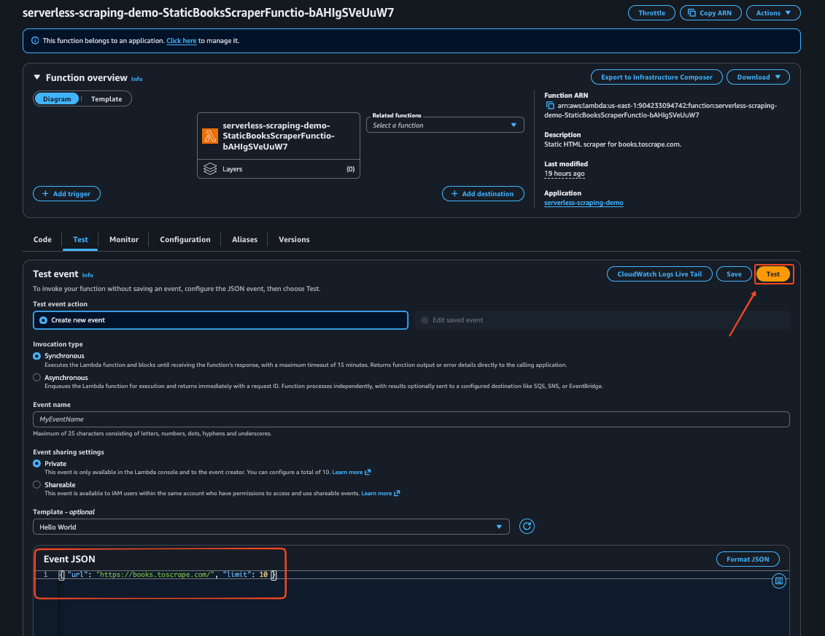
Then open the static scraper function, once in there, go to the Test tab and create a new test with the following event:
{
  "url": "https://books.toscrape.com/",
  "limit": 10
}
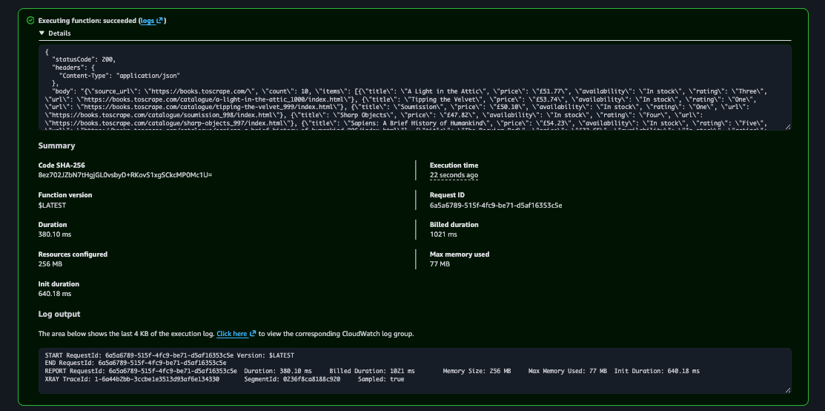
After running the test, open Monitor > Logs to inspect the CloudWatch log stream. This confirms that the scraper works locally and in AWS.
When BeautifulSoup isn't enough: headless browsers on Lambda
BeautifulSoup only parses the HTML it receives. It does not run JavaScript, wait for client-side rendering, click buttons, solve captchas, or behave like a real browser.
| Scenario | Use BeautifulSoup | Use a browser or scraping API |
|---|---|---|
| Data availability | The target returns the data in the initial HTML | The data appears only after JavaScript rendering |
| Request type | The page can be fetched with a normal HTTP request | The site requires interaction before the data loads |
| Data extraction | You can identify the fields with stable CSS selectors | You need screenshots or the fully rendered DOM |
| Browser features | You do not need cookies, sessions, or browser actions | You need sessions or browser actions |
| Blocking behavior | — | The site employs anti-bot measures |
You can run Playwright or Chromium on Lambda, but package size and cold starts can quickly become harder to manage. If you actually need a real browser, Playwright is usually the easiest way to go. You can check out our Playwright web scraping guide to get a quick head start. And if you'd rather not deal with a browser setup at all, using a scraping API can save you a lot of time and headaches.
The dead and the deprecated
PhantomJS is no longer a modern choice for web scraping. Many older tutorials still point to it, so be careful with those. Selenium can still work, but for new browser automation projects, Playwright is usually the cleaner option.
You want to also be careful with older Lambda browser packages. chrome-aws-lambda worked for a while, but the original package is no longer the safest default because Chromium, Puppeteer, and Lambda runtimes move quickly. So a safer bet is puppeteer-core with @sparticuz/chromium, or use a Lambda container image with Playwright.
Finally, avoid treating puppeteer-stealth as a permanent anti-bot fix. By early 2025, many advanced bot protection systems were already flagging common Puppeteer stealth patterns with captchas or 403 responses.
Stealth plugins patch obvious browser fingerprints, but harder targets also look at IP reputation, session behavior, interaction patterns, and request history.
If you want to dig into browser-level anti-bot tricks, these guides on nodriver and undetected-chromedriver are a good place to start
Here's a simple cheatsheet:
- Use requests and BeautifulSoup for static HTML.
- Use Playwright when you truly need rendering.
- Use a scraping API when browser rendering, proxies, and anti-bot handling are necessary.
The part nobody wants to talk about: AWS IPs get blocked
Moving a scraper to Lambda does not make it invisible. AWS actually publishes its IP ranges, and many websites can identify traffic from cloud providers. If you want a wider look, check out our guide on AWS web scraping.
In some cases, running from Lambda can make blocking more likely because the request now comes from a known datacenter range.
Common failure modes include:
- HTTP 403 responses
- Captcha pages
- Rate limiting
- Redirects to bot-check pages
- Different content from what you see in your browser
Cloudflare-protected sites usually look at more than your user agent. Harder targets can also evaluate IP reputation, device fingerprints, browser, cookies, sessions, interaction patterns, and IP history. For a deeper breakdown, read our guide on bypassing Cloudflare anti-bot protection at scale.
Skip the proxy stack with ScrapingBee
ScrapingBee provides a hosted scraping API that handles browser rendering, proxy selection, geolocation, and extraction for you.
Full disclosure: I co-founded ScrapingBee.
Instead of managing headless browsers, IP rotation, blocked IPs, and retry logic inside Lambda, you can let Lambda call ScrapingBee and focus on post-fetch logic.
To follow along, create a ScrapingBee account and copy your API key from the dashboard.
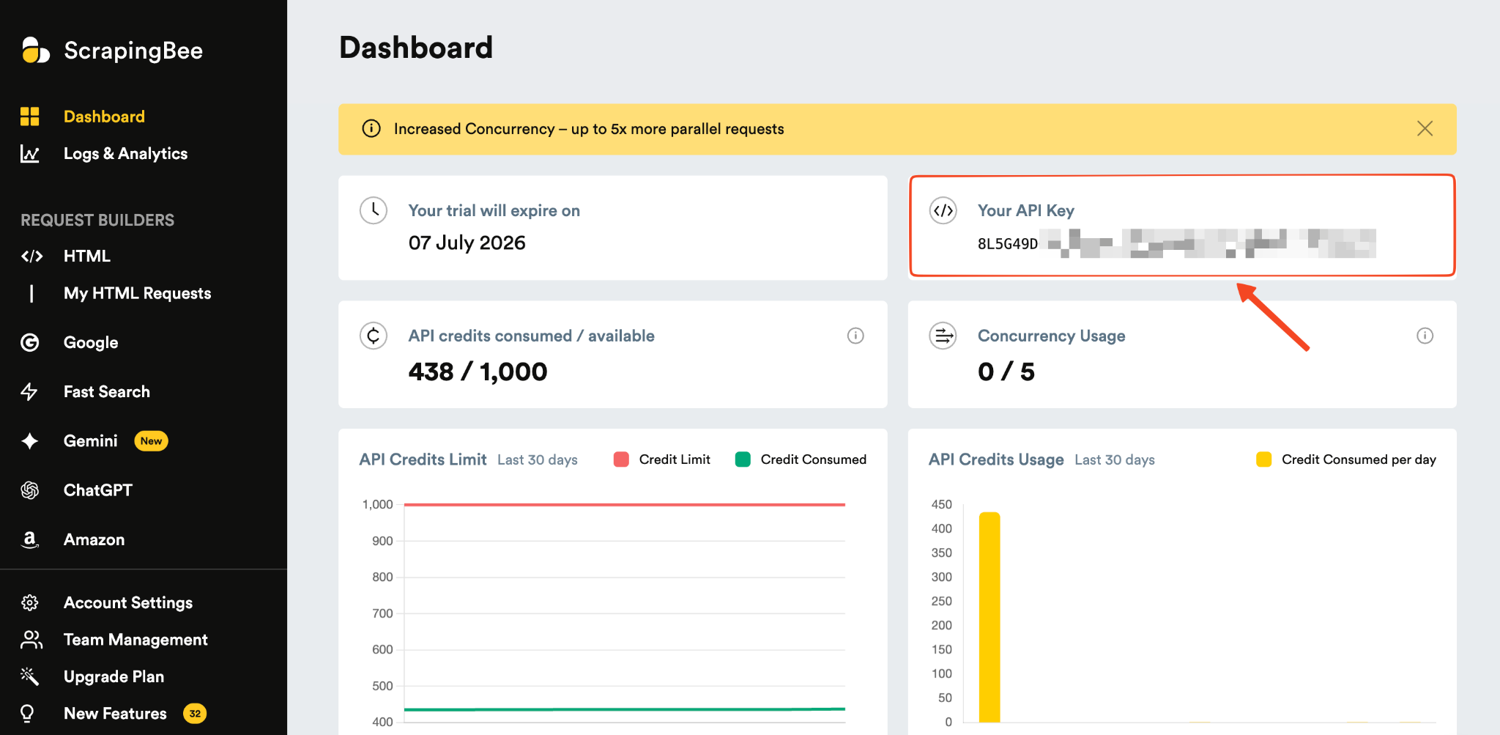
New users get 1,000 free scraping credits, which is more than enough to test the service.
If you want the managed AWS path, start with the ScrapingBee AWS API. For the full list of request parameters, rendering options, geolocation settings, and extraction rules, refer to the ScrapingBee documentation.
Now, we can add a second Lambda function that calls ScrapingBee and writes the result to S3.
A ScrapingBee Lambda that writes to S3
The static scraper works because Books to Scrape returns the data in the initial HTML. For harder pages, you may need JavaScript rendering, proxy handling, country targeting, or extraction options. That is where the ScrapingBee-backed Lambda comes in.
This second Lambda function will do three things:
- Read the ScrapingBee API key from SSM Parameter Store.
- Call ScrapingBee with parameters from the Lambda event.
- Write the response to S3 and return the S3 location.
Create the ScrapingBee function folder
Start by creating a separate folder for the ScrapingBee Lambda:
mkdir -p functions/scrapingbee_api
touch functions/scrapingbee_api/app.py
touch functions/scrapingbee_api/requirements.txt
touch functions/scrapingbee_api/Makefile
Add the dependencies to functions/scrapingbee_api/requirements.txt:
boto3>=1.34,<2
requests>=2.32,<3
requests is used to call ScrapingBee. boto3 is used to read the API key from SSM Parameter Store and write the scrape result to S3.
Add the ScrapingBee Lambda code
Now add the Lambda function code to functions/scrapingbee_api/app.py.
This function will read the ScrapingBee API key, call ScrapingBee with the parameters from the Lambda event, and write the result to S3.
Step 1: Configure clients and defaults.
Start with the imports, ScrapingBee endpoint, default target URL, and clients.
SCRAPINGBEE_ENDPOINT = "https://app.scrapingbee.com/api/v1"
DEFAULT_URL = "https://books.toscrape.com/"
HTTP_TIMEOUT_SECONDS = float(os.getenv("SCRAPINGBEE_TIMEOUT_SECONDS", "30"))

HTTP = requests.Session()
_SSM = None
_S3 = None
_API_KEY_CACHE: str | None = None
The function reuses the HTTP session and caches AWS clients across warm invocations. This keeps the handler simple and avoids recreating clients unnecessarily.
Step 2: Load the API key safely.
def get_api_key() -> str:
    global _API_KEY_CACHE
    if _API_KEY_CACHE:
        return _API_KEY_CACHE

    local_key = os.getenv("SCRAPINGBEE_API_KEY")
    if local_key:
        _API_KEY_CACHE = local_key
        return _API_KEY_CACHE

    parameter_name = os.getenv("SCRAPINGBEE_API_KEY_PARAMETER")
    if not parameter_name:
        raise RuntimeError(
            "Set SCRAPINGBEE_API_KEY for local runs or SCRAPINGBEE_API_KEY_PARAMETER in Lambda."
        )

    parameter = ssm_client().get_parameter(Name=parameter_name, WithDecryption=True)
    _API_KEY_CACHE = parameter["Parameter"]["Value"]
    return _API_KEY_CACHE
Local runs can use SCRAPINGBEE_API_KEY. Deployed Lambda functions should use SCRAPINGBEE_API_KEY_PARAMETER, which points to a SecureString in SSM.
Step 3: Build ScrapingBee request parameters from the event.
def build_scrapingbee_params(payload: dict[str, Any]) -> dict[str, str]:
    params: dict[str, str] = {
        "url": str(payload.get("url") or DEFAULT_URL),
        "render_js": _bool_string(payload.get("render_js"), default=False),
    }

    optional_simple_params = [
        "country_code",
        "wait",
        "wait_for",
        "wait_browser",
        "timeout",
        "device",
        "session_id",
        "tag",
    ]
    for name in optional_simple_params:
        if payload.get(name) not in (None, ""):
            params[name] = str(payload[name])

    for name in ["premium_proxy", "stealth_proxy", "block_ads", "block_resources"]:
        if payload.get(name) is not None:
            params[name] = _bool_string(payload[name])

    for name in ["extract_rules", "ai_extract_rules", "js_scenario"]:
        encoded = _json_param(payload.get(name))
        if encoded:
            params[name] = encoded

    return params
This lets the same Lambda function support simple and advanced ScrapingBee calls. For example, a scheduled event can pass country_code, render_js, or extract_rules without changing the code.
Step 4: Call ScrapingBee.
Now add the function that sends the actual request to ScrapingBee.
def call_scrapingbee(payload: dict[str, Any]) -> requests.Response:
    api_key = get_api_key()
    response = HTTP.get(
        SCRAPINGBEE_ENDPOINT,
        params=build_scrapingbee_params(payload),
        headers={"Authorization": f"Bearer {api_key}"},
        timeout=HTTP_TIMEOUT_SECONDS,
    )
    response.raise_for_status()
    return response
The API key is sent in the Authorization header. The function raises an exception for non-2xx responses so the Lambda handler can return a clear failure.
Step 5: Save the result to S3.
Add a small helper that writes the ScrapingBee result to S3.
def put_result(bucket: str, key: str, payload: dict[str, Any]) -> None:
    s3_client().put_object(
        Bucket=bucket,
        Key=key,
        Body=json.dumps(payload, ensure_ascii=False).encode("utf-8"),
        ContentType="application/json",
    )
S3 is a good default output destination for scraped data because it is durable, cheap, and easy to connect to other AWS services later.
Step 6: Connect everything in the handler.
Finally, wire the pieces together in the handler.
def lambda_handler(event: dict[str, Any] | None, context: Any) -> dict[str, Any]:
    payload = _payload_from_event(event)
    output_bucket = payload.get("output_bucket") or os.getenv("OUTPUT_BUCKET")
    output_key = payload.get("output_key") or f"scrapes/{datetime.now(UTC):%Y/%m/%d}/{uuid4()}.json"

    try:
        scrapingbee_response = call_scrapingbee(payload)
        result: dict[str, Any] = {
            "source_url": payload.get("url") or DEFAULT_URL,
            "status_code": scrapingbee_response.status_code,
            "content_type": scrapingbee_response.headers.get("Content-Type", ""),
            "body": scrapingbee_response.text,
        }

        if output_bucket:
            put_result(str(output_bucket), str(output_key), result)
            result["s3_uri"] = f"s3://{output_bucket}/{output_key}"
            result.pop("body", None)

        return response(200, result)
    except requests.RequestException as exc:
        return response(502, {"error": "scrapingbee_request_failed", "message": str(exc)})
    except Exception as exc:
        return response(500, {"error": "scrape_failed", "message": str(exc)})
The handler reads the event, calls ScrapingBee, builds a result object, and writes the full response to S3. When the response is saved to S3, the Lambda return payload only includes metadata and the s3_uri.
Add the Makefile
SAM needs to know how to package this function. Add this to functions/scrapingbee_api/Makefile:
build-ScrapingBeeScraperFunction:
	mkdir -p "$(ARTIFACTS_DIR)"
	cp app.py "$(ARTIFACTS_DIR)/"
	python -m pip install -r requirements.txt -t "$(ARTIFACTS_DIR)"
This is the same build pattern as the static scraper. It copies the handler and installs the dependencies into the build artifact folder.
Update the SAM template
Now update template.yaml so the stack includes the S3 bucket, the SSM parameter name, and the new ScrapingBee Lambda.
Add this parameter near the top of the template:
Parameters:
  ScrapingBeeApiKeyParameterName:
    Type: String
    Default: /scrapingbee/api-key
    Description: SSM SecureString parameter containing the ScrapingBee API key.
This keeps the parameter name configurable. The actual API key is not stored in the SAM template.
Next, add an S3 bucket under Resources:
 ScrapeOutputBucket:
    Type: AWS::S3::Bucket
    DeletionPolicy: Retain
    UpdateReplacePolicy: Retain
The bucket is where the ScrapingBee Lambda will write its output. The retain policy prevents collected scrape output from being deleted automatically if the stack is removed.
Now add the ScrapingBee Lambda resource:
ScrapingBeeScraperFunction:
    Type: AWS::Serverless::Function
    Metadata:
      BuildMethod: makefile
    Properties:
      Runtime: python3.13
      CodeUri: functions/scrapingbee_api/
      Handler: app.lambda_handler
      MemorySize: 512
      Timeout: 60
      Description: Scraper that delegates rendering, proxies, and extraction to ScrapingBee.
      Environment:
        Variables:
          SCRAPINGBEE_API_KEY_PARAMETER: !Ref ScrapingBeeApiKeyParameterName
          OUTPUT_BUCKET: !Ref ScrapeOutputBucket
      Policies:
        - Statement:
            - Effect: Allow
              Action:
                - ssm:GetParameter
              Resource: !Sub arn:${AWS::Partition}:ssm:${AWS::Region}:${AWS::AccountId}:parameter${ScrapingBeeApiKeyParameterName}
            - Effect: Allow
              Action:
                - s3:PutObject
              Resource: !Sub ${ScrapeOutputBucket.Arn}/*
      Events:
        DailyScrapingBeeScrape:
          Type: ScheduleV2
          Properties:
            ScheduleExpression: rate(1 day)
            State: DISABLED
            Input: '{"url":"https://books.toscrape.com/","render_js":false,"extract_rules":{"title":"h1"}}'
This function gets a longer timeout and more memory than the static scraper because it calls an external API and may handle larger responses.
Notice how the IAM policy is intentionally narrow. The function can read one SSM parameter and write objects into one S3 bucket. It does not need broad access to SSM or S3.
Store the ScrapingBee API key in SSM
Before deploying this function, store your ScrapingBee API key in SSM Parameter Store:
export SCRAPINGBEE_API_KEY="YOUR_API_KEY"

aws ssm put-parameter \
  --name /scrapingbee/api-key \
  --type SecureString \
  --value "$SCRAPINGBEE_API_KEY" \
  --overwrite \
  --profile serverless-scraping \
  --region us-east-1
This keeps the API key out of your code and out of template.yaml.
For local-only smoke tests, you can also keep the key in a .env file:
SCRAPINGBEE_API_KEY=YOUR_API_KEY
Create a ScrapingBee test event
Create a test event for the ScrapingBee Lambda:
touch events/scrapingbee-books.json
Add this to events/scrapingbee-books.json:
{
  "url": "https://books.toscrape.com/",
  "render_js": false,
  "extract_rules": {
    "title": "h1"
  }
}
For this sandbox page, JavaScript rendering is not needed, so render_js is set to false. The extract_rules value asks ScrapingBee to return the page's h1 text.
Build and deploy the updated stack
Validate and build the SAM application again:
sam validate --lint
sam build
Then deploy the updated stack:
sam deploy \
  --stack-name serverless-scraping-demo \
  --resolve-s3 \
  --capabilities CAPABILITY_IAM \
  --profile serverless-scraping \
  --region us-east-1 \
  --parameter-overrides ScrapingBeeApiKeyParameterName=/scrapingbee/api-key
SAM updates the existing CloudFormation stack and adds the new Lambda function, the S3 bucket, and the required permissions.
Invoke the ScrapingBee function
After deployment, invoke the ScrapingBee Lambda. First, create the folder:
mkdir -p validation-results
Then we can invoke Lambda
aws lambda invoke \
  --function-name serverless-scraping-demo-ScrapingBeeScraperFunction \
  --payload fileb://events/scrapingbee-books.json \
  --profile serverless-scraping \
  --region us-east-1 \
  validation-results/scrapingbee-response.json
Open the response:
cat validation-results/scrapingbee-response.json
A successful response should include a statusCode of 200 and an s3_uri pointing to the saved result:
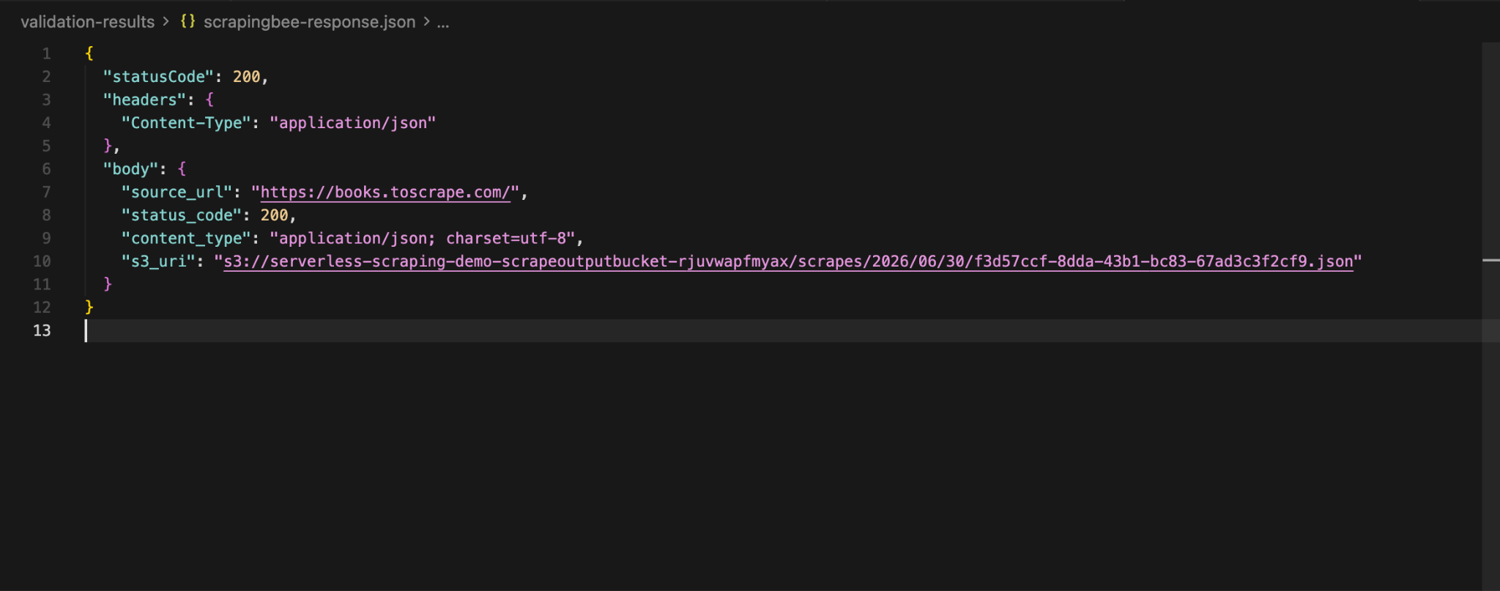
Now copy the S3 object locally to inspect it:
aws s3 cp s3://YOUR_BUCKET/scrapes/YYYY/MM/DD/result.json - \
  --profile serverless-scraping \
  --region us-east-1
The saved object should contain the ScrapingBee response metadata and body.
{
  "source_url": "https://books.toscrape.com/",
  "status_code": 200,
  "content_type": "application/json; charset=utf-8",
  "body": "{\"title\":\"All products\"}"
}
At this point, Lambda is no longer responsible for fetching the target directly. It triggers the ScrapingBee request, stores the response in S3, and returns the S3 location for downstream use.
Cold starts, SnapStart, and arm64
A cold start happens when Lambda creates a new execution environment before running your function. For small Python scrapers, this is usually not the main bottleneck. Network delays, retries, browser startup, and slow target websites often matter more.
| Topic | What to do |
|---|---|
| Python scrapers | Keep dependencies small, reuse HTTP sessions outside the handler, and avoid loading large files during import. |
| Java scrapers | Keep initialization predictable and use SnapStart when startup time becomes noticeable. |
| SnapStart | Use it through a published version or alias, not only $LATEST. It is especially useful for Java functions. |
| arm64 | Use it when your dependencies support it. For simple Python scrapers, it is usually a good default. |
| Browser scraping | Test carefully. Playwright, Chromium, native libraries, and container images can change cold start behavior. |
What does this actually cost?
Lambda pricing comes down to two things: requests and duration. Duration is billed in GB-seconds (memory × runtime). The free tier gives you 1 million requests and 400,000 GB-seconds each month. Let's consider a few examples.
Example 1: a daily static scrape.
A 256 MB function running for 3 seconds once per day uses:
30 x 3 x 0.25 = 22.5 GB-seconds
Well within the free tier.
Example 2: one million static pages per month.
At 256 MB and 2 seconds per page:
1,000,000 x 2 x 0.25 = 500,000 GB-seconds
After the free tier, 100,000 GB-seconds are billable:
100,000 x $0.0000133334 = $1.33
Requests still cost $0 since they're covered by the free tier.
Example 3: one million headless browser pages per month.
At 2 GB and 10 seconds per page:
1,000,000 x 10 seconds x 2 GB = 20,000,000 GB-seconds
After the free tier:
19,600,000 x $0.0000133334 = $261.33
Note: This doesn't include extras like CloudWatch logs, S3 storage, data transfer, proxies, or ScrapingBee credits.
Java on Lambda in 2026
Python is the primary focus of this guide, but Java is still a good option if your team already uses the JVM or wants stronger structure around parsing, data models, and API responses.
The Java version of the scraper uses Java 21, Maven, java.net.http.HttpClient, Jsoup, Jackson, and Lambda SnapStart.
The Java function follows the same logic as the Python scraper. It receives a Lambda event or an API Gateway request, fetches the Books to Scrape page with Java's built-in HttpClient, parses the book cards with Jsoup, and returns the extracted records as JSON.
The main SAM resource looks like this:
JavaBooksScraperFunction:
  Type: AWS::Serverless::Function
  Properties:
    Runtime: java21
    CodeUri: java-scraper/
    Handler: com.scrapingbee.lambda.BookScraperHandler::handleRequest
    MemorySize: 512
    Timeout: 30
    AutoPublishAlias: live
    SnapStart:
      ApplyOn: PublishedVersions
    Events:
      JavaBooksApi:
        Type: HttpApi
        Properties:
          Path: /java/books
          Method: GET
AutoPublishAlias publishes a function version and points the live alias to it. This matters because SnapStart applies to published versions, not the unpublished $LATEST version.
Build the Java project locally:
JAVA_HOME=/opt/homebrew/opt/openjdk@21/libexec/openjdk.jdk/Contents/Home \
  mvn -f java-scraper/pom.xml test package
After deployment, invoke the Java Lambda through the live alias:
aws lambda invoke \
  --function-name serverless-scraping-demo-JavaBooksScraperFunction:live \
  --payload fileb://events/java-books.json \
  --profile serverless-scraping \
  --region us-east-1 \
  validation-results/java-books-response.json
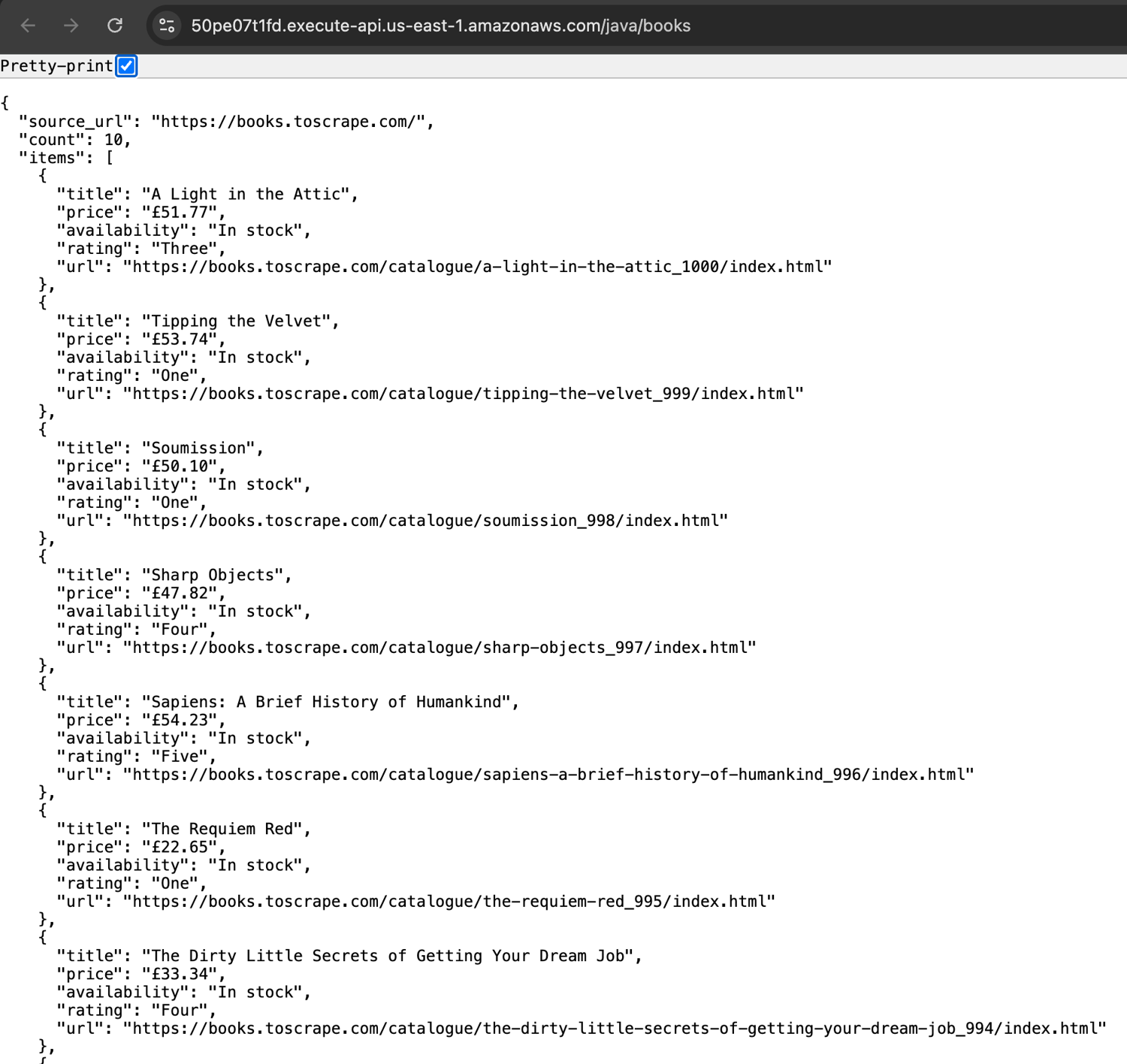
If you expose it through API Gateway, you can open the generated endpoint in your browser:
https://YOUR_API_ID.execute-api.us-east-1.amazonaws.com/java/books
A successful response returns the scraped book data as JSON.
Production checklist
Before running a Lambda scraper in production, check these eight things.
- Keep HTTP timeouts below the Lambda timeout. If the function timeout is 30 seconds, the outbound request should usually time out earlier, for example at 10 or 20 seconds. Leave time for parsing, S3 writes, logging, and a clean error response.
- Reuse clients at module level. Create requests.Session(), boto3 clients, database clients, and browser objects outside the handler when possible. Lambda can reuse the execution environment, so module-level clients reduce repeated setup work on warm invocations.
- Store secrets in SSM Parameter Store or Secrets Manager. Environment variables are fine for non-sensitive configuration, but API keys should live in SSM Parameter Store or in Secrets Manager. The Lambda environment should store only the parameter name or secret ARN.
- Handle SQS partial batch failures. If one message fails, do not make Lambda retry the entire batch. Enable ReportBatchItemFailures on the event source mapping and return only the failed message IDs.
import boto3
import requests

HTTP = requests.Session()
S3 = boto3.client("s3")
SSM = boto3.client("ssm")


def lambda_handler(event, context):
    failures = []

    for record in event.get("Records", []):
        try:
            process_scrape_job(record)
        except Exception:
            failures.append({"itemIdentifier": record["messageId"]})

    return {"batchItemFailures": failures}
- Configure a dead letter queue. Retries are not enough. Failed jobs should eventually move to a DLQ so you can inspect the payload, identify broken selectors or blocked targets, and replay only the jobs that are safe to retry.
- Use CloudWatch Logs Insights and X-Ray. Logs should include the target URL, status code, duration, retry count, and output key. X-Ray helps separate Lambda time from network latency, S3 writes, SSM calls, and downstream API calls.
- Cap reserved concurrency. Lambda can scale quickly, but your target website may not appreciate that. Reserved concurrency gives you a hard upper bound and protects both the target site and your AWS account from accidental fan-out.
- Respect robots.txt, terms of service, and privacy laws. This is not legal advice, but scraping law is fact-specific. Cases like hiQ v. LinkedIn, Meta v. Bright Data, and Van Buren v. United States show why public access, authentication, authorization, and data use all matter. Review the target's rules before scraping.
Conclusion
AWS Lambda is a strong fit when you need short, scheduled, or event-driven scrapers without managing servers.
But its limits show up when pages need long browser sessions or anti-bot handling. When that happens, the next step is to use ScrapingBee to handle these challenges.
Start with 1,000 free API credits, no credit card required.
Frequently asked questions
Is BeautifulSoup illegal?
No. BeautifulSoup is just an open-source Python library for parsing HTML.
Using Lambda for web scraping
Create a Lambda handler to fetch one or a few URLs, parse responses, and store results. Use EventBridge for schedules, SQS for queues, and S3 for storage.
Can AWS Lambda run locally?
Yes. With AWS SAM CLI, you can test Lambda functions locally using sam local invoke or run local API routes with sam local start-api.
What is the maximum runtime of an AWS Lambda function?
The maximum runtime is 15 minutes, or 900 seconds. For longer jobs, split the work with SQS or Step Functions, or move the workload to another service
Should I use Java or Python for Lambda scraping?
Python is generally the more modern and popular choice for Lambda scraping, thanks to its simplicity and support. However, you can use Java if your team already works with the JVM or can benefit from features like SnapStart.

Kevin worked in the web scraping industry for 10 years before co-founding ScrapingBee. He is also the author of the Java Web Scraping Handbook.