CSS text obfuscation is a technique that makes website content difficult to scrape while keeping it visually readable to visitors. Websites can rearrange characters, hide fake text, or generate content through CSS. Add dynamic character wrapping, and even extracting a simple product price can become surprisingly tricky.
In this guide, I'll explain how these techniques work and show you how to scrape obfuscated text with Playwright. We'll explore real examples, build reusable JavaScript utilities to reconstruct visible text, and handle dynamically changing HTML. There's no universal solution, but with the right browser APIs, you can overcome many common text obfuscation tricks.
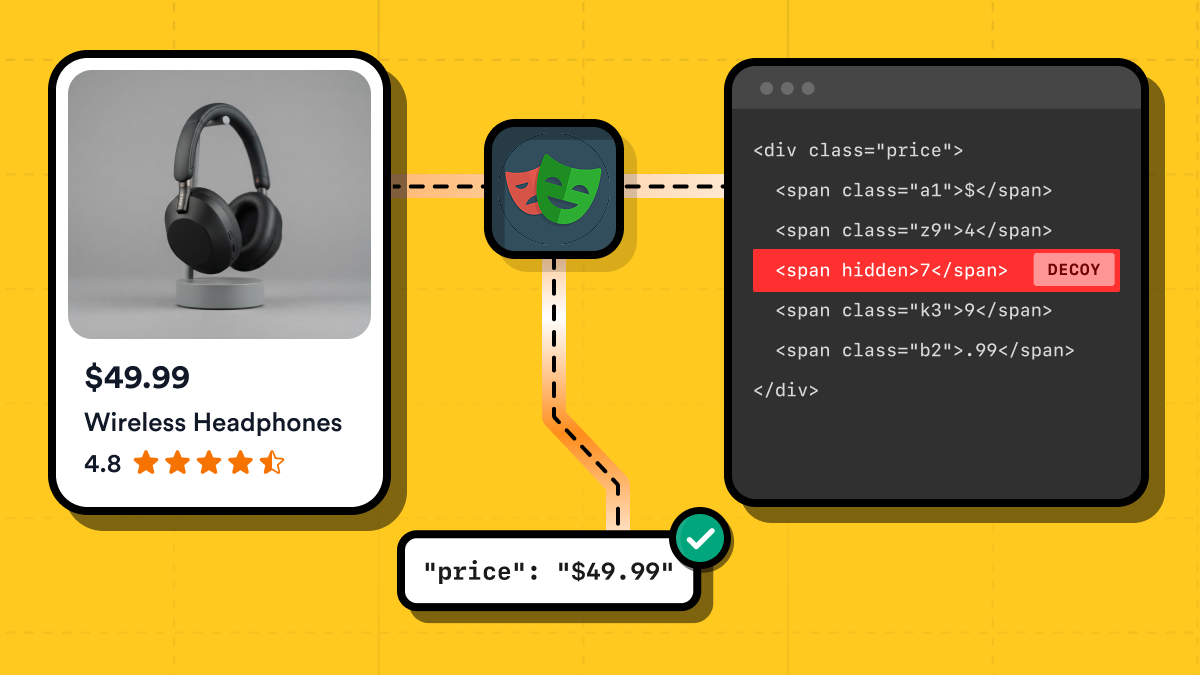
Why does your scraper extract the wrong text?
Picture this: you've decided to scrape some product prices. You write your script, set up the selectors, run it, and everything works like a charm. Beautiful! Time to collect some data. Then you check the results and discover that a pair of headphones worth $79.50 apparently costs $7,498.56. Wait, what?
You open the product page again. Nope, the price is definitely $79.50. You check your selectors. They're fine. You run the scraper again. Same ridiculous price. So where the hell are those extra digits coming from?
Well, there are several possible explanations. Maybe the website loads its content dynamically with JavaScript, and your scraper grabs the HTML before everything is ready. Or perhaps the text is split across multiple elements, and your extraction logic gets confused.
But there's another possibility, and it's particularly annoying: the website might be deliberately messing with the text to make your scraper's life harder. This brings us to text obfuscation. And of all the annoying things you can encounter when web scraping, it deserves a special place on the list.
What is text obfuscation?
Obfuscation means deliberately making something harder to understand or interpret while preserving its intended behavior. The idea isn't specific to web scraping. Developers sometimes obfuscate JavaScript code by replacing meaningful variable names with random characters, introducing unnecessary complexity, or rearranging code to make reverse engineering more difficult.
Websites can do something similar with their content. Instead of making code difficult to read, they make text difficult to extract.
For example, a website can use CSS to:
- Rearrange characters so they appear in a different order than in the HTML.
- Insert fake characters that are hidden from visitors but remain in the DOM.
- Generate visible text using CSS pseudo-elements instead of HTML.
JavaScript can complicate things further by wrapping individual characters in separate HTML elements, changing their attributes, or dynamically rebuilding parts of the page. To a human visitor, everything looks perfectly normal. The price is still $79.50, and there's nothing suspicious about it. But a scraper reading the HTML might get a completely different value.
And here's the tricky part: using a real browser doesn't automatically fix this. Browsers know how to render the text correctly, but JavaScript properties like textContent and innerText don't always return what you actually see on the screen. Fortunately, browsers also provide tools that can help us figure out how the text is actually displayed.
Text obfuscation is just one of the challenges you might face when collecting website data. For other common obstacles, including CAPTCHAs, IP blocking, and anti-bot systems, check out our guide on web scraping without getting blocked.
So, now that we know what text obfuscation is and why it can cause trouble, let's look at some common techniques websites use to confuse scrapers.
Common CSS text obfuscation techniques
CSS isn't just for making websites look pretty. It can also change how text appears on the screen without changing the underlying HTML. And that gives websites several ways to confuse scrapers.
Let's look at some examples.
Reordering text with Flexbox
One of the simplest tricks is to put text fragments in the wrong order in the HTML and use CSS to rearrange them visually.
Imagine a product page with the following markup:
<div class="price">
  <span class="price__cents">.99</span>
  <span class="price__dollars">$49</span>
</div>
Notice anything strange? The cents come before the dollars. If you extract the text directly from this element, you'll get .99$49, which obviously isn't a valid price.
But now let's add some CSS:
.price {
  display: inline-flex;
}

.price__cents {
  order: 2;
}

.price__dollars {
  order: 1;
}
Flexbox lets us control the visual order of elements using the order property. Here, we're telling the browser to display the dollars first and the cents second. The result? Visitors see a perfectly normal price: $49.99. However, the actual HTML hasn't changed. Both textContent and innerText still follow the original DOM order, so neither reconstructs the price correctly.
You can see this trick in action in my Flexbox reordering demo. Try clicking Disable CSS reordering and watch what happens to the price. The HTML remains exactly the same, but the visual order changes.
What about accessibility?
Note that this approach can also cause accessibility problems. Screen readers generally follow the DOM reading order rather than the visual Flexbox order, meaning visitors who rely on assistive technology might hear the wrong price.
Accessibility used to be something many developers barely thought about, although thankfully things have improved over the years. I personally know someone who relies entirely on a screen reader to navigate websites, so this isn't just some theoretical concern to me. It's worth remembering that accessibility features aren't optional extras for everyone. For some people, they're the only way to use the web.
And breaking that experience just to make a scraper's life more difficult? Not exactly a great trade-off.
Generating fake text with CSS pseudo-elements
The previous trick rearranged text that already existed in the HTML. But what if we could display something that isn't in the HTML at all? That's where CSS pseudo-elements come in.
The ::before and ::after pseudo-elements use the CSS content property to insert generated content into the rendered page. They're commonly used for decorative elements, icons, and labels, but they can also be used to display an entire product price. For example, imagine this HTML:
<div class="price is-obfuscated">$9999</div>
Nothing unusual so far, except that the price is ridiculously high (well, at least for pretty basic headphones). But now let's add some CSS:
.price.is-obfuscated {
  font-size: 0;
}

.price.is-obfuscated::before {
  content: "$79.50";
  display: inline-block;
  font-size: 2.4rem;
}
Here's what's happening:
- We set
font-size: 0on the price element, making the original$9999text invisible. - We use
::beforeto generate a completely different price:$79.50. - We give the pseudo-element a normal font size so the generated price appears on the screen.
Now visitors see $79.50, while the HTML still contains $9999. And here's the catch: CSS-generated content doesn't become part of the DOM. So even if you use textContent or innerText, you'll still get $9999 instead of the price displayed in the browser.
You can try this yourself on my CSS-generated content demo.
Fortunately, this trick isn't impossible to detect. Browsers expose computed styles through getComputedStyle(), which lets us inspect the content property of pseudo-elements. We'll use that technique later to recover text that ordinary DOM extraction misses.
Hiding fake characters with CSS
Here's another fun trick: instead of rearranging characters or generating new text, a website can insert extra characters into the HTML and hide them with CSS.
Imagine you're scraping a product page. The displayed price is $79.50, but the HTML looks like this:
<div class="price">
  $7<span class="decoy">4</span>9<span class="decoy">8</span>.5<span class="decoy">6</span>0
</div>
Notice those extra digits inside the <span> elements? If you extract the text using textContent, you'll get $7498.560 instead of $79.50. But the website can make those unwanted digits disappear with a single CSS rule:
.decoy {
  display: none;
}
Problem solved for visitors! The browser hides the extra digits, and the price looks perfectly normal. Unfortunately, textContent doesn't care whether an element is visible, so your scraper still collects the wrong value.
And display: none isn't the only way to pull off this trick. CSS offers several alternatives:
/* Remove the element from the layout */
.decoy--display {
  display: none;
}

/* Hide it and remove it from the normal layout flow */
.decoy--visibility {
  visibility: hidden;
  position: absolute;
}

/* Make it transparent */
.decoy--opacity {
  opacity: 0;
  position: absolute;
}

/* Make the text zero-sized */
.decoy--font {
  font-size: 0;
}
All four techniques can produce the same visible price, but they don't behave identically when you try to extract the text. For example, innerText generally ignores elements hidden with display: none or visibility: hidden. However, characters hidden using opacity: 0 or font-size: 0 can still appear in its output. So switching from textContent to innerText isn't a guaranteed solution either.
I created an invisible decoy characters demo to demonstrate all four approaches. Each card displays the same price, $79.50, but contains additional digits in the HTML. Try revealing the hidden characters and comparing the textContent and innerText results. It's a good illustration of why text existing in the DOM doesn't necessarily mean it's visible to the user.
Reversing text with CSS bidirectional properties
Here's a particularly sneaky trick: a website can reverse the way characters appear on the screen without changing their order in the HTML. CSS has properties for controlling text direction, primarily to support languages written from right to left, such as Arabic and Hebrew. But these properties can also be used to confuse web scrapers.
For example, consider this HTML:
<div class="price is-obfuscated">05.97$</div>
Well, that's certainly an unusual way to write a price. If you extract the text, you'll get 05.97$, which doesn't make much sense.
Now let's add two CSS properties:
.price.is-obfuscated {
  direction: rtl;
  unicode-bidi: bidi-override;
}
Here's what they do:
direction: rtlsets the text direction to right-to-left.unicode-bidi: bidi-overrideforces the browser to follow that direction when displaying the characters, overriding their usual bidirectional behavior.
Together, these properties reverse the visual order of the characters. So the browser displays $79.50, even though the HTML contains 05.97$. And once again, there's a catch: neither textContent nor innerText accounts for this visual reversal. Both return the original string, 05.97$.
I created a bidirectional text override demo where you can see this behavior in action.
You might think the solution is simply to reverse the extracted string. And yes, that would work for this particular example. But real pages can mix left-to-right and right-to-left text, apply different directions to nested elements, and combine bidirectional properties with other CSS tricks.
Scrambling characters with custom fonts
Now we're getting into the really nasty stuff. If the previous techniques weren't annoying enough, some developers take obfuscation to another level by creating custom fonts that deliberately display the wrong characters. These are probably the people who graduated with honors in making web scrapers miserable.
Normally, when a browser encounters the character 7, it uses a font to draw something that looks like a seven. But fonts define how characters are represented visually, and there's nothing stopping someone from creating a font where 1 looks like $, 2 looks like 7, and so on.
For example, imagine this HTML:
<span class="price">123456</span>
With a normal font, visitors would see 123456. But a specially modified font could map those characters to completely different symbols:
| Character in HTML | Displayed glyph |
|---|---|
1 | $ |
2 | 7 |
3 | 9 |
4 | . |
5 | 5 |
6 | 0 |
The website then loads that font using CSS:
@font-face {
  font-family: "ObfuscatedPrices";
  src: url("/fonts/prices.woff2") format("woff2");
}

.price {
  font-family: "ObfuscatedPrices", sans-serif;
}
And just like that, visitors see $79.50, while the HTML still contains 123456. The worst part? This technique is much harder to handle using the methods we've discussed so far.
Both textContent and innerText return the original characters. Checking computed styles might tell you which font is being used, but it won't automatically reveal what those characters are supposed to look like. Even analyzing character positions won't help much, because the characters are already in the correct order. It's their visual appearance that's been changed.
To recover the actual text, you may need to inspect the custom font and figure out how its characters map to the displayed glyphs. That can involve analyzing the font's character mappings and glyph outlines, which is a rather different challenge from dealing with ordinary CSS properties.
So, if you ever encounter a website where the extracted text looks like complete nonsense despite being in the right order, check whether a custom font is involved before blaming your scraper.
Combining multiple CSS obfuscation techniques
So far, we've looked at each obfuscation technique separately. But here's a fun question: what stops a website from using several of them at once? Absolutely nothing. Or, as the famous meme goes, ¿Por qué no los dos?
In fact, why stop at two? A particularly determined developer could combine Flexbox reordering, invisible characters, bidirectional text, and CSS-generated content into one glorious mess.
For example, imagine a product price built using this HTML:
<div class="price is-obfuscated">
  <span class="price__fraction">
    .5<span class="decoy--font">6</span>0
  </span>
  <span class="price__whole">
    <span class="price__currency"></span>
    <span class="price__digits">97</span>
    <span class="decoy--opacity">8</span>
  </span>
</div>
The markup already looks a little suspicious, but CSS can make things much worse:
- Flexbox moves the whole-dollar portion before the fractional part.
- Bidirectional text properties reverse
97so visitors see79. - Hidden characters add fake digits (
6and8) that visitors never see. - A nested
::beforepseudo-element generates the$symbol, which doesn't exist anywhere in the HTML.
Put everything together, and the browser displays a perfectly reasonable price: $79.50. Meanwhile, textContent returns .560978, and innerText produces a similarly useless result with additional line breaks.
I put together a combined CSS obfuscation demo where you can see all four tricks working together. This example also demonstrates why handling individual CSS tricks isn't always enough. Your scraper might successfully restore the order of the digits and filter out invisible characters, only to discover that the currency symbol is still missing because it was generated by a pseudo-element inside a nested element.
The good news is that you don't necessarily need a separate workaround for every possible combination. By inspecting how the browser positions text and generates content, you can build an extraction method that handles several of these tricks together.
How to spot text obfuscation
Now that you've seen what CSS obfuscation can do, there's another question: how do you figure out which trick a website is using? After all, it's easier to deal with an enemy when you know what you're fighting.
Before assuming you're dealing with some particularly evil CSS magic, though, check the obvious stuff first. Is the website using JavaScript to load its content? If your scraper doesn't execute JavaScript, or extracts data before the page finishes updating, you might simply be looking at incomplete HTML. No conspiracy required.
If that's not the problem, open your browser's Developer Tools and start investigating. Here's a quick checklist:
- Compare the displayed text with
textContentandinnerText. If the browser shows$79.50but both properties return something different, CSS obfuscation might be involved. - Inspect the HTML structure. Are characters split across multiple
<span>elements? Do they appear in a strange order? Check for Flexbox or Grid layouts and properties such asorderandflex-direction. - Look for hidden characters. Extra digits or letters in the HTML are a pretty good clue. Inspect their computed styles for
display: none,visibility: hidden,opacity: 0, orfont-size: 0. - Check for CSS-generated content. Look for
::beforeand::afterrules with acontentproperty. Remember that the generated text won't appear in the HTML. - Check the text direction. If characters appear reversed, inspect the
directionandunicode-bidiproperties. - Inspect custom fonts. If the extracted characters are in the correct order but don't resemble what you see on screen, check
font-familyand any@font-facedefinitions. A custom font isn't necessarily suspicious, but it can be worth investigating.
You can also temporarily disable suspicious CSS rules in Developer Tools and see whether the displayed text changes. This is often the quickest way to confirm what's happening.
Tip: Before digging into CSS obfuscation, make sure you're extracting the right elements in the first place. If you need a refresher, check out my guide on using CSS selectors for web scraping.
Of course, identifying the technique is only half the battle. You still need to extract the correct text, preferably without writing a separate workaround for every CSS trick you encounter. Fortunately, browsers already know where characters appear on the screen. The next step is figuring out how to use that information.
How to deal with CSS text obfuscation
Alright, you've discovered that a website is messing with its text. What now? The good news is that you don't necessarily need a complicated solution. Some CSS tricks can be handled with a few lines of JavaScript. Others require a bit more detective work.
Here are several approaches worth trying, starting with the simplest ones.
1. Render the page and try innerText
Before doing anything fancy, try extracting the text from a fully rendered page using innerText instead of textContent. Unlike textContent, which returns the text stored in the DOM regardless of whether it's visible, innerText takes some aspects of the page's rendering into account. For example, it generally skips elements hidden with display: none.
Here's a simple example using Playwright:
await page.goto('https://example.com/product');

const price = await page.locator('.price').innerText();

console.log(price);
Browser required? Yes. Playwright runs this code in a real browser environment, which can load the page's CSS and execute JavaScript.
Limitations: As you've seen in the earlier experiments, innerText isn't a perfect representation of what visitors see. It won't fix Flexbox reordering or bidirectional overrides, and it may include characters hidden with opacity: 0 or font-size: 0.
Also, make sure the content has actually loaded before extracting it. A rendered page doesn't necessarily mean all its data is ready.
2. Inspect computed styles to find hidden characters
If the extracted text contains extra characters, check whether CSS is hiding them. The browser's getComputedStyle() method returns the styles actually applied to an element, including rules from external stylesheets.
For example:
const styles = await page.locator('.decoy').evaluate((element) => {
  const style = getComputedStyle(element);

  return {
    display: style.display,
    visibility: style.visibility,
    opacity: style.opacity,
    fontSize: style.fontSize,
  };
});

console.log(styles);
If you discover that an element has display: none, visibility: hidden, or another property that makes it invisible, you can exclude its text from the extracted result. This is particularly useful when a website inserts fake digits between legitimate ones.
Browser required? For reliable computed styles, yes. You could inspect inline styles or parse CSS files without a browser, but accounting for cascading rules, inheritance, and media queries quickly becomes complicated.
Limitations: Visibility isn't always straightforward. You may need to inspect ancestor elements, check whether an element actually occupies visible space, and account for techniques such as clipping or overlapping elements. Also, invisible content isn't automatically malicious; websites hide legitimate content all the time.
3. Recover text from CSS pseudo-elements
What if the text is visible in the browser but doesn't exist in the DOM? As demonstrated earlier, CSS can generate content using ::before and ::after. Fortunately, getComputedStyle() can inspect these pseudo-elements too.
For example:
const content = await page.locator('.price').evaluate((element) => {
  return getComputedStyle(element, '::before').content;
});

console.log(content); // '"$79.50"'
Notice the extra quotes. For a simple CSS string, the computed content value includes its string representation, so you'll need to parse it before using it.
Browser required? A browser is the practical choice here because it resolves which CSS rules apply. Reading stylesheet declarations without one is possible, but isn't equivalent to inspecting the rendered page.
Limitations: The content property isn't limited to simple strings. It can use attributes, counters, and other values that require additional handling. Pseudo-elements can also appear on nested elements, so inspecting only the main price container might not be enough.
4. Reconstruct text using character positions
Now for something a little more interesting. Instead of trying to recognize every possible CSS trick, what if you asked the browser where each character actually appears?
Browsers already calculate this information when rendering text. The JavaScript Range API lets you select individual characters and measure their positions using getBoundingClientRect().
Here's a simplified example for a price stored in a single text node:
const result = await page.locator('.price').evaluate((element) => {
  const node = element.firstChild;
  const characters = [];

  for (let i = 0; i < node.length; i++) {
    const range = document.createRange();

    range.setStart(node, i);
    range.setEnd(node, i + 1);

    const rect = range.getBoundingClientRect();

    characters.push({
      text: node.textContent[i],
      x: rect.x,
    });
  }

  return characters
    .sort((a, b) => a.x - b.x)
    .map((character) => character.text)
    .join('');
});
The idea is simple: measure each character, sort them from left to right, and join them back into a string. This can recover text rearranged with CSS, including the bidirectional override from Experiment 4, where the HTML contains 05.97$ but the browser displays $79.50.
Browser required? Yes. This technique depends on layout calculations performed by the rendering engine.
Limitations: This is only a basic example for a single-line text node. Real pages can contain nested elements, multiple lines, hidden characters, and right-to-left text. You'll need additional logic to handle those cases. Measuring every character also introduces processing overhead, especially on large pages.
Still, it's a promising approach because it doesn't require knowing exactly which CSS property was used to rearrange the text.
5. Look for the original data somewhere else
Here's one more possibility that's easy to overlook: perhaps you don't need to reconstruct the displayed text at all. Some websites store product information in structured data, HTML attributes, or JSON embedded in the page. The visual price might be obfuscated while another representation contains the original value.
For example:
<meta itemprop="price" content="79.50">
<meta itemprop="priceCurrency" content="USD">
In this case, you could extract the price directly from the metadata instead of analyzing the visual text.
Browser required? Not necessarily. If the data exists in the original HTML, a regular HTTP request and an HTML parser may be enough.
Limitations: Not every website exposes this information, and the values aren't guaranteed to be accurate or up to date. Some pages also generate their structured data dynamically, which brings us back to JavaScript rendering.
Don't assume that alternative data sources are always available, but they're definitely worth checking before building a more complicated extraction algorithm.
6. Use OCR as a last resort
Alright, what if none of the previous methods work? The website has pulled every CSS trick imaginable, and your scraper still can't figure out the correct text.
Well, here's a thought: if you can see the correct price on the screen, why can't your scraper see it too? Actually, it can!
Instead of trying to reconstruct text from HTML and CSS, you can take a screenshot of the rendered page and use Optical Character Recognition (OCR) to read it.
For example, Playwright can capture a screenshot of a specific element:
await page.locator('.price').screenshot({
  path: 'price.png'
});
You can then pass the image to an OCR engine such as Tesseract, which recognizes text directly from images without requiring a separate vision-language model.
For more complicated pages, you can also bring AI into the picture. For example, a computer vision model based on YOLO can help locate product prices and other elements in screenshots, while OCR reads the text inside those regions. Vision-language models offer another way to interpret screenshot content.
Browser required? You'll generally need a browser to render the page and capture what visitors see. However, the OCR processing itself can run separately.
Limitations: OCR introduces extra processing overhead and can make mistakes, particularly with small text, unusual fonts, or low-quality screenshots. AI-based solutions can also increase costs and aren't guaranteed to recognize everything correctly.
That's why I'd treat OCR as a fallback rather than the first thing to try. But when the DOM becomes completely unreliable, reading the rendered pixels may be your best option.
Want to explore visual scraping further? Check out Computer Vision Web Scraping with Playwright and YOLO for an example combining object detection, OCR, and structured data extraction. If you'd rather start with a simpler Tesseract-based approach, see Playwright OCR: Web Scraping with Tesseract.js in Node.js.
7. Can AI help with text obfuscation?
At this point, you might be wondering: why bother with all these complicated extraction techniques when AI can do the job for you? Fair question. After all, modern AI models can analyze HTML, extract structured data, and understand natural language instructions. Surely they can figure out a product price?
Well, I decided to put that theory to the test. I used an AI-powered web extraction tool against the CSS obfuscation experiments from earlier. First, I asked it to extract prices as structured data. Then I tried a more explicit instruction:
What exact price does a visitor SEE after CSS rendering? HTML may contain hidden digits or CSS-generated text. Ignore invisible characters and don't copy raw HTML text.
The results weren't particularly impressive. For example, in the CSS-generated content experiment, the AI returned $9999 instead of the displayed $79.50. In the hidden characters experiment, it happily included the fake digits, returning values like $7498.560. Even explicitly telling it to ignore invisible characters didn't help.
Why? Because AI can't reliably reconstruct visual information it doesn't actually receive. If an extraction tool provides the model with HTML text but not enough information about the rendered layout and CSS, the model may have no way of knowing which characters are visible or how they're arranged.
This doesn't mean AI is useless for web scraping. Far from it. It's excellent at interpreting content, extracting information from messy documents, and converting unstructured data into useful formats. But when dealing with CSS obfuscation, AI alone isn't a magic fix.
A more promising approach is to combine AI with visual information. For example, you could capture a screenshot and use OCR or a vision-language model to recognize the displayed text. Alternatively, you could reconstruct the visible text using browser APIs and then let AI process the recovered data.
So, before asking an AI model to extract something, make sure it actually has access to the information needed to get the answer right. Otherwise, you're just asking it to make an educated guess.
AI extraction isn't always as reliable as it sounds. If you're considering using an AI-powered scraper, take a look at our comparison of AI web scraping tools to see how different solutions perform on real websites.
Which approach should you use?
There's no single technique that works for every obfuscated page. The best choice depends on what the website is doing.
| Approach | Best suited for | Browser needed? |
|---|---|---|
innerText | Simple hidden elements | Yes, for reliable rendering |
| Computed styles | Hidden decoy characters | Yes, preferably |
| Pseudo-element inspection | CSS-generated text | Yes, preferably |
| Character geometry | Reordered or reversed text | Yes |
| Alternative data sources | Available metadata or original values | Not always |
| OCR and computer vision | Reading visually rendered text when DOM extraction fails | Usually, to capture the rendered page |
| AI-powered extraction | Interpreting and structuring extracted data | Depends on the approach |
And these approaches aren't mutually exclusive. In fact, combining them is often more effective than relying on just one. For example, you could use computed styles to exclude hidden characters, browser geometry to restore their correct order, and pseudo-element inspection to recover generated content.
That combination is exactly what I'll explore in the next section, using Playwright to build a reusable text extraction utility and test it against the CSS obfuscation examples from earlier.
Building a Playwright scraper to handle CSS obfuscation
Alright, we've looked at the tricks websites can use to mess with extracted text. Now let's try fighting back. We'll build a small Playwright-based scraper that combines two approaches we've already discussed: measuring where characters appear on the screen and recovering text generated by CSS pseudo-elements.
The goal is to make the scraper work without knowing which obfuscation technique a website uses. Give it an element, and it'll try to reconstruct the text a visitor actually sees. Of course, this isn't going to be some magical solution that defeats every CSS trick ever invented. Think of it as an experimental tool rather than a production-ready scraper. Still, as you'll see, it handles quite a few nasty cases.
Setting up the project
We'll use Node.js and Playwright with Chromium. You'll also need a recent version of Node.js and npm installed.
Start by creating a new project:
mkdir css-obfuscation-scraper
cd css-obfuscation-scraper
npm init -y
Install Playwright and its Chromium browser:
npm install playwright
npx playwright install chromium
Since we'll use JavaScript ES modules, configure the project accordingly:
npm pkg set type=module
Next, create two utility files. The project structure will look something like this:
css-obfuscation-scraper/
├── package.json
└── src/
    ├── index.js
    └── utils/
        ├── extractVisibleText.js
        └── extractRenderedText.js
The index.js file will launch Chromium, visit the experimental pages, and run the extraction utilities. I won't include the entire test runner here, since most of it is just browser setup and reporting. You can find the complete project, including the test runner, on GitHub.
Learn more about scraping with Playwright in our dedicated tutorial.
Extracting visible text using character positions
Let's start with extractVisibleText.js. The idea is to find individual characters inside an element, measure where they appear on the screen, and reconstruct the text based on their visual positions.
First, we use document.createTreeWalker() to find text nodes, including those nested inside multiple HTML elements. Then Intl.Segmenter splits their contents into grapheme clusters, which is more reliable than splitting strings into individual JavaScript characters.
The interesting part is how we measure each character:
const range = document.createRange();

for (const { segment, index } of segmenter.segment(node.nodeValue)) {
  range.setStart(node, index);
  range.setEnd(node, index + segment.length);

  const rect = [...range.getClientRects()].find(
    (r) => r.width > 0 && r.height > 0
  );

  if (!rect) continue;

  fragments.push({
    text: segment,
    x: rect.x,
    y: rect.y,
    domIndex: fragments.length,
  });
}
Each visible character gets its own screen coordinates. The full utility also checks CSS visibility and ancestor opacity to filter out hidden text.
Once we've collected the fragments, we sort them by their positions:
const sorted = [...fragments].sort((a, b) => {
  if (Math.abs(a.y - b.y) < 4) {
    return a.x - b.x || a.domIndex - b.domIndex;
  }

  return a.y - b.y;
});

const visualText = sorted.map((f) => f.text).join('');
For a simple horizontal price, this lets us read characters from left to right, regardless of their original DOM order. The approach can handle Flexbox reordering, bidirectional overrides, and several techniques involving invisible characters.
I've shown only the essential parts here. The complete extractVisibleText.js implementation is available in the project's GitHub repository.
One important limitation: This approach assumes horizontal, left-to-right text and uses a small tolerance when comparing vertical positions. It's not a complete text layout engine, so complex multilingual layouts, overlapping characters, and vertical writing modes may require additional handling.
Recovering CSS-generated content
Our first utility handles text that exists in the DOM. But what about characters generated by ::before and ::after? For those, we'll use extractRenderedText.js, which builds on extractVisibleText() and also looks for CSS-generated content.
The first step is to inspect pseudo-elements using getComputedStyle():
const style = getComputedStyle(element, `::${type}`);
const raw = style.content;

let text = '';

if (raw.startsWith('"') && raw.endsWith('"')) {
  try {
    text = JSON.parse(raw);
  } catch {
    // Unsupported CSS string syntax.
  }
}
Here, type is either before or after. The full implementation checks the selected element and its descendants, filters out invisible content, and extracts simple CSS string values. There's one complication: pseudo-elements don't have their own DOM nodes, so we can't measure their positions using Range. Instead, the utility estimates their coordinates using the bounding rectangles of their host elements.
Once we've collected the generated text, we combine it with the DOM characters extracted earlier:
const fragments = [
  ...dom.fragments.map((fragment) => ({
    ...fragment,
    source: 'dom',
  })),
  ...css.generatedFragments,
];

// The complete utility then sorts these fragments by their screen coordinates,
// using their source (dom, ::before, or ::after) to resolve ties.
// This produces the final renderedText value.
Now we have a single entry point for both extraction methods:
const result = await extractRenderedText(
  page.locator('#obfuscated-price')
);

console.log(result.renderedText); // $79.50
No special handling for Flexbox, hidden digits, or bidirectional text is needed in the calling code. You can find the complete extractRenderedText.js implementation in the project's GitHub repository.
Keep in mind: This is a simplified implementation. It handles basic CSS string values, approximates pseudo-element positions, and doesn't fully account for clipping, transformations, or complex layouts. It also won't decode custom fonts with deliberately remapped glyphs.
Testing the scraper against combined CSS obfuscation
Time to see whether this thing actually works. I tested the utilities against all five experimental pages, covering eight extraction cases in total. The toughest was Experiment 5: Layered CSS Obfuscation, which combines Flexbox reordering, bidirectional text, invisible digits, and a nested CSS pseudo-element.
The visitor sees $79.50, but the HTML contains .560978, with the dollar sign generated entirely through CSS. Here's the relevant Playwright output:
{
  rawText: '.560978',
  visibleDomText: '79.50',
  generatedFragments: [
    { text: '$', source: '::before', hostIndex: 4, /* ... */ }
  ],
  renderedText: '$79.50'
}
Not bad! The first utility reconstructs the visible characters in the correct order, while the second recovers the missing dollar sign from ::before. Together, they produce the price displayed in the browser.
Of course, these are controlled experiments, not proof that the scraper can handle every website. Complex layouts, custom fonts, and other obfuscation methods may require different solutions. There's also a performance cost: measuring individual characters is more expensive than reading textContent, so it's best to target specific elements.
Still, the results demonstrate an important idea: instead of reversing every CSS trick individually, we can reconstruct the text based on how the browser displays it. No OCR required.
Dynamic character wrapping: when JavaScript joins the party
So far, we've looked at how CSS can make the text displayed in a browser differ from what's actually written in HTML. But CSS isn't the only troublemaker here. JavaScript can also manipulate the DOM, sometimes making text extraction considerably more difficult. One technique worth knowing about is dynamic character wrapping.
The idea is pretty simple: instead of keeping a string as a single text node, JavaScript splits it into individual characters and wraps them in HTML elements, usually <span> tags.
For example, a normal price might look like this:
<div class="price">$79.50</div>
After JavaScript processes it, the markup might become:
<div class="price">
  <span>$</span>
  <span>7</span>
  <span>9</span>
  <span>.</span>
  <span>5</span>
  <span>0</span>
</div>
But here's something important: character wrapping isn't necessarily an obfuscation technique. Developers also use it for perfectly legitimate reasons, such as text animations, interactive effects, and typography. Just because you find a dozen nested <span> elements doesn't mean someone is trying to sabotage your scraper. In fact, the example above doesn't even break textContent. It still returns $79.50.
Things get more interesting when websites combine character wrapping with randomized structures, CSS reordering, and frequent DOM updates. Let's look at a few ways this can happen.
Dynamically generating character wrappers
The first approach involves generating HTML wrappers with JavaScript instead of including them in the original page.
For example:
const price = document.querySelector('.price');
const value = '$79.50';

for (const char of value) {
  const span = document.createElement('span');
  span.textContent = char;
  price.append(span);
}
This creates a separate <span> for every character. A website could go further by introducing additional nesting levels and assigning randomly generated class names:
<div class="price">
  <span class="wrap-x7df2">
    <span class="wrap-k29p1">$</span>
  </span>
  <span class="wrap-a84mn">7</span>
  <!-- More randomly wrapped characters -->
</div>
Now imagine that the classes and nesting change every time the page loads. A scraper that expects a particular class name or a fixed number of nested elements could break. And if it only downloads the original HTML without executing JavaScript, it might find an empty price container.
However, once JavaScript finishes generating the content, both textContent and innerText can still recover the correct price. I created a dynamic character wrapping demo to demonstrate this behavior.
So, randomized wrappers can make selectors unreliable, but they don't automatically make the underlying text unreadable.
Shuffling characters and restoring their order with CSS
Now let's make things a little nastier. Instead of generating character wrappers in the correct sequence, JavaScript can shuffle them before inserting them into the DOM. Then CSS puts them back in the intended visual order. Remember the Flexbox trick from earlier? The same idea works with dynamically generated elements.
For example, JavaScript might produce:
<div class="price">
  <span style="order: 4">5</span>
  <span style="order: 0">$</span>
  <span style="order: 5">0</span>
  <span style="order: 2">9</span>
  <span style="order: 3">.</span>
  <span style="order: 1">7</span>
</div>
With this CSS:
.price {
  display: inline-flex;
}
The browser displays $79.50, because Flexbox arranges the elements according to their order values. But textContent returns 5$09.7, following the original DOM sequence. Now add randomly generated classes, extra wrappers, and a new shuffle on every page load. Suddenly, hardcoded selectors or assumptions about character positions become pretty useless.
You can experiment with this on my shuffled character wrappers demo. Every time you click Reshuffle characters, JavaScript generates a new DOM sequence while CSS restores the same price.
This is a more serious form of obfuscation because the source text is deliberately arranged incorrectly. Simply waiting for JavaScript to finish won't solve the extraction problem.
Asynchronous rendering and frequent DOM mutations
Here's another problem that's less about confusing the scraper and more about catching it at the wrong moment. Modern websites frequently generate or update content asynchronously. A price might appear several seconds after the initial page load, or JavaScript might periodically replace its HTML.
Consider a script that adds the characters of a price one at a time:
const price = document.querySelector('.price');

for (const char of '$79.50') {
  const span = document.createElement('span');
  span.textContent = char;

  price.append(span);

  await new Promise((resolve) => setTimeout(resolve, 120));
}
Depending on when your scraper reads the element, it might get $, $79, $79.5, or the complete $79.50. And if the website keeps rebuilding the DOM, the problem can happen repeatedly. This is particularly annoying because the scraper can be technically correct and still extract incomplete data.
For example, waiting for the page's load event isn't enough if JavaScript schedules another update afterward. Even waiting for an element to exist doesn't guarantee that its content is ready.
I built an asynchronous DOM mutations demo to demonstrate such scenario.
To handle this reliably, a scraper needs to do more than wait for the page to load. It should check whether the expected content is available and ideally whether the relevant DOM subtree has stopped changing for a reasonable period.
Dynamic character wrapping is just one challenge posed by JavaScript-heavy websites. Our guide to scraping dynamic content covers JavaScript rendering, waiting for elements, and handling content that loads after the initial page request.
Combining dynamic wrapping with CSS obfuscation
And finally, there's nothing stopping a website from combining all these techniques. Because apparently scrambling the DOM once wasn't enough.
In my combined dynamic obfuscation demo, JavaScript generates randomly nested character wrappers, shuffles their order, inserts invisible digits, and periodically rebuilds the entire structure. CSS restores the visual order and adds a dollar sign through ::before.
Visitors still see $79.50, but the underlying HTML changes with every rebuild. This creates two challenges: waiting for the content to finish updating and reconstructing the visually displayed text. Solving only one isn't enough. Even a perfectly timed extraction can return nonsense if it ignores CSS.
Fortunately, we can tackle these problems separately, as we'll see in the next section.
Handling dynamic character wrapping with Playwright
Remember the extractRenderedText() utility we built earlier? The good news is that it already handles many of the problems caused by dynamic character wrapping.
For example, in Experiment 6, JavaScript generates random classes and nested elements around individual characters. That's not a problem for the extractor because it walks through text nodes without relying on specific class names or nesting levels.
Experiment 7 takes things further by shuffling characters in the DOM and restoring their visual order with Flexbox. But the extractor handles that too, since it uses screen coordinates rather than DOM order to reconstruct the text.
In both experiments, I tested extraction before and after regenerating the HTML. The result was always $79.50, even though the underlying markup changed.
However, the last two experiments introduced a different challenge: what happens when you try to extract content while JavaScript is still building it? Let's solve that problem without relying on arbitrary delays.
Waiting for the DOM to stabilize
The simplest solution might seem to be adding a fixed delay before extracting the text. And sure, waiting three seconds might work. Until the website takes four seconds to load, or updates the price right when your scraper starts reading it. A better approach is to use the browser's MutationObserver API, which monitors changes to an element and its descendants.
Our waitForStableContent.js utility waits for two conditions:
- DOM stability: The target element hasn't changed for a specified period, such as 500 milliseconds.
- Content readiness: The extracted value passes a validation check.
Both matter. After all, Loading… could sit there unchanged for several seconds, but that doesn't mean it's the information you wanted.
Here's the core idea behind the observer:
const observer = new MutationObserver(() => {
  clearTimeout(quietTimer);
  quietTimer = setTimeout(finish, quietMs);
});

observer.observe(element, {
  childList: true,
  characterData: true,
  attributes: true,
  subtree: true,
});

quietTimer = setTimeout(finish, quietMs);
Every detected mutation resets the quiet timer. Once the element remains unchanged for quietMs, the utility captures its content and checks whether it's ready.
The full implementation also includes a maximum timeout, checks whether the DOM changed during extraction, and supports two callbacks:
validate()determines whether the extracted content is acceptable.read()optionally specifies how to extract it, such as using ourextractRenderedText()utility instead oftextContent.
You can find the complete waitForStableContent.js implementation in the project's GitHub repository.
Now let's put those callbacks to work.
Waiting for a complete price
In Experiment 8, the page initially displays Loading…. JavaScript then builds the price character by character, so extracting it too early might return $ or $79 instead of $79.50.
Here's how we can wait for a complete price:
const price = page.locator('#dynamic-price');

await waitForStableContent(price, {
  quietMs: 500,
  timeoutMs: 10_000,
  validate: (text) => /^\$\d+\.\d{2}$/.test(text),
});

const result = await extractRenderedText(price);

console.log(result.renderedText); // $79.50
The validate() callback checks whether the extracted text matches the expected price format, while quietMs ensures the DOM has stopped changing for at least 500 milliseconds.
In this experiment, the same approach also worked when the page rebuilt its content. However, a valid price isn't necessarily the final one: the website could still update it later.
Validating the reconstructed text
Now for the interesting part. Unlike Experiment 8, Experiment 9 combines asynchronous rendering with shuffled characters, hidden digits, and CSS-generated content. Even after the page finishes updating, textContent returns something like 8579.06 instead of $79.50.
So waiting for a valid raw text value won't work. Instead, we need to validate the reconstructed visible text using the optional read() callback:
const price = page.locator('#dynamic-price');

const text = await waitForStableContent(price, {
  quietMs: 500,
  timeoutMs: 12_000,

  read: async (locator) => {
    const result = await extractRenderedText(locator);
    return result.renderedText;
  },

  validate: (text) => /^\$\d+\.\d{2}$/.test(text),
});

console.log(text); // $79.50
Now waitForStableContent() observes DOM mutations, calls extractRenderedText() once the content stabilizes, and validates the reconstructed price rather than the underlying HTML.
The experiment passed even after regenerating the randomized markup. The raw text changed, but the extracted visible price remained $79.50.
The important distinction is that waiting for content and reconstructing content are separate responsibilities. By connecting the two utilities through read(), we can handle both ordinary and obfuscated text.
There are limitations, of course. A quiet DOM doesn't guarantee that the website won't update again, and matching a price format doesn't prove the value is correct. CSS-only visual changes may also go undetected.
Still, the takeaway is simple: a loaded page isn't necessarily ready to scrape, and its raw text isn't necessarily what visitors see.
Related reading: Using AI to generate extraction code? See how to execute, verify, and refine AI-generated scrapers instead of trusting their first output.
Conclusion
Text obfuscation can be a real headache, but as you've seen, there are ways to fight back. With browser APIs, a bit of JavaScript, and some patience, you can recover data even from pages that seem determined to confuse your scraper.
But obfuscation isn't the only challenge. Websites may also use anti-bot protection, CAPTCHAs, and IP blocking. And if you're scraping at scale, managing browsers, proxies, and retries can quickly become a project of its own.
That's where ScrapingBee comes in. It handles the scraping infrastructure for you, offering JavaScript rendering, rotating proxies, CAPTCHA handling, geotargeting, and custom JavaScript execution.
That leaves you more time to focus on extracting the data you actually need.
Want to give it a try? Sign up for ScrapingBee and get 1,000 free API credits. No credit card required!
Frequently asked questions
What is CSS text obfuscation?
CSS text obfuscation is a technique that makes website content harder to extract without changing how it appears to visitors. It can involve rearranging characters, hiding fake text, or generating content through CSS pseudo-elements.
Why does my web scraper extract incorrect text?
Your scraper might be reading content before JavaScript finishes loading or extracting hidden characters that aren't visible on the page. CSS properties can also change the visual order of text without changing the underlying HTML.
What is dynamic character wrapping?
Dynamic character wrapping involves splitting text into individual characters and surrounding them with HTML elements, often using JavaScript. It becomes an obfuscation technique when combined with randomized structures, character reordering, or other tricks that interfere with extraction.
Can Playwright bypass CSS obfuscation?
Playwright provides access to browser APIs that can help reconstruct obfuscated text. By examining computed styles, character positions, and CSS-generated content, you can handle many common techniques, although there's no guaranteed universal solution.
Can AI extract obfuscated text?
AI extraction tools can struggle when they only receive HTML without information about how the browser displays it. Combining AI with screenshots, OCR, or browser-based text reconstruction can improve results, but accuracy isn't guaranteed.

Ilya is an IT tutor and author, web developer, and ex-Microsoft/Cisco specialist. His primary programming languages are Ruby, JavaScript, Python, and Elixir. He enjoys coding, teaching people and learning new things. In his free time he writes educational posts, participates in OpenSource projects, tweets, goes in for sports and plays music.