` tag. Each team also has a class `team`.
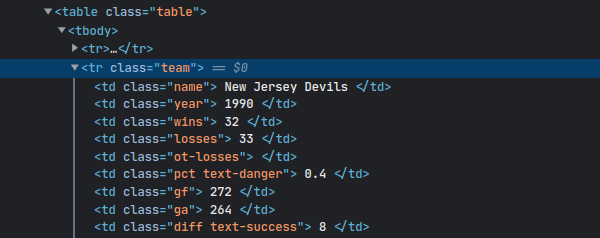
From this, you can infer the CSS selector required to select the data: `tr.team`. The `css` method takes the CSS selector and returns a [`NodeSet`](https://nokogiri.org/rdoc/Nokogiri/XML/NodeSet) of elements matching the query. Then you can simply iterate over the elements using the `each` method.
For every team, their name is stored in a `| ` tag with a class `name`. Since there is only one element with class `name` inside each team, you can use the `at` method to get the element. Like the `css` method, the `at` method finds elements with a given CSS selector but returns only the first element.
Once you have the element, you can extract its text using the `content` method:
```ruby
doc.css("tr.team").each do |team|
puts team.at(".name").content.strip
end
```
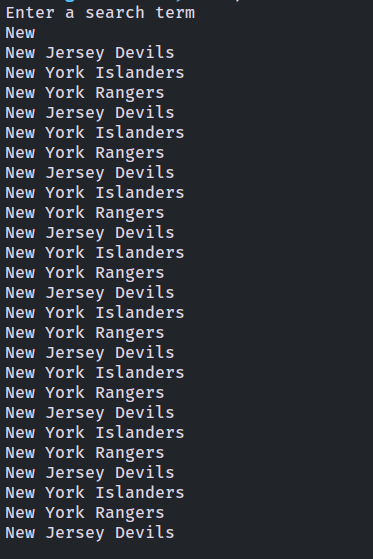
Run the code using `ruby scrape.rb`, and enter a search term when prompted. You should see the names of the teams matching the search query:
Let’s go one step further and extract more information. How about the total wins of each team?
Going back to the page source, the number of wins for each team is stored in a ` | ` element with a class `wins`. Like the name, you can use the `at` method to extract it. Here’s the code to do so:
```ruby
require 'nokogiri'
require 'open-uri'
puts "Enter a search term"
search_term = gets.chomp
doc = Nokogiri::HTML5(URI.open("https://www.scrapethissite.com/pages/forms/?q=#{search_term}"))
teams = {}
doc.css("tr.team").each do |team|
team_name = team.at(".name").content.strip
team_wins = team.at(".wins").content.to_i
teams[team_name] ||= 0
teams[team_name] += team_wins
end
teams.each do |team_name, team_wins|
puts "#{team_name} => #{team_wins}"
end
```
Here, a hash named `teams` has been defined to store the scores. First, the code checks if the team name is already in the hash. If it is, the number of wins is added to the existing score. If it isn’t, the score is initialized to 0.
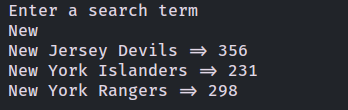
Run the script and enter a search term. You will see the total wins of each team:
### Handling Pagination
Your code can now successfully extract text from the web page. But this is just the first page. Let’s take the script to the next level by adding the ability to handle pagination.
The code starts similarly—by importing the required modules, prompting the user for a search term, and making a request to the first page:
```ruby
require 'nokogiri'
require 'open-uri'
puts "Enter a search term"
search_term = gets.chomp
doc = Nokogiri::HTML5(URI.open("https://www.scrapethissite.com/pages/forms/?q=#{search_term}"))
```
To handle pagination, you need to know the total number of pages. A quick peek to the page source reveals that the links to the pages are stored as `` tags inside `` tags inside a `` tag with a class `pagination`.
The number of pages is the last number that occurs in this list, which is the second to last `- ` tag. (The last `
- ` is the link to the last page but doesn’t contain the page number.)
The following code extracts the second to last element as well as the page number:
```ruby
pages = doc.css(".pagination a")[-2].content.to_i
```
As before, create a `teams` hash:
```ruby
teams = {}
```
Then create a loop that will run from `1` to `pages`.
```ruby
(1..pages).each do |page_num|
puts "Scraping page #{page_num}"
end
```
This time, the URL will be slightly different. If you visit any page (other than the first one) in your browser, you’ll see a `page_num` query parameter added to the URL. This parameter is the page number you want to view. You’ll land on the first page if you set `page_num` to `1`. This is a huge relief, as you don’t need to handle the first page differently.
Add the following code to the `each` loop. Note that this code is the same as what you did previously. The only difference is that this time, it is executed for each page.
```ruby
(1..pages).each do |page_num|
puts "Scraping page #{page_num}"
doc = Nokogiri::HTML5(URI.open("https://www.scrapethissite.com/pages/forms/?q=#{search_term}&page_num=#{page_num}"))
doc.css("tr.team").each do |team|
team_name = team.at(".name").content.strip
team_wins = team.at(".wins").content.to_i
teams[team_name] ||= 0
teams[team_name] += team_wins
end
end
```
Finally, print the result:
```ruby
teams.each do |team_name, team_wins|
puts "#{team_name} => #{team_wins}"
end
```
Here’s the complete code:
```ruby
require 'nokogiri'
require 'open-uri'
puts "Enter a search term"
search_term = gets.chomp
doc = Nokogiri::HTML(URI.open("https://www.scrapethissite.com/pages/forms/?q=#{search_term}"))
pages = doc.css(".pagination a")[-2].content.to_i
teams = {}
(1..pages).each do |page_num|
puts "Scraping page #{page_num}"
doc = Nokogiri::HTML(URI.open("https://www.scrapethissite.com/pages/forms/?q=#{search_term}&page_num=#{page_num}"))
doc.css("tr.team").each do |team|
team_name = team.at(".name").content.strip
team_wins = team.at(".wins").content.to_i
teams[team_name] ||= 0
teams[team_name] += team_wins
end
end
teams.each do |team_name, team_wins|
puts "#{team_name} => #{team_wins}"
end
```
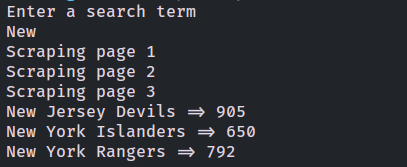
Run the code, and you’ll see that it now scrapes each page and provides each team’s total number of wins:
To check out the final code, you can access this [GitHub repository](https://github.com/heraldofsolace/Nokogiri-demo).
## Conclusion
As you’ve seen, web scraping is a powerful tool that you can use to extract text from a web page. You can use it in the absence of an API, or you can use it to overcome an API’s limitations. In this tutorial, you learned how to use the Nokogiri gem to scrape a web page and extract text.
Even though Nokogiri is lightweight and simple, there are some use cases that are outside its scope. For example, if you’re scraping a dynamic web page that runs JavaScript, Nokogiri will not be able to do the job because it can’t execute JavaScript. In that case, a sophisticated tool like [Watir](/blog/scraping-watir-ruby/) may be more suitable.
If you’re looking for a fast, powerful, and easy-to-use web scraping tool, be sure to check out our [scraper API](https://www.scrapingbee.com/). It handles headless browsers at scale and rotates proxies, giving you an unmatched and uninterrupted web scraping experience.
Before you go, check out these related reads:
- [Getting Started with HtmlUnit](https://www.scrapingbee.com/blog/getting-started-with-htmlunit/)
- [10 Tips on How to make Python's Beautiful Soup faster when scraping](https://www.scrapingbee.com/blog/how-to-make-pythons-beautiful-soup-faster-performance/)
|