IPv4 and IPv6 are the two versions of the Internet Protocol: the addressing system every device uses to send and receive data. IPv4 uses 32-bit addresses and ran out of new ones years ago, while IPv6 uses 128-bit addresses and now carries about half of user traffic. This guide compares them side by side, answers whether IPv6 is faster or safer, shows how much of the web supports it, and explains what that means if you use proxies or scrape websites.
Key takeaways
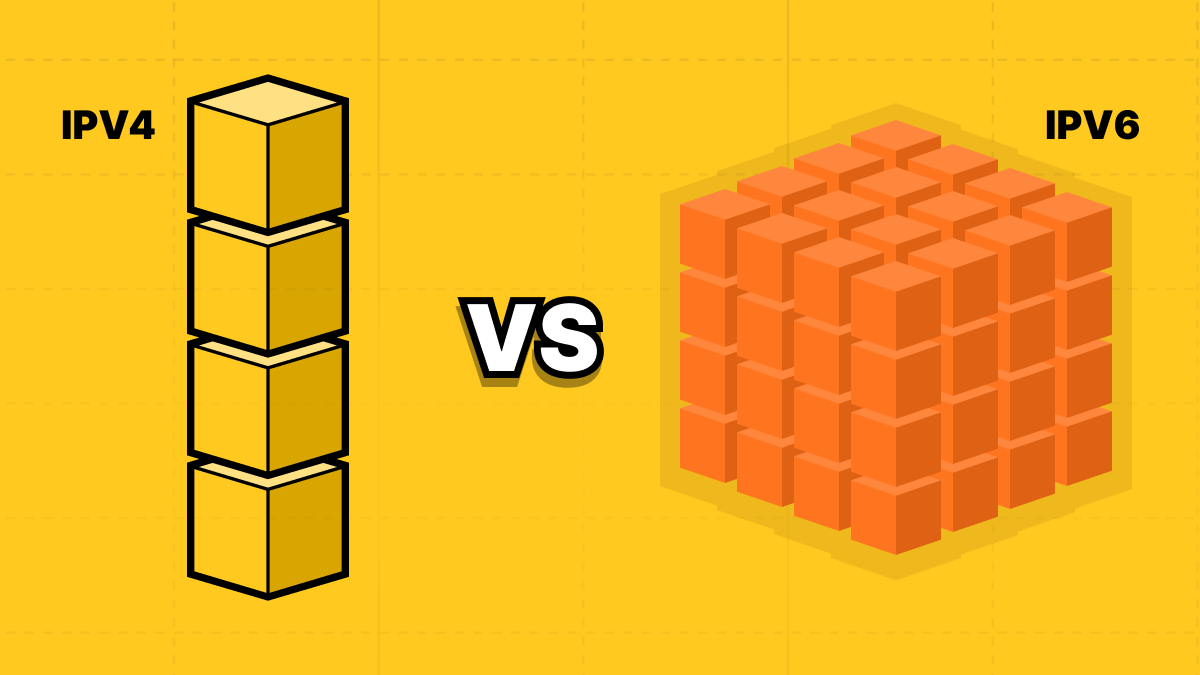
- IPv4 has about 4.3 billion addresses; IPv6 has 2^128, which is 2^96 times as many, enough for every device to have its own.
- Google first measured more than half its users reaching it over IPv6 on March 28, 2026; other measurements, such as APNIC’s 42%, are lower.
- IPv6 isn’t inherently faster or more secure: routing, NAT, and configuration decide both, and our test found median speeds within a few milliseconds.
- In our test of 1,050 sites, 49.1% of popular websites loaded over IPv6, but only 29.5% of commonly scraped sites did.
- For scraping, IPv6 proxies are cheap but only reach IPv6-ready sites, and sites can count a whole /64 range as one client.
IPv4 vs IPv6 at a glance
The main difference between IPv4 and IPv6 is address size. IPv4 uses 32-bit addresses written as four numbers, such as 192.0.2.1, which allows about 4.3 billion addresses. IPv6 uses 128-bit addresses written in hexadecimal, such as 2001:db8::1, and allows about 340 undecillion addresses. IPv6 also simplifies the packet header, drops broadcast, and lets devices configure their own addresses.
Both protocols now exist side by side, with Google reporting that its IPv6 traffic first passed 50% on March 28, 2026.
Under the hood, the differences are a lot more nuanced: from who fragments packets to the DNS record a site needs to be reachable. The table below is a quick overview:
| Feature | IPv4 | IPv6 |
|---|---|---|
| Defining standard | RFC 791 (1981) | RFC 8200 (2017) |
| Address length | 32 bits | 128 bits |
| Number of addresses | About 4.3 billion | About 340 undecillion (3.4 × 10³⁸) |
| Notation | Four numbers from 0 to 255, separated by dots: 192.0.2.1 | Eight groups of hex digits separated by colons, with leading zeros dropped and one run of zero groups shortened to :: |
| Header size | 20 bytes minimum, up to 60 with options | Fixed 40 bytes, with optional extension headers for extra functions |
| Header checksum | Yes, recalculated at every hop | None; relies on link-layer and transport-layer checks |
| Who fragments packets | The sending host and any router on the path, unless the Don’t Fragment flag is set | Only the sending host; routers drop oversized packets and send back an ICMPv6 “Packet Too Big” message |
| Minimum MTU | 68 bytes, with hosts required to accept 576-byte datagrams | 1,280 bytes |
| Delivery types | Unicast, broadcast, multicast (anycast only as a routing technique) | Unicast, multicast, and anycast |
| Address resolution | ARP (Address Resolution Protocol) | Neighbor Discovery Protocol (NDP), carried over ICMPv6 |
| Auto-configuration | Manual or DHCP, with a 169.254.0.0/16 link-local fallback | SLAAC builds an address from router advertisements; DHCPv6 is optional; every interface also gets an fe80:: link-local address |
| NAT | Widespread, including carrier-grade NAT, to stretch scarce addresses | Not needed, since every device can have a globally unique address |
| IPsec | Optional add-on | Originally mandatory to implement, recommended but optional since 2011 (RFC 6434, kept in RFC 8504) |
| DNS record type | A | AAAA |
| Loopback address | 127.0.0.1 (the whole 127.0.0.0/8 block is reserved) | ::1 |
| Private or local ranges | 10.0.0.0/8, 172.16.0.0/12 and 192.168.0.0/16; 169.254.0.0/16 link-local | fc00::/7 unique local, with fd00::/8 used in practice; fe80::/10 link-local |
What is IPv4?
IPv4 is the first widely deployed version of the Internet Protocol (IP) addressing system. It gives every connected device a 32-bit address and allows for about 4.3 billion addresses in total, which seemed more than enough when it was defined in RFC 791 in September 1981. No one foresaw the billions of personal devices we have today.
That supply inevitably ran out as the internet went mainstream. On February 3, 2011, the IANA (Internet Assigned Numbers Authority) handed out the last five blocks of IPv4 addresses. To extend IPv4 address usage, networks use NAT (Network Address Translation): your home router gets a public address, assigns private addresses to home devices, and sends all traffic out through that public IPv4 address. Mobile carriers use a more advanced system: carrier-grade NAT (CGNAT), which shares a pool of public addresses among multiple subscribers.
What is IPv6?
IPv6 is the current version of the Internet Protocol (IP), standardized in RFC 8200. It uses 128 bits, allowing about 340 undecillion addresses; that's 340 followed by 36 zeros, enough to assign about 40 octillion addresses per person on Earth and still not run out. It was designed to replace IPv4, but many factors make IPv4 hard to phase out, so in practice the two protocols run side by side.
IPv6 addresses are written as eight groups of hexadecimal digits, separated by colons: 2001:0db8:0000:0000:0000:0000:0000:0001. Two writing rules of thumb make IPv6 addresses easier to read and type: leading zeros in each group can be dropped, and one run of consecutive zero groups can be represented as a double colon (::). Applying the first rule to the example results in 2001:db8:0:0:0:0:0:1, and the second gives 2001:db8::1.
RFC 5952 turns these rules into a single recommended format, assigning the double colon to the longest run of zeros, so the same address is always written the same way. Most IPv6 addresses also split neatly in half: the first 64 bits identify the network (the /64 prefix), and the last 64 bits identify the device.
Key differences between IPv4 and IPv6
Most of the differences between IPv4 and IPv6 show up in their address size and how they behave on a working network:
Address space and notation
IPv4 uses 32 bits, allowing 2^32 (about 4.3 billion) addresses, compared with IPv6's 128 bits, which allows 2^128 (about 3.4 × 10³⁸), about 2^96 times as many. Put another way, IPv6 can give each person on Earth about 10 quintillion copies of the entire IPv4 address space.
The two also look very different in writing: IPv4 addresses are always written in full (four numbers between 0 and 255), while IPv6 addresses (eight groups of hex digits) are mostly written in shorthand, following RFC 5952. Here's an example:
IPv4   192.0.2.1
IPv6   2001:0db8:0000:0042:0000:0000:0000:0010   (full)
       2001:db8:0:42::10                          (compressed)
The compressed form drops leading zeros (0042 becomes 42, 0000 becomes 0) and replaces the longest run of zero groups with a double colon (::). In practice, this means one IPv6 address can be written several ways, so logs, allowlists, and blocklists need to compare addresses in this standard compressed form or they will miss matches. IPv6 addresses also need square brackets in URLs, for example, https://[2001:db8::1]/, otherwise their colons could be confused with a port number.
Packet header and fragmentation
An IPv4 header runs from 20 to 60 bytes, depending on options, and carries a checksum that every router must recalculate. IPv6 uses a fixed 40-byte header with fewer fields, moves optional features into extension headers, and drops the header checksum entirely, saving routers work on every packet.
They also differ in how they fragment packets. A router that meets a link too small for an IPv4 packet can split it into two, unless the packet carries the "Don't fragment" flag. In IPv6, only the sender can fragment. If a router can't forward a packet, it drops it and sends back an ICMPv6 "Packet Too Big" message, which also includes the link's limit. Every IPv6 link must carry packets of at least 1,280 bytes.
That design makes ICMPv6 a core component of the network's layer 2 and layer 3 control plane. Configurations that block all ICMP, a habit carried over from IPv4, result in a broken connection the moment the server sends a full-size packet.
Address configuration
IPv4 devices get their addresses from a DHCP server or by manual setup. IPv6 adds a third option: with stateless address auto-configuration (SLAAC, RFC 4862), a device listens for the router’s announcement of the network’s /64 prefix and generates the last 64 bits itself, with no server involved.
Networks can also run DHCPv6 (RFC 8415) to hand out addresses centrally or, alongside SLAAC, to supply details such as DNS servers. ISPs use it to delegate entire address blocks to home routers. Every IPv6 interface also gives itself a link-local address starting with fe80::, which works only on the local network segment and is what routers and neighboring devices use to talk to each other.
Because SLAAC lets systems choose the device half of their own address, early implementations built it from the network card’s hardware address, which allowed websites to recognize a laptop as it moved between networks. Temporary addresses (RFC 8981) fix this by using a random device half for new connections by default; they last one day, are retired after two days, and most desktop and mobile operating systems now use them for outgoing traffic.
NAT and end-to-end addressing
IPv4 uses NAT and CGNAT to stretch out its address supply, but they break the internet's end-to-end model: a device behind NAT can make outgoing connections, but can't easily accept incoming ones. That complicates hosting a local server or any peer-to-peer use cases, which is why such applications often resort to workarounds like NAT traversal and relay servers.
IPv6 gives every device a public address. RFC 6177's guidance on address assignment says homes and businesses should get more than a single /64, such as a /56 (room for 256 subnets, each normally a /64) or a /48 (room for 65,536), although some ISPs still hand out less. Keep in mind that public addresses still require a firewall, and RFC 6092 recommends that IPv6 home routers block unsolicited inbound connections by default.
Broadcast, multicast, and neighbor discovery
IPv4 uses broadcast to reach every device on a local network, mostly visible in ARP (Address Resolution Protocol), while IPv6 uses multicast and anycast. In IPv6, ARP is replaced by Neighbor Discovery (defined in RFC 4861), which runs over ICMPv6 and also handles finding routes, configuring addresses, and checking for duplicates.
In a packet capture, ARP requests become ICMPv6 Neighbor Solicitations sent to a “solicited-node” multicast address beginning ff02::1:ff, answered by Neighbor Advertisements, with Router Solicitations and Router Advertisements appearing when a device joins the network.
In firewall rules, ICMPv6 can’t be blocked wholesale: Neighbor Discovery uses ICMPv6 types 133 to 137, and dropping them breaks address resolution and auto-configuration on the local network, just as filtering ICMPv6 messages breaks connections.
DNS records and dual stack
A site publishes its IPv4 addresses in A records and its IPv6 addresses in AAAA records. The two are independent: a domain can have either or both, and example.com and www.example.com can differ.
A dual-stack device holds both address types and picks one for each connection. Networks that drop IPv4 altogether still need a way to reach IPv4-only sites. These networks use translation mechanisms, such as NAT64 (RFC 6146), which translates IPv6 packets to IPv4 at the network edge, and DNS64 (RFC 6147), which makes IPv4 invisible to devices by inventing AAAA records for names that only have A records.
464XLAT (RFC 6877), used on many mobile networks, adds a small translator on the device so apps that insist on IPv4 still work. IPv6-mostly networks use DHCP option 108 (RFC 8925) to let devices that can manage without IPv4 decline an IPv4 address. In every case, the website at the far end sees an ordinary IPv4 connection from the translator’s address.
Is IPv6 faster than IPv4?
Not by design. IPv6 has no built-in speed advantage you'd notice, and in most measurements the two are close. Where IPv6 is faster, it's usually because the path skips carrier-grade NAT or has better routing; where it's slower, the cause is usually a tunnel, poor peering, or a misconfigured network. That's why most IPv6 vs IPv4 speed benchmarks compare two network paths rather than the protocols.
IPv6 vs IPv4 speed can also be a challenging metric to measure because of Happy Eyeballs (RFC 8305), a mechanism used by most browsers and operating systems. This mechanism prefers an IPv6 connection, but if it doesn't connect within a fraction of a second, the system starts an IPv4 connection in parallel and proceeds with whichever connects first. That means a slow or broken IPv6 connection may appear only as a brief delay that the user never notices. Version 3 of this mechanism's specification is still an IETF draft.
Simple scripts and scrapers often don't use Happy Eyeballs, so even on a dual-stack machine, a host with a broken IPv6 route can stall every request for the full timeout before IPv4 is tried.
NAT type is more relevant than IPv6 vs IPv4 speed in gaming. A strict NAT rating, common behind CGNAT, limits incoming connections, and IPv6 can avoid that since each console gets a public address, but only for consoles and games that support IPv6.
Is IPv6 more secure than IPv4?
No, not by itself. The claim that IPv6 is safer because IPsec is mandatory is out of date: IPsec was required only in early specs, has been a 'should' since RFC 6434 in 2011, and was never mandatory to use. Security depends on firewalls, configuration, and monitoring, which both protocols need.
Most of the confusion comes from a handful of claims that were once true, are partly true, or were never true at all. Here’s how they hold up.
| Myth / Claim | Facts (What’s actually true) |
|---|---|
| IPsec is mandatory in IPv6. | Early IPv6 node requirements made IPsec mandatory. RFC 6434 relaxed that to “should” in 2011, and RFC 8504 kept it. Using IPsec was never required, and it works over IPv4 too. |
| NAT keeps IPv4 safe. | NAT blocks unsolicited incoming traffic only as a side effect of how it tracks connections. The IETF states that NAT “was not developed as a security mechanism”. A stateful firewall gives the same protection on IPv6, and neither stops malware a user downloads or a phishing link they click. |
| IPv6 can’t be scanned. | Brute-forcing a whole /64 subnet is infeasible, but attackers narrow the search with predictable addresses such as 2001:db8::1 and 2001:db8::2, DNS records, reverse-DNS lookups, and addresses that embed an IPv4 address or a port number (RFC 7707). A server with a public hostname is as easy to find as it is on IPv4. |
| IPv6 addresses track you. | Early SLAAC built the device half of the address from the network card’s hardware address, which followed a laptop from network to network. Modern systems use random identifiers and rotating temporary addresses (RFC 8981). The network prefix still identifies a household for as long as the ISP keeps it the same, much as a home’s public IPv4 address does, and it can be more specific than an IPv4 address shared by many users through CGNAT. |
| You should disable IPv6 to be safe. | Microsoft advises against it: “We don’t recommend that you disable IPv6 or IPv6 components or unbind IPv6 from interfaces. If you do, some Windows components might not function.” Its recommended alternative is to prefer IPv4 over IPv6 through prefix policies (the DisabledComponents registry value 0x20). The safer fix is to apply the same firewall rules to IPv6 as to IPv4. |
| Your VPN or proxy covers IPv6 too. | A VPN that only tunnels IPv4, or a system-wide proxy set up the same way, leaves IPv6 connections to dual-stack sites going out directly, in the clear, revealing your real IPv6 address (RFC 7359). Check that your provider either tunnels IPv6 or blocks it, and confirm with an IPv6 leak test. |
How much of the internet uses IPv6?
Roughly half of users can reach the internet over IPv6, but only about a third of websites can be reached that way. The exact number depends on who measures: Google counts users reaching Google, APNIC counts users whose devices are IPv6-capable, and Cloudflare counts requests to its sites. Here's where IPv6 adoption stands based on the main measures.
| Measurement | Value | Source | Date |
|---|---|---|---|
| Users reaching Google over native IPv6 | 50.10%, first time above 50% | Google via Internet Society Pulse | March 28, 2026 |
| Worldwide IPv6 capability | 42% | APNIC | April 2026 |
| Share of requests to dual-stack sites over IPv6 | Less than a third in 2025, and over two-thirds in India | Cloudflare Radar Year in Review | 2025 |
| Websites using IPv6 | 31.8% | W3Techs | October 2026 |
| Top 1 million web hosts | 35.7% publish an IPv6 address and 31.7% answered over IPv6 from all five test locations | Common Crawl | July 2026 |
| Country examples | France 73% and India 72% on Google's measure | Internet Society Pulse | April 2026 |
Why IPv4 is still everywhere
If the world ran out of IPv4 addresses over 15 years ago, why do two-thirds of websites still only work over IPv4? Many factors are at play here. Yes, we've run out of IPv4 addresses, but that doesn't mean IPv4 is no longer usable; it's just more expensive, but not so expensive that it forces a direct swap.
IANA handed its last blocks of addresses to the five regional internet registries on February 3, 2011, and the registries then ran down their own pools one by one. APNIC, which serves the Asia-Pacific region, moved to rationing its final block in April 2011; ARIN, which covers North America, ran out in September 2015; the RIPE NCC, which serves Europe, the Middle East and Central Asia, made its last allocation in November 2019; and LACNIC, for Latin America and the Caribbean, assigned its last available block in August 2020.
AFRINIC, which serves Africa, has been in its final exhaustion phase since January 2020. Networks that need IPv4 today mostly join waiting lists for returned addresses or buy them from someone who has spares.
Addresses sold for an average of $20.04 each in the first half of 2026, according to transaction data published on CircleID. The largest cloud providers pass the cost straight on: AWS, Google Cloud and Azure each charge $0.005 an hour for a public IPv4 address.
Even so, IPv4 still doesn't cost enough to force the direct swap to IPv6. Nearly every site still works over IPv4, so a network that adds IPv6 gains access to almost nothing it couldn’t already reach, while a site that dropped IPv4 would lose roughly half of visitors whose connections have no IPv6. Dual stack lets the two protocols run side by side indefinitely, and NAT, CGNAT, and translation tools such as NAT64 cover the gaps for networks short of addresses, so the cost of staying on IPv4 is spread thin: a few dollars a month per server, or a CGNAT system at the ISP.
We tested 1,050 sites over IPv4 and IPv6
We requested 1,050 sites over both protocols from two servers, five times each, and compared the results. About half of the most popular websites loaded over IPv6, but fewer than a third of the sites people most often scrape did. When a site treated the two protocols differently, it was more likely to block or rate-limit IPv4 than IPv6.
Sample
The main sample is the top 1,000 domains on the Tranco list, a research ranking that combines several popularity lists. We used list 8PXYV, generated on October 9, 2026, so anyone can rebuild the exact sample. Tranco ranks domains rather than websites, so we tested each one at the bare domain (example.com) and at www (www.example.com), and counted a domain as reachable if either name worked.
The second sample is 50 sites that are commonly scraped: 9 marketplaces, 9 retailers, 7 travel sites, 7 social platforms, 6 search engines, 6 job boards, and 6 real estate portals. For each site, we tested both the homepage and one page a scraper would want, such as search results or a product listing.
Method
We ran the test from two DigitalOcean servers with native IPv6, one in Atlanta and one in Frankfurt. Each server first looked up every hostname’s IPv4 (A) and IPv6 (AAAA) records with dig. It then requested every URL with curl, once forcing IPv4 (curl -4) and once forcing IPv6 (curl -6), with the order randomized for each page so neither protocol benefited from a cache the other had warmed up. Each server made five full back-to-back passes between 23:10 UTC on October 9 and 01:07 UTC on October 10, 2026.
For each request, we recorded the status code, connection time, and time to the first byte, both measured after the DNS lookup, so lookups didn’t skew the results. Timings come from the first response, before any redirect. A second request then followed any redirects to the final page to record its status and determine whether it was a challenge or block page. We counted a page as loading over a protocol if the final page arrived, with any status code, in at least three of the five passes from that server.
We recognized challenge and block pages by the signatures of the major bot-protection services, including Cloudflare, Akamai, DataDome, PerimeterX, Imperva, AWS WAF and Kasada, as well as generic “access denied” page titles and HTTP 429 (too many requests) responses. We counted a page as different only when the same kind of difference appeared in at least three of the five passes.
Each site’s pages were requested one at a time, at least two seconds apart, for about ten requests per URL from each server over the whole test, and our requests identified the study and linked to its code. We stored only response details such as status codes, timings, sizes, and page titles.
Report
The results from both servers and the target list are published on GitHub.
Of the 1,000 Tranco domains, 41.3% publish an IPv6 address on either the bare domain or www. That figure is held down by the many content-delivery, advertising, and tracking domains in the list that don’t serve a website at all. Among the 725 domains that served a page over IPv4 from both servers, 54.1% published an IPv6 address and 49.1% loaded over IPv6 from both.
For comparison, Common Crawl’s July 2026 survey of the top million web hosts found 35.7% publishing an IPv6 address and 31.7% answering from all five of its test locations.
The scraping targets lag well behind. Only 15 of the 50 publish an IPv6 address: Google, Bing, Yahoo, Yandex, Amazon, IKEA, Expedia, Kayak, Hotels.com, Trivago, LinkedIn, ZipRecruiter, Instagram, Facebook and YouTube. eBay, Walmart, Etsy, Target, Booking.com, Airbnb, Zillow, Indeed, X, Reddit, TikTok and Pinterest don’t. Six targets failed over IPv4 from at least one of our servers, so they’re left out of the comparison. Of the remaining 44, 31.8% publish an IPv6 address and 29.5% loaded over IPv6 from both servers.
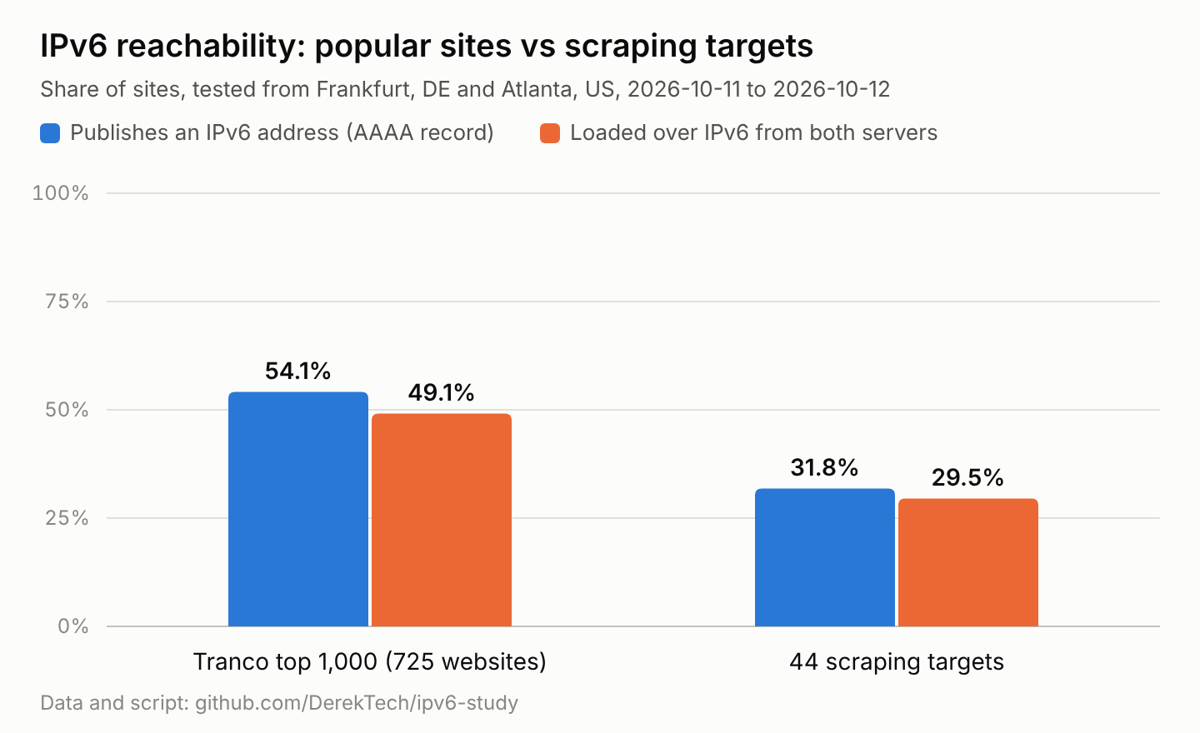
| Sample | Websites tested | Publish an IPv6 address (AAAA record) | Loaded over IPv6 from both servers |
|---|---|---|---|
| Tranco top 1,000 | 725 | 54.1% | 49.1% |
| Commonly scraped sites | 44 | 31.8% | 29.5% |
Table of IPv6 reachability. Tranco top 1,000: 54.1% publish an IPv6 address and 49.1% loaded over IPv6 from both servers. Commonly scraped sites: 31.8% publish an IPv6 address and 29.5% loaded over IPv6 from both servers.
Speed was effectively the same on both protocols. Medians in Atlanta were 1.3 ms to connect on both, and 49.8 ms (IPv4) vs 49.2 ms (IPv6) to the first byte. In Frankfurt, 1.2 ms vs 1.5 ms and 108.9 ms vs 113.0 ms. Of the 16 pages that treated the protocols differently, 8 blocked or rate-limited only IPv4 and 2 only IPv6. Where the bare domain and www disagreed, only www had an IPv6 address in 112 cases and only the bare domain in 20.
How to check whether you're using IPv4 or IPv6
Most modern operating systems and internet providers quietly switch between IPv4 and IPv6, so you might be using both without realizing. The checks below tell you what your device has, what the internet sees, and what a given site supports.
Your device addresses
On Linux
ip -4 addr
ip -6 addr
On Windows
ipconfig
On macOS
ifconfig
IPv4 addresses appear as inet on Linux and macOS or “IPv4 Address” on Windows. IPv6 addresses show up as inet6 or “IPv6 Address”. If the only IPv6 address starts with fe80::, your device has IPv6 enabled, but your network isn’t providing it, because that address works only on the local network. An address starting with 2 or 3 means your network gives you real IPv6.
Your public addresses
On Linux and macOS
curl -4 https://ifconfig.co
curl -6 https://ifconfig.co
On Windows
curl.exe -4 https://ifconfig.co
curl.exe -6 https://ifconfig.co
Each command prints the address that websites see when you connect over that protocol. If the IPv6 command prints an error such as “Couldn’t connect to server” instead of an address, your connection has no working IPv6 path. Check out using a proxy with curl for more details on curl web scraping.
For a browser check, test-ipv6.com runs a series of IPv4 and IPv6 connections from your browser and gives your setup a score out of 10. It also flags common problems, such as IPv6 that’s configured but broken, and provides suggestions.
Whether a site supports IPv6
On Linux and macOS
dig AAAA example.com +short
On Windows
nslookup -type=AAAA example.com
If the output lists one or more IPv6 addresses, the site publishes an AAAA record. If it returns nothing, the site can only be reached over IPv4. Keep in mind that a published address doesn’t prove the site works over IPv6, so follow up with a real request:
curl -6 -sS -o /dev/null -w "%{http_code} %{remote_ip}\n" https://example.com
A status code such as 200, followed by an IPv6 address, means the site answered over IPv6. Note that your internet provider must support IPv6 for this command to work.
Forcing one protocol
With curl, -4 forces IPv4 and -6 forces IPv6, as in the commands above. In Python, the httpx library lets you pick the protocol by binding the connection to a local address: 0.0.0.0 for IPv4 or :: for IPv6.
import httpx

for name, local_address in (("IPv4", "0.0.0.0"), ("IPv6", "::")):
    transport = httpx.HTTPTransport(local_address=local_address)
    with httpx.Client(transport=transport, timeout=10) as client:
        try:
            print(name, client.get("https://ifconfig.co/ip").text.strip())
        except httpx.TransportError:
            print(name, "not available on this connection")
The requests library has no setting for this, but you can override the function its underlying library, urllib3, uses to choose which kind of address to look up. The change applies to every request in the program, so set it once, before making requests.
import socket
import requests
import urllib3.util.connection as urllib3_connection

def use_only(family):
    urllib3_connection.allowed_gai_family = lambda: family

for name, family in (("IPv4", socket.AF_INET), ("IPv6", socket.AF_INET6)):
    use_only(family)
    try:
        print(name, requests.get("https://ifconfig.co/ip", timeout=10).text.strip())
    except requests.exceptions.ConnectionError:
        print(name, "not available on this connection")
Web scraping is a great use case for forcing the protocol per client or per script: you get to choose the protocol for each job without changing anything else on your machine. Check out using a proxy with Python requests for more web scraping tips.
Prefer IPv4 without disabling IPv6
Microsoft advises against disabling IPv6 because some Windows components stop working without it. At the same time, switching it off cuts you off from IPv6-only services and the IPv6 fallback you get when an IPv4 path fails. If IPv6 is causing problems, the safer fix is to tell the system to try IPv4 first and keep IPv6 available.
On Windows, run this in an administrator Command Prompt, then restart:
reg add "HKLM\SYSTEM\CurrentControlSet\Services\Tcpip6\Parameters" /v DisabledComponents /t REG_DWORD /d 0x20 /f
The value 0x20 is Microsoft’s recommended “prefer IPv4 over IPv6” setting. It only changes the order in which Windows tries addresses, so IPv6 still works when IPv4 isn’t available.
On Linux, add these lines to /etc/gai.conf:
precedence  ::1/128        50
precedence  ::/0           40
precedence  2002::/16      30
precedence  ::/96          20
precedence  ::ffff:0:0/96  100
The last line raises IPv4 above IPv6 in the order programs try addresses. The other four lines are needed because adding any precedence line makes the system discard its whole default table, so the file has to restate it. That change affects programs that use the system’s address ordering, which covers most command-line tools and scripts.
So should you use IPv6? If your network offers it and the checks above pass, leave it on: you’ll gain access to IPv6-only services and lose nothing on IPv4. Set a preference only when IPv6 is broken somewhere along your path, and for scraping, you can force the protocol in your code rather than change the whole system.
IPv4 vs IPv6 proxies for web scraping
IPv6 proxies are much cheaper than IPv4 proxies, but cheaper isn't the same as harder to block. They only work on sites that support IPv6, and many large sites group IPv6 clients by their /64 range, so a thousand addresses from one range can count as one visitor. For hardened targets, IPv4 datacenter or residential proxies are still more reliable.
Why IPv6 proxies are cheap
A single /48 block of IPv6 contains 65,536 /64 subnets, each with about 18 quintillion addresses, while an IPv4 address sold for an average of $20.04 in the first half of 2026. Proxy prices follow: at the time of writing, Proxy6 lists IPv6 proxies at $0.08 to $0.26 per IP per month, against $1.24 to $1.50 for its IPv4 proxies, and Proxy-Seller advertises IPv6 from $0.02 per IP against $0.49 for IPv4.
How sites group IPv6 clients
Rate limits and blocks rarely apply to a single IPv6 address. Cloudflare’s documentation for its original rate-limiting product says it acts once “an individual IPv4 address or IPv6 /64 IP range exceeds a rule threshold,” so every address inside one /64 counts as the same client. Because a /64 normally belongs to one household or one server, grouping by range is the natural default for any site that employs bot protection.
Which targets are reachable
An IPv6 proxy is only useful if the target answers over IPv6. This is what our test found for some of the most commonly scraped sites:
| Site | IPv6 address | Loaded over IPv6 | Same response as IPv4 |
|---|---|---|---|
| Yes | Yes | Yes | |
| YouTube | Yes | Yes | Yes |
| Yes | Yes | Yes | |
| Yes | Yes | No: IPv4 hit a login wall | |
| Yes | Yes | Yes | |
| Wikipedia | Yes | Yes | Yes |
| Amazon | Yes | Yes | Yes |
| X | No | No | n/a |
| No | No | n/a | |
| eBay | No | No | n/a |
Why IPv6-only proxies fail
If a site has no AAAA record, an IPv6-only exit has nothing to connect to. Depending on the provider, the request either fails outright or is quietly sent through an IPv4 fallback, which means you’re no longer using the addresses you paid for and may be sharing a much smaller IPv4 pool with other customers.
When to use IPv6 proxies
Use IPv6 proxies only when four things are true: the target supports IPv6, it serves the same content over IPv6 as over IPv4, it’s lightly protected, and your provider spreads you across many /64s and /48s. If any of those fail, use IPv4 datacenter proxies for easy targets and residential proxies for hard ones.
A managed web scraping API takes these responsibilities off your hands. ScrapingBee picks and rotates proxies for every request: datacenter proxies by default, residential proxies when you add premium_proxy=true, and proxies in a specific country with country_code, so you never manage IP versions or address ranges yourself. You can try it with 1,000 free API credits, no credit card required.
IPv4 vs IPv6 FAQ
Should I use IPv4 or IPv6?
Use both. Most devices and networks run dual stack, sending traffic over IPv6 when the destination supports it and falling back to IPv4 when it doesn't. You don't need to choose unless something breaks, and even then it's better to fix the IPv6 problem than to turn IPv6 off.
Is IPv6 better for gaming?
Sometimes. IPv6 can avoid carrier-grade NAT, which often causes strict or moderate NAT types that get in the way of hosting and voice chat. But this benefit only applies to games and consoles that support IPv6, and many matchmaking services still run on IPv4, so results vary by title and network.
Should I enable IPv6 on my router?
Yes, if your ISP supports it. Modern routers include a firewall that blocks unsolicited inbound IPv6 traffic by default. Enabling IPv6 lets sites and apps that support it use it, while dual stack keeps IPv4 working for everything else, so nothing that works today stops working.
Should I disable IPv6?
Usually not. Microsoft recommends preferring IPv4 over IPv6 on Windows instead of disabling IPv6, because parts of Windows rely on it. If something isn't working, set IPv4 as preferred or check the router and ISP settings first. Disabling IPv6 can break features and only hides the underlying problem.
What are the disadvantages of IPv6?
The main ones are practical rather than technical. Not every website, game service, or company network supports it. The addresses are harder to read and type, and running two protocols means two sets of firewall rules and monitoring. Poorly configured IPv6 can also cause slow fallbacks or VPN leaks.
Why do some people still prefer IPv4?
Familiarity and compatibility. IPv4 addresses are short and easy to read; every network and tool supports them, and many administrators know their quirks well. Some older equipment, apps, and services still work only over IPv4, so it remains the safe default for anything that has to reach the whole internet.
Can IPv4 and IPv6 talk to each other directly?
No. They're separate protocols with different packet formats, so an IPv4-only device can't talk to an IPv6-only one without help. Networks bridge them with dual stack, which runs both at once, or with translation such as NAT64 and DNS64, which lets IPv6-only devices reach IPv4-only sites.
How do I know if I have IPv6?
Visit a test site such as test-ipv6.com, or run curl -6 https://ifconfig.co in a terminal. If you get an IPv6 address back, your connection supports it. To see the addresses on your own machine, run ip -6 addr on Linux, ifconfig on macOS, or ipconfig on Windows.
Are IPv6 proxies good for web scraping?
They can be, for the right targets. IPv6 proxies are cheap and plentiful, but they only work on sites that support IPv6, and large sites often treat a whole /64 range as one client. They suit lightly protected, IPv6-ready targets; for hardened sites, IPv4 datacenter or residential proxies are more reliable.
Why are IPv6 proxies so cheap?
Because IPv6 addresses cost almost nothing to get. A single /48 allocation contains 65,536 /64 subnets, while IPv4 addresses sell for around $20 each and cloud providers charge for every public IPv4 address. The catch is that many addresses from one range add up to far fewer distinct identities than the count suggests.