A SOCKS5 proxy is an intermediary server that forwards your traffic to a target on your behalf using version 5 of the SOCKS protocol. It works below application protocols such as HTTP, enabling it to relay TCP and UDP traffic without encrypting that traffic by default. This makes a SOCKS5 proxy useful when an application needs flexible routing through a particular server or exit IP.
This article explains how SOCKS5 works, how it compares with SOCKS4 and a VPN, and how to configure one. It also explains when SOCKS5 is the right interface for a scraper and when an HTTP proxy endpoint is the more direct choice. This includes how ScrapingBee's Proxy Mode puts an HTTP proxy in front of its scraping API, so you don't have to manage a proxy pool yourself.
TL;DR
SOCKS5 sends supported TCP connections and UDP datagrams through an intermediary server. Compared with SOCKS4, it adds authentication-method negotiation, UDP relaying, and IPv6 support, but it doesn’t provide traffic encryption on its own. It’s useful for routing application traffic through a chosen proxy or exit IP for scraping and privacy-related use cases, although changing the IP visible to a target doesn’t guarantee anonymity.
For web scraping, the traffic is HTTP, so an HTTP/HTTPS proxy interface is usually the more direct choice than SOCKS5. ScrapingBee's Proxy Mode exposes exactly that so proxy rotation, geotargeting, and anti-bot handling happen behind the scenes instead of in your code.
What Is a SOCKS5 Proxy?
SOCKS is a family of proxy protocols that lets a client route network connections through an intermediary server, rather than connecting directly to the destination. SOCKS5 is the latest standardized version of SOCKS. It builds on the basic relay concept as a general-purpose proxy protocol for TCP-based applications and, through a separate relay mechanism, UDP datagrams. In practical terms, a SOCKS5 proxy is a server that implements the SOCKS5 protocol and forwards traffic on a client’s behalf.
Because it operates below application protocols such as HTTP, SOCKS5 is useful for more than web scraping or browsing. In practice, the same proxy can relay compatible traffic from API clients, database tools, file-transfer applications, messaging software, and other network programs.
Its design is protocol-agnostic, but it doesn’t guarantee security per se. In practical terms, this means that SOCKS5 changes the network path and can prevent the destination from seeing the client’s direct IP address. However, it doesn’t inherently encrypt application traffic. Encryption must come from another layer, such as an encrypted tunnel. Likewise, while authentication controls access to the proxy, it doesn’t automatically protect relayed data from interception.
These distinctions matter because SOCKS5 added several capabilities over earlier SOCKS versions to address exactly this kind of access control and flexibility, such as:
- Authentication-method negotiation: The client and proxy can choose from supported authentication methods.
- UDP relaying: The
UDP ASSOCIATEcommand enables proxying for applications that use UDP. - IPv6 addressing: Requests can identify destinations using IPv6 addresses, alongside IPv4 addresses and domain names.
How Does a SOCKS5 Proxy Work?
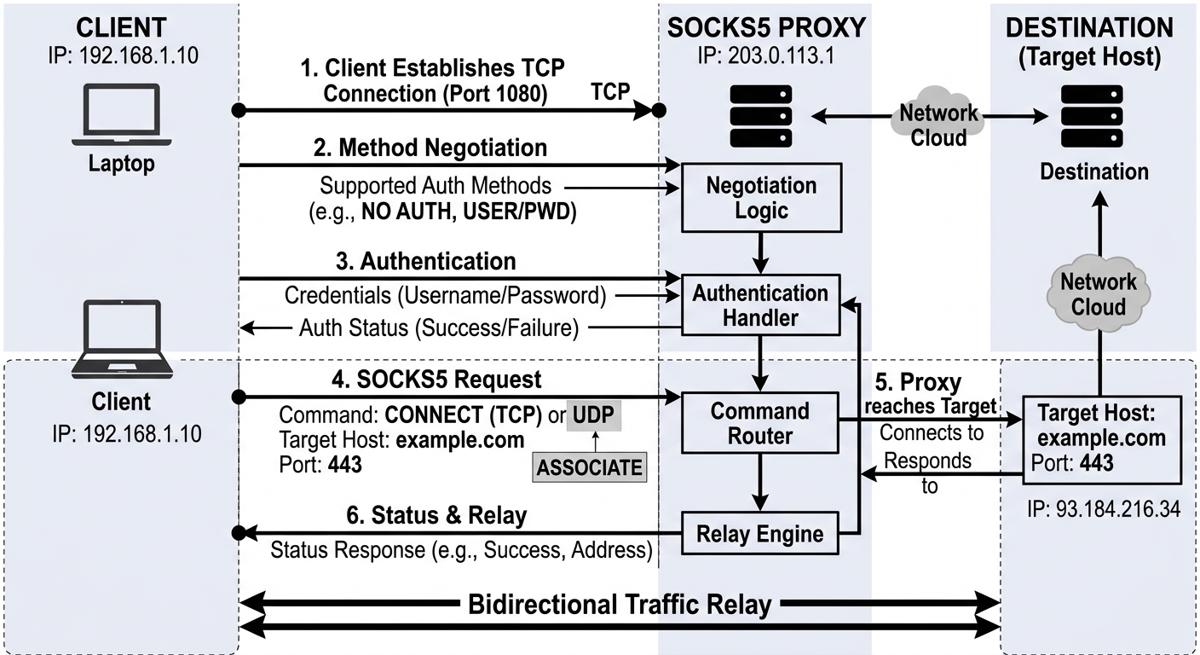
After covering what SOCKS5 is and does, let’s walk through the mechanics of the handshake itself. A SOCKS5 proxy works as an intermediary at the session layer between a client and a destination as follows:
- The client establishes a TCP connection to the proxy, typically on port 1080.
- During method negotiation, the client sends a list of supported authentication methods, and the proxy selects one.
- Authentication occurs if the selected method requires it.
- The client submits a SOCKS5 request containing a command (
CONNECTfor a TCP connection orUDP ASSOCIATEfor UDP), plus the target host and port. - After the proxy reaches the target, it returns a status response and relays traffic bidirectionally between the endpoints.
Below is a schematic image of how this process works:
This relay design also explains why, for a proxied connection, the target normally sees the proxy’s network source IP rather than the client’s source IP. That said, this doesn’t make the client anonymous. The target can still identify or correlate users through cookies, account authentication, browser fingerprinting, application payloads, and other signals. Also note that SOCKS5 doesn’t need to understand HTTP, HTTPS, or another application-level protocol, since it forwards payload data without interpreting application-specific messages, headers, or semantics.
One consequence of this hands-off approach is that DNS resolution depends entirely on the client’s proxy configuration, rather than on SOCKS5 itself. In curl and Python requests, the scheme determines where the destination hostname is resolved:
socks5://: Requests or curl resolve the hostname locally, then send the resulting IPv4 or IPv6 address through the proxy. The local DNS resolver, therefore, handles the lookup.socks5h://: The client sends the hostname through the SOCKS connection, and the proxy performs the destination lookup. In curl, this is equivalent to using--socks5-hostname.
To be clear, the socks5h label is a client-side convention indicating proxy-side hostname resolution, not a separate SOCKS protocol version. However, note that other applications and SOCKS libraries may expose this same DNS-resolution behavior through different URL schemes, flags, or defaults.
SOCKS5 vs HTTP and HTTPS Proxy
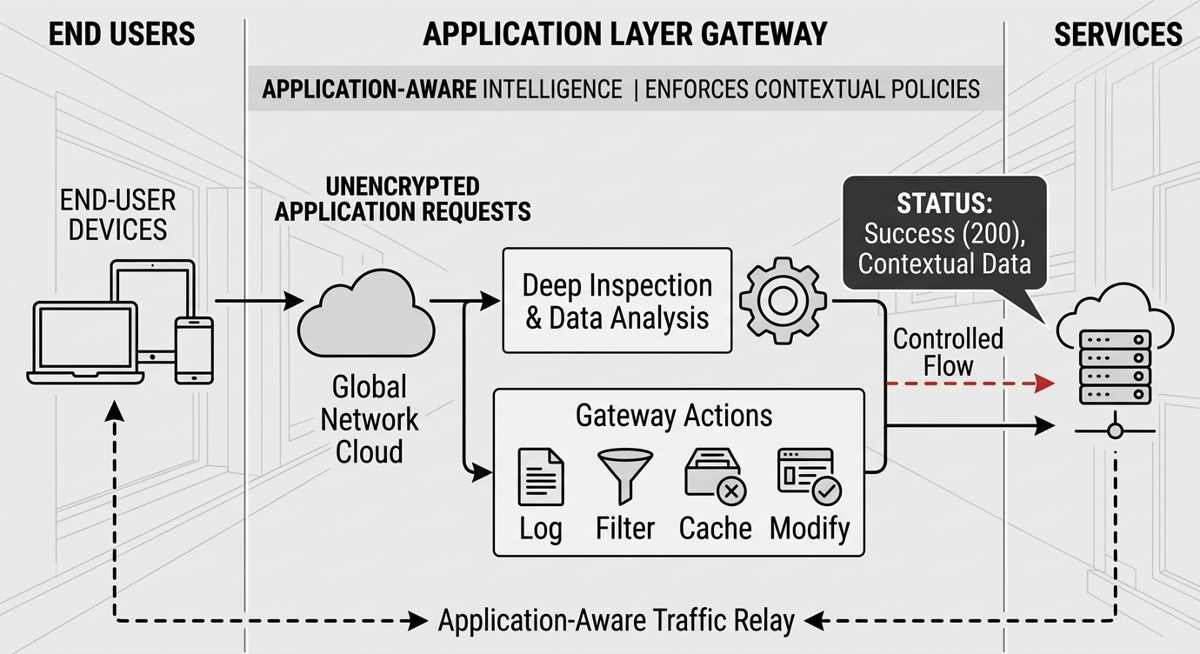
The key difference between a SOCKS5 and an HTTP proxy is the networking layer at which each one operates. An HTTP proxy understands the structure and semantics of HTTP, including request methods, URLs, headers, status codes, and message bodies. And because it’s application-aware, it can inspect, log, filter, cache, or modify unencrypted HTTP requests and responses. The image below shows, at a high level, the application schema of an HTTP proxy:
A SOCKS5 proxy, by contrast, operates below the HTTP application layer. So, instead of parsing HTTP messages, it establishes a connection or relay to a requested host and port, then transfers the application data without needing to understand its format. In practice, this means the same SOCKS5 proxy can carry traffic that an HTTP proxy isn’t built to handle: the payload could be HTTP, but it could just as easily be a database protocol, file-transfer traffic, or another supported protocol, all through the same connection. That flexibility is what makes SOCKS5 protocol-agnostic.
HTTPS requires a more precise comparison, since it complicates the “application-aware vs. protocol-agnostic” distinction just drawn. An HTTP proxy can use the CONNECT method to establish a TCP tunnel between the client and the destination server. TLS is then negotiated through that tunnel, so the proxy doesn’t automatically see the decrypted HTTPS request or response content, even though it remains an HTTP-aware proxy in principle. However, it can still observe connection-level information, such as the tunnel’s destination. But viewing or modifying encrypted application data would generally require separate TLS interception, along with client trust configuration.
Overall, these technical differences affect which proxy type is better suited to a particular workload. The following table compares SOCKS5 with HTTP and HTTPS proxies across the practical factors that matter most when choosing between them:
| Factor | SOCKS5 proxy | HTTP/HTTPS proxy |
|---|---|---|
| Protocol support | Can relay supported HTTP and non-HTTP traffic without interpreting the application protocol. | Designed for HTTP traffic. HTTPS is commonly carried through a CONNECT tunnel. |
| Application awareness | Doesn’t parse HTTP methods, headers, status codes, or message bodies. | Understands HTTP semantics, which can support request-level logging, filtering, caching, and debugging. |
| Web scraping use | Useful when a browser, HTTP library, or automation tool expects a SOCKS interface. | Common for web scraping because scraping workloads are HTTP-based and clients often support these proxies directly. |
| DNS behavior | Can support proxy-side hostname resolution when the client passes the domain name to the proxy, such as with socks5h://. | DNS behavior depends on the proxy type, tunneling method, and client configuration. |
| Routing flexibility | Suitable when a workflow needs SOCKS-specific routing or must proxy both scraping requests and non-HTTP traffic. | Typically the more direct choice when the workflow only needs HTTP or HTTPS requests. |
| Best choice when | Client compatibility, remote DNS resolution, or support for multiple application protocols is the priority. | HTTP-specific controls, direct client support, or easier request-level debugging is the priority. |
Given these differences, the right choice depends on the workload. HTTP and HTTPS proxies are often the more direct option for web scraping. SOCKS5 is useful when the client expects a SOCKS interface, proxy-side DNS resolution is needed, or the same workflow must handle both HTTP and non-HTTP traffic. Client compatibility, routing requirements, DNS behavior, and protocol support should therefore guide your decision.
DNS resolution also lands differently. A SOCKS5 client resolves locally or remotely depending on which URL scheme you typed, so the behavior is a client convention you can get wrong. An HTTP proxy has no equivalent ambiguity: the hostname always reaches the proxy, so resolution is proxy-side by construction. For a scraping pipeline, that's one less thing to misconfigure, and one more reason these workloads converge on HTTP proxies.
SOCKS4 vs SOCKS5
The SOCKS4 vs SOCKS5 comparison centers on four areas: authentication, transport support, address types, and DNS handling. SOCKS4 provides basic TCP proxying, while SOCKS5 expands the protocol with negotiated authentication, UDP relaying, IPv6 support, and domain-name destination addresses. Note that SOCKS4a is a separate extension to SOCKS4 and shouldn’t be treated as a feature of the original SOCKS4 protocol (and it’s referenced below only where relevant to DNS handling).
The following table breaks down each of these four areas side by side, plus typical use cases:
| SOCKS4 | SOCKS5 |
|---|---|
Authentication: No negotiated authentication framework. A SOCKS4 request includes a USERID field, and historical implementations could use mechanisms such as IDENT. The USERID field isn’t equivalent to SOCKS5 username/password authentication. | Authentication: Supports authentication-method negotiation, including no authentication, username/password, and GSSAPI. The client advertises supported methods, and the proxy selects one. |
Transport: TCP only. SOCKS4 primarily uses the CONNECT command for outbound TCP connections, with BIND available for specific inbound-connection workflows. | Transport: TCP and UDP. SOCKS5 supports commands such as CONNECT, BIND, and UDP ASSOCIATE, with the latter establishing a UDP relay association through the proxy. |
| IPv6: No. Plain SOCKS4 requests use IPv4 destination addresses. | IPv6: Yes. SOCKS5 requests can carry IPv4 addresses, IPv6 addresses, or domain names using an explicit address-type field. |
| Remote (proxy-side) DNS resolution: No. Plain SOCKS4 has no mechanism for passing a destination hostname to the proxy. The separate SOCKS4a extension added support for sending a domain name for proxy-side resolution. | Remote (proxy-side) DNS resolution: The protocol supports domain-name destination addresses. Whether the hostname is actually passed to and resolved by the proxy depends on the client’s behavior and configuration. |
| Typical use: Legacy systems and applications that only implement SOCKS4. | Typical use: The usual choice when authentication negotiation, UDP relaying, IPv6 addressing, or other SOCKS5 capabilities are required. |
Given these gaps in authentication, transport, addressing, and DNS handling, SOCKS5 is generally preferred for new configurations. It supports modern addressing and more flexible connection requirements without being tied to one authentication approach, and it’s better supported by current scraping tools and networking libraries. SOCKS4 can still remain appropriate for legacy compatibility, but as the table shows, it usually doesn’t offer a practical advantage when both versions are available.
SOCKS5 Proxies vs VPN: How They Differ and Whether to Combine Them
SOCKS5 proxies and VPNs solve different problems: one proxies traffic for a specific application, the other encrypts and reroutes traffic at the device level. So, understanding that distinction matters both when choosing between them and when deciding whether to run them together.
The two sections below cover each in turn: how SOCKS5 and VPNs compare on encryption, scope, and performance, and then whether pairing a SOCKS5 proxy with a VPN tunnel actually makes sense.
SOCKS5 Proxy vs VPN
A SOCKS5 proxy is commonly configured for a particular application or client, such as a scraper, browser, or command-line tool. It relays supported traffic through the proxy, so the destination normally sees the proxy’s network source IP rather than the client’s. And as already stated above, SOCKS5 doesn’t provide traffic encryption by default.
A VPN works differently: it creates an encrypted tunnel between the device and a VPN endpoint, then routes traffic through that tunnel. Its coverage can include broader device traffic, although the exact scope depends on routing configuration and features such as split tunneling. This encryption is the key trade-off against SOCKS5’s approach. Because SOCKS5 doesn’t add encryption overhead by default, it can be lighter-weight, but it isn’t necessarily faster. This is because performance depends on implementation, network route, server load, latency, bandwidth, and connection handling. The practical choice therefore depends on whether you need application-level proxying or an encrypted tunnel with broader routing coverage.
Should You Use SOCKS5 With a VPN?
Given that the two operate at different layers, some VPN services also expose SOCKS5 proxy endpoints, so that the two technologies can be combined. But note that the layers still remain distinct even when paired: a SOCKS5 connection handles proxying, while an active VPN tunnel provides encryption between the device and the VPN endpoint. Also, SOCKS5 doesn’t become encrypted merely because the proxy and VPN are operated by the same company. Similarly, using a VPN company’s SOCKS5 endpoint by itself doesn’t mean a VPN tunnel is active.
If both are enabled, a SOCKS-aware application may send its traffic to the SOCKS5 proxy through the VPN tunnel, depending on the operating system’s routes, split-tunneling rules, DNS configuration, and client settings. This can add routing flexibility, but it also introduces complexity and potential performance costs.
Ultimately, whether combining them is worthwhile depends on the required traffic path and threat model. A VPN can provide encrypted transport for broader device traffic, while SOCKS5 can give one application a specific proxy endpoint. Also, neither setup guarantees anonymity, and calling one configuration “more private” requires context: privacy depends on routing, configuration, provider trust, logging practices, DNS behavior, and the application protocols in use.
How to Use a SOCKS5 Proxy
The most common ways to use proxies in your code are with Python and curl. To route a request through a SOCKS5 proxy in Python, first create a folder on your local machine:
mkdir proxy-requests
Navigate into the folder:
cd proxy-requests
Create a virtual environment:
python -m venv venv
Activate the virtual environment:
source venv/bin/activate # For Unix/macOS. For Windows: .\venv\Scripts\activate
In the activated virtual environment, install requests with its optional SOCKS dependencies:
pip install "requests[socks]"
Now, go to your SOCKS5 proxy provider and check for the proxy’s IP address and port:

Now you can create a Python file, use the proxy’s data, and write the following code:
import requests

proxies = {
    "http": "socks5h://13.xx.yy.zzz:1080",
    "https": "socks5h://13.xx.yy.zzz:1080",
}
response = requests.get(
    "https://httpbin.org/ip",
    proxies=proxies,
    timeout=30,
)
response.raise_for_status()
print(response.json())
For security reasons, I obfuscated most of the proxy IP. When running the code, you should obtain a result similar to the following:

The response shows the (obfuscated) proxy’s egress IP. To verify the routing, first request the same endpoint without the proxy and confirm that the two returned IP addresses differ.
If you prefer using curl, the approach is similar. In this case, for the sake of testing, I tried using another proxy. To reproduce it, run the following command:
curl --proxy "socks5h://45.xx.yy.zz:4289" https://httpbin.org/ip
The response should again show the proxy’s egress IP:

SOCKS5 for Web Scraping: When It Helps, and What to Use Instead
For web scraping purposes, choosing between a self-managed SOCKS5 proxy pool and a managed scraping API is an operational decision:
- A self-managed pool gives you low-level control over IP selection, rotation logic, sessions, DNS behavior, timeouts, and retry policies. That control can suit simple workloads, specialized routing requirements, or teams that already have reliable proxy infrastructure. At recurring or production scale, however, you’ll also need to replace dead IPs, monitor proxy health, rotate addresses, respond to blocks, manage concurrency, and maintain the surrounding infrastructure.
- A managed scraping API moves much of that work to a service layer, which can coordinate proxy rotation, anti-bot measures, JavaScript rendering, and retries. However, you’ll trade some implementation control for a higher-level interface.
On the protocol question, the comparison above already gives the answer. Scraping workloads are HTTP, so an HTTP or HTTPS proxy is usually the more direct choice. SOCKS5 earns its place when your tooling expects a SOCKS interface, when your client gives you no other way to get proxy-side hostname resolution, or when the same workflow has to carry non-HTTP traffic as well.
ScrapingBee is a web scraping API that manages the infrastructural overhead. Its Proxy Mode exposes the API through a proxy interface at proxy.scrapingbee.com:8886, so compatible clients can route requests through it the way they would through any upstream proxy.
Note that Proxy Mode changes how the API is accessed. It doesn’t turn ScrapingBee into a general-purpose proxy provider. And about that, several implementation details matter:
- TLS verification must be disabled: Proxy Mode requires
-kin curl,verify=Falsein Python Requests, or the client’s equivalent because ScrapingBee terminates TLS on its side. - JavaScript rendering defaults to enabled: Set
render_js=Falsein the Proxy Mode parameters when browser rendering isn’t required. - Requests consume API credits: Proxy Mode uses ScrapingBee API credits, with cost depending on the selected request options.
- External browsers can multiply API calls: When Selenium, Puppeteer, or another browser automation tool is routed through Proxy Mode, requests generated by that browser can each result in a separate API call. This is a consequence of routing an external browser’s requests through Proxy Mode, not simply of enabling ScrapingBee’s own
render_jsoption.
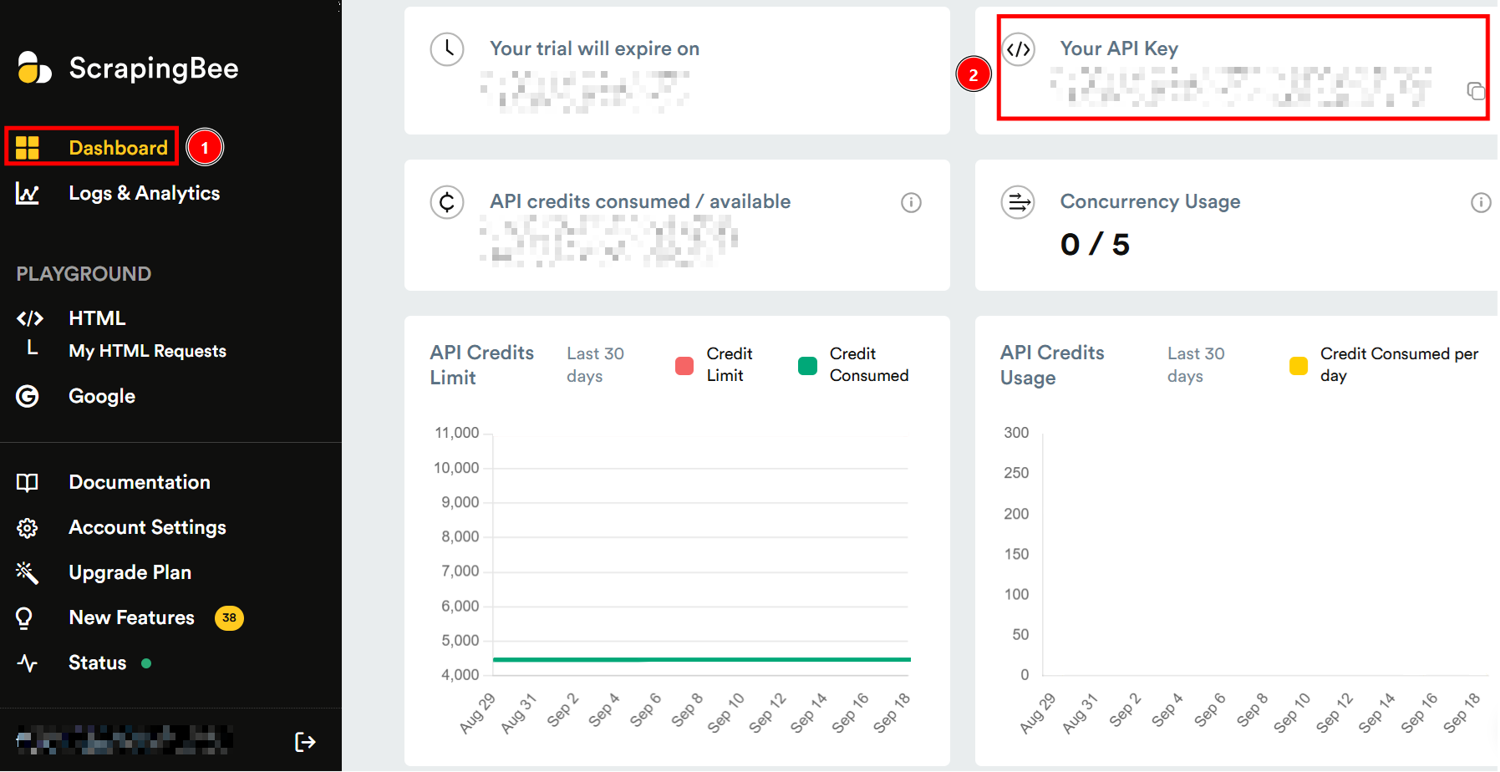
To use ScrapingBee’s Proxy Mode, you first have to register on ScrapingBee’s website and get your API key in the dashboard:
Below is how to use the Proxy Mode in Python:
import requests

proxy_url = "http://<YOUR-SCRAPINGBEE-API-KEY>:render_js=False&premium_proxy=True@proxy.scrapingbee.com:8886"
proxies = {"http": proxy_url, "https": proxy_url}

response = requests.get(
    "https://httpbin.org/ip",
    proxies=proxies,
    verify=False,
    timeout=60,
)

print('Response HTTP Status Code: ', response.status_code)
print('Response HTTP Response Body: ', response.content)
Note where the credentials go. The API key sits in the username field of the proxy URL and the request options in the password field; both are sent to ScrapingBee's endpoint as HTTP Basic credentials in a Proxy-Authorization header. That leg is cleartext between your client and the proxy. HTTPS between your client and the target site does not retroactively protect the proxy-authentication exchange, so treat the API key accordingly on untrusted networks.
The result is the following:

As you can see, in this case, the client connects to ScrapingBee’s proxy endpoint on the configured port, using your API key for authentication. ScrapingBee then processes and forwards the request to the target URL. The image shows that the returned IP differs from the client’s public IP: this indicates that the request was routed through ScrapingBee’s proxy infrastructure.
So, this demonstrates that ScrapingBee manages the infrastructure under the hood. In other words, with respect to the previous examples, in this case I didn’t need to have a proxy provider: ScrapingBee managed proxies from its proxy pool.
Overall, choosing the right model depends on whether your priority is direct network control or reducing recurring proxy and anti-bot operations to scrape without getting blocked.
Scrape Without Managing Proxies — Try ScrapingBee
If you’re researching SOCKS5 because you need proxy infrastructure for web scraping, consider whether managing that infrastructure is actually part of the value you want to build. ScrapingBee handles proxy rotation, configurable geotargeting, and anti-bot measures through its web scraping API, which can also be accessed through Proxy Mode by compatible tools. It isn't a proxy provider you have to configure and babysit yourself, and no service can guarantee that every target will always work, but it can reduce the operational work involved in maintaining proxy pools and adapting request strategies.
Try ScrapingBee with 1,000 free API credits: no credit card required.
SOCKS5 Proxy FAQs
Can I get a SOCKS5 proxy for free?
Free public SOCKS5 proxy lists exist, but their operators are often unknown, and their servers can be unreliable, overloaded, or short-lived. So, treat them with caution. A SOCKS proxy created through an SSH connection to a server you control can reduce some third-party risk, although self-hosting doesn’t automatically provide anonymity. Tor also exposes a SOCKS interface, but it’s a different system with distinct routing and performance characteristics; for production scraping, reliable managed infrastructure is generally more practical than public proxy lists. Learn more about free SOCKS5 options.
Are my SOCKS5 proxy credentials sent securely?
Not when you use the standard RFC 1929 username/password authentication method by itself. That method sends the username and password in cleartext between the client and SOCKS5 proxy, and HTTPS encryption between the client and destination doesn’t retroactively protect this earlier proxy-authentication exchange. This is particularly important when the password field contains an API key, so you should only send sensitive credentials over a trusted network path or when the service supplies additional transport protection.
The same caution applies to HTTP proxies using Basic authentication: credentials in Proxy-Authorization travel in cleartext between client and proxy unless that leg is separately protected.
Is it legal to use a SOCKS5 proxy?
SOCKS5 is a networking protocol, and using a proxy isn’t inherently unlawful. Whether a particular use is permitted depends on the activity performed through the proxy, applicable law in the relevant jurisdiction, authorization, and the rules governing the service being accessed. Violating a website’s terms of service also isn’t automatically equivalent to breaking the law, although it can carry separate contractual or access-related consequences.
Can I use a SOCKS5 proxy for anything besides web scraping?
Yes. Because SOCKS5 supports TCP connections and UDP relaying without being limited to HTTP, compatible applications can use it for much more than browsing and scraping. Examples can include TCP-based applications, VoIP software, and UDP-based applications, but actual compatibility depends on the client’s SOCKS5 implementation and the proxy server’s supported commands, transport capabilities, and configuration.