Competitors can reprice several times a day, and checking their pages by hand doesn't scale. This guide shows how to track competitor prices using web scraping in Python: you fetch product pages from Amazon, Walmart, and most other retailers, extract the price and stock fields, store a snapshot on every run, and get a Slack or email alert when a competitor undercuts you.
TL;DR
You can track competitor prices with one Python script and a scraping API like ScrapingBee. You don't need a subscription tool unless you track more than a few hundred SKUs. How it works:
- Amazon and Walmart have dedicated parsers that return structured JSON in one call, with no selectors to maintain.
- Every other retailer goes through the HTML API, which tries a CSS selector first, then JSON-LD, then AI extraction, so one code path covers the rest.
- Storage is one snapshot added on every run (to a CSV, Parquet, or SQL table, whichever you already use), so you build a price history you can compare over time.
- Alerts are sent only the first time a competitor undercuts you while in stock. A repeat run, or a used or multipack offer, does not trigger one.
- The code is tested on live APIs, and a ready-to-run companion repo is there if you'd rather not build it yourself.
What tracking competitor prices using web scraping involves
Competitor price tracking means monitoring a set of competitor product pages on a schedule, extracting the price, stock status, and any promotion from each page, saving those values so you can see how they change, and acting when a number crosses a line you care about.
Track competitor prices with web scraping in four steps:
- List the competitor product URLs you need to monitor and map each one to your own SKU.
- Fetch each page with a scraping API that handles proxies and anti-bot defenses, or a dedicated parser for Amazon and Walmart that returns structured JSON directly.
- Extract the price and stock fields with CSS selectors, JSON-LD, or AI extraction.
- Store the snapshots and trigger an alert when a competitor undercuts your price by a threshold.
The two parts most likely to break are anti-bot defenses and CSS selectors that stop matching after a site redesign.
Before you write any code, weigh build vs. buy. It comes down to scale and maintenance. A handful of sites and a few hundred SKUs favor building it yourself, while thousands of SKUs with no one to maintain the scraper favor a vendor tool. That math has been shifting, though. The hidden cost of building used to be selector maintenance, since competitor redesigns kept breaking your scraper. AI extraction has cut into that cost (you describe the field in plain English instead of rewriting selectors), which is a big part of why building has become more attractive at scales where it used to lose. You'll find the full build-vs-buy comparison at the end. This guide assumes you've decided to build.
And there are two ways to approach it. One is a deterministic pipeline you own (fetch → parse → store → alert). The other is pointing an agent at ScrapingBee's hosted MCP (Model Context Protocol) server, which gives the agent tools to do the scraping and query your price history directly – the emerging alternative to wiring the whole pipeline yourself. This guide builds the pipeline, because it's more controllable and debuggable, and it gives you a price history, then shows how to open it up to an agent over MCP in Step 5. Pick the pipeline when you want deterministic control. Use the agent when you'd rather describe the job than code it.
If you're new to scraping in Python, the web scraping in Python guide covers the basics this article assumes.
The four problems any competitor price tracker has to solve
Every price tracker, homegrown or commercial, has to get past the same four obstacles. All four sit on top of one setup step, matching each competitor product to your own SKU so you compare like-for-like. Step 1 handles that mapping.
Problem 1: Anti-bot defenses. Amazon, Walmart, Best Buy, along with many stores on Shopify, WooCommerce, and similar platforms, sit behind bot-management systems like Cloudflare, DataDome, HUMAN (formerly PerimeterX), or Akamai Bot Manager. The datacenter IP isn't even the first thing that exposes you. These systems fingerprint your TLS handshake (JA4), and Python's requests and httpx emit a default TLS signature that can be flagged before your request reaches the page. So requests.get() gets a 403 or a CAPTCHA quickly, and rotating IPs alone won't fix a fingerprint problem. You need traffic that looks like a browser. The broader trend is toward tighter controls too. In July 2025 Cloudflare started blocking AI crawlers by default on new domains and launched a pay-per-crawl marketplace in private beta.
Problem 2: JavaScript rendering. Many product pages render the price client-side from a JSON blob after the initial HTML loads, so BeautifulSoup on the raw HTML comes back without the price.
Problem 3: Selectors that break. Competitor pages get redesigned. A CSS selector that returned the price in March returns None in June, your tracker quietly logs nulls, and your alerts go silent. Selector drift arguably kills more homegrown trackers than anti-bot defenses do, because it fails without throwing an error.
Problem 4: Scheduling, storage, and alerting. A script you run once isn't a tracker. A tracker runs on a schedule, keeps a history of every observation, and pings you only when something changes, not on every run.
Those four problems map onto one pipeline:
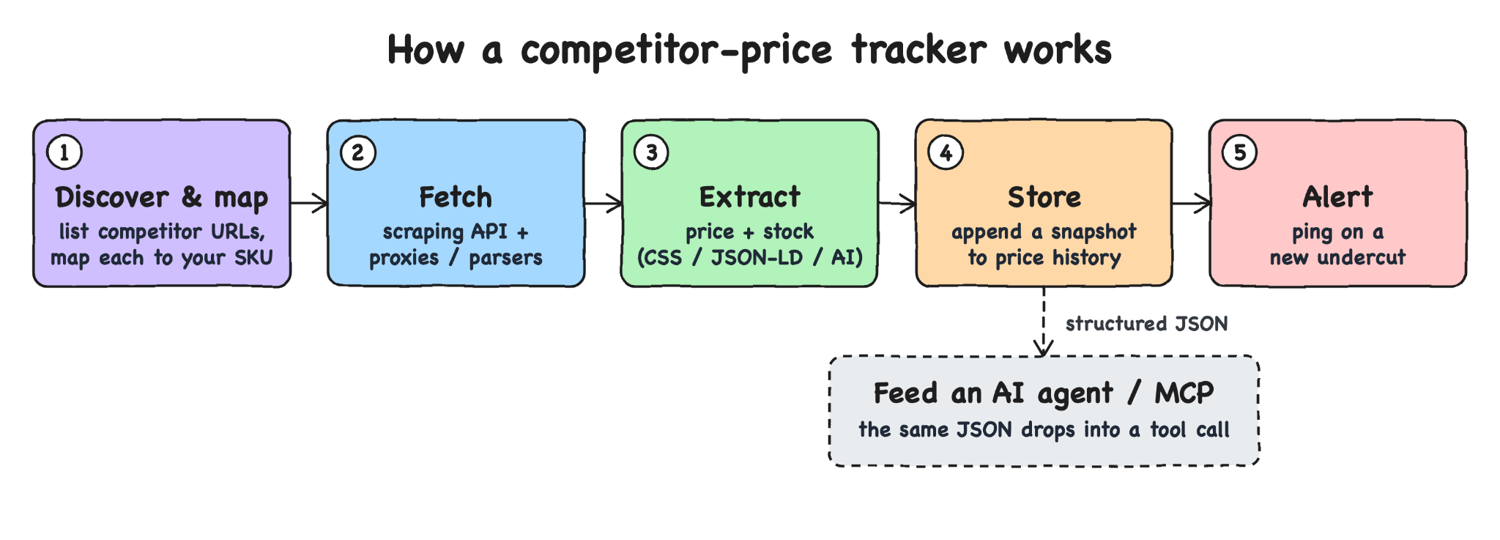
The steps that follow build this pipeline: Step 1 sets up the SKU mapping, Steps 2–4 solve the four problems (anti-bot and JavaScript rendering are both handled at the fetch step, Step 2), and Step 5 assembles them into one working script.
Step 1. List the URLs and map them to your SKUs
Start with a flat file mapping each competitor product to one of your own SKUs. This boring step largely decides whether your alerts are signal or noise. The file is a plain CSV:
our_sku,source,identifier,our_price
MOUSE-001,amazon,B004YAVF8I,14.99
MOUSE-002,walmart,15545702811,14.99
HOODIE-009,generic,https://www.scrapingcourse.com/ecommerce/product/abominable-hoodie,75.00
Four columns do the job. You need your SKU, the source (which decides how you fetch it), the identifier, and your current price (so the tracker can compare). For marketplaces, store the stable identifier rather than the full URL. Amazon's ASIN (B004YAVF8I) and Walmart's item ID (15545702811) survive slug and title changes. The pretty URL does not.
Where do those IDs come from? The same dedicated parsers have search endpoints. One call returns the ranked products for a keyword, each with its ASIN or item ID and current price:
import requests

AUTH = {"Authorization": "Bearer YOUR-API-KEY"}

# Amazon search: discover competitor products + ASINs for a keyword
r = requests.get("https://app.scrapingbee.com/api/v1/amazon/search",
                 headers=AUTH, params={"query": "logitech wireless mouse"}, timeout=90)
for p in r.json()["products"][:5]:
    print(p["asin"], p["price"], p["title"][:50])
# /walmart/search works the same way, returning each product's `id` and `price`.
That also turns "track these 20 URLs" into "track whoever ranks for these 20 keywords".
Map at the variant level, not the product name. Search "logitech wireless mouse" and the top hits include a Logitech M185 and a different "Logitech Silent Wireless Mouse". They share a brand and category but are different products at different price points. Comparing them directly is a bug, not an insight. Map on SKU, GTIN (Global Trade Item Number), or model number, and store a match-confidence flag if your catalog is fuzzy. matcher.py in the companion repo is a working version (GTIN-first, then model code, then fuzzy title, since "M185" and "M510" have near-identical titles but are different products).
Step 2. Fetch the product page (proxies and anti-bot)
With each competitor product mapped to your SKU, the next job is fetching those pages. You have two paths here: the generic one works for most retailers, and the dedicated-parser path for Amazon and Walmart skips HTML parsing entirely.
The generic case for any retailer's product page
For an arbitrary retailer, fetch the page through ScrapingBee's HTML API, which runs the request through a headless browser and a managed proxy pool so you don't have to maintain either. Your requests call only ever talks to the ScrapingBee endpoint. ScrapingBee makes the browser-fingerprinted request to the retailer on its side, so the requests TLS-signature problem from Problem 1 isn't yours to solve.
The fingerprint problem runs deeper than the network layer. DataDome and Cloudflare flag the automation itself. The Runtime.enable CDP (Chrome DevTools Protocol) calls that Selenium, Puppeteer, and Playwright issue to drive a browser that can trip a CAPTCHA even on a real machine with a perfect residential IP. Keeping a DIY stealth stack ahead of that is constant work a managed browser pool does for you. The endpoint is https://app.scrapingbee.com/api/v1/.
The non-marketplace examples in this guide use public, scrape-safe practice stores (scrapingcourse.com, books.toscrape.com, scrapeme.live) so you can run them as-is without hammering a real company's site. They're cleaner than reality, though. Expect messier markup, missing structured data, regional variants, and tougher, evolving anti-bot on your own competitors. You'll see it work on real, defended sites in the Amazon and Walmart section next, which runs against live products. Here's a request against one of those practice stores:
import requests

API_KEY = "YOUR-API-KEY"

resp = requests.get(
    "https://app.scrapingbee.com/api/v1/",
    headers={"Authorization": f"Bearer {API_KEY}"},
    params={
        "url": "https://www.scrapingcourse.com/ecommerce/product/abominable-hoodie",
        "render_js": "true",        # execute JS (default) for client-side prices
        "premium_proxy": "true",    # residential IPs for protected retailers
        "country_code": "us",       # geotarget; requires premium_proxy
    },
    timeout=90,
)
print(resp.status_code)
html = resp.text
Pick the proxy tier per target rather than always reaching for the strongest. render_js is on by default and handles client-side prices. premium_proxy=true switches to residential IPs for most sites behind Cloudflare or DataDome. stealth_proxy=true uses a separate pool for the hardest targets where premium still gets blocked. Prices and availability are often region-specific, so geotargeting with country_code matters for accurate tracking.
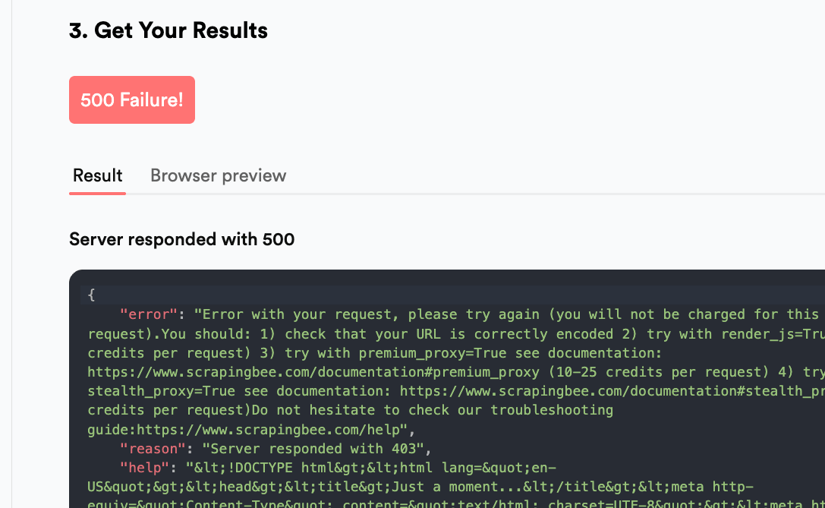
You can watch a plain fetch get stopped and the right tier get through. Against a Cloudflare-protected page, classic gets the interstitial and stealth_proxy clears it:
def fetch(url, **extra):
    return requests.get("https://app.scrapingbee.com/api/v1/",
                        headers={"Authorization": "Bearer YOUR-API-KEY"},
                        params={"url": url, **extra})

cf = "https://www.scrapingcourse.com/cloudflare-challenge"
classic = fetch(cf, render_js="false")
stealth = fetch(cf, stealth_proxy="true")
print("classic:", classic.status_code, "Just a moment" in classic.text)
print("stealth:", stealth.status_code, "Just a moment" in stealth.text)
# classic: 500 True    ← the Cloudflare "Just a moment…" challenge, not the page
# stealth: 200 False   ← bypassed; the real page comes back
Classic proxy: the cheap fetch gets the challenge, not the page.
Stealth proxy: same URL, HTTP 200, the real page comes back.
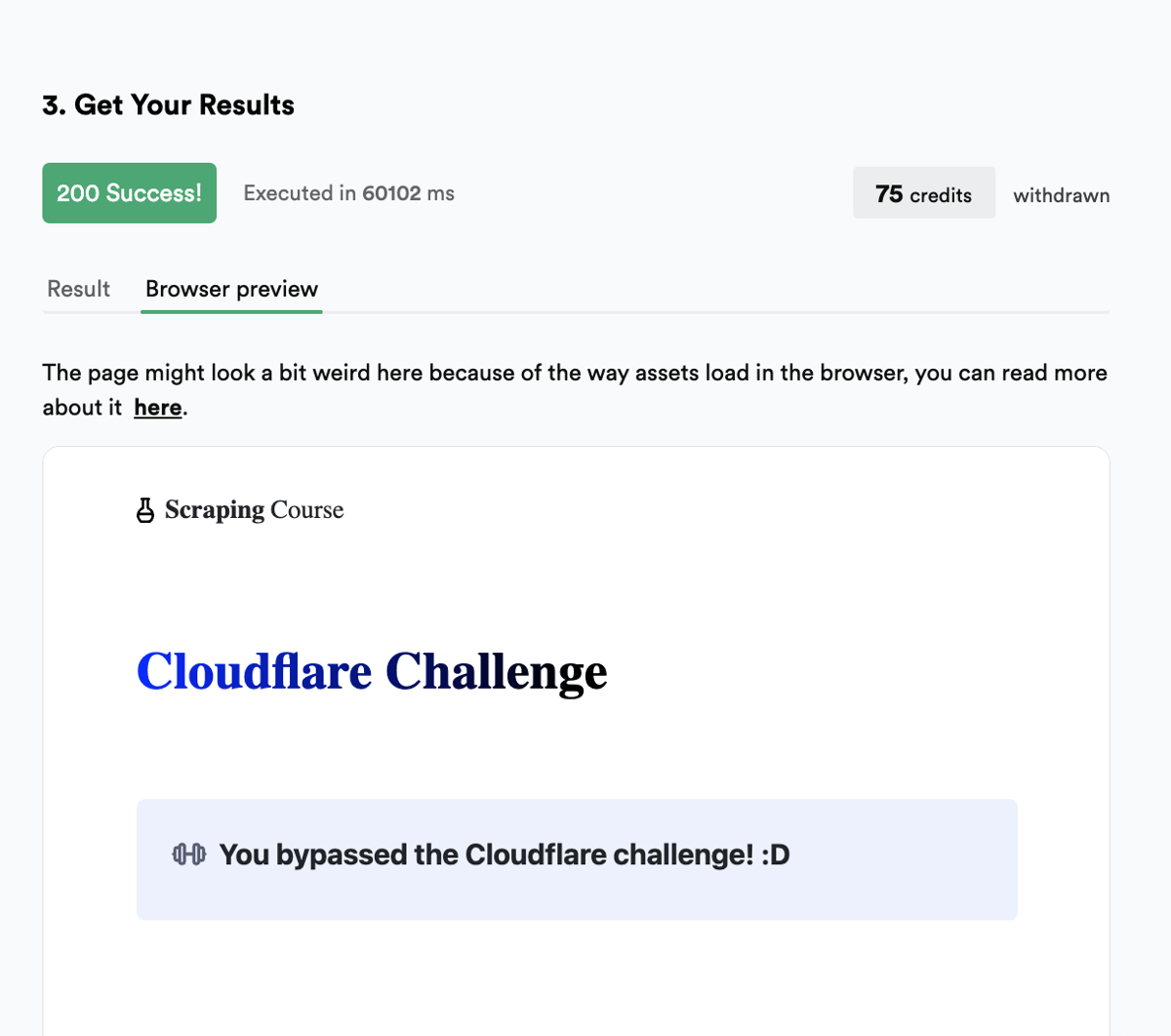
A full interstitial like this is the hard case. stealth_proxy cleared it, while premium_proxy wasn't enough. For Amazon and Walmart you skip all of this. The dedicated parsers in the next section return JSON because they handle this kind of defense for you.
The credit cost scales with the tier, and the difference is large enough that picking the right one is a budget decision:
| Configuration | Credits per request |
|---|---|
Classic proxy, no JS (render_js=false) | 1 |
| Classic proxy + JS (default) | 5 |
| Premium proxy + JS | 25 |
| Stealth proxy | 75 |
AI extraction add-on (ai_extract_rules) | +5 |
See ScrapingBee pricing for plan-level credit allotments. You're charged when the request succeeds (200 or 404, since a target 404 like a discontinued product still returns a page), so a blocked 403/429/5xx fetch doesn't cost you credits.
At scale this is the budget line that matters. Tracking ~500 SKUs once a day runs to roughly 75k–225k credits a month depending on tier. The free 1,000 credits are for testing, not for running a catalog, so size a plan to your SKU count. These per-request costs, and the response fields shown throughout, were accurate when tested in mid-2026 and do change, so verify the current numbers for your own run.
When the price loads late or hides behind a click. render_js runs the page's JavaScript, but some prices show up only after a delay or an interaction, like a variant you select or a region modal you dismiss. wait_for blocks until a selector is in the DOM before returning. js_scenario runs a sequence of browser actions first:
import json, requests

scenario = {"instructions": [
    {"wait_for": ".price"},   # block until the price element renders
    {"scroll_y": 600},        # trigger any lazy-loaded content
    {"wait": 500},
]}

resp = requests.get(
    "https://app.scrapingbee.com/api/v1/",
    headers={"Authorization": "Bearer YOUR-API-KEY"},
    params={
        "url": "https://www.scrapingcourse.com/ecommerce/product/abominable-hoodie",
        "render_js": "true",
        "js_scenario": json.dumps(scenario),
        "extract_rules": json.dumps({"price": ".price"}),
    },
    timeout=90,
)
js_scenario also supports click, fill, and infinite_scroll, enough to reach a price behind a size picker or a "see price in cart" button. It runs in the headless browser, so it's billed at the normal render_js rate from the table above (no surcharge).
ScrapingBee is only for publicly accessible product pages, the ones you can see in an incognito window without logging in. Scraping behind login credentials is prohibited by ScrapingBee's terms of service. The HTML API documentation covers every parameter.
The specialized case for Amazon and Walmart
Amazon and Walmart are the two targets where the generic path is the wrong tool. Both run aggressive anti-bot defenses, render key fields client-side, and restructure their HTML often. You can fight that with the stealth proxy and parse the result yourself, but ScrapingBee has dedicated parsers for both that return structured JSON in one call, with no HTML parsing and no selectors to maintain. Everything in this section runs against live products on Amazon and Walmart (household-name marketplaces with strong anti-bot), so you're seeing the parsers handle production sites, not a sandbox.
This part of the build is cheaper and more durable than building it yourself. Here's an Amazon product fetched by ASIN through the Amazon API:
import requests
API_KEY = "YOUR-API-KEY"
resp = requests.get(
    "https://app.scrapingbee.com/api/v1/amazon/product",
    headers={"Authorization": f"Bearer {API_KEY}"},
    params={"query": "B004YAVF8I"},   # the ASIN
    timeout=90,
)
data = resp.json()
print(data["title"], data["price"], data["currency"], data["stock"])
The product is passed as a query (the 10-character ASIN), not a url or asin parameter. The response is parsed JSON, trimmed to the fields a price tracker cares about:
{
  "asin": "B004YAVF8I",
  "title": "Logitech M185 Wireless Mouse, 2.4GHz with USB Mini Receiver ...",
  "brand": "Logitech",
  "price": 13.99,
  "price_buybox": 13.99,
  "price_strikethrough": 17.99,
  "currency": "USD",
  "stock": "In Stock",
  "rating": 4.5,
  "reviews_count": 42635,
  "is_prime": true
}
No selector touched that price. The full payload also includes images, delivery, category, sales_rank, variations, featured_merchant, and a product_details block, but for tracking you usually want price, price_strikethrough (the list price the discount is measured against), currency, and stock. Here's that call in the request builder:
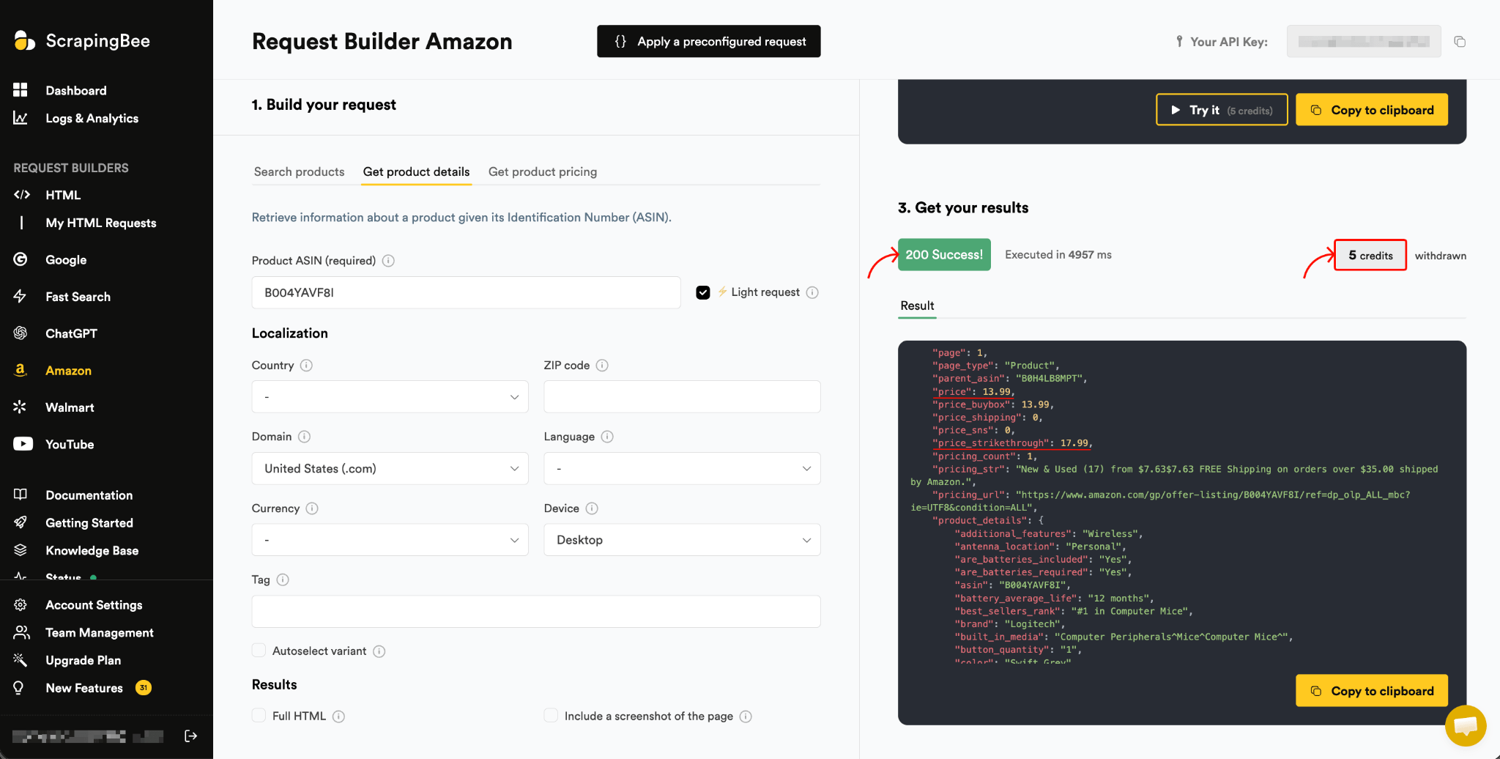
Walmart works the same way through the Walmart API, with the item ID passed as product_id:
resp = requests.get(
    "https://app.scrapingbee.com/api/v1/walmart/product",
    headers={"Authorization": f"Bearer {API_KEY}"},
    params={"product_id": "15545702811"},
    timeout=90,
)
data = resp.json()
print(data["title"], data["price"], data["currency"], data["out_of_stock"])
The Walmart response shape is flatter than Amazon's. The response, trimmed:
{
  "id": "15545702811",
  "title": "Logitech Silent Wireless Mouse, Blue/Gray, Walmart Exclusive",
  "price": 13.83,
  "currency": "USD",
  "out_of_stock": false,
  "rating": 4.5,
  "rating_count": 4844,
  "seller_name": "Walmart.com",
  "gtin": "...",
  "sku": "..."
}
Amazon reports stock as a stock string ("In Stock"), while Walmart uses an out_of_stock boolean. Amazon uses reviews_count, Walmart uses rating_count. The dedicated parsers save you from selector maintenance, but you still normalize their fields into one shape, which is what Step 5 does.
One more Amazon endpoint: /amazon/pricing. The product endpoint gives you the headline price. The pricing endpoint (also 5 credits, but keyed by asin rather than query) returns the offers on the listing, each condition, seller, and price, so you see the full competitive picture when third parties and Amazon itself compete on one ASIN:
resp = requests.get(
    "https://app.scrapingbee.com/api/v1/amazon/pricing",
    headers={"Authorization": f"Bearer {API_KEY}"},
    params={"asin": "B004YAVF8I"},   # note: asin=, not query=
    timeout=90,
)
for offer in resp.json()["pricing"]:
    print(offer["condition"], offer["price"], offer["currency"], "-", offer["seller"])
# New         13.99 USD - Amazon.com
# Used - Very Good  7.72 USD - Amazon Resale
# ... (plus more New offers from third-party sellers, from ~$14.90)
If your competitive question is "who's selling this and at what price", that offer list is the answer, not a single number.
Make sure you're comparing the same offer. A marketplace listing's headline price is whatever currently wins the Buy Box, which can be a used unit, a third-party seller, or a different-size variant than the one you sell. The M185 listing above shows the trap. Its Buy Box also carries a Used - Very Good offer at $7.72, and the product has a 4-pack variant under a different ASIN (B0FD7NN6CM). Compare your new single unit against either of those and your "a competitor undercut us by nearly half" alert is pure noise.
So before you trust a number, pin the condition to New (and decide whether you accept any third-party seller or only the first-party offer), confirm the variant is the single unit you sell, and store the seller and condition next to the price so a bad comparison is auditable instead of invisible. The companion repo does this. It reads the Buy Box condition and seller, flags a used or multipack offer, records both in every snapshot, and won't fire an undercut alert on a non-comparable offer, because a used unit at $7.72 isn't an undercut of your new $14.99.
Watch for store- and region-specific pricing. Walmart serves different prices by store, and you'll see that variance in the Step 5 walkthrough. Walmart exposes store_id to pin a specific store for like-for-like comparison, but when I tried it, it was slow and only intermittently returned a price, so verify it works for your targets before relying on it. Amazon exposes domain (.co.uk, .de) for international tracking. Two more parameters come with caveats. Walmart's delivery_zip returns empty fields (prefer store_id), and Amazon's zip_code doesn't reliably move the price, so confirm a location parameter changes the number before using it.
When to use which proxy tier
The right tier depends on the target's defenses. This table maps the common cases:
| Target | Use Case/Method | Credits |
|---|---|---|
| Independent / smaller retailer | Classic + JS | 5 |
| Shopify / WooCommerce store behind Cloudflare | Premium + JS | 25 |
| Amazon or Walmart | Dedicated Amazon / Walmart API | 5 / 10 (light) |
| Hardest anti-bot, no dedicated parser | Stealth | 75 |
Scraping an Amazon page through the stealth proxy and parsing it yourself is 75 credits and leaves you maintaining selectors against a site that keeps restructuring its HTML. The dedicated parser is 5 credits for Amazon and 10 for Walmart, or 15 each in full mode (light_request=false), and hands you parsed JSON. When the target is Amazon or Walmart, default to it.
Dedicated parsers exist for Amazon, Walmart, Google, YouTube, and ChatGPT (plus a Fast Search endpoint). For every other retailer, you're on the generic path, which means you need to extract the price yourself.
Step 3. Extract the price (selectors vs. AI extraction)
Once you have the HTML from the generic path in Step 2, you need to extract the price from it. Which approach you use depends on how many distinct sites you track.
CSS selectors, XPath, and JSON-LD
The traditional path is CSS or XPath selectors. ScrapingBee can run them server-side with the extract_rules parameter, with no extra credits and no BeautifulSoup needed for simple cases. Here it is against a public demo store. The call cost 1 credit (no JS):
import json
import requests

resp = requests.get(
    "https://app.scrapingbee.com/api/v1/",
    headers={"Authorization": "Bearer YOUR-API-KEY"},
    params={
        "url": "https://books.toscrape.com/catalogue/a-light-in-the-attic_1000/index.html",
        "render_js": "false",
        "extract_rules": json.dumps({
            "title": "h1",
            "price": ".price_color",
            "availability": {"selector": ".availability", "output": "text", "clean": True},
        }),
    },
    timeout=60,
)
print(resp.json())
# {"title": "A Light in the Attic", "price": "£51.77", "availability": "In stock (22 available)"}
The more durable selector-based approach is JSON-LD. Most retailers embed a schema.org/Product block in a <script type="application/ld+json"> tag for Google's benefit, and that structured data changes far less often than the visual layout. Fetch the HTML, then parse the block with BeautifulSoup:
import json
import requests
from bs4 import BeautifulSoup

resp = requests.get(
    "https://app.scrapingbee.com/api/v1/",
    headers={"Authorization": "Bearer YOUR-API-KEY"},
    params={"url": "https://www.scrapingcourse.com/ecommerce/product/abominable-hoodie", "render_js": "false"},
    timeout=60,
)
soup = BeautifulSoup(resp.text, "html.parser")

def find_product(node):
    """Walk the JSON-LD graph to find the schema.org Product node."""
    if isinstance(node, dict):
        t = node.get("@type")
        if t == "Product" or (isinstance(t, list) and "Product" in t):
            return node
        for v in node.values():
            if (found := find_product(v)):
                return found
    elif isinstance(node, list):
        for v in node:
            if (found := find_product(v)):
                return found
    return None

data = json.loads(soup.find("script", type="application/ld+json").string)
product = find_product(data)
offers = product["offers"][0] if isinstance(product["offers"], list) else product["offers"]
print(offers["price"], offers["priceCurrency"], offers["availability"])
# 69.00 USD http://schema.org/OutOfStock
The find_product walk matters because retailers nest the Product node inside an @graph array alongside BreadcrumbList and Organization nodes, so you can't assume it's the top-level object. Some sites also list @type as an array, so the check handles both forms.
The selector-drift problem
Your .price_color selector works perfectly until the competitor ships a redesign and renames it to .product-price__amount. Your scraper doesn't crash. It silently returns None and the tracker stores a null. Selectors are cheap to write and expensive to keep working, and that upkeep scales linearly with the number of distinct sites you track.
AI extraction with ai_extract_rules
The alternative is ai_extract_rules, which extracts each field with a model instead of a selector. You hand it a typed schema, so a markup change doesn't break it the way a selector would:
import json
import requests

ai_rules = {
    "price": {"description": "current product price as a number", "type": "number"},
    "currency": {"description": "ISO 4217 currency code", "type": "string"},
    "in_stock": {"description": "whether the product is in stock", "type": "boolean"},
}

resp = requests.get(
    "https://app.scrapingbee.com/api/v1/",
    headers={"Authorization": "Bearer YOUR-API-KEY"},
    params={"url": "https://scrapeme.live/shop/Bulbasaur/", "ai_extract_rules": json.dumps(ai_rules)},
    timeout=120,
)
print(resp.json())
# {'price': 63.0, 'currency': 'GBP', 'in_stock': True}
# Note: on some pages this 200s with a non-JSON body, so .json() raises. Retry like fetch_generic() in Step 5.
The same call runs in ScrapingBee's request builder, at 10 credits:
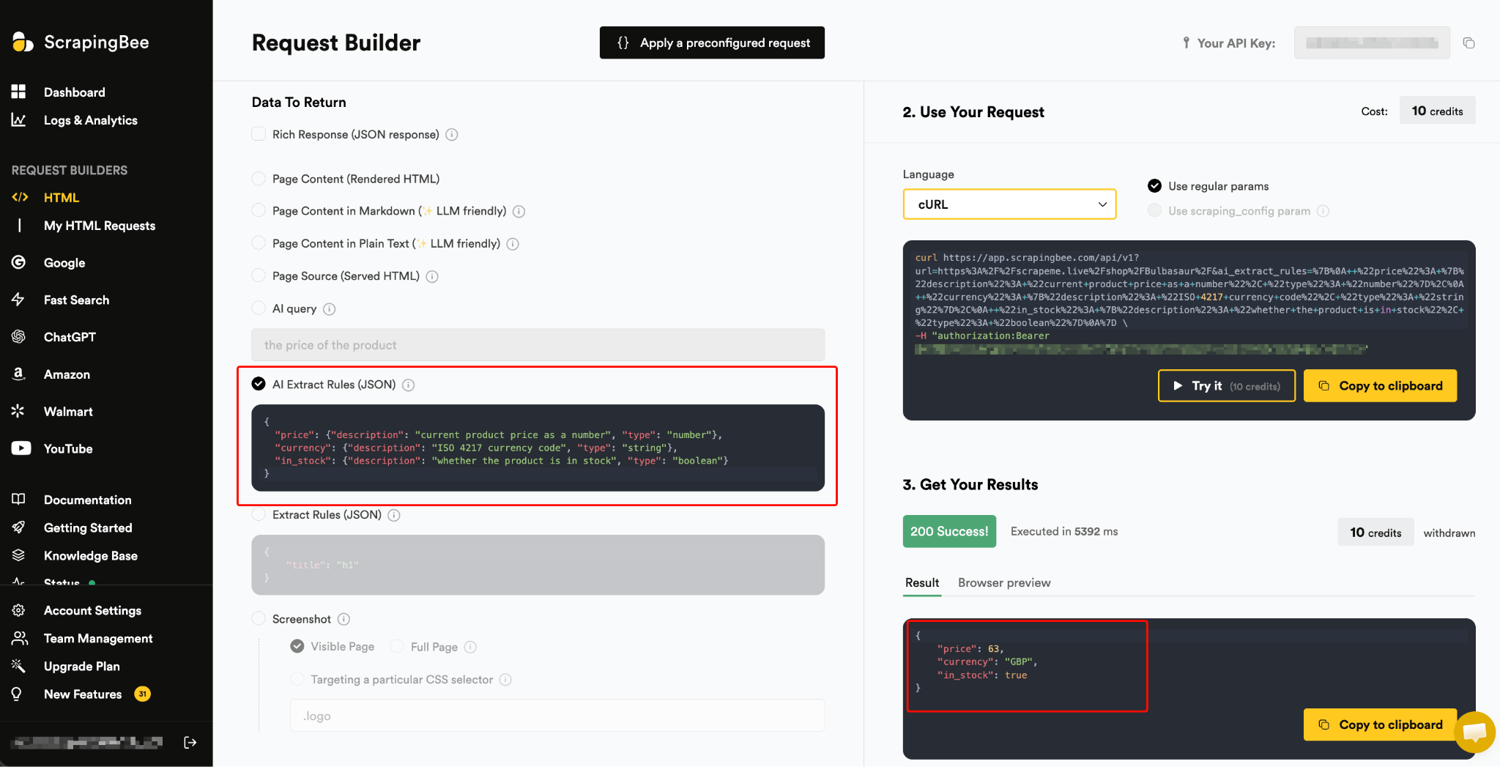
The schema supports string, number, boolean, list, and item (nested object) types, so the price comes back as a number, not a string with a currency symbol you have to strip. AI extraction adds 5 credits per request, so a standard JS-rendered fetch with AI extraction runs to 10 credits total. The feature is documented on the AI web scraping page and the data extraction documentation.
AI extraction is not deterministic. When I ran the same ai_extract_rules request against a clean WooCommerce product page, price (63.0) and in_stock (true) stayed stable, but currency flipped between the clean ISO code GBP and the bare symbol £ from one run to the next, same request, same page. On a busier page it degrades further. Sometimes only the title comes back and the price drops entirely, or in_stock reads true for a product whose own JSON-LD says OutOfStock. An ai_query description doesn't reliably help. It can make the currency field worse, returning "$" instead of "USD".
Worse, it has an outright failure mode: on some pages it frequently returns HTTP 200 with the plain-text body Sorry, couldn't get the response from AI (not JSON), and still bills the full 10 credits each time. That's why the tracker in Step 5 retries fetch_generic and raises instead of trusting .json().
One knob does help. ai_selector scopes the extraction to a slice of the page instead of the whole DOM. Point it at the product summary (ai_selector=".summary") and the currency stabilizes to GBP, instead of slipping to a bare £. The catch is that it's only as good as the selector you give it. Point it at a block that isn't there and the call fails outright. So set ai_selector when you know the page's structure. It improves AI extraction, but it doesn't make it deterministic, so keep the retry-and-validate approach.
Use the dedicated parsers for Amazon and Walmart. They're deterministic and cheaper. For the long tail of small retailers where a selector per site isn't worth maintaining, AI extraction is lower-maintenance, but validate the output (reject nulls, sanity-check against the previous snapshot). Where a site exposes clean JSON-LD, that's often the most reliable of the three.
In a real tracker you don't choose one of these once. A generic fetcher cascades them in order of reliability. It tries a per-site selector if you've set one, then JSON-LD, then a price meta tag, with AI extraction as the fallback, and it validates whatever comes back. The cheap deterministic methods handle most sites, and AI covers the awkward long tail. Step 5's minimal tracker uses the AI fallback alone, while the companion repo runs the full cascade.
Step 4. Schedule the scrape, store snapshots, trigger alerts
A tracker is a scraper that runs on a schedule, keeps history, and tells you when something moved.
Scheduling (cron, GitHub Actions, serverless)
Four options run from most infrastructure to least:
Cron on a small VM. Fine if you already run a box. One crontab line runs it every six hours (the cd matters, since cron's working directory isn't the script's, and the tracker reads/writes history.csv relative to it):
0 */6 * * * cd /opt/tracker && /usr/bin/python3 tracker.py >> tracker.log 2>&1
GitHub Actions. Free for public repos, with no server to manage. There's one catch. The runner is ephemeral, so unless you commit history.csv back at the end of the job, every run starts from a blank history and your change-detection (alerting only on a new undercut) never works. That's the git-scraping pattern:
name: price-tracker
on:
  schedule:
    - cron: "0 */6 * * *"
  workflow_dispatch:
permissions:
  contents: write                      # to commit the snapshot back
jobs:
  track:
    runs-on: ubuntu-latest
    steps:
      - uses: actions/checkout@v6      # restores history.csv so it accumulates
      - uses: actions/setup-python@v6
        with: { python-version: "3.12" }
      - run: pip install requests beautifulsoup4 python-dotenv
      - run: python tracker.py
        env:
          SCRAPINGBEE_API_KEY: ${{ secrets.SCRAPINGBEE_API_KEY }}
          SLACK_WEBHOOK_URL: ${{ secrets.SLACK_WEBHOOK_URL }}
      - run: |                          # git-scraping: persist the snapshot, or history resets every run
          git config user.name price-tracker-bot
          git config user.email actions@users.noreply.github.com
          git add history.csv && git commit -m "snapshot $(date -u +%FT%TZ) [skip ci]" || exit 0
          git pull --rebase && git push
The companion repo ships this workflow with the schedule block commented out (manual by default), so a fresh clone never spends credits unasked – uncomment the cron line to turn it on.
Serverless cron. Cloudflare Workers Cron Triggers, Vercel Cron, or Modal run the tracker on a schedule with no box to patch, usually the lower-friction default over a long-lived VM.
No-code schedulers. If a non-engineer on the team owns the workflow, ScrapingBee has native n8n, Zapier, and Make connectors that call the API on a schedule and drop results into a sheet or a Slack channel.
Storage (flat files, SQL, DuckDB)
There are two storage patterns and a query layer. Start with the first.
Append-only flat files handle more than you'd expect. Append each run's snapshots to a CSV, JSONL, or Parquet file and you've got price history:
import pandas as pd

# snapshots = the rows collected this run (a list of dicts)
pd.DataFrame(snapshots).to_parquet("history.parquet")   # needs pyarrow or fastparquet

# or append to CSV:
pd.DataFrame(snapshots).to_csv("history.csv", mode="a", header=False, index=False)
A hundred SKUs scraped daily for three years is around 100,000 rows, and a flat file handles that fine.
A database makes sense when you outgrow flat files or want concurrent writers. The schema is the same either way:
CREATE TABLE price_history (
    timestamp   TIMESTAMPTZ,
    our_sku     TEXT,
    competitor  TEXT,
    comp_price  NUMERIC,
    currency    TEXT,
    in_stock    BOOLEAN,
    our_price   NUMERIC
);
SQLite is fine for a single-writer cron job, and Postgres when you have several. The tracker doesn't care which, so keep this part stack-agnostic and use whatever your team already runs.
Query it with DuckDB. You don't need a database server to analyze the history. DuckDB runs SQL directly over your CSV or Parquet files, a natural fit for this shape of data. Start with the current standings, and reduce to the latest snapshot per SKU first. Skip that step and you're ranking every historical row, not today's price:
import duckdb

# Current standings: each SKU's most recent snapshot, biggest undercut first.
duckdb.sql("""
    SELECT our_sku, competitor, comp_price, our_price,
           round((our_price - comp_price) / our_price * 100, 1) AS undercut_pct
    FROM (SELECT *, row_number() OVER (PARTITION BY our_sku ORDER BY timestamp DESC) AS rn
          FROM 'history.csv')
    WHERE rn = 1 AND comp_price < our_price
    ORDER BY undercut_pct DESC
""").show()
But "what's the price right now" is a question a single scrape answers too. The reason you keep history is the questions a single fetch can't answer, and they're window functions, not more scraping. "Who repriced since we last looked?" is one query:
duckdb.sql("""
    SELECT our_sku, competitor, prev_price, comp_price AS latest_price,
           round((comp_price - prev_price) / prev_price * 100, 1) AS pct_change
    FROM (SELECT our_sku, competitor, comp_price,
                 lag(comp_price) OVER (PARTITION BY our_sku ORDER BY timestamp) AS prev_price,
                 row_number()    OVER (PARTITION BY our_sku ORDER BY timestamp DESC) AS rn
          FROM 'history.csv')
    WHERE rn = 1 AND prev_price IS NOT NULL AND comp_price <> prev_price
    ORDER BY abs(pct_change) DESC
""").show()
# MOUSE-002  walmart  9.88 -> 13.83  (+40.0%)   <- caught from history, not a fresh scrape
That query is the same shape as a sale-detector, a repricing-cadence report, or a "first time a competitor went below us" alert. Run the same queries against history.parquet or a Postgres table when you outgrow a flat file. (The companion repo exposes both as MCP tools, undercuts and recent_changes, so an assistant can answer either without you writing the SQL.)
Alerts (Slack and email on undercut)
This is the part that makes it a tracker instead of an archive. Compare the latest price to your own and post to a Slack incoming webhook when a competitor drops below you by a threshold:
import os
import requests

SLACK_WEBHOOK_URL = os.environ["SLACK_WEBHOOK_URL"]

def alert_if_undercut(sku, title, comp_price, our_price, threshold=0.05):
    if comp_price and comp_price < our_price * (1 - threshold):
        pct = (our_price - comp_price) / our_price * 100
        requests.post(SLACK_WEBHOOK_URL, json={
            "text": f":rotating_light: *{sku}* undercut: competitor {comp_price} "
                    f"vs our {our_price} ({pct:.1f}% lower) - {title}"
        }, timeout=10)
A 5% default threshold keeps you from getting pinged over rounding. Swap the requests.post for smtplib if your team uses email instead of Slack.
As written, this fires on every run where a competitor is under your threshold. To page only on a new undercut, compare each price to that SKU's previous snapshot before posting, which is what the lag() query in the storage section computes. Add the in-stock and same-offer checks from the Amazon and Walmart section too, so a competitor that has been cheaper all week, or whose Buy Box is a used or multipack unit, doesn't trigger a false alert. The companion repo wires all three in. The version here keeps the alert loop small, so the mechanism stays easy to follow.
Step 5. Put it all together into a working tracker
Here's the full path from a list of competitor URLs to an alert when one undercuts you. It reads targets.csv, dispatches each row to the right endpoint, normalizes every response into one typed PriceSnapshot, appends history, and flags undercuts:
from __future__ import annotations

import csv, json, os
from dataclasses import dataclass, asdict, fields
from datetime import datetime, timezone
from typing import Any, Callable

import requests
from requests.adapters import HTTPAdapter
from urllib3.util import Retry

API_KEY = os.environ["SCRAPINGBEE_API_KEY"]
HTML_API = "https://app.scrapingbee.com/api/v1/"
AMAZON_API = "https://app.scrapingbee.com/api/v1/amazon/product"
WALMART_API = "https://app.scrapingbee.com/api/v1/walmart/product"
THRESHOLD = 0.05

AI_RULES = {
    "price": {"description": "current product price as a number", "type": "number"},
    "currency": {"description": "ISO 4217 currency code", "type": "string"},
    "in_stock": {"description": "whether the product is in stock", "type": "boolean"},
}


@dataclass(frozen=True, slots=True)
class PriceSnapshot:
    timestamp: str
    our_sku: str
    competitor: str
    comp_price: float | None
    currency: str | None
    in_stock: bool
    our_price: float


def build_session() -> requests.Session:
    """Retry transient failures with backoff. Every call goes to the ScrapingBee
    API, never directly to a retailer, so our own TLS fingerprint never matters."""
    retry = Retry(total=3, backoff_factor=1.0,
                  status_forcelist=(429, 500, 502, 503, 504), allowed_methods=("GET",))
    s = requests.Session()
    s.mount("https://", HTTPAdapter(max_retries=retry))
    s.headers["Authorization"] = f"Bearer {API_KEY}"
    return s


def fetch_amazon(s: requests.Session, asin: str) -> dict[str, Any]:
    r = s.get(AMAZON_API, params={"query": asin}, timeout=90)
    r.raise_for_status()  # a 401/403/422 returns a JSON error body, not a price, so fail loud
    d = r.json()
    return {"price": d.get("price"), "currency": d.get("currency"),
            "in_stock": d.get("stock") not in (None, "", "Currently unavailable")}


def fetch_walmart(s: requests.Session, item_id: str) -> dict[str, Any]:
    r = s.get(WALMART_API, params={"product_id": item_id}, timeout=90)
    r.raise_for_status()
    d = r.json()
    return {"price": d.get("price"), "currency": d.get("currency"),
            "in_stock": not d.get("out_of_stock", False)}


def fetch_generic(s: requests.Session, url: str, attempts: int = 5) -> dict[str, Any]:
    # AI extraction sometimes returns HTTP 200 with a plain-text "Sorry, couldn't get
    # the response from AI" instead of JSON, and it's still billed. Retry, then fail loud.
    for _ in range(attempts):
        r = s.get(HTML_API, params={"url": url, "ai_extract_rules": json.dumps(AI_RULES)}, timeout=120)
        r.raise_for_status()  # a 401/403/422 is an error body, not a price; don't parse it as one
        try:
            d = r.json()
        except ValueError:
            continue
        return {"price": d.get("price"), "currency": d.get("currency"), "in_stock": d.get("in_stock")}
    raise RuntimeError(f"AI extraction failed for {url} after {attempts} attempts")


DISPATCH: dict[str, Callable[[requests.Session, str], dict[str, Any]]] = {
    "amazon": fetch_amazon, "walmart": fetch_walmart, "generic": fetch_generic,
}


def track(targets: str = "targets.csv", history: str = "history.csv") -> list[PriceSnapshot]:
    session = build_session()
    now = datetime.now(timezone.utc).isoformat(timespec="seconds")
    snapshots: list[PriceSnapshot] = []

    with open(targets, encoding="utf-8") as f:
        rows = list(csv.DictReader(f))

    for t in rows:
        fetch = DISPATCH.get(t["source"])
        if fetch is None:
            print(f"  ! {t['our_sku']}: unknown source {t['source']!r} (use amazon, walmart, or generic)")
            continue
        try:
            data = fetch(session, t["identifier"])
        except (requests.RequestException, RuntimeError) as e:
            print(f"  ! {t['our_sku']}: {e}")
            continue
        our_price, comp = float(t["our_price"]), data["price"]
        snap = PriceSnapshot(now, t["our_sku"], t["source"], comp,
                             data["currency"], bool(data["in_stock"]), our_price)
        snapshots.append(snap)
        flag = ""
        if comp and comp < our_price * (1 - THRESHOLD):
            flag = f"  <-- UNDERCUT {(our_price - comp) / our_price * 100:.1f}%"
        print(f"  {snap.our_sku:12} {snap.competitor:8} {snap.currency} {snap.comp_price} "
              f"(ours {snap.our_price}){flag}")

    write_header = not os.path.exists(history)
    with open(history, "a", newline="", encoding="utf-8") as f:
        writer = csv.DictWriter(f, fieldnames=[fld.name for fld in fields(PriceSnapshot)], lineterminator="\n")
        if write_header:
            writer.writeheader()
        writer.writerows(asdict(s) for s in snapshots)
    return snapshots


if __name__ == "__main__":
    track()
When I ran it against the three-row targets.csv from Step 1, I got this, with live prices:
  MOUSE-001    amazon   USD 13.99 (ours 14.99)  <-- UNDERCUT 6.7%
  MOUSE-002    walmart  USD 13.83 (ours 14.99)  <-- UNDERCUT 7.7%
  HOODIE-009   generic  USD 69.0 (ours 75.0)  <-- UNDERCUT 8.0%
Each row gets one typed PriceSnapshot and an undercut flag. The generic row succeeded here because fetch_generic retries. AI extraction hit that billed failure mode on most attempts for that row (see Step 3). On an unlucky run it exhausts all five retries and the tracker skips that SKU instead of crashing, so a bad fetch costs you one row, not the whole run.
Don't read the marketplace numbers as fixed. Across calls I saw Walmart return $13.83, $13.52, and $9.88 for the same item ID, because it serves variable pricing. The parser is reliable. The price isn't.
Wire the alert_if_undercut function from the alerts section into the loop, put it on the cron or Actions schedule from Step 4, and you have a working tracker.
The companion repo is the hardened, runnable version of everything above. It adds SKU matching (matcher.py), currency normalization, and a generic fetcher that cascades a per-site CSS selector → JSON-LD → price meta → AI (most sites resolve deterministically, awkward ones take a one-line selector, and Cloudflare-protected ones a per-target premium/stealth proxy).
It fetches concurrently to scale to hundreds of SKUs, fires alerts only on a new undercut from an in-stock, comparable offer (no used or multipack unit, no repeated alerts on every run), and ships the MCP server and a GitHub Actions workflow that commits price history back so it accumulates over time. git clone, add your API key, edit targets.csv, run.
Below is tracker.py from that repo on a first run against the three-row targets.csv. The two in-stock undercuts each fire a 🚨 alert, while the out-of-stock row is flagged but stays quiet (the in-stock gating):

Before you trust it, reconcile the first run by hand
The first time you point this at your own targets, open two or three of the scraped pages in a browser and check the number matches, especially generic-path SKUs. A 50%-drift guard catches a price that moves, but not a selector or AI that grabbed a "related items", per-unit, or subscription price on run one and then returns the same wrong number every run after. A consistently-wrong extraction never trips a change-based check. A human looking at that first run is what catches it. Reconcile a few by hand, then schedule it and let it run.
Scaling past a handful of SKUs
The tracker above is sequential. It's fine for three rows, too slow for three hundred, since each call takes a few seconds. Fan out with a thread pool bounded to your plan's concurrency limit:
from concurrent.futures import ThreadPoolExecutor

session = build_session()

def fetch_row(t):
    fetch = DISPATCH.get(t["source"])
    return t["our_sku"], fetch(session, t["identifier"]) if fetch else None

with ThreadPoolExecutor(max_workers=20) as pool:
    results = list(pool.map(fetch_row, rows))   # rows: the targets.csv rows read in track()
Each fetch is network-bound and spends most of its time waiting, so fetching one at a time is the bottleneck. In my testing, five Amazon product requests sent one at a time took about 20 seconds, while the same five sent concurrently finished in about 6 seconds, roughly 3x faster. The speedup grows as you raise the worker count toward your plan's concurrency cap, so stay under that cap, because the API returns HTTP 429 when you go over it.
Where the data goes next (agents and MCP)
A Slack ping is the simplest action, and for many teams it's enough. But often the snapshot table feeds something automated, like a repricing agent that drafts a recommendation, an anomaly check that separates a real price move from a scrape error, or a tool an assistant calls when someone asks "who's undercutting us this week?" The structured JSON the dedicated parsers and ai_extract_rules return drops into a prompt, a function call, or a vector store with no HTML-parsing layer in between.
That has two halves. First, ScrapingBee runs a hosted MCP server, so an agent can do the scraping itself. Connect it to the endpoint and it gets tools for fetching HTML, screenshots, and files, plus the dedicated Amazon, Walmart, and Google extractors (its live tools/list exposes tools like get_amazon_product_details, get_walmart_product_details, get_page_html, and get_screenshot), with nothing to deploy. In Claude Code it's one command:
claude mcp add --transport http scrapingbee "https://mcp.scrapingbee.com/mcp?api_key=YOUR-API-KEY"
(Claude Desktop adds the same URL under Settings → Connectors.)
With that wired in, "what's the current price and who has the Buy Box on this ASIN?" is something the agent answers by calling ScrapingBee directly. And when the consumer is an LLM rather than your own parser, you often don't need to extract fields at all. return_page_markdown=true returns clean markdown (breadcrumbs, title, price, variants) in one call, ready to drop into a prompt instead of raw HTML.
Second, expose your own tracker's history as a tool the same way, so the assistant can answer questions about what you've already collected:
from fastmcp import FastMCP
import duckdb

mcp = FastMCP("price-tracker")

@mcp.tool()
def undercuts(min_pct: float = 5.0) -> list[dict]:
    """SKUs whose competitor's latest snapshot undercuts our price by at least min_pct percent."""
    return duckdb.execute(
        "SELECT our_sku, competitor, comp_price, our_price "
        "FROM (SELECT *, row_number() OVER (PARTITION BY our_sku ORDER BY timestamp DESC) AS rn "
        "      FROM 'history.csv') "
        "WHERE rn = 1 AND comp_price < our_price * (1 - ? / 100)",
        [min_pct],
    ).df().to_dict("records")

if __name__ == "__main__":
    mcp.run()
Now "who's undercutting us right now?" and "who repriced this week?" both return live rows from the same CSV the tracker writes. The first comes from undercuts, the second from the recent_changes tool the repo adds alongside it, with no dashboard and no glue layer. (DuckDB reads the CSV directly. Run it against Parquet or Postgres the same way.) The tracker is the data layer, and what reads it is up to your stack. Where this guide deliberately stops is the action. Turning a price signal into an automated price change is repricing logic (margin, minimum advertised price, brand). It stops at a trustworthy signal, and the decision stays yours.
Common pitfalls and best practices
A few habits separate a tracker that runs for a year from one that rots in three months:
- Throttle your own requests. Even when the API handles concurrency, put a 1–3 second delay between requests and don't refresh more often than your repricing decisions need. Scraping politely helps keep you off blocklists.
- Normalize currency and number formats, and don't trust the $ sign. A European price string of "1.299,00" is not 1.299. Strip symbols, normalize the decimal separator, and store a float plus a currency code. And watch the one symbol you can't trust. $ is USD, CAD, AUD, MXN and more, so a bare $ on its own could be any of them. Compare only within the same currency, and prefer an explicit code (JSON-LD's
priceCurrency, the dedicated parsers'currency) over a guessed symbol, or a Canadian competitor's C$20 gets compared against your $20. The dedicated Amazon and Walmart parsers already return numeric prices and an explicit currency code. Selector and AI paths need this step. - Decide between promo price and list price. Most product pages show both a current price and a struck-through list price (Amazon returns
priceandprice_strikethrough). Pick which one your team acts on and document it. Don't track both by accident. - Treat personalized prices as a benchmark, not the exact number. Some retailers personalize prices by account or session, so the public price you scrape anonymously may not match what a logged-in buyer sees. That's usually fine. The anonymous price is the right competitive benchmark, and it's the only one you can collect within ScrapingBee's terms. Don't treat it as the exact price every customer is shown.
- Monitor the monitor: alert on coverage loss, not just log it. Log it loudly when extraction returns
None, or when a price is more than ~50% different from the previous snapshot. Those are almost always a broken selector or a misread, not a real price move. But logging isn't enough, because the worst failure is the silent one. A subset of your SKUs returns null for weeks while your dashboard sits flat and no one notices. So fire an alert when a share of your targets stop returning a price in a single run. The companion repo pages you when more than ~25% come back empty (a broken selector, a block, or a quota hit). That dead-man's-switch keeps a tracker that goes silent from failing unnoticed for months, though a value that's consistently wrong but present won't trip it. Reconciling the first run by hand catches that. - Capture evidence for MAP monitoring. If you're a brand watching resellers for Minimum Advertised Price violations, your tracker is a compliance tool, so capture evidence alongside the number. ScrapingBee's
screenshot=trueparameter archives the page image as proof. - Scrape only public product pages. Never behind a login or past an access control. Public pricing data is generally allowed in the US and EU, with the full picture and the lawyer caveat in the FAQ below.
See how AI assistants price you: the surface buyers check first
Your tracker watches competitor product pages, but that's not the only place your price shows up. A growing number of buyers ask an assistant "what's the cheapest [product]?" before opening a product page, or instead of it. So now there's a second thing to watch: how AI assistants price and rank you. An assistant can quote a stale price, miss you entirely, or name a competitor as cheapest. That's a different signal from product-page scraping. The product page is the ground truth you reprice against, and the AI surface is what the buyer sees.
ChatGPT has the most reach of these surfaces today, but Gemini, Perplexity, and others shape the same buyer view. ScrapingBee's ChatGPT endpoint (with search=true for live data) captures the ChatGPT one in a single call:
import requests

r = requests.get(
    "https://app.scrapingbee.com/api/v1/chatgpt",
    headers={"Authorization": "Bearer YOUR-API-KEY"},
    params={
        "prompt": "What is the current price of the Logitech M185 wireless mouse and which retailer is cheapest?",
        "search": "true",       # live web data, not the model's training cutoff
        "country_code": "us",   # answers are geo-sensitive
    },
    timeout=120,
)
print(r.json()["results_text"])
# A live run (country_code=us) still came back with off-geo pricing, naming a "cheapest" seller:
# "Cheapest: Shopee — THB 450.00 (Logitech M185, 4.8/5, ~66K reviews); other regions
#  ~£8.22 (UK) or RM39–RM58 (Malaysia)." Exactly the geo-noise the caveats below describe.
Run it across your products and competitors, diff the answers over time, and alert when the assistant drops you, quotes a stale price, or ranks a competitor cheapest. The answer is non-deterministic and geo-noisy. The same query can return US prices one time and off-geo prices the next, even with country_code=us, and that inconsistency is what buyers get, which is why it's worth watching. And it's heavy. ChatGPT-with-search costs ~15 credits and is slow (it can 504 on big queries), so run it daily or weekly, not on the six-hour price cron. The companion repo's ai_surface.py wraps this.
Build vs. buy: when to skip this and pay for SaaS
Building wins at small-to-mid scale. Buying wins at large scale with no engineering time to spare.
Build when you're tracking up to a few hundred SKUs, want control over the alerting and thresholds, or want the snapshots in your own data warehouse. The pipeline in this article is that path, and SaaS pricing for these tools typically ranges from the low hundreds to low thousands per month (it varies by vendor and SKU volume), a recurring bill that usually costs more than the initial build, plus ongoing API credits and occasional selector upkeep. Buy when you're tracking thousands of SKUs across hundreds of competitors, need a polished UI for non-technical buyers, and have no one to maintain a scraper. Tools like Prisync, Skuuudle, and Competera package this kind of price scraping behind a UI and a support contract, a fit for a different kind of buyer.
ScrapingBee sits on the build side. The HTML API, AI extraction, and dedicated parsers cover the same fetch-and-parse work those tools package, and you keep control of everything above the fetch layer.
Where this is heading: agents, bot auth, and pricing law
The pipeline above is today's baseline, not the end state. Three shifts are worth building toward.
The architecture is going agent-shaped. You already wired ScrapingBee's hosted MCP server in Step 5, so an agent can do the scraping and query your price history through tools. The shift ahead is the rest of the loop – compare, decide, alert – becoming an agent's job too, rather than a hand-wired pipeline a person maintains. Alongside build and buy, delegating that whole loop to a computer-use agent is now a third option. So if you build now, expose the pieces as tools, not just a script, so an agent can drive them later.
Bots are starting to identify themselves, not just hide. The anti-bot arms race in Step 2 is only half the story. The other half is Web Bot Auth, an IETF draft (built on RFC 9421 HTTP Message Signatures) where an agent signs each request with a cryptographic key and the site verifies it. Adoption has moved quickly. Visa, Mastercard, and Amex announced support for it for agentic commerce (reported around October 2025), AWS WAF added support (reported November 2025), and Cloudflare says it validates it at its edge. It pairs with the pay-per-crawl idea to suggest a web where legitimate crawlers authenticate and pay for access. Today you still need browser-grade fingerprints. Medium-term, expect an identified-and-paid lane to matter.
Regulators moved from the scraping side to the pricing side. The live legal question is shifting from "can I scrape public prices" (more settled than it once was) to "is my algorithmic pricing legal". The FTC's surveillance-pricing study (initial findings, January 2025) and New York's algorithmic-pricing disclosure law (enacted in 2025) target personalized pricing (setting an individual's price from their own data), not competitor price-matching, which is generally treated as lawful. But if your tracker feeds an automated repricer, that's the side regulators are now watching, so keep the "why this price changed" trail your snapshots already give you.
Get started
Building a competitor price tracker takes one Python file and a scraping API that bypasses Cloudflare. ScrapingBee's free trial gives you 1,000 API credits, no credit card, enough to run the tracker against your own competitors and see real undercuts before you size a plan.
Or skip the assembly: clone the companion repo, drop in your key, and the tracker runs in minutes. Push past the defaults and the Amazon and Walmart API docs cover every parameter and response field. Either way, you'll be watching competitor prices instead of checking them by hand.
FAQ
Is web scraping legal for tracking competitor prices?
Scraping publicly available pricing data is generally permitted in the US and EU when you respect robots.txt, don't bypass technical access controls, and don't scrape behind a login. Republishing the scraped content is a separate legal question. Consult a lawyer for your specific use case.
How often should I scrape competitor prices?
Match the frequency to your own repricing decisions, not to the competitor. Many retailers now run algorithmic repricers that can move prices multiple times a day, so "daily" has shifted toward "a few times a day" for competitive categories like electronics. Fast-moving ones (flights, hotels, flash sales) justify hourly. But more frequent scraping costs more credits and only matters if you can act on it. There's no point scraping hourly if you reprice weekly.
Can I scrape Amazon and Walmart prices?
Yes, using ScrapingBee's dedicated Amazon API and Walmart API, which return parsed JSON. The Amazon product endpoint costs 5 credits in light mode (15 with full rendering). Walmart is 10 light, 15 full. Both target only publicly accessible product pages, with no logged-in or Business-account-only pricing.
What's the best tool to track competitor prices?
It comes down to whether you have engineering time. A paid tool's value is mostly the interface and the support contract, not the raw fetching. With an engineer on hand, a Python script plus a scraping API is usually the lowest-cost option that still scales. Without one, a subscription tool gives you a polished UI and someone to maintain it.
How do I deal with sites that block scrapers?
Use a scraping API that routes through residential or stealth proxies and a headless browser, so the anti-bot fingerprinting is handled on the provider's side instead of yours. ScrapingBee's premium proxy handles most Cloudflare/DataDome/HUMAN sites and the stealth tier is for the hardest. For Amazon and Walmart, the dedicated parsers deal with those defenses for 5-15 credits.
How do I store and visualize the scraped price data?
Append snapshots to a CSV, Parquet file, or a (timestamp, sku, competitor, price) table, then query it with DuckDB straight over those files, no warehouse needed. Chart it with whatever your stack already has, or hand the file to an LLM to summarize the week's moves.
Can I do this without writing code?
Yes. ScrapingBee's native n8n, Make, and Zapier connectors wire the API into a no-code workflow. You give up flexibility for setup speed.