To send a curl OPTIONS request, run curl -X OPTIONS <url>. The HTTP OPTIONS method asks a server what communication options are available for a resource, without fetching the resource's normal GET response.
The useful information in an OPTIONS response is commonly found in its response headers, so this guide shows how to read them and reproduce a browser's cross-origin resource sharing (CORS) preflight. curl's command-line options, which are unrelated to the OPTIONS method, get their own section later.
Quick answer (TL;DR)
Add -i to a curl OPTIONS request to print the response headers. An OPTIONS response often has little or no body, so without -i you may see nothing. Depending on the server and request, the headers may include Allow or CORS headers such as Access-Control-Allow-Methods.
# Send an OPTIONS request and include the response headers
curl -X OPTIONS https://httpbin.org/anything -i
What is an HTTP OPTIONS request?
An HTTP OPTIONS request asks a server for information about the communication options available for a target resource. The server usually answers in response headers, which vary by server and request. One of them may be Allow, listing the methods the resource supports. It isn't required in a successful OPTIONS response, but it is in a 405 Method Not Allowed response.
You'll run into OPTIONS in two places:
- Inspecting an endpoint to see what the server says a resource supports.
- CORS preflight. Before certain cross-origin requests, the browser automatically sends an OPTIONS request, called a preflight, to ask whether the real request is allowed. It's one specific use of OPTIONS, with its own request headers.
How to send an OPTIONS request with curl
-X (--request) sets the method curl sends. curl uses GET unless another option selects a different method:
curl -X OPTIONS https://httpbin.org/anything
When I ran this, the terminal printed nothing. That isn't an error: as the -i output below shows, httpbin answered 200 with content-length: 0.
If you searched for "curl -x options", note that lowercase -x is curl's proxy option. The method flag is uppercase -X. To run the same calls from code, see the Python curl request guide.
Viewing the response headers
Add -i (--include) to print the response headers before any body. Running the TL;DR command against httpbin returned:
HTTP/2 200
date: Thu, 01 Oct 2026 16:50:44 GMT
content-type: text/html; charset=utf-8
content-length: 0
server: gunicorn/19.9.0
allow: OPTIONS, GET, PATCH, PUT, TRACE, POST, DELETE, HEAD
access-control-allow-origin: *
access-control-allow-credentials: true
access-control-allow-methods: GET, POST, PUT, DELETE, PATCH, OPTIONS
access-control-max-age: 3600
For debugging, -v (--verbose) also prints connection and TLS details, the request curl sent (> lines), and the response headers (< lines):
# -v shows verbose protocol and connection information, including headers
curl -X OPTIONS https://httpbin.org/anything -v
Here's my output, trimmed to the request and response:
* using HTTP/2
> OPTIONS /anything HTTP/2
> Host: httpbin.org
> User-Agent: curl/8.7.1
> Accept: */*
>
< HTTP/2 200
< date: Thu, 01 Oct 2026 16:50:44 GMT
< content-type: text/html; charset=utf-8
< content-length: 0
< server: gunicorn/19.9.0
< allow: DELETE, OPTIONS, PUT, PATCH, TRACE, HEAD, POST, GET
< access-control-allow-origin: *
< access-control-allow-credentials: true
< access-control-allow-methods: GET, POST, PUT, DELETE, PATCH, OPTIONS
< access-control-max-age: 3600
httpbin returns Allow, but a successful OPTIONS response doesn't have to. Its method order also changed between runs, so don't depend on it.
Two headers here answer different questions:
- Allow says which methods the resource supports.
- Access-Control-Allow-Methods is CORS-specific: it tells the browser which methods a cross-origin request may use. Browsers don't use
Allowfor CORS permission.
Don't swap -i for -I, which sends a HEAD request instead. For more ways to print headers, see how to show response headers with curl.
Sending a CORS preflight OPTIONS request
A plain -X OPTIONS doesn't reproduce what a browser sends. Browsers preflight only certain cross-origin requests: a simple POST doesn't necessarily trigger one, but Content-Type: application/json does, because it isn't a CORS-safelisted content type. So does a non-safelisted custom header.
Say your front end at https://example.com wants to send a JSON POST to an API on another origin. That takes two round trips:
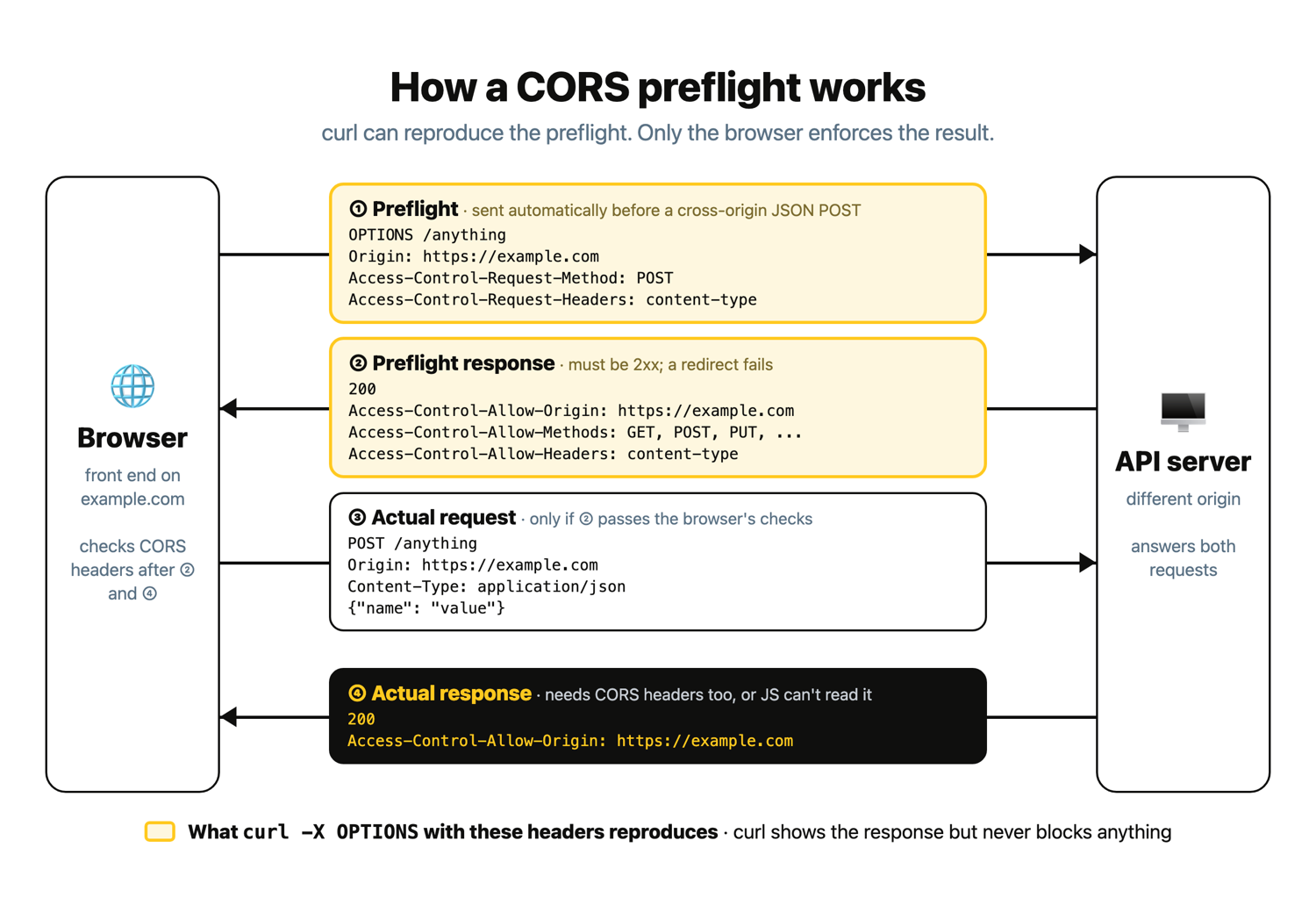
With curl, the preflight is:
# Reproduce a browser CORS preflight for a proposed cross-origin JSON POST
curl -i -X OPTIONS https://httpbin.org/anything \
  -H "Origin: https://example.com" \
  -H "Access-Control-Request-Method: POST" \
  -H "Access-Control-Request-Headers: content-type"
I got back:
HTTP/2 200
date: Thu, 01 Oct 2026 16:50:45 GMT
content-type: text/html; charset=utf-8
content-length: 0
server: gunicorn/19.9.0
allow: POST, GET, HEAD, PATCH, TRACE, DELETE, OPTIONS, PUT
access-control-allow-origin: https://example.com
access-control-allow-credentials: true
access-control-allow-methods: GET, POST, PUT, DELETE, PATCH, OPTIONS
access-control-max-age: 3600
access-control-allow-headers: content-type
Look for four things:
- A 2xx status (200 here). The preflight response itself must be 2xx. Also avoid redirects in general: browser behavior around redirects for preflighted requests is inconsistent, and some browsers still reject them.
Access-Control-Allow-Originpermitting your origin. httpbin echoedhttps://example.com.- POST in
Access-Control-Allow-Methods. content-typeinAccess-Control-Allow-Headers.
A wildcard Access-Control-Allow-Origin: * can't authorize a credentialed CORS request (one with cookies or HTTP auth); the server has to return the specific origin, as httpbin does here. httpbin echoes any origin, though, so test a real API with your app's actual origin.
curl does not enforce browser CORS. A preflight that looks right in curl doesn't prove the browser will allow the whole request. The JSON body goes in the POST that follows, which you can test by sending a JSON POST request with curl.
Common curl options you'll use
These are the flags used in this guide, plus a few you'll reach for next:
| Option | What it does |
|---|---|
-X, --request | Sets the request method string. |
-H, --header | Adds a request header. |
-d, --data | Sends request data. curl uses POST unless another method was already selected. |
-i, --include | Includes response headers in the output, before the body. |
-I, --head | Fetches headers with a HEAD request. |
-v, --verbose | Prints protocol and connection debug info, including request and response headers. |
-L, --location | Follows redirects. |
-o, --output | Saves output to a filename you choose. |
-O, --remote-name | Saves output using the remote filename. |
-L changes which URL you end up examining, and combined with -X, it reuses the forced method on every redirect. For -o and -O, see how to download files with curl.
-d doesn't mean "send JSON." It sends the body you give it, form-encoded by default, as a POST:
# -d sends a request body and uses POST here; no need for -X POST
curl https://httpbin.org/anything -d "name=value&foo=bar" -i
httpbin echoed back what it received (trimmed):
HTTP/2 200
content-type: application/json
...
  "form": {
    "foo": "bar",
    "name": "value"
  },
  "headers": {
    ...
    "Content-Type": "application/x-www-form-urlencoded",
    ...
  },
  "method": "POST",
Adding -X POST would be redundant, and with -L it would force POST onto redirects. Moving to code? Compare the best Python HTTP clients.
How to share or convert a curl command
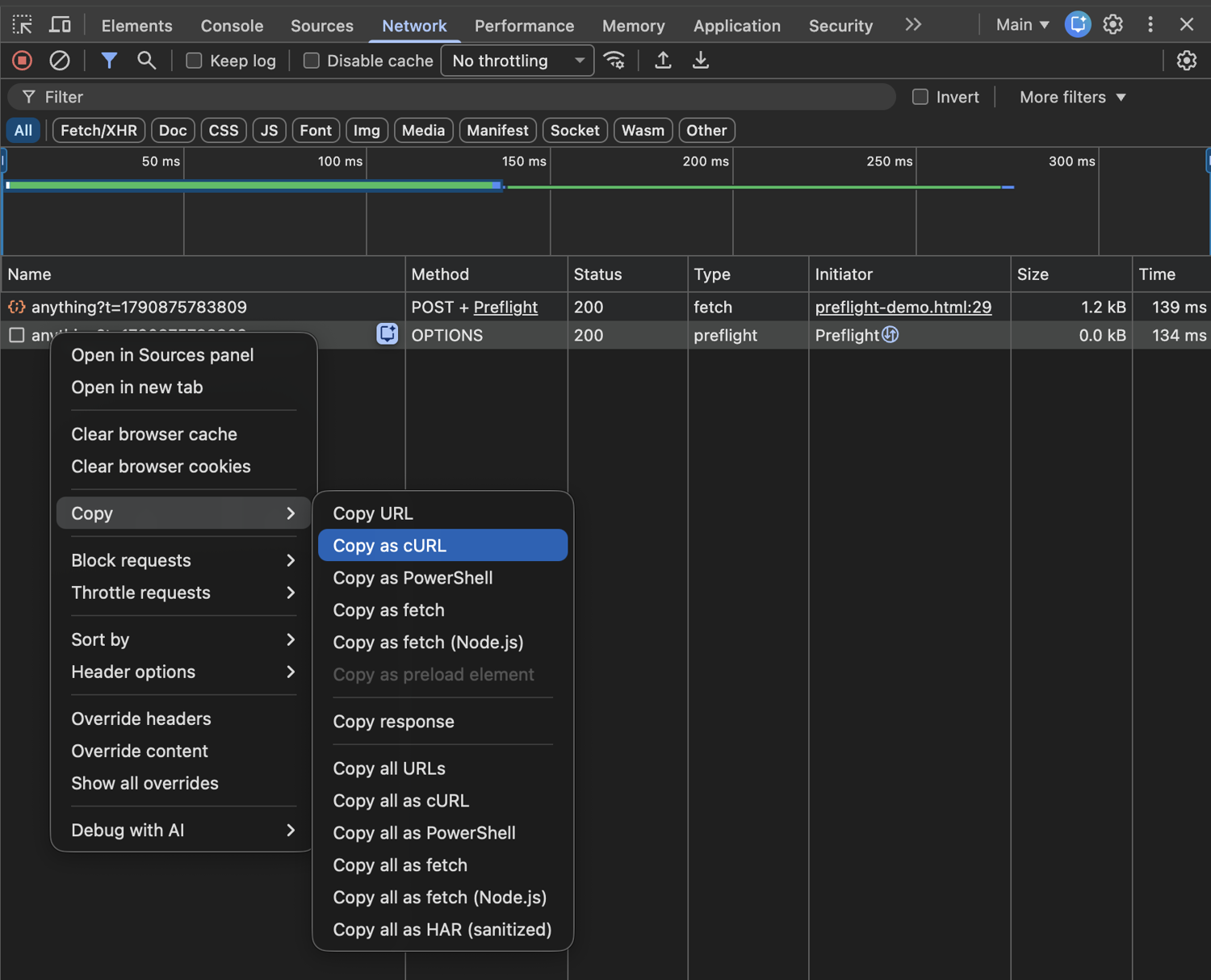
In the DevTools Network tab, right-click a request and choose Copy › Copy as cURL. When debugging a preflight, copy the OPTIONS entry (Chrome lists it with type preflight under the All filter), not the POST that follows it. No OPTIONS entry? The request may not have needed a preflight, or the browser reused a cached one.
Before you share the command or paste it into a converter, redact anything sensitive. A copied request can include:
- Authorization headers
- Cookies
- API tokens
- Sensitive query parameters
- Credentials or personal data in the request body
The curl converter turns a curl command into Python, JavaScript, Go, and other languages. Review and test the output. If you're converting curl to JavaScript for the browser, the fetch call is still subject to CORS.
From curl testing to fetching pages at scale
Fetching real pages repeatedly means dealing with proxies, anti-bot systems, and JavaScript rendering. The ScrapingBee web scraping API handles those, and you can call it with curl: typically with GET, or POST and PUT for forms and stateful endpoints. Authenticate with Authorization: Bearer YOUR-API-KEY (the api_key query parameter is deprecated). First run export SCRAPINGBEE_API_KEY="YOUR-API-KEY":
# Fetch a page through ScrapingBee and print only the response headers
curl -G "https://app.scrapingbee.com/api/v1/" \
  -H "Authorization: Bearer $SCRAPINGBEE_API_KEY" \
  --data-urlencode "url=https://books.toscrape.com/" \
  -d "render_js=false" \
  -s -D - -o /dev/null
-G sends the -d values as query parameters on a GET request. The Spb-* headers I got back (trimmed):
HTTP/2 200
spb-last-modified: Wed, 08 Feb 2023 21:02:32 GMT
spb-etag: W/"63e40de8-c85e"
spb-cost: 1
spb-initial-status-code: 200
spb-resolved-url: https://books.toscrape.com/
spb-request-id: e5a304a4-4f78-4341-9826-0acbfdc374dd
The first two are the target's own headers, prefixed. The rest are ScrapingBee metadata, such as spb-cost in credits.
ScrapingBee doesn't document OPTIONS forwarding, so it can't proxy a CORS preflight or test a site's OPTIONS response. For more, see web scraping without getting blocked.
Troubleshooting OPTIONS and CORS
The terminal is blank. The response probably has little or no body. Add
-ior-v.There's no Allow header. That doesn't mean the resource supports no methods.
Allowis required in a 405 response but optional in other responses.There are no CORS headers. Send a realistic preflight with
OriginandAccess-Control-Request-Method. If they're still missing, the server may not allow CORS for that origin or request.The preflight looks fine but the real request fails. Browsers check CORS headers on the actual response too. If it lacks
Access-Control-Allow-Origin(plusAccess-Control-Allow-Credentials: truefor credentialed requests), it fails. Send the real request with the sameOriginheader and-ito check.The real request returns 405. The endpoint doesn't support that method, regardless of CORS. On httpbin, a preflight to
/getadvertises DELETE, but a real DELETE is rejected:curl -s -i -X OPTIONS https://httpbin.org/get \ -H "Origin: https://example.com" \ -H "Access-Control-Request-Method: DELETE" | grep -iE "^HTTP|^allow|^access-control-allow-methods" curl -s -i -X DELETE https://httpbin.org/get | grep -iE "^HTTP|^allow"HTTP/2 200 allow: HEAD, OPTIONS, GET access-control-allow-methods: GET, POST, PUT, DELETE, PATCH, OPTIONS HTTP/2 405 allow: HEAD, GET, OPTIONSYou get a redirect. Redirects can cause CORS failures: the preflight response itself must be 2xx, and some browsers still don't follow redirects for preflighted requests. Test the final URL directly where possible.
-Lcan hide the redirect when testing with curl, so inspect the original URL with-ifirst.curl works but the browser reports a CORS error. That can be expected: curl doesn't enforce CORS.
curl exits successfully despite an HTTP error. curl doesn't treat an HTTP 4xx or 5xx response as a transfer error by default, so check the HTTP status. Add
--failif your script needs curl to return a non-zero exit code for HTTP errors.
Fetch pages at scale with ScrapingBee
Sign up for a free ScrapingBee account to get 1,000 free API credits, no credit card required, and try the curl call above on the pages you need.
curl OPTIONS request FAQs
Does a curl OPTIONS request count against my API's rate limits?
It can, depending on the API and its infrastructure. Some servers send OPTIONS through the same rate-limiting layer as other requests, while CORS middleware may answer preflights before application-level rate limiting runs. Check the API's docs.
What are curl options?
curl options are command-line flags that change how curl sends a request or handles its response. Most have a long form: -X is --request, -H is --header, and -d is --data. curl --help shows only a summary; run curl --help all or man curl for the full list. They're unrelated to the HTTP OPTIONS method, which is a request method curl can send.
Can browsers cache the result of a preflight OPTIONS request?
Yes. A server can return Access-Control-Max-Age in the preflight response so the browser caches the result for matching requests, subject to browser-specific limits. curl has no preflight cache: every curl command is just another HTTP request.
How do I see the response headers of an OPTIONS request?
Add -i to include the response headers, or -v for verbose debugging output. To write only the headers, use -D headers.txt, or -D - for standard output:
curl -s -X OPTIONS https://httpbin.org/anything -D - -o /dev/null
HTTP/2 200
date: Thu, 01 Oct 2026 16:50:48 GMT
content-type: text/html; charset=utf-8
content-length: 0
server: gunicorn/19.9.0
allow: PUT, POST, TRACE, PATCH, DELETE, HEAD, GET, OPTIONS
access-control-allow-origin: *
access-control-allow-credentials: true
access-control-allow-methods: GET, POST, PUT, DELETE, PATCH, OPTIONS
access-control-max-age: 3600
Can curl send a server-wide OPTIONS * request?
Yes. curl normally takes the request target from the URL path, but --request-target '*' sends the asterisk form instead. It works over HTTP/2 too; --http1.1 is only there so you get the classic OPTIONS * HTTP/1.1 request:
curl -i --http1.1 --request-target '*' -X OPTIONS https://curl.se/
curl.se answered HTTP/1.1 200 OK with Allow: GET,POST,OPTIONS,HEAD. OPTIONS * asks about the server in general; it doesn't list routes. Support varies: example.com and httpbin.org returned 400 Bad Request.