To scrape trading card prices, send the card's public page URL to a web scraping API that renders JavaScript and returns the final HTML, then parse the prices in Python. This method works across different games and marketplaces, including TCGplayer, Cardmarket, and PriceCharting. A couple of games offer a free API (Magic via Scryfall, Pokémon via the Pokémon TCG API), but official coverage is limited, so scraping is the more flexible way to get current prices across sites.
In this guide, I'll walk developers, collectors, and hobbyists through the full workflow in Python, from scraping a single card to an entire collection. You'll see how to fetch JavaScript-rendered pages, parse prices with BeautifulSoup or extraction rules, handle retries and errors, schedule and scale scrapes, reduce blocking risk, and account for legal considerations.
Key takeaways
- The reliable way to get trading card prices is to scrape the card's public page with a web scraping API that renders JavaScript and rotates proxies, so one call returns the price even on bot-protected sites.
- Two games have a free official API you can use as a shortcut: Scryfall (Magic) and the Pokémon TCG API (Pokémon). For every other game, most marketplaces, or a data field the free APIs don't expose, scraping is the go-to route (eBay is the exception — use its approved API instead).
- TCGplayer's own developer API has been effectively closed to new applicants since around late 2024, so scraping public pages is the practical way to get its live prices.
- Plain requests scripts return empty prices because card sites render prices with JavaScript; render_js=true (plus premium_proxy for protected sites) fixes that.
- Always check the target site's Terms and robots.txt, keep request rates polite, and never scrape behind a login.
How to scrape trading card prices in Python (step by step)
To scrape trading card prices in Python, send the card's public page to a web scraping API that renders the JavaScript, then parse the price out of the returned HTML. That's the whole workflow, and the six steps below build it up from a single request to a repeatable price sheet for a full collection.
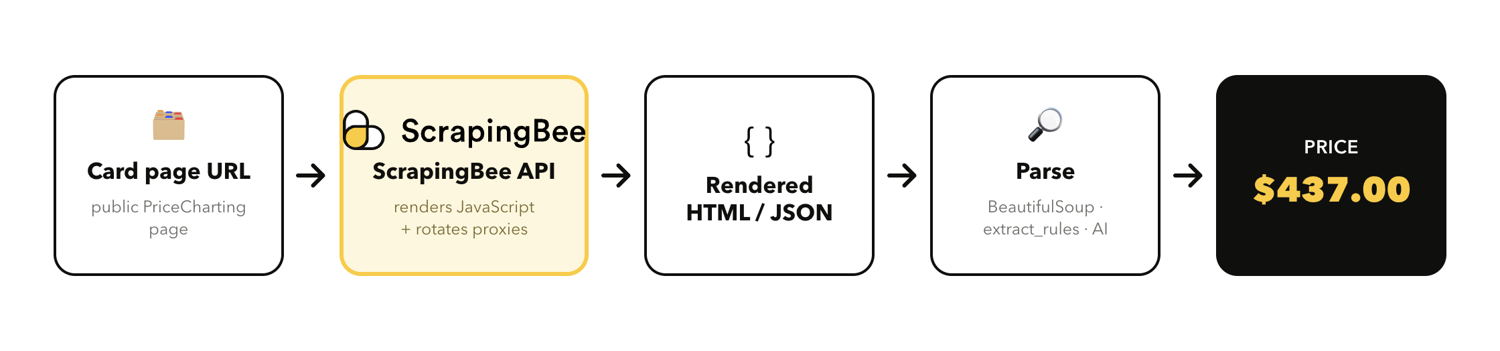
I'll use a public PriceCharting card page as the example, because it renders its prices with JavaScript and shows both ungraded and graded (PSA 10) prices on one page. The fetching approach works on any card marketplace unchanged; you'll just need to swap in that site's own CSS selectors (or skip selectors entirely with the AI extraction approach in Step 4). But, before you start coding, check that site's Terms of Service and robots.txt, and keep your request rate polite.
What you need
You'll need three things to follow along with this guide:
- A free ScrapingBee API key (1,000 credits, no credit card required).
- Python 3.10 or newer.
- The requests and beautifulsoup4 packages installed:
pip install requests beautifulsoup4
Paste your API key into an environment variable so it stays out of your code. Every snippet below reads it from SCRAPINGBEE_API_KEY:
export SCRAPINGBEE_API_KEY="your_api_key_here"
Step 1 - Fetch the rendered price page
If you run a plain requests.get() against a card page, you'll usually get HTML with no price in it. Marketplaces render the price with JavaScript after the page loads, and many sit behind anti-bot protection like Cloudflare. The number simply isn't in the raw HTML that a basic request receives.
The do-it-yourself fix is to drive a headless browser (a real browser running with no visible window) with Selenium or Playwright, so the JavaScript executes and the price appears. That works, but then you own the browser installs, the proxies, and the anti-bot cat-and-mouse.
ScrapingBee does all of the above for you! You pass the card URL with render_js=true, and it runs a headless browser server-side, returning the fully rendered HTML. For sites that block datacenter IPs, add premium_proxy=true to route the request through residential proxies (IPs that belong to real home internet connections). PriceCharting rendered fine for me without it, so I left it off here and kept it as the escalation path:
import os
import requests

API_KEY = os.environ["SCRAPINGBEE_API_KEY"]
SCRAPINGBEE_URL = "https://app.scrapingbee.com/api/v1/"
CARD_URL = "https://www.pricecharting.com/game/pokemon-base-set/charizard-4"


def fetch_page(url):
    response = requests.get(
        SCRAPINGBEE_URL,
        params={
            "api_key": API_KEY,
            "url": url,
            "render_js": "true",
            # "premium_proxy": "true",  # add for sites that block datacenter IPs
        },
        timeout=120,
    )
    response.raise_for_status()
    return response.text


html = fetch_page(CARD_URL)
print(f"Fetched {len(html)} characters of rendered HTML")
When I ran this, I got back:
Fetched 1112213 characters of rendered HTML
Over a million characters of HTML means the page rendered, and the price is in there now. If you want more background on why this happens, see the scraping JavaScript-rendered pages with Python guide.
Step 2 - Parse the price with BeautifulSoup
Now pull the price out of that HTML. On PriceCharting card pages, the ungraded market price lives in #used_price .price and the PSA 10 graded price in #manual_only_price .price selector. To find a selector like this yourself, right-click the price in your browser and choose "Inspect" to see which element holds it.
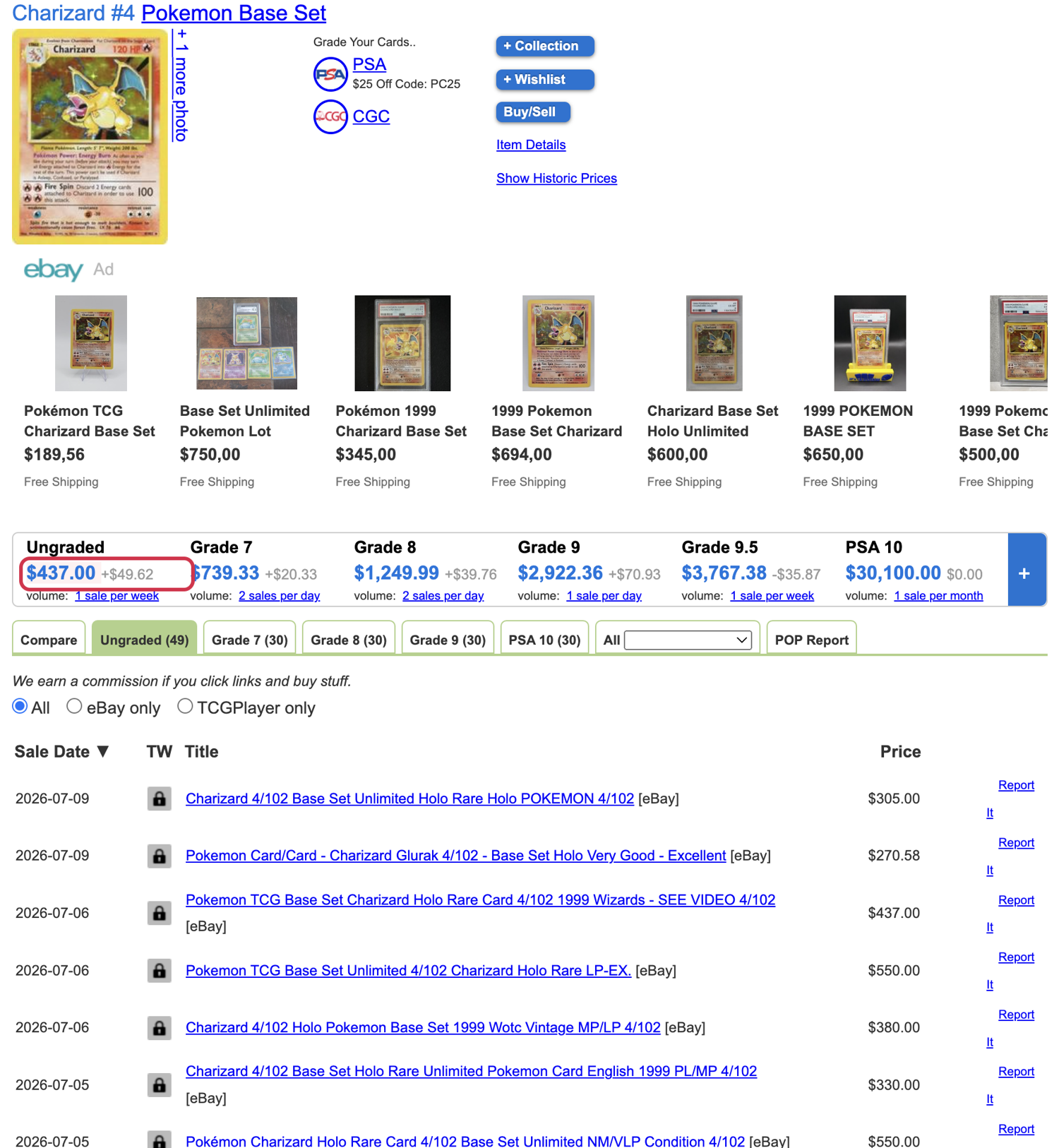
I use BeautifulSoup to grab the node, strip the $ and commas, and convert to a float. The important part is the None check: if the selector matches nothing (card not found, or the site changed its layout), return None instead of crashing.
from bs4 import BeautifulSoup

def parse_price(html, selector):
    soup = BeautifulSoup(html, "html.parser")
    node = soup.select_one(selector)
    if node is None:
        return None
    text = node.get_text(strip=True)          # e.g. "$437.00"
    cleaned = text.replace("$", "").replace(",", "")
    try:
        return float(cleaned)
    except ValueError:
        return None

ungraded = parse_price(html, "#used_price .price")
psa10 = parse_price(html, "#manual_only_price .price")
print(f"Ungraded price: {ungraded}")
print(f"PSA 10 price:   {psa10}")
Here's what I got back for the Base Set Charizard:
Ungraded price: 437.0
PSA 10 price:   30100.0
Two clean floats you can store or compare. That's the full manual approach: fetch, then parse.
Step 3 - Get clean fields with extract_rules
Hand-parsing works, but you can skip it. Pass extract_rules and ScrapingBee applies your CSS selectors server-side and returns named JSON fields instead of raw HTML. You map each field name to a selector, send it as a JSON string, and read the response with response.json():
import json

EXTRACT_RULES = {
    "name": "h1#product_name",
    "ungraded_price": "#used_price .price",
    "grade_9_price": "#graded_price .price",
    "psa10_price": "#manual_only_price .price",
}

response = requests.get(
    SCRAPINGBEE_URL,
    params={
        "api_key": API_KEY,
        "url": CARD_URL,
        "render_js": "true",
        "extract_rules": json.dumps(EXTRACT_RULES),
    },
    timeout=120,
)
print(json.dumps(response.json(), indent=2))
The response came back already structured!
{
  "name": "Charizard #4 Pokemon Base Set",
  "ungraded_price": "$437.00",
  "grade_9_price": "$2,922.36",
  "psa10_price": "$30,100.00"
}
One call, clean fields, no BeautifulSoup. See the data extraction rules documentation for the full selector syntax.
Before storing the scraped data, normalize fields by keeping card identifiers consistent and formatting prices as a currency value.
Step 4 - Skip brittle selectors with AI extraction
CSS selectors break when a site tweaks its markup. If a source changes its layout often, AI web scraping is the more resilient option: you describe the fields you want in plain English with ai_query and let the API figure out where they are.
AI_QUERY = (
    "Return a JSON object with the card name, the ungraded market price, "
    "the lowest listing price, and the PSA 10 graded price."
)

response = requests.get(
    SCRAPINGBEE_URL,
    params={
        "api_key": API_KEY,
        "url": CARD_URL,
        "render_js": "true",
        "ai_query": AI_QUERY,
    },
    timeout=180,
)
print(json.dumps(response.json(), indent=2))
Here's what I got back:
{
  "card_name": "Charizard #4",
  "ungraded_market_price": "$437.00",
  "lowest_listing_price": "$437.00",
  "psa_10_graded_price": "$30,100.00"
}
This solution requires no selectors, and it survives small layout changes. One small caveat: AI extraction infers fields rather than reading exact nodes, so a fuzzy field like "lowest listing price" can map to whatever the model thinks is closest (here, it reused the ungraded price). Name your fields precisely and spot-check the output. ai_query costs +5 credits on top of the base call. For more on this approach, see AI-powered price scraping.
Step 5 - Scrape a whole set or watchlist
The payoff is going from one card to a whole collection. Loop over a list of card URLs, call the API for each, collect the results, and write them to CSV.
In the following examples, I add a short delay between requests to stay within limits. On paid ScrapingBee plans, you can run these concurrently instead.
import csv
import time

WATCHLIST = [
    "https://www.pricecharting.com/game/pokemon-base-set/charizard-4",
    "https://www.pricecharting.com/game/pokemon-base-set/blastoise-2",
    "https://www.pricecharting.com/game/pokemon-base-set/venusaur-15",
]

EXTRACT_RULES = {
    "name": "h1#product_name",
    "ungraded_price": "#used_price .price",
    "psa10_price": "#manual_only_price .price",
}

rows = []
for url in WATCHLIST:
    response = requests.get(
        SCRAPINGBEE_URL,
        params={
            "api_key": API_KEY,
            "url": url,
            "render_js": "true",
            "extract_rules": json.dumps(EXTRACT_RULES),
        },
        timeout=120,
    )
    card = response.json()
    card["url"] = url
    rows.append(card)
    time.sleep(1)  # wait between requests

with open("card_prices.csv", "w", newline="") as f:
    writer = csv.DictWriter(f, fieldnames=["name", "ungraded_price", "psa10_price", "url"])
    writer.writeheader()
    writer.writerows(rows)
The above produced a price sheet CSV with card details that I could open in any spreadsheet tool:
name,ungraded_price,psa10_price,url

Charizard #4 Pokemon Base Set,$437.00,"$30,100.00",https://www.pricecharting.com/game/pokemon-base-set/charizard-4

Blastoise #2 Pokemon Base Set,$87.51,"$7,975.32",https://www.pricecharting.com/game/pokemon-base-set/blastoise-2

Venusaur #15 Pokemon Base Set,$95.00,"$3,336.00",https://www.pricecharting.com/game/pokemon-base-set/venusaur-15
Step 6 - Handling missing prices, errors, and retries
If you run the code across a real watchlist, something might eventually fail: a card page that doesn't exist, or a transient server error. You can wrap the request in a retry loop, check the HTTP status, and skip cards with no price instead of crashing the whole job. ScrapingBee doesn't charge credits for HTTP 500 responses, so retrying on a 500 is free.
MAX_RETRIES = 3

def scrape_card(url):
    for attempt in range(1, MAX_RETRIES + 1):
        try:
            response = requests.get(
                SCRAPINGBEE_URL,
                params={
                    "api_key": API_KEY,
                    "url": url,
                    "render_js": "true",
                    "extract_rules": json.dumps({"name": "h1#product_name",
                                                 "ungraded_price": "#used_price .price"}),
                },
                timeout=120,
            )
        except requests.RequestException:
            time.sleep(2 * attempt)
            continue

        if response.status_code >= 500:   # transient and not billed, so retry
            time.sleep(2 * attempt)
            continue
        if response.status_code != 200:
            return None
        return response.json()
    return None

for url in WATCHLIST:
    data = scrape_card(url)
    if not data or not data.get("ungraded_price"):
        print(f"no price for {url}, skipping")
        continue
    print(f"{data['name']}: {data['ungraded_price']}")
When I pointed the code above at a real card and a made-up URL, the good one printed its price, and the bad one was skipped cleanly instead of taking down the run:
Charizard #4 Pokemon Base Set: $437.00
no price for https://www.pricecharting.com/game/pokemon-base-set/does-not-exist-9999, skipping
That's a scraper you can leave running over a full collection! If you're new to the underlying concepts, the web scraping with Python guide covers them in more depth.
There you have it! We covered fetching trading card pricing pages, different price parsing methods with ScrapingBee, and error handling. Now, let's explore more advanced scenarios and provide answers to common questions you might have.
Automate and schedule your card price tracker
To track prices over time, you can run your scraper on a schedule and append each result to a store. Every run adds a timestamped row, and over weeks, you've got price history for your whole collection.
A simple way is to use a cron job plus a CSV or database. Just point the cron at the watchlist script from Step 5 and let it append daily:
# Every day at 8am, run the tracker and log output
0 8 * * * cd /path/to/project && /path/to/.venv/bin/python step5_watchlist.py >> tracker.log 2>&1
If you'd rather not manage cron, the ScrapingBee CLI has built-in scheduling for recurring scrapes from the command line.
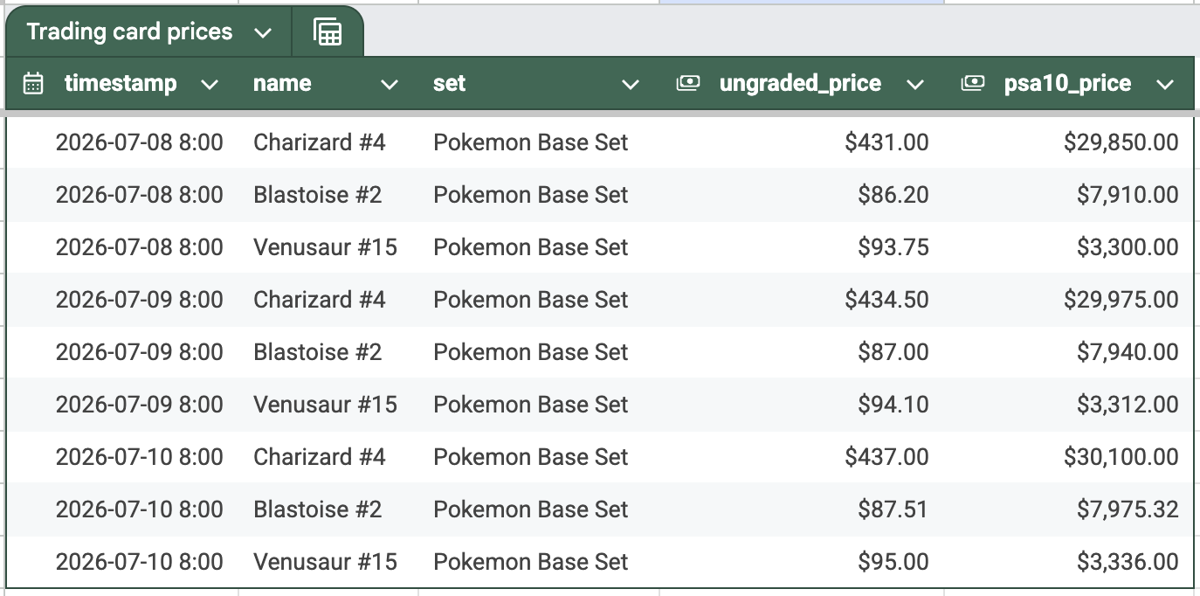
Whichever store you use, add a timestamp column and append a new row on every run rather than overwriting the last value. That's what turns a one-off snapshot into a price history you can chart, so you can evaluate price trends.
A no-code alternative for historical pricing data is Google Sheets, which many collectors already use to watch a collection's value. For simple public pages, =IMPORTXML("https://…","//your/xpath") pulls a price straight into a cell. For pages that need JavaScript rendering or block automated requests, call the ScrapingBee API from Apps Script on a schedule and write the returned price and a timestamp into the sheet:
Staying unblocked as you scale
As you scrape more cards more often, blocks get more likely. The fix is to match the proxy tier to each request instead of paying for the heaviest option everywhere. ScrapingBee gives you three tiers: Classic (datacenter) for easy pages, Premium (premium_proxy=true) for sites that block datacenter IPs, and Stealth (stealth_proxy=true) for the hardest anti-bot sites, like those behind Cloudflare's anti-bot protection.
The credit cost scales with the tier, so this choice is also your cost control: Classic runs 1 to 5 credits per request, Premium 10 to 25, and Stealth 75, with AI extraction adding 5 on top. HTTP 500 responses aren't charged, so retries are safe.
Keep request rates polite, cache anything you don't need for real-time pricing, and pay only for the tier a given source actually needs, so a large job stays predictable. For the full playbook, see web scraping without getting blocked, and check current rates on the ScrapingBee pricing page.
Is there a trading card price API? What exists, and what to scrape
A few games have official price APIs, but most do not, and the biggest marketplace's API (TCGplayer) is closed. For Magic, Scryfall is free. For Pokémon, the Pokémon TCG API is free and returns prices sourced from TCGplayer and Cardmarket. PriceCharting has a paid API that covers many games, plus graded prices.
There is no broad, open API that covers every game, and sports card and Yu-Gi-Oh price APIs are limited or unofficial. Scraping is the flexible option that fills most of that gap: any game, most marketplaces, and the fields that an API doesn't expose — eBay is the one notable exception, covered in the table below.
| Source | Games | Official API? | Cost | How to get prices |
|---|---|---|---|---|
| Scryfall | Magic: The Gathering | Yes (free) | Free | Free API (shortcut for Magic) |
| Pokémon TCG API | Pokémon | Yes (free, key) | Free tier | Free API returning TCGplayer and Cardmarket prices |
| PriceCharting | Multi-game + graded | Yes (paid) | Subscription | Paid API, or scrape the public page |
| TCGplayer | Multi-game marketplace | Closed to new devs | n/a | Scrape public pages (API closed to new applicants) |
| Cardmarket | Multi-game (EU) | No open API | n/a | Scrape public pages politely |
| eBay sold listings | All (real sales) | Yes (approval) | Varies | Use eBay's approved API; scraping eBay is restricted by its User Agreement |
A couple of caveats worth knowing before you build on an API. The free Pokémon TCG API still works and still returns TCGplayer and Cardmarket price snapshots on a free key, but the team behind it is moving development to a commercial successor (Scrydex), so treat the free tier as convenient-but-not-guaranteed and cache what you pull.
Scryfall's API is free but asks for polite rate limiting (roughly 10 requests per second, with 50 to 100 ms between calls). And for eBay, use its approved API rather than scraping, because eBay's User Agreement restricts automated access.
For everything else, scraping the public page is the route that always works, the same way you'd approach scraping product prices from a large marketplace. TCGplayer is a good example: its own pricing-data policy has kept the developer API closed to new applicants since around late 2024, so the public pages are the practical source for its live prices.
Is it legal to scrape trading card prices?
Scraping publicly visible card prices is generally lawful in the US, and courts have read the main anti-hacking law, the Computer Fraud and Abuse Act (CFAA), narrowly. That said, this is not legal advice. A site's Terms of Service can still forbid scraping, the rules differ by country, and none of this applies once data sits behind a login.
The practical line is public versus login-gated. Prices shown on a public product page are fair game to read; anything you'd need an account to see is not. Check the target site's Terms and its robots.txt before you start, keep your request rate polite so you're not straining the site, and cache what you don't need fresh. Bear in mind that a Terms of Service violation is usually a contract matter between you and the site, not a criminal one, but it can still get your access cut off, so it's worth respecting.
ScrapingBee has one hard rule that's worth adopting as your own: no scraping behind a login. Stay on public pages, keep your rate reasonable, respect the site's stated wishes, and you're on solid ground.
Scrape any card marketplace with ScrapingBee
The whole workflow comes down to one ScrapingBee API call: it renders the page, rotates proxies, and returns the price as structured JSON your tracker can ingest. It works across every game and marketplace that allows scraping, handles JavaScript and anti-bot protection, and starts with 1,000 free API credits, no credit card required. Just point ScrapingBee at your first card page and see the price come back.
Trading card scraping FAQs
Is there a Pokémon card price API?
Yes. The Pokémon TCG API returns Pokémon card data and prices sourced from TCGplayer and Cardmarket on a free tier. If you need a game or marketplace it doesn't cover, or a field it doesn't expose, scrape the public price page with a rendered request instead.
Is there a TCG, sports card, or Yu-Gi-Oh price API?
Only partly. Magic has Scryfall and Pokémon has the Pokémon TCG API, but there is no broad open API covering every game, and TCGplayer's own developer API has been closed to new applicants since around late 2024. Sports card and Yu-Gi-Oh price APIs are limited or unofficial, so scraping the public price pages is the reliable cross-game route.
Why does my Python scraper return no price?
Because the price is rendered with JavaScript after the page loads, so a plain requests call gets HTML without the number in it. Render the page with a headless browser or a web scraping API that runs JavaScript for you, then parse the rendered HTML.
Is it legal to scrape trading card prices?
Scraping publicly visible card prices is generally lawful in the US, and courts have read the main anti-hacking law narrowly. But this is not legal advice: a site's Terms of Service can still forbid scraping, rules differ by country, and you should never scrape behind a login. Check the target site's Terms and robots.txt first.
How do I scrape card prices into Google Sheets?
For simple cases, you can pull a public price page into Sheets with IMPORTHTML or IMPORTXML. For pages that need JavaScript rendering or that block automated requests, call a web scraping API from Apps Script and write the returned price into a cell on a schedule; a simple tracking app built with Apps Script or a lightweight front end can then display those values from Google Sheets.
How often can I refresh prices without getting blocked?
Keep it polite: space requests out, use residential or stealth proxies for protected sites, and cache prices you don't need in real time. Refreshing a large collection once or a few times a day is usually enough and keeps both your block rate and your costs down.