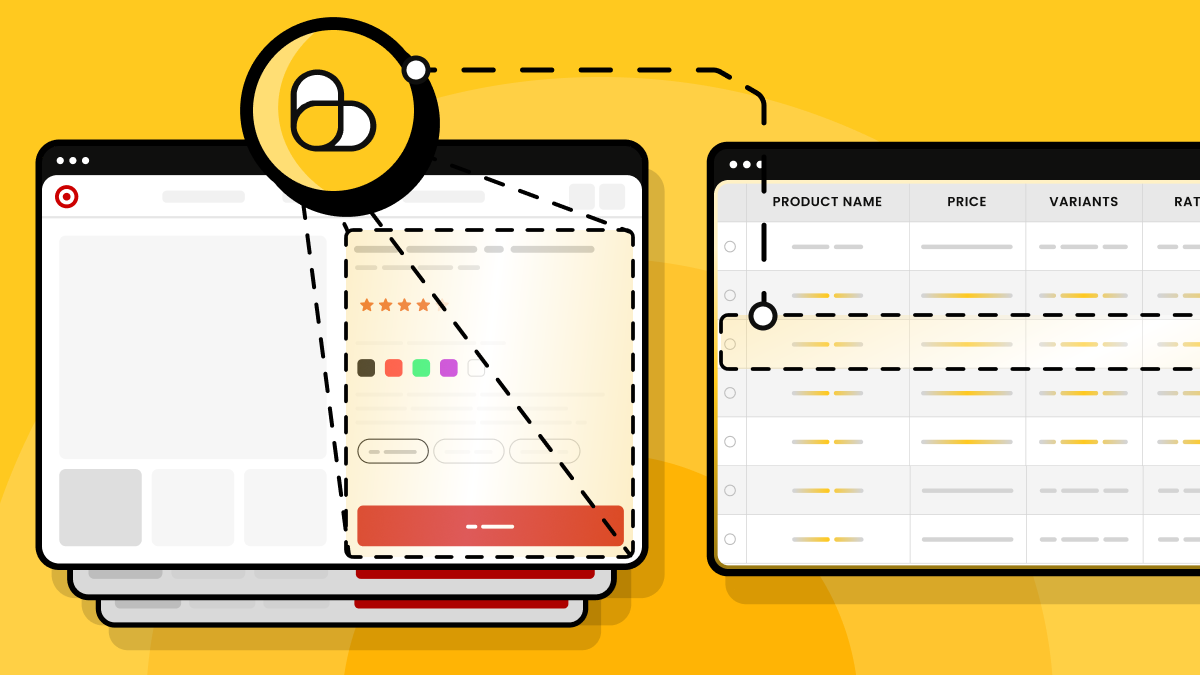
This guide shows you how to scrape Target product data in two ways. The fastest path is Target's internal RedSky JSON API, which returns structured data without page rendering. The other is by rendering the webpage and extracting the fields. We'll walk through both approaches with working Python code and show you how to route requests through proxies, which you'll need because Target strictly blocks automated traffic.
Can you legally scrape Target.com?
Scraping Target product data that anyone can access without logging in is lower risk than scraping private or login-gated content. However, Target's Terms of Use restrict automated access to its data, so respect its robots.txt and never scrape post-login content. As a simple check, if you can access a page in an incognito browser without logging in, it's considered public.
Even when scraping public pages, don't hammer Target servers. Avoid sending large bursts of traffic, add delays between requests, and keep request volumes reasonable.
After a successful scrape, how you use that data is also equally important. Pulling prices for your own pricing strategy or monitoring competitors carries less risk than republishing Target's catalog in a competing storefront.
U.S. courts treat factual data differently from creative content. Information such as prices, UPCs, and stock availability is factual data. You can use it for analysis, monitoring, or business decisions.
Product descriptions, photography, and marketing copy are different. While you can scrape this content, it is protected by copyright law. So republishing it in your own application, website, or commercial product introduces copyright issues.
What product data you can pull from Target
You can scrape any visible text on a Target product page without logging in. This includes the TCIN (Target's product ID), item title, brand, price, ratings, review count, images, and product specifications.
This data is useful for price monitoring, customer sentiment analysis, and broader market research. For example, you can monitor price changes across products and refine your pricing strategy, or analyze review trends to understand how customers perceive a product.
Additionally, you can scrape Target stores for stock, availability, and fulfillment details through Target's RedSky API. This data shows whether a product is in stock, which stores carry it, and which fulfillment options are available, such as shipping, pickup, drive-up, and same-day delivery. You can use it to identify high-demand products, compare inventory across locations, or track how availability changes over time.
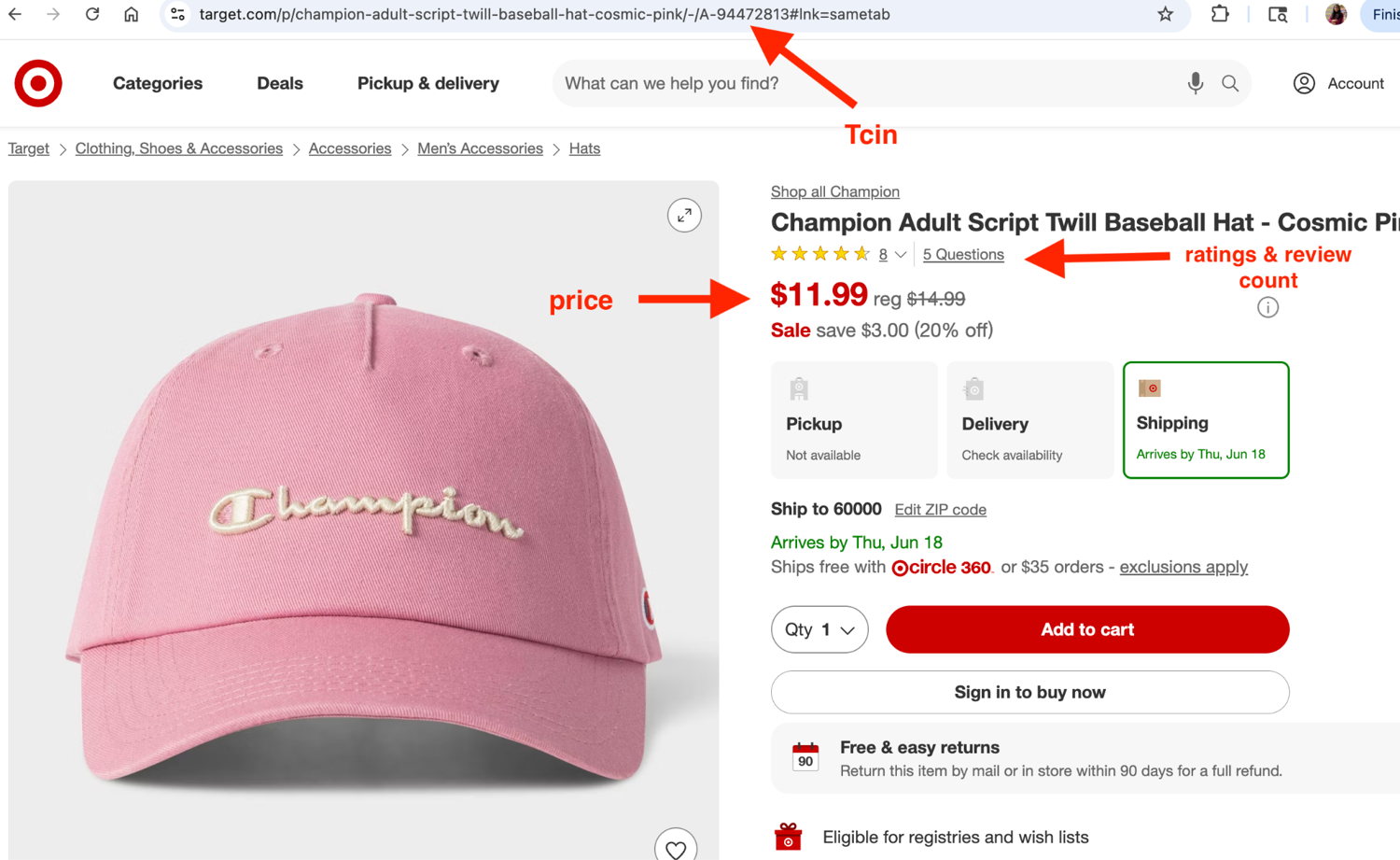
For any product, you need the TCIN to identify it and pull its data, whether you're scraping the webpage or using the RedSky API. Target product URLs typically follow the structure "/p/{slug}/-/A-{tcin}". The TCIN sits after "/A-" in the URL, as highlighted in the image below.
Two ways to scrape Target, and when to use each
RedSky API is the most reliable way to scrape Target data because it's what powers the e-commerce website itself. The API returns structured JSON, so all you need to do is call the correct endpoint with the right parameters. Since there's no JavaScript rendering involved, it's also the fastest and cheapest approach.
Even with the API approach, you may still run into rate limits or IP restrictions. In those cases, consider routing requests through ScrapingBee so it can handle the proxy infrastructure while you focus on collecting the data.
The catch is that many RedSky endpoints require specific parameters. For example, the redsky_aggregations/v1/web/product_summary_with_fulfillment_v1 endpoint requires values for store_id, ZIP code, and pricing store ID to return the relevant product information. You can usually find these parameters in the Network tab of your browser's DevTools.
If you don't have these parameters, use the second option instead: rendering the webpage and extracting the fields. This is also better when you only need information visible on the product page and don't need additional data, such as stock availability or fulfillment details.
For the rendering approach, start with ScrapingBee's premium proxies. They use high-quality rotating IPs and are often enough to prevent IP blocking. If that isn't enough, move to ScrapingBee's stealth proxy mode, which modifies browser fingerprints and other signals that websites use for bot detection.
These features help your scraper get past Target's anti-bot systems and collect data more reliably at scale. The same approach works across other scraping e-commerce sites.
| Path | How it works | Best for | ScrapingBee call | Approx credits/request |
|---|---|---|---|---|
| RedSky JSON API | Hit redsky.target.com endpoints with the required parameters and parse the JSON response. | To extract details like stock, availability, and shipping details that aren't directly visible on the website | requests.get("https://app.scrapingbee.com/api/v1", params={"api_key": API_KEY, "url": redsky_url, "premium_proxy": "true"}) | ~10 |
| Render the page | Pass the request through ScrapingBee with premium_proxy=true and render_js=true, then extract the data from the embedded JSON or DOM. | Product fields that only exist on the page or when you don't have the required RedSky parameters. | requests.get("https://app.scrapingbee.com/api/v1", params={"api_key": API_KEY, "url": target_url, "render_js": "true", "premium_proxy": "true"}) | ~25 |
| Stealth render | Render the page using ScrapingBee's stealth mode to bypass stricter anti-bot protections. | Bypassing stricter anti-bot checks when premium proxies aren't enough. | requests.get("https://app.scrapingbee.com/api/v1", params={"api_key": API_KEY, "url": target_url, "stealth_proxy": "true"}) | ~75 |
Method 1, Scrape Target's RedSky JSON API (the reliable path)
Say you want to scrape the Target product page below. Open the Network tab, search for RedSky requests, and copy the API endpoint powering the page.
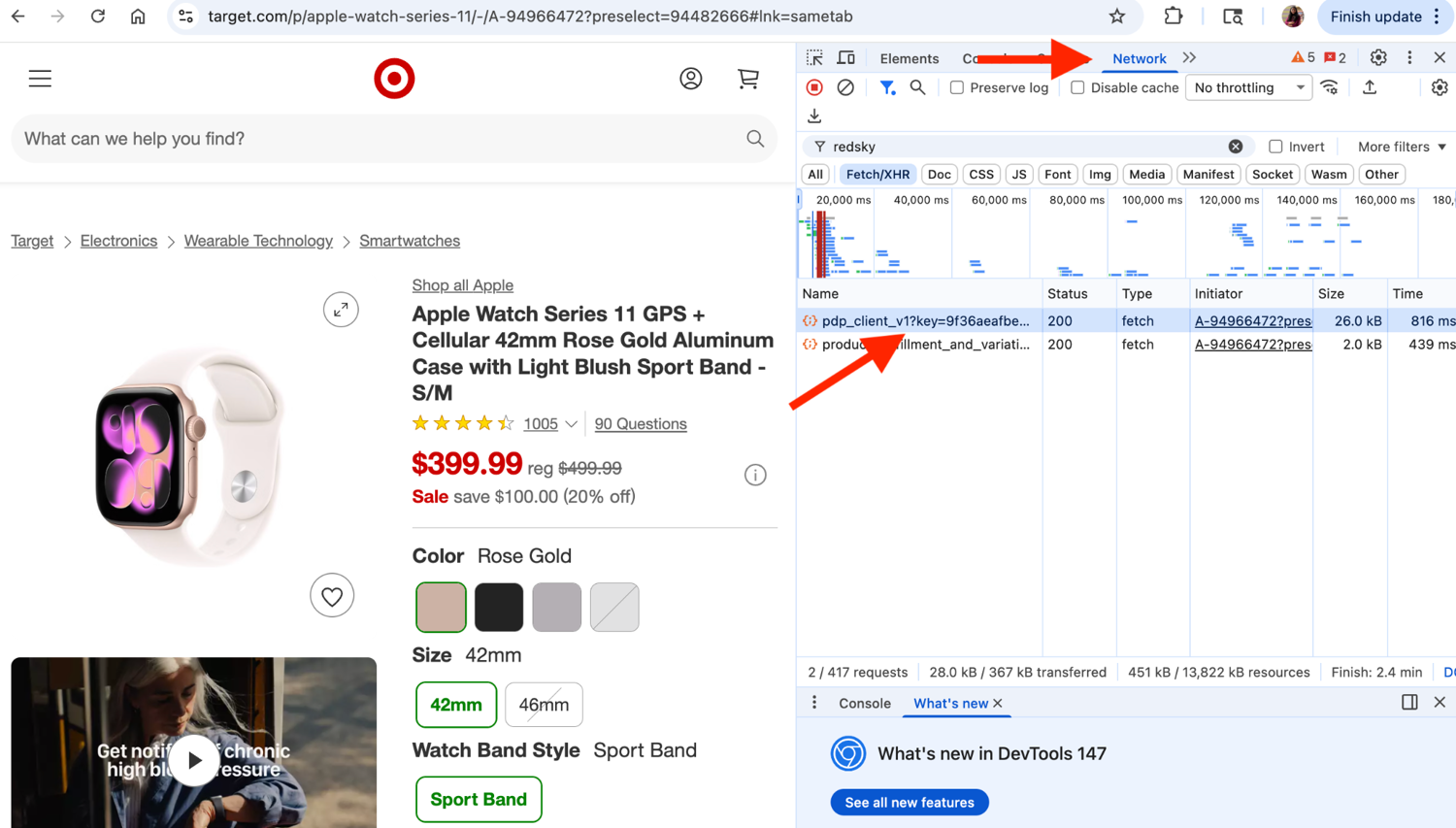
Now let your scraper hit this endpoint with the product's TCIN and necessary store parameters to get back the results as JSON.
The best part about calling the RedSky API instead of scraping the webpage is that it returns structured JSON, so you don't have to parse the HTML.
The code below sends a request to Target's RedSky API through ScrapingBee and extracts product fields like the title, price, rating, and review count. Replace the TCIN with any other item TCIN, and you'll get the details for that product.
The premium_proxy=true parameter routes the request through ScrapingBee's premium proxy network to reduce the chances of IP-based blocking, while country_code="us" ensures the request originates from the United States. In the target_url, we use store_id=3991, which is Target's default store_id for all digital products.
import json
import requests

SCRAPINGBEE_API_KEY = "PASTE_YOUR_API_KEY"
REDSKY_KEY = "9f36aeafbe60771e321a7cc95a78140772ab3e96"
TCIN = "94482666"

target_url = (
    "https://redsky.target.com/redsky_aggregations/v1/web/pdp_client_v1"
    f"?key={REDSKY_KEY}&tcin={TCIN}&store_id=3991&pricing_store_id=3991&channel=WEB"
)

response = requests.get(
    "https://app.scrapingbee.com/api/v1",
    params={
        "api_key": SCRAPINGBEE_API_KEY,
        "url": target_url,
        "premium_proxy": "true",
        "country_code": "us",
    },
)

data = json.loads(response.text)
product = data["data"]["product"]
child_price = product["children"][0]["price"]

title        = product["item"]["product_description"]["title"]
price        = child_price["current_retail"]
reg_retail_price   = child_price["reg_retail"]
discount_percent = child_price.get("save_percent")
rating       = product["ratings_and_reviews"]["statistics"]["rating"]["average"]
review_count = product["ratings_and_reviews"]["statistics"]["rating"]["count"]

print("Title            :", title)
print("Current price    :", price)
print("Discount percent :", f"{discount_percent}%" if discount_percent else "No discount")
print("Regular price    :", reg_retail_price)
print("Rating           :", rating)
print("Review count     :", review_count)
The output prints the current price, discount percentage, regular price before the discount, overall rating, and customer review count in the terminal.
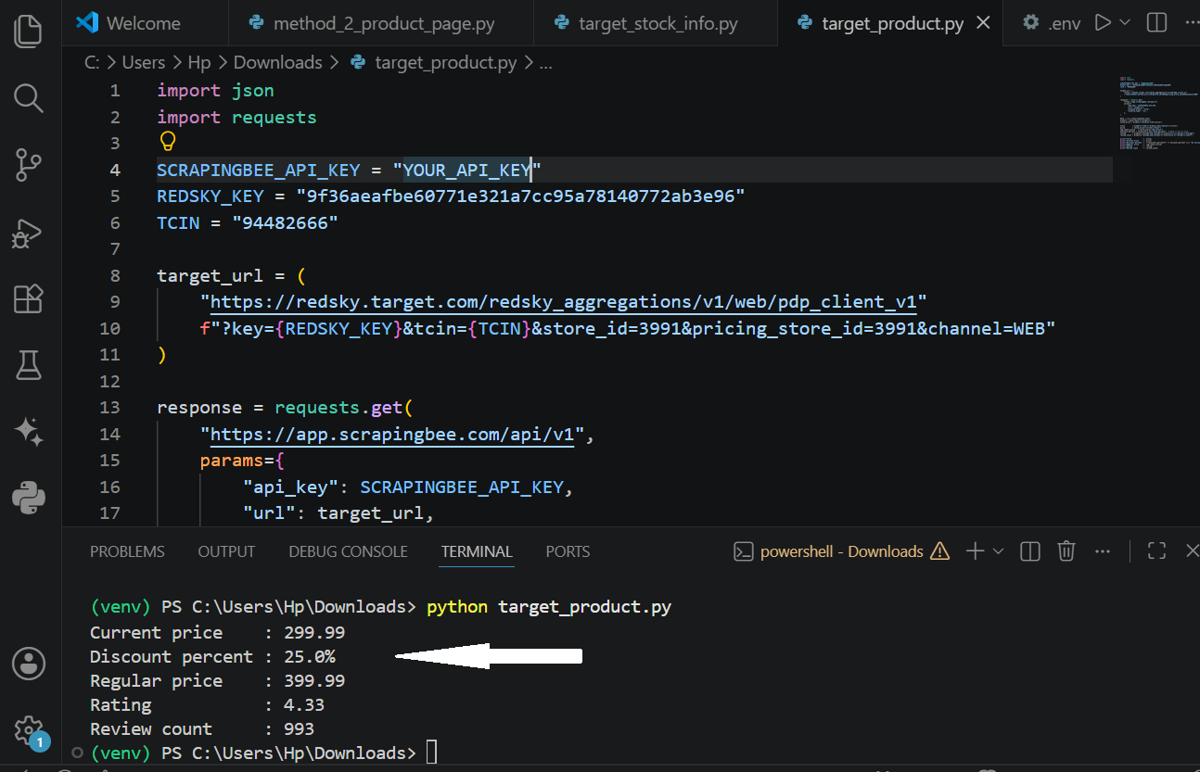
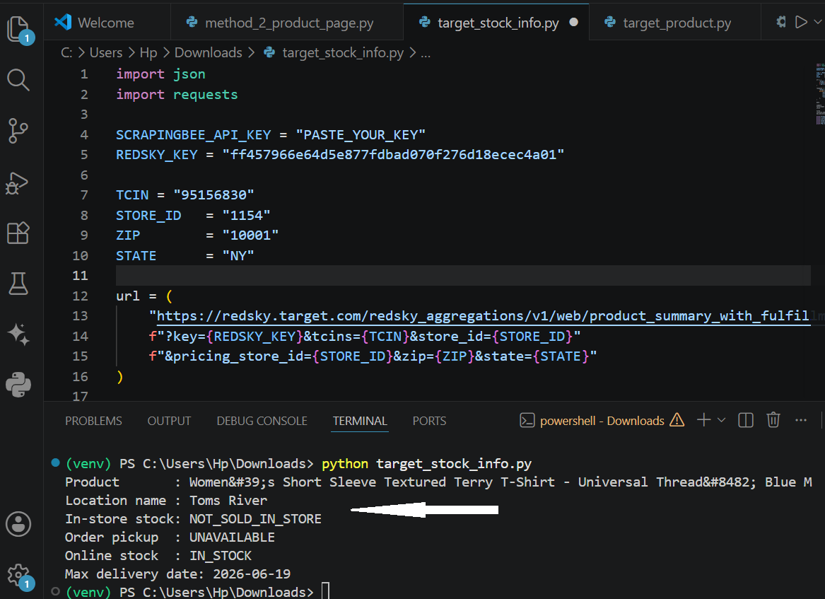
The previous example only returns the product details visible on the page. Say you want store-level information, such as whether a product is available at a specific store or what fulfillment options (store or digital) are available. In that case, you can use the endpoint shown in the code below and pass the relevant ZIP code and store ID.
import json
import requests

SCRAPINGBEE_API_KEY = "PASTE_YOUR_API_KEY"
REDSKY_KEY = "ff457966e64d5e877fdbad070f276d18ecec4a01"

TCIN = "95156830"
STORE_ID   = "1154"
ZIP        = "10001"
STATE      = "NY"

url = (
    "https://redsky.target.com/redsky_aggregations/v1/web/product_summary_with_fulfillment_v1"
    f"?key={REDSKY_KEY}&tcins={TCIN}&store_id={STORE_ID}"
    f"&pricing_store_id={STORE_ID}&zip={ZIP}&state={STATE}"
)

response = requests.get(
    "https://app.scrapingbee.com/api/v1",
    params={
        "api_key": SCRAPINGBEE_API_KEY,
        "url": url,
        "premium_proxy": "true",
        "country_code": "us",
    },
)

data        = json.loads(response.text)

summary     = data["data"]["product_summaries"][0]
fulfillment = summary["fulfillment"]
store       = fulfillment["store_options"][0]

title       = summary["item"]["product_description"]["title"]
location_name  = store["store"]["location_name"]
max_delivery_date = fulfillment["shipping_options"]["services"][0]["max_delivery_date"]

print("Product       :", title)
print("Location name :", location_name)
print("In-store stock:", store["in_store_only"]["availability_status"])
print("Order pickup  :", store["order_pickup"]["availability_status"])
print("Online stock  :", fulfillment["shipping_options"]["availability_status"])
print("Max delivery date:", max_delivery_date)
The screenshot below shows the product title, store name, in-store inventory, pickup availability, and whether the product is available online. If it is, you'll also see the latest estimated delivery date.
Method 2, Render the product page (when you need the DOM)
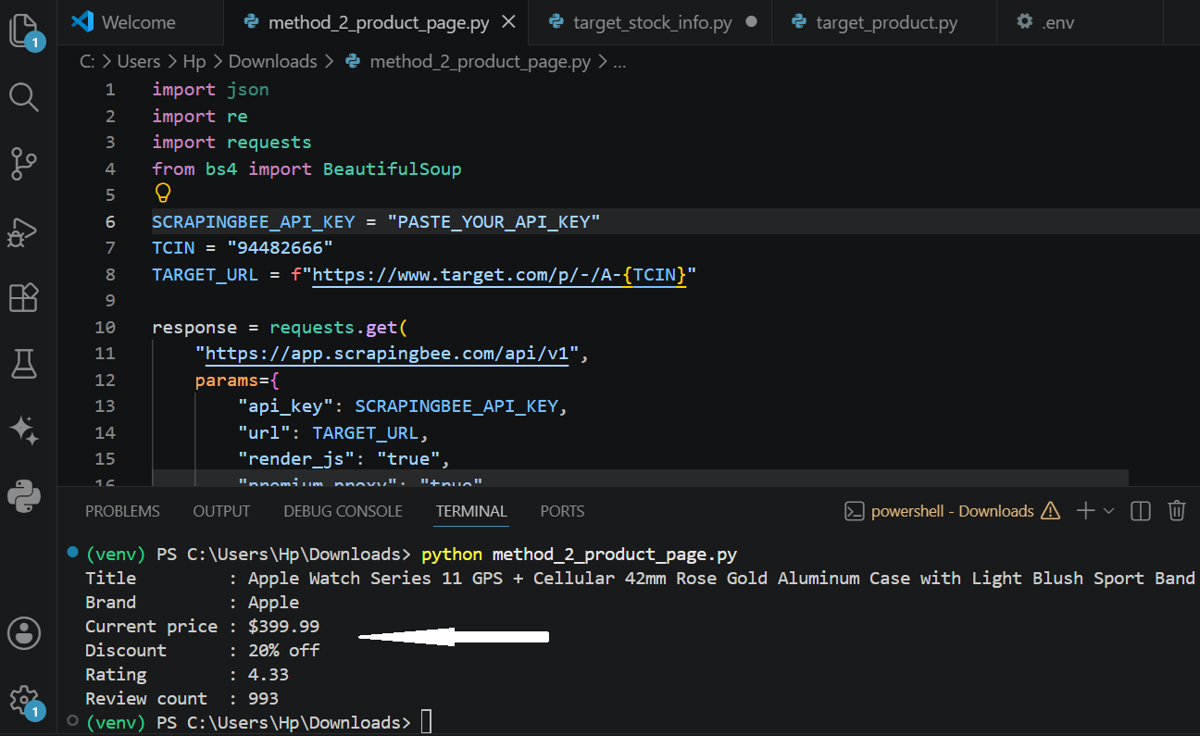
If you don't have the required RedSky parameters, or you just need the data visible on the page, render the webpage and use Beautiful Soup to parse the HTML and extract the fields you need.
I use the ScrapingBee request below. render_js=true renders the page before returning the HTML, and wait_for='[data-test="product-price"]' waits until the product price appears on the page. This ensures the data is fully loaded before we extract the fields. I also use data-test attributes like [data-test="product-price"] to identify and extract fields because Target changes CSS class names often, while data-test values stay much more stable.
response = requests.get(
    "https://app.scrapingbee.com/api/v1",
    params={
        "api_key": SCRAPINGBEE_API_KEY,
        "url": TARGET_URL,
        "render_js": "true",
        "premium_proxy": "true",
        "country_code": "us",
        "wait_for": '[data-test="product-price"]',
    },
)
Full code:
import json
import re
import requests
from bs4 import BeautifulSoup

SCRAPINGBEE_API_KEY = "PASTE_YOUR_API_KEY"
TCIN = "94482666"
TARGET_URL = f"https://www.target.com/p/-/A-{TCIN}"

response = requests.get(
    "https://app.scrapingbee.com/api/v1",
    params={
        "api_key": SCRAPINGBEE_API_KEY,
        "url": TARGET_URL,
        "render_js": "true",
        "premium_proxy": "true",
        "country_code": "us",
        "wait_for": '[data-test="product-price"]',
    },
)

response.raise_for_status()
soup = BeautifulSoup(response.text, "html.parser")

title_ele = soup.select_one('[data-test="product-title"]')
price_ele = soup.select_one('[data-test="product-price"]')
discount_ele = soup.select_one('[data-test="product-savings-amount"]')
rating_ele = soup.select_one('[data-test="ratingCountLink"] .styles_ndsScreenReaderOnly__JErIH')
review_count_ele = soup.select_one('[data-test="ratingCountLink"] .dptUFT')
brand_ele = soup.select_one('[data-test="shopAllBrandLink"] span')

title = title_ele.get_text(strip=True) if title_ele else None
price = price_ele.get_text(strip=True) if price_ele else None
discount = discount_ele.get_text(strip=True) if discount_ele else None

# parse "(20% off)" -> "20% off"
discount_percent = re.search(r"\((.+?)\)", discount).group(1) if discount else None
brand = re.sub(r"(?i)^shop\s*all\s*", "", brand_ele.get_text(strip=True)).strip() if brand_ele else None
review_count = review_count_ele.get_text(strip=True) if review_count_ele else None

# parse "4.76 out of 5 stars with 1795 reviews" -> 4.76
rating = float(re.search(r"([\d.]+) out of 5", rating_ele.get_text()).group(1)) if rating_ele else None

print("Title         :", title)
print("Brand         :", brand)
print("Current price :", price)
print("Discount      :", discount_percent or "No discount")
print("Rating        :", rating)
print("Review count  :", review_count)
Method 3, Survive Target's anti-bot and selector changes
Large e-commerce sites like Target use CAPTCHAs, bot protection systems, and other anti-scraping measures, so premium proxies alone aren't always enough. So if you ever get blocked, switch to stealth proxies.
Stealth proxies use a more advanced and highly anonymized proxy network designed for websites with aggressive anti-bot protections. They're a bit more expensive than premium proxies, but they can help you avoid getting blocked while scraping.
To use stealth proxies, just replace premium_proxy with stealth_proxy:
response = requests.get(
    "https://app.scrapingbee.com/api/v1",
    params={
        "api_key": SCRAPINGBEE_API_KEY,
        "url": TARGET_URL,
        "render_js": "true",
        "stealth_proxy": "true",
        "country_code": "us",
    },
)
In method 2, we also relied on the CSS class to select a child element like .styles_ndsScreenReaderOnly__JErIH to extract the rating. If Target changes that class name, the scraper breaks.
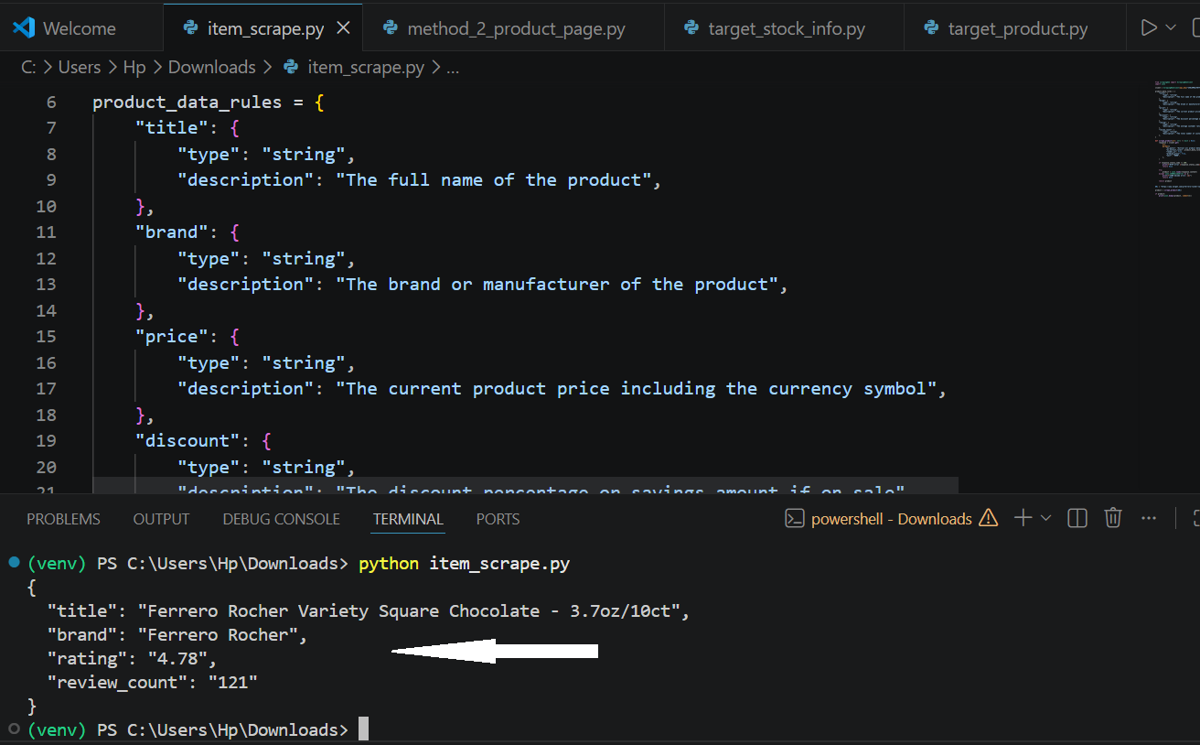
To address this, ScrapingBee offers AI web scraping with ai_extraction_rules parameter. Here, the AI automatically identifies the requested content and returns it as structured fields. Your job is simply to define the fields you need in plain language and pass them in a dictionary, like in the snippet below.
product_data_rules = {
    "title": {
        "type": "string",
        "description": "The full name of the product",
    },
    "brand": {
        "type": "string",
        "description": "The brand or manufacturer of the product",
    },
    "price": {
        "type": "string",
        "description": "The current product price including the currency symbol",
    },
    "discount": {
        "type": "string",
        "description": "The discount percentage or savings amount if on sale",
    },
    "rating": {
        "type": "string",
        "description": "The average customer rating out of 5 stars",
    },
    "review_count": {
        "type": "string",
        "description": "The total number of customer reviews",
    },
}
The ScrapingBee request with ai_extract_rules looks like:
response = client.get(
        url,
        params={
            "ai_query": "Extract all product details from this Target product page",
            "ai_extract_rules": product_data_rules,
            "render_js": True,
            "premium_proxy": True,
            "wait": "5000",
        },
    )
Full code:
from scrapingbee import ScrapingBeeClient
import json
client = ScrapingBeeClient(api_key="PASTE_YOUR_API_KEY")
product_data_rules = {
    "title": {
        "type": "string",
        "description": "The full name of the product",
    },
    "brand": {
        "type": "string",
        "description": "The brand or manufacturer of the product",
    },
    "price": {
        "type": "string",
        "description": "The current product price including the currency symbol",
    },
    "discount": {
        "type": "string",
        "description": "The discount percentage or savings amount if on sale",
    },
    "rating": {
        "type": "string",
        "description": "The average customer rating out of 5 stars",
    },
    "review_count": {
        "type": "string",
        "description": "The total number of customer reviews",
    },
}
def scrape_product(url: str) -> dict | None:
    response = client.get(
        url,
        params={
            "ai_query": "Extract all product details from this Target product page",
            "ai_extract_rules": product_data_rules,
            "render_js": True,
            "premium_proxy": True,
            "wait": "5000",
        },
    )
    if response.status_code != 200:
        print(f"HTTP error {response.status_code}: {url}")
        return None
    try:
        product = json.loads(response.content)
    except json.JSONDecodeError as e:
        print(f"JSON decode error: {e}")
        return None
    return product
URL = "https://www.target.com/p/ferrero-rocher-variety-square-chocolate-4-27oz-10ct/-/A-94770148"
product = scrape_product(URL)
if product:
    print(json.dumps(product, indent=2))
Output:
What it costs to scrape Target at scale
The cost to scrape Target depends on the scraping method you choose. A RedSky API request through ScrapingBee's premium proxies costs around 10 credits per request. Rendering the same product page with render_js=true and premium proxies costs around 25 credits per request.
If you use ScrapingBee's stealth proxies to bypass stricter anti-bot protections, the cost increases to roughly 75 credits per request. Moreover, if you use ai_extract_rules, add roughly 5 credits per request on top of the base request cost.
| Path | Credits per request | 1,000 products | 100,000 products |
|---|---|---|---|
| RedSky + premium proxies | ~ 10 | 10,000 | 1,000,000 |
| Render page + premium proxies | ~ 25 | 25,000 | 2,500,000 |
| Stealth render | ~ 75 | 75,000 | 7,500,000 |
The credit gap becomes significant once you start scraping large catalogs. For example, scraping 100,000 products through the RedSky API would consume roughly: 100,000 × 10 credits = 1,000,000 credits. Scraping those same 100,000 products by rendering the page consumes ~2,500,000 credits (100,000 × 25 credits).
That's 2.5x more credits for the same data. So if you can get the data through RedSky, the API approach is usually the better choice.
ScrapingBee only bills successful requests. That means requests that return a 200 or 404 response count toward your credit usage, while requests that fail with a 500 error do not.
If you're testing the workflow, ScrapingBee provides 1,000 free credits without requiring a credit card. That's enough for almost 100 RedSky requests, which is plenty to validate your selectors and get a cost estimate before running at scale.
Scrape Target at scale: scheduling and concurrency
Once your scraper works for a single product, you'll probably want to scale it. The first step is to maintain a watchlist of product URLs or TCINs and process them in batches.
When scraping at scale, pacing matters. Target actively monitors request patterns and blocks IPs that poll product pages too aggressively. So add small delays between requests and keep your traffic patterns closer to normal browsing behavior. The code below uses a random 3 to 8 second delay between requests.
import json
import time
import random
from scrapingbee import ScrapingBeeClient

client = ScrapingBeeClient(api_key="PASTE_YOUR_API_KEY")

URLS = [
    "https://www.target.com/p/ferrero-rocher-variety-square-chocolate-4-27oz-10ct/-/A-94770148#lnk=sametab",
    "https://www.target.com/p/jockey-women-s-organic-cotton-stretch-short-sleeve-tee/-/A-94175164?preselect=1000042324#lnk=sametab",
    "https://www.target.com/p/google-pixel-watch-3-wifi/-/A-93208169?preselect=92424249#lnk=sametab",
    "https://www.target.com/p/bubba-24oz-with-dual-sip-lid-water-bottle/-/A-95117954?preselect=94911411#lnk=sametab",
    "https://www.target.com/p/lenovo-v15-g4-15-6-fhd-ryzen-5-7430u-16gb-ram-512gb-ssd-amd-radeon-graphics-wi-fi-6-win11-pro-black/-/A-1011111206?preselect=1011111206#lnk=sametab",
]

product_data_rules = {
    "title": {
        "type": "string",
        "description": "The full name of the product",
    },
    "brand": {
        "type": "string",
        "description": "The brand or manufacturer of the product",
    },
    "price": {
        "type": "string",
        "description": "The current product price including the currency symbol",
    },
    "discount": {
        "type": "string",
        "description": "The discount percentage or savings amount if on sale, otherwise None",
    },
    "rating": {
        "type": "string",
        "description": "The average customer rating out of 5 stars",
    },
    "review_count": {
        "type": "string",
        "description": "The total number of customer reviews",
    },
}

def scrape_product(url: str) -> dict | None:
    response = client.get(
        url,
        params={
            "ai_query": "Extract all product details from this Target product page",
            "ai_extract_rules": product_data_rules,
            "render_js": True,
            "premium_proxy": True,
            "wait": "5000",
        },
    )

    try:
        product = json.loads(response.content)
        product["url"] = url
        return product
    except json.JSONDecodeError as e:
        print(f"JSON decode error: {e}")
        return None

results = []

for i, url in enumerate(URLS):
    try:
        product = scrape_product(url)
        if product:
            results.append(product)
            print(f"Title         : {product.get('title')}")
            print(f"Brand         : {product.get('brand')}")
            print(f"Current price : {product.get('price')}")
            print(f"Discount      : {product.get('discount') or 'No discount'}")
            print(f"Rating        : {product.get('rating')}")
            print(f"Review count  : {product.get('review_count')}")
    except Exception as e:
        print(f"Error: {e}")

    # Target IP-blocks fast polling -- random delay mimics human browsing
    if i < len(URLS) - 1:
        delay = random.uniform(3, 8)
        print(f"Waiting {delay:.1f}s (anti-polling pacing)...")
        time.sleep(delay)

with open("results.json", "w") as f:
    json.dump(results, f, indent=2)

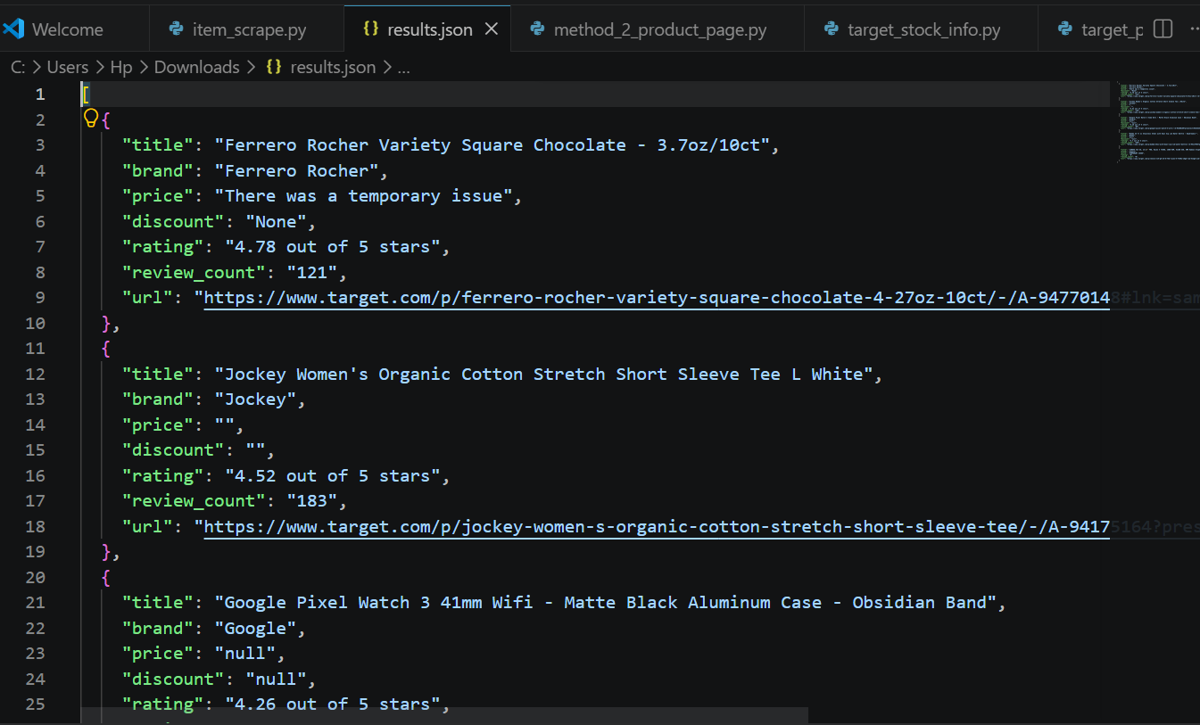
print("Results saved to results.json")
Set country_code=us in the request since Target is US-only. Without it you risk getting redirects or empty responses.
The below screenshot shows the final results saved in a JSON file.
ScrapingBee also supports concurrent requests if you want to run multiple product pages in parallel. The exact concurrency limit depends on your plan; higher tiers support significantly more concurrent requests than entry-level plans.
Moreover, if you want to automate the scraper, the ScrapingBee CLI offers built-in scheduling, so you can run recurring scraping jobs without managing your own server.
When you should NOT scrape Target
Any information behind a Target login shouldn't be scraped. For example, your scraper shouldn't log in to the website and collect order history, saved carts, payment information, or Target Circle offers. The same applies to cardholder pricing and other account-specific data.
Instead, stick to publicly accessible product pages. If you need bulk authorized data, explore Target's official partner, affiliate, or supplier programs. Approved partners can access authorized data feeds and APIs that provide inventory, pricing, and product information.
If you're using ScrapingBee, you are generally safe because ScrapingBee requests don't support logged-in scraping. A good place to start is Method 1. Pick a Target product you actually want to track, grab its TCIN, and run the RedSky example. ScrapingBee gives you 1,000 free credits to get started, no credit card required.
If you'd rather skip the setup entirely, this Target product scraper is specifically built for Target and returns structured product data directly.
Frequently Asked Questions
Can you web scrape Target.com?
Yes, you can scrape public Target product data like prices, product titles, ratings, reviews, and availability information. The two most reliable approaches are reading data from Target's RedSky JSON API or rendering the product page and extracting the data from it. Both methods require proxies because Target actively blocks bot traffic. Note that you should never scrape content behind the Target login page.
Does Target have a public API?
Target does not provide an official public product API for developers. However, its website relies on an internal API called RedSky (redsky.target.com), which returns product data in JSON format. Since the API powers publicly accessible product pages, you can use it. However, Target rate-limits requests and blocks suspicious IPs, so using proxies is often necessary.
Does Target block scrapers?
Yes. Target uses commercial bot protection systems that detect and block automated traffic, including direct requests to its RedSky API. Datacenter IPs and aggressively paced requests are often blocked quickly. To improve reliability, use residential proxies with random delays between requests. If you're still hitting blocks, stealth proxies are the next step up.
How do you avoid getting blocked scraping Target?
Route requests through residential or stealth proxies, use a U.S. location, and pace requests so they look like normal browsing activity. For multi-step workflows, reuse the same session to maintain a consistent IP address across requests. A managed scraping API like ScrapingBee handles most of this for you, so you don't have to manage that infrastructure yourself.
Is it legal to scrape Target.com?
Scraping public product data carries less legal risk than scraping login-gated content. That said, Target's ToS strictly prohibits automated access, so don't scrape behind a login, respect robots.txt, and don't do anything with the data that could violate copyright law. However, this isn't legal advice, so if you're doing this commercially, check your specific use case with a lawyer.
What is the best way to scrape Target product prices?
The most reliable way is through the RedSky JSON API. If RedSky isn't available for your use case, extract the price from the page's embedded JSON rather than relying on CSS classes, which Target frequently changes. Also, route requests through proxies to avoid getting blocked. For storing historical prices and setting up price-drop alerts, check out our full price scraper walkthrough.