Immoscout24.ch is a Swiss real estate portal. Its listings load from an internal JSON API, and the site is behind an anti-bot wall that triggers CAPTCHAs on the first request. If you want to know how to scrape Immoscout24.ch, consider that:
- The site’s Terms forbid automated access.
- Swiss data-protection law covers the agent contact details in each listing.
This guide presents the techniques to scrape Immoscout24.ch responsibly.
Key takeaways
- Immoscout24.ch is a Swiss site. It is a different company from the German immobilienscout24.de. This means that techniques you can find online that are written for scraping the German site cannot be assumed to apply to Immoscout24.ch.
- The listing data is exposed in an embedded JSON blob and an internal JSON API. This lets you extract structured data, not brittle HTML.
- The site is behind an anti-bot wall that triggers CAPTCHA challenges on the first request. Requests from non-Swiss IP addresses are especially likely to be challenged. You need robust anti-bot handling plus a Swiss proxy.
- Scraping public property attributes is generally low-risk. Note that agent names, phones, and emails are personal data under Swiss law (revFADP) and GDPR, so minimize them and do not build a contact database.
- The site’s Terms forbid automated access. Keep volume low, respect the site’s terms, and use the official partner data feed for anything bulk or commercial.
Is it legal to scrape Immoscout24.ch?
Scraping publicly visible property data from Immoscout24.ch is not automatically unlawful. However, “not automatically unlawful” is a long way from “legal without qualification”. The first constraint is contractual. Immoscout24.ch’s General Terms and Conditions, Section 7, are explicit:
“It is prohibited to systematically select the Content available on the Marketplaces (e.g. by scraping), to copy, publish or otherwise reproduce it, or to link it with other data”.
So, any programmatic, systematic collection of listings puts you in breach of the platform’s terms, regardless of volume. That breach is a civil and contractual risk, not an automatic criminal offence under Swiss law.
The second constraint is data protection. For a Swiss-domiciled platform like Immoscout24.ch, the primary applicable statute is Switzerland’s revised Federal Act on Data Protection (revFADP). This law entered into force on 1 September 2023 and carries extraterritorial effect. In other words, it applies to any processing of personal data about persons in Switzerland regardless of where you are located. Agent names, direct phone numbers, email addresses, and precise geolocation data embedded in listings all qualify as personal data under revFADP. The law’s position about this data is clear: public availability is not consent, and visibility on a webpage does not grant a lawful basis to harvest, store, or redistribute that data.
GDPR may apply concurrently if you are EU-based, but treating it as the primary law for a Swiss site is a material inaccuracy. If your use case is bulk or commercial, the legally sound route is Immoscout24.ch’s official partner data feed, which is offered to qualified partners. Note that this is not legal advice. Consult a legal professional if your use case involves commercial-scale scraping or compliance questions.
Immoscout24.ch is not ImmobilienScout24.de
Before writing a single line of code, it is worth clarifying a persistent source of confusion in the community. Immoscout24.ch is the Swiss real-estate portal operated by SMG Swiss Marketplace Group. By contrast, ImmobilienScout24.de is the German portal operated by Immobilien Scout GmbH, an entirely separate company. The two portals share a common heritage and similar names, but they are distinct legal entities running independent infrastructure.
This distinction matters in practice. The majority of scraping code circulating on developer blogs targets the German ImmobilienScout24.de website. Their base URLs, flows, endpoint paths, and parameters do not apply to the Swiss site. Immoscout24.ch also uses its own page structure and data endpoints, which are examined in the next section.
So, before copying anyone’s code, confirm which domain you are actually targeting.
Where Immoscout24.ch hides its property data
Immoscout24.ch is a JavaScript-rendered website. The HTML response embeds listing data as a JSON state object, while much of the user interface is hydrated client-side by JavaScript. As a result, the property data may not appear as conventional HTML elements even though the underlying data is already present in the response.
The good news is that the underlying data is accessible through two cleaner routes: a JSON state object embedded in a <script> tag and an internal JSON API that the page calls in the background. Let me show you both mechanisms.
Consider the following listing target page:
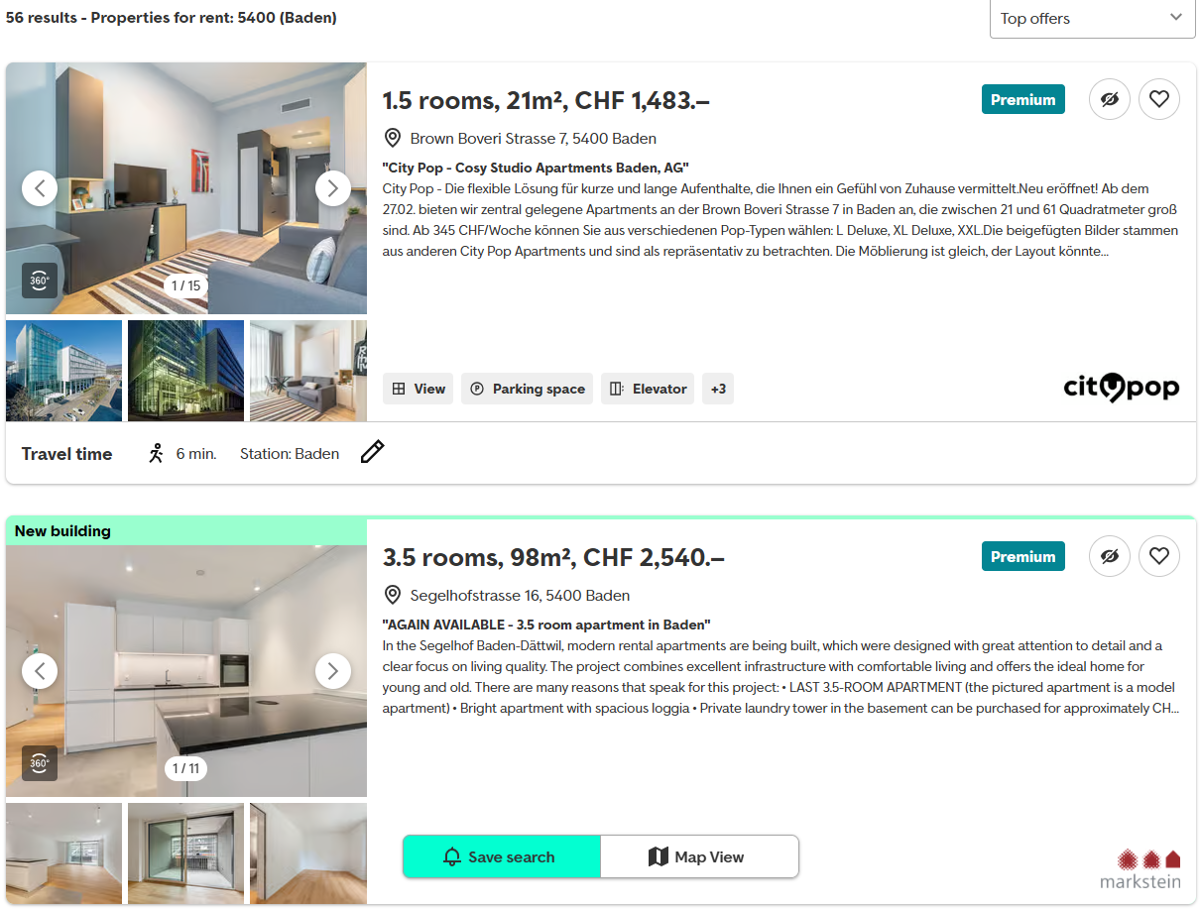
To visualize the JSON object, I right-clicked on the page, then inspected it:
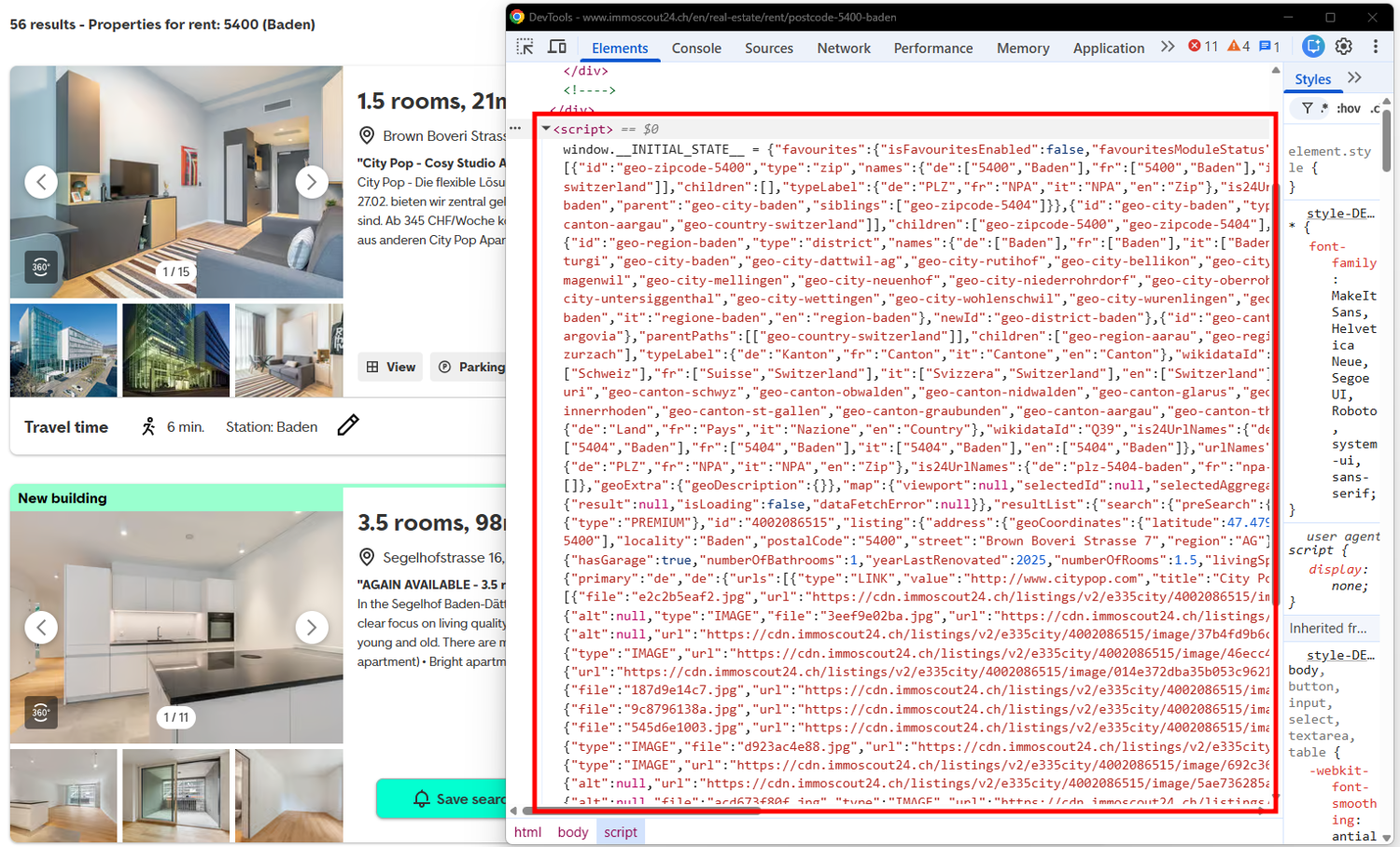
As the image shows, there is a <script> tag that contains the JSON blob containing the listings’ data.
To visualize the JSON API call, right-click on the page and inspect it. Navigate to the Network tab, filter for Fetch/XHR, and reload the page. Then, search for API endpoints that render the content:
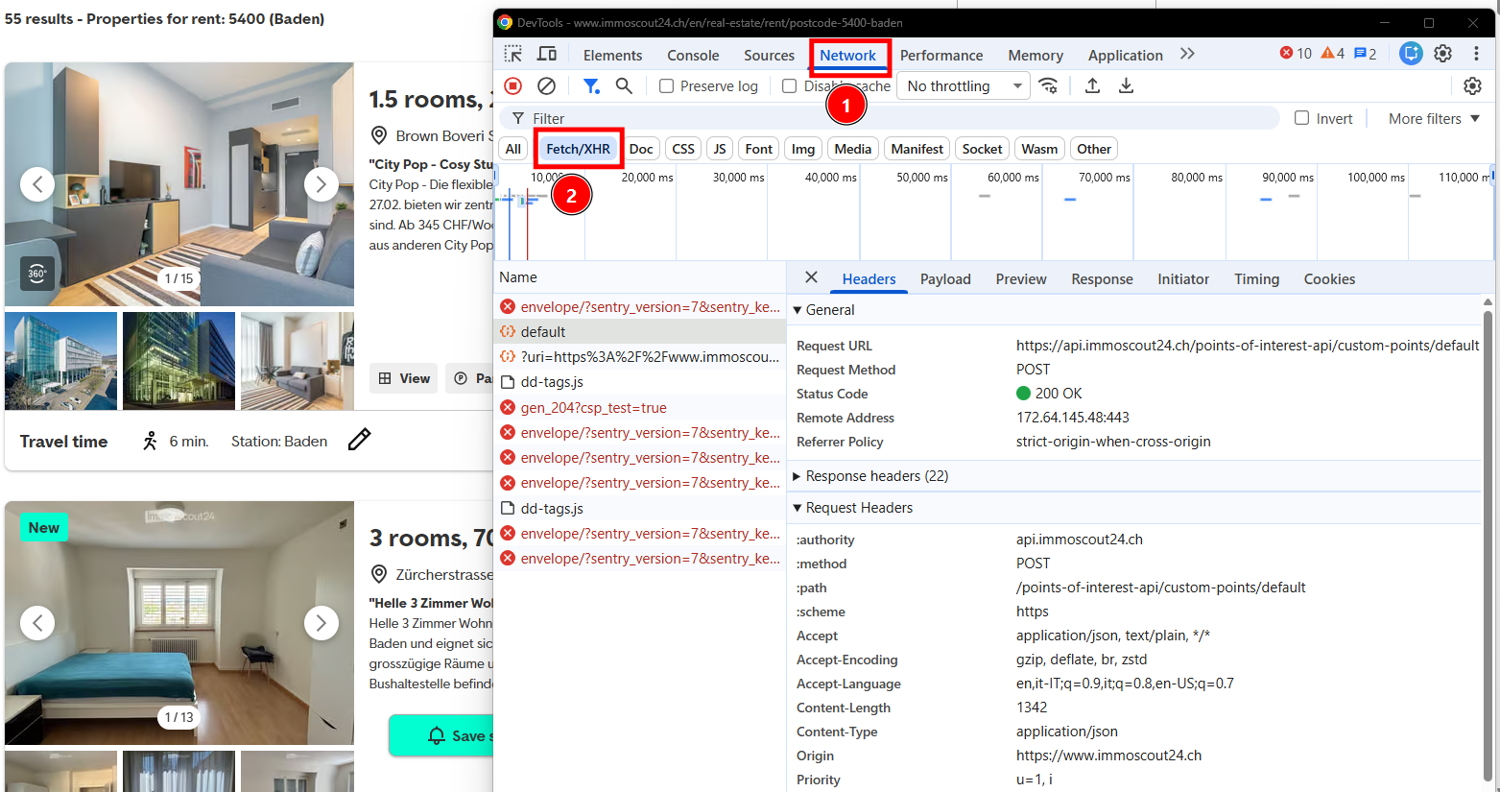
Both approaches avoid relying on CSS selectors. Although JSON schemas can also change, they are generally less coupled to visual redesigns than rendered page elements.
How to scrape Immoscout24.ch property data in Python (step by step)
In this section, I’ll show you how to scrape Immoscout24.ch in Python. Let’s start by defining the prerequisites.
What you need
To reproduce this tutorial, you need the following:
- A ScrapingBee API key (the free trial gives you 1,000 credits, no credit card required).
- Python 3.10+
Create a folder on your machine called immoscout24-scraping/:
mkdir immoscout24-scraping
Navigate to the folder:
cd immoscout24-scraping
Create a virtual environment:
python -m venv venv
Activate the virtual environment:
source venv/bin/activate # For Linux/macOS. For Windows: venv\Scripts\activate
In the activated virtual environment, install the needed libraries:
pip install scrapingbee beautifulsoup4
Step 1 - Get a rendered search page past the anti-bot wall
Start by retrieving a rendered search-results page through ScrapingBee. The example uses the public rental-listings page for Baden:
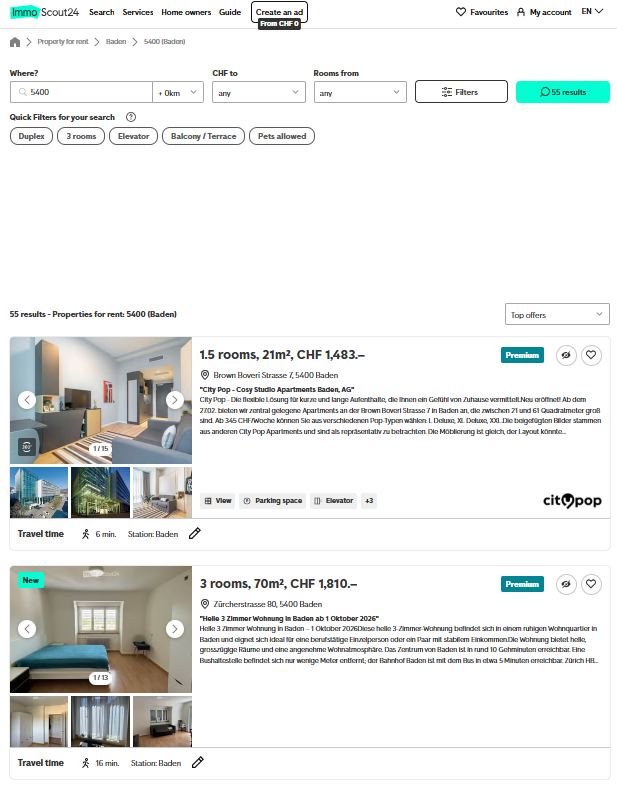
The following snippet is the one I used for a simple call to bypass the anti-bot wall:
from scrapingbee import ScrapingBeeClient

SCRAPINGBEE_API_KEY = "<MY-SCRAPINGBEE-API-KEY>"
TARGET_URL = "https://www.immoscout24.ch/en/real-estate/rent/postcode-5400-baden"
client = ScrapingBeeClient(api_key=SCRAPINGBEE_API_KEY)

response = client.html_api(
    TARGET_URL,
    params={
        "stealth_proxy":"true",
        "render_js":"true",
        "country_code":"ch",
        "block_resources":"false",
    },
)

print(f"HTTP status : {response.status_code}")
print(f"HTML length : {len(response.text):,} characters")
This script:
- Defines the target page.
- Uses ScrapingBee’s client to fetch the response.
- Prints the response status code and the response’s length.
The important parameters are:
- "stealth_proxy":"true", which enables ScrapingBee’s anti-bot proxy handling.
- "render_js":"true", which renders the JavaScript-dependent page.
- "country_code":"ch", which routes the request through a Swiss proxy.
- "block_resources":"false", which lets the page load its own scripts and requests under the JavaScript render instead of blocking them.
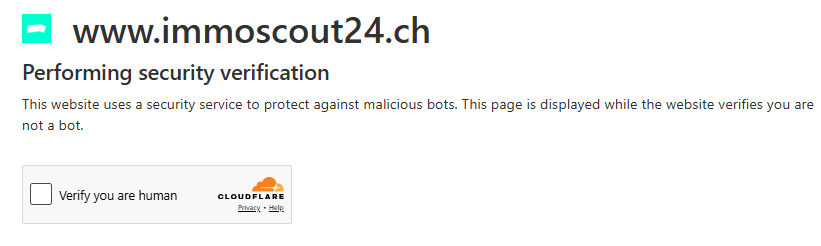
In my tests, requests from outside Switzerland encountered a verification page or CAPTCHA, as shown below. The dedicated anti-bot section later in this guide explains why these parameters are used and why simpler measures may not be sufficient. The following image shows Cloudflare's CAPTCHA:
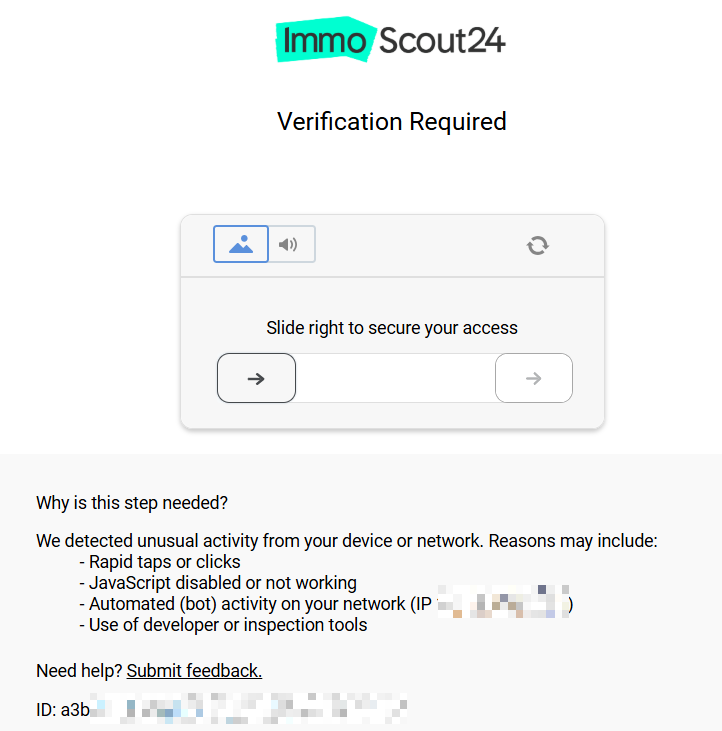
Moreover, the website is aggressively protected. So, even after verification, you will hit a sliding CAPTCHA if your IP is not a Swiss one:
The result I obtained from the script is this one:
HTTP status : 200
HTML length : 997,072 characters
Generally speaking, a 200 response and a large HTML body are good signs, but they do not prove the listing loaded. Check for expected listing selectors or item text before parsing, and fail clearly on a block page or an empty app shell, so you know the response contains real content.
NOTE: The target website has strong defenses against anti-bot systems in place. It may happen that the first time you run the code, you get the result shown above. Then, it can happen that you run it a second time and you get a 500. In that case, add the parameters "block_resources":"false" and "wait_browser": "networkidle2" in params{} inside the method client.html_api().
NOTE: The documentation says to use the client.get() method, but the API response says the method will be deprecated in version 3.00 and will be replaced by client.html_api(). I suggest using client.html_api() from the beginning.
Step 2 - Pull the listings from the embedded JSON
As shown previously, the page HTML contains a window.__INITIAL_STATE__ object. The following code locates its <script> element, decodes the JSON, and navigates the resulting structure to retrieve the listings:
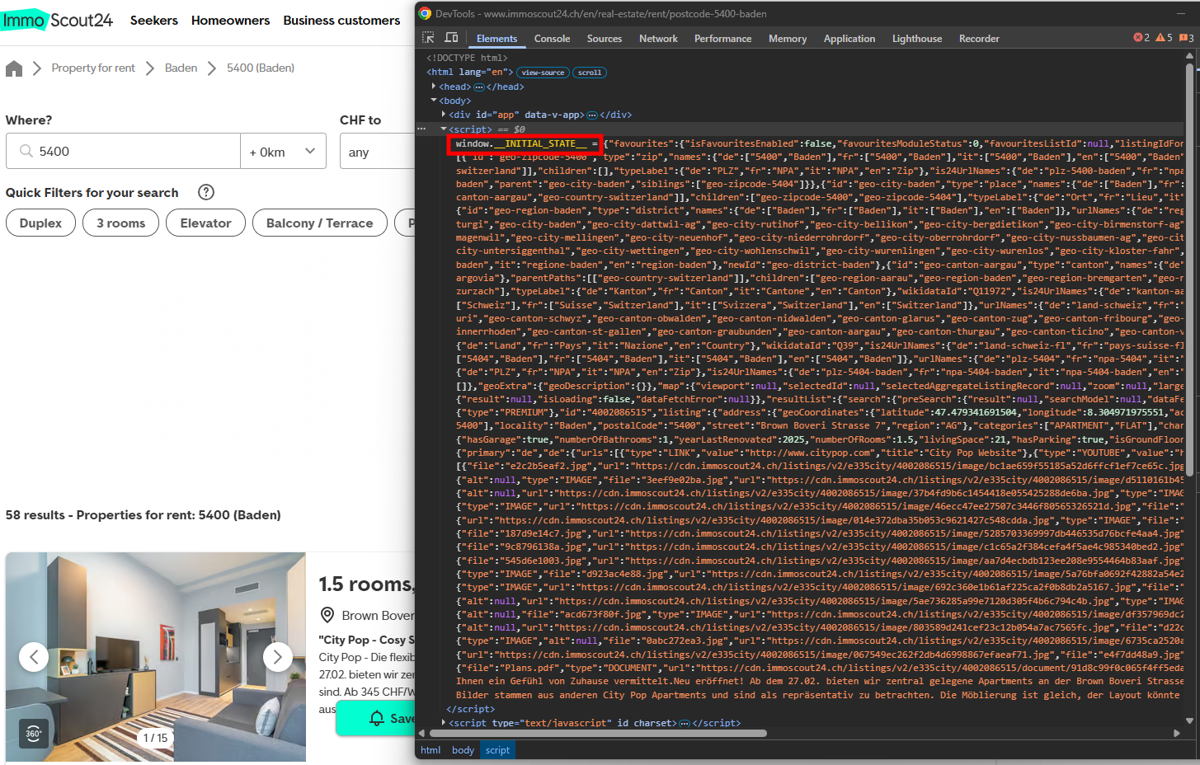
The code must parse the response and find __INITIAL_STATE__. To do so, I used BeautifulSoup as follows:
import re
import json
from bs4 import BeautifulSoup
from scrapingbee import ScrapingBeeClient

SCRAPINGBEE_API_KEY = "<MY-SCRAPINGBEE-API-KEY>"
TARGET_URL = "https://www.immoscout24.ch/en/real-estate/rent/postcode-5400-baden"

client = ScrapingBeeClient(api_key=SCRAPINGBEE_API_KEY)

response = client.html_api(
    TARGET_URL,
    params={
        "stealth_proxy": "true",
        "render_js": "true",
        "country_code": "ch",
        "block_resources": "false",
    },
)

soup = BeautifulSoup(response.text, "html.parser")

# Locate the __INITIAL_STATE__ blob embedded in a <script> element
initial_state = None

for tag in soup.find_all("script"):
    script_text = tag.get_text()

    # Some BeautifulSoup versions may exclude script content from get_text()
    if not script_text:
        script_text = tag.decode_contents()

    if "__INITIAL_STATE__" not in script_text:
        continue

    match = re.search(
        r"window\.__INITIAL_STATE__\s*=\s*(\{.*\})\s*;?\s*$",
        script_text,
        re.DOTALL,
    )

    if match:
        initial_state = json.loads(match.group(1))
        break

if initial_state is None:
    print("Could not find __INITIAL_STATE__ — inspect the HTML manually.")
else:
    listings = (
        initial_state
        .get("resultList", {})
        .get("search", {})
        .get("fullSearch", {})
        .get("result", {})
        .get("listings", [])
    )

    print(f"Found {len(listings)} listings\n")

    for item in listings:
        listing = item.get("listing", {})
        address = listing.get("address", {})

        print({
            "id": listing.get("id"),
            "price": (
                listing.get("prices", {})
                .get("rent", {})
                .get("gross")
            ),
            "rooms": (
                listing.get("characteristics", {})
                .get("numberOfRooms")
            ),
            "size_m2": (
                listing.get("characteristics", {})
                .get("livingSpace")
            ),
            "locality": address.get("locality"),
            "postcode": address.get("postalCode"),
            "street": address.get("street"),
            "link": (
                "https://www.immoscout24.ch/en/real-estate/"
                f"rent/id-{listing.get('id')}"
            ),
        })
The script retrieves the rendered page, locates __INITIAL_STATE__, and converts the matching JSON text into a Python object. It then navigates the known listings path and prints the selected property fields.
Below is the result I obtained:
Found 20 listings

{'id': '4002086515', 'price': 1483, 'rooms': 1.5, 'size_m2': 21, 'locality': 'Baden', 'postcode': '5400', 'street': 'Brown Boveri Strasse 7', 'link': 'https://www.immoscout24.ch/en/real-estate/rent/id-4002086515'}
{'id': '4003337242', 'price': 2540, 'rooms': 3.5, 'size_m2': 98, 'locality': 'Baden', 'postcode': '5400', 'street': 'Segelhofstrasse 16', 'link': 'https://www.immoscout24.ch/en/real-estate/rent/id-4003337242'}
{'id': '4003317345', 'price': 1900, 'rooms': 1.5, 'size_m2': 69, 'locality': 'Baden', 'postcode': '5400', 'street': 'Segelhofstrasse 8', 'link': 'https://www.immoscout24.ch/en/real-estate/rent/id-4003317345'}
{'id': '4003278455', 'price': 1950, 'rooms': 3.5, 'size_m2': 75, 'locality': 'Baden', 'postcode': '5400', 'street': 'Mellingerstrasse 176', 'link': 'https://www.immoscout24.ch/en/real-estate/rent/id-4003278455'}

/ <...omitted for brevity...>

{'id': '4003153819', 'price': 2325, 'rooms': 2.5, 'size_m2': 66, 'locality': 'Baden', 'postcode': '5400', 'street': 'Wiesenstrasse 30a', 'link': 'https://www.immoscout24.ch/en/real-estate/rent/id-4003153819'}
{'id': '4003321064', 'price': 2360, 'rooms': 2.5, 'size_m2': 68, 'locality': 'Baden', 'postcode': '5400', 'street': 'Theaterplatz 3', 'link': 'https://www.immoscout24.ch/en/real-estate/rent/id-4003321064'}
Step 3 - Why a detail page can fail, and how to check it before parsing
Consider a single property now:
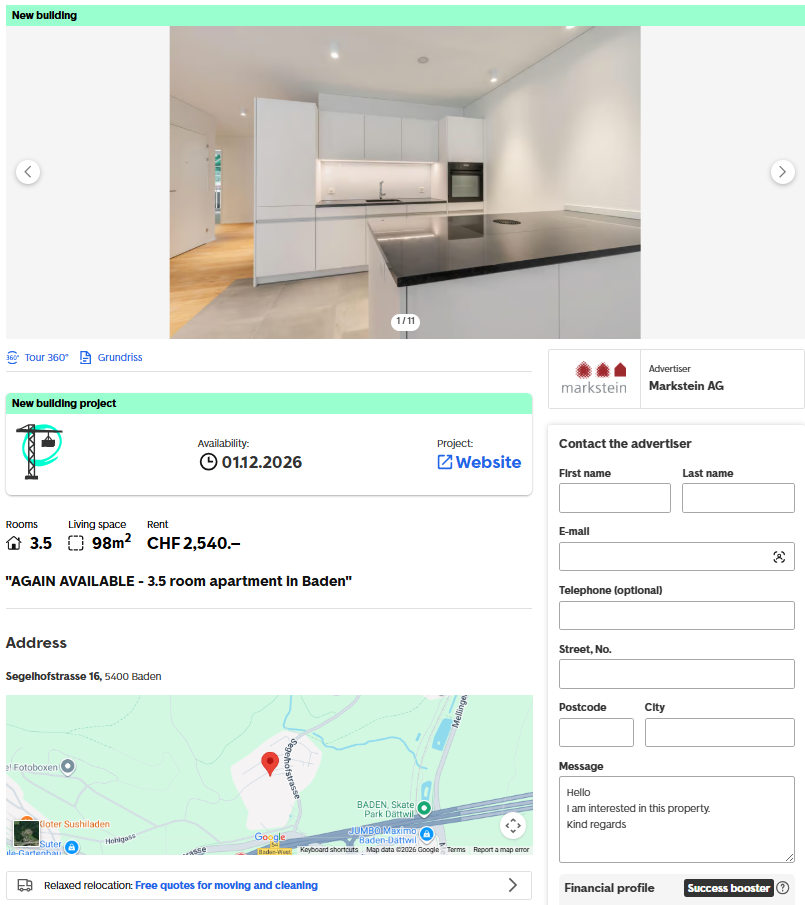
A single property page can be requested with the same ScrapingBee parameters used for the listing pages:
from scrapingbee import ScrapingBeeClient

SCRAPINGBEE_API_KEY = "<MY-SCRAPINGBEE-API-KEY>"
TARGET_URL = "https://www.immoscout24.ch/rent/4003142456"
client = ScrapingBeeClient(api_key=SCRAPINGBEE_API_KEY)
response = client.html_api(
    TARGET_URL,
    params={
        "stealth_proxy":"true",
        "country_code":"ch",
        "render_js":"true",
        "block_resources":"false",
    },
)
print(f"HTTP status : {response.status_code}")
print(f"HTML length : {len(response.text):,} characters")
In my test, the response was the following:
HTTP status : 500
HTML length : 586 characters
In this test, the detail-page request returned HTTP 500, so no property data could be extracted from that response. A successful HTTP 200 response should still be validated before parsing because a block or challenge page may also return that status.
When the property page loads successfully, inspect its embedded JSON structure rather than assuming it uses the exact path shown for search results in Step 2 because it may change:
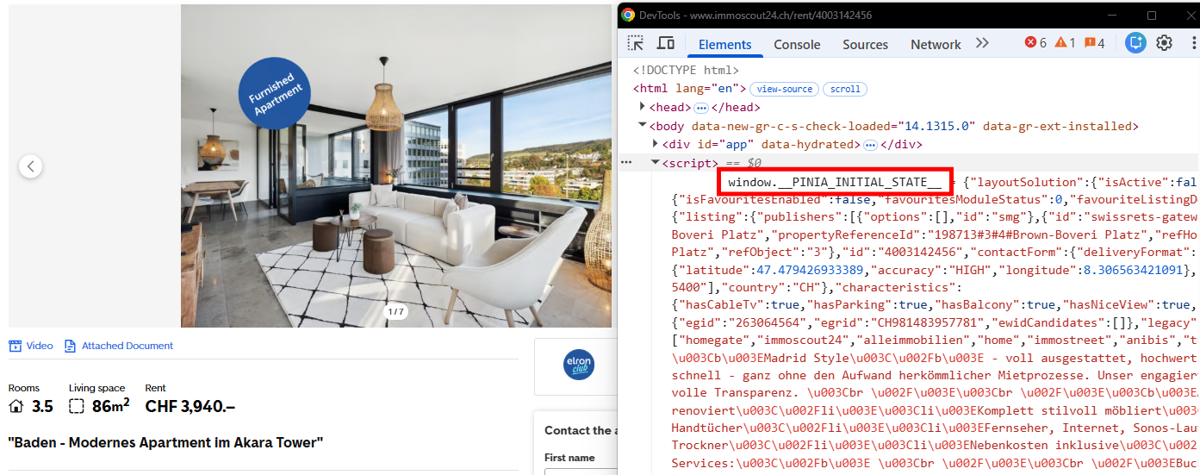
In that case, adjust the JSON extraction path to the structure returned by the property page.
Step 4 - Get structured fields with extract_rules or AI extraction
Step 2 relies on a known JSON path to extract listings data. The evolution of this approach is using AI. As an alternative, ScrapingBee’s ai_query parameter lets you describe the required fields in plain English and receive structured JSON:
import json
from scrapingbee import ScrapingBeeClient

SCRAPINGBEE_API_KEY = "<MY-SCRAPINGBEE-API-KEY>"
TARGET_URL = "https://www.immoscout24.ch/en/real-estate/rent/postcode-5400-baden"
AI_QUERY = (
    "Return valid JSON only: an array of all rental listings with fields "
    "id, price, rooms, size_m2, locality, postcode, street, and link. "
    "Use null for missing values."
)

client = ScrapingBeeClient(api_key=SCRAPINGBEE_API_KEY)
response = client.html_api(
    TARGET_URL,
    params={
        "stealth_proxy":"true",
        "render_js":"true",
        "country_code":"ch",
        "block_resources":"false",
        "ai_query":AI_QUERY,
    },
)
result = response.json()

# ScrapingBee's AI may return either a bare array or a wrapped object
if isinstance(result, list):
    listings = result
elif isinstance(result, dict):
    # grab the first value that is a list
    listings = next((v for v in result.values() if isinstance(v, list)), [])
else:
    listings = []
print(f"Found {len(listings)} listings\n")
for listing in listings:
    print({
        "id":       listing.get("id"),
        "price":    listing.get("price"),
        "rooms":    listing.get("rooms"),
        "size_m2":  listing.get("size_m2"),
        "locality": listing.get("locality"),
        "postcode": listing.get("postcode"),
        "street":   listing.get("street"),
        "link":     listing.get("link"),
    })
The result is exactly like the one I obtained in step 2.
This implementation needs one additional guard. In particular, the code calls response.json() directly on the AI’s output. But the shape of that output is not guaranteed. Depending on the API response format, ScrapingBee's AI may return a bare array [...] or a wrapped object such as {"listings": [...]}. The fallback used here selects the first list-valued field in a wrapped response. So it assumes that this field contains the requested listings. If the API returns multiple list-valued fields, the extraction logic may need to target the expected key explicitly.
For this reason, I added the isinstance check. This normalizes the response into a list regardless of what the AI returns.
As a final consideration, note that using the ai_query parameter costs an additional 5 API credits. Check the credits system on the ScrapingBee website for detailed information on API costs.
Step 5 - Paginate a search responsibly
To extract more data, request each listing page URL and reuse the extraction logic from Step 2. Inspect the page to see the selector for following the links:
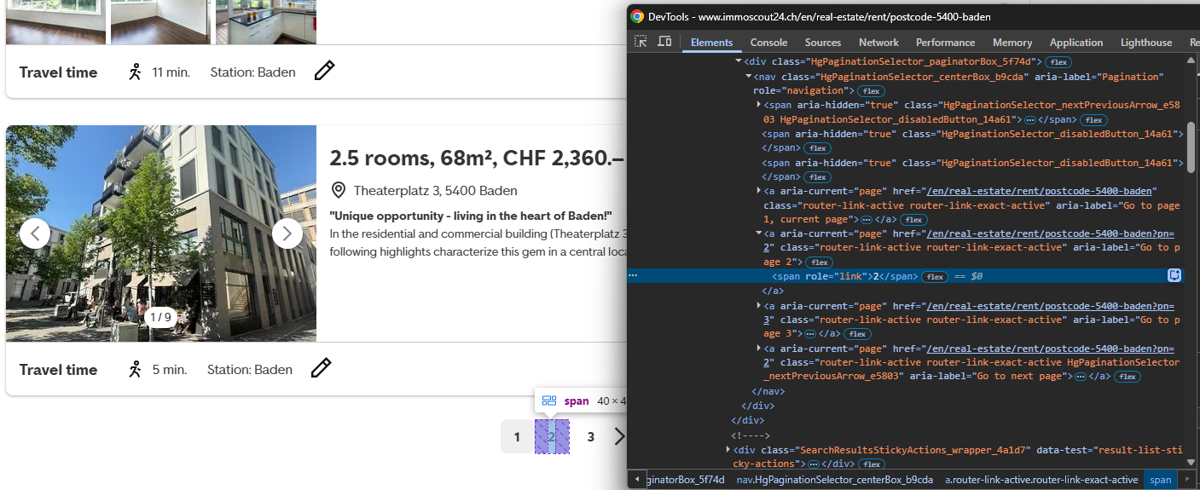
The following example limits the run to two pages, waits three seconds between requests, and writes the combined property attributes to CSV:
import csv
import json
import re
import time
from bs4 import BeautifulSoup
from scrapingbee import ScrapingBeeClient

SCRAPINGBEE_API_KEY = "<MY-SCRAPINGBEE-API-KEY>"

BASE_URL = (
    "https://www.immoscout24.ch/en/real-estate/rent/"
    "postcode-5400-baden"
)
# Keep the total request volume low: page 1 and page 2 only.
PAGE_URLS = [
    BASE_URL,
    f"{BASE_URL}?pn=2",
]

OUTPUT_FILE = "baden_rent_listings_pages_1_2.csv"
REQUEST_DELAY_SECONDS = 3
client = ScrapingBeeClient(api_key=SCRAPINGBEE_API_KEY)

def extract_initial_state(html):
    """Extract the window.__INITIAL_STATE__ JSON object from the HTML."""
    soup = BeautifulSoup(html, "html.parser")
    for tag in soup.find_all("script"):
        script_text = tag.get_text()
        if not script_text:
            script_text = tag.decode_contents()
        if "__INITIAL_STATE__" not in script_text:
            continue
        match = re.search(
            r"window\.__INITIAL_STATE__\s*=\s*(\{.*\})\s*;?\s*$",
            script_text,
            re.DOTALL,
        )
        if match:
            return json.loads(match.group(1))
    return None

def extract_listings(initial_state, page_number):
    """Convert the listings on one result page into dictionaries."""
    raw_listings = (
        initial_state
        .get("resultList", {})
        .get("search", {})
        .get("fullSearch", {})
        .get("result", {})
        .get("listings", [])
    )
    page_listings = []
    for item in raw_listings:
        listing = item.get("listing", {})
        address = listing.get("address", {})
        prices = listing.get("prices", {})
        characteristics = listing.get("characteristics", {})
        listing_id = listing.get("id")
        page_listings.append({
            "page": page_number,
            "id": listing_id,
            "price": prices.get("rent", {}).get("gross"),
            "rooms": characteristics.get("numberOfRooms"),
            "size_m2": characteristics.get("livingSpace"),
            "locality": address.get("locality"),
            "postcode": address.get("postalCode"),
            "street": address.get("street"),
            "link": (
                f"https://www.immoscout24.ch/en/real-estate/rent/"
                f"id-{listing_id}"
                if listing_id
                else None
            ),
        })
    return page_listings

all_listings = []
for page_number, page_url in enumerate(PAGE_URLS, start=1):
    # Delay only between requests, not before the first request.
    if page_number > 1:
        print(
            f"Waiting {REQUEST_DELAY_SECONDS} seconds "
            "before the next request..."
        )
        time.sleep(REQUEST_DELAY_SECONDS)
    print(f"Requesting page {page_number}: {page_url}")
    response = client.html_api(
        page_url,
        params={
            "stealth_proxy":"true",
            "render_js":"true",
            "country_code":"ch",
            "block_resources":"false",
        },
    )
    if not response.ok:
        print(
            f"Could not retrieve page {page_number}: "
            f"HTTP {response.status_code}"
        )
        continue
    initial_state = extract_initial_state(response.text)
    if initial_state is None:
        print(
            f"Could not find __INITIAL_STATE__ on page {page_number}."
        )
        continue
    page_listings = extract_listings(initial_state, page_number)
    all_listings.extend(page_listings)
    print(f"Collected {len(page_listings)} listings from page {page_number}.")

fieldnames = [
    "page",
    "id",
    "price",
    "rooms",
    "size_m2",
    "locality",
    "postcode",
    "street",
    "link",
]
with open(OUTPUT_FILE, "w", newline="", encoding="utf-8-sig") as csv_file:
    writer = csv.DictWriter(csv_file, fieldnames=fieldnames)
    writer.writeheader()
    writer.writerows(all_listings)

print(f"\nCollected {len(all_listings)} listings in total.")
print(f"Saved the results to {OUTPUT_FILE}.")
The result via CLI is the following:
Collected 20 listings from page 1.

Waiting 3 seconds before the next request...
Requesting page 2: https://www.immoscout24.ch/en/real-estate/rent/postcode-5400-baden?pn=2
Collected 20 listings from page 2.

Collected 40 listings in total.
Saved the results to baden_rent_listings_pages_1_2.csv.
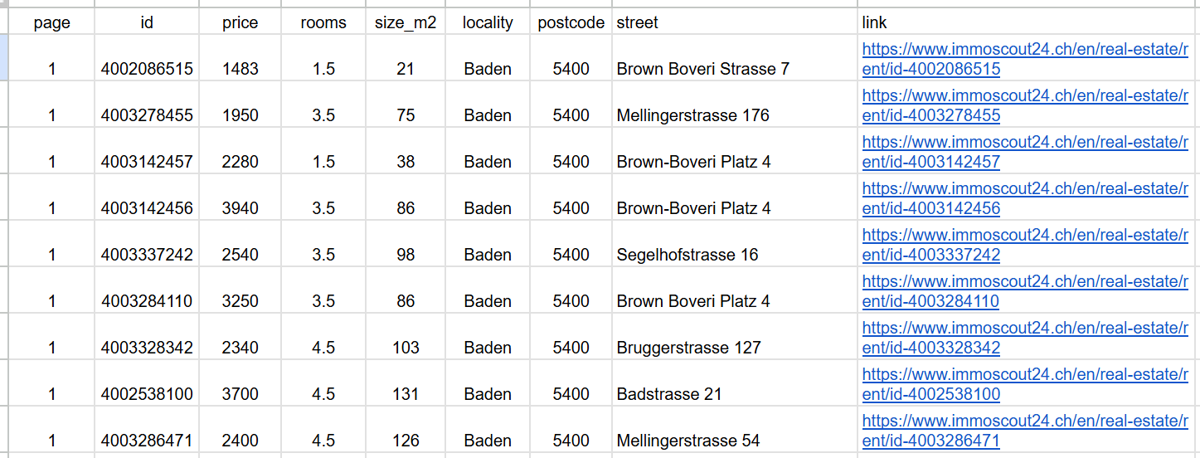
When opening the CSV file, I obtained the following CSV:
Step 6 - Handle blocks, retries, and what NOT to collect
Multiple page requests may fail because of network errors, timeouts, or unsuccessful HTTP responses. The good news is that ScrapingBee does not charge you for failed requests:

However, a good practice is to wrap the requests in a try-except block to manage possible failures. The snippet that follows shows how I implemented it:
import csv
import json
import re
import time
from bs4 import BeautifulSoup
from scrapingbee import ScrapingBeeClient

SCRAPINGBEE_API_KEY = "<MY-SCRAPINGBEE-API-KEY>"

BASE_URL = (
    "https://www.immoscout24.ch/en/real-estate/rent/"
    "postcode-5400-baden"
)
# Keep the total request volume low: page 1 and page 2 only.
PAGE_URLS = [
    BASE_URL,
    f"{BASE_URL}?pn=2",
]
OUTPUT_FILE = "baden_rent_listings_pages_1_2.csv"
REQUEST_DELAY_SECONDS = 3
RETRY_DELAY_SECONDS = 5
MAX_ATTEMPTS = 2  # Initial request plus one retry.
client = ScrapingBeeClient(api_key=SCRAPINGBEE_API_KEY)

def extract_initial_state(html):
    """Extract the window.__INITIAL_STATE__ JSON object from the HTML."""
    soup = BeautifulSoup(html, "html.parser")
    for tag in soup.find_all("script"):
        script_text = tag.get_text()
        if not script_text:
            script_text = tag.decode_contents()
        if "__INITIAL_STATE__" not in script_text:
            continue
        match = re.search(
            r"window\.__INITIAL_STATE__\s*=\s*(\{.*\})\s*;?\s*$",
            script_text,
            re.DOTALL,
        )
        if match:
            return json.loads(match.group(1))
    return None

def extract_listings(initial_state, page_number):
    """Convert the listings on one result page into dictionaries."""
    raw_listings = (
        initial_state
        .get("resultList", {})
        .get("search", {})
        .get("fullSearch", {})
        .get("result", {})
        .get("listings", [])
    )
    page_listings = []

    for position, item in enumerate(raw_listings, start=1):
        try:
            listing = item.get("listing", {})
            address = listing.get("address", {})
            prices = listing.get("prices", {})
            characteristics = listing.get("characteristics", {})
            listing_id = listing.get("id")
            page_listings.append({
                "page": page_number,
                "id": listing_id,
                "price": prices.get("rent", {}).get("gross"),
                "rooms": characteristics.get("numberOfRooms"),
                "size_m2": characteristics.get("livingSpace"),
                "locality": address.get("locality"),
                "postcode": address.get("postalCode"),
                "street": address.get("street"),
                "link": (
                f"https://www.immoscout24.ch/en/real-estate/rent/"
                f"id-{listing_id}"
                if listing_id
                else None
                ),
            })
        except (AttributeError, TypeError, KeyError, ValueError) as error:
            print(
                f"Skipping listing {position} on page {page_number} "
                f"because it could not be parsed: {error}"
            )
    return page_listings

all_listings = []
for page_number, page_url in enumerate(PAGE_URLS, start=1):
    # Delay only between requests, not before the first request.
    if page_number > 1:
        print(
            f"Waiting {REQUEST_DELAY_SECONDS} seconds "
            "before the next request..."
        )
        time.sleep(REQUEST_DELAY_SECONDS)
    response = None
    for attempt in range(1, MAX_ATTEMPTS + 1):
        try:
            print(
                f"Requesting page {page_number} "
                f"(attempt {attempt}/{MAX_ATTEMPTS}): {page_url}"
            )
            candidate = client.html_api(
                page_url,
                params={
                "stealth_proxy":"true",
                "render_js":"true",
                "country_code":"ch",
                "block_resources":"false",
                },
            )
            if candidate.ok:
                response = candidate
                break
            print(
                f"Page {page_number} returned HTTP "
                f"{candidate.status_code}."
            )
            if candidate.status_code == 500:
                print("ScrapingBee does not charge for HTTP 500 responses.")
        except Exception as error:
            print(f"Request for page {page_number} failed: {error}")
        if attempt < MAX_ATTEMPTS:
            print(f"Waiting {RETRY_DELAY_SECONDS} seconds before retrying...")
            time.sleep(RETRY_DELAY_SECONDS)
    if response is None:
        print(f"Skipping page {page_number} after both attempts failed.")
        continue
    try:
        initial_state = extract_initial_state(response.text)
    except (json.JSONDecodeError, AttributeError, TypeError, ValueError) as error:
        print(f"Skipping page {page_number}: could not parse its data: {error}")
        continue
    if initial_state is None:
        print(f"Could not find __INITIAL_STATE__ on page {page_number}.")
        continue
    page_listings = extract_listings(initial_state, page_number)
    all_listings.extend(page_listings)
    print(f"Collected {len(page_listings)} listings from page {page_number}.")

fieldnames = [
    "page",
    "id",
    "price",
    "rooms",
    "size_m2",
    "locality",
    "postcode",
    "street",
    "link",
]
with open(OUTPUT_FILE, "w", newline="", encoding="utf-8-sig") as csv_file:
    writer = csv.DictWriter(csv_file, fieldnames=fieldnames)
    writer.writeheader()
    writer.writerows(all_listings)

print(f"\nCollected {len(all_listings)} listings in total.")
print(f"Saved the results to {OUTPUT_FILE}.")
Via CLI, I obtained:
Requesting page 1 (attempt 1/2): https://www.immoscout24.ch/en/real-estate/rent/postcode-5400-baden

Collected 20 listings from page 1.
Waiting 3 seconds before the next request...
Requesting page 2 (attempt 1/2): https://www.immoscout24.ch/en/real-estate/rent/postcode-5400-baden?pn=2
Collected 20 listings from page 2.

Collected 40 listings in total.
Saved the results to baden_rent_listings_pages_1_2.csv.
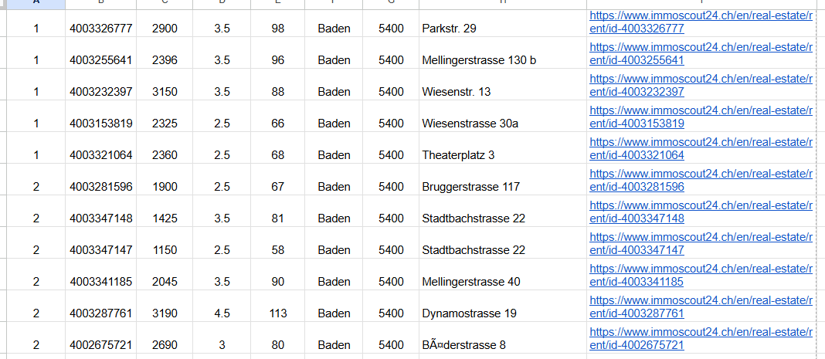
This version produces the same CSV structure as Step 5, while allowing unsuccessful requests and malformed records to be skipped. The CSV below shows rows from both page 1 and page 2:
Keep request volume low, stop if the scraper is causing disruption, and apply the field-level collection rules described in the responsible-scraping section below.
Getting past the anti-bot wall
If you tried scraping Immoscout24.ch using common open-source frameworks and got back a CAPTCHA challenge or an empty payload, you are not alone. The problem is the protection layer sitting in front of the website.
When trying to pass its anti-bot wall, the following measures are generally insufficient:
- User-agent rotation: Anti-bot challenges are based on behavioral fingerprinting and TLS signatures, not user-agent strings alone. Swapping "python-requests/2.31" for "Mozilla/5.0..." changes nothing that matters.
- Request delays/polite throttling: Rate limiting is not the primary trigger here. The challenge fires on the first request, not after you have hammered the server.
- Stealth browser plugins: These patch browser-automation leakage points effectively against weaker protections. But the website's defense mechanism evaluates JavaScript execution environment characteristics and network-level signals that most open-source stealth plugins don’t cover.
- Free proxy lists: These IPs are burned very often. They have been flagged across every major anti-automation tool vendor. Using them against a highly-protected real estate portal will get you blocked before the TCP handshake completes.
For this tutorial, the practical approach to scrape Immoscout24.ch without getting blocked is to use ScrapingBee with "stealth_proxy":"true" and "country_code":"ch", while keeping request volume low. This combines anti-bot handling with a Swiss exit IP rather than relying on any one of the measures above.
Scrape responsibly: what to collect, what to skip
The legal section explained the applicable terms and data-protection considerations. At the field level, the practical distinction is between information about the property and information that identifies a natural person:
- Property attributes: price, rooms, floor area, features, construction year, energy label, and anything that ordinarily describes the property rather than a person. Nevertheless, review listing descriptions, images, and precise addresses because these fields may contain or reveal identifying information.
- Personal data: Agent or private-seller names, direct phone numbers, email addresses, identifiable photographs, and other fields linked to a natural person. They require additional care under revFADP and, where applicable, GDPR. Their public availability does not constitute consent to collect, retain, redistribute, or repurpose them for a contact database.
Compliance also covers how you scrape. The rules of thumb to keep in mind are:
- Keep request volume low: Hammering a site at scale causes service degradation for real users. Beyond the technical risk of getting blocked, excessive automated load can factor into an unfair-access or unauthorized-access analysis under Swiss law.
- Respect robots.txt and the site’s Terms of Service: Immoscout24.ch’s ToS prohibits systematic scraping. Note that robots.txt disallowances are not legally binding in all jurisdictions. However, ignoring them removes any good-faith argument in a dispute. Read both before you start.
- For bulk or commercial use, use the official channel: Immoscout24.ch offers a partner data feed for professional integrations. If your use case is commercial, the partner feed is the right path.
Scrape Swiss property data without the block wall
ScrapingBee combines JavaScript rendering, proxy management, and Swiss geolocation in a single API request. You can use it to retrieve Immoscout24.ch listing data and apply the structured-data extraction demonstrated in this tutorial.
New accounts include 1,000 API credits with no credit card required, allowing you to test the workflow and validate your extraction logic. Start scraping for free by claiming your free trial.
Immoscout24.ch scraping FAQs
Is it legal to scrape Immoscout24.ch?
Scraping publicly visible property attributes is not automatically unlawful, but the site’s Terms and applicable data-protection obligations still matter. Account for:
- The site’s Terms forbid automated access, so scraping is against its wishes. This is a contractual and civil risk.
- Switzerland’s revised data-protection act (revFADP) and GDPR also cover the agent contact details embedded in listings. So, do not harvest or store that personal data.
Overall, this is not legal advice. Contact a specialized lawyer for any doubts.
Does Immoscout24.ch have an API?
Not an open one for the public. SMG Swiss Marketplace Group, which operates Immoscout24.ch, gates its APIs behind a partner portal, and there is no self-serve developer API for arbitrary listing data. For bulk or commercial data needs, the partner data feed is your best choice.
Why does my scraper get a CAPTCHA on the first request?
Because Immoscout24.ch sits behind a strong anti-bot wall that fingerprints requests and challenges automated ones immediately. It also raises CAPTCHA challenges for non-Swiss traffic. User-agent rotation, request delays, stealth plugins, and free proxy lists do not clear it on their own. You need advanced anti-bot handling combined with a Swiss exit IP.
Is Immoscout24.ch the same as ImmobilienScout24.de?
No. Immoscout24.ch is the Swiss portal. ImmobilienScout24.de is a German portal. They are entirely separate companies. They share naming and heritage but are distinct entities with different infrastructure, terms, and anti-bot configurations. Scraping techniques, code, and API endpoints written for the German site cannot be assumed to carry over to the Swiss one.
Can I collect agent contact details from listings?
Be very careful. Agent and private-seller names, phone numbers, email addresses, and photos are personal data under Swiss revFADP and GDPR. And public availability is not consent. Building a contact database from scraped listing data carries real legal duties and meaningful enforcement risk under both frameworks. A responsible scraper collects property attributes and minimizes or skips personal contact fields entirely.
How do I not get blocked scraping Immoscout24.ch?
Use anti-bot handling with a Swiss IP, and keep your request volume low. In practice, that means stealth-grade proxy rendering, polite delays between requests, and targeting JSON endpoints where possible to avoid full page renders.