If you're trying to figure out how to scrape Google Scholar with Python, you're in the right place.
You already know that Google Scholar is one of the most useful public sources for academic search data. You can use it to track research topics, collect article metadata, review citation counts, find author profiles, and build internal research tools.
But scraping Google Scholar is actually not as simple as it looks, with anti-scraping measures, such as blocking suspicious IPs. That is why I prefer using ScrapingBee for tasks like these.
ScrapingBee handles all the heavy lifting for you, including proxies, CAPTCHA solving and JavaScript rendering, allowing you to scrape Google Scholar data without coding everything from scratch.
So, in this guide, I'll walk you through extracting article titles, authors, and links using Python and a simple web scraper API. By the end of it, you'll have an efficient solution to gather Google Scholar data without worrying about constant blocks and bans.

Quick Answer (TL;DR)
To cut to the chase, I'll show you a quick summary of how you can scrape Google Scholar with Python by sending a Scholar search URL through ScrapingBee's web scraping API, then parse the returned HTML for titles, authors, links, and citations.
Here's the code:
import requests
from urllib.parse import quote_plus
from bs4 import BeautifulSoup

# Your ScrapingBee API key
api_key = "YOUR_API_KEY"

# The search query you want to run on Google Scholar
search_query = "machine learning"
encoded_query = quote_plus(search_query)

# Construct the Google Scholar URL
google_scholar_url = f"https://scholar.google.com/scholar?q={encoded_query}"

# Parameters for ScrapingBee
params = {
    'api_key': api_key,
    'url': google_scholar_url,
    'country_code': 'us',
    'custom_google': 'true'
}

# Make the request
response = requests.get('https://app.scrapingbee.com/api/v1/', params=params)

# Check if the request was successful
if response.status_code == 200:
    print("Success! Response received.")

    # Parse the HTML content
    soup = BeautifulSoup(response.content, 'html.parser')

    # Extract article titles
    titles = [el.text for el in soup.select('.gs_rt')]

    # Extract author information
    authors = [el.text for el in soup.select('.gs_a')]

    # Extract links to papers
    links = []
    for title_element in soup.select('.gs_rt a'):
        if 'href' in title_element.attrs:
            links.append(title_element['href'])

    # Print the results
    for i in range(min(len(titles), len(authors))):
        print(f"Title: {titles[i]}")
        print(f"Authors: {authors[i]}")
        if i < len(links):
            print(f"Link: {links[i]}")
        print("---")
else:
    print(f"Error: {response.status_code}")
    print(response.text)
Note: Replace YOUR_API_KEY with your actual ScrapingBee key.
For Google domains and subdomains, pass custom_google=true to the API when making your request, and you'll get basic Google Scholar results back in your terminal. You also get 1,000 free trial credits when you sign up, so you can test the setup before committing.
If you need a more detailed walkthrough on scraping Google Scholar with Python, continue reading.
Set Up Your ScrapingBee Environment
Let's start with the setup. You only need a ScrapingBee account, an API key, Python, and a few libraries. Just follow these 5 easy steps.
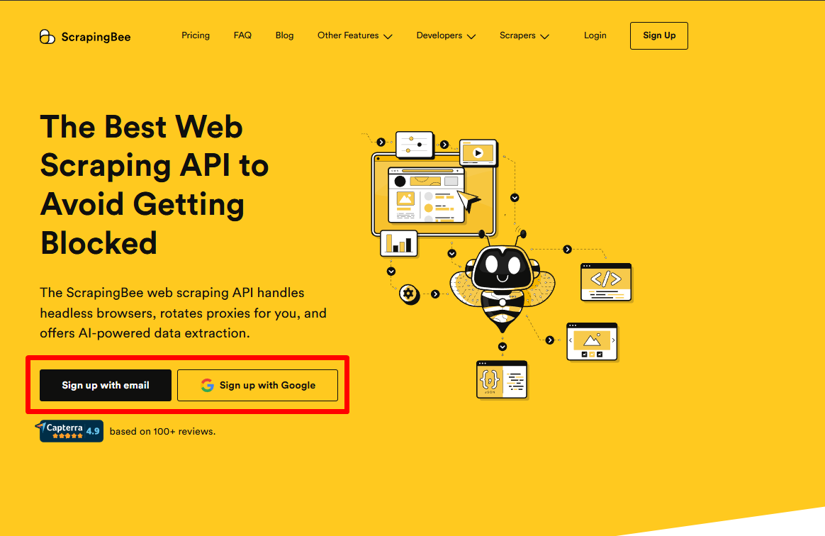
1. Create Your ScrapingBee Account
Head over to ScrapingBee and sign up—no credit card required. Once you verify your email, you'll instantly be credited with 1,000 free credits, which is more than enough to follow along.
2. Get Your API Key
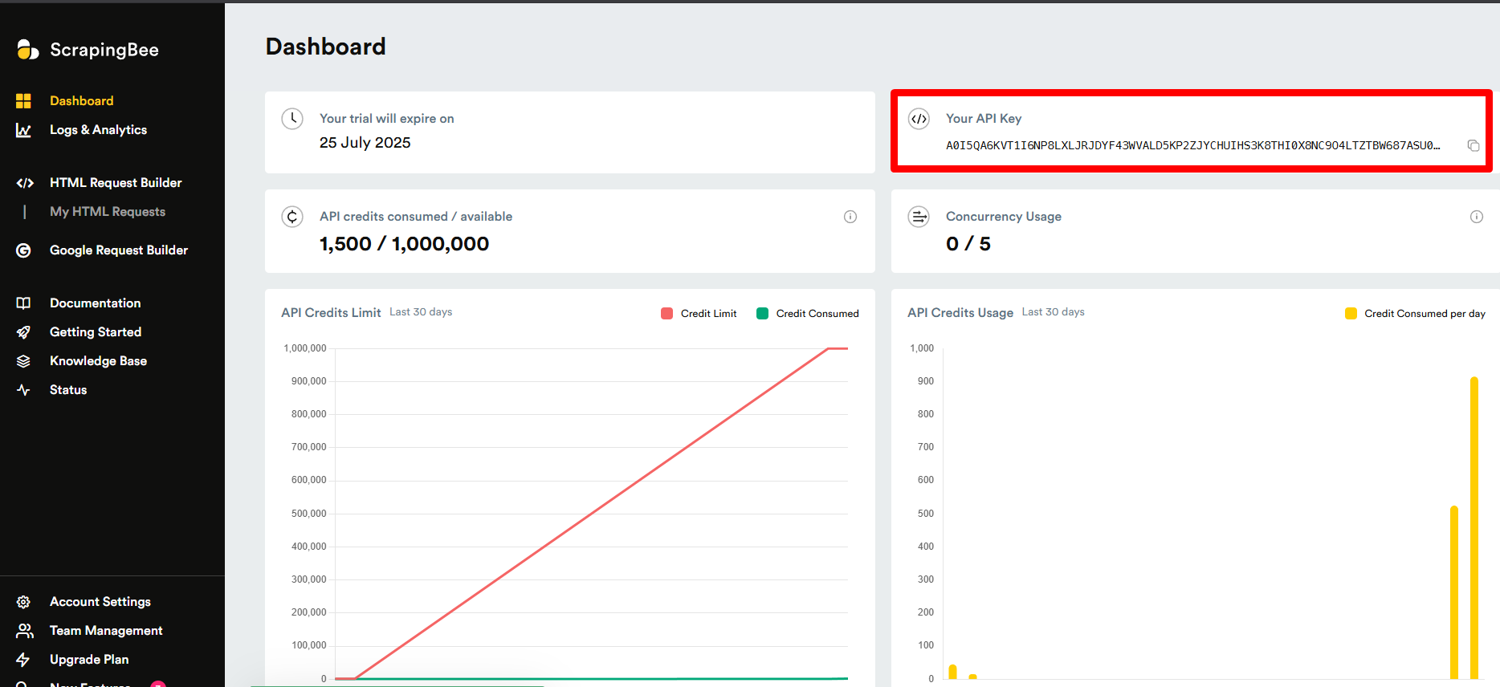
After logging in, copy your API key from the dashboard. Make sure you store the key securely and never share it publicly. I once pushed mine to GitHub by mistake and had to revoke it fast to prevent misuse!
3. Install the Python SDK
Create a separate environment so your scraper dependencies do not clash with other Python projects.
python -m venv scraping_env
Activate it on macOS or Linux:
source scraping_env/bin/activate
Activate it on Windows:
scraping_env\Scripts\activate
Install the ScrapingBee Python SDK using this command:
pip install scrapingbee
If you want a broader foundation first, our Python Web Scraping Tutorial is a good read.
4. Install Required Libraries
Along with the ScrapingBee SDK, you'll need a few additional installed libraries for a complete scraping toolkit:
pip install requests beautifulsoup4
This installs:
- requests: for making HTTP requests to access the Google Scholar pages
- beautifulsoup4: for parsing and navigating HTML content from the web page
5. Verify Your Google Scholar Scraper
Let's make sure everything is working correctly with a simple test:
from scrapingbee import ScrapingBeeClient


client = ScrapingBeeClient(api_key='YOUR_API_KEY')

# Make a test request to a simple website
response = client.get('https://www.scrapingbee.com/')

# Check if it worked
if response.status_code == 200:
    print("Success! Your ScrapingBee setup is working.")
else:
    print(f"Something went wrong. Status code: {response.status_code}")
Replace 'YOUR_API_KEY' with the actual key from your dashboard, run the script, and you should see a success message. Your Google Scholar scraper is now ready, and you can start scraping article data.

Make Your First Google Scholar API Request
This is where the fun begins. Let's launch your first request to Google Scholar. In my experience, the trickiest part of scraping Google Scholar isn't parsing the HTML; it's getting past the site's defenses to extract data.
But don't worry. ScrapingBee makes it easy by handling IP rotation, JavaScript rendering, and CAPTCHA challenges for you.
Here's how we'll structure your request using ScrapingBee:
import requests
from urllib.parse import quote_plus
from bs4 import BeautifulSoup

# Your ScrapingBee API key
api_key = "YOUR_API_KEY"

# The search query you want to run on Google Scholar
search_query = "machine learning"
encoded_query = quote_plus(search_query)

# Construct the Google Scholar URL
google_scholar_url = f"https://scholar.google.com/scholar?q={encoded_query}"

# Parameters for ScrapingBee
params = {
    'api_key': api_key,
    'url': google_scholar_url,
    'country_code': 'us',
    'custom_google': 'true'
}

# Make the request
response = requests.get('https://app.scrapingbee.com/api/v1/', params=params)

# Check if the request was successful
if response.status_code == 200:
    print("Success! Response received.")

    # Parse the HTML content
    soup = BeautifulSoup(response.content, 'html.parser')

    # Extract article titles
    titles = [el.text for el in soup.select('.gs_rt')]

    # Extract author information
    authors = [el.text for el in soup.select('.gs_a')]

    # Extract links to papers
    links = []
    for title_element in soup.select('.gs_rt a'):
        if 'href' in title_element.attrs:
            links.append(title_element['href'])

    # Print the results
    for i in range(min(len(titles), len(authors))):
        print(f"Title: {titles[i]}")
        print(f"Authors: {authors[i]}")
        if i < len(links):
            print(f"Link: {links[i]}")
        print("---")
else:
    print(f"Error: {response.status_code}")
    print(response.text)
Let me break down what's happening here.
- We're constructing a URL for your Google Scholar scraper with our search parameters, then passing it to ScrapingBee along with some important API parameters.
- Next, we pass the Google Scholar URL to ScrapingBee. The important parameter is custom_google=true, because ScrapingBee requires it for Google domains and Google subdomains.
- When you run this code, ScrapingBee will send your request through its proxy network, render the page with a real browser, and return the HTML content containing Google Scholar articles, citations, and other data.
Finally, we parse the result cards with BeautifulSoup and extract the title, URL, author/source line, and snippet.
Handling Pagination
One limitation of the basic approach is that it only gets the first page of results. Here's how to handle pagination to get more comprehensive data:
import time

# Number of pages to scrape
num_pages = 3
results = []

for page in range(num_pages):
    # Calculate the start parameter (10 results per page)
    start = page * 10

    # Construct the Google Scholar URL with pagination
    paginated_url = f"https://scholar.google.com/scholar?q={encoded_query}&start={start}"

    # Update the URL parameter
    params['url'] = paginated_url

    try:
        # Make the request
        response = requests.get('https://app.scrapingbee.com/api/v1/', params=params)

        if response.status_code == 200:
            print(f"Successfully scraped page {page+1}")
            # Store the HTML content for later parsing
            results.append(response.content)
        else:
            print(f"Error on page {page+1}: {response.status_code}")
            print(response.text)

        # Be nice to the service - add a delay between requests
        time.sleep(5)
    except Exception as e:
        print(f"An exception occurred on page {page+1}: {e}")
        # Continue with the next page even if one fails
        continue
I've added a 5-second delay between requests to be respectful to both Google Scholar and ScrapingBee's services.
Extract Article Data with BeautifulSoup
Now that we have our HTML content, we need to parse it to get specific data from the Google Scholar results.
This complete code brings out the BeautifulSoup:
from bs4 import BeautifulSoup

# Parse the HTML content
soup = BeautifulSoup(response.content, 'html.parser')

# Extract article titles
titles = [el.text for el in soup.select('.gs_rt')]

# Extract author information
authors = [el.text for el in soup.select('.gs_a')]

# Extract links to papers
links = []
for title_element in soup.select('.gs_rt a'):
    if 'href' in title_element.attrs:
        links.append(title_element['href'])

# Print the results
for i in range(min(len(titles), len(authors))):
    print(f"Title: {titles[i]}")
    print(f"Authors: {authors[i]}")
    if i < len(links):
        print(f"Link: {links[i]}")
    print("---")
Google Scholar's HTML structure uses specific CSS classes for different elements – .gs_rt for article titles, .gs_a for author information, and so on. I've found these selectors to be fairly stable, but Google occasionally changes their structure, so you might need to adjust them if you notice missing data.
If you prefer to export data to formats like JSON, CSV, or even Google Sheets, you'll need to take additional steps. Our data extraction documentation page covers everything from converting organic results into an HTML table to exporting structured data as a JSON file. So, check it out if you need extra help.
What Data Can You Scrape from Google Scholar?
Google Scholar results usually come with useful details you can collect, clean up, and work with later. For example, you can pull the paper title, authors, year, link, short preview, PDF link, and citation count. On author pages, you can also collect details like research interests, publication lists, h-index, and co-authors.
This gives you enough data to compare papers, follow a topic, check how often a work is cited, or build a simple research database.
Here's some of the data you can extract:
Search Results Pages
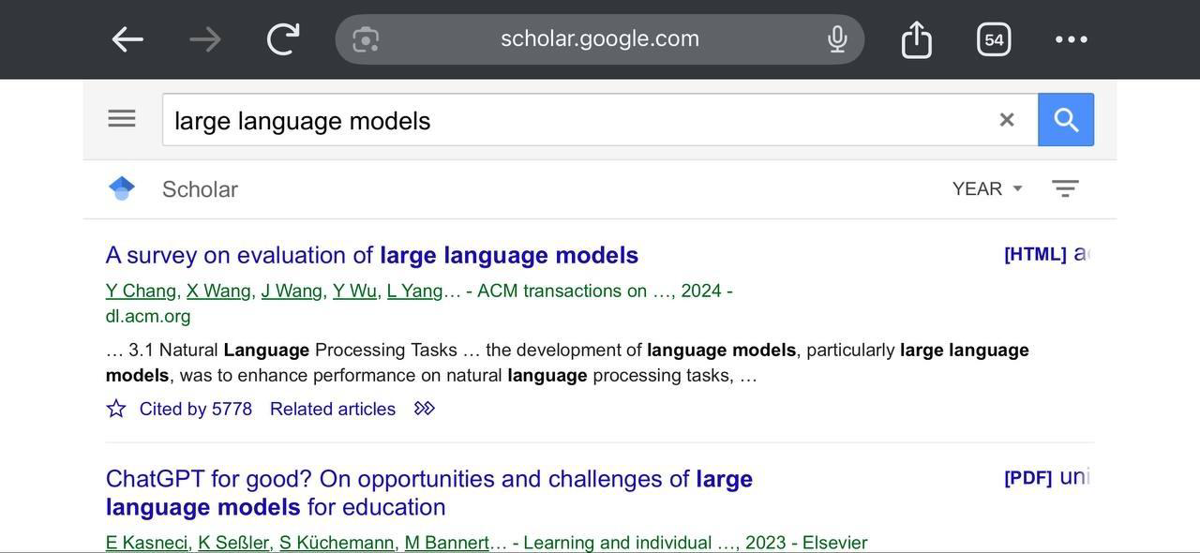
From search result pages, you can extract titles, result URLs, snippets, publication metadata, authors, years, PDF or HTML access links, Cited by links, Related articles, and All versions. This is the best starting point for most Google Scholar scrapers.
Citation Formats
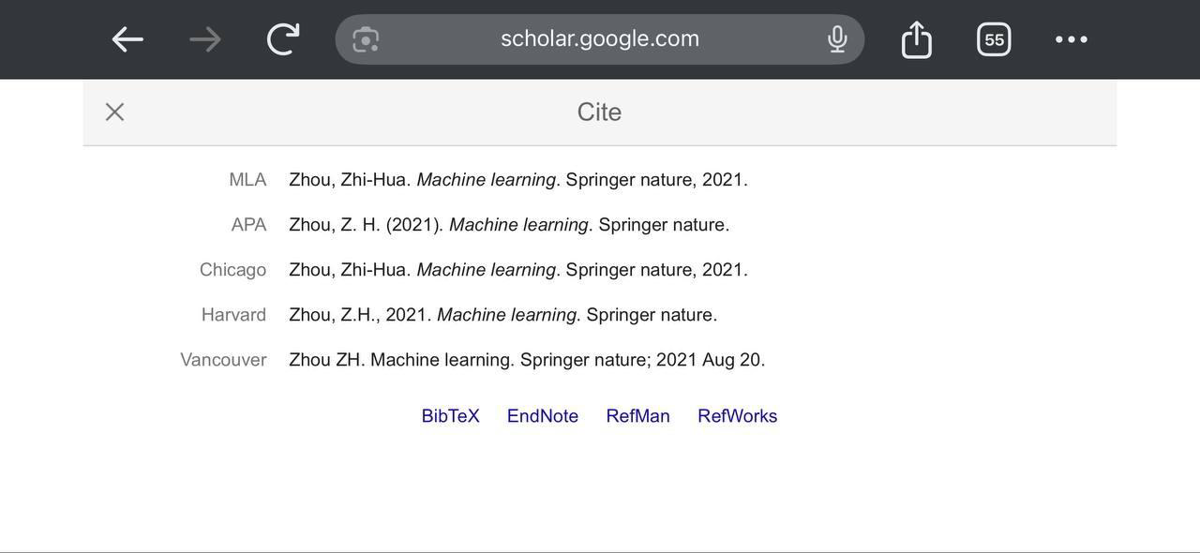
You can also scrape Google Scholar cite data by opening the citation popup for a result. The popup can show formatted citations such as MLA, APA, Chicago, Harvard, and Vancouver, plus export links like BibTeX, EndNote, RefMan, RefWorks, and RIS depending on the interface.
Author Search Results
Author search pages can return cards with the author's names, affiliations, research interests, verified email domains, and citation counts.
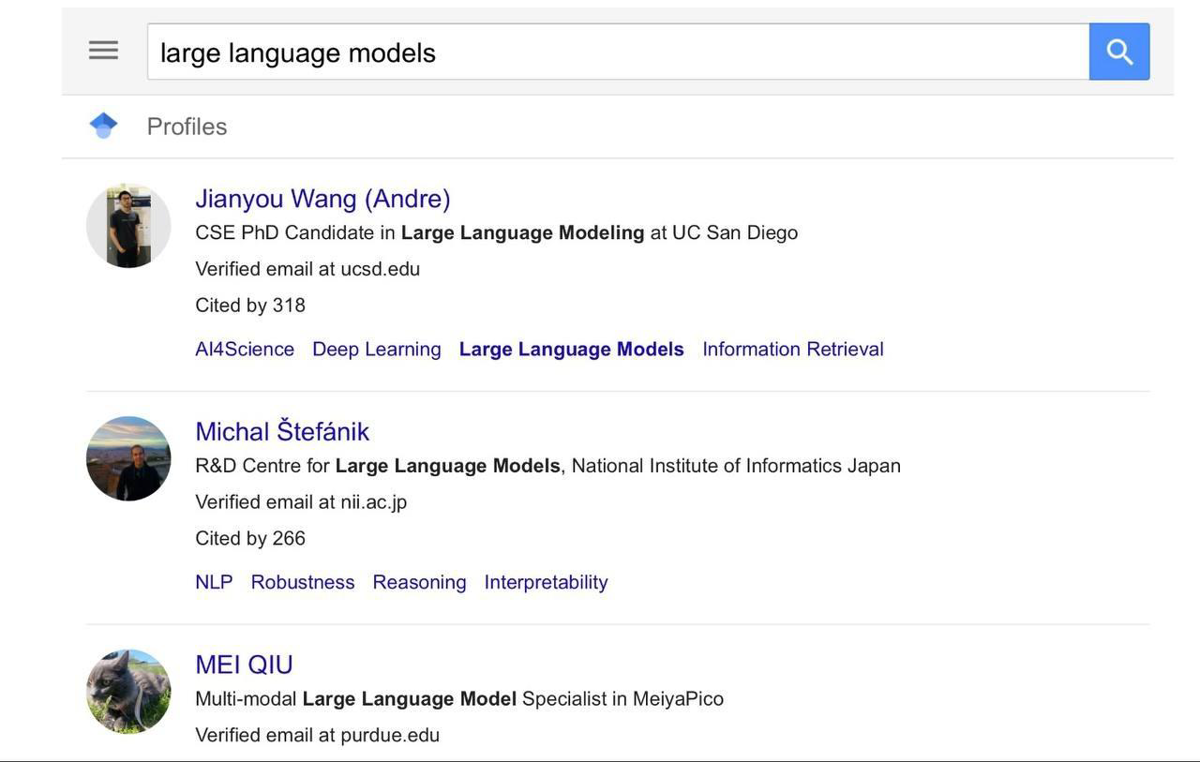
You can also get a direct link to each profile when scraping for Google Scholar authors.
Author Profile Pages
Full author profiles can include profile metadata, co-authors, publication lists, citation graphs, total citations, etc.
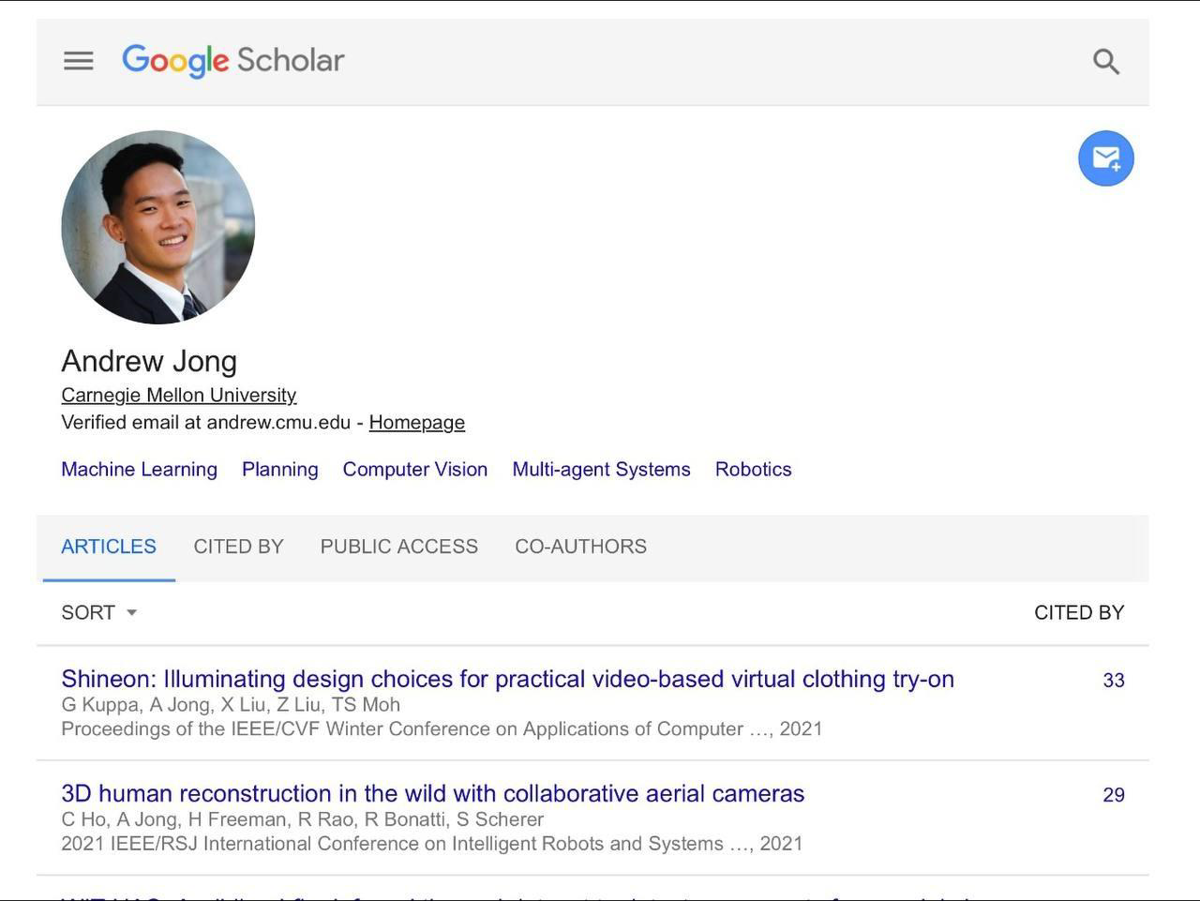
If you need to scrape Google Scholar profiles or scrape Google Scholar co-authors, profile pages give you a more structured view than normal search results.
Best Practices to Avoid Blocking
Even with ScrapingBee handling the heavy lifting, it's good to follow some best practices to ensure reliable scraping of Google Scholar. From my experience scraping academic sources, here are some tips:
- Respect rate limits. Don't hammer Google Scholar with requests. Space them out, even when using ScrapingBee. I recommend at least 5-10 seconds between requests.
- Rotate user-agents. ScrapingBee can handle this for you with the browser_headers parameter, which simulates different browsers.
- Implement exponential backoff. If you encounter errors, wait longer before retrying. Start with a few seconds and double the wait time with each failure.
These practices work because they make your scraping behavior look more like a human user and less like an automated scraper. Google Scholar's anti-bot systems look for patterns that indicate automation, so breaking those patterns is key to extracting data from Google Scholar successfully.
Power Up Your Research
By now, you've seen how just a few lines of Python, paired with ScrapingBee's powerful API, can transform Google Scholar's vast academic repositories into clean, structured data. This guide has laid the groundwork: from setting up your environment and handling pagination to parsing with BeautifulSoup.
Ready to dive in? Sign up for ScrapingBee, grab your API key, and with a single API call, you'll be harvesting titles, authors, links, and more. As you scale up, remember to pace your requests with respectful rate limiting and intelligent backoff.
Before you go, check out these related reads:
Google Scholar Scraping FAQs
Is it legal to scrape Google Scholar?
Google Scholar's terms of service regarding automated scraping remains a grey area. Google's Terms of Service prohibit scraping without permission, but many researchers do it for academic research purposes. I recommend scraping at a reasonable rate and reading our guide on terms of service and automated scraping to understand the legal side better.
How does ScrapingBee handle CAPTCHA on Google Scholar?
ScrapingBee uses a combination of residential proxies and browser fingerprinting to bypass CAPTCHAs when you scrape Google. If a CAPTCHA appears, ScrapingBee can either solve it or try different IP addresses until it finds one that doesn't trigger the CAPTCHA, making it a reliable Google Scholar scraper.
Can I extract citation counts and h-index data?
Yes. You can extract Cited by counts from result pages and h-index or i10-index values from public author profiles. However, keep in mind that parsing these accurately might require additional text processing because not every result or profile exposes the same fields.
How many requests can I make per minute?
With ScrapingBee's standard plan, you can make about 10-15 requests per minute to Google Scholar. However, I recommend staying on the conservative side with academic sources, so 5-10 requests per minute is safer for long-term scraping.
Can You Scrape Multiple Pages of Google Scholar Results?
Yes, you can paginate with the start parameter and increase in steps of 10 (start=0, 10, 20…). Google Scholar caps each query at 1,000 results, so plan to narrow your search if you need more.
Why Does My Script Return Different HTML Than My Browser?
Google may return different HTML based on location, headers, device type, consent pages, or anti-bot checks. Always inspect the returned HTML before changing selectors.
What Is the Best Option for Large-Scale Scholar Data Collection?
For large-scale jobs, managed scraping APIs like ScrapingBee always outperform DIY setups by handling residential proxy rotation, CAPTCHA solving, and headless browsers automatically.
Can I customize my Google Scholar scraper with parameters like hl=en or as_sdt=0,5?
Yes. You can include parameters like hl=en and as_sdt=0,5 in your search URL. ScrapingBee will return the full HTML, letting you extract titles, links, and citations using Python. Just build your query, pass it into the API, and parse the data with BeautifulSoup.