Learning how to scrape eBay requires navigating complex HTML structures and aggressive anti-bot protections. To extract data reliably, a scraper must handle JavaScript rendering and rotate proxies to avoid IP blocks.
This guide demonstrates how to build a functional eBay scraper to track prices, research product trends, and aggregate seller data.
Quick Answer (TL;DR)
You can scrape eBay with Python in just a few lines of code using ScrapingBee. Simply initialize the client with your API key, enable premium_proxy, set device to mobile, and specify the eBay URL you want to scrape. eBay's search results are already in the initial HTML, so JavaScript rendering is not needed and render_js can stay off. ScrapingBee handles proxy rotation automatically, allowing you to focus on extracting the data you need.
Setup: Your ScrapingBee Request
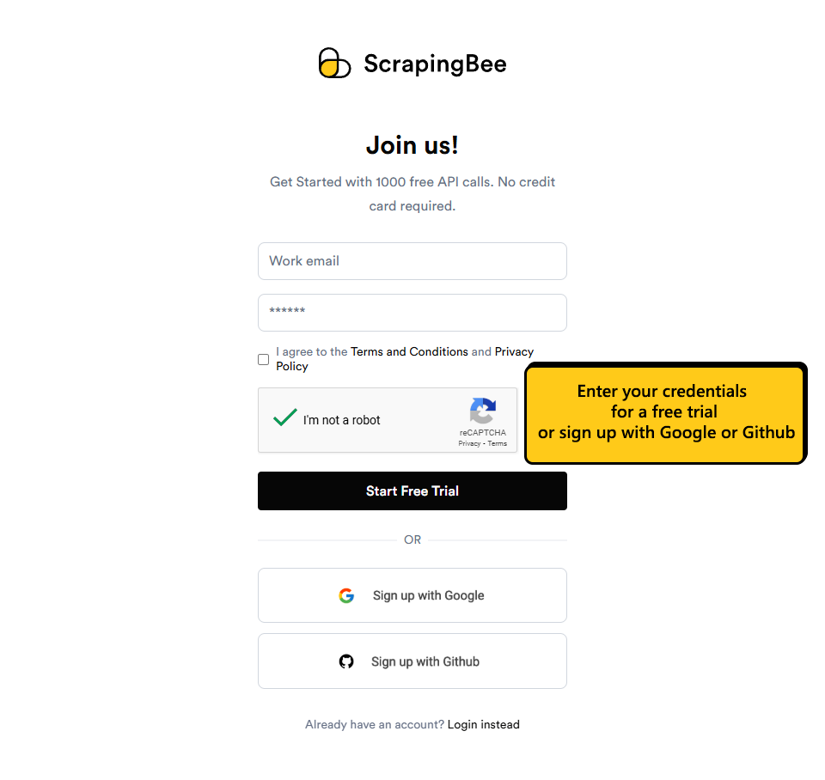
Setting up ScrapingBee for eBay scraping is straightforward. First, you'll need to sign up for an account and get your API key. After registration, you'll find your key in the dashboard. This key is essential for authenticating your requests to our API.
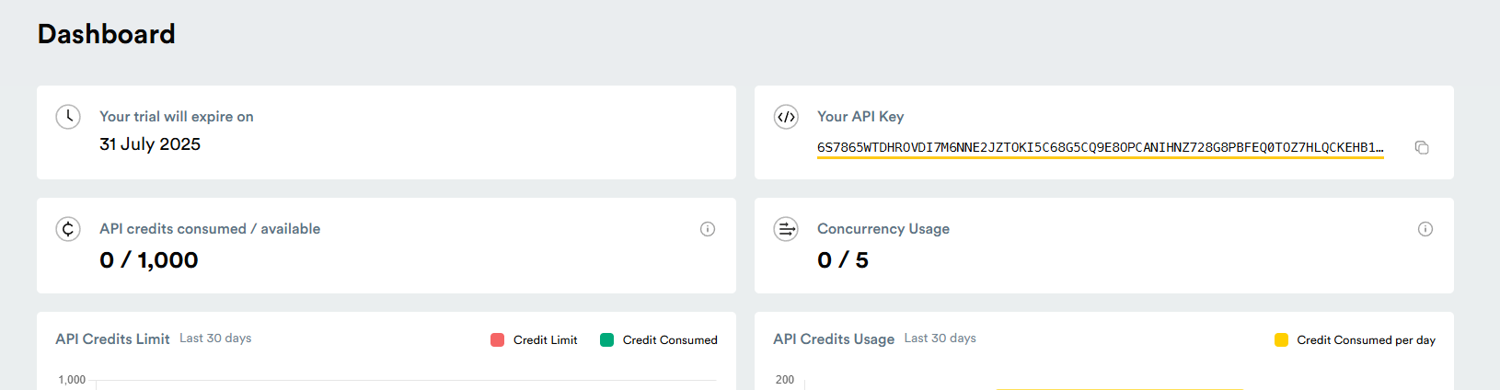
After a successful sign-up, you will be presented with a dashboard displaying the expiration date of your free trial, available credits, concurrent connections, and your API key.
Step-by-Step: How to Scrape eBay with Python
Now let's build a complete solution showing how to scrape eBay listings with Python using ScrapingBee and BeautifulSoup. We'll extract product information from a search results page:
from scrapingbee import ScrapingBeeClient
from bs4 import BeautifulSoup
import csv

def scrape_ebay_products(search_query, max_pages=1):
    client = ScrapingBeeClient(api_key='YOUR_API_KEY')
    all_products = []

    for page in range(1, max_pages + 1):
        if page == 1:
            ebay_url = f'https://www.ebay.com/sch/i.html?_nkw={search_query.replace(" ", "+")}'
        else:
            ebay_url = f'https://www.ebay.com/sch/i.html?_nkw={search_query.replace(" ", "+")}&_pgn={page}'

        print(f"Scraping page {page}: {ebay_url}")

        response = client.get(
            ebay_url,
            params={
                'country_code': 'us',
                'premium_proxy': True,
                'render_js': False,
                'device': 'mobile'
            }
        )

        if response.status_code == 200:
            soup = BeautifulSoup(response.content, 'html.parser')
            listings = soup.select('li.s-card')

            for listing in listings:
                if 'srp-river-answer' in listing.get('class', []):
                    continue

                product = {}

                title_elem = listing.select_one('div.s-card__title span.su-styled-text')
                if title_elem:
                    product['title'] = title_elem.get_text(strip=True)

                price_elem = listing.select_one('span.s-card__price')
                if price_elem:
                    product['price'] = price_elem.get_text(strip=True)

                url_elem = listing.select_one('a.s-card__link:not(.image-treatment)')
                if url_elem:
                    product['url'] = url_elem['href']

                if 'title' in product and product['title'] != 'Shop on eBay':
                    all_products.append(product)

            print(f"Found {len(listings)} products on page {page}")
        else:
            print(f"Failed to scrape page {page}: Status code {response.status_code}")

    return all_products

products = scrape_ebay_products('vintage camera', max_pages=2)

with open('ebay_products.csv', 'w', newline='', encoding='utf-8') as f:
    writer = csv.DictWriter(f, fieldnames=['title', 'price', 'url'])
    writer.writeheader()
    writer.writerows(products)

print(f"Scraped {len(products)} products and saved to ebay_products.csv")
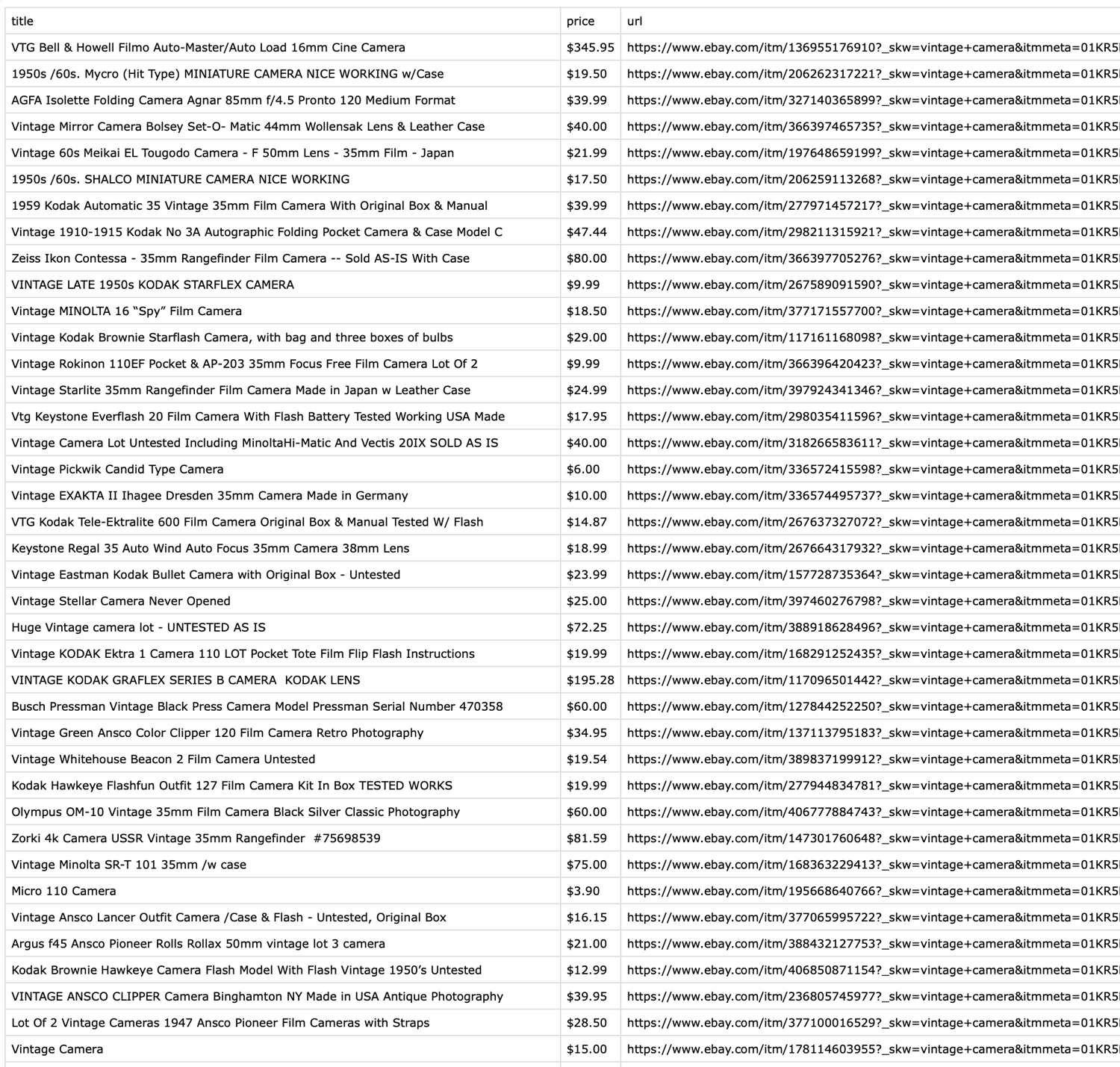
This script searches for "vintage camera" on eBay, scrapes two pages of results, and saves the product titles, prices, and URLs to a CSV file. The pagination handling allows you to collect data from multiple pages.
Required Parameters for Proxy Rotation
When scraping eBay, certain ScrapingBee parameters are essential for success:
- premium_proxy: Set to True to use high-quality residential proxies that are less likely to be detected and blocked by eBay.
- country_code: Specify the country you want to route the request through (e.g., 'us' for United States).
- render_js: Set to False. eBay's search results are present in the initial HTML, so JavaScript rendering is not needed here, and skipping it saves credits. Turn it back on only for pages that load their data client-side.
- device: Set to 'mobile' to request the mobile version of the page. eBay's mobile pages are lighter and are blocked far less often than the desktop version.
Extracting Product Titles and Prices
Once you have the HTML content from ScrapingBee, you can use BeautifulSoup to extract specific data points. eBay's search results use consistent class names that make extraction straightforward:
from bs4 import BeautifulSoup

soup = BeautifulSoup(response.content, 'html.parser')

titles = soup.select('div.s-card__title span.su-styled-text')
for title in titles:
    print(f"Title: {title.get_text(strip=True)}")

prices = soup.select('span.s-card__price')
for price in prices:
    print(f"Price: {price.get_text(strip=True)}")

shipping_rows = soup.select('div.s-card__attribute-row')
for row in shipping_rows:
    text = row.get_text(strip=True)
    if 'delivery' in text.lower() or 'shipping' in text.lower():
        print(f"Shipping: {text}")
You can customize the selectors based on the specific data you need. BeautifulSoup makes it easy to navigate the HTML structure and extract information using CSS selectors or other methods. For more complex parsing needs, consider using more advanced Python HTML parsers.
eBay provides a wealth of information that you can collect through web scraping, including ways to scrape eBay related searches or scrape eBay organic results. Here are the key data points you can extract:
- Product Information
- Title and description
- Current price and "Buy It Now" price
- Item condition (new, used, refurbished)
- Available quantity
- Item location and shipping options
- Seller Details
- Seller username and feedback score
- Positive feedback percentage
- Seller's other items
- Business or individual seller status
- Listing Metrics
- Number of watchers
- Number of items sold
- Listing duration and end time
- Return policy details
- Competitive Data
- Similar items and their prices
- Best offer availability
- Auction bid history
Results (Preview)
Why Scraping eBay Can Be Tricky
eBay is designed to protect its data from automated collection. When you scrape eBay with Python or other languages without specialized tools, you'll quickly run into several roadblocks. The site employs sophisticated bot detection that identifies and blocks scraping attempts based on request patterns, headers, and IP addresses.
From my experience, using standard libraries like Requests often results in incomplete data or outright blocks. eBay loads critical content dynamically through JavaScript, meaning a simple HTTP request won't capture everything you need. Additionally, eBay frequently changes its HTML structure, breaking scrapers that rely on fixed selectors.
What Makes eBay Difficult to Scrape?
- Dynamic JavaScript Content: eBay uses JavaScript to load product details, prices, and images after the initial page load, making simple HTTP requests ineffective.
- Infinite Scroll Pagination: Many eBay pages use infinite scroll instead of traditional pagination, requiring browser automation to access all results.
- Sophisticated Bot Detection: eBay employs advanced techniques to identify and block automated scrapers, including IP-based rate limiting and behavioral analysis.
- CAPTCHA Challenges: Frequent scraping attempts often trigger CAPTCHA verification, halting your data collection.
- Changing HTML Structure: eBay regularly updates its page structure, breaking scrapers that rely on fixed CSS selectors or XPath expressions.
Why ScrapingBee Makes It Simple
ScrapingBee handles all the complexities of web scraping eBay products automatically. Unlike manual approaches using Requests and BeautifulSoup, which struggle with JavaScript content and get blocked quickly, our API renders pages just like a real browser would. The platform manages proxy rotation for eBay scraping behind the scenes, preventing IP blocks without requiring you to set up and maintain a proxy infrastructure.
With ScrapingBee, there's no browser setup needed – no Selenium configuration, no ChromeDriver installation, and no browser management headaches. You make a simple API call, and ScrapingBee returns the fully rendered HTML, ready for parsing.
How to Avoid Getting Blocked When Scraping eBay
Just like all major services, eBay employs various bot detection mechanisms.
If your eBay web scraping scripts send requests that appear to be automated, you'll hit CAPTCHAs, empty responses, and eventually IP bans… often faster than you'd expect.
Even if your script successfully fetches a single page, the challenging part is to make it work reliably over time. When you scrape eBay search engine results across multiple categories and keywords, every unnatural request can be flagged. The same applies when you scrape eBay related items or navigate through paginated results. Repetitive patterns to similar URL structures will always look suspicious for bot detection systems.
Luckily, most scraping blunders can be easily avoided. The usual suspects are:
- default headers
- no IP rotation
- predictable request timing
- handling excessive JavaScript rendering
The ultimate goal is to make your traffic appear as regular browser behaviour, because that's the only guaranteed way to avoid eBay's anti-scraping measures.
In the next sections, we'll cover each of these areas in detail.
Use Realistic Headers and User Agents
Most HTTP clients out there self-advertise themselves via User-Agent headers.
For example, Python's requests library sends a User-Agent header that literally says "python-requests", which is extremely likely to get flagged by anti-bot systems.
Even once-off scripts need a realistic User-Agent string, along with other headers that a real browser would use (like Accept-Language and Accept-Encoding).
Unfortunately, eBay web scraping policy isn't documented publicly, so the safer your fingerprint looks, the longer your scraper is likely to run before triggering any anti-bot prevention measures.
Relying on a single User-Agent header is unreliable. Rotate User-Agent strings to avoid raising suspicions.
Rotate IPs and Control Request Frequency
Rotating your User-Agent headers won't help you if you're sending dozens of requests per second from a single IP. This is another fastest way to get blocked. eBay analyzes request patterns per IP and is very sensitive to any unnatural bursts of traffic from a single source, so it's crucial to rotate proxies and randomize delays between requests.
Additionally, if you ever get a CAPTCHA or 429, it is better to back off exponentially than to solve it instantly and keep retrying immediately.
Add JavaScript Rendering Only When Needed
An ability to render JavaScript is handy, but expensive. And it's not just about money or API credits but time. JavaScript rendering drastically slows down the scraping process, and it might not even be needed.
For example, search result pages load most data in the initial response. However, product detail pages often rely on JavaScript to render pricing/shipping/seller information.
Before you turn on JavaScript rendering by default, test each page with and without.
When a Scraping API Saves Time
Handling proxy rotation infrastructure, maintaining natural-looking User-Agent strings, and CAPTCHA solvers is a significant amount of work, which requires further monitoring and maintenance to keep up with eBay's evolving defenses.
Relying on a managed API like ScrapingBee handles proxy rotation, browser fingerprinting, JavaScript rendering, and automatic retries behind the scenes. Instead of debugging why a headless browser update broke your scraping setup, just call an API.
If you want to learn more, see our guide on getting blocked.
Legal Disclaimer and Best Practices
Are you wondering whether eBay does allow web scraping? According to eBay's Terms of Service, automated platform access is restricted. However, scraping publicly-available data for personal or research purposes is generally legal (or in a grey area). Keep in mind, this varies by jurisdiction.
In order to stay compliant, remember to:
- Respect robots.txt directives
- Only scrape publicly-accessible pages
- Never collect personal data
- Don't generate traffic that could impact eBay's infrastructure
For a more detailed overview, check our web scraping legal guide.
This guide is for educational purposes only. If you want to scrape data as part of your commercial activities, always consult legal counsel.
Start Scraping eBay Today with ScrapingBee
In this guide, we've seen how to scrape eBay with Python using ScrapingBee's powerful API. Understanding how to scrape eBay properly can save you hours of development time and frustration. ScrapingBee handles the complex parts – JavaScript rendering, proxy rotation, and anti-bot measures – so you can focus on extracting and using the data.
Getting started is easy with ScrapingBee's free trial credits. You can test the service with real eBay scraping tasks before committing to a plan – sign up for 1,000 free API calls and start scraping hundreds of pages. The simple API integration works with any programming language, not just Python, making it accessible regardless of your tech stack.
Whether you're building a price comparison tool, conducting market research, or gathering data for analysis, ScrapingBee provides the reliability and simplicity you need for successful eBay scraping.
FAQs About How to Scrape eBay
Can I scrape eBay for commercial use?
While scraping is technically possible, you should review eBay's Terms of Service before scraping for commercial purposes. Many e-commerce sites prohibit automated data collection for commercial use. Consider using the official eBay API for commercial applications, or ensure your scraping activities comply with their terms and rate limits.
Do I need proxies to scrape eBay?
Yes, proxies are essential for successful eBay scraping. eBay implements IP-based rate limiting and blocking, which quickly stops scrapers using a single IP address. ScrapingBee's premium proxy feature handles this automatically, rotating high-quality proxies to prevent blocking while maintaining session consistency.
Does eBay use JavaScript to load content?
Not for search results. eBay's search results pages return their listings in the initial HTML, so they can be scraped without JavaScript rendering, which is what this guide does. Product detail pages often load pricing, shipping, and seller information client-side; for those, enable ScrapingBee's render_js parameter to get the complete page content, just as a real user would see in their browser.
Can I scrape seller ratings and feedback?
Yes, you can scrape seller ratings and feedback from eBay using ScrapingBee. You'll need to navigate to the seller's profile page and extract the relevant information using BeautifulSoup selectors. The process is similar to scraping product listings, but with different CSS selectors targeting the seller information elements.
Can you scrape eBay sold listings and completed listings?
Yes, the trick is to add LH_Complete=1&LH_Sold=1, which filters results to show only completed and sold items.
Luckily, the same selectors work and prices reflect final sale values.
How do you scrape eBay item descriptions if they load in an iframe?
Whenever you need to scrape data that's loaded via iframes, you need to first extract the iframe's source URL, and then make a separate request to that URL.
In eBay's case, a separate request to that URL reveals the actual item descriptions HTML.
What is the best way to export scraped eBay data for analysis?
One of the most popular data formats is CSV, and Python has built-in csv support. It can be easily imported using any spreadsheet software. However, if you're dealing with huge volumes of data, Parquet is often superior to CSV.
If you're dealing with nested or structured data, JSON will be more convenient.
Before you go, check out these related reads: