Web scraping crypto prices with Python is possible using the requests and BeautifulSoup packages. However, using an API is the more practical solution for most cases. With scraping, you may encounter issues because the websites might be JavaScript rendered, or employ anti-bot defenses, which you can overcome using ScrapingBee.
Read on to find out how to get crypto prices via API and by scraping. We also finish with an example of building a crypto price tracker with email alerts.
Key Takeaways (TL;DR)
- For most cases, an API suffices to get the crypto price data you need.
- Scraping helps when the API doesn't have the data you need, or to compare multiple sources.
- A simple scraper with requests + BeautifulSoup may fail on some sites, e.g. CoinMarketCap.
- Crypto price scrapers typically fail because the target is JavaScript rendered or employs anti-bot defenses.
- ScrapingBee helps you fetch JS rendered pages and bypass anti-bot defenses, with just a single API call.
- Learn how to build a crypto tracker with periodic fetching, CSV storage, and change alerts.
Should you scrape crypto prices or use an API?
For most projects, calling crypto prices APIs with Python just works. Scraping may just needlessly complicate things. Several crypto platforms and websites such as CoinGecko, CoinMarketCap, and Crypto.com provide an API, typically with some sort of free plan. The CCXT library lets you programmatically access crypto exchanges. All of these just give you the data in JSON instead of you having to mess with HTML pages, CSS selectors and all that stuff.
Web scraping cryptocurrency prices is recommended only if you can't get what you need through the APIs. Sometimes the data is only on a HTML webpage, or API access is rate limited or too expensive while scraping a public webpage with the same data is almost free. You might also want to compare multiple sources and not all of them provide a usable API. These are all the typical reasons to prefer scraping over an API.
We've provided a decision matrix below to help you decide:
| Your Goal | Best Approach | Why |
|---|---|---|
| Simple live price | CoinGecko or CoinMarketCap /simple/price API | It's Free! |
| Historical Data | CoinGecko API | Part of free demo plan (attribution required) |
| Exchange-specific price | Use CCXT | Python SDK available |
| Required data is not in any API | Scrape the HTML | Fallback to scraping if API unavailable |
| Dashboard with no endpoint | Scrape HTML, with JS render if necessary | No easier option available |
| Many sources at once | Use API where possible, scrape where necessary | Need not scrape all the sources, just scrape ones without API |
Get crypto prices with the CoinGecko API (the fast path)
One of the simplest ways to get crypto prices is to use the CoinGecko API in Python. There is a keyless public API with rate limits of 10-30 calls per minute per IP. The rate limit varies based on server load. Here's the code to call this API using the requests package (needs to be installed):
import requests

r = requests.get(
    'https://api.coingecko.com/api/v3/simple/price',
    params = {
        "vs_currencies": 'usd',
        "ids": "bitcoin",
        "names": "Bitcoin",
        "symbols": "btc",
    }
)

print(r.json())
# OUTPUT: {'bitcoin': {'usd': 62385}}
For increased rate limits, you sign up for an API key. You can read more at the official CoinGecko API docs. Another popular alternative is the CoinMarketCap API, which also works similarly in Python.
Scrape crypto prices with Python and BeautifulSoup
Let's look at how to scrape crypto prices with Python. For starters, you could scrape the current Bitcoin prices from BitInfoCharts. This site lists general prices of various cryptocurrencies along with exchange specific prices as well (Coinbase, Kraken, etc.). It also does not provide an API, so it's an ideal target for this demonstration.
In the HTML of the page, the bitcoin prices come under one cell of a big table element. You can just get this cell and process the text in its elements to get the prices. For web scraping with Python, the most basic packages you'll need are requests and BeautifulSoup4. You can install them with pip or uv:
pip install requests beautifulsoup4
Or
uv add requests beautifulsoup4
Next, here's the code to scrape BitInfoCharts for bitcoin prices:
import json

from bs4 import BeautifulSoup
import requests

# fetch the page and init the soup object
r = requests.get('https://bitinfocharts.com/')
soup = BeautifulSoup(r.text, features="html.parser")

# get the table cell elements with btc prices
btc_cell_els = soup.select('#t_price td.c_btc>*')

# iterate over the elements, extract prices if they have any
data = {}
for el in btc_cell_els:
    if el.text:
        if '=' in el.text:
            key, val = el.text.split("=")
            data[key.strip()] = val.strip()
        elif ':' in el.text:
            key, val = el.text.split(":")
            data[key.strip()] = val.strip()

print(json.dumps(data, indent=2))
This prints the following output:
{
  "1 BTC": "62,810.09 USD",
  "coinbase": "62,657.31 USD",
  "kraken": "62,589.3 USD",
  "bitfinex": "62,626 USD",
  "bitstamp": "62,670.37 USD",
  "okex": "62,723.5 USD",
  "1 USD": "0.000016 BTC"
}
The code above prints bitcoin prices from various exchanges, and also the inverse conversion (1 USD -> Bitcoin). You can improve upon it by converting all the values to integers and so on. But now, let's proceed to something a bit more involved.
Say you want to scrape Bitcoin daily historical prices from CoinGecko starting from 11th April 2020 to 25th April 2020. This data is not available under the free or even the basic plan of their API. It may not be cost effective for you to subscribe to the $100+/month analyst plan to get just this data for a one-off analysis. This is the kind of scenario where a scraper comes in handy.
The URL you want to scrape is https://www.coingecko.com/en/coins/bitcoin/historical_data?start=2020-04-11&end=2020-04-25. Notice that the start and end dates are part of the URL parameters. A screenshot of the page and the HTML structure is below:
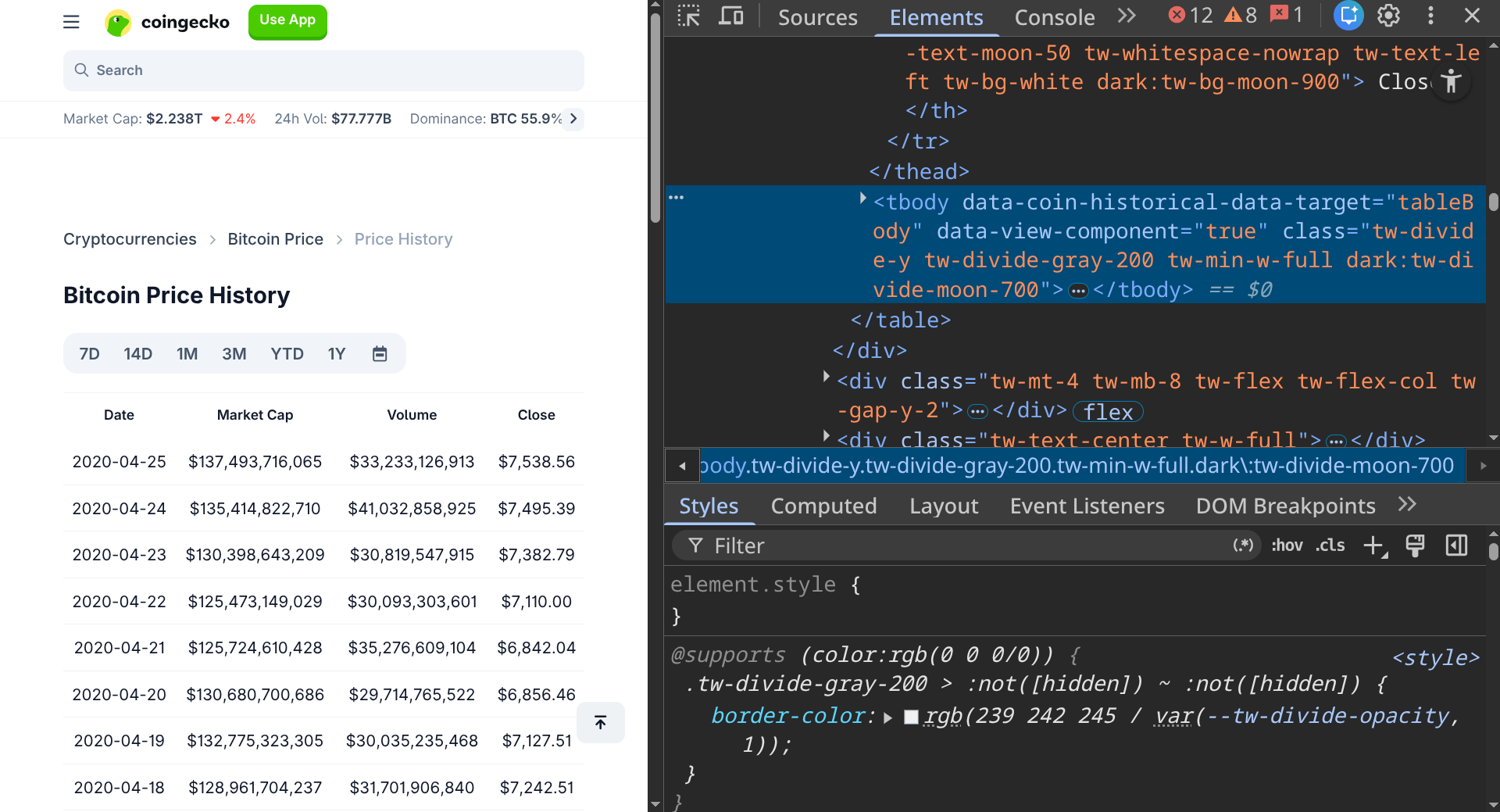
The page appears to be typical old school HTML. So, a simple scraper that just picks up the table element and parses that to a CSV dump should work. We tried building one:
import csv
import sys

from bs4 import BeautifulSoup
import requests

# Specify the dates in yyyy-mm-dd
start_date = '2020-04-11'
end_date = '2020-04-25'

currency = 'bitcoin'

url = f'https://www.coingecko.com/en/coins/{currency}/historical_data'
url += f'?start={start_date}&end={end_date}'

# fetch the page
r = requests.get(url)
if r.status_code != 200:
    print(f"ERROR: Got a {r.status_code} status")
    sys.exit()

# make it a soup object
soup = BeautifulSoup(r.text, features="html.parser")

# empty array to store results
results = []

# get the table body rows to extract data
tbody_rows = soup.select("tbody[data-view-component=true] tr")

# function to clean amount text
def clean_amount(amt):
    amt = amt.replace("\n", "").replace("$", "").replace(",", "")
    return amt.strip()

for row in tbody_rows:
    cells = row.select("td")
    results.append({
        "Date": cells[0].text.replace("\n", "").strip(),
        "Market Cap ($)": clean_amount(cells[1].text),
        "Volume ($)": clean_amount(cells[2].text),
        "Close ($)": clean_amount(cells[3].text),
    })

# Write to CSV
headers = results[0].keys()
with open("coingecko_btc.csv", mode="w", newline="", encoding="utf-8") as csvfile:
    writer = csv.DictWriter(csvfile, fieldnames=headers)
    writer.writeheader()
    writer.writerows(results)
Looks neat, right? But here's what we got when we tried running it:
ERROR: Got a 403 status
Changing the user agent string to that of the latest Chrome browser didn't work either.
Why your crypto scraper gets blocked (and how to fix it)
The typical reasons for crypto scrapers getting blocked (or failing) are sites using JavaScript rendering, and/or blocking requests that look like bots. The latter is what went wrong with our CoinGecko bitcoin price scraper in the previous section. We got a 403 status meaning the site refused to serve its content to our scraper. We couldn't fix it by mocking a human browser's user agent either.
If you're getting a 200 response but the HTML doesn't seem to have the data, the data is probably JavaScript rendered. To fix this, you need an automated headless browser. A headless browser is a tool that can open a page and execute the scripts like a normal browser would, but also be controlled by your script/program. This process populates the data in the page, and then you can scrape it.
As for getting blocked with 403, it is most likely because the website has anti-bot defenses (Cloudflare in this case). Data center IPs are well known and commonly flagged. That means you might occasionally get away running scrapers on your local system but for cloud automations you're very likely to be blocked. To bypass Cloudflare in Python, you need to use a residential proxy that will request the webpage through a legitimate looking residential IP address.
Scrape crypto prices reliably with ScrapingBee (handles JS and anti-bot)
ScrapingBee comes in handy for web scraping crypto prices with Python when your scraper gets blocked. It's an API that handles JS rendering and premium proxies in a simple API call. You don't have to run a headless browser framework such as Playwright, or procure new IP addresses for a simple scraping operation. There is also a Python SDK that you can just drop into your code as a requests substitute to start with. Let's see how you can attempt scraping CoinGecko historical bitcoin prices using the ScrapingBee API. First, you need to install the scrapingbee Python package (pip install scrapingbee or uv add scrapingbee).
Next, here's the code to scrape CoinGecko, using the ScrapingBee API instead of requests to fetch the page:
import csv
import sys

from bs4 import BeautifulSoup
from scrapingbee import ScrapingBeeClient


sb_client = ScrapingBeeClient(api_key='YOUR_API_KEY')

# Specify the dates in yyyy-mm-dd
start_date = '2020-04-11'
end_date = '2020-04-25'

currency = 'bitcoin'

url = f'https://www.coingecko.com/en/coins/{currency}/historical_data'
url += f'?start={start_date}&end={end_date}'

# fetch the page with ScrapingBee API
r = sb_client.get(url, params = {"premium_proxy": "true", "render_js": "false"})
if r.status_code != 200:
    print(f"ERROR: API Call Failed")
    sys.exit()
if r.headers['spb-initial-status-code'] != '200':
    print("ERROR: No Initial 200")
    sys.exit()

# make it a soup object
soup = BeautifulSoup(r.text, features="html.parser")

# empty array to store results
results = []

# get the table body rows to extract data
tbody_rows = soup.select("tbody[data-view-component=true] tr")

# function to clean amount text
def clean_amount(amt):
    amt = amt.replace("\n", "").replace("$", "").replace(",", "")
    return amt.strip()

for row in tbody_rows:
    cells = row.select("td")
    results.append({
        "Date": cells[0].text.replace("\n", "").strip(),
        "Market Cap ($)": clean_amount(cells[1].text),
        "Volume ($)": clean_amount(cells[2].text),
        "Close ($)": clean_amount(cells[3].text),
    })

# Write to CSV
headers = results[0].keys()
with open("coingecko_btc.csv", mode="w", newline="", encoding="utf-8") as csvfile:
    writer = csv.DictWriter(csvfile, fieldnames=headers)
    writer.writeheader()
    writer.writerows(results)
This gave us a nice CSV file (coingecko_btc.csv) with the dates and bitcoin prices:
Date,Market Cap ($),Volume ($),Close ($)
2020-04-25,137493716065,33233126913,7538.56
2020-04-24,135414822710,41032858925,7495.39
2020-04-23,130398643209,30819547915,7382.79
… more rows
With very minimal setup, you can use the ScrapingBee SDK instead of requests to fetch the page. The rest of the code mostly remains unchanged. The code also uses "premium_proxy": "true" in the API requests, which routes the request through a premium proxy on ScrapingBee's backend. It's that easy! The code may sometimes work even without the premium proxy, and for harder sites, there are also stealth proxies with an even lower probability of being blocked. To use stealth proxies, you can specify "stealth_proxy": "true" in the API call parameters.
For this particular case you didn't need JS rendering. However, if you were to scrape the bitcoin price history page on CoinMarketCap instead, you may not get blocked with a 403 but you'd get a blank table with no prices. This is because the prices are loaded on the site by a script after the initial shell loads. To handle this with ScrapingBee, you pass "render_js": "true" in the params, or just omit it because it is true by default. ScrapingBee will do the hard work of rendering this page in a browser and getting you the populated HTML. On the CoinMarketCap price history page you also need to click buttons to load more data or change the date ranges. You can have ScrapingBee API do this by supplying a custom JavaScript scenario that will be executed in the page before returning the response to you.
You might be wondering how much this costs. ScrapingBee works on a credit system, where each API call can cost you 1-75 credits. You can see the brief credit-cost table below to figure out how this might work out for scraping crypto prices:
| Operation | Credit Cost |
|---|---|
| Classic Scrape Without JS | 1 |
| Classic Scrape With JS Render | 5 |
| Premium Proxy Without JS | 10 |
| Premium Proxy With JS Render | 25 |
| Stealth Proxy (Forces JS) | 75 |
The credit costs vary with the subscription plans and you can always choose the one that works best for you. Finally, ScrapingBee also offers a dedicated Crypto.com scraping endpoint, if you're scraping prices from Crypto.com specifically.
Build a real-time crypto price tracker (poll and store to CSV)
If you want to get crypto prices with Python to build a real-time crypto price tracker, here we show one way to go about it. We'll use CoinMarketCap's keyless trial pro API for the sake of simplicity but you can use this approach with any other API or scraping workflow. This is a bitcoin price tracker, and again, you can do this with other cryptocurrencies too.
NOTE: The following scraper polls prices every 1 minute and the data might be around 1 minute old. This is reasonable as a real time crypto price Python scraper for many use cases. But if you're looking for a more latency sensitive tracker with fresher data for trading automation, etc., you might need a higher-tier API that gives you data with freshness of only a few seconds.
You only need the requests package installed for this one. Here's the code:
from pathlib import Path
import requests
import time

endpoint = 'https://pro-api.coinmarketcap.com/trial-pro-api'
currency_id = '1' # For Bitcoin

# Start the infinite polling loop
while True:
    r = requests.get(f'{endpoint}/v1/simple/price?ids={currency_id}')
    if r.status_code == 200:
        result = r.json()
        price = result['data'][0]['price']
        timestamp = result['status']['timestamp'] # e.g. 2026-03-05T22:43:48.471Z

        # Make a CSV file name is based on date
        # To store each day's prices in separate files
        csv_file = Path(timestamp.split("T")[0] + '.csv')

        # if file does not exist yet, create it with headers
        if not csv_file.exists():
            # creates the file writes headers
            csv_file.write_text("timestamp,price")

        # append timestamp and price safely
        with csv_file.open(mode="a", encoding="utf-8") as csv_handle:
            # Always append with newline character
            csv_handle.write(f"\n{timestamp},{price}")

        # sleep 1 minute until next poll
        time.sleep(60) # 60 seconds = 1 min
Briefly, the scraper fetches the prices every 1 minute in an infinite while loop, and appends that as a line in a CSV file. The timestamp is returned by the API itself and this can be trusted to be accurate as per the service. Calculating the timestamp on the machine might introduce some latency (especially if you do it before the API call, because the API call takes some time). Finally, we used the timestamp to derive the CSV file's name as per the date and append this name to that file. We ran this for a few minutes on 19th June 2026, and we have the CSV file 2026-06-19.csv:
timestamp,price
2026-06-19T08:48:19.695Z,62584.542223293734
2026-06-19T08:49:20.520Z,62592.26891369511
2026-06-19T08:50:21.391Z,62597.08727638644
2026-06-19T08:51:22.230Z,62583.03237407734
2026-06-19T08:52:23.335Z,62593.04761071637
In a production setup however, you wouldn't typically leave a Python script running in an infinite loop like this. You'd remove the while loop, have the script do just one iteration, and set up an OS-level cron job (or some other scheduler) that runs the script every 1 minute or at whatever frequency you need it to.
Before you go: We also have an article on how to scrape stock prices with Python if you're interested.
Add a price alert (notify when a coin hits your target)
If you followed along and built the bitcoin price tracker, you might also want to get an alert to buy some bitcoins when price drops below a certain threshold you set. Let's look at how to do this. For this you will need a Resend account to send yourself emails (free trial works), and the resend Python package installed (pip install resend or uv add resend). Here's the modified code:
from pathlib import Path
import requests
import resend
import time

resend.api_key = 'YOUR_RESEND_API_KEY'

endpoint = 'https://pro-api.coinmarketcap.com/trial-pro-api'
currency_id = '1' # For Bitcoin
alert_threshold = 62600 # in USD

# Start the infinite polling loop
while True:
    r = requests.get(f'{endpoint}/v1/simple/price?ids={currency_id}')
    if r.status_code == 200:
        result = r.json()
        price = result['data'][0]['price']
        timestamp = result['status']['timestamp'] # e.g. 2026-03-05T22:43:48.471Z

        # Make a CSV file name is based on date
        # To store each day's prices in separate files
        csv_file = Path(timestamp.split("T")[0] + '.csv')

        # if file does not exist yet, create it with headers
        if not csv_file.exists():
            # creates the file writes headers
            csv_file.write_text("timestamp,price")

        # append timestamp and price safely
        with csv_file.open(mode="a", encoding="utf-8") as csv_handle:
            # Always append with newline character
            csv_handle.write(f"\n{timestamp},{price}")

        # send the email if current price is less than threshold
        if price < alert_threshold:
            r = resend.Emails.send({
                "from": "onboarding@resend.dev",
                "to": "your-email-id@example.com",
                "subject": "BTC Price Drop Alert",
                "html": f"<p>Current Price: {price}, Timestamp: {timestamp}</p>"
            })
            time.sleep(3600)

        # sleep 1 minute until next poll
        time.sleep(60) # 60 seconds = 1 min
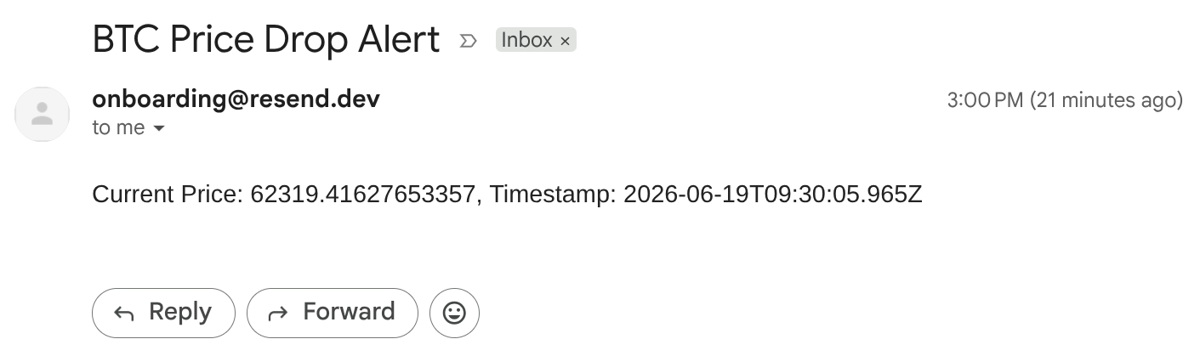
The above piece adds some lines to the code in the previous section. There is a defined threshold price, and add some lines to initialize Resend and send an alert when the price is below the threshold. Sending this email also pauses the scraper for an hour so you don't get a flood of emails if the price stays low for a while. Be sure to use the same email that you used for signing up with Resend. Also, if you've already bought some BTC and want to make a tracker to know when to sell, define that threshold, and use the greater than operator for the price comparison.
This is an email we got from the script:
Is it legal to scrape crypto prices?
Generally, scraping falls under a legal gray area. It is recommended to scrape only publicly available data. On the other hand, scraping anything that is behind a login wall (free or paid plan) is sure to get you into trouble. ScrapingBee never scrapes any login-walled content. Always check the robots.txt of the site you're scraping and read your target website's Terms of Service to understand more.
Be nice and follow rate limits, to not overload the site. Specifically with crypto prices, there are many APIs that can cover most use cases. So, if you can use one of these, it's a cleaner approach and you can worry less about legal issues. Finally, this is just a general recommendation, and you'd want to consult a lawyer with your use-case for the latest legal-advice.
FAQs
Is the CoinGecko API still free?
As of June 2026, CoinGecko has a free keyless public API for very basic functions, which is rate limited by IP address. In addition there is also a free demo plan that does not give you a commercial license and needs to be attributed when its data is displayed.
Can I scrape CoinMarketCap with Python?
You can scrape CoinMarketCap public pages with Python. It's not recommended to scrape anything behind a login wall. Public pages can be Javascript rendered, and may also have anti-bot defenses, so you need to handle these. You can also use a scraping API that bypasses these difficulties, or directly use the CoinMarketCap API if that works.
Why does my crypto scraper return empty data?
Crypto scrapers typically return empty data because they either got blocked for appearing like a bot, or the content in the page you're trying to scrape is Javascript rendered and you need a headless browser to render it.
How do I get real-time crypto prices in Python?
Crypto price APIs usually provide up to 1-minute fresh crypto prices. Anything with lower latency would require higher-tier subscriptions with these APIs. CoinGecko, for instance, gives you the freshest prices starting only from their $100+/month Analyst plan. Scraping is also an option but there is some latency involved in fetching and parsing. The high-tier APIs can give you data through websockets for very low latency.
Do I need a proxy to scrape crypto prices?
Depends on the site you're scraping. Some crypto sites do not employ anti-bot defenses, so it's easy to get by with any IP. Some websites tend to block suspicious (e.g. data center linked) IP addresses, so you'll need a proxy to scrape with a different IP address.
Is scraping crypto prices legal?
Scraping anything in general falls under a legal gray area. With crypto prices, you could scrape any publicly available information but scraping anything behind a login can get you into trouble. Use APIs wherever possible and always consult a lawyer with your use-case for professional legal advice.
Is your crypto scraper getting blocked because of Javascript rendering or anti-bot defenses? Try ScrapingBee today with 1000 free trial credits. Use the render_js and premium_proxy/stealth_proxy features.