There are four ways to scrape Apple App Store data. Two methods rely on Apple's official endpoints. Another uses open-source Python libraries, which are wrappers around those endpoints. The fourth is a web scraping API that extracts data directly from the App Store website.
Each approach comes with different trade-offs around data coverage, reliability, rate limits, and implementation effort. In the sections below, I'll walk through all four methods and share the full code examples I tested on my machine.
TL;DR / Key takeaways
- The iTunes Search API returns app metadata as JSON, including information such as app name, developer, ratings, and pricing, but it does not provide full user reviews.
- Apple's RSS customer reviews feed provides recent user reviews, but it is limited to max 500 reviews per app.
- Open-source Python libraries such as
itunes-app-scraperandapp-store-web-scraperwrap Apple endpoints to simplify development. However, they break when Apple changes its underlying structure and are still subject to rate limits. - If you need search rankings, category charts, or complete review histories, you'll need to scrape the rendered
apps.apple.compages directly. These pages rely on JavaScript rendering and often require proxy management. - A web scraping API handles JavaScript rendering, proxies, rate limits, and data extraction in a single API call, making it the more practical option when scraping at scale.
What data can you get from the App Store (and the 4 ways to get it)
You can fetch any publicly available information on the App Store, including app name, developer, category, price, version, release notes, rating average, rating count, screenshots, and public reviews. If you can view the information without logging in, you can usually collect it.
Some data is not publicly available. For example, app download counts, personalized app recommendations, and downloaded apps are tied to an Apple user account. You won't find this information on public App Store pages, so you can't and shouldn't scrape it.
There are four ways to scrape Apple App Store data:
- iTunes Search API: Apple's official API for app metadata such as app details, ratings, review counts, screenshots, pricing, and version information.
- RSS review feed: Provides recent customer reviews, including ratings, review text, author details, and app version information.
- Open-source libraries: Community-maintained Python packages that wrap Apple's APIs. They internally handle pagination and response parsing, which makes the scraping code simpler.
- Web scraping API: Extracts data directly from App Store pages while handling JavaScript rendering, proxies, and rate limits automatically.
| Method | What you get | Official? | Limit in 2026 | Best for |
|---|---|---|---|---|
| iTunes Search API | App metadata such as app details, ratings, screenshots, pricing, and version information | Official | Does not provide user reviews, search rankings, category charts, or other App Store insights beyond metadata | Quick lookups, or when you only need app metadata fast and cheap. |
| RSS review feed | Recent user reviews, ratings, and review text | Official | Only recent reviews; not suitable for historical data | When you need sample review texts fast and cheap. |
| Open-source libraries | Both app metadata and reviews | Unofficial | Inherits the same limitations as Apple's endpoints and can break when Apple changes its structure or endpoints | Simple code that internally handles calling Apple's endpoints, pagination, and HTML parsing. |
| Web scraping API | Any publicly available information on the App Store website | Unofficial | Paid after free credits are exhausted and only supports publicly accessible data | Large-scale scraping and data that Apple's APIs do not expose |
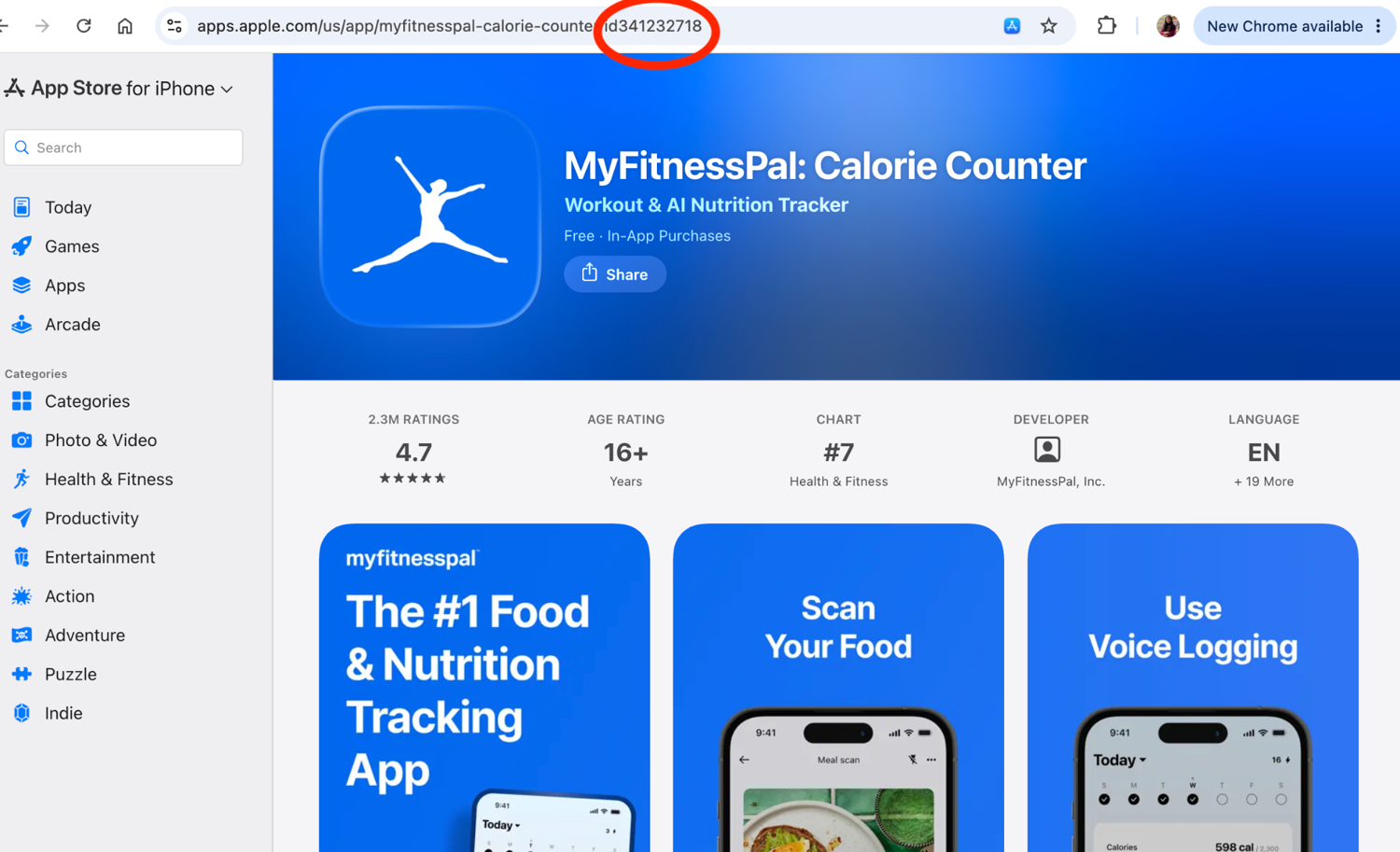
All four methods require an App ID. The unique numeric value that appears after /id in the app URL is the App ID. The image below highlights exactly where to find it:
Method 1: Apple's iTunes Search API (app metadata)
If all you need is to scrape App Store apps metadata, Apple's iTunes Search API is a free public API for it. There's no API key, OAuth flow, or account registration required. You simply send an HTTP request and receive the results as JSON.
The API exposes two main endpoints:
- Search endpoint: Search for apps using a keyword and it returns matching results.
- Lookup endpoint: Retrieve details for a specific app using its App ID.
Search endpoint
The general search URL looks like this: https://itunes.apple.com/search?term={search_query}
You can also add filters such as country, entity, and attribute to narrow the results. For example: https://itunes.apple.com/search?term=pinterest&entity=software. This searches for the keyword "pinterest" and limits the results to App Store apps. Without entity=software, the API may also return other Apple content such as music, podcasts, movies, or books.
Lookup endpoint
With the App ID, you can retrieve metadata for a specific app using the lookup endpoint: https://itunes.apple.com/lookup?id=341232718.
The iTunes Search API is designed only for metadata. It doesn't return user review text, search rankings, or category chart positions. Apple also recommends roughly 20 calls per minute. If you exceed that rate, requests may fail.
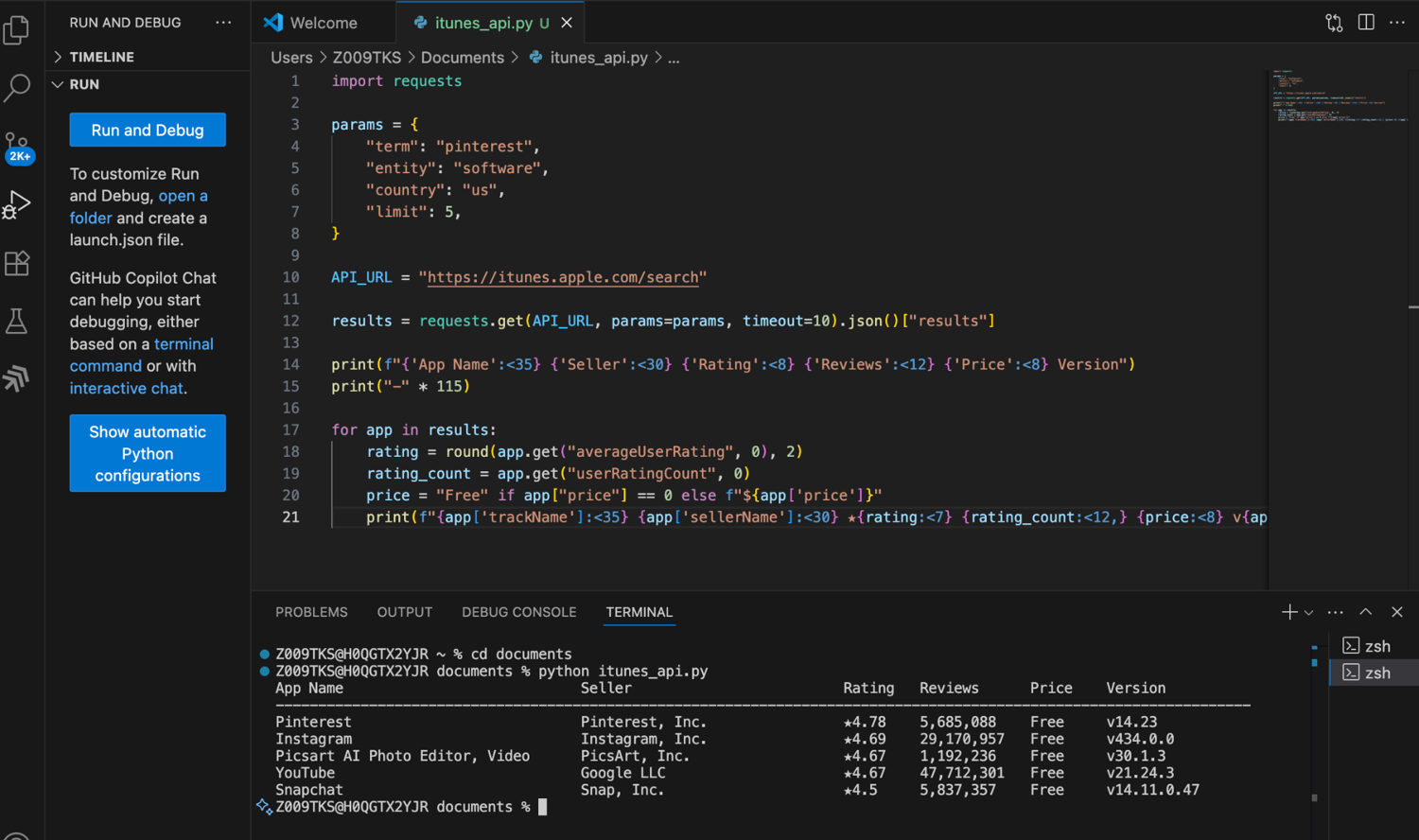
In the code below, I send a request to the Search endpoint for the keyword "pinterest". The request is limited to the US App Store and filtered to software apps using the entity=software parameter. From the response, I extract fields such as the developer name, average rating, rating count, and app price.
import requests
params = {
    "term": "pinterest",
    "entity": "software",
    "country": "us",
    "limit": 5,
}
API_URL = "https://itunes.apple.com/search"
results = requests.get(API_URL, params=params, timeout=10).json()["results"]
print(f"{'App Name':<35} {'Seller':<30} {'Rating':<8} {'Reviews':<12} {'Price':<8} Version")
print("-" * 115)
for app in results:
    rating = round(app.get("averageUserRating", 0), 2)
    rating_count = app.get("userRatingCount", 0)
    price = "Free" if app["price"] == 0 else f"${app['price']}"
    print(f"{app['trackName']:<35} {app['sellerName']:<30} ★{rating:<7} {rating_count:<12,} {price:<8} v{app['version']}")
In the output, you'll notice that Apple doesn't just return the Pinterest app. It also returns other apps whose metadata matches the keyword, including Instagram, YouTube, and SnapChat. That's because the Search API performs a relevance-based semantic search across Apple's catalog.
The above method is useful when you're discovering apps or researching a category. However, if you already know the exact app you want and don't need the extra results, use the Lookup endpoint instead. In the code below, I use it to fetch a single app's data using its App ID.
import requests
PINTEREST_APP_ID = "429047995"
LOOKUP_URL = "https://itunes.apple.com/lookup"
lookup_result = requests.get(LOOKUP_URL, params={"id": PINTEREST_APP_ID}, timeout=10).json()["results"]
if lookup_result:
    app = lookup_result[0]
    rating = round(app.get("averageUserRating", 0), 2)
    rating_count = app.get("userRatingCount", 0)
    price = "Free" if app["price"] == 0 else f"${app['price']}"
    screenshots = app.get("screenshotUrls", [])

    print(f"{'App Name':<35} {'Seller':<30} {'Rating':<8} {'Reviews':<12} {'Price':<8} Version")
    print("-" * 115)
    print(f"{app['trackName']:<35} {app['sellerName']:<30} ★{rating:<7} {rating_count:<12,} {price:<8} v{app['version']}")

    print("\nScreenshot URLs:")
    for i, url in enumerate(screenshots, 1):
        print(f"  {i}. {url}")
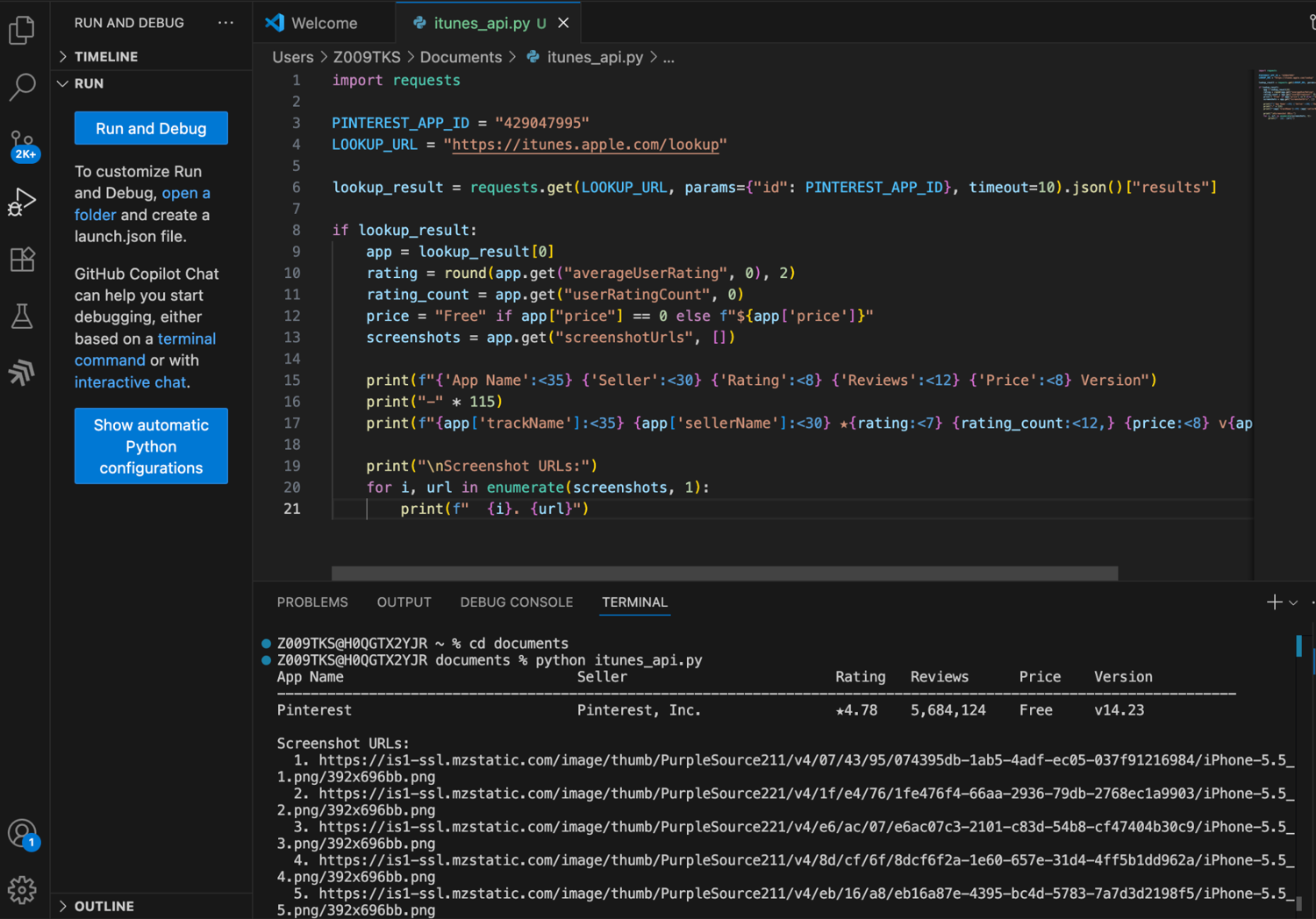
Now you get data only for Pinterest. I've also included the screenshot URLs in the output. These are direct links to the app screenshots displayed on the App Store.
Method 2: Apple's RSS feeds for App Store reviews
If you need full review text for sentiment analysis or monitoring reactions to new releases, Apple's RSS Reviews Feed provides it. Unlike the iTunes Search API, which only returns metadata, the RSS feed returns individual reviews, including the rating, review title, review text, author name, and app version.
This URL pattern returns recent Instagram reviews from the US App Store: https://itunes.apple.com/us/rss/customerreviews/page=1/id=389801252/sortby=mostrecent/json
Where:
country= App Store storefront (e.g., us, gb, in, ca)APP_ID= App Store app IDpage= page number (typically 1-10)
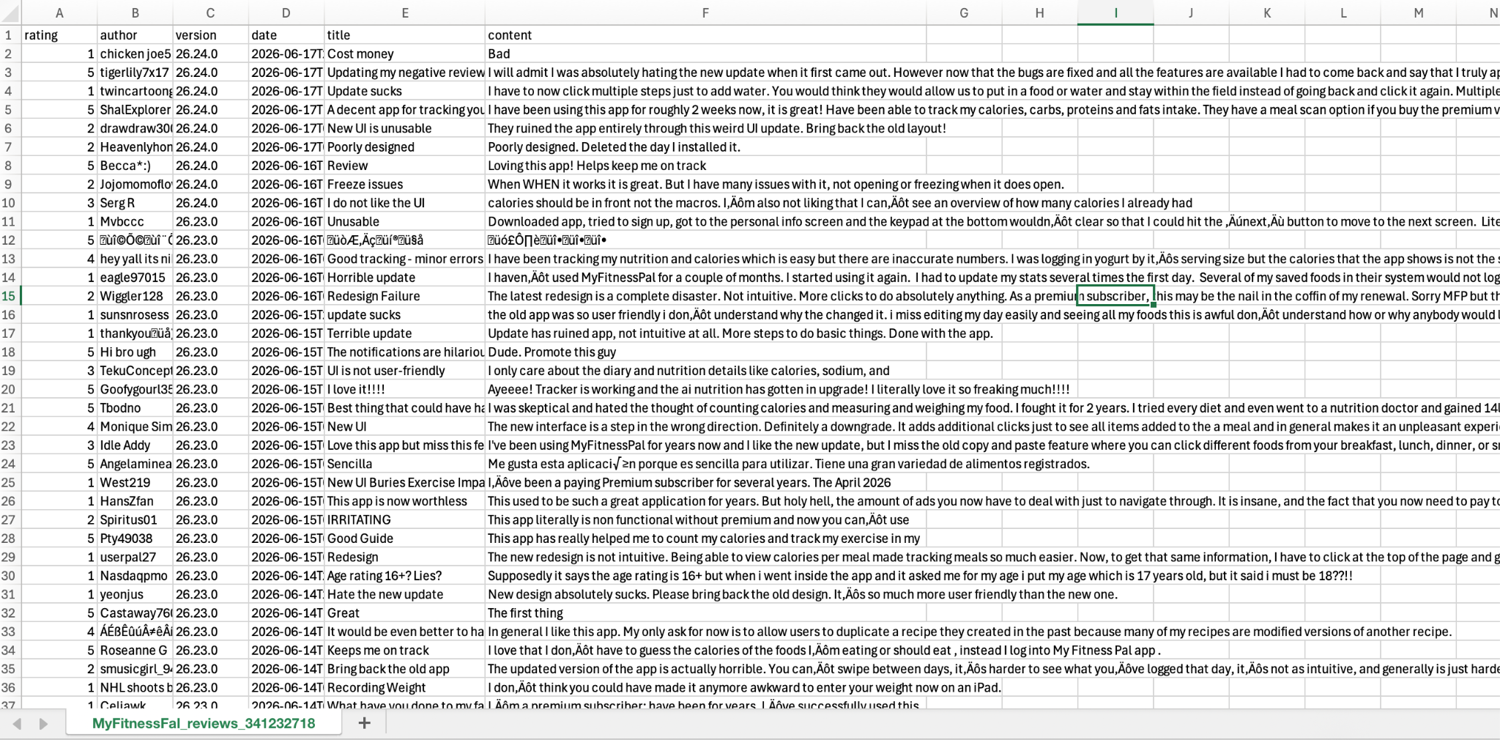
In the code below, I fetch the first 10 pages of the MyFitnessPal app reviews from Apple's RSS feed. For each review, I save rating, author, app version, review date, title, and review text to a CSV file. Note that you should loop through multiple pages, as review data isn't always available on the same page for every app.
import requests
import csv
import time
APP_ID = "341232718"
URL = "https://itunes.apple.com/us/rss/customerreviews/page={}/id={}/sortby=mostrecent/json"
reviews = []
for page in range(1, 11):
    print(f"Fetching page {page}...")

    resp = requests.get(URL.format(page, APP_ID), timeout=15)
    entries = resp.json().get("feed", {}).get("entry", [])

    if not entries:
        print(f"No entries on page {page}. Continuing...")
        continue

    if isinstance(entries, dict):
        entries = [entries]

    for entry in entries:
        if "im:rating" in entry:
            reviews.append({
                "rating": entry["im:rating"]["label"],
                "author": entry["author"]["name"]["label"],
                "version": entry["im:version"]["label"],
                "date": entry["updated"]["label"],
                "title": entry["title"]["label"],
                "content": entry["content"]["label"],
            })

    time.sleep(1)
# Save to CSV
with open(f"MyFitnessPal_reviews_{APP_ID}.csv", "w", newline="", encoding="utf-8") as f:
    csv.DictWriter(f, fieldnames=["rating", "author", "version", "date", "title", "content"]).writeheader()
    csv.DictWriter(f, fieldnames=["rating", "author", "version", "date", "title", "content"]).writerows(reviews)
print(f"Saved {len(reviews)} reviews to MyFitnessPal_reviews_{APP_ID}.csv")
Output:
Method 3: Open-source Python App Store scraper libraries
If you don't want to manually call Apple's APIs, open-source Python libraries wrap those endpoints for you. In my testing, two libraries were particularly useful:
- itunes-app-scraper: Retrieves app metadata and performs app lookups using an App ID.
- app-store-web-scraper: Retrieves App Store reviews and automatically handles pagination.
Instead of manually building requests, parsing JSON responses, and handling pagination, you can call appropriate methods from these libraries and receive structured Python objects. If you're working in JavaScript, similar App Store scraping libraries are also available through npm.
Before using these libraries, install them first: pip install app-store-web-scraper
itunes-app-scraper is not available on PyPI, so install it directly from GitHub: pip install git+https://github.com/digitalmethodsinitiative/itunes-app-scraper.git
The below code retrieves metadata of different apps using their App IDs and the itunes-app-scraper library.
from itunes_app_scraper.scraper import AppStoreScraper


scraper = AppStoreScraper()


# get_multiple_app_details takes a list of app IDs
# returns a generator: wrap in list() to materialise
apps = list(scraper.get_multiple_app_details(
    app_ids=["1477376905", "310633997"],
    country="us",
))


for app in apps:
    print(app["trackName"], "|", app["artistName"], "|",
          "★", round(app.get("averageUserRating", 0), 2), "|",
          "v" + app["version"])
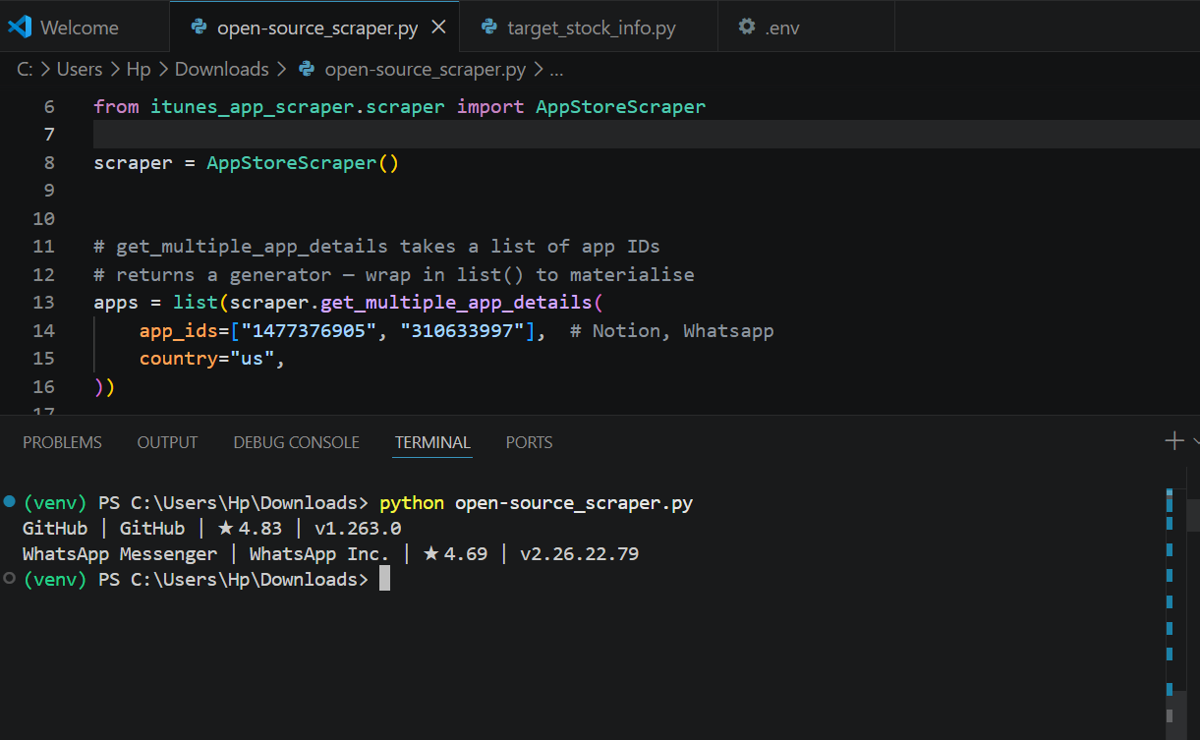
The code below fetches up to 20 reviews through the app-store-web-scraper library.
from app_store_web_scraper import AppStoreEntry


app = AppStoreEntry(app_id=341232718, country="gb")


for review in app.reviews(limit=20):
    print("-----")
    print("ID:", review.id)
    print("Rating:", review.rating)
    print("Title:", review.title)
    print("Review:", review.content)
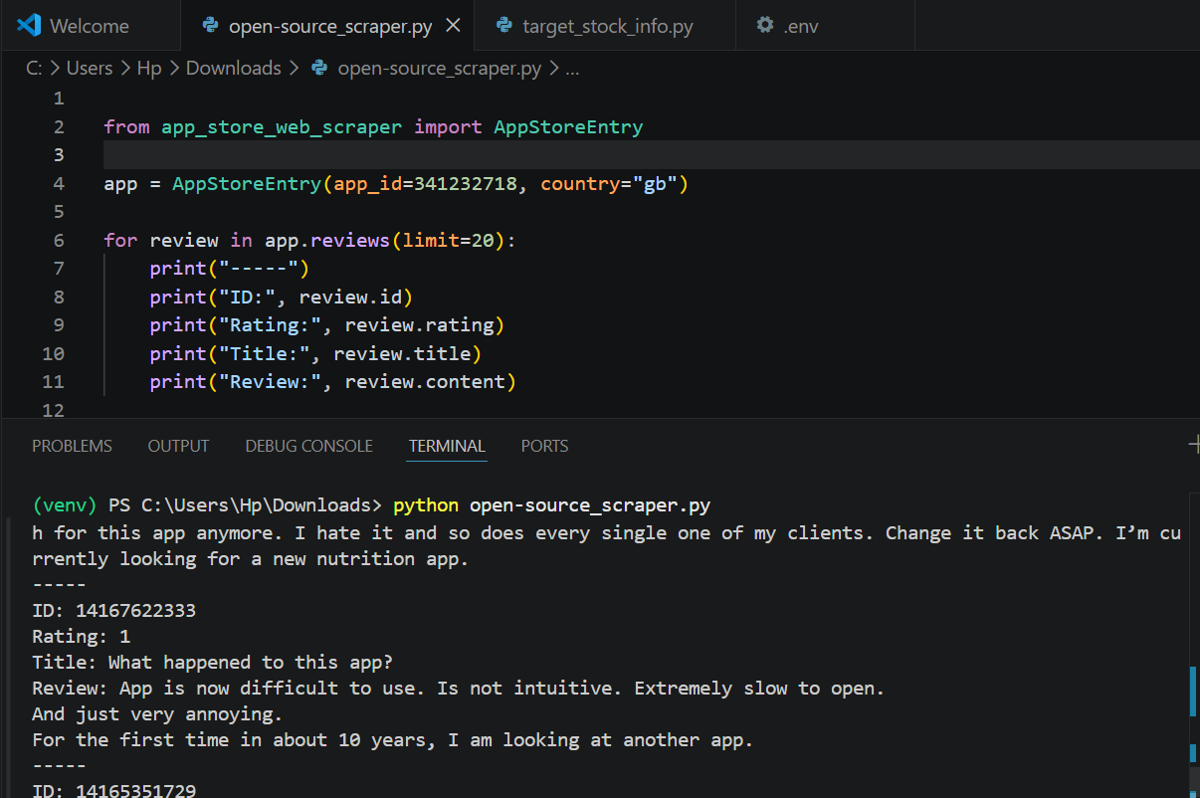
This Python web scraping approach saves you from writing pagination and JSON parsing code, but they hit the same Apple endpoints with the same rate limits and IP restrictions. I added 1-second delays between calls to avoid 429s. That works fine at a small scale; past a few hundred requests you'll need proxies either way.
Method 4: Scrape Apple App Store data at scale with a web scraping API
When you want to scrape Apple App Store data like search rankings, category charts, full review histories, or any information that isn't exposed through Apple's APIs, use a web scraping API.
Much of the content on apps.apple.com is rendered with JavaScript, and Apple actively limits automated traffic from datacenter IP addresses. That's why scraping App Store pages at scale requires browser rendering, rotating proxies, and storefront-specific geolocation.
With ScrapingBee's Apple App Store Scraper API, you swap the browser/proxy/anti-block setup for one API call. You get back the rendered page or structured data.
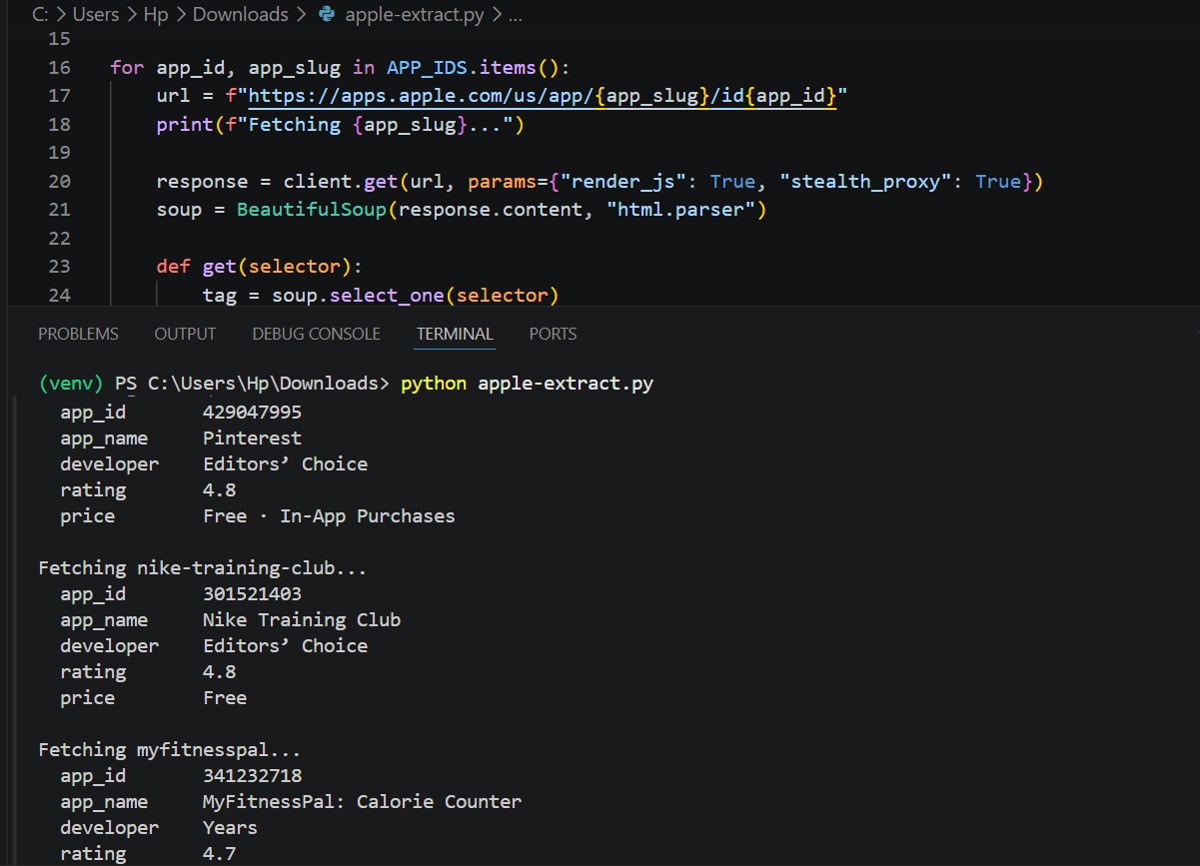
In the code below, I use ScrapingBee to render the App Store pages for multiple apps and retrieve the fully loaded HTML. I then parse the page with BeautifulSoup and extract fields such as the app name, developer, rating, and price.
from bs4 import BeautifulSoup
from scrapingbee import ScrapingBeeClient
import time


YOUR_API_KEY = "PASTE_YOUR_API_KEY"
client = ScrapingBeeClient(api_key=YOUR_API_KEY)


APP_IDS = {
    "429047995":  "pinterest",
    "301521403":  "nike-training-club",
    "341232718":  "myfitnesspal",
}


results = []


for app_id, app_slug in APP_IDS.items():
    url = f"https://apps.apple.com/us/app/{app_slug}/id{app_id}"
    print(f"Fetching {app_slug}...")


    response = client.get(url, params={"render_js": True, "stealth_proxy": True})
    soup = BeautifulSoup(response.content, "html.parser")


    def get(selector):
        tag = soup.select_one(selector)
        return tag.get_text(strip=True) if tag else None


    data = {
        "app_id":    app_id,
        "app_name":  get("span.multiline-clamp__text"),
        "developer": get(".badge-dd span.multiline-clamp__text"),
        "rating":    get("span.text-container"),
        "price":     get("p.attributes"),
    }


    results.append(data)
    time.sleep(3)


    for key, value in data.items():
        print(f"  {key:<12} {value}")
    print()
Output:
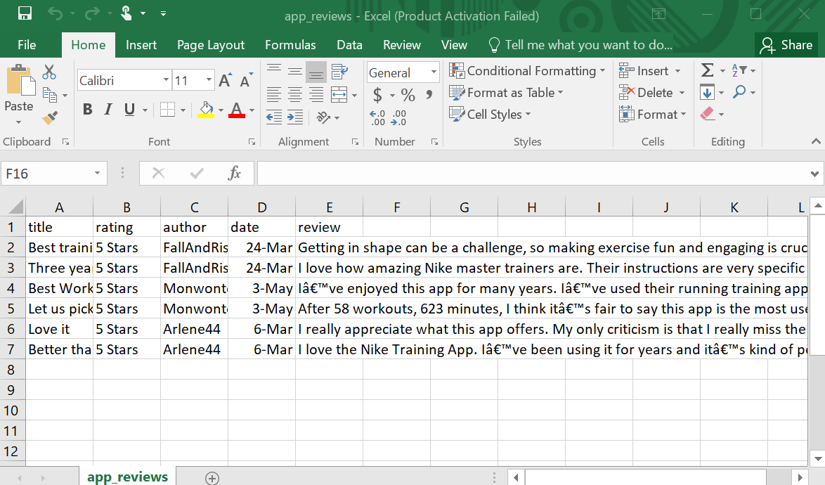
ScrapingBee also supports structured data extraction. You pass field selectors through the extract_rules parameter, and the API returns JSON instead of raw HTML. The below code shows it.
ScrapingBee even offers AI-powered extraction for pages with complex or frequently changing markup. Rather than writing and maintaining parsing code, you can define the fields you want in plain language and let the AI extract them from the page.
import csv
import json
from scrapingbee import ScrapingBeeClient


YOUR_API_KEY = "PASTE_YOUR_API_KEY"
client = ScrapingBeeClient(api_key=YOUR_API_KEY)
response = client.get(
    "https://apps.apple.com/us/app/nike-training-club/id301521403?see-all=reviews&platform=iphone",
    params={
        "render_js": True,
        "premium_proxy": True,
        "extract_rules": {
            "reviews": {"selector": "p[data-testid='truncate-text']", "type": "list"},
            "titles":  {"selector": "h3.title",                       "type": "list"},
            "ratings": {"selector": "ol.stars",                       "type": "list", "output": "@aria-label"},
            "authors": {"selector": "span.author",                    "type": "list"},
            "dates":   {"selector": "time.date",                      "type": "list"},
        }
    }
)


data = json.loads(response.content.decode("utf-8", errors="ignore"))


reviews = data.get("reviews", [])
titles  = data.get("titles", [])
ratings = data.get("ratings", [])
authors = data.get("authors", [])
dates   = data.get("dates", [])


with open("app_reviews.csv", "w", newline="", encoding="utf-8") as f:
    writer = csv.DictWriter(f, fieldnames=["title", "rating", "author", "date", "review"])
    writer.writeheader()
    for row in zip(titles, ratings, authors, dates, reviews):
        writer.writerow({"title": row[0], "rating": row[1], "author": row[2], "date": row[3], "review": row[4]})


print(f"Saved {len(reviews)} reviews to app_reviews.csv")
Output:
The first three methods are fully free. ScrapingBee provides 1,000 free credits, after which usage is billed based on the requests you make. For premium proxies with JavaScript rendering, ScrapingBee charges 25 credits per request. If you use stealth proxies (ScrapingBee's advanced proxies for passing harder blocks), it costs 75 credits per request. Similarly, if you want to scrape Google Play data, this step-by-step guide shows how to scrape it at scale.
Which method should you use?
If you only need app metadata, use the iTunes Search API or Lookup endpoint.
If you need customer review text, use Apple's RSS Reviews Feed. It works well for sentiment analysis and tracking reactions to new releases, but only returns recent reviews.
For simplicity, there are Python libraries that wrap these endpoints. They handle pagination and response parsing for you, so you only need to make a few function calls. However, the same rate limits still apply because these libraries ultimately call the same Apple endpoints. For example, app-store-web-scraper fetches reviews in batches of 20 to avoid getting blocked. They're great for quick scripts, but not ideal if you can't tolerate breakage in production due to IP blocks or rate limits.
So if you want to scrape App Store webpages without getting blocked, you need to handle proxies and JavaScript rendering. A web scraping API makes that easier. Send requests through the ScrapingBee API and it handles IP rotation, proxies, and browser rendering. That also gets you data that Apple's APIs don't expose: full review histories, search rankings, and category charts.
As a final call, for one-off metadata lookups, open-source libraries and Apple endpoints are the better choice. If you need a production-scale scraper or access to public data that Apple's APIs don't expose, use managed web scraping tools like ScrapingBee.
Is it legal to scrape the App Store?
Scraping publicly accessible App Store data, such as app titles, developer names, prices, ratings, and public reviews, is generally lower-risk than scraping private or logged-in content. However, you should collect the data while respecting Apple's Terms of Service and robots.txt rules. Don't send heavy request traffic that could impact Apple's servers, and never scrape anything behind an Apple ID login.
This doesn't automatically mean scraping is allowed in every situation. You should seek legal advice for your particular use case, especially if you plan to scrape data at scale, build commercial products on top of it, or use it in ways that may conflict with Apple's Terms of Service or intellectual property policies.
When using ScrapingBee, you're generally safer because it doesn't support post-login scraping. If you need to scrape App Store data at scale, ScrapingBee handles the browser rendering, proxies, and infrastructure for you. Get started with 1,000 free credits and no credit card required.
FAQs
Is it possible to scrape App Store reviews?
Yes. Apple's RSS feed provides recent reviews via a free API endpoint. You can hit it directly and parse the JSON output. For full historical reviews or to scrape Apple App Store data at scale (including all reviews available on the app), you'll need to scrape the rendered App Store web pages using a tool like ScrapingBee.
Does Apple have a public App Store API?
Apple's iTunes Search API is public but only provides app metadata. While there is an App Store Connect API, it only allows you to access your own apps' sales and reviews. There is no public API for competitor review histories, search rankings, or category charts. To get that data, you have to scrape the App Store webpages directly.
How do I find an app's App Store ID?
Open the app's App Store page and look at the URL. The numeric value that appears after /id is the App ID. You'll need this regardless of the scraping method you choose.
Can I scrape App Store search results and rankings?
No. Apple's official APIs only provide app metadata and recent reviews. Search-result rankings and category positions are displayed on App Store web pages and aren't exposed through the APIs. To collect them, you need an Apple App Store search scraper API that handles JavaScript rendering and proxy rotation.
Can I scrape the Google Play Store the same way?
Yes. The overall approach is the same: start with the official endpoints when they provide the data you need, and scrape the rendered web pages when they don't. However, Google Play has its own APIs, libraries, and page structure, so the implementation is different. Check out this managed Google Play scraper if you need to scrape Google Play at scale.