Understanding how to scrape Algolia begins with targeting the search endpoint instead of HTML pages. To scrape Algolia search, get the public search-only API key, application ID, and index name, then send requests directly to Algolia to retrieve clean JSON results.
This tutorial walks you through the process of building an Algolia scraping Python script. It also covers automated API key retrieval, pagination, and techniques for going beyond the 1,000-result limit.
Key takeaways
- Retrieve the hits array with structured search results by targeting Algolia's Search API directly instead of scraping JavaScript-rendered search pages.
- Extract the Algolia application ID, search API key, and index name from network requests, or automate their retrieval through JavaScript rendering and XHR interception.
- The search-only Algolia API key is public by design, but public does not mean authorized. Respect the site's Terms of Service and robots.txt, keep request rates reasonable, and never reuse a leaked or exposed admin key.
- Paginate with the page parameter, but remember that Algolia limits search results to 1,000 records by default through paginationLimitedTo.
- Get more than 1,000 results by splitting searches into filtered ranges, paginating through each subset, and merging the collected records.
What is Algolia, and what does scraping Algolia mean?
Algolia is a hosted search API that helps you add fast and responsive search functionality to your website. Many web applications use Algolia's InstantSearch widgets or connect directly to its APIs to implement product search, documentation search, listings, and content discovery.
When referring to how to scrape Algolia, the goal is to extract data from a third-party website that uses Algolia to power its search functionality. Algolia-backed search pages tend to load results dynamically through JavaScript. To scrape them, you would need to:
- Get the search page.
- Render it with a browser automation tool (e.g., Playwright, Selenium, Puppeteer).
- Simulate the search interactions.
- Wait for the search results to be retrieved.
- Parse the updated HTML.
- Extract data from the final DOM.
Instead, it is just more efficient to target the Algolia Search API endpoint itself and collect search results from it.
Note that Algolia scraping should not be confused with Algolia's Crawler. That is an automated web crawling service that works in the opposite direction, indexing your own website content into an index so it can be searched via Algolia.
Is it legal to scrape a site's Algolia search?
I am not a lawyer, but scraping an Algolia-powered search page can fall into a grey area…
On the one hand, as official documentation explains, the search API key used by web pages to connect to the Algolia Search API and retrieve results is designed to be public. This means that accessing the same search requests through the API is close to retrieving the publicly available data already displayed on the page.
On the other hand, the fact that data is publicly accessible does not mean that every scraping scenario is allowed. Before you scrape an Algolia search endpoint, check the target site's Terms of Service and comply with robots.txt. Using scraped data in ways prohibited by the website's policies might create legal issues.
In general, only use public Algolia search keys intended for client-side use. Never use private admin keys or write-capable API keys, even if they are accidentally exposed. Also, keep your request rate reasonable and avoid putting unnecessary load on the target servers.
How to scrape Algolia search in Python: a step-by-step guide
In this section, you will learn how to scrape Algolia API endpoints using a custom Python script.
The target site will be HN Algolia, a Hacker News search engine powered by Algolia. Along the way, you will see all the techniques needed to build an Algolia scraping Python script that gathers search results directly from the Algolia Search API.
Note that the same approach applies to any website that implements its search feature through Algolia. Before scraping any website, make sure to review its Terms of Service to verify that your use case is allowed.
Step #1: Find Algolia's app ID, search key, and index name
To scrape an Algolia-powered website, you first need to identify the Algolia application ID, search-only API key, and index name. You can find these values in two ways:
- Manually, by inspecting the site's requests in your browser developer tools.
- Programmatically, by capturing the site's XHR requests with ScrapingBee.
Manual approach: Inspect Algolia requests in your browser
A common way to find Algolia credentials is to inspect the dynamic requests sent by the page when you perform a search.
Open the target website in your browser and follow these steps:
- Open your browser Developer Tools.
- Go to the “Network” tab.
- Filter requests by “Fetch/XHR”.
- Run a search on the website (e.g., “javascript”).
- Look for a /query or /queries request sent to an Algolia domain ending with
algolia.net.
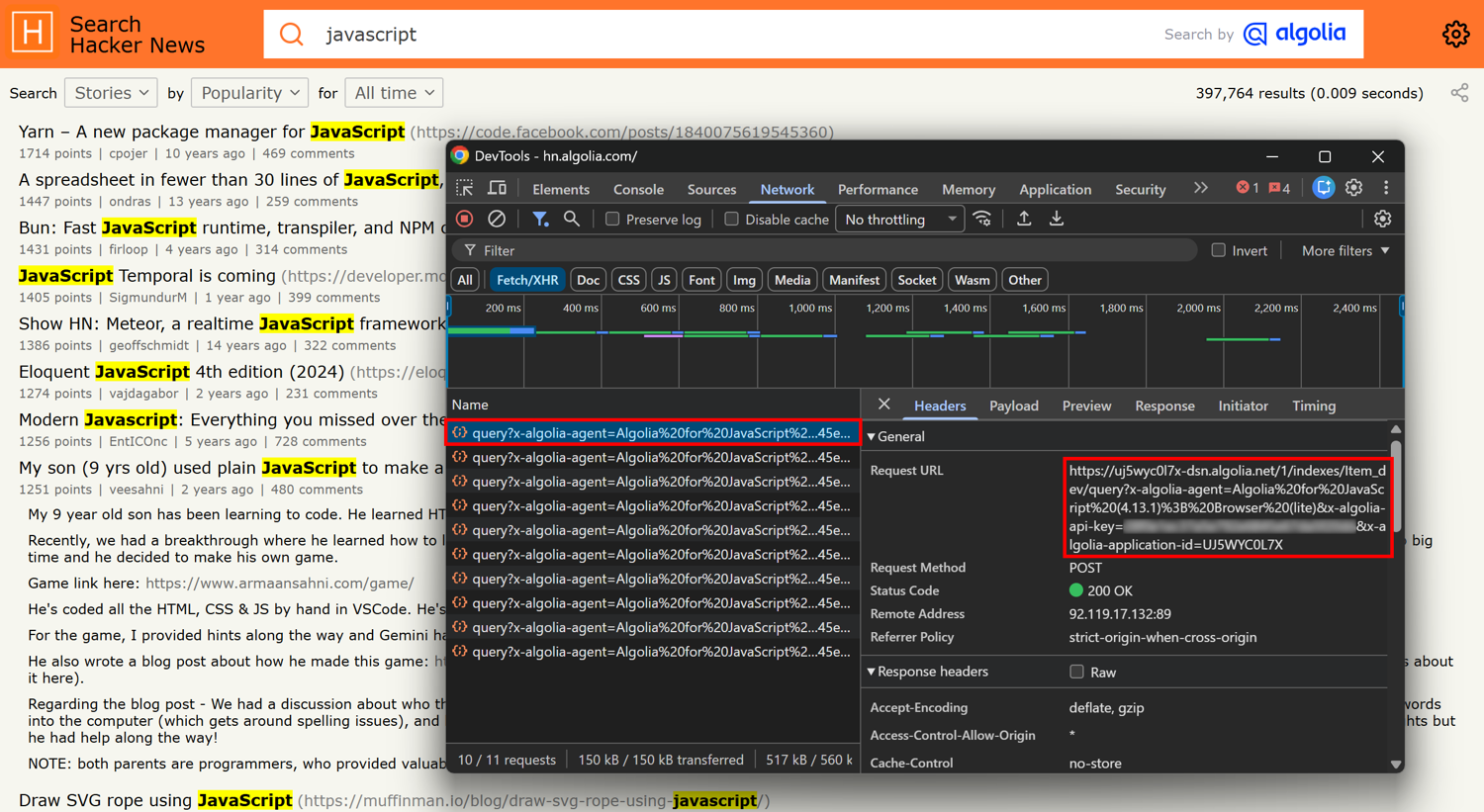
Note that an Algolia search call is generally a POST request sent to an endpoint with this structure:
https://<APP_ID>-dsn.algolia.net/1/indexes/<INDEX_NAME>/query
The request URL and headers contain the information you need:
- Algolia application ID: available in the x-algolia-application-id header or query parameter.
- Algolia search API key: available in the x-algolia-api-key header or query parameter.
- Index name: included in the Algolia endpoint path.
For example, the HN Algolia website sent this request to Algolia:
https://uj5wyc0l7x-dsn.algolia.net/1/indexes/Item_dev/query?x-algolia-agent=Algolia%20for%20JavaScript%20(4.13.1)%3B%20Browser%20(lite)&x-algolia-api-key=<ALGOLIA_SEARCH_API_KEY>&x-algolia-application-id=UJ5WYC0L7X
Here, the required Algolia identifiers are:
- Algolia application ID: UJ5WYC0L7X
- Algolia search API key:
<ALGOLIA_SEARCH_API_KEY>(omitted for security reasons) - Index name: Item_dev
Algolia application IDs are typically short uppercase strings, while search API keys are longer alphanumeric values.
You can also search the page source for these values. Look for a <script> tag containing the site's Algolia configuration:
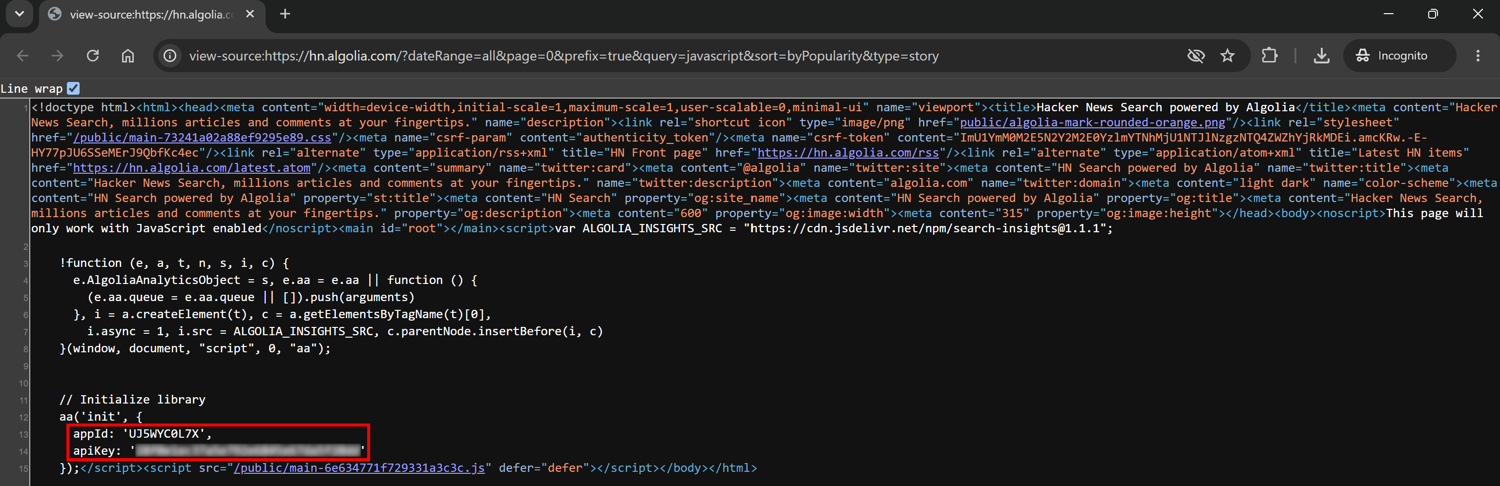
This manual approach works well for occasional scraping tasks. However, it requires manual steps and can become time-consuming when API keys change frequently.
Programmatic approach: Automatically capture Algolia XHR requests with ScrapingBee
Instead of manually opening Developer Tools and inspecting browser traffic, you can use ScrapingBee to render the page and capture the XHR/Ajax requests generated by JavaScript.
ScrapingBee is a web scraping API that can handle browser rendering, JavaScript execution, and anti-bot handling. Specifically, the XHR request capture feature allows you to get access to the dynamic requests (including Algolia search requests) made by a page in the browser.
This approach is useful when Algolia credentials used by the site are short-lived. It also comes in handy for automated scenarios, when you want to inspect one or more Algolia-powered websites without repeating the manual steps highlighted earlier.
To get started with ScrapingBee, sign up for free, activate the free trial (1,000 requests), and retrieve your API key.
Use the ScrapingBee Python SDK to send a request to the target page with the json_response=True parameter. That parameter instructs ScrapingBee to return additional information from the browser session, including XHR/Ajax requests generated by the page.
Now, note that when searching for “javascript” on HN Algolia, the page URL updates to:
https://hn.algolia.com/?dateRange=all&page=0&prefix=true&query=javascript&sort=byPopularity&type=story
So, target that URL with ScrapingBee:
# pip install scrapingbee

from scrapingbee import ScrapingBeeClient

client = ScrapingBeeClient(api_key="<YOUR_SCRAPINGBEE_API_KEY>")

response = client.html_api(
    "https://hn.algolia.com/?dateRange=all&page=0&prefix=true&query=javascript&sort=byPopularity&type=story",
    params={
        "render_js": "True",
        "json_response": "True", # To get XHR/Ajax requests
        "wait": "3000", # Wait for the dynamic Algolia request to be made
    },
)

response.raise_for_status()

data = response.json()
# Print the URLs of the XHR/Ajax requests made by the page
for request in data.get("xhr", []):
    url = request.get("url", "")
    print(url)
The output will include this URL:

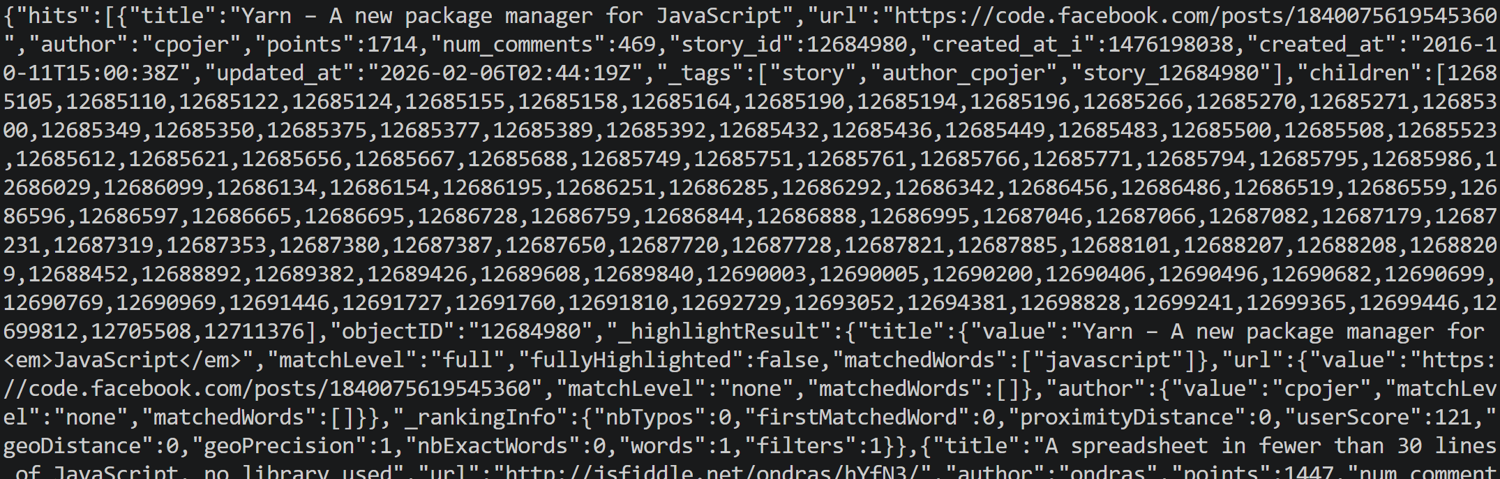
You can also access the Algolia request response directly with:
request.get("body")
You will get the search response data in JSON format:
Alternatively, you can extract the Algolia application ID, API key, and index name directly from the request URL:
from urllib.parse import urlparse, parse_qs

for request in data.get("xhr", []):
    url = request.get("url", "")

    # Check if the URL points to Algolia
    if "algolia.net" in url and "indexes" in url:
        print("--- Algolia Search Request Found ---")
        print(f"URL: {url}")

        # Parse the Algolia credentials from URL
        parsed_url = urlparse(url)
        query_params = parse_qs(parsed_url.query)

        # parse_qs returns lists, so grab the first item if available
        api_key = query_params.get("x-algolia-api-key", [None])[0]
        app_id = query_params.get("x-algolia-application-id", [None])[0]

        # Extract Index Name from the Path
        path_segments = [seg for seg in parsed_url.path.split('/') if seg]

        index_name = None
        if "indexes" in path_segments:
            idx_pos = path_segments.index("indexes")
            # The index name follows right after 'indexes'
            if idx_pos + 1 < len(path_segments):
                index_name = path_segments[idx_pos + 1]

        if app_id != None and api_key != None and index_name != None:
          # Display Extracted Values
          print(f"App ID:     {app_id}")
          print(f"API Key:    {api_key}")
          print(f"Index Name: {index_name}")
        break
The output will be:

For a similar workflow, see our guide on inspecting browser traffic with Selenium Wire.
Step #2: Query the Algolia Search API directly
Once you have the Algolia credentials, you can call the Algolia Search API with a standard HTTP request. When working with scraping JavaScript-rendered pages, targeting the API endpoints used by the page is one of the most common advanced web scraping techniques.
This approach skips browser rendering and lets you access structured JSON results directly from Algolia. Use HTTPX (or your preferred Python HTTP client) to send an authenticated POST request to the Algolia search endpoint:
# pip install httpx

import httpx

# Algolia credentials for the HN Algolia page
app_id = "UJ5WYC0L7X"
api_key = "<ALGOLIA_SEARCH_API_KEY>"
index_name = "Item_dev"

# Build the Algolia Search API URL
url = f"https://{app_id}-dsn.algolia.net/1/indexes/{index_name}/query"

# Add Algolia authentication parameters
params = {
    "x-algolia-application-id": app_id,
    "x-algolia-api-key": api_key,
}

# Define the search parameters
payload = {
    "query": "javascript",
    "hitsPerPage": 10,
    "page": 0,
}

response = httpx.post(
    url,
    params=params,
    json=payload,
)

response.raise_for_status()

data = response.json()
print(data)
If you are not familiar with this syntax, read our guide on web scraping with HTTPX.
You can also pass the Algolia credentials as headers:
headers = {
    "x-algolia-application-id": app_id,
    "x-algolia-api-key": api_key,
}

# payload = { ... }

response = httpx.post(
    url,
    headers=headers,
    json=payload,
)

response.raise_for_status()

data = response.json()
print(data)
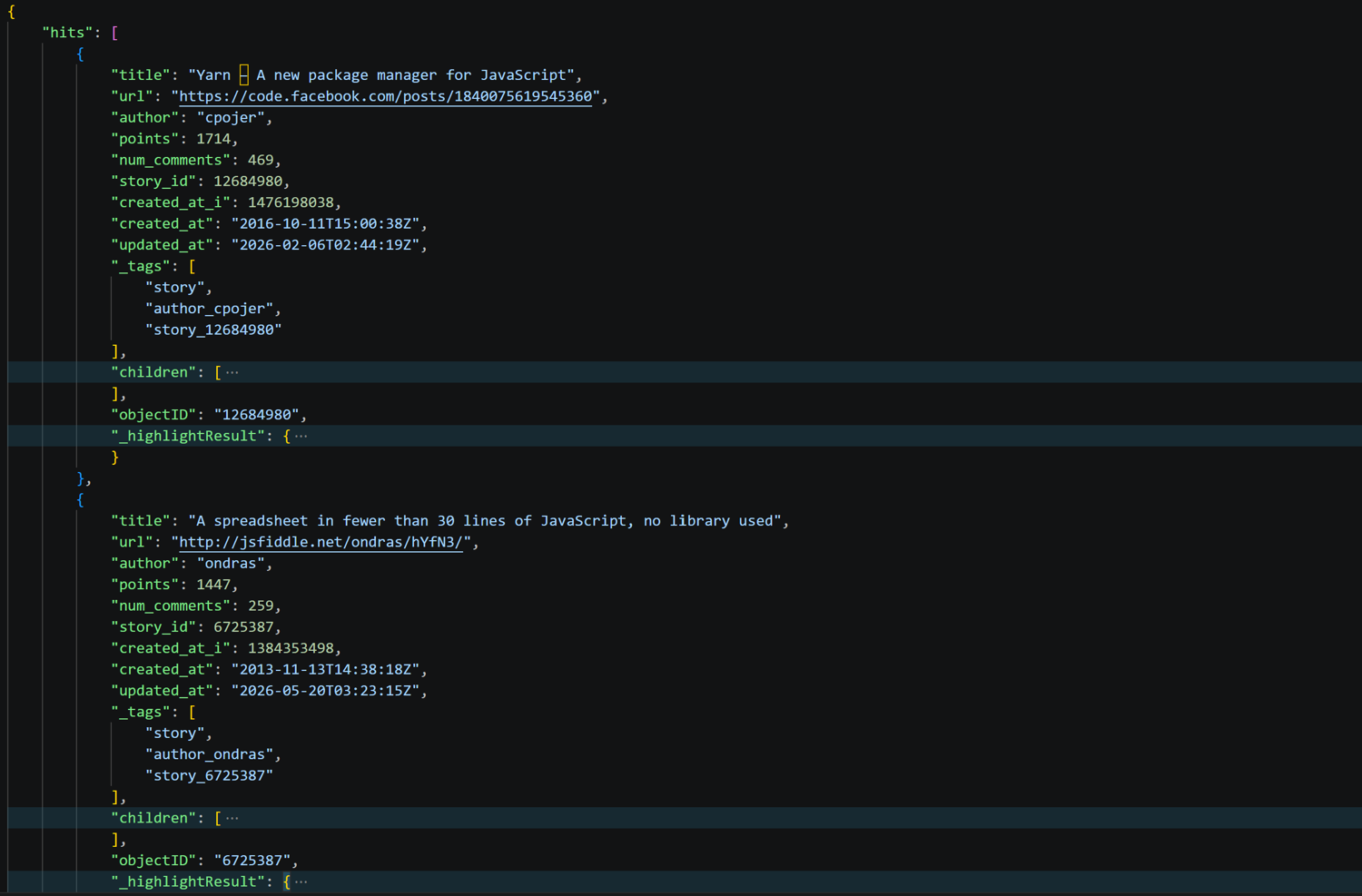
Run the script, and inspect the returned JSON response. This will contain the search results returned by Algolia:
The response also includes useful Algolia metadata:
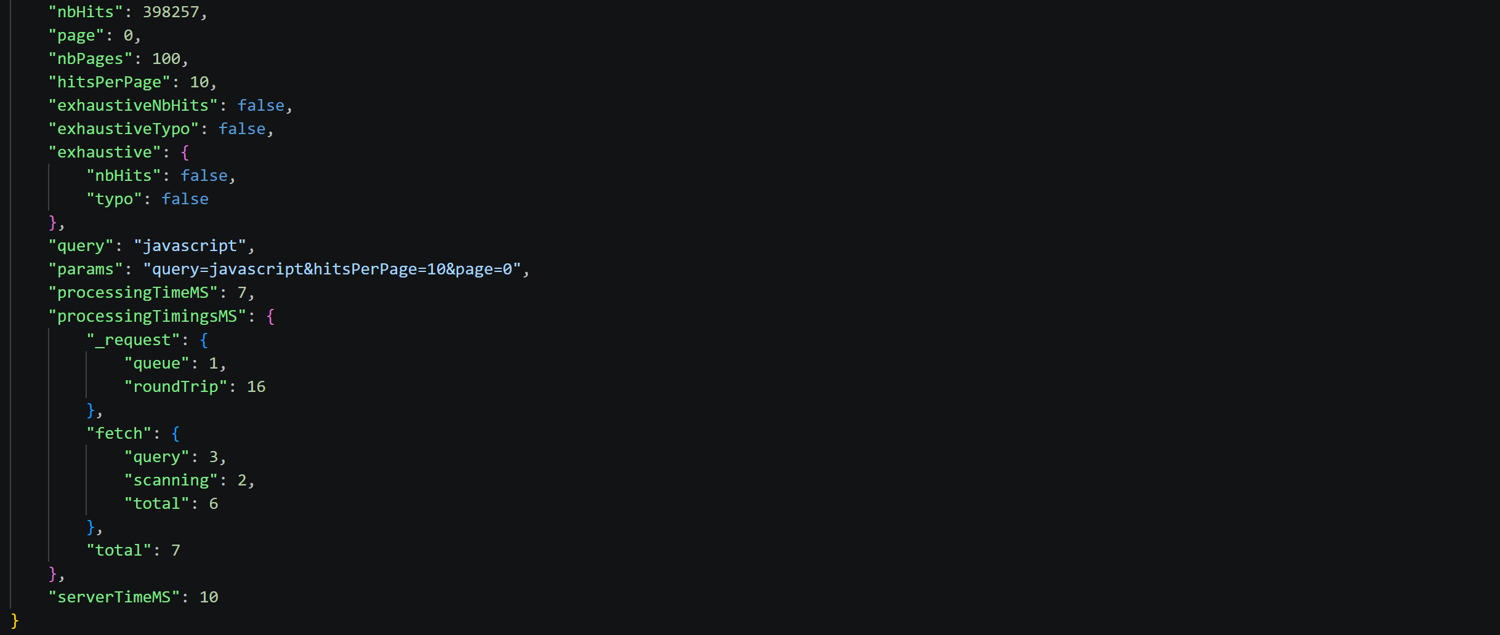
The most important data fields in the Algolia Search API response are:
- hits: the list of matching records returned by Algolia.
- nbHits: the total number of records matching the query.
- nbPages: the total number of result pages based on hitsPerPage.
- page: the current result page.
For more information about supported request parameters and response fields, see the Algolia Search REST API reference.
Step #3: Paginate through the results
Algolia search responses can contain thousands of matching records, but a single request only returns a limited number of results. To get all available data, you need to paginate through the results using Algolia's pagination parameters.
For example, if nbHits is 328 and hitsPerPage is 10, Algolia will expose 33 pages of results. You can then loop through each page by increasing the page parameter from 0 to nbPages - 1.
A simple Algolia pagination scraping workflow looks like this:
page = 0

while True:
    payload = {
        "query": "javascript",
        "hitsPerPage": 10,
        "page": page,  # Target a specific page
    }

    response = httpx.post(
        url,
        params=params,
        json=payload,
    )

    response.raise_for_status()

    data = response.json()

    # Handle the retrieved search data...

    # Iterate through the next page
    page += 1
    if page >= data["nbPages"]:
        break
The script reads nbPages from the response and continues requesting pages until it reaches the last available page.
For large datasets, consider sending multiple page requests concurrently to reduce execution time. Yet, avoid sending too many parallel requests as you do not want to flood Algolia servers or trigger rate limits.
Now, keep in mind that there is an important limitation when scraping Algolia. The search provider does not expose unlimited pagination. By default, the number of global results returned by Algolia is capped by the paginationLimitedTo setting. This means that:
nbPages × hitsPerPage <= paginationLimitedTo
Since the default value for paginationLimitedTo is 1,000, you cannot get more than 1,000 search results via regular pagination alone. This limitation is intentional. After all, Algolia is designed for fast search experiences, not for exporting entire indexes.
To better understand this mechanism, look at the Algolia pagination metadata returned in the first response from HN Algolia:

Although the query matches 398,258 records (nbHits), Algolia only exposes 100 pages (nbPages). That is because hitsPerPage was set to 10, so nbPages × hitsPerPage must be less than or equal to paginationLimitedTo (whose default value is 1,000).
If you try to request page 100 (the 101st page), the API does not return an error. Instead, it returns an empty hits array because the request exceeds the pagination limit.
Step #4: Retrieve more results with filtered queries
To retrieve more than 1,000 Algolia results, you can split the index into smaller groups and paginate each group separately.
Start by inspecting a result object from the hits array. In the case of HN Algolia, each object has a points field representing the story score. Instead of querying all records at once, you can set a custom filter on points to divide results into smaller ranges.
For example, use the filters API parameter to create filtered searches where each query returns fewer than 1,000 records:
{
  "query": "javascript",
  "filters": "points >= 10 AND points < 15"
}
Then, repeat the same process for other ranges:
points 0-4
points 5-9
points 10-14
...
For each range, check nbHits. If it approaches or exceeds 1,000 results, split the range further. If nbHits is below the 1,000 limit, paginate through the results. Finally, merge all results. Thanks to filtered pagination, you can scrape more than 1,000 Algolia results.
Notice that this approach to Algolia API scraping is not limited to numeric values. Depending on the index, you can split results using other attributes, such as product categories, dates, timestamps, and more.
Another option is the Algolia Browse API, which supports cursor-based retrieval of the full index instead of relevance-based search. The problem is that it requires the browse permission, which most public search-only API keys do not have. As a result, calling it with a regular search key often results in a 403 Forbidden error response.
Step #5: Extract the data fields and export to CSV
Algolia Search API responses are returned as structured JSON. Specifically, each result is available inside the hits array as an object containing the same fields that the JavaScript-rendered page later renders for end users.
From each hit object, select the fields relevant to your use case, collect them, and export the results to your preferred format. For example, the following Algolia scraper extracts Hacker News stories and saves them to a CSV file:
# pip install httpx

import httpx
import csv

# Algolia credentials for HN Algolia
app_id = "UJ5WYC0L7X"
api_key = "<ALGOLIA_SEARCH_API_KEY>"
index_name = "Item_dev"

# Make a request to the Algolia Search API
url = f"https://{app_id}-dsn.algolia.net/1/indexes/{index_name}/query"

params = {
    "x-algolia-application-id": app_id,
    "x-algolia-api-key": api_key,
}

payload = {
    "query": "javascript",
    "hitsPerPage": 30,
    "page": 0,
}

response = httpx.post(
    url,
    params=params,
    json=payload,
)

response.raise_for_status()

data = response.json()

# Extract the fields you need
stories = []
for hit in data["hits"]:
    stories.append(
        {
            "title": hit.get("title"),
            "url": hit.get("url"),
            "author": hit.get("author"),
            "points": hit.get("points"),
            "num_comments": hit.get("num_comments"),
            "created_at": hit.get("created_at"),
        }
    )

# Save results to CSV
with open("hacker_news_stories.csv", "w", newline="", encoding="utf-8") as file:
    fieldnames = [
        "title",
        "url",
        "author",
        "points",
        "num_comments",
        "created_at",
    ]

    writer = csv.DictWriter(file, fieldnames=fieldnames)

    writer.writeheader()
    writer.writerows(stories)
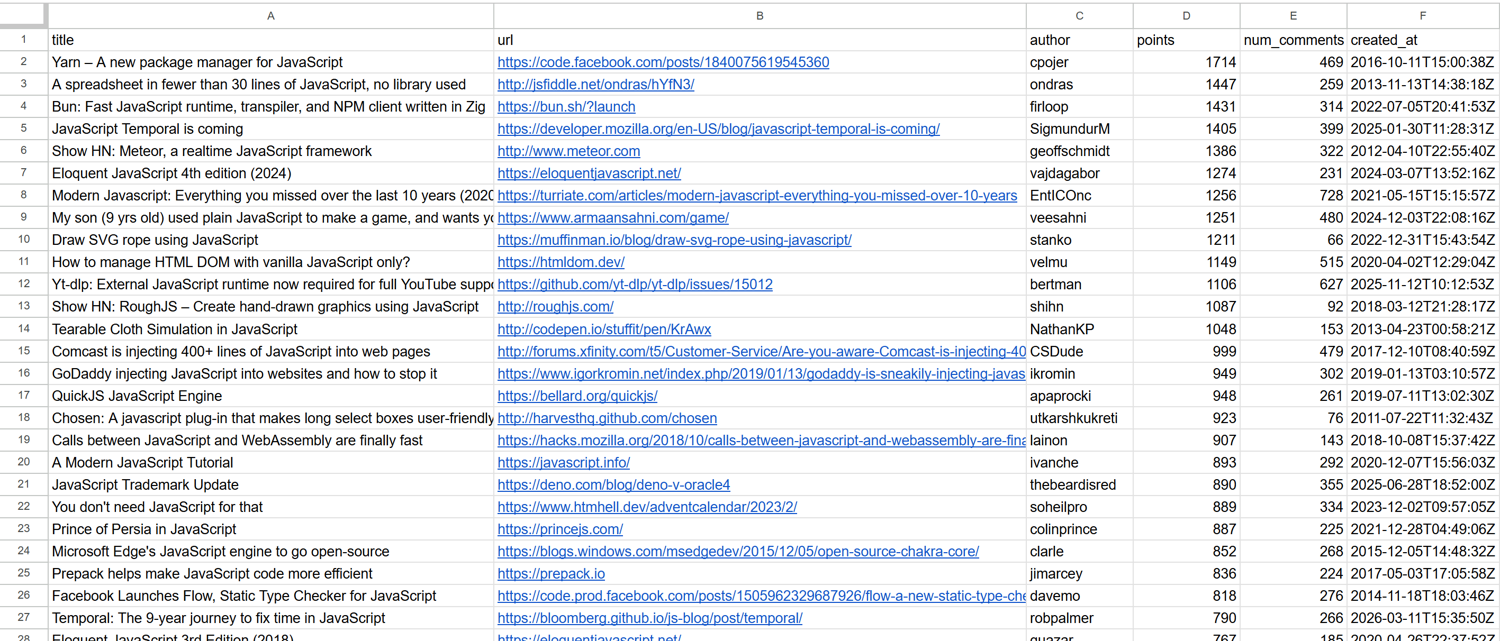
Run the Algolia scraping Python script above. This will produce a hacker_news_stories.csv file, which contains clean, structured data:
The scraped records correspond to the same stories displayed on the HN Algolia page after searching for “javascript”:
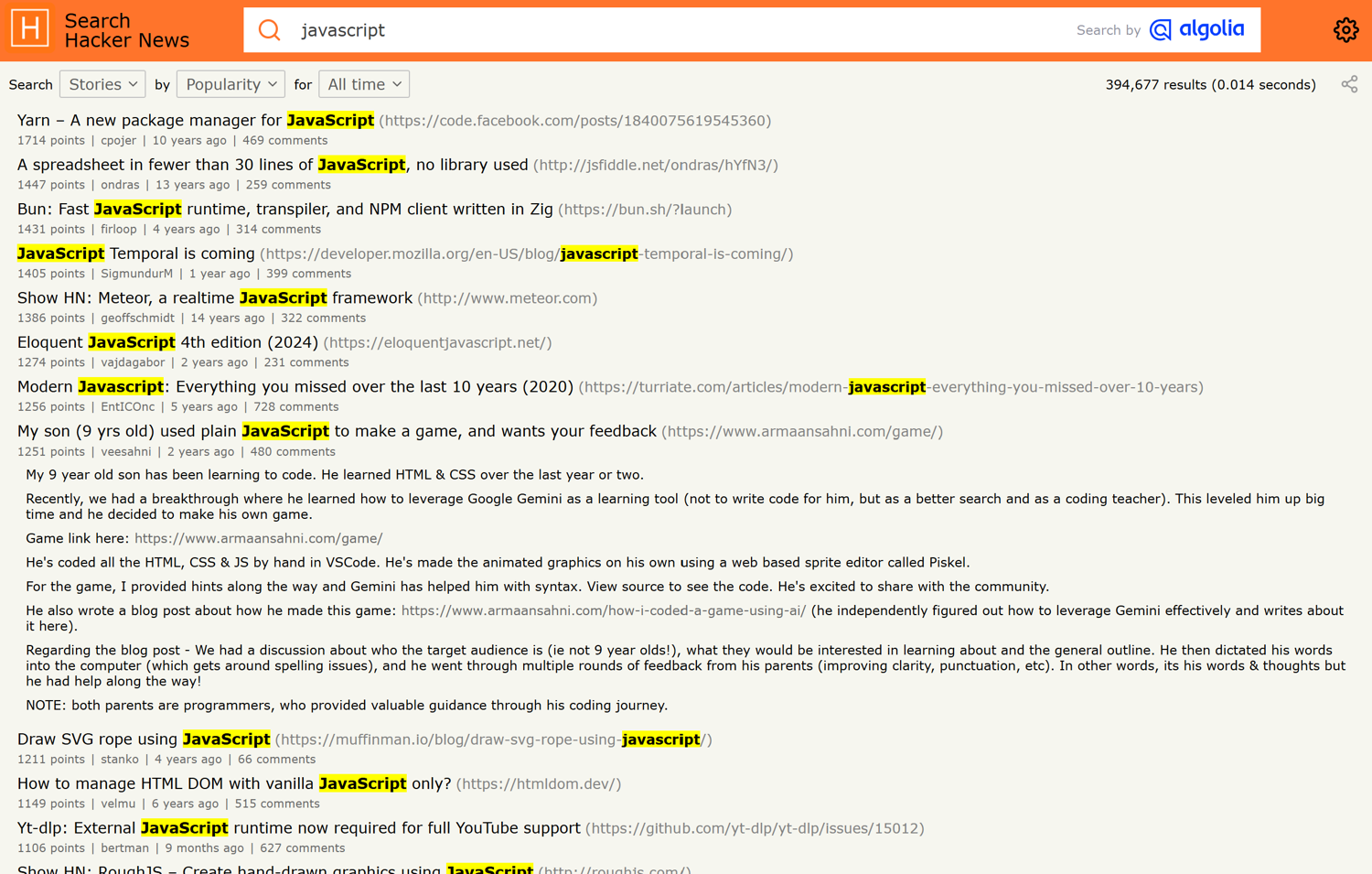
This highlights one of the main advantages of scraping Algolia search results directly through its API. Instead of downloading HTML pages, rendering JavaScript, and extracting elements with CSS selectors, you directly retrieve the structured data used by the website itself.
[Extra] Handle multi-index searches
So far, you have queried a single Algolia index through the /query endpoint. Still, many production websites search multiple indexes with a single request. Instead of calling /query, they use the multiple search endpoint below:
POST https://<APP_ID>-dsn.algolia.net/1/indexes/*/queries
Even Algolia's own website sends requests to /*/queries, as it searches multiple indexes simultaneously:
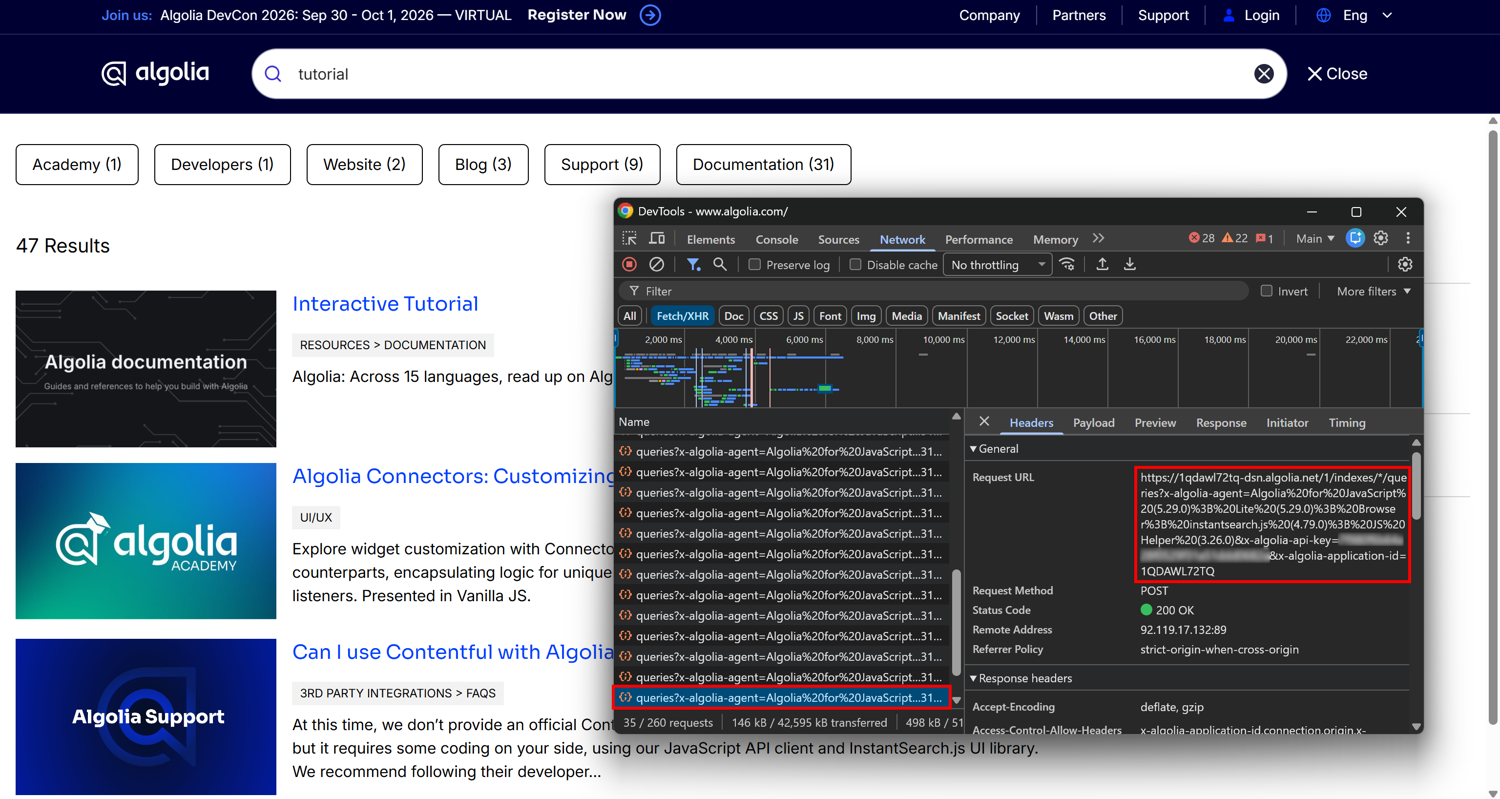
The authentication is exactly the same as before. The main difference is the request body:
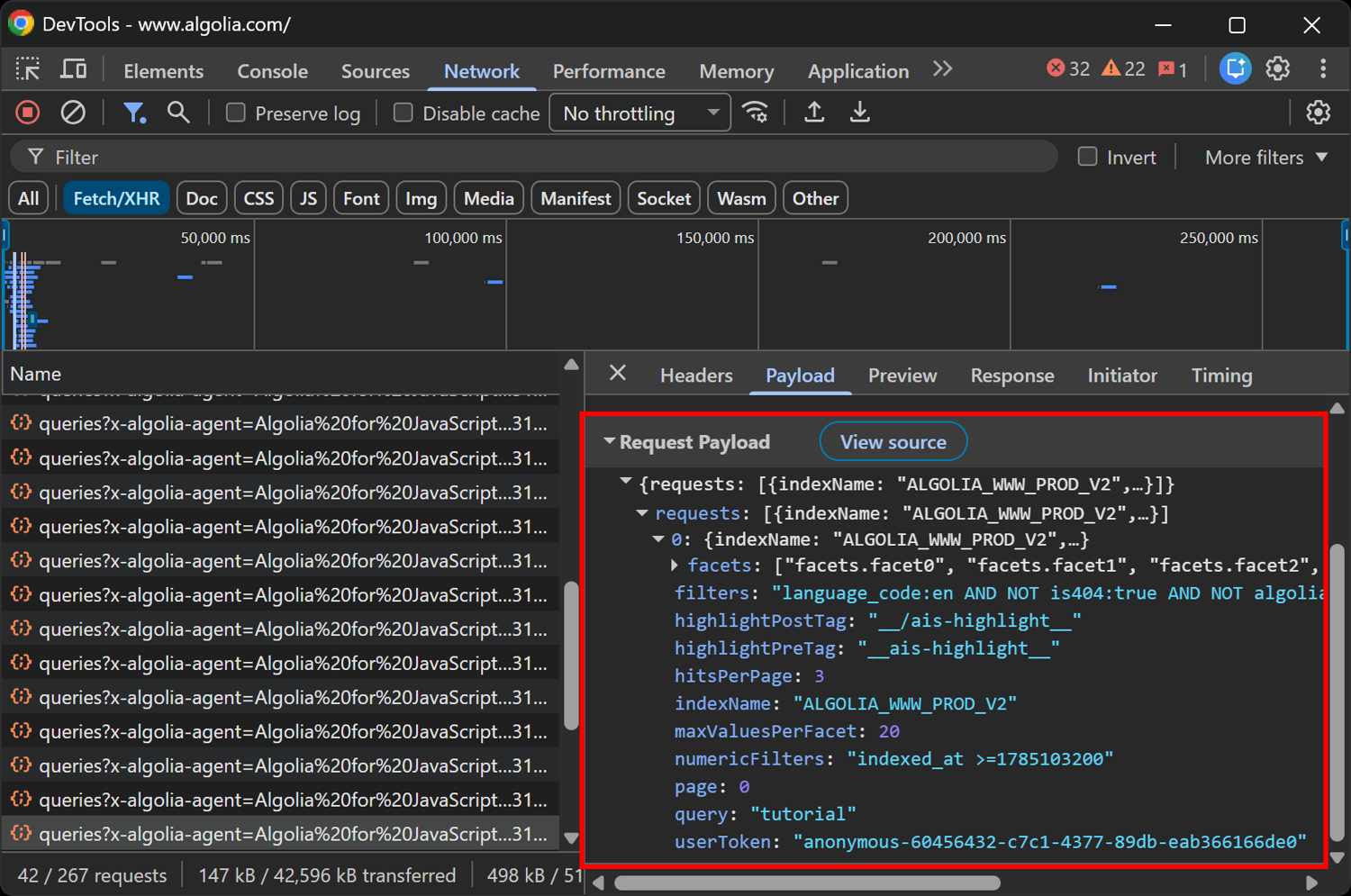
Instead of sending a flat JSON payload, you need to send a payload with a requests array where each item targets a specific index. A possible request body for a /*/queries endpoint could look like this:
payload = {
    "requests": [
        {
            "indexName": "docs",
            "params": "query=playwright&hitsPerPage=10&page=0",
        },
        {
            "indexName": "blog",
            "params": "query=playwright&hitsPerPage=10&page=0",
        },
    ]
}
The response contains a root-level results array, where each element in that array is the individual search response corresponding to one of the requests sent.
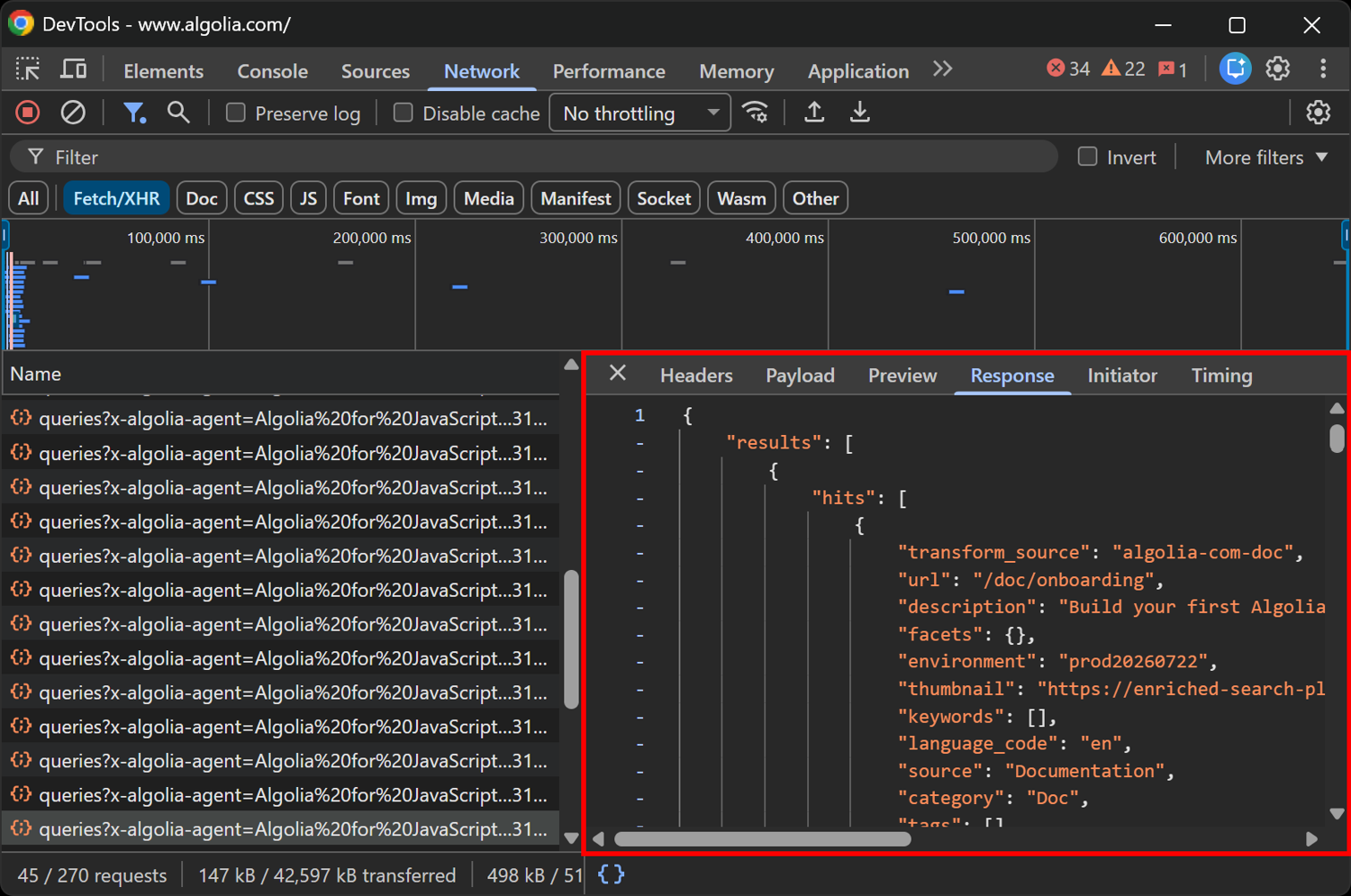
Each object has the same structure you saw previously, including fields such as hits, nbHits, nbPages, and page. It also features an index field corresponding to one of the indexName values specified in the request body's requests array.
When the Algolia Search API key is secured, rotated, or the site blocks you
Scraping Algolia search can be quite straightforward, as the search endpoint itself is public. The main issue is that the website calling it can add protection layers, rotate credentials, or limit automated traffic.
Below are the most common issues, along with solutions to build a reliable and ethical Algolia scraper.
Handling website blocks and anti-bot protection
One of the biggest obstacles when you scrape Algolia is that the target search page might be protected by WAFs, CAPTCHAs, or other anti-bot systems.
For occasional scraping, manually visiting the page in the browser and inspecting Algolia search requests to find the API key can work. This technique does not scale, though. For automated workflows, you need to access the page without getting blocked and capture the required API key before calling the search endpoint.
Handling secured or expiring Algolia API keys
Some websites employ secured Algolia API keys instead of static search keys. These keys can include restrictions such as expiration times, allowed indexes, filters, or referer limitations. As a result, a key copied from an earlier request may stop working or return authorization errors later.
A viable solution is to retrieve the current credentials each time you run your scraper or detect an authorization error. When a page is protected, or JavaScript generates the key dynamically, you can use a browser-based scraping approach to load the page and capture the required API requests before calling the search endpoint.
If you do not want to manage a browser-based infrastructure yourself, consider trying ScrapingBee's JavaScript rendering mode.
Avoiding Algolia rate limits
Even when your API requests are valid, sending a lot of requests can trigger Algolia rate limit blocks. To avoid receiving 429 Too Many Requests errors when scraping Algolia, keep your request volume reasonable.
On large-scale projects, a practical approach is to route requests through rotating proxies. ScrapingBee's Proxy Mode lets you send requests through its proxy infrastructure while keeping your scraping logic unchanged.
Scrape Algolia at scale with ScrapingBee
Learning how to scrape Algolia starts with calling its Search API to get clean JSON data. ScrapingBee helps with the harder parts:
- Access JavaScript-rendered, protected pages and capture dynamic XHR requests to automatically retrieve public Algolia Search API credentials.
- Route requests through proxies to reduce the risk of triggering Algolia's rate limits.
Start with 1,000 free API credits, no credit card required.
How to Scrape Algolia: FAQs
Is it legal to scrape Algolia search?
This depends on the specific website, the data being collected, and the intended use. The Algolia Search API used by websites is designed to be public, and accessing the same requests made by the site's front end typically means retrieving publicly available data. It is still important to check the site's Terms of Service and any applicable rules before scraping. This information is provided for technical guidance only and should not be considered legal advice.
How do I find a site's Algolia API key?
Open your browser's Developer Tools, go to the “Network” tab, filter by “Fetch/XHR”, and perform a search on the page. You will see a request to the *.algolia.net endpoint. This contains the Algolia search API key as an x-algolia-api-key header or query parameters. Consider also inspecting the page source, as these values are often embedded in a dedicated JavaScript <script> tag.
Why can I only get 1,000 results from Algolia?
Because Algolia limits pagination to 1,000 results by default through the paginationLimitedTo setting. Only the index owner can increase that limit. If you need more results, split your search into smaller filtered queries (e.g., by price, date, category) so that each one returns fewer than 1,000 records, paginate through each subset, and finally merge all the retrieved records. Keep this approach reasonable. Attempting to exhaustively download an entire catalog beyond an owner-configured limit may violate the website's Terms of Service.
What is the difference between the /query and /*/queries endpoints?
The /1/indexes/{index}/query endpoint searches a single Algolia index. The /1/indexes/*/queries endpoint executes multiple searches in one request and expects a body with a requests array, where each item specifies an indexName and its search parameters. If a website uses /*/queries, sending a single-query payload instead of a requests array is a common cause of failed requests.
Do I need a browser to scrape Algolia?
No. You may need a browser once to discover the Algolia application ID, search API key, and index name. After that, you can query the Algolia Search API directly with standard requests via an HTTP client, without rendering pages or executing JavaScript. Thus, your Algolia scraper does not need to rely on browser automation tools.
What if the Algolia key is secured or stops working?
Some Algolia keys can expire or stop working because they are deployed with restrictions. Secured keys may include validUntil settings, allowing access only to specific indexes, filters, or other limitations. This means a hardcoded key can become invalid or reject certain requests. To handle this, retrieve the key from the live page each time your scraper runs instead of storing it permanently. Re-run the API key retrieval logic in case of authorization errors.
Is scraping Algolia the same as using Algolia's Crawler?
No, the two point in opposite directions. Algolia's Crawler indexes your own website into an Algolia index so you can add search functionality to it. By contrast, Algolia scraping means querying the search API of a third-party website that uses Algolia to retrieve publicly available search results.