The most pragmatic way to parse XML in Python is to use the built-in ElementTree module. Consider lxml when you need more speed or full XPath, xmltodict when you want a plain dictionary, and defusedxml when parsing untrusted content.
XML files are rarely already on your disk. In practice, you need to parse an API response, an RSS feed, or a sitemap. All of these you need to fetch first.
This guide covers that whole pipeline. Examples were run on Python 3.13 with lxml 6.1, defusedxml 0.7.1, xmltodict 1.0.4, and requests 2.34.2.
Key takeaways (TL;DR)
- ElementTree is a part of Python's standard library and is the best starting point.
ET.fromstring()parses a string;ET.parse()reads an XML file. Query the tree withfind(),findall(), anditer().- lxml adds full XPath 1.0 support, faster parsing, and
iterparse()streaming for huge files. - xmltodict turns XML files into a Python dictionary, which makes it one call away from JSON.
- Untrusted XMLs should not be parsed with the standard library alone: defusedxml blocks XML External Entity (XXE) and billion-laughs attacks.
- Real-world XMLs (like sitemaps, RSS feeds, API responses) need to be fetched first, which often is a bigger challenge than parsing them.
Which Python XML library should you use?
For most jobs, you should start with ElementTree, which is a part of the standard library, and only move to something else when you have a good reason to do so.
Choose lxml for full XPath 1.0, the fastest parsing, or streaming huge files that do not fit in memory. Use xmltodict to get a Python dictionary or JSON, and defusedxml for any untrusted input.
Here's how most popular Python XML parsing libraries compare:
| Library | Install | Best for | XPath support | Large files | Notes |
|---|---|---|---|---|---|
| ElementTree | Built-in | Default everyday parsing | Partial (subset) | OK via iterparse() | Start here |
| lxml | pip install lxml | Speed plus full XPath | Full XPath 1.0 | Excellent | Near drop-in for ElementTree |
| xmltodict | pip install xmltodict | XML to dict and JSON | None | Poor | One-line conversion |
| xml.dom.minidom | Built-in | Small docs, pretty-printing | None | Poor | DOM API, verbose |
| xml.sax | Built-in | Event streaming, low memory | None | Excellent | Callback-based, more code |
| BeautifulSoup (lxml-xml) | pip install beautifulsoup4 lxml | Handling messy markup | None (CSS-style finds) | OK | Slowest of the group |
The same decision logic applies when you are parsing HTML in Python: pick the leanest and simplest parser that matches the job, not the most feature-rich one.
Parse XML with ElementTree (string and file)
The two most important operations are parsing XML structure from a string and reading XML files.
ET.fromstring() parses a string and returns the root Element directly, while ET.parse() reads an XML file and returns an ElementTree object, and your parsed representation can be fetched by calling .getroot(). I know, this can be a bit confusing.
Importing the module as ET is the universal convention and you will see it in the ElementTree documentation and almost every codebase that touches XML.
Once you hold the root element, the rest is just tree navigation:
import xml.etree.ElementTree as ET

xml_string = """<?xml version="1.0"?>
<catalog>
    <book id="bk101" category="web">
        <title>XML Parsing Basics</title>
        <author>Jane Doe</author>
        <price>29.99</price>
    </book>
    <book id="bk102" category="data">
        <title>Data Pipelines in Python</title>
        <author>John Smith</author>
        <price>39.95</price>
    </book>
</catalog>"""

root = ET.fromstring(xml_string)
print(root.tag)  # catalog

with open("catalog.xml", "w") as f:
    f.write(xml_string)

tree = ET.parse("catalog.xml")
root = tree.getroot()
print(root.tag)  # catalog
Access elements, attributes, and text
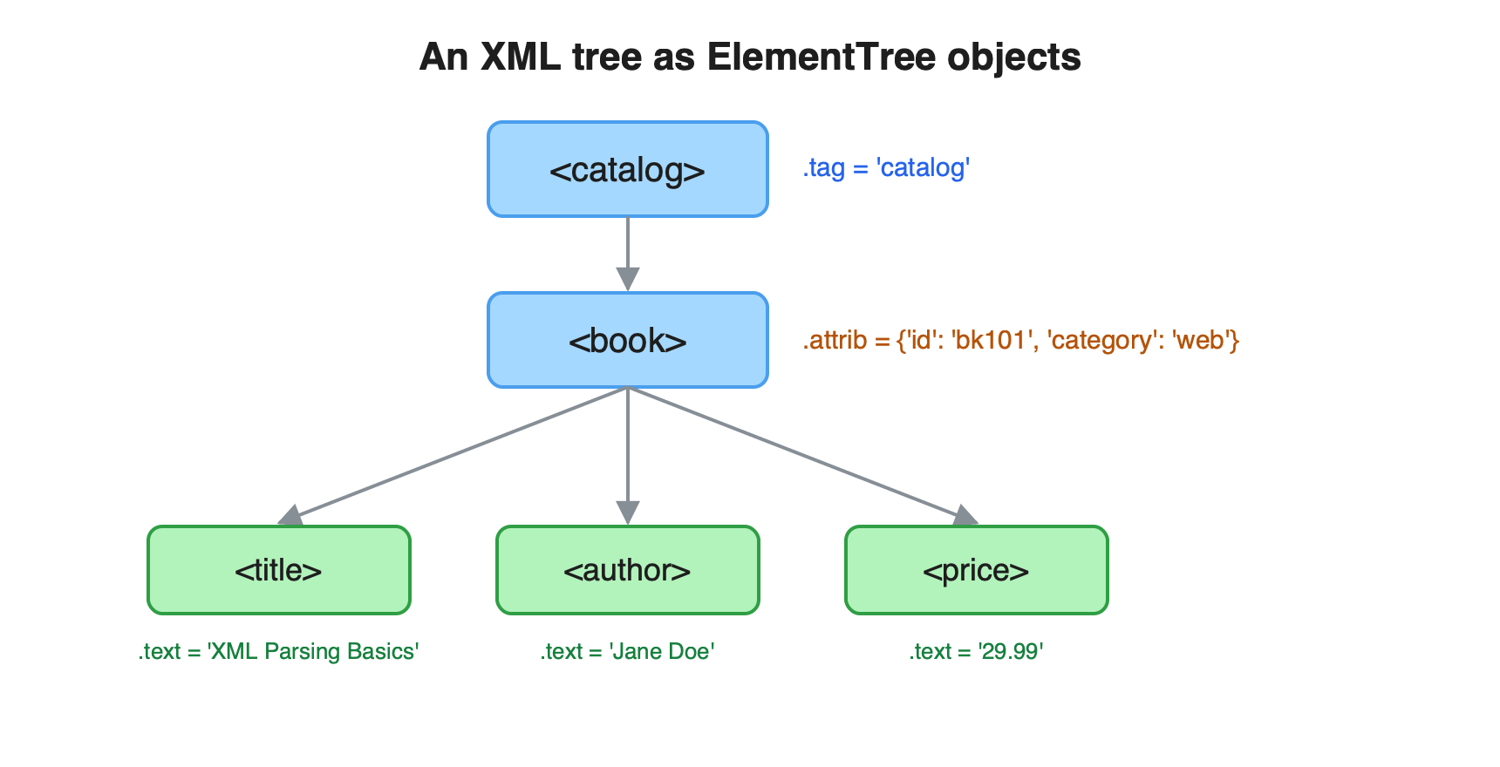
Every Element exposes three handles: .tag holds the element name, .attrib returns the attributes as a plain dictionary, and .text returns the string between the tags. Loop over an element to visit its direct children:
import xml.etree.ElementTree as ET

tree = ET.parse("catalog.xml")
root = tree.getroot()

for book in root:
    print(book.tag, book.attrib)
    print(book.get("category", "uncategorized"))
    print(book.attrib["id"])

    title = book.find("title").text
    price = float(book.find("price").text)  # .text is always a string
    print(f"{title}: {price}")
Prefer book.get("category") over book.attrib["category"] when an attribute might be absent: get() returns None or your default, while the bracket form raises a KeyError.
One important thing: .text is always a string, even when the content looks numeric. Cast it explicitly, as the float(...) call above does, before doing math on prices, counts, or timestamps.
Find and filter nodes: find(), findall(), iter(), and XPath
XML traversal relies on just a handful of methods: find() returns the first matching direct child, findall() returns a list of all matching direct children, and iter() walks every descendant recursively.
The distinction between direct children and descendants causes most lookup surprises.
import xml.etree.ElementTree as ET

root = ET.parse("catalog.xml").getroot()

first = root.find("book")
print(first.get("id"))  # bk101

books = root.findall("book")
print(len(books))  # 2

print(root.findall("title"))  # []

titles = [el.text for el in root.iter("title")]
print(titles)  # ['XML Parsing Basics', 'Data Pipelines in Python']

web_books = root.findall(".//book[@category='web']")
print(web_books[0].find("title").text)  # XML Parsing Basics
ElementTree accepts XPath-style expressions in find() and findall(): .//tag matches at any depth, [@attr='x'] filters on attributes, and tag[2] selects by position.
It is a subset of XPath 1.0, so don't be surprised that functions like contains() are missing; ElementTree XPath support lists exactly what works. If this is not enough, lxml is the upgrade path.
Handle XML namespaces (why findall returns nothing)
If findall() returns an empty list on XML you did not write, the document almost certainly uses namespaces. ElementTree expands every namespaced tag to {namespace-uri}tag, so findall("url") matches nothing in a sitemap where each tag is really {http://www.sitemaps.org/schemas/sitemap/0.9}url. Match the full form or pass a namespace map. Sitemaps and RSS/Atom feeds always use namespaces, which makes this the single most common XML parsing bug.
import xml.etree.ElementTree as ET

sitemap = """<?xml version="1.0" encoding="UTF-8"?>
<urlset xmlns="http://www.sitemaps.org/schemas/sitemap/0.9">
    <url>
        <loc>https://example.com/</loc>
        <lastmod>2026-05-29</lastmod>
    </url>
    <url>
        <loc>https://example.com/blog/</loc>
        <lastmod>2026-06-01</lastmod>
    </url>
</urlset>"""

root = ET.fromstring(sitemap)

print(root.findall("url"))  # []

print(root.tag)  # {http://www.sitemaps.org/schemas/sitemap/0.9}urlset

ns = {"sm": "http://www.sitemaps.org/schemas/sitemap/0.9"}
for url in root.findall("sm:url", ns):
    print(url.find("sm:loc", ns).text)
When you modify a namespaced document and write it back out, call ET.register_namespace("", "http://www.sitemaps.org/schemas/sitemap/0.9") first so the output keeps the original prefix style instead of generated ns0: prefixes.
Parse large XML files faster with lxml and iterparse
When ElementTree becomes the bottleneck, consider switching to lxml: it's written in C, parses significantly faster, supports full XPath 1.0, and its API is a near drop-in replacement (etree.parse(), find(), findall() all behave the same).
For files too large to hold in memory, iterparse() streams the document element by element.
Let's see it in action:
from lxml import etree

tree = etree.parse("catalog.xml")
root = tree.getroot()

print(root.findall("book")[0].get("id"))  # bk101

titles = root.xpath("//book[price > 30]/title/text()")
print(titles)  # ['Data Pipelines in Python']

for event, elem in etree.iterparse("catalog.xml", events=("end",), tag="book"):
    process(elem)
    elem.clear()  # free the processed element
The elem.clear() call is the part people forget: without it, iterparse() still builds the whole tree and you gain nothing.
The same library choice pays off in HTML scraping too; see how to speed up parsing with lxml in BeautifulSoup pipelines, and the lxml docs for parser options like encoding overrides.
Convert XML to a dict or JSON with xmltodict
xmltodict.parse() converts an XML string into a dictionary that mirrors the document structure: attributes become keys prefixed with @, and text that sits next to attributes lands under #text. From there, JSON is one json.dumps() call away, and xmltodict.unparse() reverses the trip:
import json
import xmltodict

xml_string = """<book id="bk101">
    <title>XML Parsing Basics</title>
    <price currency="USD">29.99</price>
</book>"""

data = xmltodict.parse(xml_string)
print(data["book"]["title"])           # XML Parsing Basics
print(data["book"]["@id"])             # bk101
print(data["book"]["price"]["#text"])  # 29.99

print(json.dumps(data, indent=2))
xml_again = xmltodict.unparse(data, pretty=True)
xmltodict is the fastest path from XML to a Python dictionary. That also makes it the natural bridge when you already parse JSON in Python elsewhere in the pipeline.
Skip xmltodict when the document mixes text and child elements inside the same parent (the dictionary can get messy) or when you need XPath queries — in those cases, stay with ElementTree or lxml.
Fetch and parse XML from the web (sitemaps, RSS, APIs)
Most XMLs you parse in production are either a sitemap, an RSS/Atom feed, or an API response behind an HTTP request, not a file on disk. Fetch it with requests, pass response.content to ET.fromstring(), then parse as usual. For sources that rate-limit, gzip, or block automated requests, route the fetch through a web scraping API so the XML actually comes back.
Here is the pattern on a real sitemap, listing every <loc> URL:
import requests
import xml.etree.ElementTree as ET

resp = requests.get("https://www.scrapingbee.com/sitemap.xml", timeout=10)
resp.raise_for_status()

root = ET.fromstring(resp.content)

ns = {"sm": "http://www.sitemaps.org/schemas/sitemap/0.9"}
urls = [loc.text for loc in root.findall("sm:url/sm:loc", ns)]

print(f"{len(urls)} URLs in the sitemap")
Use response.content, not response.text: the bytes let the parser honor the encoding declared in the XML prolog, while response.text applies a guessed decoding that can corrupt the document.
The namespace map is doing its job again: the sitemaps protocol requires that namespace on every sitemap. That guarantee is what lets you pull every URL from a sitemap at crawl time. The same fetch-then-parse pattern lets you scrape Google News RSS feeds or any public feed.
Real-world fetches fail in predictable ways: gzipped responses, wrong encodings, HTTP 403 and 429 errors, and anti-bot systems that block plain requests clients. When that happens, ScrapingBee's web scraping API handles proxies, retries, and blocking for you, the ScrapingBee documentation shows how it looks like in practice.
One caveat before you point a script at someone's server: stick to public, pre-login pages and check the site's robots.txt and terms of service first.
Parse XML safely: prevent XXE and billion-laughs attacks
Python's standard XML parsers (ElementTree, minidom, SAX) are not safe against malicious input: a crafted document can read local files through an XML External Entity attack or exhaust your memory through a billion-laughs entity expansion. The Python docs on XML vulnerabilities state this plainly.
For XML from any untrusted source, parse with defusedxml — it is a drop-in replacement.
import defusedxml.ElementTree as ET

root = ET.parse("catalog.xml").getroot()
print(root.tag)  # catalog

bomb = """<?xml version="1.0"?>
<!DOCTYPE lolz [
  <!ENTITY lol "lol">
  <!ENTITY lol2 "&lol;&lol;&lol;&lol;&lol;&lol;&lol;&lol;&lol;&lol;">
]>
<lolz>&lol2;</lolz>"""

try:
    ET.fromstring(bomb)
except Exception as e:
    print(type(e).__name__)  # EntitiesForbidden
The rule is simple: untrusted source means defusedxml. Anything fetched from the web, uploaded by a user, or received from a third-party system counts as untrusted.
The config file your own build pipeline writes is fine to parse with the standard library; the feed a stranger's server returns is not. Given the cost of the swap (one import line), there is little reason to skip it.
Handle ParseError and malformed XML
Real-world XMLs are messy and can break, so remember about wrapping parsing in try/except and catch xml.etree.ElementTree.ParseError.
The usual causes include: unclosed tags, a wrong encoding declaration, and stray ampersands that should be &.
import xml.etree.ElementTree as ET
from lxml import etree

broken = "<catalog><book><title>Unclosed tag</catalog>"

try:
    root = ET.fromstring(broken)
except ET.ParseError as e:
    print(f"Parse failed: {e}")
# Parse failed: mismatched tag: line 1, column 36

parser = etree.XMLParser(recover=True)
root = etree.fromstring(broken.encode(), parser=parser)
print(etree.tostring(root))
recover=True tells lxml to repair what it can instead of refusing the document, which salvages most truncated or sloppily generated feeds. And remember the defensive habit from the attributes section: find() returns None when an element is missing, so check for None before touching .text on data you do not control.
Frequently Asked Questions
What Python package is used to parse XML?
While there are multiple XML parsing packages available, the built-in xml.etree.ElementTree module is good enough for most things and needs no extra setup. Consider lxml for full XPath and speed, xmltodict to convert XML into a dictionary, and defusedxml to parse untrusted input safely.
How do you parse an XML file in Python?
When working with the standard library, call ET.parse("file.xml"), then .getroot() to get the root element, and query it with find(), findall(), or iter(). If your XML is already in a string, use ET.fromstring(), which returns the root element directly.
How do I convert XML to JSON in Python?
Parse the XML with xmltodict.parse(), which returns a dictionary, then pass that dictionary to json.dumps(). Attributes appear as @-prefixed keys and element text next to attributes appears under #text.
Why does findall() return an empty list?
The most common cause is that your document almost certainly uses XML namespaces. ElementTree expands each tag to {namespace-uri}tag, so plain names match nothing; pass a namespace map like root.findall("sm:url", {"sm": "http://www.sitemaps.org/schemas/sitemap/0.9"}).
Is it safe to parse XML from an untrusted source?
Not with the standard library alone: specially-crafted documents can read local files (XXE) or exhaust memory (billion laughs). Use defusedxml as a drop-in replacement.
Should I use ElementTree or lxml?
Default to ElementTree since it ships with Python and covers everyday parsing. Switch to lxml when you need full XPath 1.0, faster parsing, or iterparse() streaming with constant memory on very large files.
Going Beyond Parsing
Parsing XML in Python is mostly a solved problem. However, fetching the XML from a rate-limited or bot-protected server can be challenging. ScrapingBee handles these hard parts for you so that you can focus on the data itself, and the free trial includes 1,000 credits with no credit card required.
Want to learn more about fetching data? Check our article about the best Python web scraping libraries!