In Python, to parse a datetime object from a string, you can use one of the datetime.strptime(), datetime.fromisoformat(), and dateutil.parser.parse() methods for formatted dates, and the dateparser library for messy, relative, natural-language dates. Dateparser works very well with the kind of dates you'd get by scraping, parsing logs, or pulling from an API or a CSV file. In this blog, we'll cover 5 available tools to parse datetime strings in Python and help you pick the best one for your job.
Key takeaways
- datetime.strptime(text, format): A fast option. It's strict and works only when you know the format.
- datetime.fromisoformat(text): Parses standard ISO 8601 date strings without additional format specification. Fastest of the lot, and works only on Python 3.11+.
- dateutil.parser.parse(text): Recognizes multiple Western date formats and parses accordingly. Works best for unknown formats.
- dateparser.parse(text): Parses messy, relative, or multilingual dates. Best suited for scraped data containing unformatted or inconsistently formatted dates, but also very slow.
- pandas.to_datetime(series): Works for parsing whole columns of date strings in dataframes or CSV files.
- Naive vs. timezone aware: Comparing these two types causes a TypeError, so decide early on which one you'd like to parse date strings into.
Which Python date parser should you use?
To parse datetime from a string in Python, pick a date parser based on how predictable your date string is. You'll be making a trade-off between parsing unpredictable date formats and parsing dates with speed.
From the datetime module, strptime works fast but only if you supply the format to be used. The fromisoformat function works fastest of all, but only with ISO 8601 formatted dates. The dateutil.parser.parse method works by detecting the format and parsing the date. You can use this when you know that the dates follow a predictable format but you don't know the format itself.
The dateparser library works on all kinds of messy and unpredictable formats, best suited for dates encountered while web scraping in Python or scraped from large datasets such as logs. It also handles relative dates ('2 days ago' or '3 weeks ago'), and even multilingual dates ('il y a 3 jours' or 'hace un mes'). Lastly, if you have a column full of dates in a table (a Pandas DataFrame, a CSV, or an Excel file), you can use pandas.to_datetime to parse the whole column as datetime objects in one go.
To summarize, if you know the format while parsing datetimes in Python, stick to datetime.strptime() or datetime.fromisoformat() because they're the fastest. Fall back to libraries such as dateparser only if you cannot predict the date formats you'll encounter.
Which Python date parser to use:
| Method | Best for | Needs a format string? | Speed | Handles relative / multilingual? |
|---|---|---|---|---|
| datetime.strptime() | Known fixed formats | yes | fastest | no |
| datetime.fromisoformat() | ISO 8601 only | no | fastest | no |
| dateutil.parser.parse() | unknown Western formats | no | medium | no |
| dateparser.parse() | messy, relative, multilingual, scraped | no | slowest | yes |
| pandas.to_datetime() | a whole column or series | optional | fast on columns | partial |
Parse a known format fast with datetime.strptime()
The strptime Python function converts a string to a datetime using a format composed with the strptime format codes that you supply. It raises a ValueError if the string does not match exactly.
from datetime import datetime


d = datetime.strptime('2026-06-15', '%Y-%m-%d')

print(d)

# OUTPUT: 2026-06-15 00:00:00
In the snippet above, we specified the format '%Y-%m-%d' to parse a Python string to datetime in the 'yyyy-mm-dd' format. Though strptime is among the fast ones of the methods we discuss here, it is also very strict with the format. If we used a date like '06-06-2026' with the same format string '%Y-%m-%d', it would raise a ValueError.
The format string specification for strptime typically consists of case-sensitive alphabetic codes starting with the % sign. Any other characters between these codes will be expected to appear verbatim. For example, specify hyphens (-) in the format code if your date strings have hyphens as separators.
It's also worth noting that the Python datetime strptime is the inverse of the strftime function, which converts a datetime object to a string based on the specified format.
Common strptime format codes
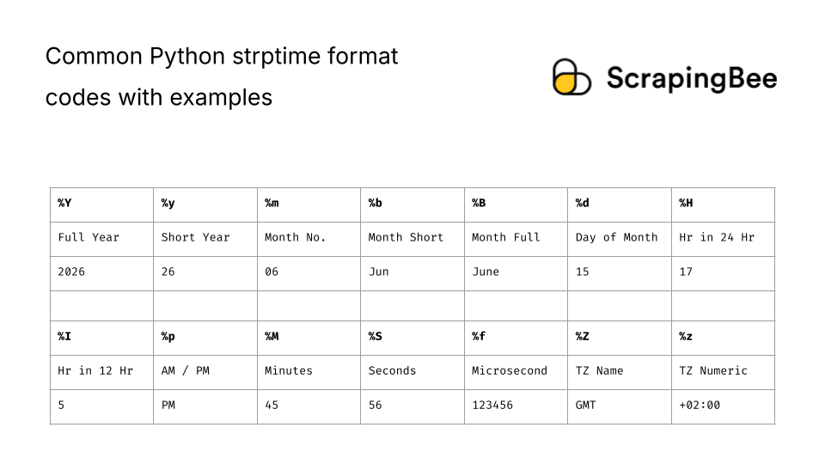
The table below shows some common codes useful for parsing date strings using strptime.
| Code | Meaning | Example |
|---|---|---|
| %Y | Year in 4 digits | 2026 |
| %y | Year, last 2 digits | 26 |
| %m | Month number | 06 |
| %b | Month name abbreviated | Jun |
| %B | Month name in full | June |
| %d | Day of month | 15 |
| %H | Hour in 24-hr format | 17 |
| %I | Hour in 12-hr format | 5 |
| %M | Minute | 45 |
| %S | Second | 56 |
| %f | Microsecond (6 digits) | 123456 |
| %p | AM/PM | PM |
| %Z | Named timezone (unreliable support) | GMT |
| %z | Timezone (numeric UTC offset) | +02:00 |
When strptime fails: ValueError and the %Z gotcha
ValueError is the most common error encountered while using strptime, caused by the date string not falling under the specified format. Some of the common causes of ValueError are listed below.
2-digit vs. 4-digit year:
A common case is when one overlooks the difference between the 2-digit short year (%y) and the full 4-digit year (%Y). Let's see this in code:
from datetime import datetime


try:

    d = datetime.strptime('14/6/26', '%d/%m/%Y')

except ValueError as e:

    print(e)

    # ERROR: time data '14/6/26' does not match format '%d/%m/%Y'


d = datetime.strptime('14/6/26', '%d/%m/%y')

print(d)

# OUTPUT: 2026-06-14 00:00:00
Unconverted data remains:
Another common error happens when your format string does not cover the full string and the unconverted data remains. You can see an example below where the string contains a date and hours but the format specifies only a date.
from datetime import datetime


try:

    d = datetime.strptime('2026-06-01 05:00', '%Y-%m-%d')

except ValueError as e:

    print(e)

    # ERROR: unconverted data remains:  05:00


d = datetime.strptime('2026-06-01 05:00', '%Y-%m-%d %H:%M')

print(d)

# OUTPUT: 2026-06-01 05:00:00
Errors parsing named timezones with %Z:
Probably the most frustrating error to encounter with strptime is while using %Z, because parsing named timezones with strptime can be ambiguous and highly restricted. While GMT and UTC are known to work, most others fail, with the exception of the local machine timezone. It's commonly recommended to parse strings using numeric timezones (%z for +0200). However, for scraped date strings you might need to use dateparser to handle named timezones because you don't control how the dates are formatted. Let's see how this works out:
from datetime import datetime
import dateparser


try:

    d = datetime.strptime('5 PM EST, June 14 2026', '%I %p %Z, %B %d %Y')

except ValueError as e:

    print(e)

    # ERROR: time data '5 PM EST, June 14 2026' does not match format '%I %p %Z, %B %d %Y'


d = dateparser.parse("5 PM EST, June 14 2026")

print(d)

# OUTPUT: 2026-06-14 17:00:00-05:00
Parse ISO 8601 strings with datetime.fromisoformat()
In Python, you can parse ISO 8601 strings using the inbuilt datetime.fromisoformat() function without installing any additional libraries. This is the fastest method in Python to parse datetime from the ISO-formatted date strings provided with most JSON APIs or present in the structured data sections on web pages. As of Python 3.11+, this works on most ISO 8601 formatted strings, including those that specify a timezone offset or end with Z (read more about this in the Python 3.11 release notes). This was a significant upgrade because, before Python 3.11, fromisoformat was restrictive and only supported strings of the format that would result from using the datetime.isoformat() function.
Let's see some examples of using the fromisoformat function. We ran this on Python 3.14, but it should work the same on any version starting from 3.11.
Parsing ISO dates without time:
from datetime import datetime


d1 = datetime.fromisoformat('2026-06-15')

print(d1)


d2 = datetime.fromisoformat('20260615')

print(d2)


d3 = datetime.fromisoformat('2026-W25-1')

print(d3)


# All of the above will print: 2026-06-15 00:00:00
Parsing ISO dates with time:
from datetime import datetime


d1 = datetime.fromisoformat('2026-06-15T05:00:00')

print(d1)


d2 = datetime.fromisoformat('2026-06-15 05:00:00')

print(d2)


d3 = datetime.fromisoformat('2026-06-15T05:00')

print(d3)


d4 = datetime.fromisoformat('20260615:050000')

print(d4)


d5 = datetime.fromisoformat('20260615:0500')

print(d5)


d6 = datetime.fromisoformat('2026-06-15T05:00:00.000000')

print(d6)


# All of the above will print: 2026-06-15 05:00:00
Parsing ISO 8601 strings with timezones:
from datetime import datetime


d1 = datetime.fromisoformat('2026-06-15T05:00Z')

print(d1)

# OUTPUT: 2026-06-15 05:00:00+00:00


d2 = datetime.fromisoformat('2026-06-15T05:00+0200')

print(d2)

# OUTPUT: 2026-06-15 05:00:00+02:00
Parse unknown formats automatically with dateutil
The dateutil.parser.parse() function in Python parses common and varying Western formats without requiring a format string. This works best for dates in datasets or scraped content with unknown formats, or if the dataset does not follow consistent formatting. This is common in the case of manually entered dates. It's also not a part of the standard Python library, so you will need to install it with pip or uv:
pip install python-dateutil
OR:
uv add python-dateutil
You can see some examples of the formats it parses below:
from dateutil import parser


d1 = parser.parse("15/6/26")

print(d1)


d2 = parser.parse("15.6.26")

print(d2)


d3 = parser.parse("6/15/2026")

print(d3)


d4 = parser.parse("15-6-2026")

print(d4)


d5 = parser.parse("2026 Jun 15")

print(d5)


d6 = parser.parse("15th June 2026")

print(d6)


d7 = parser.parse("June 15, 2026")

print(d7)


d8 = parser.parse("2026 06 15")

print(d8)


d9 = parser.parse("2026 Jun 15")

print(d9)


# All of the above will print: 2026-06-15 00:00:00
With this kind of flexibility, we do have some caveats. Things get ambiguous when you use the dateutil parser on dates with three 2-digit integers with separators between them. In a US context that would be month first; some Asian countries (Japan, China, etc.) put the year first, and most other countries put the date first. But dateutil has that covered too. If you are able to infer the context from the web page or otherwise while scraping, you can use the dayfirst=True or yearfirst=True parameters to parse ambiguous dates accordingly. By default, it assumes that the month is the first integer, if that's 12 or less. This contextual disambiguation is illustrated in the snippet below.
from dateutil import parser


d1 = parser.parse("10/11/12")

print(d1)

# OUTPUT: 2012-10-11 00:00:00

# default is month first


d2 = parser.parse("10/11/12", dayfirst=True)

print(d2)

# OUTPUT: 2012-11-10 00:00:00


d3 = parser.parse("10/11/12", yearfirst=True)

print(d3)

# OUTPUT: 2010-11-12 00:00:00
This works across formatting styles with different separators too:
from dateutil import parser


d1 = parser.parse("10/11/12", dayfirst=True)

print(d1)


d2 = parser.parse("10.11.12", dayfirst=True)

print(d2)


d3 = parser.parse("10-11-12", dayfirst=True)

print(d3)


d4 = parser.parse("10 11 12", dayfirst=True)

print(d4)


# All of the above will print: 2012-11-10 00:00:00
So, dateutil.parser.parse can get you further than the inbuilt functions in the datetime module while being much less strict with the formatting. However, it still cannot handle common and ambiguous timezone names (EST, PST, etc.), relative times ('2 days ago'), and languages other than English ('15 de junio, 2026'). Read the dateutil parser docs for more information.
Parse messy, relative, and multilingual dates with dateparser
The dateparser Python library parses date strings that most other tools cannot. This includes relative dates ('2 days ago'), dates in over 200 language locales ('il y a 3 jours'), and ambiguous formats too. The dateparser parse(date_string) method returns a datetime if the parsing is successful. Otherwise it quietly returns None, which you need to check for. It does not raise an Exception if the parsing fails. You can install the Python dateparser library with pip or uv:
pip install dateparser
OR:
uv add dateparser
Once you're ready, you can try some of the examples from below:
import dateparser


date_strs = [

    "2026-06-15",  # Clean yyyy-mm-dd

    "5 days ago",  # Relative Date

    "15 de junio, 2025",  # Spanish Date

    "il y a 3 jours",  # Relative Date in French

    "10/11/12",  # Ambiguously Formatted Date

    "Unknown, TBA",  # No date available

]


for date_str in date_strs:

    print(date_str, dateparser.parse(date_str), sep=" -> ")


'''

OUTPUT:

2026-06-15 -> 2026-06-15 00:00:00

5 days ago -> 2026-06-11 10:57:37.654844

15 de junio, 2025 -> 2025-06-15 00:00:00

il y a 3 jours -> 2026-06-13 10:57:37.661430

10/11/12 -> 2012-10-11 00:00:00

Unknown, TBA -> None

'''
You can see from the above samples that dateparser handles a whole bunch of messy, relative, and multilingual dates with the same function. This makes it highly suitable for scraped dates, where the data may be user generated and sometimes not even have a date.
Fix ambiguous dates with DATE_ORDER
Just like dateutil, dateparser also has features to handle ambiguous date interpretations caused by different ordering systems. Let's consider '10/11/12' as the date string again, and you'll see that by default, it parses with the 'MDY' order that's used in the US. For scraped data, you might want to change this based on the scraped site's locale. To do so, you can use the DATE_ORDER key in the settings supplied to the parse function, as shown below:
import dateparser


print(dateparser.parse("10/11/12"))

# OUTPUT: 2012-10-11 00:00:00


print(dateparser.parse("10/11/12", settings={"DATE_ORDER": "DMY"}))

# OUTPUT: 2012-11-10 00:00:00


print(dateparser.parse("10/11/12", settings={"DATE_ORDER": "YMD"}))

# OUTPUT: 2010-11-12 00:00:00
Parse relative dates ("2 days ago", "il y a 3 jours")
The Python dateparser can parse relative dates, unlike the other methods such as dateutil or strptime that we've demonstrated earlier. This makes it unique and very useful for handling such dates, especially in scraped data. The parse function also provides a setting PREFER_DATES_FROM, which can be set to "past" or "future", in case of ambiguous relative dates. Examples below:
import dateparser


print(dateparser.parse("2 days ago"))

# OUTPUT: 2026-06-14 14:06:52.088195


print(dateparser.parse("il y a 3 jours"))

# OUTPUT: 2026-06-13 14:07:25.243512


print(dateparser.parse("two years"))

# OUTPUT: 2024-06-16 14:07:45.309226

# For ambiguous cases like this, past dates are default


print(dateparser.parse("two years", settings={"PREFER_DATES_FROM": "future"}))

# OUTPUT: 2028-06-16 14:08:31.653743

# Use "PREFER_DATES_FROM": "future" to prefer future dates in case of ambiguity


print(dateparser.parse("two years", settings={"PREFER_DATES_FROM": "past"}))

# OUTPUT: 2024-06-16 14:09:53.706440

# You can also explicitly prefer past dates
Handle timezones and incomplete dates
Dateparser can also handle timezones with some changes to settings. The first setting is RETURN_AS_TIMEZONE_AWARE, which you can set to True to get timezone-aware datetime objects instead of naive objects. Let's see how this works:
import dateparser


print(dateparser.parse("25th June 2026, 6 PM PST", settings={

    "RETURN_AS_TIMEZONE_AWARE": True

}))

# OUTPUT: 2026-06-25 18:00:00-08:00
In the above snippet, PST is assumed to be "Pacific Standard Time", which is 8 hours behind UTC (-08:00). For strings without a timezone, you can also specify one using the TIMEZONE setting:
import dateparser


print(dateparser.parse("25th June 2026, 6 PM", settings={

    "TIMEZONE": "PST",

    "RETURN_AS_TIMEZONE_AWARE": True

}))

# OUTPUT: 2026-06-25 18:00:00-08:00
Finally, if you have incomplete dates like "December 2023", you can parse that too by specifying the PREFER_DAY_OF_MONTH setting to first, last, or current. You can see how this works:
import dateparser


print(dateparser.parse("December 2023", settings={

    "PREFER_DAY_OF_MONTH": "first",

}))

# OUTPUT: 2023-12-01 00:00:00
Extract a date from a block of text with search_dates()
Dateparser offers a search_dates function that can process long chunks of text to extract any mentions of dates in them as datetime objects. This is an underrated feature, very useful for web scraping and not offered by any other tool. For a given chunk of text, the function returns a list of results, each containing the date specified in the text and the datetime object parsed from that bit. It also works with multilingual text. Before jumping all in, bear in mind that the search_dates function can be slower and the support can be limited, so use it only when absolutely necessary. We've shown some examples below for you to try out:
from dateparser.search import search_dates


print(search_dates("Posted on May 1, 2026 by the editorial team"))

# OUTPUTS: [('on May 1, 2026 by the', datetime.datetime(2026, 5, 1, 0, 0))]


print(search_dates("Este blog fue publicado el 1 de mayo de 2026."))

# OUTPUTS: [('1 de mayo de 2026', datetime.datetime(2026, 5, 1, 0, 0))]
Parse a whole column at once with pandas.to_datetime()
The pandas.to_datetime() function converts an entire column of date strings to datetime objects in one call. It is common to encounter whole columns of date strings with scraped data, API responses, or while parsing log files. This function comes in handy when your date strings are already in a DataFrame or in some tabular format such as CSV.
While using this function, you can also specify a format to match the date strings, using the codes you'd typically use for the strptime function we discussed above. Supplying a specific format also makes this quicker, as the function does not have to infer the format for each string.
You can also specify how to handle errors using the errors parameter. Changing this to coerce will cause invalid date strings to parse into NaT (Not a Time) objects, while valid date strings will yield datetime objects as expected. The default for this is raise, which will instead cause an exception if any of the values fail to parse into a valid datetime object.
The example below demonstrates this function on a DataFrame, coercing the errors and parsing mixed formats.
import pandas as pd


df = pd.DataFrame({

    "Name": ["Alice", "Bob", "Charlie", "Dave", "Eve"],

    "DOB": ["5 May 2000", "N/A", "8 June 2002", "2001-08-04", "3 Apr 1999"]

})


df['dob_dt'] = pd.to_datetime(df['DOB'], errors="coerce", format="mixed")

print(df)

'''

OUTPUT:

      Name          DOB     dob_dt

0    Alice   5 May 2000 2000-05-05

1      Bob          N/A        NaT

2  Charlie  8 June 2002 2002-06-08

3     Dave   2001-08-04 2001-08-04

4      Eve   3 Apr 1999 1999-04-03

'''
Read the pandas to_datetime docs to see how this works in detail.
dateparser vs dateutil vs strptime: speed at scale
The Python dateparser parse function is built on top of dateutil, adding language detection. So it's the slowest. The dateutil parser itself is built on top of low-level methods such as strptime and fromisoformat, adding convenience features like format detection, so it's slower than the inbuilt methods.
From the inbuilt datetime module, fromisoformat is the fastest while strptime is also quite fast, all because of strict format restrictions which allow them to skip the format/language detection step. The pandas module's to_datetime offers similar speed to strptime.
While the speed hardly matters for parsing a handful of dates, it becomes crucial while parsing thousands of dates, especially in scraping workflows with that many pages or data points. In such cases, it is wiser to pick the tool that performs the best.
To illustrate this, we ran a benchmark to parse datetime in Python using the various methods we listed so far. We took 10,000 random dates in the yyyy-mm-dd format and parsed each one of them into a datetime object using all the methods. We used Python's timeit module to measure the time this takes, with 3 repetitions. The code and the benchmark results for parsing datetimes in Python with various methods are shown in the snippet below:
from datetime import datetime

import random

import timeit


from dateutil.parser import parse as dateutil_parse

import dateparser

import pandas as pd


# Prepare the test date strings

date_strs = []

for i in range(10000):

    # Add a YYYY-MM-DD date string using random unix timestamp int

    timestamp = random.randint(0, 1781604160)

    dt = datetime.fromtimestamp(timestamp)

    date_strs.append(dt.strftime("%Y-%m-%d"))


df = pd.DataFrame({"date_strs": date_strs})


# Define the benchmark functions

def bm_strptime():

    """strptime benchmark function"""

    datetime_objs = [datetime.strptime(ds, "%Y-%m-%d") for ds in date_strs]

    return datetime_objs


def bm_fromisoformat():

    """fromisoformat benchmark function"""

    datetime_objs = [datetime.fromisoformat(ds) for ds in date_strs]

    return datetime_objs


def bm_dateutil():

    """dateutil.parser.parse benchmark function"""

    datetime_objs = [dateutil_parse(ds) for ds in date_strs]

    return datetime_objs


def bm_dateparser():

    """dateparser.parse benchmark function"""

    datetime_objs = [dateparser.parse(ds) for ds in date_strs]

    return datetime_objs


def bm_pandas():

    """pandas.to_datetime benchmark function"""

    df['datetimes'] = pd.to_datetime(df['date_strs'])

    return df


# Run the benchmarks with timeit, in triplicates

t_strptime = timeit.timeit(bm_strptime, number=3)

t_fromisoformat = timeit.timeit(bm_fromisoformat, number=3)

t_dateutil = timeit.timeit(bm_dateutil, number=3)

t_dateparser = timeit.timeit(bm_dateparser, number=3)

t_pandas = timeit.timeit(bm_pandas, number=3)


# Calculate ratios

r_strptime = round(t_strptime / t_fromisoformat, 1)

r_fromisoformat = 1.0

r_dateutil = round(t_dateutil / t_fromisoformat, 1)

r_dateparser = round(t_dateparser / t_fromisoformat, 1)

r_pandas = round(t_pandas / t_fromisoformat, 1)


# Print results

print("--- Benchmark Relative Performance ---")

print("strptime:", r_strptime)

print("fromisoformat:", r_fromisoformat)

print("dateutil:", r_dateutil)

print("dateparser:", r_dateparser)

print("pandas.to_datetime:", r_pandas)

'''

OUTPUT:

--- Benchmark Relative Performance ---

strptime: 43.3

fromisoformat: 1.0

dateutil: 166.6

dateparser: 13786.3

pandas.to_datetime: 43.3

'''
In our benchmark, we observed that the fromisoformat function was the most efficient method to parse yyyy-mm-dd formatted dates. Using that as the standard, we see that strptime and pandas' to_datetime are about 40 times slower, and the dateutil parser is about 150 times slower. The dateparser parse function is about 13,000 times slower than fromisoformat, or about 300 times slower than strptime. All of this is because the additional conveniences offered by each method bring down the efficiency. In other words, the stricter the format requirements, the better the performance.
In a real-world scraping scenario, to get the best performance, use the strictest tool that the data lets you use. Fall back to the more lax tools only if the data demands it. If the format of dates is uniform across the dataset, it would be faster to detect the format and use strptime than to use dateutil or dateparser on each data point.
Parsing dates from real scraped data
Scraped dates are messy on purpose, with relative dates and dates in local languages, and they do not always come with timezones. This is because they are most likely meant for humans to understand, and these humans have additional context from the source. When you're scraping such data into a machine-readable format, you'd want to do this as early in the pipeline as you can. You will also want to check a few initial data points and decide whether you'd like to use naive or timezone-aware datetime objects, as mixing up the two can cause a TypeError in Python. You might also want to normalize all the dates to UTC.
Another error to watch out for occurs while dumping the scraped datetimes to a JSON file. Datetime objects are not JSON serializable, so they will cause an error. You can overcome this by dumping them as ISO 8601 strings using the isoformat() function.
A typical web scraping workflow with date parsing in Python would start with first scraping the HTML content of the pages. Then you'd pick the right tool for parsing dates from the table we've shown above, based on the kind of dates you have. Next, you'd normalize the dates to UTC or parse them as timezone-aware objects. Finally, if you're storing this data as JSON, you'd dump the dates as strings using the isoformat() function.
We've shown how you can handle some of the gotchas in a scraping workflow involving date parsing below.
Parsing datetime from strings with timezone:
from datetime import datetime, UTC


naive = datetime.fromisoformat("2026-06-15T00:00:00")

print(naive)

# OUTPUT: 2026-06-15 00:00:00


tz_aware = datetime.fromisoformat("2026-06-15T00:00:00-0200")

print(tz_aware)

# OUTPUT: 2026-06-15 00:00:00-02:00


try:

    print(naive < tz_aware)

except TypeError as e:

    print(e)

    # ERROR: can't compare offset-naive and offset-aware datetimes


# Normalizing to UTC:

naive_norm = naive.astimezone(UTC)

tz_norm = tz_aware.astimezone(UTC)


print(naive_norm < tz_norm)

# OUTPUT: True

# Does not throw TypeError
Parsing datetimes from string to dump to JSON in Python:
from datetime import datetime

import json


data = [{"date": datetime.now()}]

try:

    print(json.dumps(data))

except TypeError as e:

    print(e)

    # ERROR: Object of type datetime is not JSON serializable


# Use isoformat() to convert datetime to string

data = [{"date": datetime.now().isoformat()}]


print(json.dumps(data))

# OUTPUT: [{"date": "2026-06-16T18:32:11.476855"}]
One last thing: to scrape dates from web pages that are JS rendered or are gated by anti-bot measures, you can use the ScrapingBee API. You can also use the AI extraction feature or extract_rules data extraction to get the date field directly.
Parse cleaner dates with ScrapingBee
In this blog we showed several types of messy dates that you could encounter while web scraping. These dates typically come from messy pages that can often be JavaScript rendered or have anti-bot measures in place. To parse the dates, you first need to get the web page reliably, and that's where ScrapingBee can help, with a single API call. You can check out the ScrapingBee pricing or dive straight in with a 1000-credit free trial, no credit card required.
Frequently asked questions
How do I parse a datetime string in Python without knowing the format?
dateutil.parser.parse works for standard but unknown Western formats as long as the date is in English. Use dateparser.parse to handle relative dates (e.g. 2 days ago), dates in languages other than English, and messy or incomplete dates. Both these methods detect the format automatically, parse the date string, and give you a datetime object.
How do I parse a datetime string with a timezone in Python?
For ISO 8601 offsets like "+02:00" just use datetime.fromisoformat(). For numeric offsets with custom formats, parse them with datetime.strptime() using the '%z' code. For named timezones such as EST/PST, dateparser works best, while the inbuilt functions can be unreliable. You can also attach your own timezone after parsing if you know it.
What is the difference between strptime() and fromisoformat()?
The strptime() function requires you to specify the format, while fromisoformat() assumes you're passing in an ISO 8601 date string. The latter is much faster and, as of Python 3.11, it handles almost any valid ISO 8601 string. Try using that first for ISO dates before falling back to strptime().
How do I parse a string like "2 days ago" in Python?
Only the dateparser library can help you parse relative dates like "2 days ago". It can also handle relative dates in non-English languages, e.g. "il y a 3 jours". Relative dates are not handled by other functions such as strptime and dateutil.
How do I fix "ValueError: time data does not match format"?
This happens when the input date string doesn't match the specified format. Check for 2-digit year (%y) vs. 4-digit year (%Y), and make sure the full string is described in the format to avoid "unconverted data remains" errors. These are the common oversights. Also, for named timezones, remember that %Z does not reliably parse anything other than UTC and GMT. So use dateparser for parsing named timezones instead.
How do I convert a parsed datetime back to a yyyy-mm-dd string?
Use the strftime function with the format "%Y-%m-%d". This function is an object method, so call it using the object reference: some_dt.strftime("%Y-%m-%d"). It is essentially the inverse of strptime, which converts strings to datetime objects.