Monitoring the SERP tells you what changed around a keyword you are tracking: which competitors appeared, whether Google added an AI Overview, and whether your site was included among its sources.
In this guide, you’ll build a Python monitor using ScrapingBee’s Google Search API. It checks a keyword list under consistent location, language, and device settings, preserves the returned JSON, and stores your target’s best organic ranking, SERP features, and potential AI Overview citation URLs in SQLite.
From there, you’ll learn how to confirm changes before sending alerts, preserve history between scheduled runs, and interpret your observations alongside Search Console performance.
Key takeaways
Here’s a summary of what this article covers:
- Google stopped honoring
num=100in September 2025. Deeper tracking requires pagination; APIs may aggregate pages, but you must verify returned depth and cost. - Ahrefs found AI Overviews correlated with 58% lower top-result CTR against an estimated baseline using December 2025 data. Monitor them alongside rankings.
- A monitor samples one configured location and device; Search Console averages positions within selected filters. Use both to understand visibility and performance.
- Keep every successful raw JSON response with its collection settings. Recalculate metrics from captured data, but remember snapshots cannot recover fields the API omitted.
- Confirm changes across two successful, comparable checks before alerting. Keep collecting during Google updates and annotate rollout dates to contextualize movements.
What is SERP monitoring?
SERP monitoring means collecting search results for a fixed set of keywords at regular intervals and keeping those observations so you can compare them over time. In other words, rather than asking only where your page ranks today, you’re building a record of how the results change.
That distinction shapes the way you collect data from the SERP. That is because a ranking can stay the same while competitors, snippets, and search features change around it. So, recording those details gives you more to investigate when your visibility or traffic changes than a position number alone.
The following table connects the metrics worth keeping with the response fields you can use to capture them:
| Metric | What it tells you | Response field |
|---|---|---|
| Organic position | Where your page ranks among organic results | organic_results, position |
| SERP features | Which result features are present on the page. Presence alone does not establish pixel height or placement above organic results | ai_overviews, questions, local_results, top_stories, top_ads, bottom_ads |
| AI Overview citation | Whether the AI answer links to your site | The references inside ai_overviews |
| Competitors | Which domains enter or leave the top 3 and top 10 | organic_results, domain or url |
| Title and snippet | Whether Google serves a different title or description for your page | organic_results, title and description |
| Top 10 churn | How the domains in the first 10 organic results changed since the last run | organic_results, compared run to run |
Each observation also needs its collection settings: keyword, location, language, device, and timestamp. Without that context, an apparent ranking change could simply reflect a different search configuration.
Note that those settings make comparisons more reliable, but they don’t turn organic rank into a measure of screen placement. Position 1 means the first organic result in the returned list, which is not necessarily the first thing a user sees.
What changed in Google search in 2025 and 2026
A SERP monitor depends on more than the code that runs it. It also depends on how search results can be collected, what those results contain, and which data sources remain available. The changes below affect those foundations in different ways, and explain some of the design choices you’ll encounter later in this guide.
Google introduced JavaScript requirements for its search interface
In January 2025, Google introduced JavaScript requirements for its search interface, disrupting some SEO tools and scrapers that relied on plain HTTP requests. As Search Engine Journal reported, a Google spokesperson told TechCrunch that the change helped “better protect our services and users from bots and evolving forms of abuse and spam.”
The 100-results-per-page parameter no longer works
JavaScript wasn’t the only change that affected collection. In September 2025, Google stopped honoring num=100, which tools had used to request 100 results on one page. On September 18, Google told Search Engine Land that the parameter “is not something that we formally support”. But it did not explain the change or say whether it was permanent.
The change also coincided with shifts in Search Console reporting. Tyler Gargula’s analysis of 319 properties found that 87.7% saw impressions decline and 77.6% saw a decline in unique ranking queries. Fewer queries appeared on page 3 and beyond, while more appeared in the top 3, improving the reported average position numerically.
One proposed explanation is that scrapers using num=100 had inflated earlier impression counts. However, Google has not confirmed that explanation. So, if you build a SERP monitor, annotate the change in your historical reporting without treating the theory as an established cause.
AI Overviews and AI Mode change search visibility
Ranking history also needs to account for changes in the results themselves. AI Overviews introduce another place where your site may appear, and another reason an unchanged organic position may not produce unchanged clicks.
Three studies illustrate different parts of that picture:
- Pew Research Center examined browsing data from 900 US adults, covering 68,879 unique Google searches from March 2025. Researchers reconstructed the results through a third-party scraping service between April 7 and 17. What emerged is that AI summaries appeared for 18% of those searches. Users clicked a traditional result on 8% of visits with a summary, compared with 15% without one; clicks on summary links occurred on 1% of visits with a summary.
- Semrush’s study, refreshed December 15, 2025, followed more than 10 million keywords from its database. In this study, AI Overview prevalence rose from 6.49% in January to nearly 25% in July, then fell to 15.69% in November. These figures describe the sampled keyword database, not the proportion of all Google searches made by users.
- Ahrefs’ February 2026 analysis examined 300,000 keywords: 150,000 with an AI Overview and 150,000 informational keywords without one. Comparing aggregated desktop Search Console CTR from December 2023 and December 2025, it found that AI Overviews correlated with 58% lower top-result CTR against an estimated no-AIO baseline. This was not a simple comparison with a contemporaneous control group.
The findings of these studies are useful together, but their percentages are not interchangeable. Together, they explain why AI features belong in your monitoring history, but they do not tell you what CTR to expect for your own keywords. To understand that, record when an Overview appears, whether it includes your site, and how those observations line up with your performance data.
So, the idea is to always keep AI Mode separate from those classic-search observations. That’s because AI Mode is a different search experience, generally with prompts under 400 characters.
Google's Custom Search JSON API is closing
If you’re choosing a data source for a new monitor, Google’s own search API needs some context. The Custom Search JSON API, which returns results from a configured Programmable Search Engine, is closed to new customers, and existing customers must transition by January 1, 2027.
Google points to Vertex AI Search for searches across up to 50 domains and provides a contact route for full-web-search requirements. Neither should be assumed to replace a rank-monitoring workflow directly.
Search Console serves a different purpose again: it reports your site’s observed performance rather than supplying competitor SERP snapshots. That distinction matters more than whether a product is labeled a search API. Also, Search Console added generative AI performance reports, announced June 3, 2026, and rolled out worldwide by August 31, 2026. They report impressions from AI Overviews, AI Mode, and generative AI features in Discover, split by page URL, country, and date, plus a device breakdown on the Search report. However, these reports include no click data or position metric.
Search Console, rank trackers, or a SERP API: choosing your data source
The right choice depends on what you need to know:
- Search Console reports how your own site performed in Google.
- A rank tracker gives you a managed way to follow selected keywords.
- A SERP API gives your code structured search results, leaving you to build the storage, comparisons, and reporting.
These are complementary sources, not interchangeable versions of the same measurement. The table below shows where each fits:
| Source | What you get | Limits | Use it when |
|---|---|---|---|
| Search Console | Clicks, impressions, CTR and average position for your own site; a dedicated generative AI report with AI impressions and visible site URLs | Aggregated inside your selected filters, so chart and table totals can differ; no competitor SERP snapshots; the AI report has no clicks or positions | You need observed performance for your own site |
| Rank-tracking tool (Semrush, Ahrefs, AccuRanker) | Managed keyword tracking, history and reporting: a rank monitor you configure rather than build | Configuration, export access, schedules and billing depend on the product and plan; no rule covers every vendor | An SEO team wants a managed workflow |
| SERP API (ScrapingBee's Google Search API) | Structured results for supported queries, locations, and devices | Returned features depend on the request mode and response; you build storage, alerts, and reports | Data must enter your own product or database, or you need custom metrics |
For the project you’ll build in the following sections, Search Console provides performance context, while ScrapingBee’s API supplies the snapshots you’ll investigate. If you would rather configure an existing reporting workflow than maintain the collection pipeline yourself, a managed rank tracker may be a better fit. The comparisons of rank-tracking APIs and SERP APIs can help you weigh those options.
How to build a Google SERP monitor in Python
In this section, we’ll build a SERP monitor in stages so you can inspect what each part produces before connecting the whole pipeline. First, you’ll fetch a response for one keyword. Then you’ll extract rankings and features, preserve the results, and use that history to support confirmed alerts.
The collection and storage code provides the foundation. The later sections explain how to add the confirmation, notification, and scheduling logic needed for an unattended monitor.
Here’s the high-level schema of the whole project:
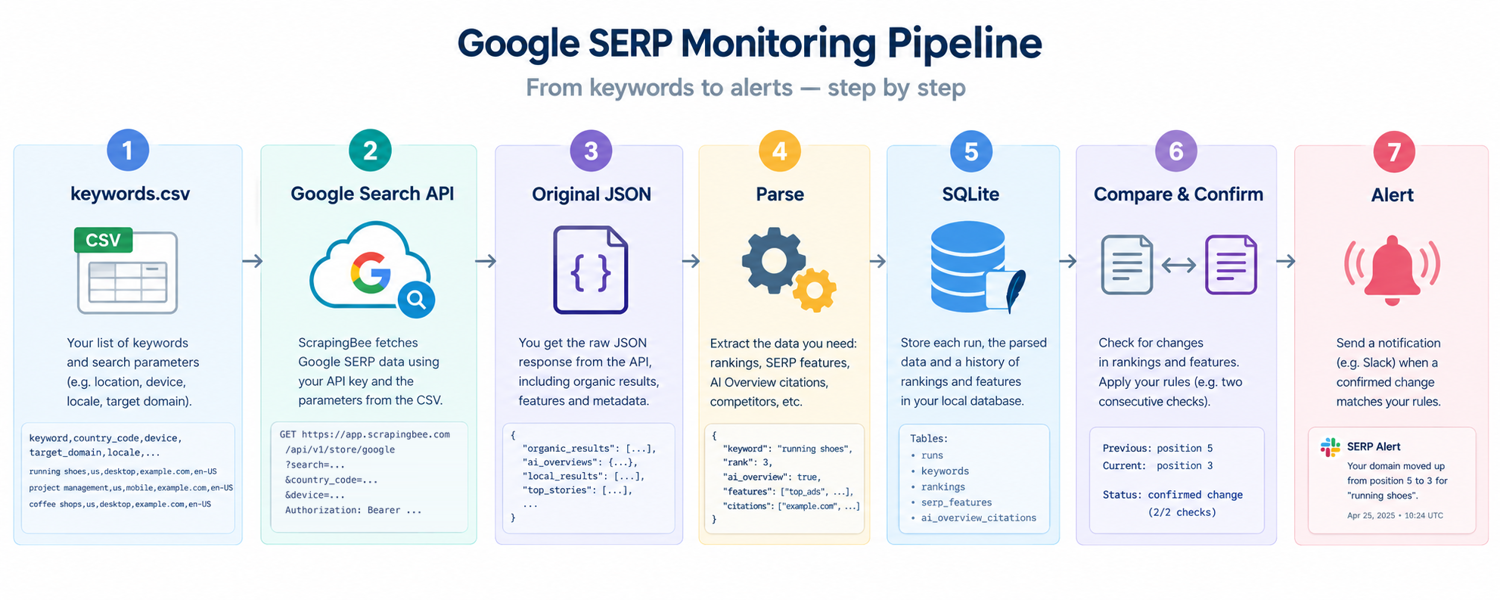
NOTE: The complete code is stored in this publicly accessible repository. The examples here are arranged as a step-by-step walkthrough, with temporary smoke tests between stages, rather than as a modular application (as it is in the repo). Replace each temporary test as you move forward; they are there to help you inspect the current stage, not to become the final scheduled entry point.
Set up the project and API key
Create a folder on your local machine called serp-monitor/:
mkdir serp-monitor
Navigate into the folder:
cd serp-monitor
Create a virtual environment:
python -m venv venv
Activate the virtual environment:
source venv/bin/activate # On Mac/Linux. On Windows: venv\Scripts\activate
In the activated virtual environment, install the libraries:
pip install scrapingbee requests python-dotenv
From ScrapingBee’s dashboard, retrieve your API key:
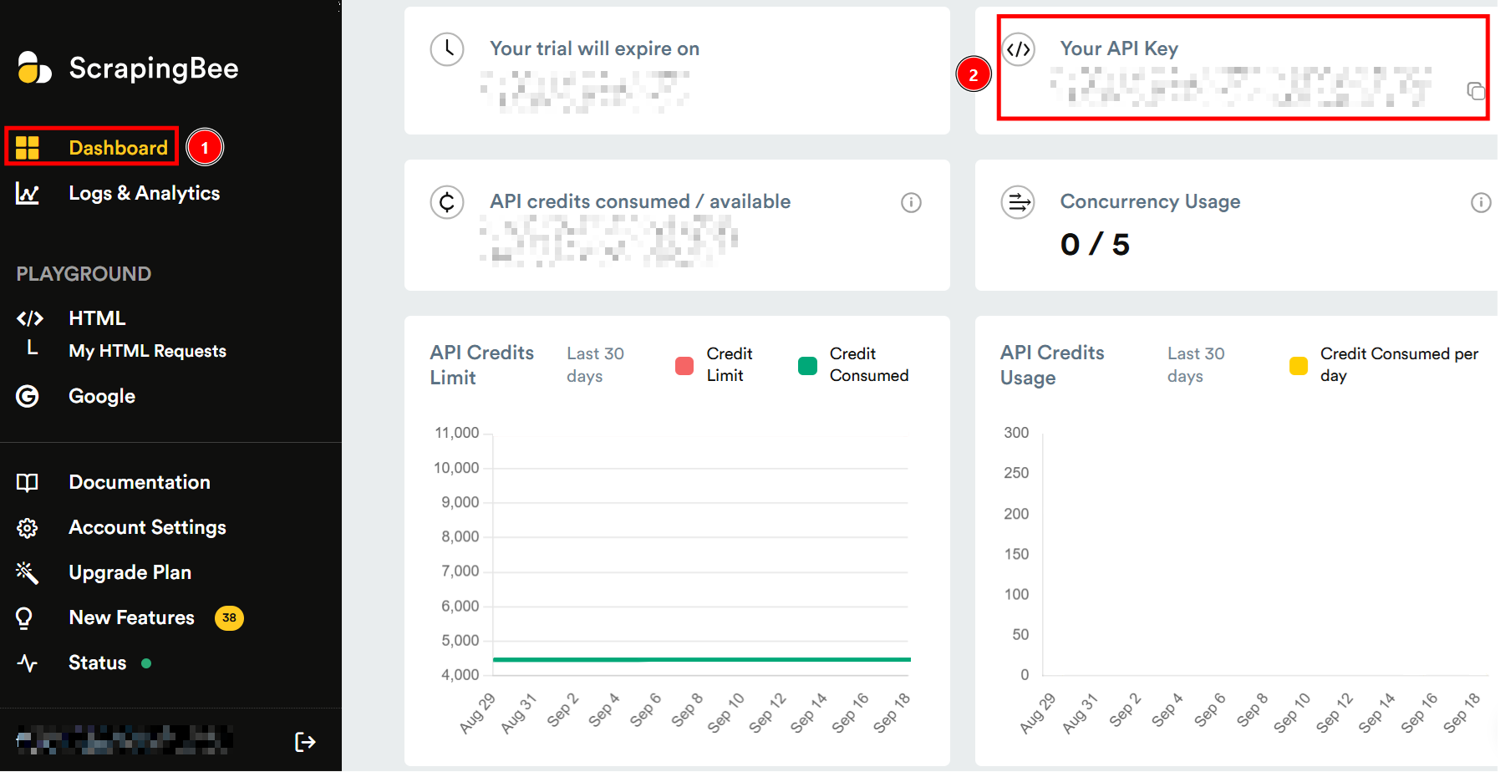
Inside serp-monitor/, create a .env file where you store your API key:
SCRAPINGBEE_API_KEY=YOUR_REAL_SCRAPINGBEE_API_KEY
So, before starting, the serp-monitor/ folder will be populated as follows:
serp-monitor/
   ├── venv/
   └── .env
Fetch a Google results page with the Google Search API
With the project ready, define what you want to monitor in a keywords.csv file. Each row supplies a keyword, its target domain, and the search settings for that observation. Keeping these inputs outside the Python code makes it easier to expand the keyword list without changing the collector.
For example, you can create the following:

Now, create a scraper.py file. Inside it, add the imports, configuration, CSV loader, and request function:
import csv
import gzip
import json
import os
import re
import sqlite3
import time
import uuid
from datetime import datetime, timezone
from pathlib import Path
from urllib.parse import urlparse
import requests
from dotenv import load_dotenv
from scrapingbee import ScrapingBeeClient

load_dotenv()

API_KEY = os.getenv("SCRAPINGBEE_API_KEY")
if not API_KEY:
    raise SystemExit("Set SCRAPINGBEE_API_KEY in .env or the environment.")

client = ScrapingBeeClient(api_key=API_KEY)
DB_PATH = Path("monitor.db")
SNAPSHOT_DIR = Path("snapshots")
LOCALE_DEFAULT = "en-US"
PAGES = 1
LIGHT_REQUEST = False

def now_utc():
    return datetime.now(timezone.utc).isoformat()

def load_keywords(path="keywords.csv"):
    with open(path, newline="", encoding="utf-8") as fh:
        rows = list(csv.DictReader(fh))
    required = {"keyword", "target_domain", "country_code", "device"}
    if not rows or not required.issubset(rows[0]):
        raise ValueError(f"CSV must contain columns: {sorted(required)}")
    return rows

def normalize_host(value):
    value = (value or "").strip().lower()
    if "://" not in value:
        value = "https://" + value
    host = (urlparse(value).hostname or "").lower().rstrip(".")
    return host[4:] if host.startswith("www.") else host

def owns_domain(result_host, target_domain):
    host, target = normalize_host(result_host), normalize_host(target_domain)
    return bool(host and target and (host == target or host.endswith("." + target)))

def fetch_serp(row, pages=PAGES, light_request=LIGHT_REQUEST):
    params = {
        "country_code": row.get("country_code") or "us",
        "device": row.get("device") or "desktop",
        "page": 1,
        "pages": pages,
        "light_request": str(light_request).lower(),
        "extra_params": f"locale={row.get('locale') or LOCALE_DEFAULT}",
    }
    if row.get("latitude") and row.get("longitude"):
        params["latitude"] = float(row["latitude"])
        params["longitude"] = float(row["longitude"])
        if row.get("radius"):
            params["radius"] = int(float(row["radius"]))

    last_error = None
    for attempt in range(3):
        try:
            response = client.google_search(row["keyword"], params=params, timeout=60)
        except requests.RequestException as exc:
            last_error = f"request error: {type(exc).__name__}: {exc}"
            if attempt < 2:
                time.sleep(2 ** attempt)
                continue
            return None, last_error, "unknown", "unknown"

        cost = response.headers.get("Spb-cost") or "unknown"
        request_id = response.headers.get("Spb-request-id") or "unknown"
        if response.status_code == 200:
            try:
                payload = response.json()
            except ValueError:
                return None, "invalid JSON response", cost, request_id
            if not isinstance(payload, dict) or not isinstance(payload.get("organic_results"), list):
                return None, "missing or invalid organic_results", cost, request_id
            return payload, None, cost, request_id

        last_error = f"HTTP {response.status_code}"
        if response.status_code not in (429, 500, 502, 503, 504) or attempt == 2:
            break
        time.sleep(2 ** attempt)
    return None, last_error, cost if "cost" in locals() else "unknown", request_id if "request_id" in locals() else "unknown"
The request mode determines which data you can expect. Setting light_request=true skips browser rendering and uses fewer credits, and light responses can include AI Overviews, but our documentation supports them only on regular requests, so use light_request=false for AI Overview history. Regular requests, with light_request=false, support Overview extraction when one is present. They don’t guarantee that Google will show one for your keyword.
The function also keeps collection failures separate from search results. Its 60-second timeout allows for the provider’s retry behavior, while bounded retries cover transport errors and retryable HTTP responses. Authentication or parameter errors need correction, not an endless retry loop.
When available, retain the Spb-cost header and request ID so you can investigate consumption or a particular response later. If either header is missing, keep its value as unknown rather than inferring it.
Before moving on, run the temporary smoke test against the first CSV row. You’re checking that the request succeeds and returns a payload you can inspect, rather than testing the whole monitor at this stage. For a first smoke test, add this temporary block at the bottom of scraper.py and run python scraper.py:
if __name__ == "__main__":
    row = load_keywords()[0]
    payload, error, cost, request_id = fetch_serp(row)
    print({"keyword": row["keyword"], "error": error,
           "cost": cost, "request_id": request_id})
    if payload:
        print(json.dumps({
            "organic_results": payload.get("organic_results", [])[:3],
            "ai_overviews": payload.get("ai_overviews", "missing"),
        }, indent=2, ensure_ascii=False))
        print("\nParsed organic results:")
        for item in payload.get("organic_results", [])[:3]:
            print({
                "position": item.get("position"),
                "title": item.get("title"),
                "url": item.get("url") or item.get("link"),
            })
Your result should look similar to the following:
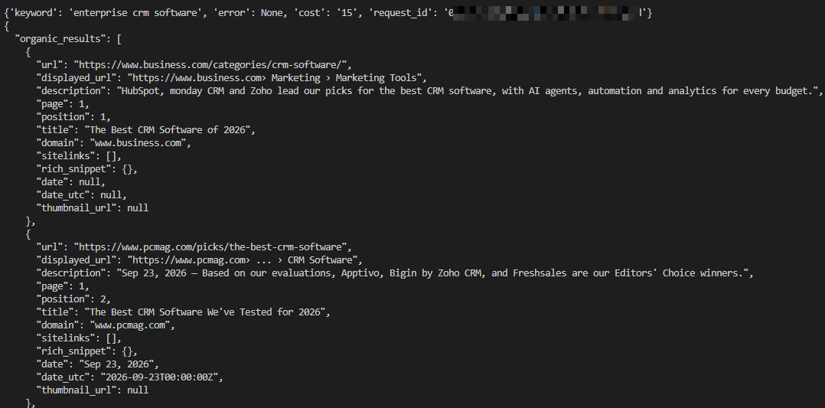
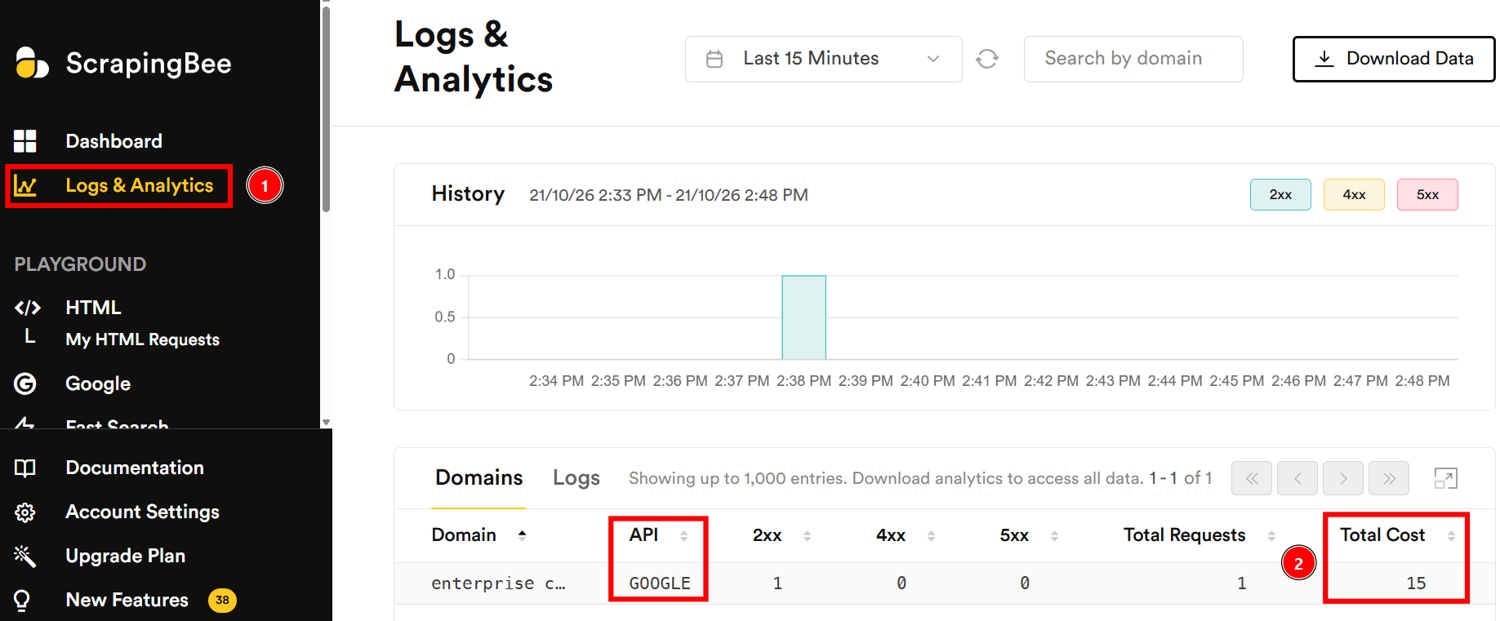
And in ScrapingBee’s dashboard, you will see the credits consumed (15):
Track your ranking across a keyword list
Now that you can retrieve a response, the next step is to find your target within its organic results. The parser uses organic_results and keeps the position supplied by the API rather than inventing a ranking from the item’s list index.
That distinction becomes especially important when you collect multiple pages. With pages above 1, positions restart on each page, so keep PAGES = 1 unless you also calculate an absolute rank. An organic ranking is also not a visual screen position; features can occupy space around the listings.
Add these functions at the end of scraper.py:
def parse_ranking(payload, target_domain):
    matches = []
    for result in payload.get("organic_results", []):
        url = result.get("url") or result.get("link") or ""
        host = normalize_host(url)
        if owns_domain(host, target_domain):
            try:
                position = int(result["position"])
            except (KeyError, TypeError, ValueError):
                continue
            matches.append({
                "position": position,
                "url": url,
                "domain": host,
                "title": result.get("title"),
                "description": result.get("description") or result.get("snippet"),
            })
    return min(matches, key=lambda item: item["position"]) if matches else None

def series_key(row):
    config = {
        "keyword": row["keyword"].strip(),
        "target_domain": normalize_host(row["target_domain"]),
        "country_code": row.get("country_code") or "us",
        "locale": row.get("locale") or LOCALE_DEFAULT,
        "device": row.get("device") or "desktop",
        "latitude": row.get("latitude") or None,
        "longitude": row.get("longitude") or None,
        "radius": row.get("radius") or None,
        "pages": PAGES,
        "light_request": LIGHT_REQUEST,
    }
    return json.dumps(config, sort_keys=True, separators=(",", ":")), config
Use the next temporary test to check the parser against a real response:
if __name__ == "__main__":
    row = load_keywords()[0]
    payload, error, cost, request_id = fetch_serp(row)
    print({
        "keyword": row["keyword"],
        "error": error,
        "cost": cost,
        "request_id": request_id,
    })
    if payload:
        print(json.dumps({
            "organic_results": payload.get("organic_results", [])[:3],
            "ai_overviews": payload.get("ai_overviews", "missing"),
        }, indent=2, ensure_ascii=False))
        ranking = parse_ranking(payload, row["target_domain"])
        print(
            "Target ranking:",
            ranking or "not found within fetched depth"
        )
If your target is not among the returned results, describe it as “not found within fetched depth.” The response tells you what was collected, not where the site ranks beyond that boundary.
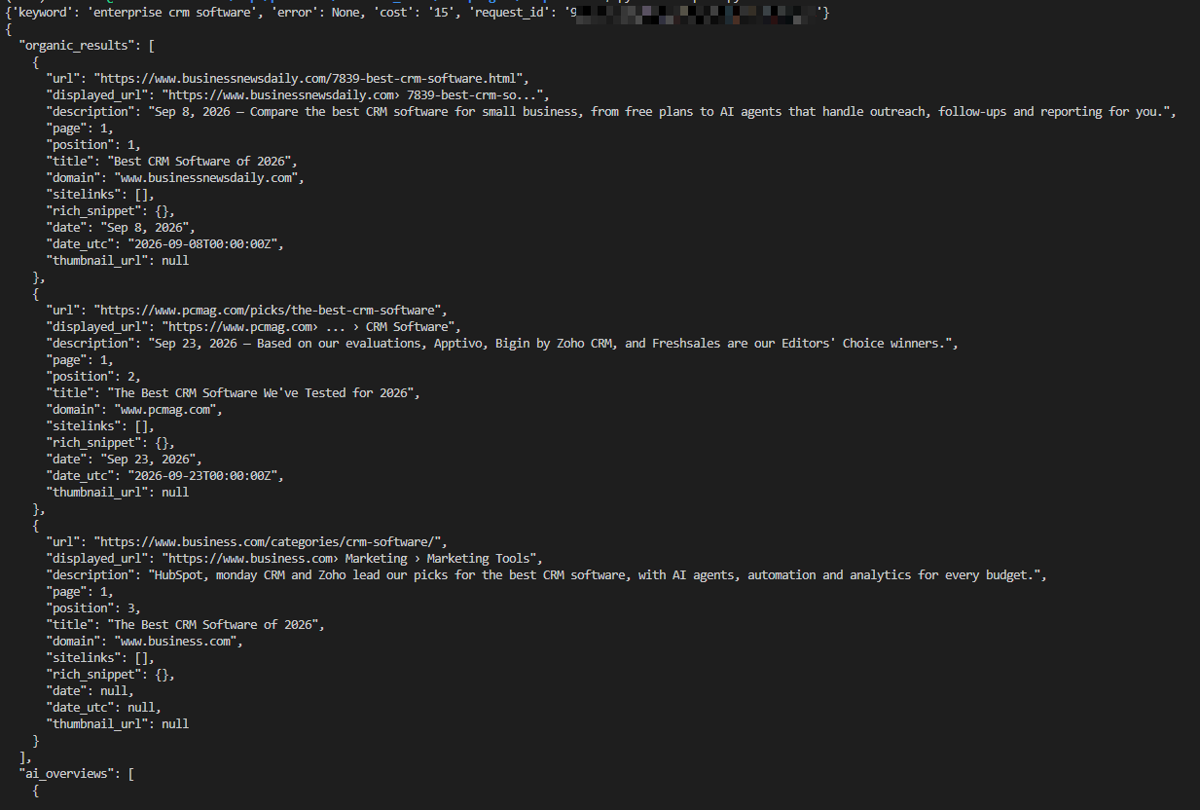
You should see output similar to the following:
Capture SERP features and AI Overview citations
A ranking number gives you one part of the observation. Recording the features around it helps you distinguish a position change from a change in the kind of results Google returned.
For each valid classic-search response, inspect ai_overviews, questions, local_results, top_stories, top_ads, bottom_ads, and knowledge_graph. The parser preserves three states: a nonempty list or dictionary means the feature was observed; an empty collection means it was not returned; and a missing or unexpectedly typed field means its state is unknown. Keeping that third state prevents incomplete data from becoming a false disappearance.
To do so, add this helper at the end of the Python file:
FEATURE_FIELDS = (
    "ai_overviews", "questions", "local_results", "top_stories",
    "top_ads", "bottom_ads", "knowledge_graph",
)

def feature_states(payload):
    states = {}
    for name in FEATURE_FIELDS:
        if name not in payload:
            states[name] = None
            continue
        value = payload[name]
        if isinstance(value, (list, dict)):
            states[name] = bool(value)
        else:
            states[name] = None
    return states

def collect_urls(value):
    """Collect URL-shaped strings recursively without assuming one schema path."""
    found = []
    if isinstance(value, dict):
        for key, child in value.items():
            if isinstance(child, str) and key.lower() in {
                "url", "link", "href", "source_url", "source_link"
            }:
                if child.startswith(("https://", "http://")):
                    found.append(child)
            else:
                found.extend(collect_urls(child))
    elif isinstance(value, list):
        for child in value:
            found.extend(collect_urls(child))
    return found

def parse_aio_citations(payload, target_domain):
    aio = payload.get("ai_overviews")
    if not isinstance(aio, (dict, list)) or not aio:
        return None  # no reliable citation series for this response
    urls = collect_urls(aio)
    # Preserve first-seen order while deduplicating normalized URLs.
    unique = []
    seen = set()
    for url in urls:
        key = url.strip().rstrip("/")
        if key not in seen:
            seen.add(key)
            unique.append(url)
    return [
        {"citation_rank": i, "url": url,
         "domain": normalize_host(url),
         "is_target": owns_domain(url, target_domain)}
        for i, url in enumerate(unique, start=1)
    ]
The AI Overview URL helper takes a deliberately broad approach: it searches recursively for URL-shaped fields rather than depending on one reference-list path. That makes the output useful for inspection, but it does not validate every collected URL as a citation. Likewise, the order in which the helper finds URLs should not be treated as confirmed citation placement.
In this case, the smoke test you can add is the following:
if __name__ == "__main__":
    row = load_keywords()[0]
    payload, error, cost, request_id = fetch_serp(row)
    print({
        "keyword": row["keyword"],
        "error": error,
        "cost": cost,
        "request_id": request_id,
    })
    if payload:
        print(json.dumps({
            "organic_results": payload.get("organic_results", [])[:3],
            "ai_overviews": payload.get("ai_overviews", "missing"),
        }, indent=2, ensure_ascii=False))
        ranking = parse_ranking(payload, row["target_domain"])
        print("SERP feature states:", feature_states(payload))
        print("AI Overview citations:", parse_aio_citations(payload, row["target_domain"]))
After running the code, you will obtain a JSON response that, at the end of it, reports the result you are searching for:

Store raw snapshots and a ranking history
The temporary tests show what the monitor can extract now. Saving the original responses lets you revisit those decisions later; for example, when you improve a parser or need to investigate an unexpected alert.
To do so, the idea is to store every successful payload as a compressed JSON snapshot with a unique run ID and UTC timestamp. This way, you never overwrite an earlier check. That is because these snapshots preserve what the API returned, though they cannot recover fields it omitted.
Alongside them, SQLite provides the structured history you’ll query for rankings, features, and alert state.
The setup below creates the five tables used for those records:
def connect_db():
    con = sqlite3.connect(DB_PATH)
    con.execute("PRAGMA foreign_keys = ON")
    con.executescript("""
    CREATE TABLE IF NOT EXISTS runs (
        id TEXT PRIMARY KEY, series_key TEXT NOT NULL, keyword TEXT NOT NULL,
        target_domain TEXT NOT NULL, country_code TEXT, locale TEXT, device TEXT,
        latitude REAL, longitude REAL, radius INTEGER, fetched_at TEXT NOT NULL,
        request_config_json TEXT NOT NULL, light_request INTEGER NOT NULL,
        credits TEXT, status TEXT NOT NULL, error TEXT, raw_path TEXT
    );
    CREATE TABLE IF NOT EXISTS organic_results (
        run_id TEXT NOT NULL REFERENCES runs(id), position INTEGER NOT NULL,
        url TEXT NOT NULL, domain TEXT, title TEXT, description TEXT,
        PRIMARY KEY (run_id, position, url)
    );
    CREATE TABLE IF NOT EXISTS serp_features (
        run_id TEXT NOT NULL REFERENCES runs(id), feature TEXT NOT NULL,
        present INTEGER, PRIMARY KEY (run_id, feature)
    );
    CREATE TABLE IF NOT EXISTS aio_citations (
        run_id TEXT NOT NULL REFERENCES runs(id), citation_rank INTEGER,
        url TEXT NOT NULL, domain TEXT, PRIMARY KEY (run_id, url)
    );
    CREATE TABLE IF NOT EXISTS alerts (
        id INTEGER PRIMARY KEY AUTOINCREMENT,
        run_id TEXT NOT NULL REFERENCES runs(id),
        baseline_run_id TEXT REFERENCES runs(id), rule TEXT NOT NULL,
        detail TEXT NOT NULL, state TEXT NOT NULL,
        created_at TEXT NOT NULL, sent_at TEXT
    );
    CREATE INDEX IF NOT EXISTS idx_runs_series_time
        ON runs(series_key, fetched_at);
    CREATE INDEX IF NOT EXISTS idx_alerts_state ON alerts(state);
    """)
    return con

def save_snapshot(run_id, fetched_at, payload):
    folder = SNAPSHOT_DIR / fetched_at[:10]
    folder.mkdir(parents=True, exist_ok=True)
    path = folder / f"{run_id}.json.gz"
    with gzip.open(path, "wt", encoding="utf-8") as fh:
        json.dump(payload, fh, ensure_ascii=False)
    return str(path)

def save_run(con, row, payload, error, cost, request_id):
    fetched_at = now_utc()
    run_id = str(uuid.uuid4())
    key, config = series_key(row)
    raw_path = save_snapshot(run_id, fetched_at, payload) if payload else None
    status = "ok" if payload is not None and error is None else "error"
    con.execute(
        """INSERT INTO runs (id, series_key, keyword, target_domain, country_code,
           locale, device, latitude, longitude, radius, fetched_at,
           request_config_json, light_request, credits, status, error, raw_path)
           VALUES (?, ?, ?, ?, ?, ?, ?, ?, ?, ?, ?, ?, ?, ?, ?, ?, ?)""",
        (run_id, key, row["keyword"], normalize_host(row["target_domain"]),
         row.get("country_code") or "us", row.get("locale") or LOCALE_DEFAULT,
         row.get("device") or "desktop", float(row["latitude"]) if row.get("latitude") else None,
         float(row["longitude"]) if row.get("longitude") else None,
         int(float(row["radius"])) if row.get("radius") else None, fetched_at,
         json.dumps({**config, "request_id": request_id}, sort_keys=True),
         int(LIGHT_REQUEST), cost, status, error, raw_path),
    )
    if payload:
        ranking = parse_ranking(payload, row["target_domain"])
        if ranking:
            con.execute(
                "INSERT INTO organic_results (run_id, position, url, domain, title, description) VALUES (?, ?, ?, ?, ?, ?)",
                (run_id, ranking["position"], ranking["url"], ranking["domain"], ranking["title"], ranking["description"]),
            )
        for feature, present in feature_states(payload).items():
            con.execute("INSERT INTO serp_features (run_id, feature, present) VALUES (?, ?, ?)",
                        (run_id, feature, None if present is None else int(present)))
        citations = parse_aio_citations(payload, row["target_domain"])
        if citations:
            con.executemany(
                "INSERT OR IGNORE INTO aio_citations (run_id, citation_rank, url, domain) VALUES (?, ?, ?, ?)",
                [(run_id, c["citation_rank"], c["url"], c["domain"]) for c in citations],
            )
    return run_id, key, status
When you test storage, expect a run record even when collection fails, but a raw snapshot path only when a response was successfully saved. If runs contains records while the related tables remain empty, inspect the response and parser output before assuming the entire pipeline worked.
Also, the final run loop needs to connect these pieces for every CSV row: load the configuration, fetch the response, save its snapshot, parse the observations, and persist them through one SQLite writer. Keep the run’s database records in one transaction, and preserve unknown feature states as SQL NULL. Then call con.commit() once the run's observations and alert transitions are saved; otherwise nothing is written when the connection closes.
Finally, comparability depends on the stored configuration as much as the ranking itself. Keep that configuration in request_config_json, and use a series_key that includes the keyword, target domain, location, locale, device, request mode, and fetched depth. That prevents a mobile check or a deeper collection from quietly entering the same comparison history as a different setup.
Detect changes and send alerts
Once observations are stored, you can start comparing them. The challenge is deciding which differences deserve a notification. A changed ranking, a failed request, and an unknown feature state are different events, even if all three interrupt an otherwise steady history.
Separate the process into detection, confirmation, and notification. Start with rules that the stored data can actually support, using the following table as a guide:
| Rule | Trigger | Required evidence |
|---|---|---|
| Ranking drop | The target drops at least three positions from a baseline in the top five | A valid target position in both observations |
| Top-10 exit | A target previously in the top 10 moves below position 10 or is no longer found within a verified top-10 response | A comparable response covering at least the first 10 organic positions |
| AI Overview change | An AI Overview appears or disappears | Explicit, known feature states from regular requests |
| Ranking URL change | A different target URL becomes the highest-ranking match | A stored target URL in both observations |
| Title change | Google returns a different title for the same URL | Matching URLs and nonempty titles |
At PAGES = 1, Google often returns fewer than 10 organic results, so the top-10 exit rule won't fire when your target drops off the page. To catch that, alert on 'not found' whenever the target was in the previous check's results, and confirm it on the next run.
NOTE: The repo's evaluate_rule does not implement it, for simplicity.
For ranking rules, a missing target is not a numeric position. So, prefer reporting “not found within fetched depth” rather than assigning position 11 or calculating a drop from an invented value. The same principle applies to features: SQL NULL means unknown, not false.
The current storage also sets limits on which alerts you can implement. Its organic_results table contains only your target’s best result, so competitor-entry and top-10 churn analysis require the full snapshots or expanded storage. Also, the broad AI Overview URL parser needs validation before its output can support citation-change alerts.
For supported rules, use the preceding successful observation with the same series_key as the baseline. If there isn’t one, record the new observation and begin building history without sending an alert.
Furthermore, when a rule first triggers, create a pending event and preserve that original baseline. This matters for a sequence such as position 2, then 5, then 5: the third observation confirms the drop from 2. Comparing it only with the immediately preceding position 5 would miss the confirmation.
The next successful, comparable observation should either confirm the same condition or cancel it if the change has reversed. A request failure or an unknown required field does neither; leave the event pending until usable evidence arrives. After confirmation, keep the event active while the condition persists rather than sending the same notification on every run. Resolve it when a valid observation shows recovery. A later recurrence can then begin a new confirmation cycle. To avoid duplicate active events, check the combination of series, rule, and affected entity before inserting another row; the current schema does not enforce that identity for you.
Save each run’s observations and alert transitions together, then send notifications outside the database transaction. This keeps a slow Slack webhook from holding a SQLite write lock.
Read the webhook from SLACK_WEBHOOK_URL and make the message useful without requiring the recipient to open the database. Include the keyword, target domain, search settings, rule, baseline and confirming values, observation times, and run IDs. “Position 2 → 5, confirmed by two successful checks” conveys much more than “ranking decreased.”
Only set sent_at after Slack accepts the notification, and retry confirmed events that remain unsent on later executions. This provides at-least-once delivery, not guaranteed deduplication: a crash between Slack acceptance and the database update can produce a repeat. Including the alert ID makes that repeat recognizable.
Finally, distinguish evidence stored on the monitor from evidence a recipient can open. A local snapshot path helps someone investigating on the host, but it is not a clickable evidence link for everyone receiving the Slack message.
NOTE: The full logic is in main.py and serp_monitor/alerts.py in the repository.
Run the monitor on a schedule
Before adding a scheduler, replace the temporary smoke test with the complete entry point. It should load keywords.csv, open the database with connect_db(), process every row, persist collection outcomes through save_run(), and evaluate alerts after successful observations. Finish by retrying confirmed notifications that have not been marked sent.
For a single-host installation, cron is a straightforward starting point. If you wish to proceed with this path, run the script from the absolute project directory because the current code resolves .env, keywords.csv, and monitor.db relative to the current working directory in the repository.
NOTE: For cron, the repository includes scripts/run_monitor.sh.
Choose the interval with confirmation in mind. With daily collection, for instance, a newly detected change normally needs the following day’s successful check before it can trigger a notification. In that case, failed or unusable checks extend that delay. This means that collecting at a consistent time makes the daily observations easier to compare, although it cannot eliminate variation in Google’s results.
GitHub Actions is another option, and the repo includes a manually triggered workflow (add a schedule: trigger to run it automatically), but temporary hosted runners introduce a persistence problem. If every execution starts with a fresh monitor.db, the monitor loses both its baseline and pending events. Restore the database and snapshots before collection, then save the updated state afterward, including when individual keyword requests fail. An unexpected restoration failure should not silently become a new, empty history.
Finally, before leaving the monitor unattended, run it twice against the same persisted database. Check that the history grows, earlier snapshots remain available, and pending events survive a restart. Also test that overlapping launches cannot write concurrently. Back up the database and snapshots together so the evidence behind an alert remains available when you need it.
Monitoring Google rankings by location and device
The same keyword can produce different results under different search settings, so location and device belong in the identity of each monitoring series.
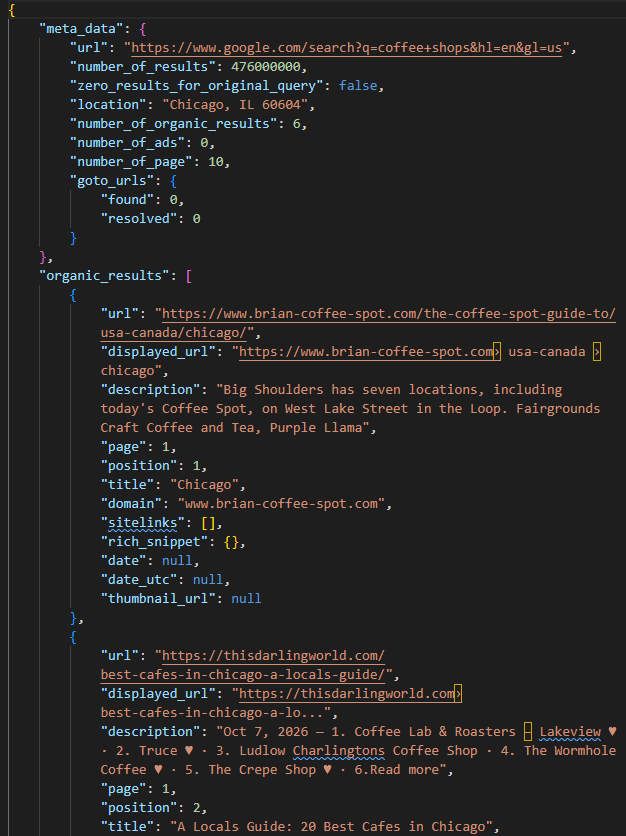
In this monitor, country_code accepts an ISO 3166-1 alpha-2 country code and defaults to us. The CSV’s locale value is passed through extra_params, for example as locale=en-US. It controls the interface language; it does not guarantee that the returned pages are written in that language.
For a more specific location, supply latitude and longitude together. You can also add a radius in meters, but it only applies when both coordinates are present. These settings define the location context you request, not a promise that every person in that city sees identical results.
The Chicago example below shows how those fields fit into the CSV (of course, you’re free to replace its keyword and target domain with your own for different results):
keyword,target_domain,country_code,locale,device,latitude,longitude,radius
coffee shops,example.com,us,,desktop,41.8781,-87.6298,500
Note that you don’t need a separate location identifier for this setup. fetch_serp() already reads the coordinate fields, while series_key() includes them alongside the other collection settings, PAGES, and LIGHT_REQUEST.
To inspect the localized response, you can use the following basic snippet:
import csv
import os
from dotenv import load_dotenv
from scrapingbee import ScrapingBeeClient

load_dotenv()
API_KEY = os.getenv("SCRAPINGBEE_API_KEY")
client = ScrapingBeeClient(api_key=API_KEY)

def send_request():
    with open("keywords.csv", newline="", encoding="utf-8") as fh:
        row = next(csv.DictReader(fh), None)
    if not row or not (row.get("latitude") or "").strip() or not (row.get("longitude") or "").strip():
        raise SystemExit("The first row of keywords.csv must contain latitude and longitude.")
    response = client.google_search(
        row["keyword"].strip(),
        params={
            "latitude": row["latitude"].strip(),
            "longitude": row["longitude"].strip(),
            "radius": row["radius"].strip(),
            "device": row["device"].strip(),
        },
        timeout=60,
    )
    print("HTTP Response Body:", response.content)

if __name__ == "__main__":
    send_request()
You will obtain something similar to the following:
NOTE: In the public repository, this file is in examples/keywords2.csv and can be tested with python main.py examples/keywords2.csv.
How to separate real ranking changes from SERP volatility
When a page drops from position 2 to 5, it’s tempting to look for something to fix. As a first step, check whether the drop repeats. If the next successful observation also places the page at 5 under the same search settings, you have a reasonable basis for an alert (but not yet a reason to rewrite the page or assume the change will last).
To judge how unusual that result is, look at the keyword’s recent history. For example, take its last seven successful checks under matching settings and calculate the median position from the checks where your target appeared. Show that median alongside the individual observations and the number of checks that found the target. That matters because a reassuring median can hide several checks where the page wasn’t found at all. So, keep those observations labeled “not found within fetched depth,” and keep failed requests separate. Neither should become an invented ranking of zero or 11.
Once you understand the movement for that keyword, widen the view. Is it isolated, or are results changing across your keyword list? This is where you can define a keyword-set churn metric that measures the share of eligible comparisons in which at least three new domains entered the first 10 organic results. After that, for each keyword, compare the current snapshot with its previous valid snapshot under the same settings. Then, deduplicate the domains before counting newcomers, and report how many comparisons qualified so the metric’s coverage is clear.
Also, consider that you’ll need the full snapshots for this calculation, because the current database stores only your target’s best organic result. That is because the metric describes turnover across your tracked keywords, but it cannot establish a Google-wide change or explain its cause.
After all this, if you see movement across several keywords, compare its timing with announced updates on the Google Search Status Dashboard. As of October 23, 2026, the September 24 spam update is listed as lasting 13 days, 16 hours. Keep collecting throughout a rollout and mark it on your timeline so you can distinguish observations made during the update from those made afterward. For core updates, Google recommends waiting a full week after completion before comparing post-update Search Console performance with a pre-update period.
Finally, consult Semrush Sensor and MozCast for broader SERP volatility signals. They help establish context, but cannot diagnose your ranking change.
Why your SERP monitor and Search Console disagree
Position 3 in your monitor and 4.8 in Search Console can both be correct because they describe different observations. That’s because your monitor captures organic results for one configured location and device at a particular moment, while Search Console aggregates positions across the searches included in your selected filters.
Google defines average position as the average position of the topmost result from your site. This means that if two of your pages appear in a search, the site-level measurement uses the higher result rather than averaging the two. Furthermore, grouping by page changes the scope to that URL’s performance, which also helps explain why chart and table totals can differ.
So, before investigating a discrepancy, narrow the comparison as far as the available dimensions allow. Match the query, country, device, relevant page, and date range, and align timezone boundaries. Those steps reduce avoidable differences, but they cannot turn an average across searches into the same measurement as one sampled organic ranking.
Historical comparisons also need context. If your reporting spans September 2025, annotate the removal of num=100, which coincided with reported impression declines and position shifts. Remember that the suggestion that scrapers had inflated earlier impressions remains unconfirmed by Google.
The dedicated AI report answers another part of the picture: impressions and which site URLs were visible, not the full individual answers or competitors’ citations. Check its available dimensions before attempting a query-level join; do not assume it supports the same breakdowns as the Search performance report.
Overall, use Search Console to assess observed performance and the monitor to investigate the sampled results behind a particular configuration. The useful question is not which number is right, but what each measurement lets you conclude.
What it costs to monitor Google SERPs with ScrapingBee
The workload determines the cost, so start with the collection schedule rather than the plan price. A daily check of 200 keywords is one workload; checking those keywords across several cities or on both desktop and mobile creates additional observations to collect.
For a uniform setup, use the monthly estimate below:

If keywords have different schedules or settings, add their scheduled checks instead of applying one multiplier to the whole list. For page 1 only, each check requires one API call: 10 credits for a light request or 15 for a regular request that supports AI Overviews.
The table shows how three daily schedules translate into consumption over 30 days:
| Monitoring setup | Calls | Light credits | Regular credits |
|---|---|---|---|
| 200 keywords, one location, desktop | 6,000 | 60,000 | 90,000 |
| 500 keywords, one location, desktop and mobile | 30,000 | 300,000 | 450,000 |
| 50 keywords, five cities, desktop | 7,500 | 75,000 | 112,500 |
If you use ScrapingBee’s SERP API, at current prices, Hobby provides 75,000 credits for $19, Freelance provides 250,000 for $49, and Startup provides 1 million for $99.
By credit allowance, the 200-keyword example fits Hobby with light requests or Freelance with regular requests. The 500-keyword desktop-and-mobile example needs Startup for either mode among these plans. The five-city example fits Hobby for light requests or Freelance for regular requests (but its light schedule uses Hobby’s entire allowance over 30 days).
The Fast Search API is another option when you need organic results and Top Stories but not AI Overviews. It costs 10 credits per request, but it is not a drop-in replacement for this implementation: the schema requires parser changes, and its published country-targeting controls do not establish equivalent city or device controls.
Overall, before choosing a plan, test the keywords and settings you actually intend to use. ScrapingBee offers a 1,000-credit trial, with no credit card required.
SERP monitoring FAQ
What is the difference between SERP tracking and rank tracking?
Rank tracking follows where your page appears for a keyword. SERP tracking also records what surrounds it, including competing URLs, local packs, and AI features. Vendors sometimes use the terms interchangeably, so check what a tool actually collects. Neither measurement, by itself, explains why a ranking changed.
What is a SERP API?
A SERP API returns search results as structured data, typically JSON, so your code can process them without maintaining its own browser and HTML parser. You submit a query and supported settings; the API returns the available results. This project uses ScrapingBee’s Google Search API to collect organic listings and search features.
Which SERP features should you track?
Start with the features that appear for your keywords and could affect how people discover your site: AI Overviews, People Also Ask, local packs, Top Stories, and ads. Record whether each feature appeared separately from whether your site was included. That keeps an Overview’s presence from being mistaken for a citation of your page.
How often should you check Google rankings?
Daily collection is a reasonable starting point. Hourly checks may be useful during a launch or for a small, high-priority keyword group, while weekly checks may be enough for lower-priority terms. Choose a frequency that supports a decision, remembering that confirmation requires another successful, comparable observation.
Can you still get 100 Google results in one request?
Don’t rely on the old num=100 behavior, which stopped working in September 2025. ScrapingBee’s pages parameter can combine up to 10 result pages in one response, although its documentation recommends three or fewer for reliability. One aggregated response does not guarantee 100 usable listings, so inspect the returned depth and actual credit consumption.
How do you track whether AI Overviews cite your site?
Use regular requests with light_request=false, then identify the Overview’s actual reference URLs and compare their hostnames with your domain. The broad URL collector in this walkthrough is a starting point for inspecting the payload, not a substitute for validating those references. Repeat checks under consistent settings before concluding that a citation is reliably present or has disappeared.
What triggers Google AI Overviews?
Longer queries and questions were more likely to produce summaries in Pew Research Center’s study: 8% of one- or two-word queries, 53% of queries with at least 10 words, and 60% of queries beginning with question words. Those findings describe March 2025 searches reconstructed in April, not current trigger rules. Your monitor can establish what appears for your own keyword set.
Is there a free Google search API?
For existing customers, Google’s Custom Search JSON API includes 100 free daily queries, but it is closed to new customers and ends January 1, 2027. Search Console serves a different need: it reports your site’s performance rather than returning competitor SERPs. For testing this implementation, ScrapingBee offers 1,000 trial credits without a credit card.
How much does SERP monitoring cost?
The main variables are how many configurations you check, how often you check them, and which request mode you use. ScrapingBee charges 10 credits per successful light call or 15 per regular call. Checking 200 keywords daily for one location on desktop uses 90,000 regular-request credits over 30 days, before additional successful checks. For aggregated pages, budget from the measured cost of your chosen configuration.
Is it legal to monitor Google search results?
That depends on the collection method, applicable terms, jurisdiction, and intended use. Google’s Terms prohibit automated access that violates its machine-readable instructions, and purchasing results through an API does not automatically settle those questions. Have qualified counsel review the intended workflow before launching a commercial service.