Web scraping for lead generation is the automated extraction of public business data to build a prospect list. The catch with lead scraping is that the sources with the best lead data are also the hardest to scrape.
When you're targeting job boards, map listings, or industry-specific directories, JavaScript rendering, datacenter IP blocks, and CAPTCHA challenges all come into play.
In this guide, I'll cover which public sources contain what lead data, how to pick the right source for your use case, and walk through the full code for scraping a popular public directory at scale.
Quick overview (TL;DR)
Scrape pre-login pages from public websites for lead generation. Even public pages require premium proxies and real browsers to be accessed reliably. The ScrapingBee API handles proxy rotation, fingerprinting, anti-bot bypass mechanisms, and rendering, so you focus only on extracting structured data without managing infrastructure. The rest of this guide shows the code.
What is web scraping for lead generation?
Web scraping for lead generation is the process of automatically collecting publicly available information about potential customers from the internet.
You can use it to gather names, website URLs, email addresses, phone numbers, job titles, hiring activity, and technology stack from company websites, contact pages, business directories, and job boards.
Many companies buy lead lists from third-party providers. The challenge is that those lists are often generic, you don't know where they came from and how recently they were updated. Moreover, if your competitors buy from the same provider, they'd have already reached out to the same prospects before you.
When you scrape leads yourself, you collect fresh data directly from the source. You define your own ideal customer profile (ICP), the type of company most likely to buy from you, and collect information only about those companies. That gives you a more targeted prospect list instead of a generic database built for everyone.
What lead data you can scrape (and from which public sources)
You can scrape any visible text on the internet that can be accessed without logging in. Business directories like Yellow Pages, Manta, or BBB (Better Business Bureau) provide contact details, ratings, and customer reviews for companies across different industries.
Google Maps is often the highest-value source for local B2B leads because small businesses may not have a strong website presence, but they actively maintain their Google Business Profiles. If you need local business data at scale, a Google Maps scraper collects contact details, addresses, ratings, and reviews.
You can also scrape individual company websites to collect emails, product and service details from landing pages, and leadership information from team pages. Job boards show you which companies are actively hiring, a signal that the company is investing in growth. Job descriptions further reveal the company's tech stack and problems it is actively solving.
Other popular leads data sources include review sites and public association directories. For example, you can scrape G2 reviews and get information about how customers perceive a product or service.
| Lead Source | Source examples | Public data you can pull | Typical blocking difficulty | Best for |
|---|---|---|---|---|
| Business directories | Yellow pages, Manta, Yelp | Business profile, contact information, location, and reviews | Low | Building targeted business lists and collecting firmographic data |
| Maps listings | Google maps | Business profile, contact information, address, and star ratings or reviews | High | Local business outreach |
| Company websites | Any public company site | Company/product description, contact emails, team details, phone numbers | Medium to high, depending on the website | Collecting detailed company and decision-maker data |
| Job boards | Indeed | Job titles, company names, locations, job descriptions, and salary brackets | High | Identifying hiring activity and buying intent |
| Review sites | G2 or Capterra | Company name, category, ratings, customer reviews | Medium to high | Understanding company reputation among its customers |
| Public association directories | Bar associations, medical boards, trade bodies | Member name, credentials, contact info, location | Low | Finding niche industry leads that match a specific ICP |
The public-source lead pipeline
Here is the workflow I use to build a lead pipeline. This six-step process turns public business data into a verified prospect list.
Define your ICP
Start by describing the type of company most likely to buy from you. Which industry are they in? Where are they located? How large is the company and its funding stage? Also consider factors such as business challenges, job titles of decision-makers, and hiring activity. The more specific you are at this stage, the more relevant your prospect list will be.
Identify public sources
Choose sources that contain information about companies matching your ICP. For local B2B businesses, Google Maps provides contact details, locations, ratings, and reviews. For industry-specific leads such as real estate companies, government registries like County Assessor or County GIS portals often contain required information.
If you're targeting SaaS or technology companies, company websites provide product information and leadership details. Review sites add customer feedback, common pain points, and the tools a company already uses.
Extract the data
Extract the fields you need from the selected sources. You can build a custom Python scraper to collect the data, but this is where most lead scraping pipelines break. Websites change layouts, increase rate limits, and update their anti-bot detection systems regularly. So teams use a scraping API or managed tool to handle browser automation, proxies, and CAPTCHA challenges. Later in this guide, I'll show you how to do this practically with full code.
Enrich
Raw records often contain only a company name, website, and contact information. Additional context like employee count, revenue range, technology stack, social profiles, and hiring activity provides a more complete view of the prospect. Scrape these additional signals yourself or use enrichment tools to add them to your dataset.
Verify
Send the gathered list through a verification tool to confirm the information is valid and current before passing it to your outreach tool. This keeps bounce rates low and protects your sender domain from being flagged as spam.
Deliver to CRM or outreach tools
Once your leads are verified and enriched, export your records as a CSV and upload them to your CRM, or use a Zapier connection if your lead generation web scraping pipeline supports it. Before importing, make sure your field names match the destination schema to avoid failed imports or incorrectly mapped records.
The hard part, why scrapers get blocked
| Lead Source | Difficulty | Scraping requirements |
|---|---|---|
| Static business/Public directories | Low | Datacenter IP, basic rate limiting |
| Company websites | Medium to high, depending on the website | Datacenter IP for most; residential proxies for sites behind Cloudflare |
| Maps listings | High | Residential proxies, JS rendering, CAPTCHA solving, careful request pacing |
| Review sites | Medium to high | Residential proxies + TLS fingerprinting |
| Job boards | High | Residential proxies, JS rendering, Cloudflare bypass, human-like behavior simulation |
Anti-bot systems first care about your IP reputation. Too many requests from the same IP address quickly get you blocked. Moreover, automated bots often run on cloud hosting providers such as AWS or DigitalOcean. Because of this, websites often trust residential IPs more than datacenter IPs.
Next, they examine browser and Transport Layer Security (TLS) fingerprints. Browser fingerprints include details such as screen resolution, fonts, and browser settings. TLS fingerprints contain the TLS version, cipher suites, and encryption preferences a browser presents during a connection. Websites compare these signals against those of real browsers and flag requests when a mismatch is detected.
To get around this, you configure the headless browser to mimic a real one. Tools like Playwright with stealth plugins do this by spoofing screen dimensions, hiding the navigator.webdriver flag, and patching the canvas API to return realistic output.
Websites also analyze browsing behavior. A bot might spend exactly two seconds on every page or navigate through hundreds of pages without scrolling or clicking. Anti-bot systems use these patterns to identify automated traffic.
What you actually need to get through
To handle these, you need browser automation tools like Playwright or Puppeteer that renders JavaScript, and residential proxies. A residential proxy routes your requests through IP addresses assigned by Internet Service Providers (ISPs) to real home devices, so your traffic looks like a regular household user browsing the web rather than a cloud server running automated scripts.
On top of all that, you need CAPTCHA solving and some basic human-like behavior baked in, such as randomized delays, scrolling patterns, and mouse movements. I know it sounds like a lot. And honestly, it is. I've watched teams spend two weeks on proxy rotation before writing a single line of extraction logic.
A scraping API like ScrapingBee sidesteps all of that. You send a request to the ScrapingBee API with render_js=true to handle JavaScript rendering, and premium_proxy=true to route through residential IPs when you're hitting harder targets. It returns the rendered HTML, so you can focus on extracting lead data rather than maintaining scraping infrastructure.
Code walkthrough, scrape a public directory for leads
I'll show how to scrape leads from Manta using the ScrapingBee API. Manta runs JavaScript rendering and blocks datacenter IPs, so a plain HTTP request doesn't work. I'll use ScrapingBee to handle proxy rotation, JavaScript rendering, and CAPTCHA solving, and write the code that extracts the lead data.
Setting up your environment
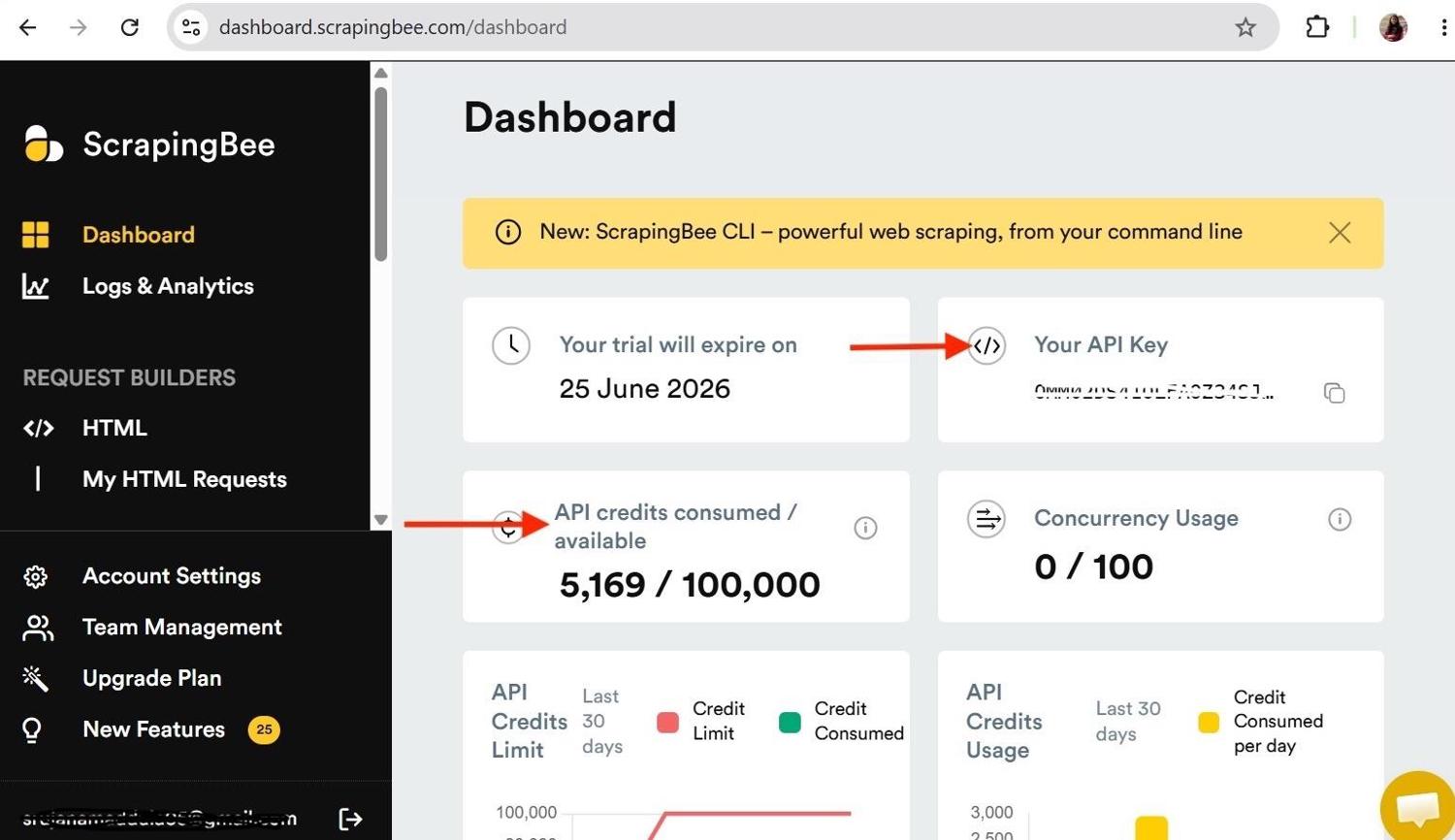
You'll need a ScrapingBee account to follow along with this tutorial. Create a free account, then copy your API key from the dashboard.
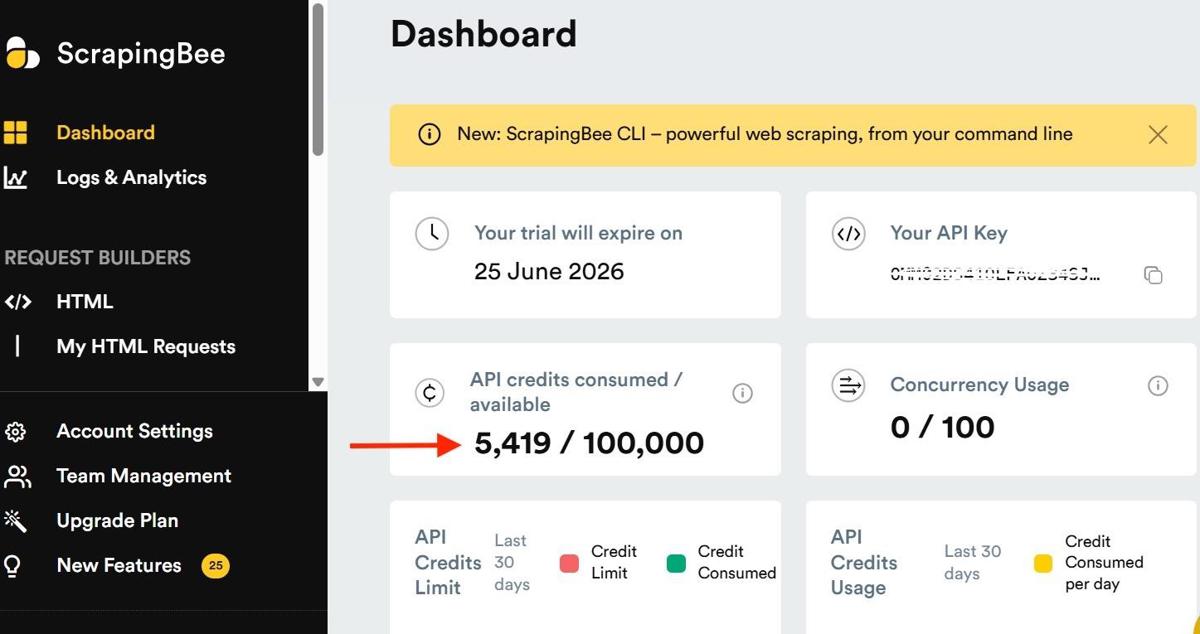
ScrapingBee provides 1,000 free API credits, which are enough to follow along and build your lead generation web scraper. The image below shows where you can view your API key and available credits.
Code walkthrough
Import requests, json, and the other necessary libraries. Then assign the ScrapingBee endpoint and your API key to variables.
import csv
import json
import time
from urllib.parse import parse_qs, unquote, urlparse
import requests

API_KEY = "PASTE_YOUR_API_KEY"
SCRAPINGBEE_ENDPOINT = "https://app.scrapingbee.com/api/v1"
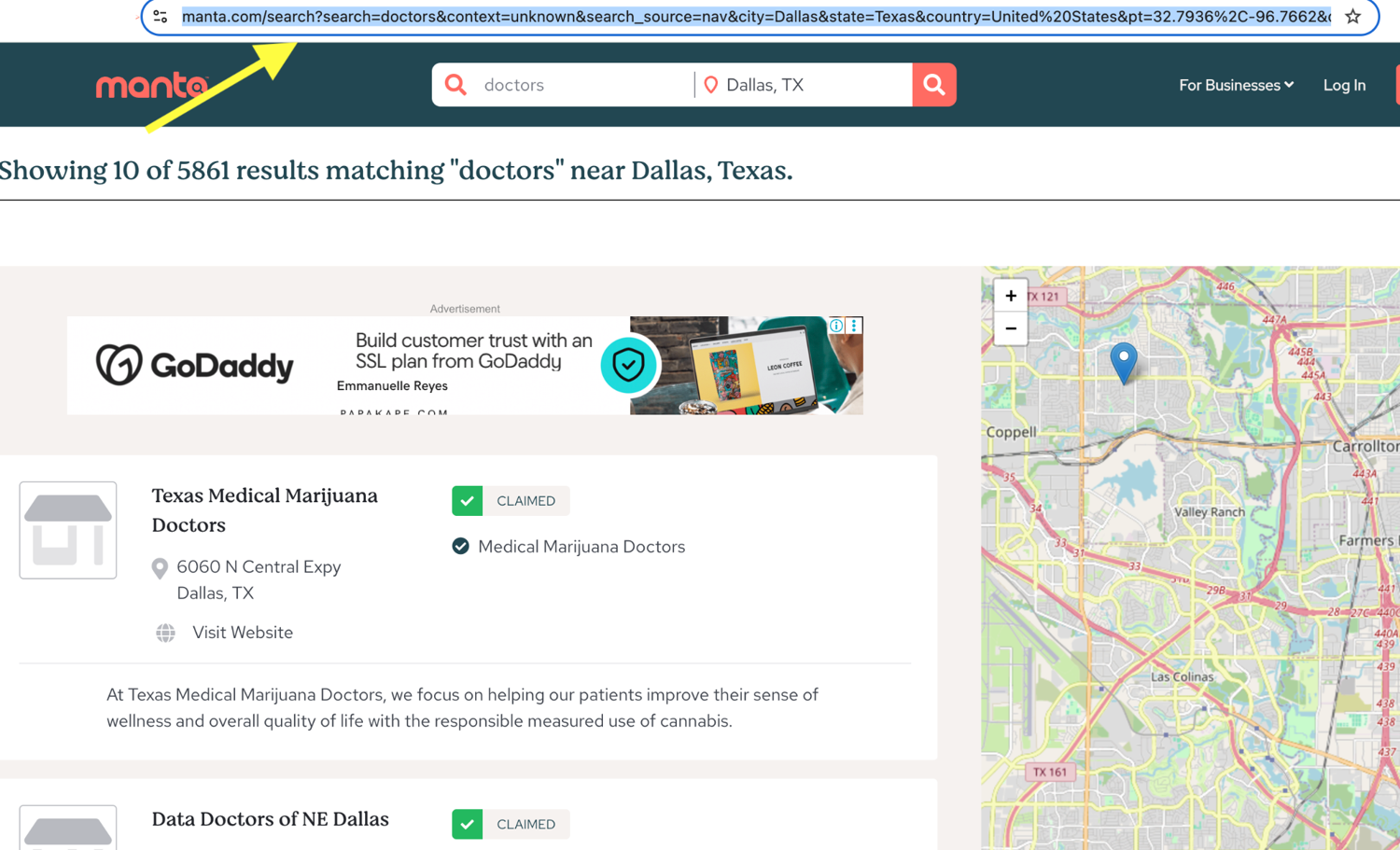
Next, get the URL you want to scrape. Go to manta.com and search for the business category and location you want to target. Say you sell software for doctors and want to collect phone numbers, website URLs, and ratings of doctors near Dallas, search for that directly on Manta and copy the results page URL into a variable.
SEARCH_URL = "https://www.manta.com/search?search=Doctors&context=industry&search_source=nav&city=Dallas&state=Texas&country=United%20States&pt=32.7936%2C-96.7662&device=desktop&screenResolution=1280x720&page_size=10"
CSV_FIELDS = ["name", "phone", "website", "profile_url"]
The extract_rules parameter is ScrapingBee's built-in extraction feature where you pass a JSON config telling it what to extract and from where. It returns the extracted data as structured JSON.
EXTRACT_RULES = {
    "businesses": {
        "selector": "div.md\\:rounded.bg-white.border-b",
        "type": "list",
        "output": {
            "name": "a[href^='/c/']",
            "profile_path": {
                "selector": "a[href^='/c/']",
                "output": "@href"
            },
            "phone": ".fa-phone + div",
            "website_redirect": {
                "selector": "a[href*='urlverify']",
                "output": "@href"
            }
        }
    }
}
Manta wraps all outbound website links in a redirect URL like /urlverify?redirect=https://example.com. Since we want the actual company website URL, define a helper function to extract it from that wrapper:
def decode_website(redirect_href):
    """Extract and decode the real URL from Manta's redirect href."""
    if not redirect_href:
        return ""
    redirect_url = parse_qs(urlparse(redirect_href).query).get("redirect", [""])[0]
    return unquote(redirect_url)
Now define the scrape_page() function. This sends a request to ScrapingBee with render_js=True so the page is fully rendered before HTML is returned, and premium_proxy=True to route the request through a residential IP.
def scrape_page(page):
    response = requests.get(
        SCRAPINGBEE_ENDPOINT,
        params={
            "api_key": API_KEY,
            "url": f"{SEARCH_URL}&page={page}",
            "render_js": "true",
            "premium_proxy": "true",
            "extract_rules": json.dumps(EXTRACT_RULES),
        },
        timeout=120,
    )
    response.raise_for_status()

    data = response.json()
    cards = data.get("businesses", [])
    print(f"Page {page}: found {len(cards)} business cards")

    rows = []
    for card in cards:
        profile_path = card.get("profile_path", "")
        rows.append({
            "name": card.get("name", ""),
            "phone": card.get("phone", ""),
            "website": decode_website(card.get("website_redirect", "")),
            "profile_url": f"https://www.manta.com{profile_path}" if profile_path else "",
        })
    return rows
The above function finds all business cards on the page, loops through each one, and extracts the business name, phone number, website, and profile URL. When a field is missing, the scraper returns an empty string instead of raising an error.
The main() function handles pagination. It loops over the specified number of pages, calls scrape_page() for each one, and appends the returned records to the final list.
def main():
    num_pages = int(input("Enter number of pages to scrape: "))
    all_rows = []

    for page in range(1, num_pages + 1):
        try:
            rows = scrape_page(page)
            if not rows:
                print(f"No results found on page {page}, stopping.")
                break
            all_rows.extend(rows)
            time.sleep(2)
        except requests.RequestException as exc:
            print(f"Page {page} failed: {exc}")

    save_to_csv(all_rows)
    print(f"Saved {len(all_rows)} businesses to manta_businesses.csv")
All code put together:
import csv
import json
import time
from urllib.parse import parse_qs, unquote, urlparse
import requests

API_KEY = "YOUR_API_KEY"
SCRAPINGBEE_ENDPOINT = "https://app.scrapingbee.com/api/v1"

SEARCH_URL = "https://www.manta.com/search?search=Doctors&context=industry&search_source=nav&city=Dallas&state=Texas&country=United%20States&pt=32.7936%2C-96.7662&device=desktop&screenResolution=1280x720&page_size=10"
CSV_FIELDS = ["name", "phone", "website", "profile_url"]


EXTRACT_RULES = {
    "businesses": {
        "selector": "div.md\\:rounded.bg-white.border-b",
        "type": "list",
        "output": {
            "name": "a[href^='/c/']",
            "profile_path": {
                "selector": "a[href^='/c/']",
                "output": "@href"
            },
            "phone": ".fa-phone + div",
            "website_redirect": {
                "selector": "a[href*='urlverify']",
                "output": "@href"
            }
        }
    }
}

def decode_website(redirect_href):
    """Extract and decode the real URL from Manta's redirect href."""
    if not redirect_href:
        return ""
    redirect_url = parse_qs(urlparse(redirect_href).query).get("redirect", [""])[0]
    return unquote(redirect_url)

def scrape_page(page):
    response = requests.get(
        SCRAPINGBEE_ENDPOINT,
        params={
            "api_key": API_KEY,
            "url": f"{SEARCH_URL}&page={page}",
            "render_js": "true",
            "premium_proxy": "true",
            "extract_rules": json.dumps(EXTRACT_RULES),
        },
        timeout=120,
    )
    response.raise_for_status()

    data = response.json()
    cards = data.get("businesses", [])
    print(f"Page {page}: found {len(cards)} business cards")

    rows = []
    for card in cards:
        profile_path = card.get("profile_path", "")
        rows.append({
            "name": card.get("name", ""),
            "phone": card.get("phone", ""),
            "website": decode_website(card.get("website_redirect", "")),
            "profile_url": f"https://www.manta.com{profile_path}" if profile_path else "",
        })
    return rows

def save_to_csv(rows, filename="manta_businesses.csv"):
    with open(filename, "w", newline="", encoding="utf-8") as file:
        writer = csv.DictWriter(file, fieldnames=CSV_FIELDS)
        writer.writeheader()
        writer.writerows(rows)

def main():
    num_pages = int(input("Enter number of pages to scrape: "))
    all_rows = []

    for page in range(1, num_pages + 1):
        try:
            rows = scrape_page(page)
            if not rows:
                print(f"No results found on page {page}, stopping.")
                break
            all_rows.extend(rows)
            time.sleep(2)
        except requests.RequestException as exc:
            print(f"Page {page} failed: {exc}")

    save_to_csv(all_rows)
    print(f"Saved {len(all_rows)} businesses to manta_businesses.csv")

if __name__ == "__main__":
    main()
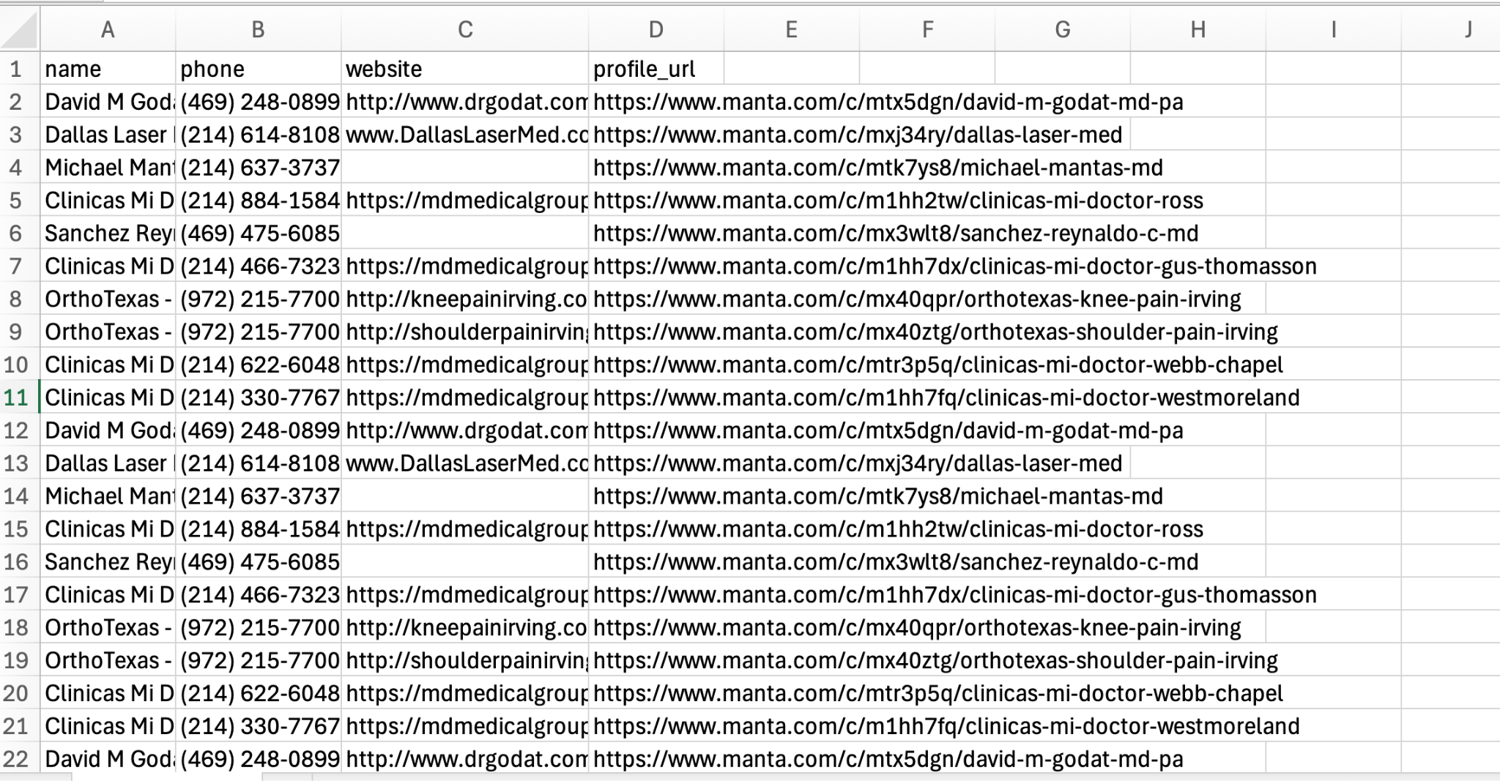
I scraped 10 pages with 10 profiles per page, so a total of 100 records were saved to a CSV file, as shown in the image below.
After the scrape completes, open your ScrapingBee dashboard to see the credits consumed. In this tutorial, the dashboard showed 5,169 credits before the run and 5,419 after. That means the scraper consumed 250 credits to collect 100 leads. So ScrapingBee's 1,000 free API credits are more than enough to get started.
You can use the same approach with other public directories too. Send a ScrapingBee request with the specific parameters and extraction rules, and it returns a structured JSON output. For Google Maps, check out ScrapingBee's dedicated Google API, which returns the results as JSON without requiring custom HTML parsing.
Verify and enrich your scraped leads
Raw scraped data is rarely outreach-ready. You'll find duplicates, generic email IDs like info@ or support@, missing contact names, and even invalid email addresses.
Run your list through a verification tool like NeverBounce or ZeroBounce before sending any emails. The same applies to purchased lists because you usually don't know when the data was last verified. According to a ZeroBounce study, 23% of an email list decays within a year. Sending emails to these invalid addresses increases bounce rates and damages your sender reputation. Once your domain gets flagged, deliverability drops and your future emails end up in recipients' spam folders.
After cleaning the list, enrich it with additional context. A company that recently raised a Series B and is actively hiring engineers is a fundamentally different prospect than one that hasn't posted a job in several months.
Scrape job boards, investor or sponsor directories such as Y Combinator, and individual company sites for these signals and enrich your raw records. But scraping multiple company websites becomes harder at scale. One site lists a name and job title in a clean layout. Another buries the same information inside three paragraphs of text. Traditionally, you'd write a separate parser for each site and maintain it whenever the page structure changes.
If you're using the ScrapingBee API from the walkthrough above, you can pass an ai_query parameter and define the fields you want in plain language. The AI extraction figures out the parsing on its own and returns the fields in a structured format, regardless of how the page is laid out. This way, you don't need a separate parser for every page structure.
Is web scraping for lead generation legal?
The safest approach to web scraping for lead generation is to stick to publicly accessible business information. Business directories, company websites, map listings, review sites, and public association directories fall into this category. For that reason, ScrapingBee does not support post-login scraping.
If you're scraping personal email addresses, an individual's location, or other identifiable information, you may need to meet additional compliance requirements like GDPR and CCPA based on where the data comes from and how you use it. If you plan to use it for outreach, you should follow certain regulations such as the CAN-SPAM Act. This means providing accurate sender information and a clear way for recipients to opt out of future communications, such as a functional unsubscribe link in every email.
Before you scrape any site, check its robots.txt and terms of service. Robots.txt can tell you which paths the site does not want crawled, while the terms of service may reveal whether automated access, data reuse, or account creation is restricted. That doesn't settle your every legal question, but it can help you understand the site's expectations and restrictions.
Build it yourself or buy a tool?
If you can't write code, buying a no-code lead scraping software or static lead database is usually the simplest option. These tools work well for one-off lead lists and require no maintenance. The tradeoff is less control over sources and fields, and the data is often stale.
When you need fresh data from custom sources and specific ICP fields, building your own scraper becomes a better option. The problem is that collecting the data is only part of the work. Websites change layouts, update anti-bot protections, and introduce new detection methods regularly, which means the scraper needs ongoing updates.
That's why many teams use a managed scraping API. ScrapingBee handles proxies, browser rendering, CAPTCHA challenges, and other anti-bot protections. You still control the extraction logic, sources, and fields.
Start Scraping leads with ScrapingBee
Web scraping for lead generation means finding the right sources, scraping them without getting blocked, and enriching or verifying the results before outreach. The scraping step is where most pipelines break, not because of the extraction logic, but because proxies go stale, JavaScript rendering breaks, and anti-bot systems change over time.
That's why I recommend using a managed scraping API like ScrapingBee. You keep control over the sources, fields, and pipeline, while ScrapingBee handles the infrastructure for you.
I've shown full working code to scrape leads from manta.com. The same approach works for any public lead source. Sign up for ScrapingBee and get 1,000 free API credits to scrape your preferred lead source today.
Frequently Asked Questions
Is web scraping for lead generation legal?
Scraping publicly accessible, pre-login business information is generally safe. However, if your workflow collects personal information, regulations such as GDPR and CCPA, or CAN-SPAM may apply. This is general information, not legal advice, so check the site's terms of service before scraping.
What is the best data source for scraping leads?
It depends on who you're targeting. For local B2B companies, Google Maps and business directories usually provide the address, contact details, and ratings. If you're looking for job titles or buying signals, company websites, contact pages, and job boards often provide more useful data.
How do I scrape leads without getting my IP blocked?
Residential proxies and JavaScript rendering get you through most anti-bot systems. On harder targets like maps and job boards, randomized delays between requests, and human-like scrolling and mouse movements also matter. ScrapingBee handles all of this for you; you only need to specify the appropriate parameters.
Why do my scraped or 'verified' emails bounce?
Email addresses change over time. People switch jobs, companies shut down inboxes, and domains expire. According to ZeroBounce, at least 23% of an email list decays within a year. So even verified lists should be checked again before a campaign.
Can I scrape LinkedIn for leads?
Not in the same way you scrape public directories. Most LinkedIn lead data sits behind a login, and logged-in scraping violates LinkedIn's terms of service and risks account restrictions or bans. That's why ScrapingBee doesn't support post-login scraping.
Do I need to code to scrape leads?
No. No-code tools work well when you need a one-time list and don't want to maintain anything. But if you need custom extraction logic or specific ICP fields, a simple Python script combined with a scraping API like ScrapingBee gives you much more control without requiring a large engineering effort.