To build a Target price tracker in Python, you need to create a loop that periodically scrapes a target.com product page, pulls the price out of the rendered HTML, saves it with a timestamp, and compares each new check against the last one to catch price changes.
The hard part is dealing with Target's anti-bot protection and JavaScript-rendered pricing, which is why in this guide, we fetch the page through ScrapingBee, a web scraping API, and only then use Python to build the rest of the tracker.
Target has no native price-drop alerts, so if you want to know the moment that console or air fryer gets cheaper, you build the watcher yourself.
After reading the guide, you will have a script that checks real products on a schedule and emails you when a price falls below your target.
What You'll Build (the 5-Stage Pipeline)
A price tracker is essentially a scraper plus four more stages:
- the scraper fetches the product page
- an extractor pulls the price from the rendered page
- storage records each price with a timestamp
- a comparison step detects drops
- a scheduler reruns the whole thing on an interval so you get alerted automatically instead of checking by hand.
A scraper tells you the price once, while a tracker reacts to changes in prices.
In the next sections we'll cover how to:
- scrape the product page (through a web scraping API)
- extract the price and title from the rendered page
- store each reading with a timestamp in SQLite
- compare the new price against the last stored one
- alert on a real drop, then schedule the whole pipeline
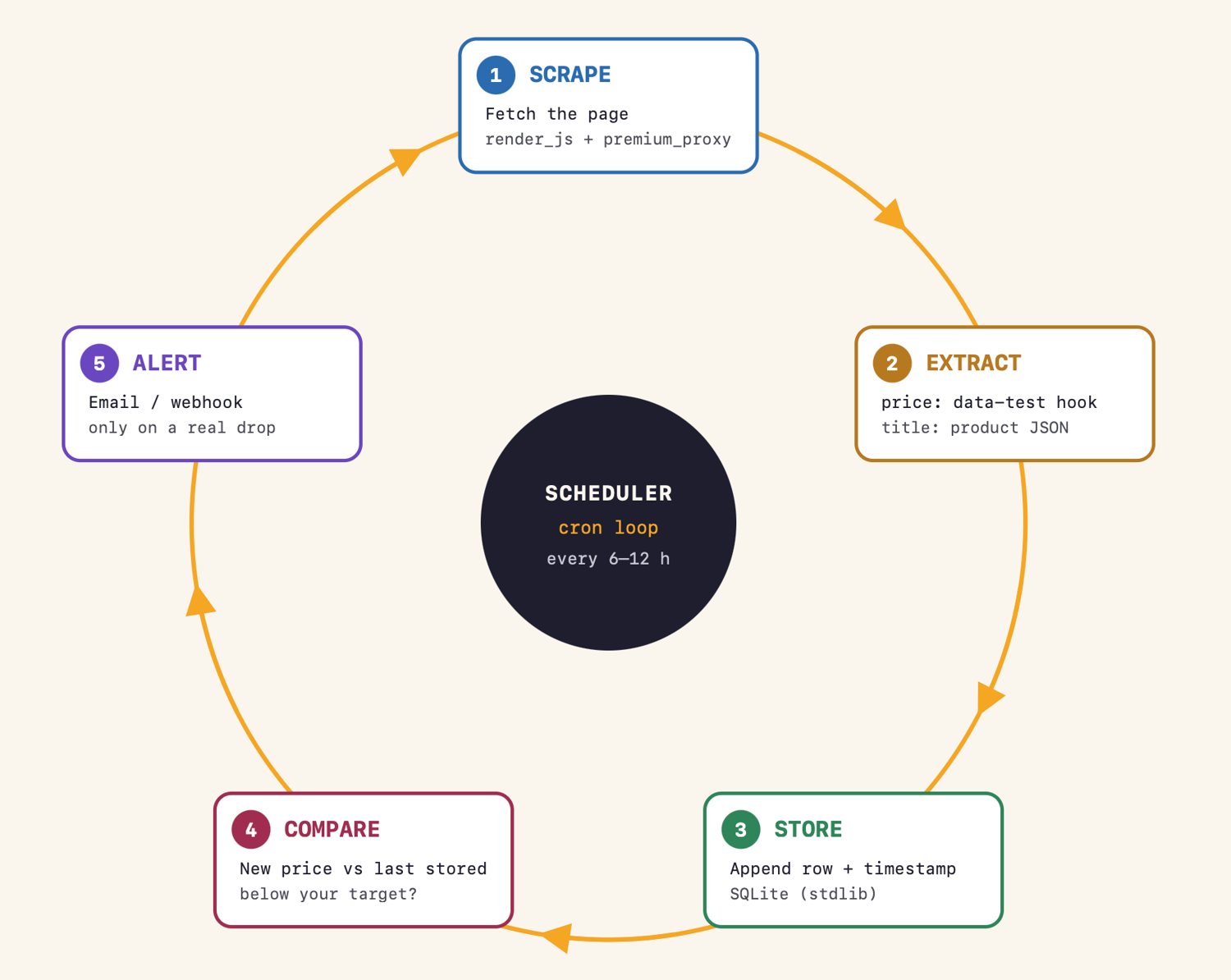
The same five stages power automated price monitoring at any scale.
Why Tracking Target Prices Is Harder Than It Looks
Target not only blocks automated traffic with various anti-bot measures, but it also loads prices with JavaScript and only renders them into the page after its scripts run, so a basic HTTP request returns HTML without any useful data.
To track prices reliably, you need JavaScript rendering and a proxy strong enough to clear those defenses, only then you can read the price out of the rendered page.
I verified the first problem directly. Requesting the Nintendo Switch 2 product page with Python's plain requests library returned HTTP 200 and 344 KB of HTML: the product title was there, but the markup contained no price field at all. The only dollar amount in the page was the marketing copy. The price arrives later, fetched by JavaScript after the page loads, which a basic client never executes.
Anyone working out how to scrape Target runs into the same set of obstacles:
- JavaScript-rendered pricing - the price exists only after the page's scripts run, so you need a headless browser, not a raw HTTP request
- Anti-bot defenses - Target challenges and blocks datacenter traffic, which is the same wall you hit doing price scraping at scale on any major retailer
- No native alerts - Target offers no price-drop notifications, and Circle offers are personalized, so the public page price is the one consistent signal worth tracking.
ScrapingBee handles the first two: JavaScript rendering runs the page in a real headless browser, and premium proxies get the request through.
What You Need Before You Start
You need Python 3.x, a ScrapingBee API key, and one pip install.
pip install scrapingbee
Sign up for ScrapingBee and you get 1,000 free API credits with no credit card required; your API key is on the dashboard right after signup. Everything else in this guide (SQLite, email) ships with Python's standard library.
One security note: keep the API key out of your source code and read it from an environment variable, as the snippets below do. And never paste a live API key into an AI coding assistant - it's like a password.
If this is your first scraping project, our intro to web scraping in Python covers the fundamentals this guide builds on.
Step 1: Scrape a Target Product Price With Python
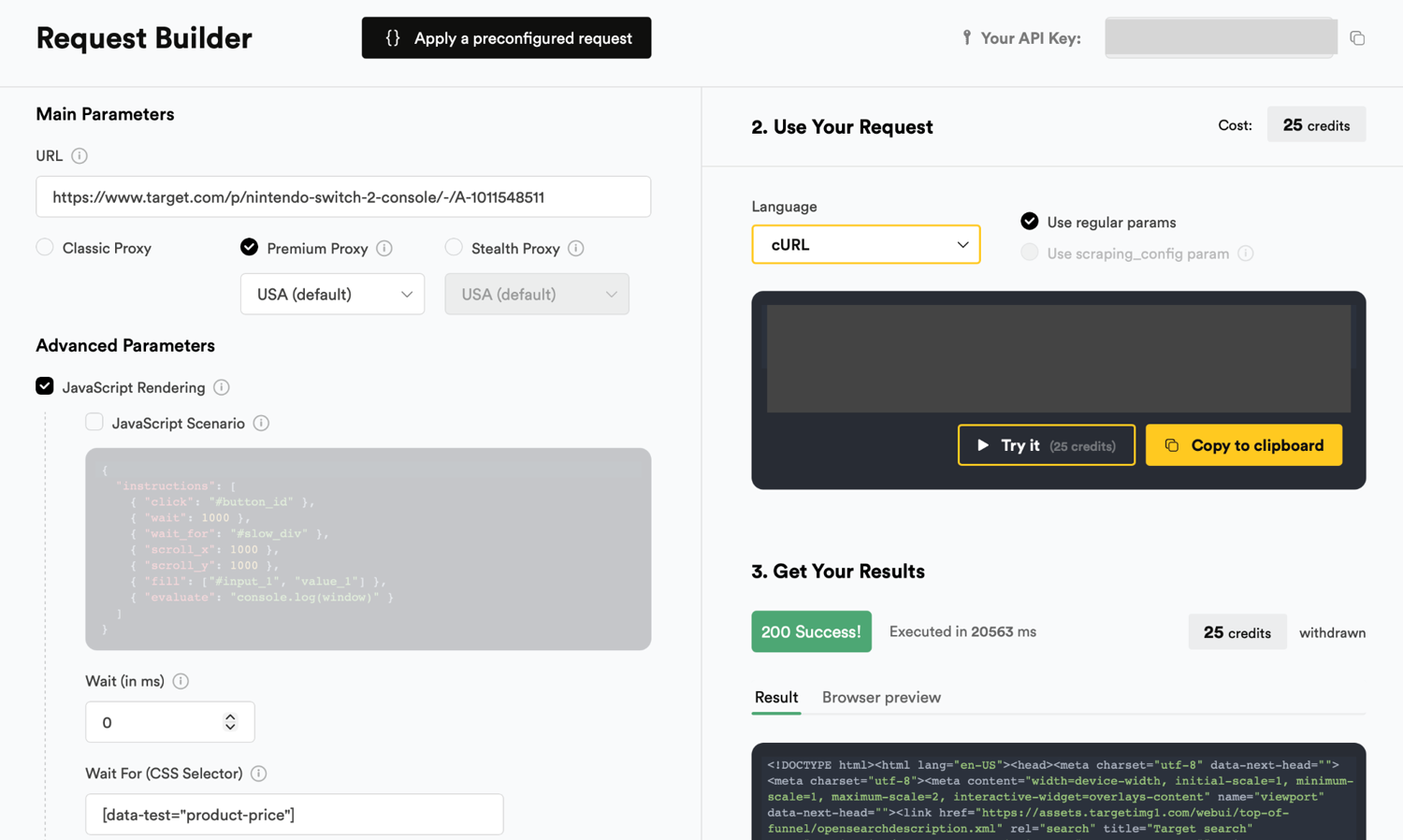
Send the Target product URL to ScrapingBee with JavaScript rendering on and premium proxies enabled, then parse the returned page. Target renders the current price into an element tagged with a stable data-test hook, so the most durable approach is to read that attribute rather than a CSS class that Target changes often. The product title, by contrast, sits in a JSON object in the page, so the code reads the title straight from that JSON. Escalate to the stealth proxy tier if premium gets blocked.
Target product URLs follow one canonical form: https://www.target.com/p/{name}/-/A-{tcin}, where the TCIN (Target.com Item Number) at the end uniquely identifies the product. That TCIN is the key we'll use to store history under.
Here is the full fetch and extraction:
import os
import re

from scrapingbee import ScrapingBeeClient

client = ScrapingBeeClient(api_key=os.environ["SCRAPINGBEE_API_KEY"])

PRODUCT_URL = "https://www.target.com/p/nintendo-switch-2-console/-/A-1011548511"

def fetch_product(url):
    response = client.get(
        url,
        params={
            "render_js": "true",       # run the page's JavaScript in a headless browser
            "premium_proxy": "true",   # residential IPs; Target blocks datacenter traffic
            "country_code": "us",
            "wait_for": '[data-test="product-price"]',  # wait until the price exists
        },
    )
    response.raise_for_status()
    return response.text

def extract_price(html):
    m = re.search(r'data-test="product-price"[^>]*>\$?([\d,]+\.\d{2})', html)
    if m:
        return float(m.group(1).replace(",", ""))
    m = re.search(r'"current_retail":\s*([\d.]+)', html)
    if m:
        return float(m.group(1))
    raise ValueError("No price found: the page may be blocked or the layout changed")

def extract_title(html):
    m = re.search(r'"product_description":.{0,3000}?"title":\s*"([^"]+)"', html, re.S)
    if m:
        return m.group(1)
    m = re.search(r'data-test="product-title"[^>]*>([^<]+)', html)
    return m.group(1).strip() if m else "Unknown product"

if __name__ == "__main__":
    html = fetch_product(PRODUCT_URL)
    print(extract_title(html), extract_price(html))
If you run it against the live Nintendo Switch 2 page, this prints:
Nintendo Switch 2 Console 449.99
The title matched the JSON path, and the price matched the data-test="product-price" element: Target does not expose the price in the page's JSON, so that rendered attribute is the reliable hook. premium_proxy cleared the anti-bot check on its own, with no need to escalate.
Two parameters carry the request. render_js=true is ScrapingBee's default and costs 5 credits per request on the Classic tier. It executes the page in a headless browser so the price actually exists in what comes back. premium_proxy=true switches to residential proxies and raises the cost to 25 credits per JavaScript-rendered request. If Target still blocks you, stealth_proxy=true is the heavier tier at 75 credits per successful call.
Start at premium and escalate only if you see blocks; that ladder (Classic, Premium, Stealth) keeps your credit spend proportional to how hard the page fights back.
Two shortcuts can cut the extraction code further. extract_rules lets ScrapingBee pull fields out with CSS selectors server-side, so you get JSON back instead of HTML. The dedicated Target Scraper API goes further and returns structured product data, price included, without you writing any extraction code at all.
Step 2: Store the Price History
One reading is a snapshot; a tracker needs history, because you cannot detect a drop without a prior value to compare against. Append every reading as a row of (TCIN, title, price, timestamp), and the simplest durable place to put it is SQLite, which ships in Python's built-in sqlite3 module.
From here on, every snippet goes into the same file as the Step 1's code:
import sqlite3

DB_PATH = "prices.db"

def init_db():
    conn = sqlite3.connect(DB_PATH)
    conn.execute("""
        CREATE TABLE IF NOT EXISTS price_history (
            tcin TEXT NOT NULL,
            title TEXT,
            price REAL NOT NULL,
            checked_at TEXT NOT NULL DEFAULT (datetime('now'))
        )
    """)
    conn.commit()
    return conn

def save_price(conn, tcin, title, price):
    conn.execute(
        "INSERT INTO price_history (tcin, title, price) VALUES (?, ?, ?)",
        (tcin, title, price),
    )
    conn.commit()
The checked_at column fills itself with the current time in UTC on every insert, so each row is a dated reading you can chart later. No ORM (object-relational mapper), migrations, or extra dependencies: this is the boring version that is likely to still work in a couple of years from now.
If even SQLite feels like too much, a CSV file with the same four columns works for a single product; you will just miss the easy querying once you track more than one.
Step 3: Detect Price Drops and Send an Alert
To detect a drop, read the last stored price for the product and compare it to the new one. If the new price is lower and at or below a target price you set, send a notification and store the new value. Guard the alert so it only fires on an actual decrease, not on every check.
The target price you set is what turns a stream of readings into a buy signal.
import smtplib
from email.message import EmailMessage

TARGET_PRICE = 429.99
DRY_RUN = True

def last_price(conn, tcin):
    row = conn.execute(
        "SELECT price FROM price_history WHERE tcin = ? ORDER BY checked_at DESC, rowid DESC LIMIT 1",
        (tcin,),
    ).fetchone()
    return row[0] if row else None

def send_alert(title, old_price, new_price):
    msg = EmailMessage()
    msg["Subject"] = f"Price drop: {title}"
    msg["From"] = "tracker@example.com"
    msg["To"] = "you@example.com"
    msg.set_content(f"{title} dropped from ${old_price:.2f} to ${new_price:.2f}.")
    if DRY_RUN:
        print(f"[DRY RUN] {msg['Subject']} | {msg.get_content().strip()}")
        return
    with smtplib.SMTP_SSL("smtp.gmail.com", 465) as smtp:
        smtp.login(msg["From"], os.environ["SMTP_APP_PASSWORD"])
        smtp.send_message(msg)

def check_for_drop(conn, tcin, title, new_price):
    previous = last_price(conn, tcin)
    save_price(conn, tcin, title, new_price)
    if previous is None or new_price >= previous:
        return  # first reading, or no drop: stay quiet
    if new_price <= TARGET_PRICE:
        send_alert(title, previous, new_price)
I tested this logic with a sequence of readings: a first reading, an unchanged price, an increase, a drop above the target, and a drop below it. Only the last one fired:
[DRY RUN] Price drop: Nintendo Switch 2 Console | Nintendo Switch 2 Console dropped from $439.99 to $424.99
Email via smtplib uses SMTP (Simple Mail Transfer Protocol) and needs provider-specific credentials, like a Gmail app password, which is why the DRY_RUN flag exists: the comparison logic works regardless, and you flip the flag once your mail setup is ready.
Both Telegram and Slack accept a plain HTTP POST to a webhook URL, so you can swap send_alert without touching anything else. Want every drop, not just target hits? Delete the TARGET_PRICE condition.
A confirmed drop has a second use: if you bought the item within the last N days, Target's price match policy generally lets you request an adjustment (check the current policy terms). The same compare-and-alert pattern works for scraping product prices on other retailers too - only the fetch and extraction change. With those two functions in place, you now track Target prices instead of checking them.
Step 4: Run It Automatically on a Schedule
Running a tracker by hand defeats the point, which is to fire-and-forget, and then wait for notifications. On macOS and Linux, cron is the zero-dependency answer - this line runs the tracker every 12 hours and appends output to a log:
0 */12 * * * cd /home/you/tracker && /usr/bin/python3 target_tracker.py >> tracker.log 2>&1
Add it with crontab -e. On Windows, Task Scheduler does the same job: create a basic task, point it at python.exe with your script path, and set a 12-hour trigger.
Every 6 to 12 hours is the right cadence - checking more often than a few times a day burns credits without catching anything new. Tighten the interval to a few hours during sale events like Black Friday or Circle Week, when prices genuinely move faster, but remember this is not FX market :)
If you would rather not babysit a crontab, the ScrapingBee CLI can run and schedule recurring scrapes through the platform instead of your machine, which also means your laptop being asleep at night stops mattering.
Track Multiple Products at Scale
Going from one product to a watchlist just wraps the same pipeline in a loop. Keep your URLs in a list (or a file) and run the same pipeline per product:
WATCHLIST = [
    "https://www.target.com/p/nintendo-switch-2-console/-/A-1011548511",
    "https://www.target.com/p/lego-city-blue-monster-truck-off-road-toy-mini-monster-truck-60402/-/A-89144383",
]

def run_watchlist():
    conn = init_db()
    for url in WATCHLIST:
        tcin = url.rsplit("A-", 1)[1]
        html = fetch_product(url)
        check_for_drop(conn, tcin, extract_title(html), extract_price(html))

if __name__ == "__main__":
    run_watchlist()
One housekeeping note: this block replaces the if __name__ == "__main__": lines from Step 1, so delete those three lines and keep a single entry point. The sequential loop stays politely under every plan's concurrency limit, and for a watchlist checked twice a day, speed is irrelevant.
Credits are the real constraint here. The math is products times checks per day times days times credits per check. Tracking 50 products every 12 hours at Premium with JavaScript rendering: 50 x 2 x 30 x 25 = 75k credits per month, comfortably inside the Freelance plan's 250k credits ($49/month, 50 concurrent requests) on ScrapingBee pricing. Scale the same formula to size any watchlist. If you later want concurrent fetches or smarter parsing, the Python web scraping libraries roundup covers the tooling.
What You Can't Track (and Why That's Fine)
You can track Target's public product-page price, but not Circle personalized offers or cardholder-only prices, because those are tied to a logged-in account. Scraping behind a login is against most sites' terms, including the tools used here: ScrapingBee's terms of service prohibit post-login scraping, so this guide does not show it and you should not attempt it.
In practice you lose little. Circle offers are personalized per account, so even logged in, your price is specific to your account, and there is no canonical "Circle price" to track. The public page price is the consistent, comparable signal, and it is the one Target adjusts during promotions. Treat a public price drop as your trigger, then open the app to see whether a Circle offer stacks on top before you buy.
Prefer a No-Code Target Price Tracker?
Not everyone wants to maintain a script, and that is fine. The tradeoffs:
| Approach | Best for | Effort | Cost |
|---|---|---|---|
| DIY Python + ScrapingBee API (this guide) | Developers who want control over storage, alerts, and logic | Medium | API credits only |
| ScrapingBee Target Scraper API | Developers who want the fetch and extraction handled, but still code the tracking | Low to medium | API credits |
| No-code price monitor | Non-developers who just want alerts | Low | Monthly subscription |
If you only need an alert on one or two products and never want to touch code, a managed monitor is the pragmatic pick - our roundup of price trackers shows what that category looks like. In between sits AI-powered price extraction, where you describe the data you want instead of writing selectors.
And if Target is only one of the stores you care about, the best e-commerce scraping APIs roundup covers the broader landscape. The build in this guide remains the most flexible option: you own the data and the alert rules, and you set your own schedule.
Build It in the Next 10 Minutes
Everything above runs on the free tier. Sign up for ScrapingBee, grab your API key, and you have 1,000 free credits (no credit card required), enough to run Step 1 against a product you actually want and watch the first reading land in your database tonight.
Frequently Asked Questions
Quick answers to the questions people ask most about tracking Target prices with Python.
How do I check a Target product's price with Python?
Send the product URL through a web scraping API with JavaScript rendering and premium proxies enabled, then read the price from the rendered price element. A plain requests.get() does not work because Target loads pricing with JavaScript. Step 1 above shows the full working code.
Does Target have a price tracker or price-drop alerts?
No. Target.com has no native price-tracking or drop-alert feature, which is why shoppers rely on third-party monitors or build their own. A Python tracker like the one in this guide closes that gap with a script you control.
Is it legal to scrape Target.com prices?
Scraping publicly visible product data is generally considered lower-risk, but this is not legal advice and rules differ by jurisdiction. Respect Target's terms of service and robots.txt, keep request volumes reasonable, and never scrape behind a login.
Why does my Python script return no price for Target?
Because Target renders prices with JavaScript into the page markup after load - a plain HTTP request returns HTML without any price field, and Target may also block the request outright. Enable JavaScript rendering and premium proxies, then extract the price from the returned page.
How often should I check Target prices?
Every 6 to 12 hours is enough. Target moves prices on a promotional cadence (weekly ads, clearance events), not continuously, so a few checks per day catch every real drop. Increase the frequency during major sale events.
How many credits does tracking Target prices cost?
Multiply credits per request by checks per day by products tracked. At 25 credits for a Premium request with JavaScript rendering, one product checked twice daily costs about 1,500 credits per month, and 50 products cost about 75,000. Verify current credit costs on the ScrapingBee pricing and documentation pages before sizing a plan.