To bypass Kasada, you must accurately mimic a real user across every detection layer. That means matching TLS, HTTP, and browser fingerprints, passing Kasada's JavaScript challenges and proof-of-work computations, and earning valid tokens, such as x-kpsdk-ct, which Kasada assigns only to successful requests.
Even then, Kasada is one of the hardest anti-bot systems to navigate, and a successful bypass can quickly become invalid. Largely because the system's primary defense, a bytecode virtual machine (VM) embedded in JavaScript (more on this later), continuously changes how challenges are served and validated. So, unless you're looking for a one-time fix, reliably bypassing Kasada is like trying to hit a moving target that keeps changing shape before you can finalize your aim.
What does that mean for web scrapers?
In practice, you'll need a stealth browser that can accurately mimic a real user across every detection layer, along with high-quality residential proxies. However, maintenance can quickly become more expensive than the data you're trying to collect. Your best bet and a cost-effective solution at scale is a managed scraping API that handles everything, including maintenance.
This guide explores both paths. First, we'll cover how Kasada works and what's required to build your own Kasada bypass. Then, we'll explain when and why a managed API is your best bet at scale.
TL;DR
- Kasada is a bot management platform that forces every incoming request to solve its proof-of-work puzzle before granting access.
- A 403 or 429 status code paired with
x-kpsdk-*response headers is a clear indication that Kasada is blocking your requests. - Plain HTTP requests fail because they exhibit bot-like characteristics, including non-browser TLS and HTTP fingerprints, irregular headers, and the inability to execute JavaScript.
- The best tools for bypassing Kasada in 2026 are Nodriver, Camoufox, or a managed scraping API.
- Because Kasada continuously rotates and adapts to traffic patterns, a working bypass can break down within hours or days and therefore requires ongoing maintenance.
- Managed Scraping APIs, though not 100% guaranteed, handle everything necessary for a working bypass, including maintenance.
What is Kasada (and why is it hard to bypass)?
Kasada, not to be confused with the Indonesian 'Yadnya Kasada' festival, is a cybersecurity platform that detects and protects against malicious bot attacks on websites, web APIs, and mobile apps. Its unique architecture, which combines invisible client-side challenges with server-side detection backed by real-time data, makes it one of the hardest anti-bot systems to navigate.
Kasada actively interrogates every request using invisible JavaScript challenges. Those client-side signals are validated server-side using analytical models and real-time data to identify traces of automation.
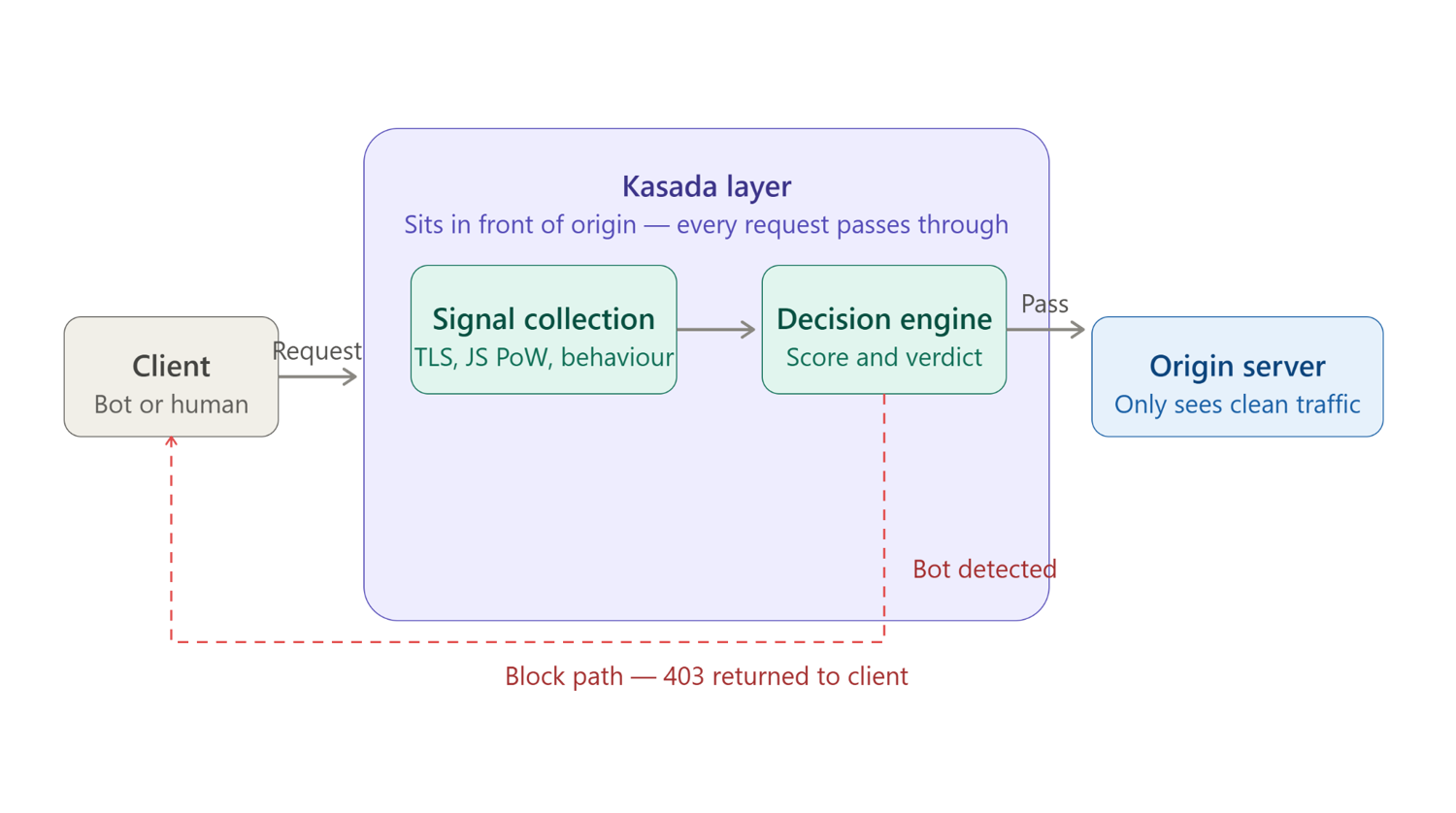
This challenge-first approach is what makes Kasada-protected websites difficult to scrape without getting blocked. Your requests must successfully execute dynamically generated JavaScript, complete proof-of-work computations, generate valid challenge tokens, and produce browser and network fingerprints that remain consistent throughout the session.
Adding to the difficulty is Kasada's JavaScript virtual machine (VM), which frequently changes the bytecode and validation logic used to generate and verify challenge responses. As a result, a bypass that works today may fail tomorrow or within a few hours. Not to mention Kasada's per-customer variant, which means a working bypass on one website does not automatically extend to another.
Since its launch in 2015, Kasada has become one of the leading bot mitigation platforms, protecting high-end, high-traffic endpoints across ticketing, sneaker drops, gaming, travel, and financial services. It was also recently named a leader in the Forrester Wave: Bot and Agent Trust Management, Q2 2026.
How to tell if Kasada is blocking you
You can tell Kasada is blocking your requests by inspecting the HTTP response. A 403 Forbidden or 429 Too Many Requests response accompanied by x-kpsdk-* headers almost always indicates that Kasada intercepted the request. Keep in mind that other anti-bot systems, like Cloudflare return similar error codes, and the x-kpsdk-* headers are the main differentiator.
If those headers aren't present, visit the target page in your browser, open the Developer tools, navigate to the Network tab, and look for these specific identifiers:
- The
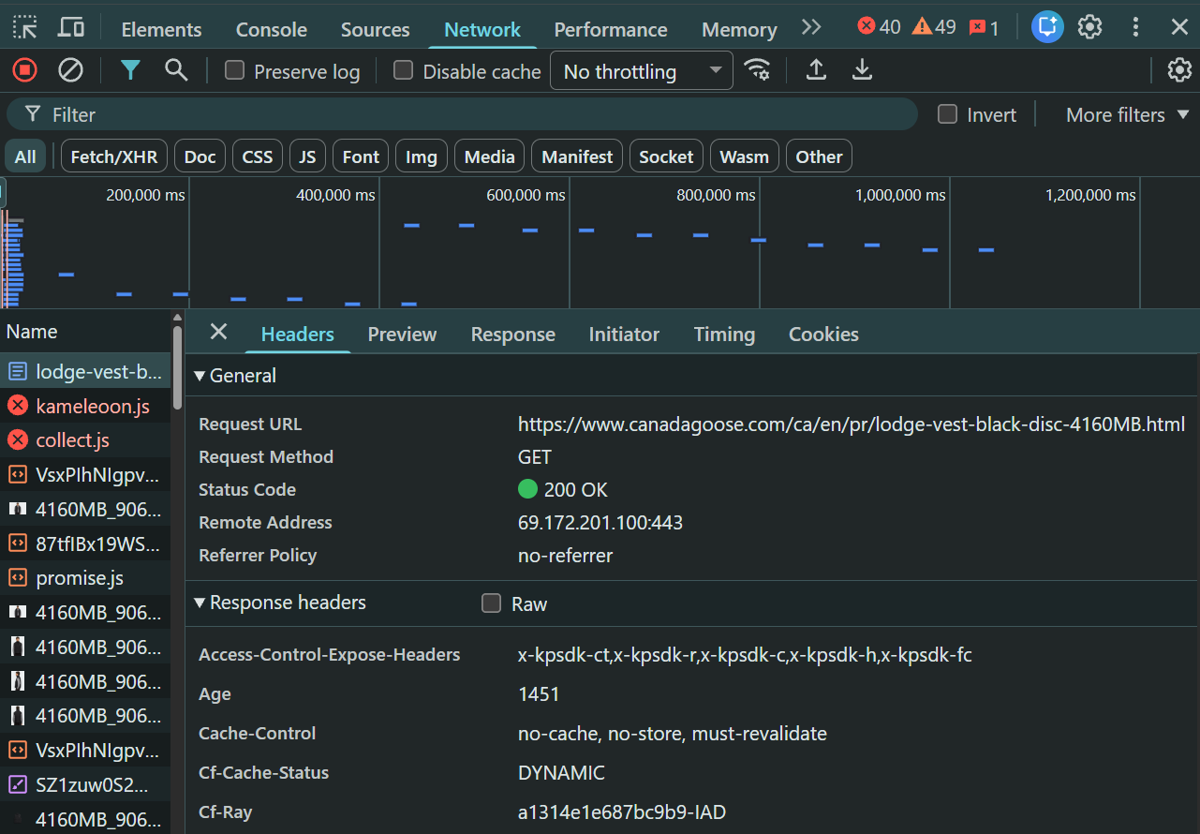
x-kpsdk-*headers. Look for response headers containingx-kpsdk-*. The full set includesx-kpsdk-ct,x-kpsdk-dv,x-kpsdk-cd, andx-kpsdk-v. Even one of these in a response header confirms Kasada's presence.
- The
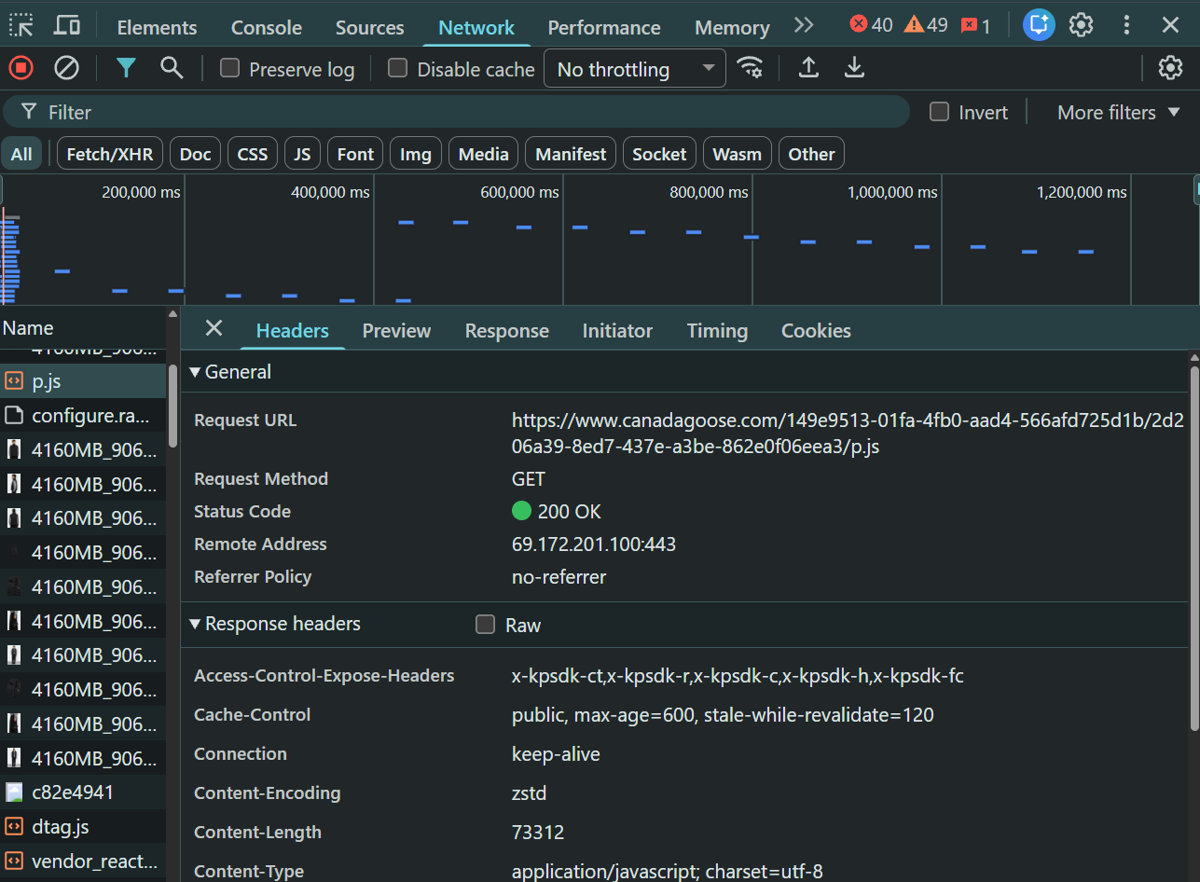
p.jscollector script. Requests to files whose paths end with/p.jsare unique to Kasada. This is the JavaScript payload for browser fingerprinting and proof-of-work computations. It also carries the same access control headers (x-kpsdk-*). Filter by JS to narrow down your search.
The table below summarizes the most common Kasada responses and what they typically indicate.
| Signal | What it means | Likely stage that flagged you |
|---|---|---|
x-kpsdk-ct present + 403 | The server rejected the token. It was either absent, expired, or the PoW solution didn't verify | TLS/HTTP fingerprint mismatch at the network layer, or the VM detected a non-genuine browser environment |
| 429 after an apparently successful challenge | The CT token was accepted, but a subsequent per-request CD token was invalid, replayed, or the session tripped a behavioral threshold | Rate or behavior layer: request cadence, mouse or scroll patterns, or a single-use x-kpsdk-cd token was reused |
Immediate 403, no x-kpsdk-* headers at all | The request was terminated before the JS challenge was ever loaded | Plain HTTP client (no JS execution), HTTP/1.1 instead of HTTP/2, or TLS fingerprint matched a known bot library like Python requests |
| Challenge loop (repeated 429) | The client is executing the JS, but the environment signals are inconsistent. For example, it keeps failing the challenge and being reissued a new one | Browser fingerprint inconsistency: navigator properties, WebGL, or crash-capture probes are returning values that don't match a genuine browser, or a datacenter IP is making the PoW difficulty too high to solve within the time window |
How Kasada detects web scrapers: the trust score
Kasada detects web scrapers using client-side interrogation techniques to analyze the underlying environment of every request. These signals are combined with server-side detection and validation methods, backed by analytical models and real-time data, to ultimately generate trust scores that determine its responses.
Requests with positive trust scores are allowed access to website resources. Anything other than that may follow a different route (escalated proof-of-work difficulty, fake data, etc.), but it almost always ends in an outright block.
Below is a breakdown of Kasada's detection techniques:
TLS fingerprinting
Every request begins with a TLS handshake, in which your web scraper sends a ClientHello message containing its supported cipher suites, TLS version, extensions, and elliptic curve preferences. Kasada hashes those parameters into a JA3 or JA4 fingerprint that is unique to request environments.
Real browsers, such as Chrome, Firefox, and Safari, each produce a consistent, well-known fingerprint. Libraries like Python's requests or Node's axios produce entirely different cipher suite orderings and extension sets that Kasada can easily flag. A mismatch at this layer results in a 403 error response, which indicates an outright block.
IP fingerprinting
Every request exposes a source IP address, and Kasada looks up that IP against a cross-customer and global reputation database built from signals shared across every site Kasada protects. Datacenter IPs generally receive a negative reputation because human traffic rarely originates from them.
Conversely, because residential and mobile IPs are associated with real ISPs, user locations, and devices, they're typically assigned a positive reputation. Keep in mind that your IP score doesn't independently result in a block unless the address is flagged as a known bad actor. Rather, it informs the overall trust score and can determine subsequent challenges, such as an escalated proof-of-work computation.
HTTP details
Kasada also inspects the HTTP layer before any page content is served. An HTTP/1.1 version, which is often associated with basic HTTP clients, is an immediate red flag. Every modern browser negotiates HTTP/2 or HTTP/3 during the TLS handshake. Falling back to HTTP/1.1 automatically identifies your scraper as non-browser traffic.
HTTP headers and their order also matter. Browsers send headers in a consistent, characteristic sequence: Accept, Accept-Encoding, Sec-Fetch-Site, Sec-Fetch-Mode, and the browser-specific Sec-CH-UA client hint headers. Automated tools frequently omit these headers entirely, send them in the wrong order, or use values inconsistent with the declared User-Agent. Any of these mismatches contributes to a negative trust score.
JavaScript fingerprinting
Kasada injects a JavaScript file containing a custom virtual machine (VM) that runs encrypted bytecode in the request environment. The VM also contains obfuscated JavaScript, which forces your scraper to execute specific instructions and collect signals about how they're carried out across four major categories.
Automation signals: properties such as navigator.webdriver = true or undefined, as well as missing plugins, are instant automation flags.
Hardware signals: CPU thread count (navigator.hardwareConcurrency), device memory, WebGL GPU renderer string, and canvas pixel-rendering output all yield hardware-specific values that are difficult to replicate without real hardware.
Runtime: the VM deliberately triggers TypeErrors and inspects the resulting error objects (how your environment fails). The shape of error objects, stack trace format, and exception message text differ between a real Chrome instance and automated versions, even in stealth configurations that patch automation properties.
OS and environment signals: system fonts, AudioContext processing output, and high-resolution timer availability round out the profile.
Kasada's Proof of Work Challenge also runs simultaneously. The VM receives puzzle parameters from Kasada's server, including difficulty level (scaled by session trust) and a required hash prefix, among others. Your scraper's CPU must solve these puzzles to produce the expected outputs. The encrypted payload is then POSTed to a Kasada collector endpoint, where it is verified server-side to ensure that the request's claimed browser identity is valid before any session token is issued.
Behavior analysis
Even after a successful request, Kasada continuously monitors user patterns and behavior throughout the entire session and can revise your trust score downward at any point. By comparing signals such as:
- Mouse movement curves: real users produce paths with natural acceleration and deceleration, while bots often produce straight lines or execute with no mouse movements at all.
- Scroll amounts and timing: real users scroll irregular, variable distances and sometimes pause to interact with page elements. Bots scroll exact pixel values at predefined intervals.
- Click coordinate variance: bots often click at machine-level efficiency, using specified coordinates. Human click actions are irregular, sometimes missing the target element and repositioning accordingly.
The system can detect any deviation, no matter how subtle. That means trust is not static: a session that passes every technical check can still decay into a block if it interacts with machine-level precision or efficiency.
Conversely, sessions that accumulate consistent humanlike interaction across multiple page loads build trust, thereby reducing PoW difficulty and relaxing behavioral thresholds. Web scrapers who attempt to mimic human behavior must invest real compute time doing so, which is itself a deliberate design cost imposed by Kasada.
How to bypass Kasada when web scraping
To bypass Kasada, your request must demonstrate that it operates within the constraints of a legitimate browser and leaves no trace of automation. In other words, you must satisfy each detection layer, and all of them must hold simultaneously.
Use residential or mobile proxies
Requests from datacenter proxies receive a negative score, even if you appear legitimate across all other layers. Kasada's cross-customer and global reputation database sees these addresses constantly, and their appearance alone is sufficient to escalate the proof-of-work difficulty to a level that makes large-scale operation impractical or to trigger an outright block.
Residential and mobile proxies are assigned by actual ISPs and therefore carry a positive trust score because they're difficult to distinguish from real user traffic. However, residential and mobile IPs can still be assigned a poor reputation when making too many requests within a specified period. Rotating between IPs can uphold your session score, but don't do so predictably (at fixed intervals). That, in itself, is a behavioral signal Kasada can easily flag. You'll want to rotate on new sessions and at varying intervals.
Geolocation consistency also matters. The proxy's IP geolocation, the browser's Accept-Language header, the navigator.language JavaScript property and any locale-setting cookies must all agree. A Polish residential IP paired with an en-US Accept-Language header is a detectable inconsistency.
Use a stealth browser (the core of any Kasada bypass)
Vanilla Selenium and Playwright are detected instantly because they leave traces of automation that Kasada easily flags. The most obvious is navigator.webdriver set to true or undefined, a property that standard automation frameworks set by default. But patching individual flags, as older stealth options, such as the Puppeteer stealth plugin, do, isn't enough. Kasada also examines other data points, including JavaScript error objects, and these differ between a real browser and an automated instance.
The stealth browser ecosystem has evolved to address this, with three tools worth trying:
Nodriver
Nodriver is the actively maintained successor to undetected-chromedriver. It communicates with Chrome directly via the Chrome DevTools Protocol (CDP) without the ChromeDriver middleware layer. This eliminates a significant class of automation artifacts at the binary level, producing a real, unmodified Chrome instance.
Below is a basic Kasada bypass script using Nodriver.
# pip install nodriver
import json
import nodriver as uc

async def main():
    browser = await uc.start()

    page = await browser.get("https://www.canadagoose.com/ca/en/pr/lodge-vest-black-disc-4160MB.html")

    await page.sleep(6)

    await page.save_screenshot("debug.png")

    title_element = await page.select("h1")
    title = title_element.text.strip() if title_element else None

    price_element = await page.select(".product-price")
    price = price_element.text.strip() if price_element else None

    product = {
        "Product": title,
        "Price": price,
    }

    # Save as JSON
    with open("product.json", "w", encoding="utf-8") as f:
        json.dump(product, f, indent=4, ensure_ascii=False)

    browser.stop()


if __name__ == "__main__":
    uc.loop().run_until_complete(main())
This script:
- Launches a Chrome instance and navigates to the target site.
- Solves Kasada's challenges. We verify this by taking a screenshot of the product page after waiting a few seconds. Your screenshot file will contain a blank page if it fails Kasada's challenges.
- Extracts the product name and price.
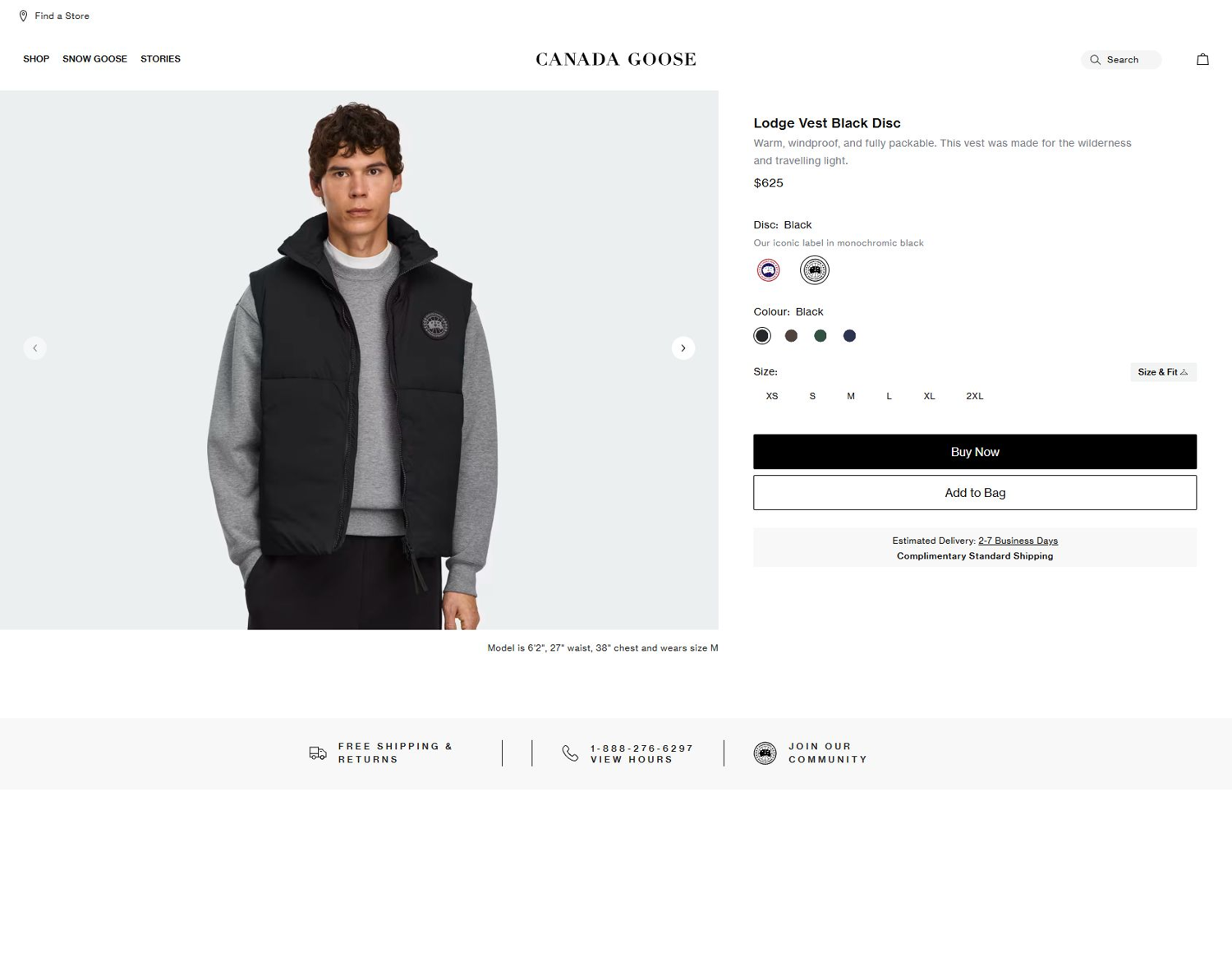
For better results, we recommend routing your requests through residential or mobile proxies. However, note that proxy authentication in Nodriver can be a bit tricky and may require injecting a Chrome extension.
Here's the output:
{
    "Product": "Lodge Vest Black Label",
    "Price": "$695.00"
}
Camoufox
Camoufox is an open-source anti-bot evasion library built on top of Firefox. It modifies fingerprints by intercepting every automation property before it reaches the page, making it difficult for anti-bot systems to detect traces of automation.
Here's a basic bypass script using Camoufox
from camoufox.sync_api import Camoufox
import random

# ScrapingBee proxy credentials
username = "YOUR_API_KEY"
password = "render_js=false&premium_proxy=true"
SB_PROXY = {
    "server": "https://proxy.scrapingbee.com:8887",
    "username": username,
    "password": password,
}

url = "https://www.canadagoose.com/ca/en/pr/lodge-vest-black-disc-4160MB.html"

with Camoufox(
    geoip=True,
    os=random.choice(["windows", "macos", "linux"]),
    proxy = SB_PROXY
) as browser:
    context = browser.new_context()
    page = context.new_page()

    response = page.goto(url, wait_until="networkidle")
    page.wait_for_timeout(5000)

    print("Status code:", response.status)

    name_el = page.query_selector("h1")
    product_name = name_el.inner_text().strip() if name_el else "N/A"

    price_el = (
        page.query_selector(".product-price")
    )
    product_price = price_el.inner_text().strip() if price_el else "N/A"

    print("Product Name:", product_name)
    print("Price:", product_price)
This script launches a stealth Firefox instance, navigates to the target page, and extracts product data, shielding all automation properties from Kasada.
To verify the script solves Kasada's challenges, we log the response status code after waiting a few seconds. A failed request most likely returns a 403 status code. You only get 200 (success) and product data if the bypass is successful.
Here's the output:
Status code: 200
Product Name: Lodge Vest Black Label
Price: $695.00
Undetected-chromedriver / SeleniumBase UC
Undetected-chromedriver (UCD) and its derivative, SeleniumBase in UC mode, patch ChromeDriver at the binary level to remove the most obvious automation fingerprints before the browser process starts. UCD modifies the ChromeDriver executable itself, while SeleniumBase UC mode wraps this into a higher-level API with additional evasion configuration. Both are more widely used than Nodriver and therefore more studied by anti-bot vendors, which means their success against sophisticated systems like Kasada is more variable and depends more on supplementary configuration.
Match TLS and HTTP/2 fingerprints
For requests where valid reusable tokens have already been obtained, an HTTP-layer approach using curl-impersonate is significantly faster and more resource-efficient than running a full browser.
curl-impersonate is a patched build of curl that replaces its standard TLS stack with a browser-identical one. It produces ClientHello messages with the exact cipher suite ordering, TLS version negotiation, and extension set of the browser they impersonate. They also negotiate HTTP/2 correctly. The result is a request that mirrors a real browser at the TLS level.
Header alignment is equally important. The user-agent, accept-language, referer, sec-fetch-*, and accept-encoding must match the browser being impersonated.
Below is a basic TLS impersonation script using curl_cffi, a Python wrapper for curl-impersonate.
from curl_cffi import requests

url = "https://www.target.com/internal-api-endpoint/v1/products"

cookies = {
    "session_id": "your_session_value",
    "auth_token": "your_auth_value"
}

headers = {
    "User-Agent": "Mozilla/5.0 (Windows NT 10.0; Win64; x64) AppleWebKit/537.36 (KHTML, like Gecko) Chrome/122.0.0.0 Safari/537.36",
    "Accept-Language": "en-US,en;q=0.9",
    "Accept": "application/json",
    "Referer": "https://www.target.com/",
}

response = requests.get(
    url,
    impersonate="chrome",
    cookies=cookies,
    headers=headers,
)

print(response.text)
Note that this example uses a placeholder endpoint and cookies. Also, keep in mind that for systems like Kasada, reusable tokens are short-lived and unreliable as sessions are often re-challenged.
Warm-up sessions and rotate fingerprints
A session that navigates directly to the target endpoint with no prior interaction is the most suspicious possible browsing pattern. Real users exhibit irregular browsing patterns: browsing category pages, revisiting previous pages, and following non-linear paths before reaching high-value endpoints such as checkout or product detail pages. Kasada's behavioral models are trained on this reality.
Timing also matters. Page delays should be drawn from a distribution rather than a fixed value. For example, scroll events should be irregular, with variable distances and speeds per page. If mouse movement is required, it should follow a curved path with natural acceleration and deceleration.
Similarly, running every session with the same browser fingerprint increases your chances of getting blocked. Kasada's ML models can cluster sessions by fingerprint similarity and apply shared reputation signals across the cluster. Rotate between fingerprints to distribute sessions across multiple fingerprints.
In practice, three approaches are most reliable in 2026:
- A fortified stealth browser capable of executing and passing the VM challenge.
- An HTTP-layer impersonator (such as
curl-impersonate) for endpoints where a valid token can be reused, and no JavaScript execution is required. - A managed scraping API that abstracts the entire challenge-solving layer.
Each approach has a different cost profile, success rate, and failure modes.
Which Kasada bypass approach should you use?
The right approach depends on two variables: your scale and how much engineering maintenance is economically sustainable. A one-off bypass has a completely different cost calculus compared to a production pipeline running continuously. The table below maps each approach to the appropriate path, including the honest limitations of every option.
| Approach | Best for | Effort/maintenance | Honest limitation |
|---|---|---|---|
| Stealth browser + residential or mobile proxy | One-off or low-frequency pulls where the JS challenge must be solved end-to-end. | Initial setup: High - stealth browser configuration, proxy integration, fingerprint tuning, session warming logic. Ongoing: High - Kasada rotates its VM bytecode regularly. So a working stealth configuration can quickly become invalid. | Slow at scale. Browser instances can become memory- and CPU-intensive, especially when running multiple instances in parallel. Requires ongoing maintenance, such that it can take days or weeks to get a broken pipeline up and running after a Kasada challenge change or adaptation. Even then, working bypasses have limited shelf lives. |
HTTP-layer impersonation, e.g. curl-impersonate | Token endpoints and API calls where a valid Kasada token can be reused. Best used as a complement to a stealth browser approach. | Initial setup: Medium - TLS and HTTP/2 configuration plus header alignment. Ongoing: Low-to-medium - curl-impersonate browser profiles update less frequently than Kasada's VM but do require updates when Chrome or Firefox major versions change TLS behavior. | Cannot solve the JS proof-of-work challenge. Any endpoint that requires a fresh VM solution is completely inaccessible when using this approach. Also, the Kasada token reuse window is short, and using expired tokens can result in blocks. |
Open-source solver, e.g. community PoW solvers, deobfuscated p.js forks | Research, experimentation, and understanding of Kasada's challenge mechanics. | Initial setup: Very high - requires a deep understanding of the VM bytecode, PoW algorithm, and token structure. Ongoing: Extremely high — breaks on every Kasada VM rotation, which can happen within days of a solver being published. Community solvers are often already obsolete by the time they circulate publicly. | Breaks per rotation. Kasada regularly deploys new VM bytecode across its entire customer base. Plus, the engineering time required to maintain a working solver in response to Kasada's updates and rotations almost always exceeds the commercial value of the data being collected. |
| Managed scraping API (ScrapingBee) | Medium to high-volume production pipelines where engineering bandwidth is more constrained than budget. | Initial setup: Low - ScrapingBee handles everything behind the scenes, providing you with an easy-to-use request interface to extract data. You only need to make a single API call. Ongoing: non-existent - ScrapingBee absorbs the maintenance burden of keeping pace with Kasada's rotations, allowing you to focus only on the data you want. | ScrapingBee charges only per successful request. Not 100% guaranteed on every Kasada-protected site because Kasada uses per-customer variants and continuously updates its challenges. However, failed 500s are not charged, so you can implement retries without accumulating cost. |
Total cost of ownership
The table above provides an overview of setup and ongoing effort, but understates one cost specific to Kasada: the maintenance burden of a DIY Kasada bypass is a recurring operational cost with no terminal state.
Kasada's architecture is designed to ensure that the cost of maintaining a working bypass exponentially exceeds the value the bypass can extract before it stops working. In fact, open-source solvers that reverse-engineer the VM are sometimes already obsolete by the time they're made public.
Using ScrapingBee for Kasada-protected sites
ScrapingBee is a managed API service that abstracts away configuration for each detection layer, allowing you to focus on extracting data rather than the tedious process of managing residential proxies and open-source stealth browsers.
With ScrapingBee, you can trigger an entire Kasada bypass with a single API call: just enable the stealth_proxy parameter, and we'll automatically handle everything necessary to avoid detection.
The stealth_proxy parameter activates ScrapingBee's stealth mode, which combines anti-bot-grade residential proxies with a real browser environment that automatically handles Kasada's VM challenges, executes JavaScript challenges, solves proof-of-work puzzles, and returns the page's rendered HTML.
Test ScrapingBee
To try it out, create a free ScrapingBee account. After a successful sign-up, you'll get 1000 credits: enough to build your first Kasada bypass script.
In your dashboard, navigate to ScrapingBee's request builder. You'll find your API key in the top-right corner. Enter your target URL in the provided box on your left, select the Stealth Proxy option, and ensure JavaScript Rendering is enabled (selected by default).
That's it. Click the Try It button to preview your result in your dashboard.
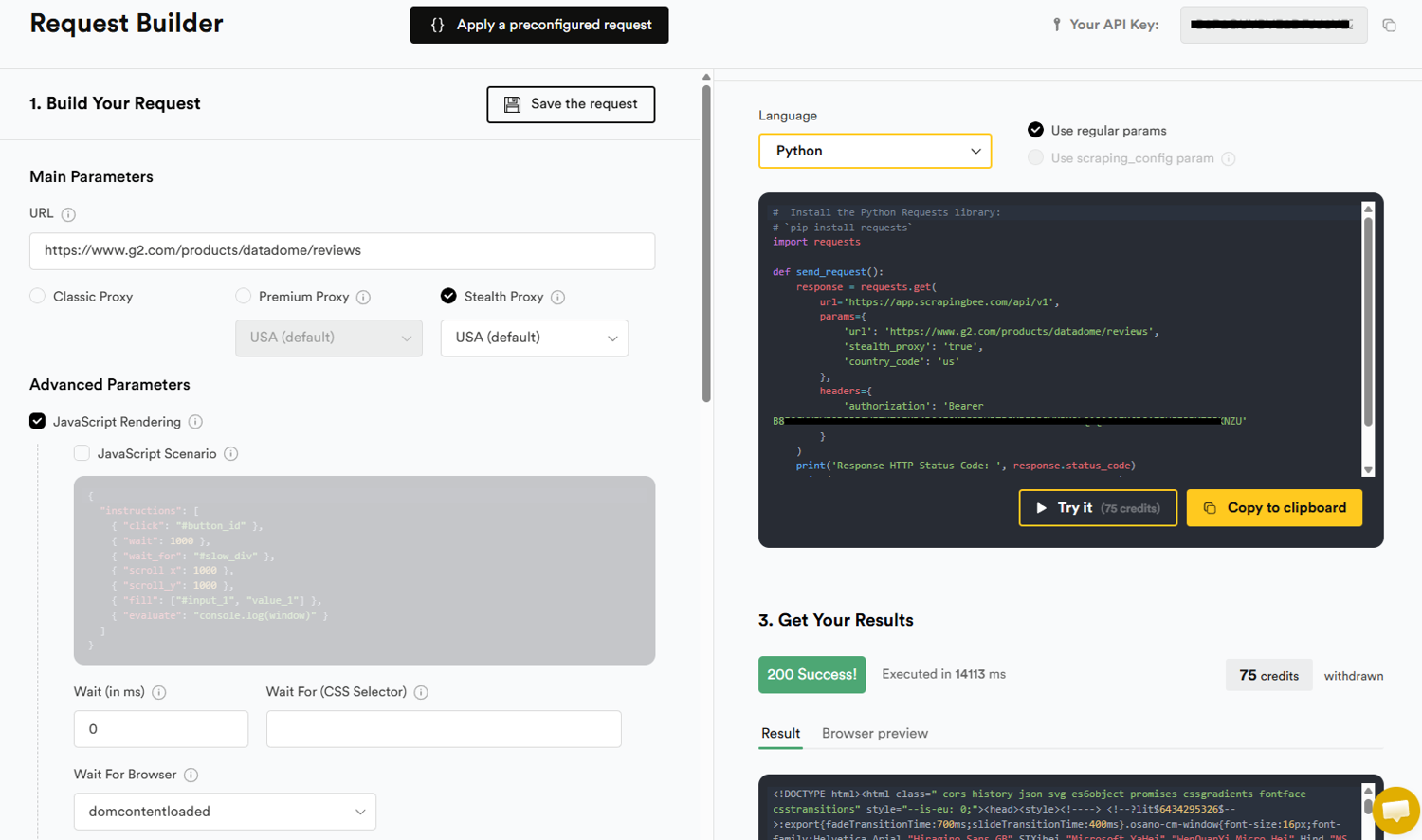
You can also select a preferred language and copy the generated code to test in your IDE. Here's a Python Sample:
#  Install the Python Requests library:
# `pip install requests`
import requests

def send_request():
    response = requests.get(
        url='https://app.scrapingbee.com/api/v1',
        params={
            'url': 'https://www.canadagoose.com/ca/en/pr/lodge-vest-black-disc-4160MB.html',
            'stealth_proxy': 'true',
            'country_code': 'us'
        },
        headers={
            'authorization': 'Bearer YOUR_API_KEY'
        }
    )
    print('Response HTTP Status Code: ', response.status_code)
    print('Response HTTP Response Body: ', response.content)
send_request()
Note that ScrapingBee only charges successful requests (200/404) and each costs 75 credits. Failed requests with the 500 HTTP status code are not charged. If Kasada blocks your request, you'll receive a 500 error code, and your credit balance remains intact. That means, aside from re-engineering and maintenance costs, you can also implement retries without incurring additional costs.
Keep in mind that while a managed scraping API absorbs the maintenance burden as Kasada consistently changes how challenges are served and validated, it doesn't eliminate the underlying uncertainty. Kasada is one of the hardest anti-bot systems to navigate, and even a managed API isn't 100% guaranteed.
Troubleshooting common Kasada blocks
Most Kasada blocks trace back to one mismatched detection layer. A common diagnostic mistake is over-engineering the response: For example, adding proxy rotations and behavioral delays to a scraper that is actually failing because it is sending HTTP/1.1 instead of HTTP/2. Before changing multiple variables at once, identify which detection layer is responsible, then address that layer first.
The failure modes below are ordered according to where they originate in Kasada's detection pipeline:
1. Immediate 403/429 on first request
An immediate block on the very first request often indicates a mismatch or direct failure in the network layer. Kasada inspects the TLS handshake, the HTTP protocol version, and the header set of the first request. A mismatch at any of these layers ends the session instantly.
Check your TLS fingerprint, HTTP version, header consistency and order, and IP reputation. If you can reproduce the block in a real browser on the same network and IP address, the problem is your IP. If the browser loads the page fine, the problem lies in one or a combination of TLS fingerprint, HTTP version, or header consistency.
2. Blocks after several successful requests
A session that passes the initial challenge but starts returning 429s after several successful requests is most likely a behavioral layer failure. Kasada's behavioral analysis runs continuously throughout the session. A session that earned an initial trust score starts to decay the moment interactions deviate from what's expected of a human request.
Common causes are fixed request patterns, making too many requests within a time period, identical navigation sequences, and IP reuse across sessions.
3. Browser automation detected
If your setup uses a browser instance but still fails Kasada's challenge (either receiving a 403, entering a loop of repeated 429s and redirects, or failing to obtain a valid x-kpsdk-ct token), the JavaScript fingerprinting layer is identifying the browser as automated. Patching popular indicators like navigator.webdriver and missing plugins, such as window.chrome, isn't enough. You'll want to switch to recent stealth options like Nodriver and Camoufox.
4. Residential proxies still blocked
Residential proxies are generally afforded positive trust scores, but they don't eliminate the possibility of an IP reputation penalty. A residential IP that is flagged in Kasada's global and cross-customer database, overused within a short window, geographically inconsistent with the session's other signals, or sourced from a provider with a degraded pool reputation can still get blocked.
Keeping requests per-IP count conservative to avoid tainting a clean residential IP, ensuring geographic consistency, and rotating aggressively (based on your volume) can fix this failure mode.
Frequently asked questions
Can you bypass Kasada with Python requests?
No. Python's requests library produces well-known JA3 hashes that Kasada instantly flags. Even if you manage to spoof the TLS handshake, your request won't pass other layers, especially JavaScript fingerprinting.
What is the X-Kpsdk-Ct header?
The x-kpsdk-ct header is Kasada's session token. It's issued after a request successfully executes the virtual machine, solves the proof-of-work puzzle, and passes JavaScript and browser fingerprinting checks.
Does Kasada show a CAPTCHA?
No, Kasada is designed never to show a CAPTCHA; rather, it uses an invisible proof-of-work challenge that your request environment must solve to prove its legitimacy.
Why does Kasada block me even with residential proxies?
Residential proxies can help you pass the IP reputation layer. Still, you must also match TLS, HTTP, and browser fingerprints, pass Kasada's JavaScript challenges and proof-of-work computations, and earn valid tokens to access a Kasada-protected website.
Are Kasada solvers reliable?
No. Open-source Kasada solvers are generally among the least reliable tools in the web scraping ecosystem, particularly because Kasada frequently rotates its challenges and adapts to new bot traffic patterns.
Is it legal to scrape a Kasada-protected site?
It depends on what is being scraped, how, and where. The clearest legal support for web scraping only exists for publicly accessible, pre-login content. The ruling in hiQ Labs v. LinkedIn held that scraping publicly available data doesn't constitute unauthorized access in the United States; however, a breach of contract and the Terms of Service (ToS) does. Other regulations (EU) exist that restrict certain public data scraping activity, especially personal information. That said, the safest course is to scrape only public data, respect robots.txt, avoid authenticated pages, respect a site's Terms of Service (ToS), and consult legal counsel before scraping at a commercial scale.
Final thoughts
Kasada is one of the hardest anti-bot systems for web scrapers to navigate. While you can create a working Kasada bypass with the right combination of a stealth browser, residential proxies, and carefully orchestrated browsing patterns, maintaining a reliable bypass at scale is an ongoing engineering challenge. One that inevitably exceeds the value of extracting data.
That said, a managed scraping API offers a more practical approach. The ScrapingBee stealth tier handles browser fingerprinting, proxy rotation, JavaScript execution, and other anti-bot defenses for you, allowing you to focus on extracting data.
The best part? ScrapingBee's Proxy Mode endpoint lets you use those features without rewriting your code. Simply point your requests session at ScrapingBee's proxy address and pass your parameters as proxy credentials.