A JA4 fingerprint is a short, readable summary of your TLS ClientHello, and anti-bot systems use it to tell a Python HTTP client from a real browser before any HTML loads. Python's requests and httpx produce a JA4 that doesn't look like Chrome's, so a server can flag them before it looks at headers or behavior. In this guide, I test the JA4 of four Python clients against my own Chrome, then show tested code that matches Chrome's JA4 with curl_cffi and with uTLS through tls-client.
Key takeaways (TL;DR)
- A JA4 has three parts: a readable summary (protocol, TLS version, Server Name Indication (SNI), counts, Application-Layer Protocol Negotiation (ALPN)), a cipher hash and an extension hash.
- JA4 sorts ciphers and extensions, so Chrome's extension shuffling, which breaks JA3, doesn't change it.
- In my test, requests and httpx sent 17 ciphers, 12 extensions and h1. Chrome 156 sent 15 ciphers, 17 extensions and h2. curl_cffi's Chrome profile matched Chrome's JA4 and HTTP/2 hash.
- uTLS is Go only. From Python you use it through tls-client, which also matched Chrome.
- JA4 is one layer. Servers also check headers, HTTP/2 settings, IP reputation and JavaScript.
- Check your JA4 when browsers update. FoxIO says JA4 values change about once a year.
What a JA4 fingerprint is and how to read one
Every HTTPS connection starts with a TLS ClientHello. This is the first message the client sends, before encryption starts. It lists the TLS versions, cipher suites, extensions and signature algorithms that the client supports. Each TLS library builds this message in its own way, so the message identifies the library. If you need the full background, read how TLS fingerprinting works.
JA4 converts the ClientHello to a string with three parts that are separated by underscores. The FoxIO README gives this value as Chrome's JA4 over TCP. My own Chrome 156 on macOS sent the same value in November 2026:
t13d1517h2_8daaf6152771_cb7bf5808d99
The first part (t13d1517h2) is plain text:
| Characters | Value | Meaning |
|---|---|---|
| t | Protocol | TLS over TCP (q is QUIC, the UDP-based transport behind HTTP/3; d is Datagram TLS (DTLS)) |
| 13 | TLS version | TLS 1.3 |
| d | SNI | The client sent a domain name (i means an IP address or no SNI) |
| 15 | Cipher count | 15 cipher suites, Generate Random Extensions And Sustain Extensibility (GREASE) values not counted |
| 17 | Extension count | 17 extensions, GREASE values not counted |
| h2 | ALPN | The first and last characters of the first ALPN value |
The second part (8daaf6152771) is the first 12 characters of a SHA-256 hash of the cipher list, sorted in hex order. The third part (cb7bf5808d99) is a truncated SHA-256 hash of the sorted extension list (without SNI and ALPN) plus the signature algorithms in their original order. The FoxIO JA4 technical details give the full rules.
The first part is the useful one when you debug a scraper. If your client shows h1 where Chrome shows h2, or 12 extensions where Chrome has 17, you can see the problem without decoding a hash.
JA4 is one method in the JA4+ family. JA4H fingerprints the HTTP request, JA4T fingerprints the TCP connection, and JA4S fingerprints the server response. JA4 itself uses the BSD 3-Clause license. The other JA4+ methods use the FoxIO License 1.1.
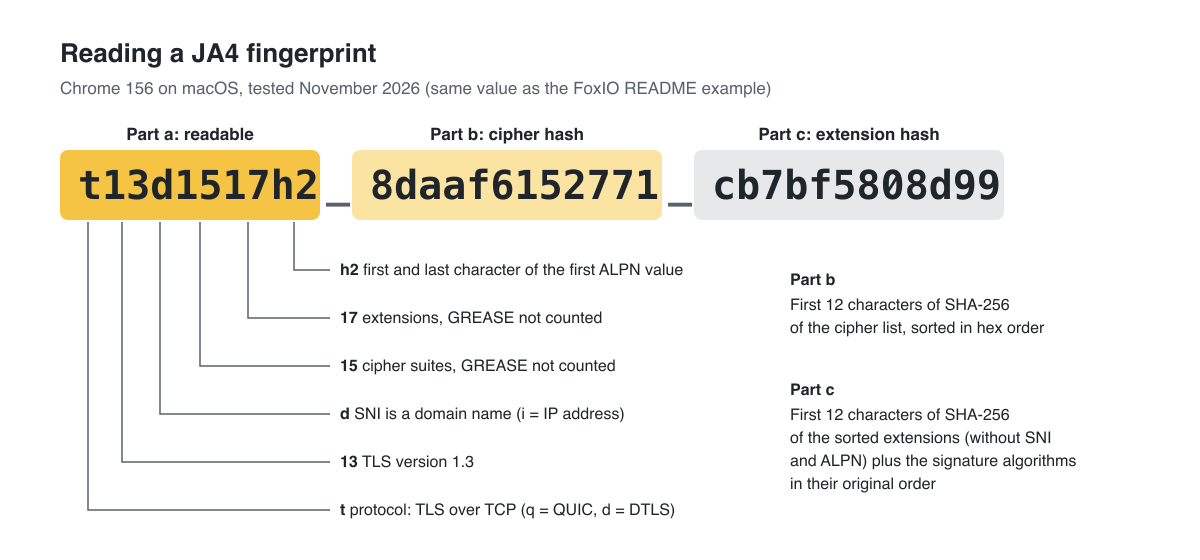
Annotated JA4 fingerprint showing protocol, TLS version, SNI, cipher and extension counts, ALPN and the two hashes
Why JA4 catches Python scrapers that got past JA3
JA3 is the older TLS fingerprint. It hashes the ClientHello fields in the order that the client sends them. In early 2023, Chromium started to shuffle the order of its TLS extensions on every connection (Chrome 110 shipped it to all users). After that, one Chrome browser produced a new JA3 hash on almost every connection, and JA3 lost most of its value for identifying real browsers. Scrapers could also change their JA3 by changing the order.
JA4 sorts the ciphers and extensions before it hashes them, so the order has no effect. FoxIO's reasoning is that applications and libraries differ much more in which ciphers they offer than in the order they use. Sorting also reduces the effect of "cipher stunting", which is the practice of randomizing the cipher order to avoid JA3 detection.
Order tricks no longer change your fingerprint, and that is the difference that matters for scrapers. To look like Chrome, your client must offer the same ciphers, extensions and signature algorithms that Chrome offers.
Large security platforms use JA4 today:
- Cloudflare: Exposes the JA4 of each request, plus "JA4 Signals", in its firewall rules, Bot Analytics and Workers. JA4 Signals are features that Cloudflare computes over the last hour of its global traffic. In August 2024, Cloudflare said that it analyzed over 15 million unique JA4 fingerprints every day. The Cloudflare post about JA4 fingerprints and inter-request signals explains the details.
- AWS WAF: Can match rules on a request's JA4 fingerprint for CloudFront and Application Load Balancer. The AWS WAF documentation on JA4 fingerprints explains the details.
Detection also compares your JA4 with the User-Agent that you claim, and with how the same JA4 behaves across many sites. A Chrome User-Agent with a Python JA4 is an easy mismatch to find. If you work on sites behind Cloudflare, our guide to scraping Cloudflare-protected sites covers the other checks.
First-hand test: the JA4 fingerprint of requests, httpx, curl_cffi and tls-client
I sent the same request through each client to a fingerprint echo service. The service returns the JA4, the JA3 hash and the HTTP/2 fingerprint that it saw. Install the four clients first:
pip install requests httpx curl_cffi tls-client
This is the script I ran:
"""Send the same request through four Python HTTP clients and print their TLS fingerprints."""
import json
import sys

import httpx
import requests
import tls_client
from curl_cffi import requests as cffi

ECHO_URL = "https://tls.peet.ws/api/all"


def via_requests():
    return requests.get(ECHO_URL, timeout=20).json()


def via_httpx():
    return httpx.get(ECHO_URL, timeout=20).json()


def via_curl_cffi(profile):
    return cffi.get(ECHO_URL, impersonate=profile, timeout=20).json()


def via_tls_client(identifier):
    session = tls_client.Session(client_identifier=identifier, random_tls_extension_order=True)
    return session.get(ECHO_URL, timeout_seconds=20).json()


CLIENTS = {
    "requests": via_requests,
    "httpx": via_httpx,
    "curl_cffi chrome": lambda: via_curl_cffi("chrome"),
    "curl_cffi firefox": lambda: via_curl_cffi("firefox"),
    "curl_cffi safari": lambda: via_curl_cffi("safari"),
    "tls-client chrome_152": lambda: via_tls_client("chrome_152"),
}


def summary(data):
    tls = data["tls"]
    h2 = data.get("http2") or {}
    return {
        "http": data["http_version"],
        "ja4": tls["ja4"],
        "ja3_hash": tls["ja3_hash"],
        "h2_hash": h2.get("akamai_fingerprint_hash", "-"),
    }


if __name__ == "__main__":
    results = {}
    for name, call in CLIENTS.items():
        row = summary(call())
        results[name] = row
        print(f"{name:<22} {row['http']:<9} {row['ja4']:<38} ja3={row['ja3_hash'][:12]} h2={row['h2_hash'][:12]}")
    if len(sys.argv) > 1:
        with open(sys.argv[1], "w") as f:
            json.dump(results, f, indent=2)
For the reference row, I opened the same URL in my desktop Chrome. I ran the test in November 2026 on macOS with Python 3.13, requests 2.34.2, httpx 0.28.1, curl_cffi 0.17.0, tls-client 2.0.0 and Chrome 156. I checked again after Chrome 157 came out on November 3, and it sent the same JA4 and HTTP/2 hash.
| Client and profile | JA4 | JA3 hash | HTTP/2 hash | HTTP version |
|---|---|---|---|---|
| Chrome 156 (real browser) | t13d1517h2_8daaf6152771_cb7bf5808d99 | 546ee11334ee (changes) | 52d84b11737d | h2 |
| Firefox 159 (Playwright, Linux) | t13d1517h2_8daaf6152771_3cbfd9057e0d | 9d42e90b0225 | 6ea73faa8fc5 | h2 |
| requests | t13d1712h1_ab0a1bf427ad_882d495ac381 | 7291ea5e449f | none | HTTP/1.1 |
| httpx | t13d1712h1_ab0a1bf427ad_8e6e362c5eac | 37f7d09ced1a | none | HTTP/1.1 |
| curl_cffi chrome | t13d1517h2_8daaf6152771_cb7bf5808d99 | 54fead5d7cb9 (changes) | 52d84b11737d | h2 |
| curl_cffi firefox | t13d1517h2_8daaf6152771_3cbfd9057e0d | 424f6d9c8b89 | 6ea73faa8fc5 | h2 |
| curl_cffi safari | t13d2013h2_a09f3c656075_7f0f34a4126d | ecdf4f49dd59 | c52879e43202 | h2 |
| tls-client chrome_152 | t13d1517h2_8daaf6152771_cb7bf5808d99 | 9b3544a54c72 (changes) | 52d84b11737d | h2 |
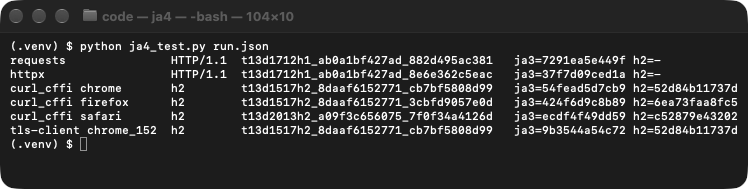
Terminal output comparing JA4 fingerprints of requests, httpx, curl_cffi and tls-client
The results show the following:
- requests and httpx: Both use Python's ssl module, which uses OpenSSL (our urllib3 vs Requests post explains how requests uses it). They share the first two parts of the JA4 (17 ciphers, 12 extensions, h1). In the raw JA4, requests sends the post_handshake_auth extension and httpx sends session_ticket instead, so the third parts differ. With httpx.Client(http2=True) (which needs pip install "httpx[http2]"), the connection used HTTP/2, but the JA4 still showed h1. httpx offers http/1.1 before h2, and JA4 reads only the first ALPN value.
- curl_cffi Chrome profile: The JA4 and the HTTP/2 fingerprint were identical to my real Chrome. The alias maps to the Chrome 152 profile for Windows, and it still matched Chrome 156 on macOS.
- Repeated requests: I sent five requests with the curl_cffi Chrome profile. The JA4 was the same each time, and the JA3 hash was different each time. tls-client with random_tls_extension_order=True showed the same pattern.
- tls-client: Its chrome_152 identifier matched both Chrome and curl_cffi on the JA4 and the HTTP/2 hash.
- Firefox and Safari profiles: The curl_cffi Firefox profile shared Chrome's cipher hash and differed in the extension and HTTP/2 hashes. Playwright's Firefox 159 on Linux matched the curl_cffi Firefox row on the JA4 and the HTTP/2 hash, and only the JA3 hash was different. I didn't compare the Safari row with a real Safari.
I also sent every client to tls.browserleaks.com, and it returned the same JA4 strings as tls.peet.ws. Use one service for all your comparisons. If two services ever show a different first part for the same connection, compare the second and third parts.
How to match Chrome's JA4 fingerprint with curl_cffi
This section assumes that curl_cffi is installed. For installation and your first request, see our curl_cffi guide.
The curl_cffi impersonate parameter gives you two ways to select a browser profile:
- Rolling alias: impersonate="chrome" selects the newest Chrome profile (for Windows) in your installed version. Your fingerprint follows Chrome when you upgrade the library.
- Pinned target: impersonate="chrome152" (or chrome152_macos) sends the same fingerprint until you change it. Your results stay reproducible, but the profile gets older.
The list of curl_cffi impersonation targets shows the current names.
A pinned target is easier to test. The following script checks the JA4 when it starts and stops with an error if the JA4 isn't the expected value, for example after a library upgrade:
"""Check the JA4 of a curl_cffi profile before you start scraping."""
from curl_cffi import requests

PROFILE = "chrome152"
# Chrome 156 on macOS
EXPECTED_JA4 = "t13d1517h2_8daaf6152771_cb7bf5808d99"
ECHO_URL = "https://tls.peet.ws/api/all"


def check_fingerprint(session: requests.Session) -> None:
    ja4 = session.get(ECHO_URL, timeout=20).json()["tls"]["ja4"]
    if ja4 != EXPECTED_JA4:
        raise RuntimeError(f"JA4 drift for {PROFILE}: got {ja4}, expected {EXPECTED_JA4}")
    print(f"JA4 check passed for {PROFILE}: {ja4}")


session = requests.Session(impersonate=PROFILE)
check_fingerprint(session)

response = session.get("https://books.toscrape.com/", timeout=20)
print(response.status_code, response.headers.get("content-type"))
JA4 check passed for chrome152: t13d1517h2_8daaf6152771_cb7bf5808d99
200 text/html
Keep the User-Agent consistent with the TLS profile. curl_cffi sets the default headers of each profile, including the User-Agent. A Chrome handshake with a Firefox or python-requests User-Agent is an easy mismatch to flag, so override only the headers that your target needs.
curl_cffi has no ja4= parameter, because a JA4 is a hash and can't be reversed to a handshake. A custom fingerprint uses ja3=, extra_fp= (signature algorithms, GREASE, extension permutation) and akamai= for HTTP/2. I tried to rebuild Chrome 156 this way from its JA3 string. The cipher and HTTP/2 hashes matched, but the JA4 had 12 extensions instead of 17, and five more curl options plus extra signature algorithms brought the count only to 16. For a browser fingerprint, use a built-in profile.
To scrape at scale, use AsyncSession. Each session keeps the same profile for all its requests, so your fingerprint stays consistent:
"""Fetch several pages concurrently with one curl_cffi AsyncSession."""
import asyncio

from curl_cffi import requests

URLS = [f"https://books.toscrape.com/catalogue/page-{n}.html" for n in range(1, 6)]


async def main():
    semaphore = asyncio.Semaphore(3)  # at most 3 requests in flight

    async with requests.AsyncSession(impersonate="chrome152") as session:

        async def fetch(url):
            async with semaphore:
                response = await session.get(url, timeout=20)
                return url, response.status_code, len(response.text)

        for url, status, size in await asyncio.gather(*(fetch(u) for u in URLS)):
            print(status, size, url)


asyncio.run(main())
All five pages returned status 200 in my run.
How to match JA4 with uTLS from Python using tls-client
uTLS is a fork of Go's crypto/tls package. It lets a Go program send the ClientHello of a specific browser, selected with a ClientHelloID such as HelloChrome_Auto. uTLS is Go only, and it has no Python package.
From Python, you use uTLS through tls-client. bogdanfinn's tls-client is a Go HTTP client that is built on a fork of uTLS. It compiles to a shared library, and Python-Tls-Client wraps that library. You install it with pip install tls-client:
"""Use bogdanfinn's tls-client (Go, uTLS fork) from Python."""
import tls_client

session = tls_client.Session(
    client_identifier="chrome_152",
    random_tls_extension_order=True,
)
# tls-client copies Chrome's handshake but not its headers, so set them yourself.
session.headers.update({
    "user-agent": (
        "Mozilla/5.0 (Windows NT 10.0; Win64; x64) AppleWebKit/537.36 "
        "(KHTML, like Gecko) Chrome/152.0.0.0 Safari/537.36"
    ),
    "accept": "text/html,application/xhtml+xml,application/xml;q=0.9,*/*;q=0.8",
    "accept-language": "en-US,en;q=0.9",
})

fingerprint = session.get("https://tls.peet.ws/api/all", timeout_seconds=20).json()
print("ja4:", fingerprint["tls"]["ja4"])
print("http2:", fingerprint["http2"]["akamai_fingerprint_hash"])
print("user-agent:", fingerprint["user_agent"])

page = session.get("https://books.toscrape.com/", timeout_seconds=20)
print(page.status_code)
ja4: t13d1517h2_8daaf6152771_cb7bf5808d99
http2: 52d84b11737d980aef856699f885ca86
user-agent: Mozilla/5.0 (Windows NT 10.0; Win64; x64) AppleWebKit/537.36 (KHTML, like Gecko) Chrome/152.0.0.0 Safari/537.36
200
Set the headers yourself. Without them, tls-client 2.0.0 sent the User-Agent tls-client/2.0.0 with a matching Chrome JA4, which is the User-Agent mismatch from the curl_cffi section.
random_tls_extension_order=True copies Chrome's own extension shuffling. JA4 ignores the order, but JA3 and other order-sensitive checks don't. With the option off, my five requests had the same JA3 hash every time, which isn't how a current Chrome behaves.
| Feature | curl_cffi 0.17.0 | tls-client 2.0.0 (Python) |
|---|---|---|
| TLS stack | curl-impersonate (curl with BoringSSL) | Go, fork of uTLS and of net/http |
| Installation | pip install curl_cffi, binary wheel | pip install tls-client, includes a Go shared library for your platform |
| Async support | Native AsyncSession on asyncio | AsyncSession that runs each request in a worker thread |
| HTTP/3 | Yes, http_version="v3" (tested) | The Go library supports it. I found no option in the Python wrapper. |
| Profile names | chrome152, chrome152_macos, alias chrome | chrome_152, chrome_152_PSK |
| Profile updates | New targets in new releases, or curl-cffi update | New identifiers in new wrapper releases |
For most Python scrapers, curl_cffi is the better default because it has native async support and HTTP/3. tls-client is a good fit when you need a profile that only it offers, or the same fingerprints as a Go service. It ships a compiled binary (2.0.0 lists macOS, Linux and Windows builds), so check your platform before production use. If your team works in Go, use uTLS directly, as described in our guide to bypassing Cloudflare in Go.
JA4 is one layer: JA4H, HTTP/2 settings and header order
A matching JA4 removes one signal, but servers can still identify a scraper by the following:
- JA4H: A fingerprint of the HTTP request. It uses the method, HTTP version, cookies, the Referer header, header count and order, and Accept-Language.
- HTTP/2 fingerprint: The Akamai-style fingerprint uses the SETTINGS frame, the WINDOW_UPDATE value and the order of the pseudo-headers. Python clients without HTTP/2 have none, which is also a signal.
- Header order and casing: Each browser version sends headers in a consistent order. Our guide to web scraping headers covers this.
- IP reputation: Servers often trust datacenter IP addresses less than residential ones.
- TLS session behavior: Session resumption and connection reuse can differ between browsers and scripts.
- JavaScript challenges: Some pages need a real browser to run a script before they return content.
Behavior also counts, because Cloudflare's JA4 Signals describe how a fingerprint behaves across its whole network. Two examples are browser_ratio_1h (the share of requests with a browser User-Agent for that JA4) and cache_ratio_1h (the share of cacheable responses). A matching Chrome JA4 that requests only HTML pages at a high rate from one IP address can still look different from real Chrome traffic.
To check your client, compare the JA4, the HTTP/2 hash and the header order with the real Chrome row from the test. In my test, curl_cffi and tls-client matched on the first two. I didn't compare header order.
When a site sends a JavaScript challenge, the next layer is browser fingerprinting, such as canvas, WebGL and navigator properties. An HTTP client can't answer these checks, because it doesn't run JavaScript.
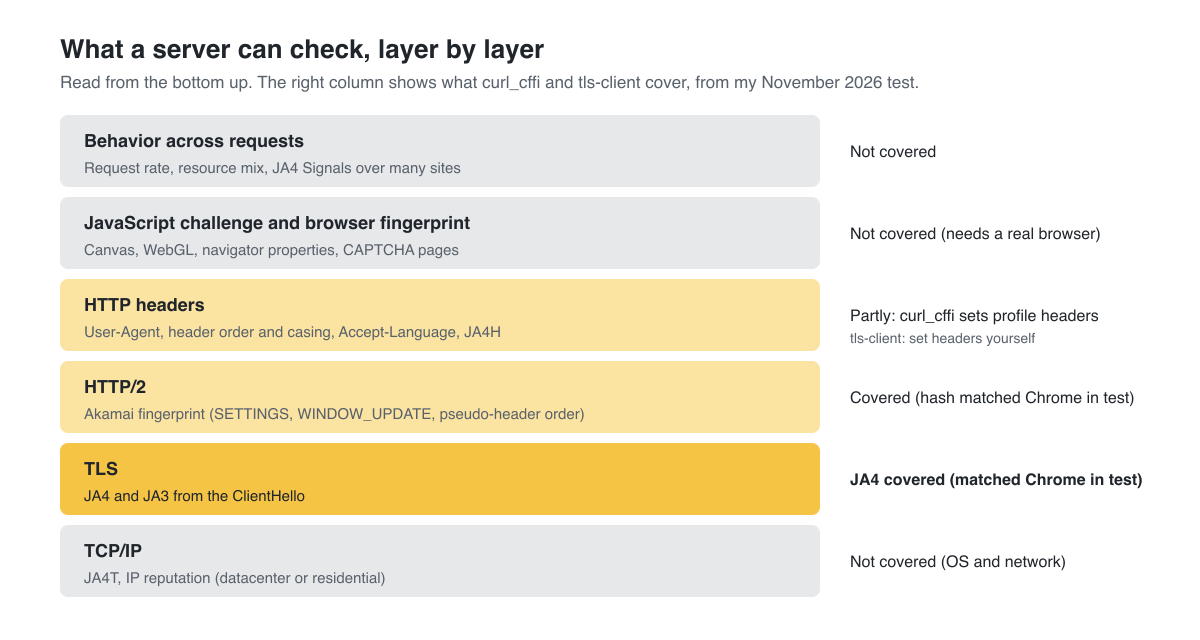
Detection layers a scraper passes through, from TCP and JA4 TLS fingerprint to JavaScript challenges
Keeping your JA4 current when Chrome updates
FoxIO says that JA4 fingerprints change as TLS libraries update, about once a year. Chrome changes its version much faster, with a new stable release every two weeks since Chrome 152 (August 25, 2026). In my test, the Chrome 152 profile still matched Chrome 156, so the JA4 itself changes less often than the version number. The User-Agent version in a pinned profile ages first, and when Chrome's TLS stack changes, an old JA4 stands out too.
Use these update paths:
- curl_cffi: Upgrade the package to get new targets. Since 0.16.0, the curl-cffi update command can download new fingerprints without a library upgrade. The command needs an API key. Without one, my test returned HTTP 401.
- tls-client: Upgrade the package, then change client_identifier to the new Chrome version.
- Scheduled check: Run the test script from the first-hand test section in CI or as a weekly cron job. Compare the result with your current Chrome, and send an alert when the JA4 doesn't match.
If you rotate profiles, use a small set of current, common browsers, for example the latest Chrome on Windows and macOS. Random or old profiles make your traffic easier to separate from real users.
When to stop matching JA4 yourself
A TLS-impersonating HTTP client stops being enough in these cases:
- The site sends a JavaScript challenge or a CAPTCHA page.
- The site scores behavior across many requests.
- The site blocks your IP range, whatever fingerprint you send.
At that point, the work grows. You must update profiles, keep headers consistent with each profile, rotate proxies and keep a headless browser as a fallback for challenge pages. Some anti-bot systems like Kasada need all of these.
For public pages, ScrapingBee does this work for you:
- Requests can go through a real headless browser with JavaScript rendering (render_js).
- You select a proxy tier per request: classic, premium (residential) or stealth. As of November 2026, a stealth proxy request costs 75 credits.
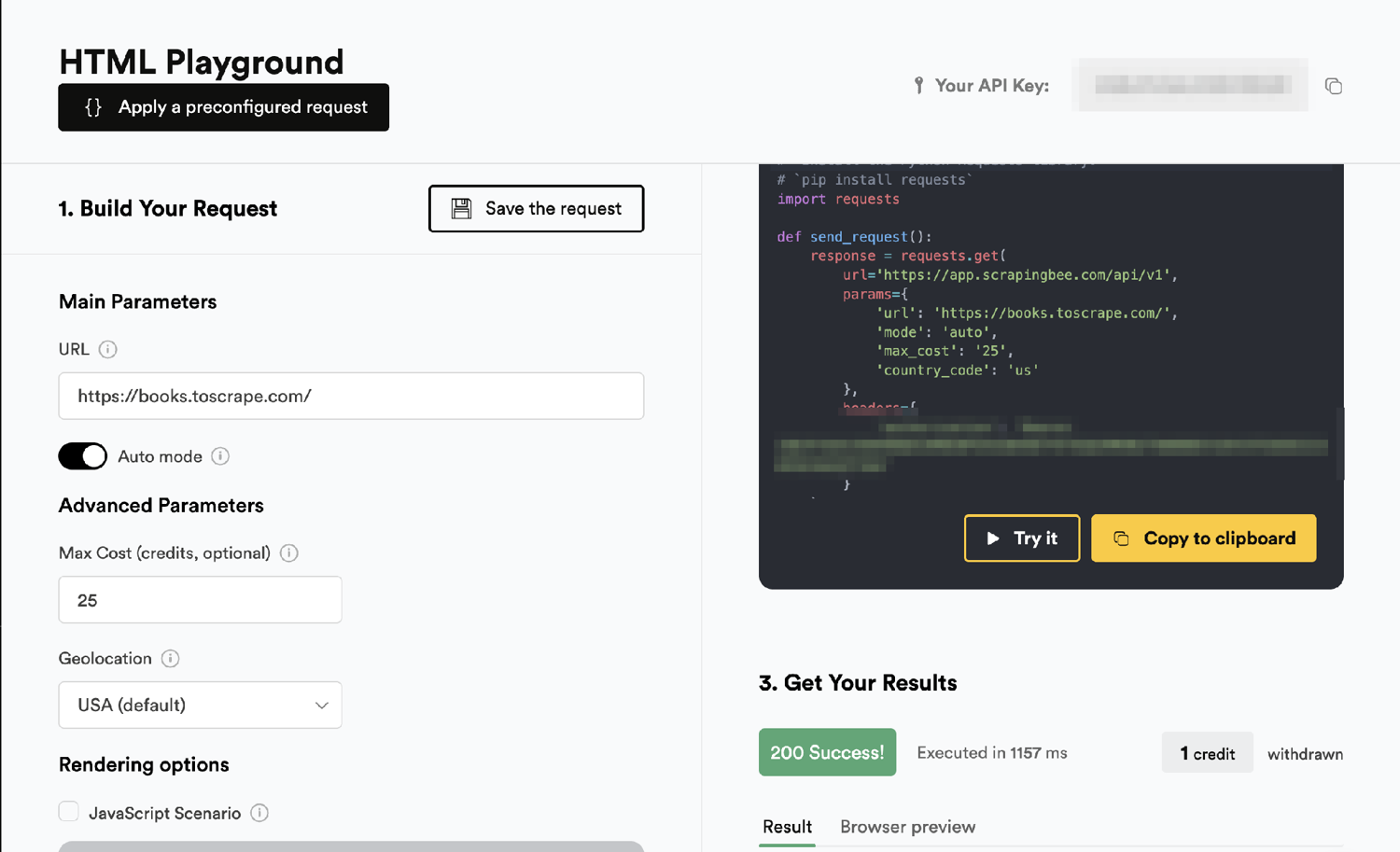
- Auto-Mode (mode=auto) tries configurations from the cheapest to the most expensive. It charges only for the one that succeeds (1, 5, 10, 25 or 75 credits as of November 2026), and 0 credits if none succeed. max_cost sets the highest cost that Auto-Mode can try.
"""Fetch a public page through ScrapingBee Auto-Mode with a credit cap."""
import os

import requests

response = requests.get(
    "https://app.scrapingbee.com/api/v1/",
    headers={"Authorization": f"Bearer {os.environ['SCRAPINGBEE_API_KEY']}"},
    params={
        "url": "https://books.toscrape.com/",
        "mode": "auto",
        "max_cost": 25,  # never go above the premium proxy + JavaScript tier
    },
    timeout=150,
)
response.raise_for_status()
print("status:", response.status_code)
print("credits charged:", response.headers.get("Spb-auto-cost"))
print(response.text[:200])
status: 200
credits charged: 1
<!DOCTYPE html>
<!--[if lt IE 7]>      <html lang="en-us" class="no-js lt-ie9 lt-ie8 lt-ie7"> <![endif]-->
The Spb-auto-cost response header shows the credits that the request used. For this simple demo page, the cheapest configuration worked, so the request cost 1 credit. Auto-Mode works only with GET requests, and it returns a 400 error if you also send render_js, premium_proxy, stealth_proxy or transparent_status_code. The ScrapingBee documentation lists all the parameters. No tool can guarantee access to every site, but with ScrapingBee your team doesn't maintain the TLS, browser and proxy layers.
ScrapingBee request builder with Auto-Mode and a credit cost preview
Skip the fingerprint upkeep with ScrapingBee
To match Chrome's JA4 in Python, use curl_cffi or tls-client, check the result against a real Chrome, and update the profile when Chrome changes. If your JA4 matches and you're still blocked, ScrapingBee handles the browser, proxy and anti-bot layers through one API. You can try ScrapingBee for free today with 1,000 free API credits and no credit card. The FAQs below answer some common JA4 questions.
JA4 fingerprint FAQs
What is the JA4 fingerprint of Chrome?
The FoxIO README gives t13d1517h2_8daaf6152771_cb7bf5808d99 as desktop Chrome's JA4 over TCP. My Chrome 156 on macOS sent the same value in November 2026. The value changes when Chrome's TLS stack changes, so check it against your own browser.
Does a proxy or VPN change my JA4 fingerprint?
Usually not. A normal forwarding proxy or VPN forwards your TLS handshake unchanged, so the JA4 still comes from your client library. It does change your IP address and can change TCP-level signals such as JA4T. A proxy that ends the TLS connection and opens a new one (an intercepting proxy) replaces your JA4 with its own.
Does JA4 fingerprinting work over HTTP/3 and QUIC?
Yes. For QUIC, the first character of the JA4 is q instead of t. curl_cffi supports HTTP/3 with http_version="v3", and my test request to an HTTP/3 server succeeded. The echo service answered over HTTP/2, so I didn't capture a q JA4. The FoxIO README lists Chrome's JA4 over QUIC as q13d0312h3_55b375c5d22e_178839b6cec1. Test your JA4 over the protocol that your scraper actually uses.
Do headless Chrome, Playwright and Selenium have a real-browser JA4?
Usually, yes. When they drive Chrome or Chromium, the TLS handshake comes from Chromium's own TLS stack. Playwright's Firefox and WebKit browsers, and its request API, send different handshakes. Detection then moves to browser-level fingerprints and automation flags, such as navigator.webdriver.
Is it legal to spoof a JA4 fingerprint when scraping?
Changing your own client's handshake isn't usually illegal by itself. What matters is what you scrape and how you scrape it. Scrape only public pages that don't need a login, respect the site's terms and rate limits, and get legal advice for your jurisdiction and your use case.