To bypass DataDome, your scraper must fully mirror a real user, satisfying all detection layers simultaneously. The catch? The more layers you account for, the closer you get to running a full browser environment, at which point, scaling becomes challenging. No wonder Benjamin Fabre, CEO of DataDome, reiterates that bypassing DataDome at scale is virtually impossible.
That doesn't mean public data is off the table, but that you've got two realistic approaches depending on your scale: a DIY stack or a managed API.
In this guide, we'll explore both paths, starting with how DataDome works and what a manual bypass setup looks like against a managed scraping API. Finally, we'll explain when and why a managed API is your best bet, at scale.
Key Takeaways (TL;DR)
- DataDome evaluates every request across multiple signals, including IP reputation, TLS fingerprinting, browser and device fingerprinting, and behavioral patterns.
- Default headless browsers leak automation indicators that DataDome can quickly detect, and their TLS fingerprints don't match those of real browsers.
- Residential proxies are a necessary component of a DataDome bypass stack, but they are not sufficient to bypass the anti-bot system.
- A DIY stack is fragile and expensive, as DataDome's real-time model updates mean a working bypass decays or requires ongoing maintenance.
- ScrapingBee trades maintenance for a single parameter (
stealth_proxy), which costs 75 credits per successful request. No bandwidth billed, and 500 responses (failed requests) are not charged. - Only scrape public, pre-login pages and always respect the website's terms of service.
What is DataDome, and how does it detect bots?
DataDome is a web security and bot management platform with a mission to protect web applications and APIs from fraudulent traffic. It detects bots using a multilayered AI/ML system that analyzes incoming requests to accurately classify them into three main categories: human, whitelisted partners using automation, and bots.
Since its launch in 2015, DataDome has gained widespread popularity. From ranking number one in G2's grid report in 2024 to being named a leader in the Forrester wave: Bot and Agent Trust Management Software, Q2 2026.
What gives DataDome this level of enterprise trust and reputation is also the primary reason why scrapers get blocked: the sheer prowess of the DataDome bot detection system.
DataDome analyzes hundreds of signals in real time across the entire request lifecycle: from network connection to user behavior. These signals are enriched with per-customer models and intelligence from processing over 5 trillion data points daily. The result is a trust score assigned to each request.
A high score, often associated with legitimate humans and partners, is allowed access to website resources. Medium triggers a device check (via a hidden JS that asks your device to perform certain actions), which can lead to a CAPTCHA, while a low score ultimately results in an outright block.
Understanding how these detection layers work is the first step to building a reliable DataDome bypass.
IP reputation
Once DataDome accesses your IP address data, which is often exposed at the network layer, it processes that information into a reputation score using various signals, including connection type (datacenter, residential, or mobile), IP history, and geolocation data.
Datacenter IPs are easily flagged because legitimate human traffic rarely originates from them. Mobile and residential IPs, tied to real internet service providers (ISPs), actual user devices, and physical locations, are often afforded more trust.
DataDome also checks IPs' cross-customer and global history. So, even a high-quality residential IP with a history of bot traffic or excessive requests on any other DataDome-protected site automatically carries a bad reputation score. Similarly, DataDome updates its database in real time to automatically flag any IP address associated with a new malicious pattern anywhere globally.
Geolocation consistency also matters. Your IP's location isn't flagged on its own, but cross-referenced against other signals. A request claiming a French browser locale and timezone but originating from a US datacenter IP is a mismatch that can negatively impact an IP reputation.
TLS/JA3 fingerprinting
Every HTTP request begins with a TLS handshake, during which the client sends a ClientHello message that reveals parameters such as the cipher suites, protocol versions, and supported TLS extensions. These parameters are hashed into a stable fingerprint using the JA3 algorithm (a hashing method developed by Salesforce in 2017).
Different client combinations (browser version and operating system (OS), or HTTP libraries) produce distinct hashes, also known as JA3 fingerprints. A Chrome 112 on Windows 11 generates a recognizable set of cipher suites in a specific order, and so do popular scraping libraries like Requests and Axios. The catch? Both groups are visibly distinctive.
DataDome maintains a frequently updated database of well-known JA3 hashes, against which it maps each user's fingerprint. If yours differs from a real browser, your request is flagged as automated. DataDome also extracts the following features from each TLS fingerprint for further analysis:
- Percentage of bots associated with the fingerprint
- IP quality
- OS and browser consistency
So even if you manage to spoof your TLS fingerprint accurately, DataDome can still flag your request if there are inconsistencies between your fingerprint and device class. For example, if a user claims to be a Firefox browser of any version, but its TLS fingerprint doesn't match that associated with the browser.
Browser and device fingerprinting
Browser and device fingerprinting is the process of collecting hundreds of client-side data points to form a unique signature that identifies each user.
This is the client-side counterpart to TLS fingerprinting: instead of cipher suites, it profiles the actual rendering environment (browser engine, OS, and GPU).
A JavaScript tag or SDK embedded on protected pages triggers the collection of various data points, including navigator properties, screen size and resolutions, installed plugins, fonts, and much more.
This script also forces your rendering environment to execute specific tasks and collect data on how they're carried out. For example, to query GPU and OS font data, it draws images and text onto an invisible canvas. The same logic applies to WebGL operations and audio signals.
DataDome also checks for variables that are unique to headless browsers. Properties like navigator.webdriver set to true or undefined, missing plugin arrays, and missing window.chrome object are easy giveaways.
All this data combines to form a unique fingerprint, which DataDome's AI model evaluates to identify inconsistencies. If a user claims to be a mobile iOS device but their browser fingerprint identifies them as a high-end desktop, DataDome flags the request as a bot.
Behavioral analysis
DataDome's behavioral models continuously monitor user interactions after a successful request. By building a baseline of expected human actions, the system can detect any deviation, however subtle.
This layer is the hardest to spoof at scale because it requires sustained human-like activity. Plus, automated libraries often expose themselves through behavioral micro-patterns that differ from natural human behavior:
- Mouse movement - humans typically produce irregularly curved, slightly erratic patterns with natural acceleration and deceleration. Bots often exhibit straight-line movements, perfectly smooth curves, or no mouse movement at all.
- Scroll behavior - natural users' scroll speed varies with intermittent pauses depending on the target element, while bots tend to scroll at a constant rate. Some poorly configured automations just jump to specific positions.
- Click precision - clicks landing on specific center coordinates and/or exactly n seconds after page element loads are easy automation signs. Natural users often produce irregular click coordinates, missing the center or the entire element area, and adjusting as needed.
There are numerous telltale signs that DataDome often looks for, and we can't cover them all, but you get the idea.
DataDome also tracks the overall session: request frequency, whether the tab is in focus, time on page, and how the session compares to established patterns for that specific site.
Keep in mind that the platform's per customer models mean that a reliable DataDome bypass must match the expected behavior on the target site. What works on a different target may not work on another.
CAPTCHA and JavaScript challenges
When DataDome suspects a bot but doesn't have sufficient evidence to issue an outright block, it runs a device check to gather more information. Similar to browser fingerprinting, DataDome injects client-side JavaScript. However, this time it not only collects data but also serves challenges that require JavaScript execution and return results that the server can verify.
As an extra layer of defense, part of these challenges is compiled to WebAssembly (WASM), which makes it harder to read or reverse-engineer. Browsers have unique WASM runtime environments, and any deviation from that adds to a negative trust score.
If the result is inconclusive or more information is needed to arrive at a final decision, DataDome issues a CAPTCHA challenge. This is typically a GeeTest-style slider that generally requires the user to slide a missing piece into a background image. Solving this CAPTCHA sets a DataDome cookie, and subsequent requests in that session are assigned a positive trust score for a defined period.
Per-customer ML models
Natural user behavior varies across sites: for example, a fashion retailer sees many mobile sessions with short dwell times. DataDome's models learn these per-site and per-endpoint baselines to accurately identify even the subtlest deviations. A sudden increase in request frequency that may be routine or seasonal on one site can be flagged on another.
In 2026, and in reaction to the rise of AI crawlers, DataDome's per-customer modeling now addresses two new threat categories: intent-based classification and LLM crawlers.
AI crawlers from OpenAI (GPTBot), Anthropic (ClaudeBot), and others now account for a significant share of verified bot requests. Many sites want to allow some AI crawlers while blocking others, or to meter the rate at which their content is consumed. DataDome's per-customer model configuration now accommodates these policies as a first-class feature.
How to bypass DataDome (methods that actually work)
To bypass DataDome, your request must appear legitimate across every detection layer simultaneously. In theory, that means high-trust proxies behind a browser that passes TLS and JavaScript fingerprinting checks, while maintaining consistent device signals and human-like interaction patterns throughout the session.
However, the reality is that DataDome frequently updates its detection layers. So even a fully assembled stack doesn't guarantee a successful bypass, especially at scale. It's, however, your best effort in an unending game of cat and mouse.
The methods discussed below address each layer individually. Combining them can result in a working DataDome bypass script.
Use a real browser with stealth patches
A realistic browser environment is a great first step in any bypass strategy. Default headless browsers often leak automation indicators, such as navigator.webdriver set to true or undefined, and a TLS fingerprint that differs from that of user-launched browsers.
DataDome can easily flag these properties and will block a standard Selenium, Playwright, or Puppeteer script before it renders any page content.
The stealth versions, however, can patch these leaks and produce fingerprints that more closely match real user sessions. Below is a list of some good open source stealth frameworks that are easy to get started with or integrate into an existing project:
- Camoufox. A modified Firefox build designed for scraping. It rotates fingerprints per session and simulates human-like mouse movements out of the box.
- Undetected-chromedriver. This library patches Selenium's ChromeDriver to hide automation signals. While it's good for existing Selenium codebases, it can become memory-intensive as you scale.
- SeleniumBase UC mode. An enhanced Selenium wrapper with built-in anti-detection that stays updated against new detection methods.
- Nodriver. A modern tool that communicates directly via Chrome DevTools Protocol, avoiding ChromeDriver entirely.
Use high-quality residential or mobile proxies
Residential and mobile proxies are often afforded high trust scores because they're assigned by ISPs and tied to real user locations. Requests from these proxy types generally appear to originate from legitimate users, making it difficult for DataDome to flag or blocklist.
That said, DataDome's IP reputation layer attributes scores based on current and historical data. So, a high-quality residential proxy with a poor history will result in a bad trust score.
Proxy rotation also matters. Making too many requests from a single IP raises suspicion and can lead to rate limits or IP bans, regardless of proxy quality. Implementing delays between requests and rotating proxies can help your IP address fly under the radar. Remember to match your IP's geolocation to the target site's expected audience.
Keep in mind that while residential proxies may satisfy the IP reputation layer, you'll need more than that to bypass DataDome reliably.
Match TLS and HTTP fingerprints
We've overviewed TLS fingerprinting: extracting signals from JA3 hashes of TLS handshake parameters. HTTP has its own equivalent. A technique that creates unique signatures based on the ordering, values, and priorities of specific implementation details such as SETTINGS frames and HEADERS frames.
Similar to TLS fingerprints, HTTP fingerprints are client-specific, and DataDome flags any inconsistencies between the two.
Curl-impersonate, a patch build of curl, can help you ensure a consistent TLS and HTTP fingerprint. It patches curl's TLS and HTTP/2 handshake, such that the entire connection imitates an actual browser.
Python wrappers like curl_cffi expose curl-impersonate via a requests-compatible interface, making integration with an existing Python scraper straightforward.
Note that TLS and HTTP fingerprint impersonation only fixes the TLS layer. Your HTTP headers still need to match the browser you're impersonating at the TLS level.
Below is a basic TLS impersonation script using curl_cffi:
from curl_cffi import requests

url = "https://www.g2.com/categories/pricing/"

response = requests.get(
    url,
    impersonate="chrome",
)

print(response.text)
This script impersonates a Chrome browser at the TLS and HTTP/2 level.
Simulate human behavior and warm up the session
DataDome continuously monitors user interactions throughout a session. While that means you must maintain a consistent human-like signal, your first few actions matter most.
Warm up the session: instead of navigating directly to the target URL, land on the homepage, pause for a while, scroll down the page, if the target requires it. You can also navigate via a click rather than a direct URL load. That presents a session context that DataDome's behavioral models treat as low risk.
When interacting with page elements, do so using human-like patterns, such as curved mouse paths with irregular accelerations and decelerations, scrolling at variable speeds, including delays between page load and first click, and slightly skewed click coordinates.
It's virtually impossible to be perfect with these interactions. The goal is to avoid machine-level accuracy and patterns that DataDome models can quickly flag.
Handle the CAPTCHA challenge
DataDome serves a CAPTCHA challenge only after a device check, when it needs additional information to reach a final decision. The DataDome CAPTCHA is a GeeTest-style slider puzzle that requires the user to slide the puzzle piece to a target position, usually to complete a background image.
There are two main approaches to a DataDome CAPTCHA bypass:
- CAPTCHA-solving service - services like 2Captcha and Anti-CAPTCHA accept a screenshot or token, route it to a human solver or a specialized model, and return the solution within a few seconds. The catch? Integrating the result back into the browser session can be challenging, since DataDome tracks the full interaction, not just the end position.
- CAPTCHA handling libraries - tools like CapSolver offer browser extension integrations and CDP hooks that attempt to intercept and auto-solve CAPTCHAs within the browser context, avoiding the screenshot-and-return roundtrip.
If the CAPTCHA is resolved successfully, you'll receive a DataDome cookie. This cookie is tied to the IP, browser fingerprint, and session. That means you can't simply move a cookie to a different session or machine. It's also time-limited and becomes invalid once the fingerprint changes. That's why "cookie generator" searches are a thing.
It's worth noting that satisfying each detection layer simultaneously is one thing. Doing so at scale is another. Each component needs to be maintained as DataDome updates its detection models; a technique that works today may stop working after the next update, which DataDome refreshes consistently.
For a few requests, a DIY stack might suffice. As volume increases, the maintenance burden and cost of keeping that stack functional eventually surpass the cost of outsourcing the problem entirely to managed scraping APIs.
The simpler path: bypass DataDome with a managed scraping API
A managed scraping API handles the entire DIY stack more efficiently behind a single API call. Think of it as hiring a bunch of supersmart minions to implement all the necessary configurations and provide you with an intuitive interface to request data.
With ScrapingBee, you can trigger an entire DataDome bypass with a single request: just enable the stealth_proxy parameter, and we'll automatically handle everything necessary to avoid detection.
More specifically, the stealth_proxy parameter activates ScrapingBee's stealth mode, which is designed for sites running systems like DataDome. It combines high-quality residential proxies with a real browser environment that automatically handles browser fingerprinting, executes JavaScript challenges, and returns the page's rendered HTML.
Test ScrapingBee
To try it out, create a free ScrapingBee account. After a successful sign-up, you'll get 1000 credits: enough to build your first DataDome bypass script.
In your dashboard, navigate to ScrapingBee's request builder. You'll find your API key in the top-right corner. Enter your target URL in the provided box on your left, select the Stealth Proxy option, and ensure JavaScript Rendering is enabled (selected by default).
That's it. Click the Try It button to preview your result in your dashboard. You can also select a preferred language and copy the generated code to test in your IDE.
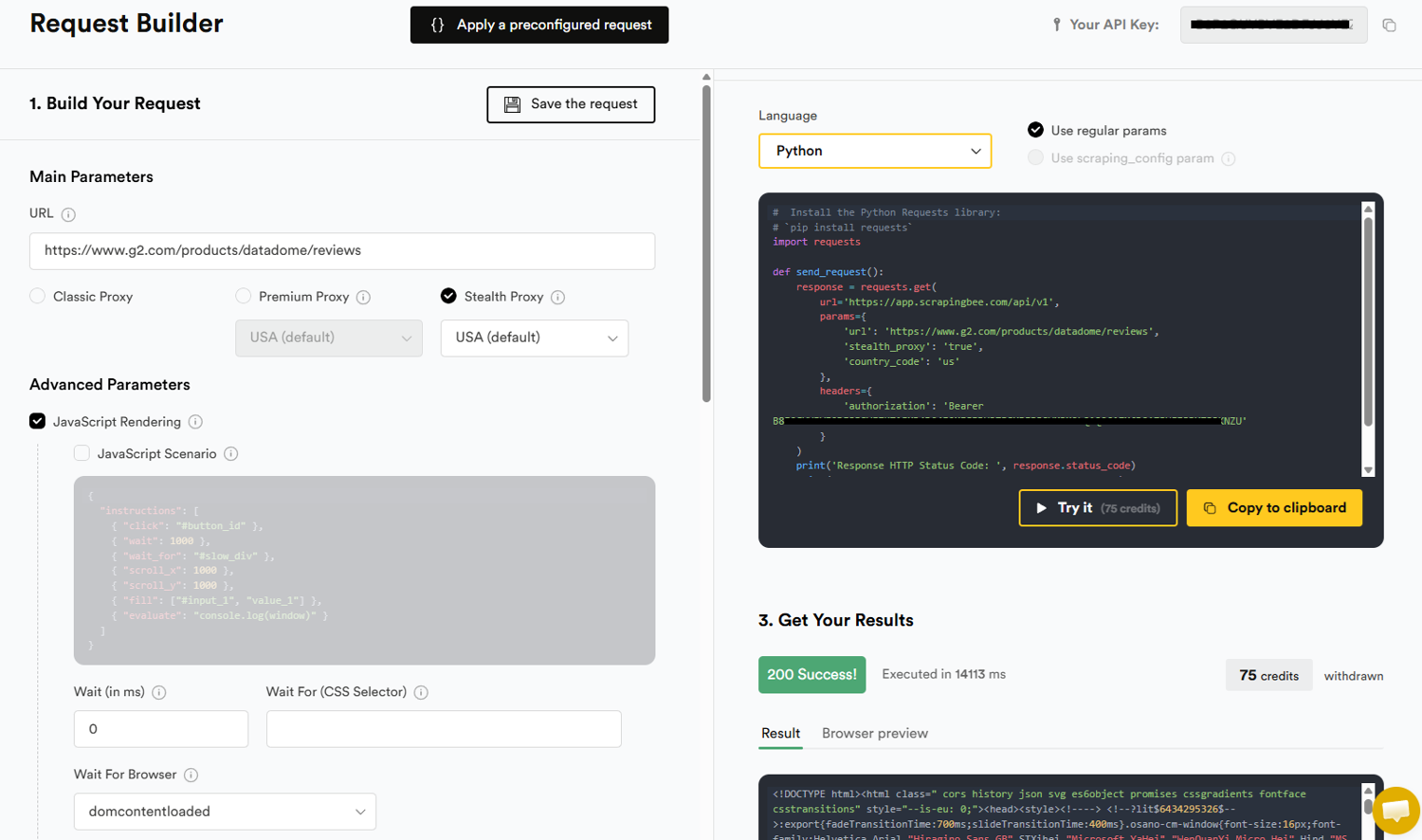
Each successful request costs 75 credits: no per-GB bandwidth bill. Failed requests with the 500 HTTP status code are not charged. If DataDome blocks your request, you'll receive a 500 error code, and your credit balance remains intact; you only pay for successful requests. That means you can safely implement retry logic without accumulating cost.
That brings us to a build-vs-buy comparison. Managed scraping APIs are more efficient and generally yield better results. No maintenance cost, and the overall cost is predictable from the start.
With a DIY stack, cost is open-ended: unpredictable proxy and infrastructure cost. For example, a proxy provider charging by bandwidth consumed means a blocked request still costs money. At scale, implementing a retry logic can accumulate hidden costs and end up representing a significant fraction of your proxy bill. Not to mention infrastructure costs: running browser instances at scale is resource-intensive, and maintenance also compounds.
Keep in mind that while a managed scraping API absorbs the maintenance burden as DataDome consistently adapts to traffic patterns or runs model updates, it doesn't eliminate the underlying uncertainty. In other words, it's not 100% guaranteed.
Bypass DataDome with Python (tested code walkthrough)
The example below requests a DataDome-protected public page via ScrapingBee's stealth proxy, and parses the resulting HTML using BeautifulSoup.
For illustration purposes, we'll scrape a G2 category page and extract the product name and product review URL.
Install the Python Packages
To follow along, run the command below to install requests and beautifulsoup4:
pip install requests beautifulsoup4
Navigate to your ScrapingBee dashboard and copy your API key. You'll need it for every request you make.
Inspect the target page
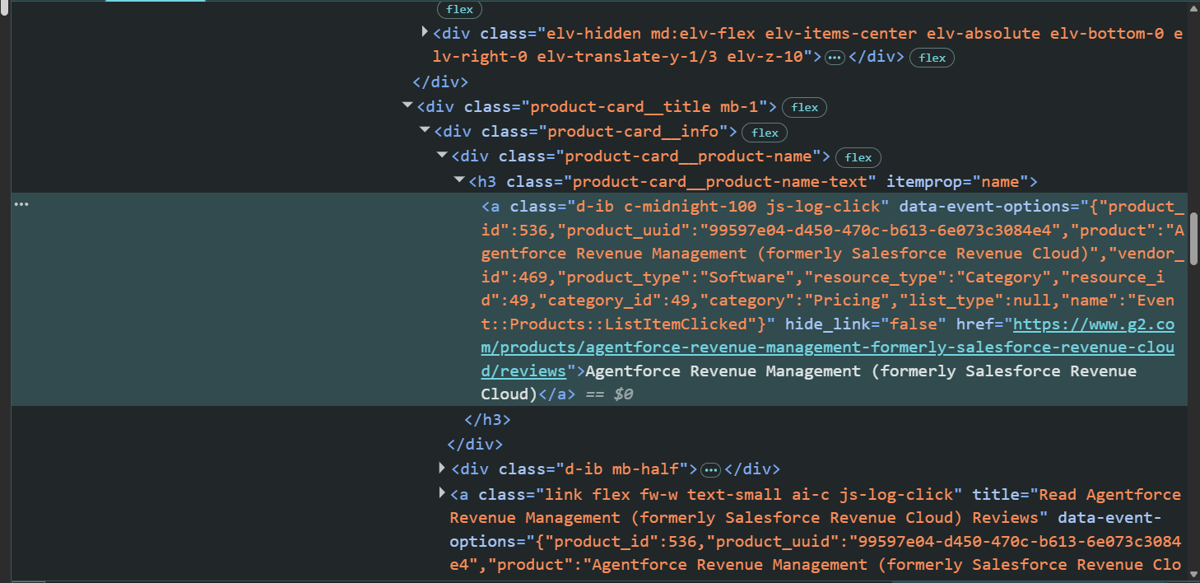
G2 wraps each product card inside a #product-cards div container. The product name and the review URL both live in the same anchor tag and are also an h3 with the class, product-card__product-name-text.
Complete Python script
The following script fetches the HTML of the target page, selects all product cards, and loops through each, extracting the product name and review URL.
import requests
from bs4 import BeautifulSoup

API_KEY = 'YOUR_API_KEY'
target_url = 'https://www.g2.com/categories/pricing/'
scrapingBee_url = 'https://app.scrapingbee.com/api/v1/'


def fetch_page(url: str) -> str | None:
    """route request through ScrapingBee's stealth proxy to fetch page content"""
    params = {
        'api_key':       API_KEY,
        'url':           url,
        'stealth_proxy': 'true',
    }

    try:
        response = requests.get(scrapingBee_url, params=params, timeout=60)
    except requests.exceptions.RequestException as exc:
        print(f'Network error: {exc}')
        return None

    if response.status_code == 200:
        return response.text

    print(f'ScrapingBee returned {response.status_code}: {response.text[:200]}')
    return None


def extract_product_details(html: str) -> None:
    """parse HTML to extract product names and review URLs"""
    soup = BeautifulSoup(html, 'html.parser')

    cards = soup.select("#product-cards .product-card")

    results = []
    for card in cards:
        name_tag = card.select_one("h3.product-card__product-name-text a")
        if not name_tag:
            continue

        product_name = name_tag.get_text(strip=True)
        review_url = name_tag.get("href")

        results.append({"name": product_name, "url": review_url})

    for r in results:
        print(r["name"], "->", r["url"])


if __name__ == '__main__':
    html = fetch_page(target_url)
    if html:
        extract_product_details(html)
    else:
        print('Could not retrieve page.')
Run the script:
python datadome_scraper.py
Here's the output:
Agentforce Revenue Management (formerly Salesforce Revenue Cloud) -> https://www.g2.com/products/agentforce-revenue-management-formerly-salesforce-revenue-cloud/reviews
Pricefx -> https://www.g2.com/products/pricefx/reviews
Conga POM (Price Optimization & Management) -> https://www.g2.com/products/conga-pom-price-optimization-management/reviews
Failure handling
The fetch_page() function in the script above currently returns None for any HTTP status code other than 200. In practice, you'll need more control. When making requests through the ScrapingBee API, the two error codes you should account for are HTTP 500 and 200 with a block page.
A 500 error response generally means your request was denied access to the website's resources: the proxy was blocked, or the JavaScript challenge did not resolve to a high enough trust score. Because ScrapingBee doesn't charge 500s, retrying costs nothing but time. So, use exponential back-off to avoid hammering the endpoint.
Similarly, DataDome occasionally returns an HTTP 200 response whose body is its own block or CAPTCHA page rather than the target content. That looks like a success to your HTTP client but contains no useful data. Detecting it requires inspecting the HTML for known DataDome challenge page elements or text, such as "Access Denied," "blocked," "captcha," etc.
Alternative: Proxy mode
ScrapingBee also provides a Proxy Mode endpoint that lets you make API requests without changing your existing structure. Instead of calling the ScrapingBee API endpoint explicitly, you point your requests session at ScrapingBee's proxy address and pass your parameters as proxy credentials:
- Username: your API key
- Password: parameters (in this case,
stealth_proxy=true)
Here's an example:
import requests

proxies = {
    'http':  'http://YOUR_API_KEY:stealth_proxy=true@proxy.scrapingbee.com:8886',
    'https': 'https://YOUR_API_KEY:stealth_proxy=true@proxy.scrapingbee.com:8887',
}

response = requests.get(
    'https://www.g2.com/categories/pricing/',
    proxies=proxies,
    verify=False,
)

print(response.status_code)
print(response.text[:500])
Why DataDome bypasses break (and what it really costs)
A bypass is rarely a one-time fix. DataDome continuously updates its JavaScript challenges, detection logic, and customer-specific models, meaning a scraper that works today may stop working tomorrow. The ongoing costs are also easy to underestimate: residential and mobile proxies are typically billed per gigabyte, and rendering pages in a browser can consume several times as much bandwidth as fetching HTML alone.
The core reason DataDome breaks is architectural. DataDome maintains per-customer ML models that learn the normal traffic patterns of each protected site. This has two direct consequences for anyone running a DIY scraper.
First, a bypass script that passes detection on one site may fail immediately on another. Each site's model has a unique baseline and different behavioral baselines. There is no universal bypass that transfers cleanly across targets.
Second, DataDome's detection logic continuously adapts to current threats. Browser fingerprint hashes currently classified as legitimate will be reclassified if a new Chrome release changes the expected JA3 output. Stealth patches that currently suppress automation properties will be detected when DataDome adds a new API surface check to its JavaScript payload. Proxy IP ranges that currently carry residential trust scores will be flagged when they appear in shared abuse data. Each update can require major changes to a DataDome bypass script.
The bottom line is, failure is structurally inevitable, and the engineering time required to diagnose and patch it is a recurring cost that almost never appears in the initial build estimate.
The honest cost math
Proxy cost is the line item most often underestimated in a DIY scraping budget, because residential and mobile proxy providers bill per gigabyte of data transferred. That pricing model interacts badly with JavaScript rendering in a way that is easy to miss until the first invoice.
A raw HTML fetch of a typical web page, without JavaScript rendering, transfers roughly 200–300 KB. The same page fetched through a full browser with JavaScript rendering enabled transfers 1.5-3 MB, depending on how asset-heavy the site is. That is an 8–10× bandwidth multiplier applied to every request, not accounting for anti-bot challenges.
The managed API model inverts this structure entirely. For example, ScrapingBee's Stealth proxy costs 75 credits per successful page, and HTTP 500 responses (failed requests) are not charged. There is no bandwidth bill, no proxy infrastructure to manage, and no engineer hours spent responding to model updates.
Build vs buy
The right choice depends on two variables: your project scale and your team's capacity to maintain a scraping stack as DataDome's models evolve. The table below maps common situations to the appropriate path.
| Situation | Best choice | Why |
|---|---|---|
| Low volume, 1–2 target sites, in-house anti-bot capacity | Build (DIY) | Full control over every detection layer; engineering cost is bounded when the scope is small, and the skills already exist in-house |
| Many targets, scaling volume, or a small team without dedicated scraping infrastructure | Buy (managed API) | Predictable per-request cost (75 credits per successful call, HTTP 500s not charged); maintenance burden transfers to the provider; no proxy bandwidth bill |
| Data is behind a login, the site's terms of service forbid scraping, or the expected data value is lower than the ongoing fragility cost | Do not bypass | Legal exposure, ToS violation risk, and a scraper that will break repeatedly are not justified by the data value; pursue an official API or data partnership instead. |
The third row deserves particular emphasis. When data sits behind a login wall, or when a site's terms of service explicitly prohibit automated access, the technical question of how to bypass DataDome is secondary to the question of whether you should.
DataDome protection on an authenticated session is a clear indication that the site operator has made a deliberate decision about what access looks like. The CFAA in the United States and equivalent statutes in the EU and the UK also apply to scraping that exceeds authorized access. A scraper that repeatedly breaks and also carries legal exposure is an expensive combination.
Is bypassing DataDome legal?
Not automatically, but it depends on what you scrape and how. Scraping publicly accessible data has been treated more leniently by US courts, most notably in hiQ Labs v. LinkedIn, where the Ninth Circuit held that scraping public data does not violate the Computer Fraud and Abuse Act. However, keep in mind that the legal landscape varies by jurisdiction and changes significantly once you move past public pages to content behind login forms, personal data, or conduct that a site's terms of service explicitly prohibit.
Anything behind a username and password: paywalled content, or data that requires accepting the terms of service to access, occupies fundamentally different legal ground. Accessing it through automated means after bypassing or circumventing an access control is the conduct that statutes like the CFAA were designed to address.
Personal data adds an extra layer of complexity. Scraping names, email addresses, phone numbers, or other data that falls within the scope of GDPR (in the EU), CCPA (in California), or equivalent privacy frameworks carries regulatory risk that is entirely separate from any CFAA analysis. Even publicly posted personal data can be subject to these frameworks depending on how it is collected and used.
Final thoughts
DataDome's "all adapting" AI/ML detection models present a unique web scraping challenge. Your DIY stack is competing against hundreds of machine learning models and an engineering team whose entire focus is on closing any new gaps. No bypass is guaranteed, and any bypass that works today may not work tomorrow.
That doesn't mean public data behind DataDome is inaccessible, but that the realistic approach isn't to out-engineer DataDome from scratch. Depending on your scale, it's more efficient and cost-effective to route around the maintenance burden entirely.
ScrapingBee handles everything, including the anti-bot layer behind a single parameter (stealth_proxy). Plus, you only pay for successful requests, so the cost stays bounded.
Sign up for ScrapingBee and get 1,000 free API credits to start building your first DataDome bypass script.
Frequently asked questions
Can DataDome be bypassed?
Yes, but not guaranteed, especially at scale. Bypassing DataDome requires satisfying every detection layer simultaneously: a high-trust residential or mobile IP, a browser that passes TLS and JavaScript fingerprint checks, and interaction patterns that read as human. Even then, DataDome always updates its detection layers in response to new threats, so a bypass that works once may not hold up on a second run.
Why does DataDome keep blocking my headless browser?
Headless browsers often leak automation signals, which DataDome detects immediately. The most common is navigator.webdriver set to true, but there are many more: the TLS fingerprint differs from that of a real browser, and the canvas rendering output also differs from that of a GPU-accelerated environment, to name a few.
Do residential proxies alone bypass DataDome?
No. Residential proxies improve your IP trust score, which affects only one of DataDome's detection layers: IP reputation. You must satisfy every layer simultaneously to have a legitimate shot at bypassing DataDome.
What is the DataDome cookie?
The DataDome cookie is a signed session token that DataDome issues to a browser after it has passed the challenge flow, either a JavaScript proof-of-work or an interactive CAPTCHA. It tells DataDome's edge that this browser/IP combination has already been verified, so subsequent requests from the same session are passed through without re-challenging, for a defined period.
How much does it cost to bypass DataDome at scale?
For a DIY stack, the cost is open-ended but driven by two main factors: residential proxies (billed per GB) and maintenance costs that can outpace the project. A managed scraping API offers a predictable cost. ScrapingBee's stealth proxy costs 75 credits per successful request. No bandwidth bill, and HTTP 500 failures are not charged.
Is it legal to bypass DataDome?
Not automatically: it depends on what you are scraping and how. Scraping publicly accessible data has been treated more leniently by US courts. In hiQ Labs v. LinkedIn, the court held that scraping publicly available data does not constitute unauthorized access under the Computer Fraud and Abuse Act (CFAA). However, content behind logins, personal data, or conduct that a site's terms of service explicitly prohibit can present legal risk.
Can you bypass the DataDome CAPTCHA automatically?
Yes. CAPTCHA-solving services (2Captcha, CapMonster, Anti-CAPTCHA) and browser extensions like CapSolver offer options for bypassing DataDome CAPTCHAs.