The best way to build a Python flight scraper is to pick the method that fits your goal, then let a web scraping API clear the anti-bot wall for you. You have four realistic options: reverse-engineer a site's own API, drive a real browser, use an official flight API, or use a managed scraping API that renders the page and rotates stealth proxies in one call.
In this guide, I'll walk you through all four, then build a general, multi-source scraper in Python with tested code against Google Flights, Kayak, and Skyscanner, and turn it into a flight price tracker that watches fares and alerts you on a drop.
Key takeaways
- There is no official Google Flights API. Google shut down QPX Express in 2018, which is why developers scrape flight sites in the first place.
- Four methods exist: reverse-engineer the site's API (fast but brittle), drive a browser (flexible but slow and blocked), use an official flight API (clean but gated or paid), or use a managed scraping API (reliable and multi-source).
- Flight sites are among the hardest scraping targets (Google WAF, Akamai on Kayak and Skyscanner), so plain requests calls return blank pages and datacenter IPs get blocked fast.
- A web scraping API renders the page and rotates stealth residential proxies in one call, so you get flight data back without running your own browser and proxy fleet.
- The real goal is usually an app, so this guide ends by building a flight price tracker that runs on a schedule and alerts you on price drops.
The 4 ways to get flight data in Python
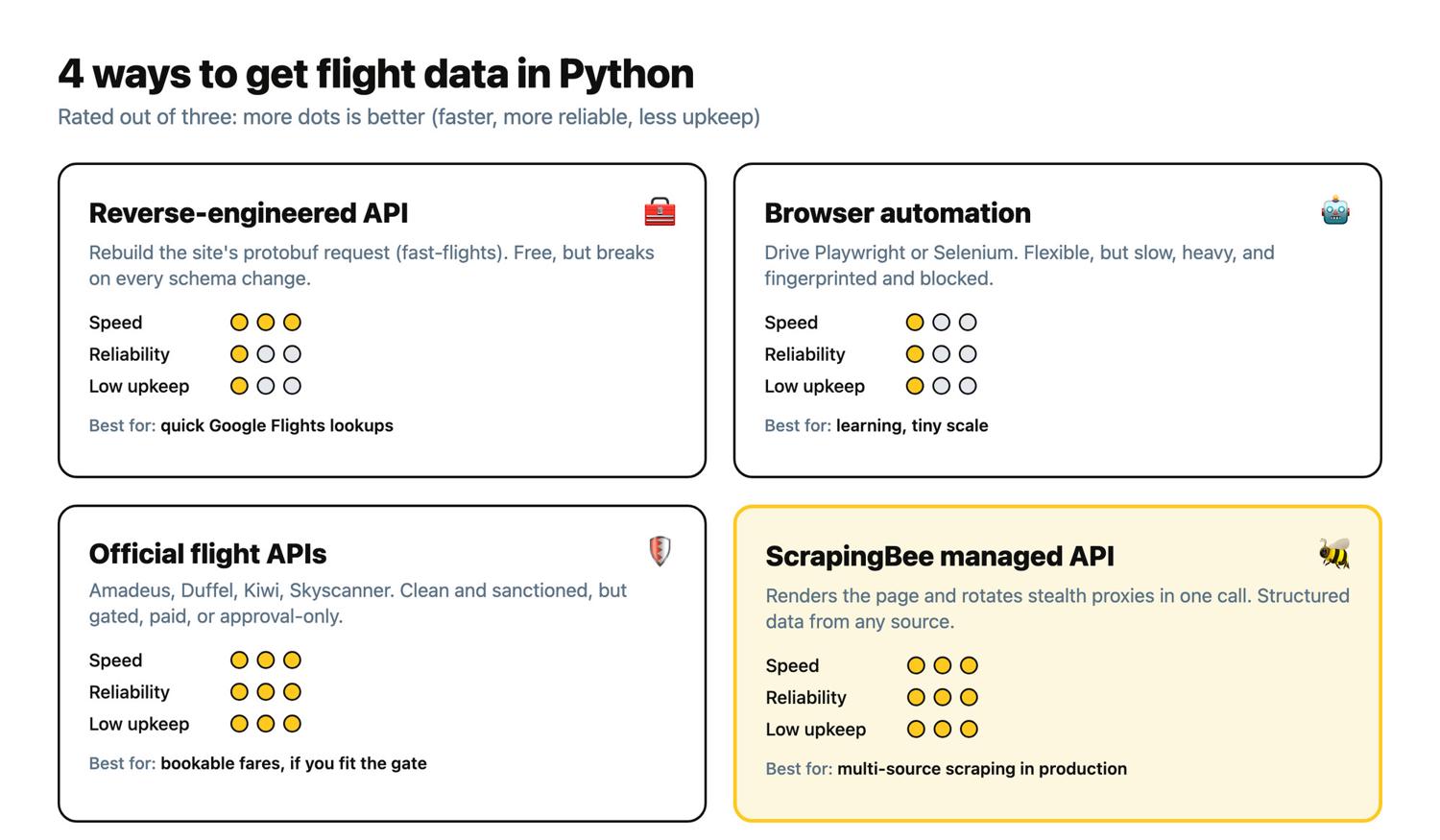
You have four realistic options, and the right one depends on your goal. Fares move with demand, inventory, promotions, and the visitor's location, so how you scrape shapes how good your downstream analysis can be.
- Reverse-engineer the site's own API. Google Flights encodes each search in a Base64 protobuf tfs URL parameter, and libraries like fast-flights reconstruct it. It is the fastest route and free, but it is brittle: it breaks when the site changes, and it still needs anti-bot help at scale.
- Browser automation with Playwright or Selenium. Flexible, because you can click and scroll like a user, but slow, resource-heavy, and easily fingerprinted and blocked on flight sites.
- Official and aggregator flight APIs (Amadeus, Duffel, Kiwi, Skyscanner). Clean and sanctioned, but gated, paid, or limited to the routes and fields they choose to expose.
- A managed scraping API (ScrapingBee). Renders the page, rotates stealth proxies, and returns structured data across any source in one call.
Beyond raw speed, two more axes decide it. The first is maintenance: the reverse-engineered and browser routes break often and need constant fixes, while official APIs and the managed route are low-maintenance. The second is legality: official APIs are the clean, sanctioned option, and scraping any source means respecting that site's Terms and robots.txt. And to clear up the most common question first: there is no official Google Flights API. Google discontinued QPX Express in 2018 and never replaced it.
| Method | Speed | Reliability | Cost | Best for |
|---|---|---|---|---|
| Reverse-engineered API (fast-flights, protobuf) | Fastest | Low to medium (breaks on site changes) | Free | Quick Google Flights lookups, hobby |
| Browser automation (Playwright / Selenium) | Slow | Low (blocks, brittle selectors) | Free infra plus your own proxies | Learning, tiny scale |
| Official / aggregator APIs (Amadeus, Duffel, Kiwi) | Fast | High | Paid or approval-gated; free tiers have largely gone | Bookable fares, teams that fit the gate |
| Managed scraping API (ScrapingBee) | Fast | High (renders and stealth-unblocks) | Credits per request | Multi-source scraping and a production pipeline without your own browser or proxy fleet |
How to build a flight scraper in Python (step by step)
To build a flight scraper in Python, send each flight search URL to a web scraping API that renders the JavaScript and clears the anti-bot wall, then extract the fields you want as structured JSON. This is the core of the article, so it is the longest part. Everything after it (the price tracker, the API comparison, scaling) builds on what you set up here. If the fundamentals are new to you, the web scraping with Python guide covers the requests-and-parsing basics this section assumes.
I built and ran everything below against the live sites while writing this, so the output blocks are the real responses, not illustrations. One reminder before you point code at any site: check that site's Terms of Service and robots.txt, and keep your request rate polite.
Prerequisites
You'll need three things:
- A free ScrapingBee API key (1,000 credits, no credit card).
- Python 3.10 or newer.
- The requests package for the API calls.
pip install requests
The scripts read your key from an environment variable, so paste it there rather than hardcoding it:
export SCRAPINGBEE_API_KEY="your_api_key_here"
Step 1 - Why flight sites block plain requests
Flight sites are JavaScript apps: the page ships as a near-empty shell, and the fares load afterward with JavaScript. On top of that, they run heavy anti-bot stacks (Google WAF on Google Flights, Akamai on Kayak and Skyscanner) that fingerprint the client and block datacenter IPs. So a plain requests call gets you a shell with no prices. Python's requests library works well for static HTML scraping, but not for these JavaScript-heavy booking pages.
Here is the problem in one snippet. A Google Flights search encodes the route and date in a Base64 tfs parameter (JFK to LAX on 2026-09-15 here), and we fetch it directly:
import requests

FLIGHT_URL = (
    "https://www.google.com/travel/flights/search"
    "?tfs=GhoSCjIwMjYtMDktMTVqBRIDSkZLcgUSA0xBWEIBAUgBmAEC&curr=USD&hl=en"
)

HEADERS = {"User-Agent": "Mozilla/5.0 (Macintosh; Intel Mac OS X 10_15_7) Chrome/126.0"}

response = requests.get(FLIGHT_URL, headers=HEADERS, timeout=60)
html = response.text
print(f"HTTP {response.status_code}, {len(html)} chars of HTML")
print(f"'$' characters in the page: {html.count('$')}")
print(f"Mentions 'Nonstop': {'Nonstop' in html}")
When I ran this, the request "succeeded" but there was not a single price on the page:
HTTP 200, 658116 chars of HTML
'$' characters in the page: 0
Mentions 'Nonstop': False
658 KB of HTML and zero dollar signs. The fares are not in the initial HTML; they are rendered afterward by JavaScript that never runs in a plain requests call. There are two ways through: reconstruct the site's underlying protobuf or JSON request (fast but fragile), or render a real browser with Selenium WebDriver so the JavaScript runs on JavaScript-heavy booking pages and the fares appear. Both need residential or stealth proxies at scale, because datacenter IPs get blocked.
Two terms worth defining, since the rest of the guide leans on them. JavaScript rendering means running the page's JavaScript in a real (headless) browser so dynamically loaded content, like fares, ends up in the HTML. See scraping JavaScript-rendered pages for the full picture. A residential proxy routes your request through a real home internet connection instead of a datacenter, so the site sees an ordinary visitor rather than a server. Stealth proxies go a step further to get past the toughest anti-bot systems; the same techniques apply to getting past Cloudflare and similar defenses.
Step 2 - Fetch flight results with ScrapingBee
The fix for step 1 is to render the page and route it through proxies that do not get blocked. ScrapingBee does both in one call. Even then, aggressive anti-bot systems can still fail a request that your parsing logic would have handled perfectly. Google is a special case: any google.com URL needs the custom_google=true parameter. Combine that with render_js=true (run a real browser) and wait (give the fares time to stream in):
import os
import requests

API_KEY = os.environ["SCRAPINGBEE_API_KEY"]
SCRAPINGBEE_URL = "https://app.scrapingbee.com/api/v1/"

FLIGHT_URL = (
    "https://www.google.com/travel/flights/search"
    "?tfs=GhoSCjIwMjYtMDktMTVqBRIDSkZLcgUSA0xBWEIBAUgBmAEC&curr=USD&hl=en"
)

def fetch_flights(url):
    response = requests.get(
        SCRAPINGBEE_URL,
        headers={"Authorization": f"Bearer {API_KEY}"},
        params={
            "url": url,
            "render_js": "true",
            "custom_google": "true",
            "wait": "8000",
        },
        timeout=180,
    )
    response.raise_for_status()
    return response.text

html = fetch_flights(FLIGHT_URL)
print(f"Fetched {len(html)} characters of rendered HTML")
print(f"'$' characters in the page: {html.count('$')}")
print(f"Mentions 'Nonstop': {'Nonstop' in html}")
Same URL as step 1, completely different result. This time the rendered page comes back full of fares:
Fetched 4159360 characters of rendered HTML
'$' characters in the page: 279
Mentions 'Nonstop': True
The Spb-cost response header tells you exactly what each call costs; this Google fetch cost 15 credits. For the non-Google sites in step 4 (Kayak, Skyscanner) you drop custom_google and add stealth_proxy=true instead, which is what gets past their Akamai defenses.
Step 3 - Parse structured flight fields
You rarely want raw HTML; you want structured flight details as fields. There are two ways to get them from ScrapingBee: CSS selectors with extract_rules, or plain-English extraction with ai_query. On flight sites, one of these is far more durable than the other.
Start with the durable one. ai_query lets you describe the fields you want in a sentence and returns clean, predictably shaped JSON for downstream use. It adds 5 credits on top of the base call:
AI_QUERY = (
    "Extract the flight search results as a JSON array named flights. For each "
    "of the first 6 flights include: airline name, price_usd (integer), "
    "departure_time, arrival_time, duration, stops (integer, 0 for nonstop), and details."
)

def ai_extract(url):
    response = requests.get(
        SCRAPINGBEE_URL,
        headers={"Authorization": f"Bearer {API_KEY}"},
        params={
            "url": url,
            "render_js": "true",
            "custom_google": "true",
            "wait": "8000",
            "ai_query": AI_QUERY,
        },
        timeout=180,
    )
    response.raise_for_status()
    return response.json()
When I ran this against Google Flights, I got back clean, structured fares, no parsing on my end:
{
  "flights": [
    {"airline": "JetBlue", "price_usd": 184, "departure_time": "8:05 AM", "arrival_time": "11:08 AM", "duration": "6 hr 3 min", "stops": 0},
    {"airline": "JetBlue", "price_usd": 184, "departure_time": "9:30 AM", "arrival_time": "12:39 PM", "duration": "6 hr 9 min", "stops": 0},
    {"airline": "JetBlue", "price_usd": 184, "departure_time": "3:15 PM", "arrival_time": "6:19 PM", "duration": "6 hr 4 min", "stops": 0},
    {"airline": "JetBlue", "price_usd": 168, "departure_time": "11:29 AM", "arrival_time": "6:27 PM", "duration": "9 hr 58 min", "stops": 1},
    {"airline": "Alaska", "price_usd": 176, "departure_time": "9:55 AM", "arrival_time": "4:22 PM", "duration": "9 hr 27 min", "stops": 1},
    {"airline": "JetBlue", "price_usd": 181, "departure_time": "1:00 PM", "arrival_time": "7:00 PM", "duration": "9 hr", "stops": 1}
  ]
}
Now the selector approach. extract_rules maps CSS selectors to named JSON fields, and it is excellent on sites with stable, semantic markup. Flight sites are the opposite. Google Flights packs each result into an aria-label on a row whose class names (li.pIav2d, .JMc5Xc) are obfuscated and rotate:
import json

EXTRACT_RULES = {
    "flight_labels": {
        "selector": "li.pIav2d .JMc5Xc",
        "type": "list",
        "output": "@aria-label",
    }
}

response = requests.get(
    SCRAPINGBEE_URL,
    headers={"Authorization": f"Bearer {API_KEY}"},
    params={
        "url": FLIGHT_URL,
        "render_js": "true",
        "custom_google": "true",
        "wait": "8000",
        "extract_rules": json.dumps(EXTRACT_RULES),
    },
    timeout=180,
)
labels = response.json().get("flight_labels", [])
print(f"Got {len(labels)} flight rows")
Here is what that returned when I ran it:
Got 0 flight rows
Zero rows. The selector I copied from the page had already stopped matching, which is exactly the failure mode selectors have on flight sites: the classes are machine-generated and change without notice. Sites change their markup often, and every change that breaks a selector is maintenance you have to do. This is why, on targets like these, AI extraction is the durable choice. Use extract_rules when a site has stable markup you control; use ai_query when you are scraping obfuscated, frequently changing pages like flight results.
Step 4 - Go multi-source (Google Flights, Skyscanner, Kayak)
The point of a general flight scraper is that one pattern covers scraping flight results from multiple websites. The only things that change per source are the target URL and, for the non-Google sites, swapping custom_google for stealth_proxy, since those sites also serve CAPTCHAs when they suspect bot traffic. The ai_query extraction stays identical, because it reads fields in plain English regardless of the markup.
SOURCES = {
    "google": {
        "url": "https://www.google.com/travel/flights/search"
               "?tfs=GhoSCjIwMjYtMDktMTVqBRIDSkZLcgUSA0xBWEIBAUgBmAEC&curr=USD&hl=en",
        "params": {"custom_google": "true"},
    },
    "kayak": {
        "url": "https://www.kayak.com/flights/JFK-LAX/2026-09-15?sort=bestflight_a",
        "params": {"stealth_proxy": "true"},
    },
    "skyscanner": {
        "url": "https://www.skyscanner.com/transport/flights/jfk/lax/260915/?adultsv2=1",
        "params": {"stealth_proxy": "true", "wait": "12000"},
    },
}

def scrape_source(source):
    params = {
        "url": source["url"],
        "render_js": "true",
        "wait": "8000",
        "ai_query": AI_QUERY,
        **source["params"],
    }
    response = requests.get(
        SCRAPINGBEE_URL,
        headers={"Authorization": f"Bearer {API_KEY}"},
        params=params,
        timeout=200,
    )
    response.raise_for_status()
    return response.json()
Kayak sits behind Akamai, so it needs the Stealth tier (stealth_proxy=true, 75 credits, 80 with ai_query). With that one swap, the same call returns the same clean shape as Google Flights:
{
  "flights": [
    {"airline": "JetBlue", "price_usd": 181, "departure_time": "9:30 am", "arrival_time": "12:39 pm", "duration": "6h 09m", "stops": 0},
    {"airline": "JetBlue", "price_usd": 181, "departure_time": "8:05 am", "arrival_time": "11:08 am", "duration": "6h 03m", "stops": 0},
    {"airline": "JetBlue", "price_usd": 161, "departure_time": "11:29 am", "arrival_time": "6:27 pm", "duration": "9h 58m", "stops": 1},
    {"airline": "JetBlue", "price_usd": 181, "departure_time": "6:00 am", "arrival_time": "8:59 am", "duration": "5h 59m", "stops": 0},
    {"airline": "Delta", "price_usd": 269, "departure_time": "11:00 am", "arrival_time": "1:51 pm", "duration": "5h 51m", "stops": 0},
    {"airline": "JetBlue", "price_usd": 181, "departure_time": "7:00 am", "arrival_time": "10:02 am", "duration": "6h 02m", "stops": 0}
  ]
}
Notice the JetBlue nonstops land at the same times and near-identical fares as the Google Flights run ($181 versus $184), which is a good sign both sources are returning real data.
Skyscanner works the same way, with one tweak: its search streams in progressively, so it needs a longer wait (I used 12000) before the fares are on the page and the flight cards have populated. With that, the same call returned a third independent view of the route:
{
  "flights": [
    {"airline": "Delta", "price_usd": 264, "departure_time": "2:45 PM", "arrival_time": "5:43 PM", "duration": "5h 58", "stops": 0},
    {"airline": "jetBlue", "price_usd": 175, "departure_time": "3:15 PM", "arrival_time": "6:19 PM", "duration": "6h 04", "stops": 0},
    {"airline": "jetBlue", "price_usd": 175, "departure_time": "9:30 AM", "arrival_time": "12:39 PM", "duration": "6h 09", "stops": 0},
    {"airline": "Alaska Airlines", "price_usd": 156, "departure_time": "9:55 AM", "arrival_time": "4:22 PM", "duration": "9h 27", "stops": 1}
  ]
}
Three sources, three slightly different prices for the same JFK to LAX nonstops ($184, $181, $175), which is exactly why aggregating across sources is worth the effort. The tougher the anti-bot stack, the longer a wait and the more retries you will want (more on that in step 6). For Google Flights specifics like the tfs protobuf parameter and Google's per-element selectors, see the dedicated Google Flights scraping tutorial rather than repeating them here.
Step 5 - The fast-flights protobuf shortcut
For Google Flights specifically, there is a faster path. The fast-flights library reconstructs the tfs protobuf request and parses Google's server response directly, so you skip a full browser render. The catch is that it is Google Flights only, unofficial, and gets blocked from a plain datacenter IP: a direct call returns Google's consent wall instead of the data, and the parser throws. The fix is to let fast-flights build the query, then fetch the HTML through ScrapingBee's Google endpoint (no render_js needed, because the fares are in a server-rendered <script> tag).
Install it alongside typing_extensions, which fast-flights imports but does not declare as a dependency, so a plain pip install fast-flights fails on import on a clean machine:
pip install fast-flights typing_extensions
Then hand fast-flights a ScrapingBee-backed fetcher:
import os
import time
import requests
from fast_flights import FlightQuery, Passengers, create_query, get_flights
from fast_flights.integrations.base import FetchIntegration

API_KEY = os.environ["SCRAPINGBEE_API_KEY"]
SCRAPINGBEE_URL = "https://app.scrapingbee.com/api/v1/"
MAX_TRIES = 4

class ScrapingBeeFetch(FetchIntegration):
    # fast-flights calls fetch_html(q) positionally, so retries live in a
    # module constant rather than a parameter the caller can never set.
    def fetch_html(self, q):
        url = q.url() if hasattr(q, "url") else q
        for attempt in range(1, MAX_TRIES + 1):
            response = requests.get(
                SCRAPINGBEE_URL,
                headers={"Authorization": f"Bearer {API_KEY}"},
                params={
                    "url": url,
                    "custom_google": "true",
                    # Skip Google's EU consent wall so the data <script> loads.
                    "cookies": "CONSENT=YES+cb.20220301-11-p0.en+FX+000",
                },
                timeout=120,
            )
            response.raise_for_status()
            if "ds:1" in response.text:
                return response.text
            time.sleep(2)
        return response.text

query = create_query(
    flights=[FlightQuery(date="2026-09-15", from_airport="JFK", to_airport="LAX")],
    seat="economy", trip="one-way", passengers=Passengers(adults=1), currency="USD",
)
print(query.url())
result = get_flights(query, integration=ScrapingBeeFetch())
When I ran it, fast-flights built the tfs URL and then parsed 30 itineraries out of the server response:
https://www.google.com/travel/flights/search?tfs=GhoSCjIwMjYtMDktMTVqBRIDSkZLcgUSA0xBWEIBAUgBmAEC&hl=&curr=USD

Parsed 30 itineraries. First 5:
  JetBlue: $168 | 11:29 -> 18:27 | stops=1
  Alaska: $176 | 09:55 -> 16:22 | stops=1
  JetBlue: $181 | 13:00 -> 19:00 | stops=1
  JetBlue: $184 | 06:00 -> 08:59 | stops=0
  JetBlue: $184 | 07:00 -> 10:02 | stops=0
Those prices match the ai_query results from step 3, which is reassuring. Two honest caveats from the run. First, I had to add a retry loop because Google intermittently served the consent page even with the cookie, so the data script was missing on some attempts. Second, fast-flights is only as stable as Google's private schema, and it covers Google Flights alone. It is a great fast path for a quick Google lookup, not a foundation for a durable, multi-source scraper. For that, the rendered ai_query approach in steps 2 through 4 is what holds up.
Step 6 - Handle blocks, retries, and rate limits
Real scraping jobs hit transient failures, so the last step makes the scraper robust. Retry on transient errors, back off politely between attempts, and skip a route with no results instead of crashing. One detail makes retries free: ScrapingBee only charges for successful requests (HTTP 200, 404, or 410), so an HTTP 500 costs nothing and you can retry it safely.
import time

MAX_RETRIES = 3

def scrape_route(url, extra_params):
    for attempt in range(1, MAX_RETRIES + 1):
        try:
            response = requests.get(
                SCRAPINGBEE_URL,
                headers={"Authorization": f"Bearer {API_KEY}"},
                params={
                    "url": url,
                    "render_js": "true",
                    "wait": "8000",
                    "ai_query": AI_QUERY,
                    **extra_params,
                },
                timeout=180,
            )
        except requests.RequestException as exc:
            print(f"  request error ({exc}); attempt {attempt}/{MAX_RETRIES}")
            time.sleep(2 * attempt)
            continue

        # 500s are transient and not billed, so back off and retry.
        if response.status_code >= 500:
            print(f"  HTTP {response.status_code}; attempt {attempt}/{MAX_RETRIES}")
            time.sleep(2 * attempt)
            continue

        if response.status_code != 200:
            return None
        return response.json()

    return None
When I ran this across Google and Kayak, one source returned fares and the other tripped the safety net:
Scraping google
  cheapest: JetBlue $168
Scraping kayak
  no fares found, skipping
That Kayak skip is the point, not a bug: on that run its page rendered slowly and came back without parseable fares, so the scraper moved on instead of crashing (a longer wait or the next scheduled run picks it back up). The pattern is: catch network errors and retry with exponential back-off, retry on 500 (it is free), give up gracefully on other non-200 codes, and skip a source that returns no fares. Reserve the Stealth tier for the hardest sites, keep a polite delay between requests, and cache anything you do not need fresh. That is the whole scraper. Next, we turn it into something you would actually run every day.
Build a flight price tracker (schedule, store, alert)
The reason most people scrape flights is to stop refreshing the page themselves and let code watch prices for them. So turn the scraper into a price tracker: run it on a schedule, append each result with a timestamp to a store, compare against the last run, and send an alert when a fare drops below your threshold.
The store can be a single SQLite table. Each run scrapes the cheapest fare, records it, and looks up the previous price for that route:
def record_price(conn, route, airline, price, checked_at):
    """Append one observation and return the previous price for this route."""
    row = conn.execute(
        "SELECT price_usd FROM price_history WHERE route = ? "
        "ORDER BY checked_at DESC LIMIT 1",
        (route,),
    ).fetchone()
    previous = row[0] if row else None
    conn.execute(
        "INSERT INTO price_history (route, airline, price_usd, checked_at) "
        "VALUES (?, ?, ?, ?)",
        (route, airline, price, checked_at),
    )
    conn.commit()
    return previous

def check_alert(route, price, previous, threshold):
    """Return an alert message if the fare dropped below the threshold."""
    if price <= threshold and (previous is None or price < previous):
        change = "" if previous is None else f" (was ${previous})"
        return f"Price drop on {route}: ${price}{change} is at or below ${threshold}"
    return None
Sending the alert is one more function; in production you point it at a Slack webhook or an email:
def send_alert(message):
    # requests.post(os.environ["SLACK_WEBHOOK_URL"], json={"text": message})
    print(f"  ALERT: {message}")
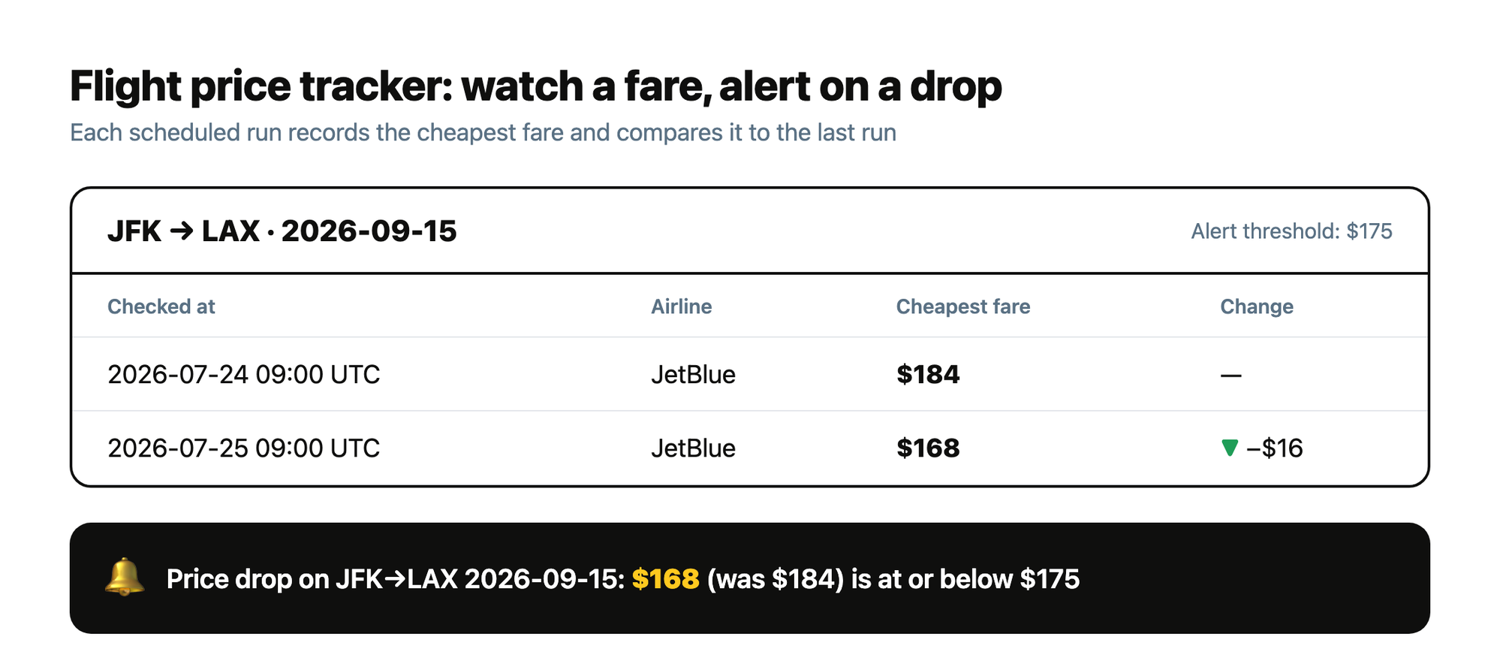
To see the whole loop without waiting a day between runs, I replayed two real scraped prices for the JFK to LAX route (first $184, then $168) against a $175 threshold:
[2026-07-24T09:00:00+00:00] JFK->LAX 2026-09-15: JetBlue $184 (previous $None)
[2026-07-25T09:00:00+00:00] JFK->LAX 2026-09-15: JetBlue $168 (previous $184)
  ALERT: Price drop on JFK->LAX 2026-09-15: $168 (was $184) is at or below $175
The first run records the baseline; the second run sees the fare fall to $168, notices it crossed the threshold, and fires the alert. That is a working price tracker. To run it on a schedule, point cron at it every few hours. Keep your key in a mode-600 .env file (the same export SCRAPINGBEE_API_KEY=... line from the prerequisites, then chmod 600 .env) and source it in the job, so the key never lands in the crontab itself, where crontab -l or cron's mail output would expose it:
0 */3 * * * cd /path/to/code && . ./.env && python3 tracker.py --live
Or run it as a GitHub Actions workflow on a schedule trigger, which needs no server of your own. If you would rather not manage cron, the ScrapingBee CLI can run scrapes on a schedule too; see scheduling recurring scrapes from the command line.
Official flight APIs vs scraping: when to use which
An official flight API is the clean choice when one exists, covers your routes, and you fit its access rules. The problem is that each one has a catch, and the ground has shifted recently:
- Amadeus Self-Service used to be the go-to free tier for live fares, but Amadeus decommissioned the Self-Service developer portal on July 17, 2026. As of this writing, self-service keys no longer work and access requires an Enterprise commercial agreement.
- Duffel is live and bookable with a pay-as-you-go model and no upfront cost, but it is flight-booking focused and you pay per order.
- Kiwi's Tequila API is now invitation-only, so new partners need Kiwi to approach them.
- Skyscanner's Travel API is partner-approval-only: it is for established businesses with a large audience (Skyscanner lists a 100,000 monthly-active-user minimum), not students or early startups.
- Aviationstack offers a self-serve free tier, but it is flight status and schedule data, not live bookable fares.
So official APIs are great when you fit them. When you do not (no free tier for your routes, an approval gate you cannot clear, or fields the API does not expose), scraping with a managed API is the flexible route that covers every source without a gate. Prices and access tiers on all of these change often, so verify the current terms with each provider before you build.
Staying unblocked at scale
Flight sites block by IP reputation, fingerprint, and request rate, so the risk grows with volume. The trick is to pick the right proxy tier per request instead of paying for the heaviest option everywhere: render_js alone for easy pages, premium_proxy for sites that block datacenter IPs, and Stealth for Kayak- and Skyscanner-class anti-bot. Keep your rate polite, cache what you do not need fresh, and pay only for the tier a source needs.
The credit math is also your cost control. As of July 2026: a Classic request is 1 credit, render_js is 5, premium_proxy is 25 (with rendering), and Stealth is 75, with ai_query adding 5 on top. Google URLs are billed at a flat 20 credits. And because HTTP 500 responses are not charged, retrying on failure is safe. For the full playbook, see web scraping without getting blocked, and confirm current rates on the ScrapingBee pricing page.
Build your flight scraper with ScrapingBee
The workflow is one call that renders the page, rotates stealth proxies, and returns structured flight data from any source. ScrapingBee handles the JavaScript rendering, the proxy rotation, and the flight anti-bot stack, so you can build a multi-source scraper and a price tracker without running your own browser fleet. There is also a dedicated flight scraping API if you want the data as a ready-made endpoint. ScrapingBee starts with 1,000 free API credits and no credit card.
Python flight scraper FAQs
Is there a Google Flights API?
No official public one. Google shut down its QPX Express API in 2018 and never replaced it, which is why developers scrape flights.google.com or use aggregator APIs. For Google Flights data specifically, you can reconstruct the site's protobuf request, render the page with a web scraping API, or use a dedicated Google Flights scraper.
Is it legal to scrape flight prices?
Scraping publicly visible fares is generally lawful in many places, but this is not legal advice. A site's Terms can still forbid it, rules vary by country, and you should never scrape behind a login. Check each target's Terms and robots.txt, keep your request rate polite, and prefer an official API where one fits.
Why does my flight scraper return no data?
Because flight sites render fares with JavaScript, so a plain requests call gets a blank page with no prices, and anti-bot systems block datacenter IPs. Render the page with a headless browser or a web scraping API, and use residential or stealth proxies so you are not blocked.
What is the fastest way to scrape Google Flights?
Reconstructing the site's protobuf request (as the fast-flights library does) is faster than driving a browser, because you skip rendering. It is Google Flights only and breaks when Google changes its schema, so for a durable multi-source scraper, render the page with a scraping API instead.
How do I track flight prices over time?
Run your scraper on a schedule (cron or GitHub Actions), append each result with a timestamp to a CSV or database, and compare against the previous run to detect drops. Add an email or Slack alert when a fare falls below your threshold, and you have a price tracker. See AI-powered price scraping for more on tracking prices over time.
Can I scrape Skyscanner or Kayak?
Yes, the same rendered-request approach works, but Kayak and Skyscanner run some of the toughest anti-bot stacks (Akamai), so you will need stealth residential proxies and a real browser render. A managed scraping API handles that for you; check each site's Terms first, and for a no-code route you can pull data into a sheet with no-code web scraping.