To build a job aggregator with web scraping, think in terms of a pipeline: source postings smartly, normalize every source to one shape, deduplicate the same job across boards, keep the data fresh, then store and serve it.
Scraping a single job page is the easy part. The real work is everything that turns a pile of scraped pages into one clean, current feed, which is why builders usually underestimate the jump from scraping pages to running a useful aggregator.
In this guide, I’ll walk through the full architecture end to end with tested Python for the pipeline: sourcing jobs from ATS systems and job boards, collecting and extracting postings, normalizing fields, handling duplicates and expiry, storing the data, scheduling runs, serving results, scaling, and scraping responsibly.

Key takeaways
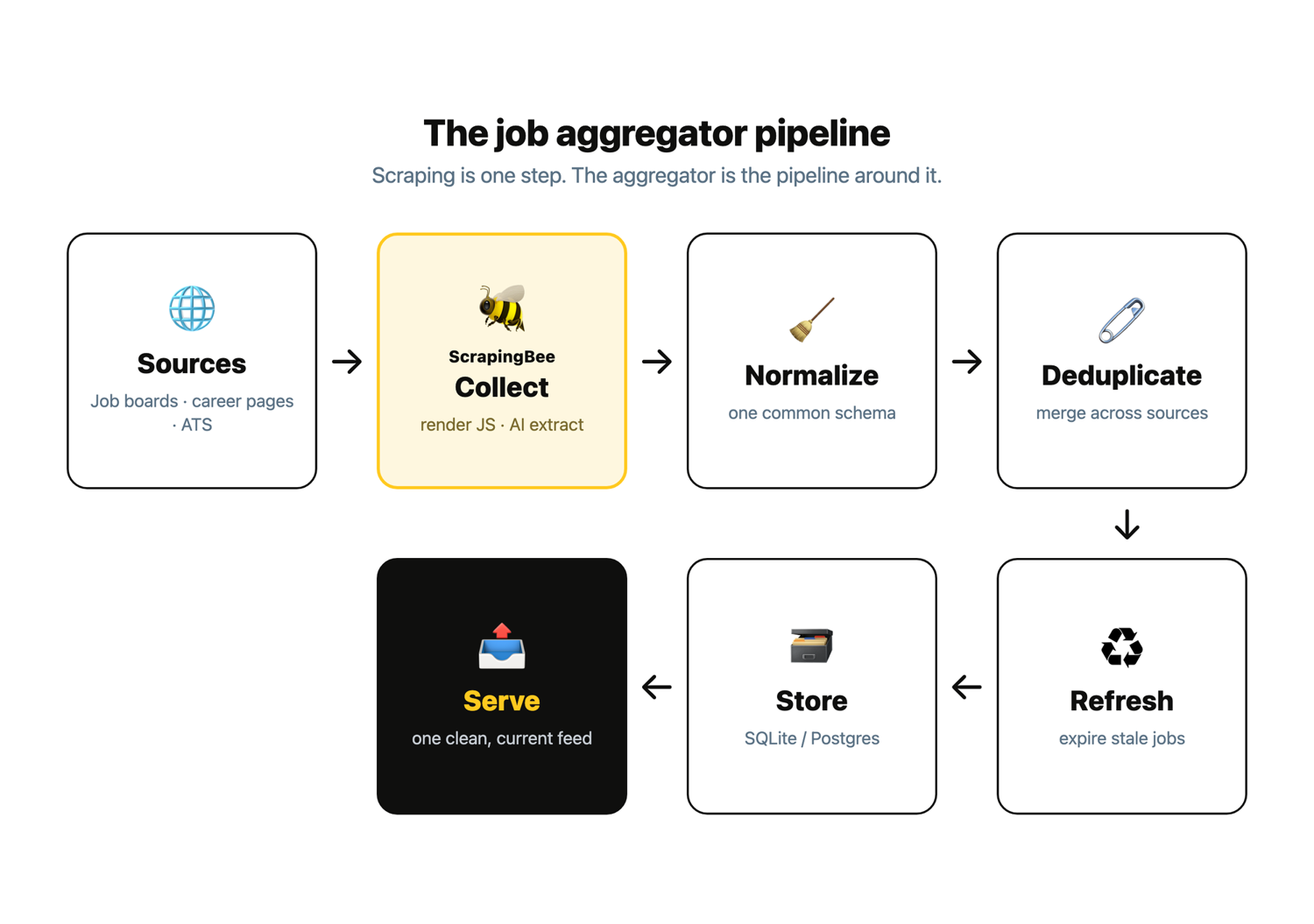
- A job aggregator is a pipeline, not a pile of scrapers: source, collect, normalize, deduplicate, refresh, store, serve.
- Scraping one page is trivial; the number of scrapers you maintain is bounded by the number of applicant tracking systems (Greenhouse, Lever, Workday), not the number of companies.
- AI extraction collapses the per-site parsing that used to break every time a site changed, which is the maintenance cost that kills most job scrapers.
- The parts nobody builds well are cross-source deduplication, freshness and expiry, and how the data gets served; that is where this guide spends its depth.
- Scrape only public job postings, respect robots.txt, and never scrape login-gated sites like LinkedIn.
What a job aggregator actually is (and why scraping is the easy part)
A job aggregator collects postings from many sources (job boards, company career pages, and applicant tracking systems), normalizes them to one shape, removes duplicates, keeps them fresh, and serves them in one place. The scraping is one step. The aggregator is the pipeline around it.
That distinction is where most builds go wrong. You can scrape a single job page in an afternoon, and then the hard parts arrive all at once: every source has a different layout, the same role shows up on five boards, listings go stale or turn into ghost jobs, and you still have to decide how job seekers and employers will actually consume the data. Those four problems (many layouts, duplicates, freshness, and serving) are the aggregator, and they are what this guide focuses on.
If you are still deciding how to handle the extraction step itself, the job scraping tools roundup compares the options; this article assumes you have picked one and focuses on the pipeline that wraps it.
Choose your sources: the ATS layer, not 2,000 sites
You do not need one scraper per company. Most companies post through a handful of applicant tracking systems (ATS) like Greenhouse, Lever, Workday, Ashby, and BambooHR. Target that layer and you can gather job listings from job boards and company career sites with a few shaped collectors instead of thousands.
There are three source types, and each earns its place:
- Job boards (Indeed, Glassdoor) for breadth. One source covers many employers, at the cost of heavier anti-bot defenses. See how to scrape a big board like Indeed, or use a ready-made Indeed API.
- Company career pages for freshness and to skip the middleman. These company pages are original sources of job openings, and the role appears here before it propagates to the boards.
- ATS endpoints or ATS-shaped scrapers for structure. Several systems, notably Greenhouse, Lever, and Ashby, publish a documented per-company jobs endpoint you can read directly with no HTML parsing. For example, Greenhouse’s job board API returns a company’s open roles as JSON.
Be honest about the exceptions. Workday and BambooHR do not offer a clean public feed, so they effectively need scraping, and Workday is the most anti-bot-heavy of the bunch. Fully bespoke career sites still need per-site handling too. That is exactly where AI extraction earns its keep, because it reads fields in plain English instead of relying on selectors that break on every redesign.
The practical payoff of targeting the ATS layer is maintenance. A scraper’s real cost is not writing it; it is fixing it every time a site changes, and that cost grows with the number of distinct layouts you parse, not the number of postings you collect. When a hundred companies all post through Greenhouse, they share one shape, so one collector covers all of them and keeps working when any single company redesigns its careers page.
Start with the ATS endpoints and the biggest boards, add bespoke sources only when a role you care about is not reachable any other way, and your maintenance surface stays small even as coverage grows.
Collect the postings (the part that is already solved)
To collect a posting, send the source URL to a web scraping API that renders the JavaScript and returns the page, then use AI extraction to pull the fields you want in plain English. That avoids the brittle per-site selectors that break on every redesign.
I ran every block below, and the outputs are the real results rather than illustrations: the collect step against the live posting, everything after it against sample data committed with the job aggregator scripts on GitHub. They share the setup here, where requests is the only dependency (pip install requests), and the few small helpers omitted for focus are in that repo too.
import os
import re
import sqlite3
import time
from datetime import datetime, timezone, timedelta
from urllib.parse import urlparse, urlunparse

import requests

API_KEY = os.environ["SCRAPINGBEE_API_KEY"]
SCRAPINGBEE_URL = "https://app.scrapingbee.com/api/v1/"
DB_PATH = "jobs.db"

CURRENCY_SYMBOLS = {"$": "USD", "€": "EUR", "£": "GBP"}
REMOTE_WORDS = {"true", "yes", "remote", "fully remote", "1"}
US_SYNONYMS = {"us", "usa", "united states", "united states of america"}
MAX_STALE_DAYS = 7
Here is the whole collect step against a public GitLab posting hosted on Greenhouse, with source hardcoded for this one example:
AI_QUERY = (
    "Extract the job posting as a JSON object with these fields: "
    "title, company, location, salary (as written, or null), "
    "remote (true or false), posted_at (a date if shown, else null)."
)

def collect(url):
    """Fetch and AI-extract one posting. Returns a dict, or None on failure."""
    response = requests.get(
        SCRAPINGBEE_URL,
        headers={"Authorization": f"Bearer {API_KEY}"},
        params={
            "url": url,
            "render_js": "true",
            "ai_query": AI_QUERY,
        },
        timeout=180,
    )
    if response.status_code != 200:
        return None
    data = response.json()
    data["url"] = url
    data["source"] = "greenhouse"
    return data
When I ran this against the live posting, I got back structured JSON:
{
  "title": "AI Engineer",
  "company": "GitLab",
  "location": "Remote, US",
  "salary": "$108,400 - $129,600 USD",
  "remote": true,
  "posted_at": null,
  "url": "https://job-boards.greenhouse.io/gitlab/jobs/8565469002",
  "source": "greenhouse"
}
One honest caveat I hit on the very first run: posted_at came back null because that Greenhouse page does not show a date. AI extraction returns what the page actually contains, not what you wish it did, which is a good reason to fill date gaps later in the pipeline. This is the extraction step, and it is well-trodden ground, so I will not re-teach it here. For the full field-by-field walkthrough, see how to scrape job postings with AI extraction.
Build the aggregation pipeline
This is the core of the article and the part every extraction tutorial skips. Once postings are coming in, a pipeline turns them into an aggregator in five steps: normalize each source to one schema, deduplicate across sources, handle freshness and expiry, store the result, and schedule the whole thing to run on its own.
Normalize every source to one schema
Every source hands you a slightly different shape. Salaries are written a dozen ways, “remote” might be a boolean, the string "Yes", or baked into the location, and dates arrive as "3 days ago", an ISO date, or nothing at all. Normalization maps any raw posting into one common job record so the later steps can treat every job the same way:
id, title, company, location, remote, salary_min, salary_max, currency, url, source, posted_at, fetched_at
The messy parts are salary and the remote flag, so they get their own helpers:
def parse_salary(text):
    """Return (salary_min, salary_max, currency) from a messy salary string."""
    if not text:
        return (None, None, None)

    currency = None
    for symbol, code in CURRENCY_SYMBOLS.items():
        if symbol in text:
            currency = code
            break
    explicit = re.search(r"\b(USD|EUR|GBP|CAD|AUD)\b", text.upper())
    if explicit:
        currency = explicit.group(1)

    numbers = []
    for token in re.findall(r"\d[\d,\.]*\s*[kK]?", text):
        token = token.strip()
        multiplier = 1000 if token.lower().endswith("k") else 1
        value = token.rstrip("kK").strip().replace(",", "")
        if value:
            numbers.append(int(round(float(value) * multiplier)))

    if not numbers:
        return (None, None, currency)
    return (min(numbers), max(numbers), currency)

def parse_remote(remote_value, location):
    """Standardize the many ways a source signals remote into a bool."""
    if isinstance(remote_value, bool):
        is_remote = remote_value
    else:
        is_remote = str(remote_value).strip().lower() in REMOTE_WORDS
    if "remote" in str(location).lower():
        is_remote = True
    return is_remote
parse_salary() stays deliberately simple: it takes whatever numbers it finds, so hourly and monthly rates arrive looking annual, and a stray year in the string can land in salary_min. Capture the pay period too once your sources mix them.
normalize() ties them together and produces the common record:
def normalize(raw, fetched_at=None, today=None):
    """Map one raw AI-extracted posting into the common schema."""
    fetched_at = fetched_at or datetime.now(timezone.utc).isoformat(timespec="seconds")
    today = today or datetime.now(timezone.utc).date()

    salary_min, salary_max, currency = parse_salary(raw.get("salary"))
    location = " ".join(str(raw.get("location", "")).split())

    return {
        "id": make_id(raw["source"], raw["url"]),
        "title": " ".join(str(raw.get("title", "")).split()),
        "company": " ".join(str(raw.get("company", "")).split()),
        "location": location,
        "remote": parse_remote(raw.get("remote"), location),
        "salary_min": salary_min,
        "salary_max": salary_max,
        "currency": currency,
        "url": raw["url"],
        "source": raw["source"],
        "posted_at": parse_posted_at(raw.get("posted_at"), today),
        "fetched_at": fetched_at,
    }
When I ran normalize() over the raw postings, the inconsistent inputs came out uniform. The script prints one JSON object per line; here are the two records I was watching, and both held up: "$108k–$130k a year" became 108000/130000, and "Remote (US)" still read as remote even though the flag lived in the location string:
{"id": "greenhouse:e045ac763a", "title": "AI Engineer", "company": "GitLab", "location": "Remote, US", "remote": true, "salary_min": 108400, "salary_max": 129600, "currency": "USD", "url": "https://job-boards.greenhouse.io/gitlab/jobs/8565469002", "source": "greenhouse", "posted_at": null, "fetched_at": "2026-07-24T09:00:00+00:00"}
{"id": "indeed:1af2e37380", "title": "AI Engineer", "company": "GitLab Inc.", "location": "Remote (US)", "remote": true, "salary_min": 108000, "salary_max": 130000, "currency": "USD", "url": "https://www.indeed.com/viewjob?jk=abc123&from=serp&vjs=3", "source": "indeed", "posted_at": "2026-07-21", "fetched_at": "2026-07-24T09:00:00+00:00"}
This one shape is what makes it possible to compare and dedupe across sources. If you want tighter control over the raw fields before they reach normalize(), ScrapingBee’s data extraction rules let you map selectors to named JSON.
Deduplicate the same job across sources
This is the step that turns a scraper into an aggregator. The same role appears on a job board, an ATS, and the company’s own careers page, so naive title-plus-company matching is not enough: locations read "Remote, US" on one and "United States" on another, and titles pick up qualifiers like "(Remote)". Do it in layers instead. Canonicalize the URL, then build a structured match key from a normalized employer, title, and location, and fall back to text similarity for near-duplicates worded differently.
def canonicalize_url(url):
    """Strip query params and fragments so tracking noise does not fool dedup."""
    parsed = urlparse(url)
    host = parsed.netloc.lower()
    path = parsed.path.rstrip("/")
    return urlunparse((parsed.scheme, host, path, "", "", ""))

def normalize_title(title):
    """Drop parenthetical qualifiers and the word 'remote' from the title."""
    without_parens = re.sub(r"\(.*?\)", " ", str(title))
    words = [w for w in _norm_text(without_parens).split() if w != "remote"]
    return " ".join(words)

def normalize_location(location):
    """Coarse location token; folds US variants and drops the 'remote' word."""
    words = [w for w in _norm_text(location).split() if w != "remote"]
    core = " ".join(words)
    return "us" if core in US_SYNONYMS else core

def match_key(record):
    """Structured key: normalized employer + title + location."""
    return (
        normalize_company(record["company"]),
        normalize_title(record["title"]),
        normalize_location(record["location"]),
    )
canonicalize_url() drops tracking noise but does not follow redirects, so resolve those in the fetch layer and canonicalize the final URL.
The dedupe() function walks the records, decides which existing job each one belongs to, and merges duplicates. When records collapse, it keeps the earliest posted_at, records every source URL on the survivor, and backfills a salary if the first copy lacked one:
def dedupe(records):
    """Collapse duplicate postings across sources into unique jobs."""
    survivors = {}          # match key -> merged record
    canon_seen = {}         # canonical url -> match key

    for record in records:
        canon = canonicalize_url(record["url"])
        key = match_key(record)

        # Same canonical URL already seen: definitely the same posting.
        if canon in canon_seen:
            key = canon_seen[canon]
        elif key not in survivors:
            # No exact key match; try a fuzzy match against existing survivors.
            for existing_key, existing in survivors.items():
                if _similar(record, existing):
                    key = existing_key
                    break

        canon_seen[canon] = key

        if key not in survivors:
            merged = dict(record)
            merged["source_urls"] = [record["url"]]
            merged["sources"] = [record["source"]]
            survivors[key] = merged
        else:
            merged = survivors[key]
            merged["posted_at"] = _earliest(merged["posted_at"], record["posted_at"])
            if record["url"] not in merged["source_urls"]:
                merged["source_urls"].append(record["url"])
            if record["source"] not in merged["sources"]:
                merged["sources"].append(record["source"])
            if merged["salary_min"] is None and record["salary_min"] is not None:
                merged["salary_min"] = record["salary_min"]
                merged["salary_max"] = record["salary_max"]
                merged["currency"] = record["currency"]

    return list(survivors.values())
This is the step I spent the most time on, and my first attempt got it wrong in an instructive way. My initial match key collapsed the Greenhouse and Indeed copies of the GitLab role but left the third one, from the company careers page, sitting on its own, because its title read "AI Engineer (Remote)" and its location said "United States" instead of "Remote, US". That is exactly the near-duplicate an aggregator has to catch, so I added the parenthetical stripping and the US-location folding you see above; only then did all three collapse into one.
The fuzzy fallback uses difflib.SequenceMatcher on the normalized titles for same-employer roles, so wording differences the structured key still misses collapse too. Embeddings are the heavier upgrade if you need to match semantically different phrasings. When I ran the deduper over six raw records (the GitLab role appears three times), I got four unique jobs:
6 raw records -> 4 unique jobs

- AI Engineer @ GitLab (Remote, US)
    posted_at=2026-07-21  seen on: greenhouse, indeed, careers
- Senior Backend Engineer @ Acme Robotics (Berlin, Germany)
    posted_at=2026-07-18  seen on: lever
- Data Scientist @ Acme Robotics (Remote - EU)
    posted_at=2026-07-24  seen on: careers
- Platform Engineer @ Nimbus Cloud (Remote, US)
    posted_at=2026-06-30  seen on: greenhouse
The three GitLab copies became one job that remembers it was seen on all three sources and kept the earliest posting date.
Handle freshness and expired jobs
Freshness is the product. A job board that shows roles filled two months ago is worse than useless, so on every run you do two things: stamp last_seen on any job you saw again, and expire the ones you did not. Companies pull listings, and they also post ghost roles they never intend to fill, so a job that lingers unseen past a threshold should drop off.
def mark_seen(jobs, seen_urls, run_time):
    """Stamp last_seen on every job whose source URL showed up in this run."""
    seen = set(seen_urls)
    for job in jobs:
        if any(url in seen for url in job["source_urls"]):
            job["last_seen"] = run_time.isoformat(timespec="seconds")
            job["active"] = True
    return jobs

def expire_stale(jobs, run_time, max_stale_days=MAX_STALE_DAYS):
    """Mark jobs inactive once they have gone unseen longer than the threshold."""
    cutoff = run_time - timedelta(days=max_stale_days)
    for job in jobs:
        last_seen = datetime.fromisoformat(job["last_seen"])
        if last_seen < cutoff:
            job["active"] = False
    return jobs
Once the store is in play, these two move into the DB layer as upsert_jobs() and expire_in_db(), which do the same thing in SQL; the in-memory versions above are the logic in its clearest form.
For a stronger signal, add a death-check that treats a 404/410 as gone. Storing fetched_at and last_seen on every record is what lets you expire stale postings automatically; expire_stale() assumes last_seen is always there, so set it the moment you first insert a job. To confirm the expiry actually fires, I ran two passes ten days apart and had Nimbus Cloud pull its listing between them; the stale job dropped off on its own:
Run 1 (2026-07-24): 4 active, 0 expired
Run 2 (2026-08-03): 3 active, 1 expired
  [active] AI Engineer @ GitLab (last_seen 2026-08-03)
  [active] Senior Backend Engineer @ Acme Robotics (last_seen 2026-08-03)
  [active] Data Scientist @ Acme Robotics (last_seen 2026-08-03)
  [EXPIRED] Platform Engineer @ Nimbus Cloud (last_seen 2026-07-24)
Store it
A simple SQLite layer is enough to start, and it scales further than most people expect. The schema is the common record, with a UNIQUE constraint on the dedup key so re-running never inserts the same job twice, and indexes on the fields you actually query: location, posted_at, and primary_source. A deduped job can carry several sources, so sources keeps the full list as JSON while primary_source records the one the job was first seen on; that single value is the one you filter and index on, and it does not change on later runs.
SCHEMA = """
CREATE TABLE IF NOT EXISTS jobs (
    dedup_key      TEXT PRIMARY KEY,
    title          TEXT NOT NULL,
    company        TEXT NOT NULL,
    location       TEXT,
    remote         INTEGER,
    salary_min     INTEGER,
    salary_max     INTEGER,
    currency       TEXT,
    url            TEXT,
    primary_source TEXT,
    source_urls    TEXT,
    sources        TEXT,
    posted_at      TEXT,
    fetched_at     TEXT,
    last_seen      TEXT,
    active         INTEGER DEFAULT 1
);
CREATE INDEX IF NOT EXISTS idx_jobs_location       ON jobs(location);
CREATE INDEX IF NOT EXISTS idx_jobs_posted_at      ON jobs(posted_at);
CREATE INDEX IF NOT EXISTS idx_jobs_primary_source ON jobs(primary_source);
"""
connect() applies that schema and sets sqlite3.Row as the connection’s row factory. That one line is what lets every query in this article hand its rows straight to dict(); without it, SQLite returns plain tuples and dict(row) fails:
def connect(db_path=DB_PATH):
    conn = sqlite3.connect(db_path)
    conn.row_factory = sqlite3.Row
    conn.executescript(SCHEMA)
    return conn
Writes go through an idempotent upsert keyed on dedup_key, so a matching job updates in place (its last_seen, source list, and status) instead of duplicating. I deliberately ran the same batch through twice to make sure a second run would not quietly double the rows; the count stayed at four:
Rows after two identical runs: 4

- Data Scientist @ Acme Robotics (Remote - EU) | 55000-68000 GBP | ['careers']
- AI Engineer @ GitLab (Remote, US) | 108400-129600 USD | ['greenhouse', 'indeed', 'careers']
- Senior Backend Engineer @ Acme Robotics (Berlin, Germany) | 70000-90000 EUR | ['lever']
- Platform Engineer @ Nimbus Cloud (Remote, US) | 140000-140000 USD | ['greenhouse']
At volume, a few thousand new postings a day is normal, so you index for serving, not just for storage. When SQLite stops keeping up, the same schema moves to Postgres unchanged.
Schedule and orchestrate
The last step turns the one-off script into a running system. Each source is fetched behind a retry wrapper so one flaky board does not kill the run, sources are staggered so you do not hit them all at once, and every run appends a line to a run log. run_once() is the job you schedule:
def run_once(conn, run_time, raw_postings):
    """One scheduled run: collect -> normalize -> dedupe -> store -> expire."""
    stamp = run_time.isoformat(timespec="seconds")

    raw = []
    for source in sorted({r["source"] for r in raw_postings}):
        raw.extend(with_retries(fetch_source, source, raw_postings))
        if STAGGER_SECONDS:
            time.sleep(STAGGER_SECONDS)

    records = [normalize(r, fetched_at=stamp, today=run_time.date()) for r in raw]
    unique = dedupe(records)
    for job in unique:
        job["last_seen"] = stamp
        job["active"] = True

    upsert_jobs(conn, unique, run_time=stamp)
    expired = expire_in_db(conn, run_time)

    (active,) = conn.execute("SELECT COUNT(*) FROM jobs WHERE active = 1").fetchone()
    print(
        f"[{stamp}] fetched {len(raw)} raw -> {len(unique)} unique | "
        f"active={active} expired_this_run={expired}"
    )
    return {"raw": len(raw), "unique": len(unique), "active": active, "expired": expired}
Two runs, ten days apart, show the store maintaining itself as Nimbus Cloud’s listing disappears:
[2026-07-24T09:00:00+00:00] fetched 6 raw -> 4 unique | active=4 expired_this_run=0
[2026-08-03T09:00:00+00:00] fetched 5 raw -> 3 unique | active=3 expired_this_run=1
Point cron at it every few hours:
0 */3 * * * cd /path/to/code && SCRAPINGBEE_API_KEY=... python3 schedule.py
Or let the ScrapingBee CLI run it on a schedule, which is handy if you would rather not manage cron; see scheduling recurring scrapes from the command line for the details.
Serve the data
The question most builders skip is how the data actually gets consumed. Because you normalized and deduped, serving is the easy part: filter on the columns you indexed, sort by posted_at, and return.
What makes an aggregator feel better than the source boards is advanced search and strong search results quality, not just more listings. The common shapes are a read API or JSON feed over your store, with filters for job title, job category, job type, or salary range; an RSS or email digest keyed to a user’s filters (freshness as a notification); and a simple front end on top.
def search_jobs(conn, location=None, remote=None, since=None, source=None, limit=50):
    """Return active jobs matching the filters, newest first."""
    clauses = ["active = 1"]
    params = []
    if location:
        clauses.append("location LIKE ?")
        params.append(f"%{location}%")
    if remote is not None:
        clauses.append("remote = ?")
        params.append(int(remote))
    if since:
        clauses.append("posted_at >= ?")
        params.append(since)
    if source:
        clauses.append("primary_source = ?")
        params.append(source)

    query = (
        "SELECT title, company, location, remote, salary_min, salary_max, "
        "currency, url, primary_source, posted_at FROM jobs WHERE "
        + " AND ".join(clauses)
        + " ORDER BY posted_at DESC LIMIT ?"
    )
    params.append(limit)
    return [dict(row) for row in conn.execute(query, params).fetchall()]
When I queried for remote jobs posted since the start of the month, I got back exactly the two I expected, newest first:
2 remote jobs posted since 2026-07-01
Search quality is a competitive advantage here, and AI can later support job recommendations or candidate matching.
The same query powers a digest. Instead of making users pull, you push: run a saved search per subscriber, diff it against what they saw last time, and email or RSS the new matches. That is a convenient way for job seekers to keep up without checking back, and since every job already carries a posted_at and a last_seen, you get it almost for free. A front end is then just a thin layer over the same search_jobs() call, with filters mapped to query parameters.
Freshness plus dedup is what makes the aggregator feel better than the source boards: fewer duplicates, no ghost jobs, and a feed that is actually current. Those two properties are also the hardest to fake, which is why an aggregator that gets them right beats one with broader but staler coverage.
Keep it running at scale
As you add sources and refresh often, collection is where cost and blocks live. Match the proxy tier to each source instead of paying for the heaviest option everywhere. Turn on render_js for JavaScript-heavy boards, add premium_proxy (residential IPs) for datacenter-blocked boards, and reserve Stealth for the hardest anti-bot sites, with polite per-source rate limits. These choices drive both reliability and cost as you add sources.
The credit cost scales with the tier, so this is also your cost control. As of August 2026, a Classic request costs 1 credit without JavaScript rendering and 5 with it, Premium is 10 to 25, and Stealth is 75, with AI extraction adding 5 on top. ScrapingBee only bills successful requests, so an HTTP 500 costs nothing and retries are safe. Prefer an ATS endpoint or a career page over a heavily defended board when you can, and the cost of a scheduled multi-source run stays predictable.
For the full playbook, see web scraping without getting blocked, and confirm current rates on the ScrapingBee pricing page.
Do it responsibly
Aggregating public job postings is a common and generally accepted use, but do it well. Scrape only public postings, never login-gated content, which puts sites like LinkedIn off limits. Respect each site’s robots.txt and Terms, keep request rates polite, and link back to the original posting so you send applicants and credit to the source rather than replacing it. This is not legal advice; rules vary by site and country, so check the ones that apply to you.
Build your aggregator’s collection layer with ScrapingBee
The pipeline is the product, and ScrapingBee handles the collection layer that supports building a successful job board aggregator while you focus on differentiation: rendering JavaScript, AI-extracting fields, rotating proxies, and scheduling runs.
That frees you to spend your time on the parts that actually differentiate an aggregator: normalization, dedup, freshness, serving, and compliance with GDPR and CCPA data privacy laws, so the result can become a valuable resource for both job seekers and employers. It starts with 1,000 free API credits and no credit card, so you can wire up your first source in minutes.
Job aggregator FAQs
How many scrapers do I need to build a job aggregator?
Fewer than you think. The number is bounded by the applicant tracking systems your targets use, not the number of companies: if most sit on Greenhouse, Lever, or Workday, you write a handful of ATS-shaped scrapers instead of one per company. Bespoke career sites still need per-site handling, which is where AI extraction helps.
How do I deduplicate the same job across different sites?
Do it in layers. Canonicalize the URL, then match on normalized employer name plus title plus location, then fall back to text similarity or embeddings for near-duplicates worded differently. Keep the earliest posting date and store every source URL on the surviving record.
How often should a job aggregator refresh its data?
Often enough to feel fresh without hammering sources: every few hours per source, staggered, is a common choice. On each run, remove postings that no longer appear at the source so expired and ghost jobs do not pile up. Freshness, not raw coverage, is what makes an aggregator useful.
Can I get job data without scraping, through an API?
Sometimes. Several applicant tracking systems, like Greenhouse, Lever, and Ashby, publish a structured jobs endpoint per company, and some job boards have official or third-party APIs. Use those where they exist, and scrape public pages for the sources that do not (Workday, for example, has no clean public feed). A good aggregator mixes both.
Can I build a job aggregator without coding?
Partly. No-code tools and RSS glue can collect from a small, fixed set of sources, which is enough for a narrow niche board. But cross-source deduplication, freshness logic, and serving usually need some code or a developer once you grow past a handful of sources. See no-code web scraping for how far the no-code route goes.
Is scraping job postings legal?
Scraping public job postings is a common and generally accepted use, but this is not legal advice. Respect each site’s robots.txt and Terms, never scrape login-gated content, keep request rates polite, and link back to the original posting. Rules vary by site and country.