Trends data comes through ScrapingBee's general HTML API: you send the Trends URL, render the page, and read either the page or what the page's own requests return. That last part separates Trends from an ordinary scrape. The JSON endpoints behind Trends refuse requests that don't already carry a Trends session, the cookies Google sets while a Trends page loads. A proxy gives you a different address rather than a session, so calling them without one returns a refusal that rotating the address doesn't remove.
The workflow below runs the Trends request from inside the rendered page, which is what supplies that session. This guide covers a working interest-over-time pull, a trending-now pull that needs no browser, a related-queries pull, the checks that stop a broken response from reaching your database, and how to read Google's relative 0-100 scale without drawing the wrong conclusion from it.
Quick answer (TL;DR)
- Send https://trends.google.com/trending to ScrapingBee's HTML API with
custom_google=trueandrender_js=true, then use a js_scenario to call Google's internal Trends endpoints from inside the page. - A new account includes free credits with no card, and Google domains bill a flat 15 credits per request. For a handful of queries from your own machine the free trendspyg library covers it, and the alternatives section says where that stops.
- The interest-over-time series is a share of all searching on a 0-100 index, never a search count. Two separately fetched series aren't comparable as returned, so a keyword list longer than the comparison cap splits across calls and the pieces can't be ranked against each other without anchoring.
- Validate before you store. The 100 check is one invariant alongside HTTP status, payload shape, bucket spacing and the unfinished trailing point.
- The classic Explore endpoint compared at most 5 items per call when we tested it; Google's Explore help page calls them groups and keeps the current limits up to date.
The only dependency is requests:
pip install requests
Or, inside a uv project:
uv add requests
What Google Trends actually measures
Trends doesn't measure how many people searched for something. Google's own documentation is explicit that each data point is divided by the total searches for that geography and time range. It's a share of all searching, on a 0-100 index.
If total search volume moves, your line can move even when nothing about your keyword changed. A falling Trends line during a period of rising overall search can still mean your term gained searches, because the total grew faster than your term did. A flat line means a stable share, or a change too small to survive rounding and sampling. Nothing inside Trends recovers the count, because the response carries the scaled ratio and never the numerator.
The same page documents three more properties of the series. Trends reports low-volume terms as zero, so a flat zero line means "below Google's reporting threshold", not "nobody searched this". A long-tail phrase shows the cost: zig programming language tutorial left 52 finished weekly points once the partial was dropped, carrying 51 zeros and a single 100. Google removes repeated searches by the same person in a short window. And the entire series comes from a sample, which is part of why one pull can differ from the next.
Trends answers some of these questions and not others:
| What you want | Use | Why |
|---|---|---|
| Monthly search volume for SEO | Google Keyword Planner, or a paid tool | Trends can't produce a number |
| Whether interest is rising or falling | Trends | Free, no account, back to 2004, and direction of share is exactly what a share index measures |
| Which terms are spiking | Trends | The trending feed is near-real-time, and we know of no free alternative with the same coverage |
| Which of these terms is bigger | Trends | Comparable within one query when the terms are of similar size |
| Regional differences | Trends | Sub-region and metro granularity, for free |
| An absolute forecast | Trends plus something else | The volume source supplies the number; check the relationship against your own history before relying on it |
Before you start
Sign up and copy your key from the dashboard. A new account starts with free credits and needs no card. Set custom_google=true to fetch Google domains. That flag is what the Google Trends Scraper page describes, and it runs on the same general API this guide uses throughout.
The CLI reference lists the price of that flag per request, 15 credits, and every delivered call in our testing billed exactly that. At 15 credits a request, 100 keywords pulled one to a call is 1,500 credits before retries. The pricing page carries the current signup grant and the plan sizes, and the Spb-cost response header confirms what your own account is charged.
Keep the key in an environment variable so that it stays out of your source:
export SCRAPINGBEE_API_KEY="your_key_here"
Scrape interest over time
The call loads a Trends page, then runs a two-step chain inside it, which is what ScrapingBee's JavaScript Web Scraping API exists to do. First it asks /trends/api/explore for a widget token, then it passes that token to /trends/api/widgetdata/multiline. Both are Google's own internal endpoints, and the chain reaches both from the page's origin, so each request goes out with the session the page already holds.
geo, timeframe and category belong to the Google Trends request built inside the rendered page. They aren't ScrapingBee API parameters. The geo you see in the target URL is part of the page address, not the value that selects the data.
The module opens with the outcome types a caller can act on, separating the failures worth another attempt from the ones that come back the same:
import json, os, time, requests

class TrendsError(Exception):
    """Base class, so callers can catch everything this module raises."""

class RetryableRequest(TrendsError):
    """A throttle from either side, a 5xx, a render that never finished, or a
    request that returned no response to the client. Raised once the attempts
    inside the call run out, so a job wrapper knows it is worth another go."""

class SchemaChanged(TrendsError):
    """A response arrived, but not in the shape this parser reads."""

class RequestRejected(TrendsError):
    """The request itself was refused. Repeating it changes nothing."""

class DataQuality(TrendsError):
    """The response parsed, but it can't answer what was asked."""


def api_key():
    """The key, or the fix. An unset variable is the first thing to go wrong."""
    try:
        return os.environ["SCRAPINGBEE_API_KEY"]
    except KeyError:
        raise RequestRejected("SCRAPINGBEE_API_KEY is not set. A free account at "
                             "scrapingbee.com gives you one.") from None


# The classic Explore endpoint compares up to 5 terms in one call, the cap when
# we tested, September 2026. If a longer list stops returning HTTP 400, raise it:
# Google's Explore help page carries the current figure.
MAX_COMPARISON_ITEMS = 5
The chain is JavaScript, because it has to run inside the loaded page. It is a Python format template. Later, fetch_widget fills its two %s placeholders with the keyword list and the category, before passing it to ScrapingBee as one of five js_scenario instructions. The evaluate step starts it and stores the result on window, and a later step reads that result, because evaluate doesn't await promises. When the payload arrives the chain appends an empty #trends-done div, and the scenario waits on that selector rather than on a fixed timer, which saved about 20 seconds a call against a blind wait of 3 seconds plus 20, on medians across the 6 calls we timed each way, with no change in cost:
CHAIN = """
window.__out = 'PENDING';
window.__req = '';

// Plant a marker the scenario can wait on, so the request returns the moment
// the payload lands instead of after a fixed wait.
function done() {
  var d = document.createElement('div');
  d.id = 'trends-done';
  document.body.appendChild(d);
}

var req = JSON.stringify({comparisonItem: %s, category: %s, property: ''});
fetch('/trends/api/explore?hl=en-US&tz=0&req=' + encodeURIComponent(req),
      {credentials: 'include'})
  .then(function (r) {
    // Surface the status before parsing. A bad geo or a sixth keyword comes
    // back as an error page, and JSON.parse would report that as a syntax
    // error rather than as the rejected request it is.
    if (r.status !== 200) { window.__out = 'HTTP_' + r.status; done(); return null; }
    return r.text();
  })
  .then(function (t) {
    if (t === null) { return; }
    var explore = JSON.parse(t.substring(t.indexOf('{')));
    var widget = explore.widgets.filter(function (w) {
      return w.id === 'TIMESERIES';
    })[0];
    // The data payload carries no keyword. This does, along with the absolute
    // window Google resolved the timeframe to. Keep it for the identity check.
    window.__req = JSON.stringify(widget.request);
    var url = '/trends/api/widgetdata/multiline?hl=en-US&tz=0'
            + '&req=' + encodeURIComponent(JSON.stringify(widget.request))
            + '&token=' + encodeURIComponent(widget.token);
    return fetch(url, {credentials: 'include'}).then(function (r2) {
      return r2.text().then(function (body) {
        window.__out = r2.status === 200 ? body : 'HTTP_' + r2.status;
        done();
      });
    });
  })
  .catch(function (e) { window.__out = 'ERROR::' + e; done(); });
'started'
"""
Google's payload arrives as JSON behind a )]}' prefix. Google marks the final bucket isPartial when the period it covers hasn't finished, and the parser carries that through as partial, which trendspyg calls is_partial. The parser turns the payload into rows and refuses anything it doesn't recognize:
# Continues the same module.

def parse_timeline(raw, keyword_count):
    """Turn Google's payload into rows, or say exactly what stopped the parse."""
    try:
        timeline = json.loads(raw[raw.index("{"):])["default"]["timelineData"]
    except (ValueError, KeyError, TypeError) as exc:
        raise SchemaChanged(f"timelineData missing or unreadable: {exc}") from exc
    if not isinstance(timeline, list):
        raise SchemaChanged(f"timelineData is {type(timeline).__name__}, not a list")

    series = []
    for point in timeline:
        try:
            # 'time' is Google's epoch for the bucket start. Keep it: it is the
            # only safe key for joining two pulls. formattedAxisTime is display
            # text and changes with locale.
            row = {"time": int(point["time"]),
                   "date": point["formattedAxisTime"],
                   "values": list(point["value"]),
                   "partial": bool(point.get("isPartial", False))}
        except (KeyError, TypeError, ValueError) as exc:
            raise SchemaChanged(f"unexpected point shape: {point!r}") from exc
        if len(row["values"]) != keyword_count:
            raise SchemaChanged(
                f"expected {keyword_count} values per point, got {len(row['values'])}")
        if not all(isinstance(v, int) and 0 <= v <= 100 for v in row["values"]):
            raise SchemaChanged(f"values outside the 0-100 scale: {row['values']}")
        series.append(row)

    if not series:
        raise SchemaChanged("timelineData was empty")
    times = [p["time"] for p in series]
    if any(b <= a for a, b in zip(times, times[1:])):
        raise SchemaChanged("points are not in strictly ascending time order")
    # Granularity: Google's buckets are evenly spaced for a given timeframe.
    # Month lengths vary by about 11%, so allow slack; a dropped period doubles
    # a gap and is caught here rather than becoming a silent hole in the series.
    gaps = [b["time"] - a["time"] for a, b in zip(series, series[1:])]
    if gaps and max(gaps) > 1.5 * min(gaps):
        raise SchemaChanged(f"uneven buckets, {min(gaps)}s to {max(gaps)}s: "
                            "a period is missing")
    if any(p["partial"] for p in series[:-1]):
        raise SchemaChanged("a partial point appeared before the end of the series")

    # At least one value in the whole response is 100, on whichever keyword and
    # week is busiest. It is not always the first keyword, and a tie means more
    # than one point can hold it. An all-zero series is the exception: a term
    # below Google's threshold has no 100 to find.
    everything = [v for p in series for v in p["values"]]
    if any(everything) and max(everything) != 100:
        raise DataQuality("response has no 100; the parse or the request is wrong")
    return series


def check_identity(request, keywords):
    """Confirm the widget Google answered describes the query you asked for.

    Nothing in the data payload names a keyword, so a crossed or stale response
    parses cleanly and passes every check above. The widget request does name
    one, in a different place per widget: a `comparisonItem` list on the
    timeseries, a single `restriction` object on related queries."""
    scope = request.get("comparisonItem") or [request.get("restriction") or {}]
    try:
        answered = [k["value"] for part in scope
                    for k in part["complexKeywordsRestriction"]["keyword"]]
    except (KeyError, TypeError) as exc:
        raise SchemaChanged(f"widget request named no keyword: {exc}") from exc
    if [k.casefold() for k in answered] != [k.casefold() for k in keywords]:
        raise DataQuality(f"asked for {keywords}, the widget answered {answered}")
fetch_widget adds the retry loop. It also unpacks the scenario's output: json_response=true makes ScrapingBee wrap the response in JSON, which carries the scenario's results in evaluate_results next to the page HTML in body, and evaluate_results holds one entry per evaluate step in the order they ran, so the last entry is window.__out.
# Continues the same module.

def fetch_widget(chain, items, category=0, retries=2):
    """Run one in-page chain. Returns Google's raw payload and the widget request
    it answered with, which `check_identity` reads to confirm the keyword. Both
    pulls come through here, so the retry, billing and status rules live in one
    place instead of two."""
    scenario = {"instructions": [
        {"wait": 2000},
        {"evaluate": chain % (json.dumps(items), json.dumps(category))},
        {"wait_for": "#trends-done"},
        {"evaluate": "window.__req"},
        {"evaluate": "window.__out"},
    ]}

    last, log = "", []
    for attempt in range(retries + 1):
        try:
            response = requests.get("https://app.scrapingbee.com/api/v1/",
                headers={"Authorization": f"Bearer {api_key()}"}, params={
                # Any Trends page can host the scenario. The geo that selects the
                # data is the one inside comparisonItem, not this URL.
                "url": "https://trends.google.com/trending?geo=US",
                "custom_google": "true",
                "render_js": "true",
                "block_resources": "false",
                "json_response": "true",
                "js_scenario": json.dumps(scenario),
            }, timeout=180)
        except requests.RequestException as exc:
            # A timeout or a reset leaves no response, so there is no status to
            # sort and no Spb-cost to read. The server may still have processed
            # it, so record the cost as unknown and reconcile against usage.
            last = f"the request never completed: {exc}"
            log.append({"request_id": "", "status": "transport", "cost": "unknown"})
            if attempt < retries:
                time.sleep(5)
            continue

        request_id = response.headers.get("Spb-request-id", "")
        # Read what this attempt billed rather than inferring it from the status.
        cost = response.headers.get("Spb-cost", "?")
        entry = {"request_id": request_id, "status": response.status_code,
                 "cost": cost}
        if response.status_code != 200:
            # A throttle page and a quota page carry the same status line and
            # differ in the first line of text, so keep a slice of it.
            entry["body"] = response.text[:120]
        log.append(entry)
        # Sort the failures: a 4xx is the same every time and raises now, a
        # throttle or a half-finished render is worth another attempt.
        if response.status_code == 429:
            last = f"429 from ScrapingBee, request {request_id}"
            if attempt < retries:
                time.sleep(15)
            continue
        if 400 <= response.status_code < 500:
            # A bad key or a malformed request fails the same way every time.
            raise RequestRejected(f"HTTP {response.status_code} from ScrapingBee, "
                                  f"request {request_id}. Check the key and the parameters")
        if response.status_code != 200:
            last = f"HTTP {response.status_code}, request {request_id}"
            if attempt < retries:
                time.sleep(5)
            continue

        try:
            results = response.json().get("evaluate_results") or []
        except ValueError as exc:
            raise SchemaChanged(f"non-JSON body, request {request_id}") from exc

        raw = str(results[-1]) if results else ""
        if raw.startswith(")]}"):
            # The step before the payload is window.__req.
            meta = results[-2] if len(results) > 1 else ""
            try:
                request = json.loads(meta or "{}")
            except ValueError as exc:
                raise SchemaChanged(f"widget metadata was unreadable, request "
                                    f"{request_id}") from exc
            return raw, request
        if raw.startswith("ERROR::"):
            # The chain threw inside the page, which is what a renamed widget or
            # a changed payload looks like. Keep the message: it names the step.
            raise SchemaChanged(f"the in-page chain failed, request {request_id}: "
                                f"{raw[7:200]}")
        if raw.startswith("HTTP_"):
            code = raw[5:]
            if code.startswith("4") and code != "429":
                # A 4xx means the request itself is wrong, usually a bad geo or a
                # keyword past the comparison cap. Retrying buys the same answer.
                raise RequestRejected(f"Google rejected the request with {raw}, "
                                      f"request {request_id}")
            last = f"Google returned {raw}, request {request_id}"
            if attempt < retries:
                time.sleep(5)
            continue
        last = f"scenario ended before the payload, request {request_id}"
        if attempt < retries:
            time.sleep(2)

    # Only the transient paths reach here: a permanent failure raised inside
    # the loop. So this is worth another attempt at the job level.
    raise RetryableRequest(f"no payload for {[i['keyword'] for i in items]} after "
                           f"{retries + 1} attempts. {last}. Attempts: {log}")


def interest_over_time(keywords, geo="US", timeframe="today 12-m",
                       retries=2, category=0):
    """One 0-100 series per keyword, on a scale shared across the request."""
    if isinstance(keywords, str):
        keywords = [keywords]
    if not 1 <= len(keywords) <= MAX_COMPARISON_ITEMS:
        # Google refuses this too, with an HTTP 400. Raise the same type here so a
        # caller handles the local check and the remote one the same way.
        raise RequestRejected(f"the classic Explore endpoint took 1 to "
                              f"{MAX_COMPARISON_ITEMS} keywords when this was written; "
                              "check Google's Explore help page for the current cap")
    items = [{"keyword": k, "geo": geo, "time": timeframe} for k in keywords]
    raw, request = fetch_widget(CHAIN, items, category, retries)
    check_identity(request, keywords)
    return parse_timeline(raw, len(keywords))

# Demo run. Each block here ends with one. Keep them out of the module itself,
# or behind `if __name__ == "__main__":`, so importing it costs no calls.
series = interest_over_time("ai agents", geo="US")
series = [p for p in series if not p["partial"]]   # drop the unfinished period
print(len(series), "points")
print(series[0]["date"], series[0]["values"][0], "->", series[-1]["date"], series[-1]["values"][0])

# Up to MAX_COMPARISON_ITEMS keywords in one call share a single 0-100 scale,
# and `values` carries one entry per keyword, in the order you passed them.
pair = interest_over_time(["machine learning", "ai agents"], geo="US")
print([p for p in pair if not p["partial"]][0])
A 12-month window returns 53 or 54 weekly points, depending on the position of the current week. The last one covers a period that hasn't finished, so the demo drops it. Those two calls also show how the scale behaves: ai agents peaks at 100 measured alone, and at 54 measured beside machine learning, because the 100 goes to whichever term is busiest in the request. The printed first point shows the same collapse, 14 alone against 7 in the pair:
52 points
Sep 7, 2025 14 -> Aug 30, 2026 18
{'time': 1757203200, 'date': 'Sep 7, 2025', 'values': [19, 7], 'partial': False}
What the response contains
The fields Google returned in our pulls were time, formattedTime, formattedAxisTime, value, hasData and formattedValue, plus isPartial on the trailing point. SchemaChanged is there for exactly this, because Google can add or rename these without notice. Read the unfinished period from isPartial, not from hasData, which returned true on every point including the last one. value is a list because a comparison query returns one entry per keyword, in the order you passed them.
We ran 5 queries, spanning 4 countries and 3 timeframes, to check that the response shape holds across regions and window lengths. Each returned on the first attempt. Read these 5 as a coverage check rather than as a measured success rate:
| Query | Points returned | Range |
|---|---|---|
| python, US, 12-m | 53 | Sep 7 2025 → Sep 6 2026 |
| coffee, GB, 3-m | 93 | Jun 10 → Sep 10 |
| cricket, IN, 12-m | 53 | Sep 7 2025 → Sep 6 2026 |
| sushi, JP, 5-y | 262 | Sep 5 2021 → Sep 6 2026 |
| bitcoin, US, 3-m | 93 | Jun 10 → Sep 10 |
Those counts are what Google returned, before you drop the partial point. Across 6 calls we timed, the 4 that returned data took a median of 8.1 seconds and a maximum of 10.6 seconds. The other 2 came back as Google refusals on a single attempt with retries turned off, and the retry loop above absorbs them. Budget for the refusals ahead of the latency.
Every sample here ran on 1 worker. What a job achieves in parallel depends on your plan's concurrency and on how many calls Google serves, so measure both on your own account before you size a run. For the windows we tested, granularity follows the timeframe, daily up to 3 months and weekly up to 5 years.
Why the checks are in the parser
The worst failures this scraper can encounter arrive looking like success. Google's refusals come back inside an HTTP 200. A reordered payload still parses as JSON. And a stale or mismatched series still contains plausible integers. The parser above raises SchemaChanged the moment the shape stops matching, and DataQuality when the shape is fine but a documented invariant fails.
Both read the payload, and the payload never names a keyword, so neither can tell you the series belongs to the query you sent. The widget request that came back beside it does name one, and check_identity holds it against what you sent. Freshness stays outside all of it, so spot-check a sample against the Trends website before you trust a run.
Keep those as separate exception types rather than one catch-all. When you wrap this in a job, retry RetryableRequest and let SchemaChanged and RequestRejected stop the run, because neither a rejected request nor a schema change clears on a retry, and swallowing either turns a broken parser into a quiet gap in your data. DataQuality sits between the two: a nonzero response with no 100 parsed cleanly but failed an invariant, so a job spanning many keywords can route one into a re-run queue, as long as it never stores one as a success. The minimal policy is one except, and it stops on DataQuality rather than queueing it. The general shape is the same one retrying failed requests in Python covers:
import time
# interest_over_time and RetryableRequest are defined earlier in this module.

def collect(keywords, geo="US", rounds=3):
    """Retry only what a retry can fix. Everything else stops the run."""
    out, throttled = {}, []
    for keyword in keywords:
        for attempt in range(rounds):
            try:
                series = interest_over_time(keyword, geo=geo)
                # Drop the unfinished period here too. A scheduled job that
                # skipped this would persist the bucket the demo throws away.
                out[keyword] = [p for p in series if not p["partial"]]
                break
            except RetryableRequest:
                time.sleep(30 * (attempt + 1))     # back off, then try again
        else:
            throttled.append(keyword)              # still throttled after `rounds`
    return out, throttled
SchemaChanged, RequestRejected and DataQuality are deliberately absent from that except. collect runs one call per keyword, so each series is normalized to its own peak. Those series carry each keyword's own direction over time, and they cannot be ranked against each other.
Log the Spb-request-id header on every attempt. When something does go wrong, it's what turns "a call failed last Tuesday" into a request the support team can look up. Log Spb-cost alongside it rather than inferring the cost from the status, because only some statuses bill, and Spb-cost is the header that tells you which.
Two things about billing are worth building around from the start. A request that reaches Google and comes back is a delivered response, so a 429 refusal inside it, or a scenario that ends before the payload lands, still counts as a call, and a keyword that fails all 3 attempts costs 3 calls. collect retries the whole call up to rounds times on top of that, so one keyword that never succeeds can cost 9.
A request that never completes leaves no response and no Spb-cost to read, so record that attempt as unknown and reconcile it against your account usage. Setting a timeout on Python requests covers the client side of it.
Scrape trending now from the RSS feed
Trending searches come from an RSS feed, so this call needs no browser and the parser is the one parsing XML with Python covers. It bills the same flat credit cost per request as any other Google domain. This is the one call in this guide you can also make straight from your own machine, because the feed needs no Trends session. Route it through the API when you are polling on a schedule from one address, or when you want a single code path for every call in a job:
import os, requests
import xml.etree.ElementTree as ET
from email.utils import parsedate_to_datetime

# Continues the same module. The exception classes are defined at the top of it.

NS = {"ht": "https://trends.google.com/trending/rss"}

def as_datetime(raw):
    """RSS dates are RFC 822. Parse them here so callers get a real datetime."""
    if not raw:
        raise SchemaChanged("an item arrived with no pubDate")
    try:
        return parsedate_to_datetime(raw)
    except (TypeError, ValueError) as exc:
        raise SchemaChanged(f"unparseable pubDate: {raw!r}") from exc

def trending_now(geo="US"):
    """Terms spiking now, from the RSS feed. One call, and no browser."""
    try:
        response = requests.get("https://app.scrapingbee.com/api/v1/",
            headers={"Authorization": f"Bearer {api_key()}"}, params={
            "url": f"https://trends.google.com/trending/rss?geo={geo}",
            "custom_google": "true",
            "render_js": "false",
        }, timeout=120)
    except requests.RequestException as exc:
        # No response means no status to sort. Raise the retryable type so a
        # caller sees a TrendsError rather than a bare requests exception.
        raise RetryableRequest(f"the request never completed: {exc}") from exc
    if response.status_code == 429:
        raise RetryableRequest(f"429 from ScrapingBee, request "
                               f"{response.headers.get('Spb-request-id', '')}")
    if 400 <= response.status_code < 500:
        raise RequestRejected(f"HTTP {response.status_code} from the feed, request "
                              f"{response.headers.get('Spb-request-id', '')}")
    if response.status_code != 200:
        raise RetryableRequest(f"HTTP {response.status_code} from the feed, request "
                               f"{response.headers.get('Spb-request-id', '')}")

    # Both cases stop here rather than returning an empty list: an error page is
    # still valid XML sometimes, and an HTML block page is not XML at all.
    try:
        root = ET.fromstring(response.content)
    except ET.ParseError as exc:
        raise SchemaChanged(
            f"feed did not parse as XML, request "
            f"{response.headers.get('Spb-request-id', '')}: {response.text[:120]!r}"
        ) from exc

    items = root.findall("./channel/item")
    if not items:
        raise SchemaChanged("feed parsed but carried no <item> elements")

    stories = []
    for item in items:
        title = item.findtext("title")
        if not title:
            raise SchemaChanged("an item arrived with no title")
        stories.append({
            "title": title.strip(),
            "traffic": (item.findtext("ht:approx_traffic", namespaces=NS) or "").strip(),
            "published": as_datetime(item.findtext("pubDate")),
            "news": [t.text.strip() for t in
                     item.findall("ht:news_item/ht:news_item_title", namespaces=NS)
                     if t.text],
        })
    return stories

# Demo run, not part of the module.
for story in trending_now("US")[:3]:
    print(f"{story['title']:<21} {story['traffic']:>8}  {len(story['news'])} articles")
The traffic band on each row is Google's own approximate count for a spiking term, a different measure from the 0-100 index, and the two never share a scale. It is the only search-volume estimate in this workflow, an approximate lower-bound bucket like 200+, and it covers only spiking terms, so it does not recover the count the index discards. The feed changes constantly, so this capture won't match yours:
deepseek v4.1 flash       200+  3 articles
blake lively              200+  3 articles
tommy mcmillen            200+  3 articles
geo is the only parameter we found that changed the output, and hours, category and hl each returned a body byte-identical to the geo-only response. It returned 10 items on every request we made, so the window it covers stretches or shrinks with how fast terms are trending, and 2 of our pulls covered 20 minutes and 110 minutes.
The /trending HTML page is the option when you need more than the feed returns. It gave more than 500 terms for the US 24-hour window in our pulls, at the same cost. Its payload is not a feed. It is a nested array: each field is found by its position, so if Google reorders it your parser keeps running and hands you the wrong column. Save one known-good response to a file, commit it, and have a test parse it, so a reorder shows up as a failing test rather than as bad rows in your database.
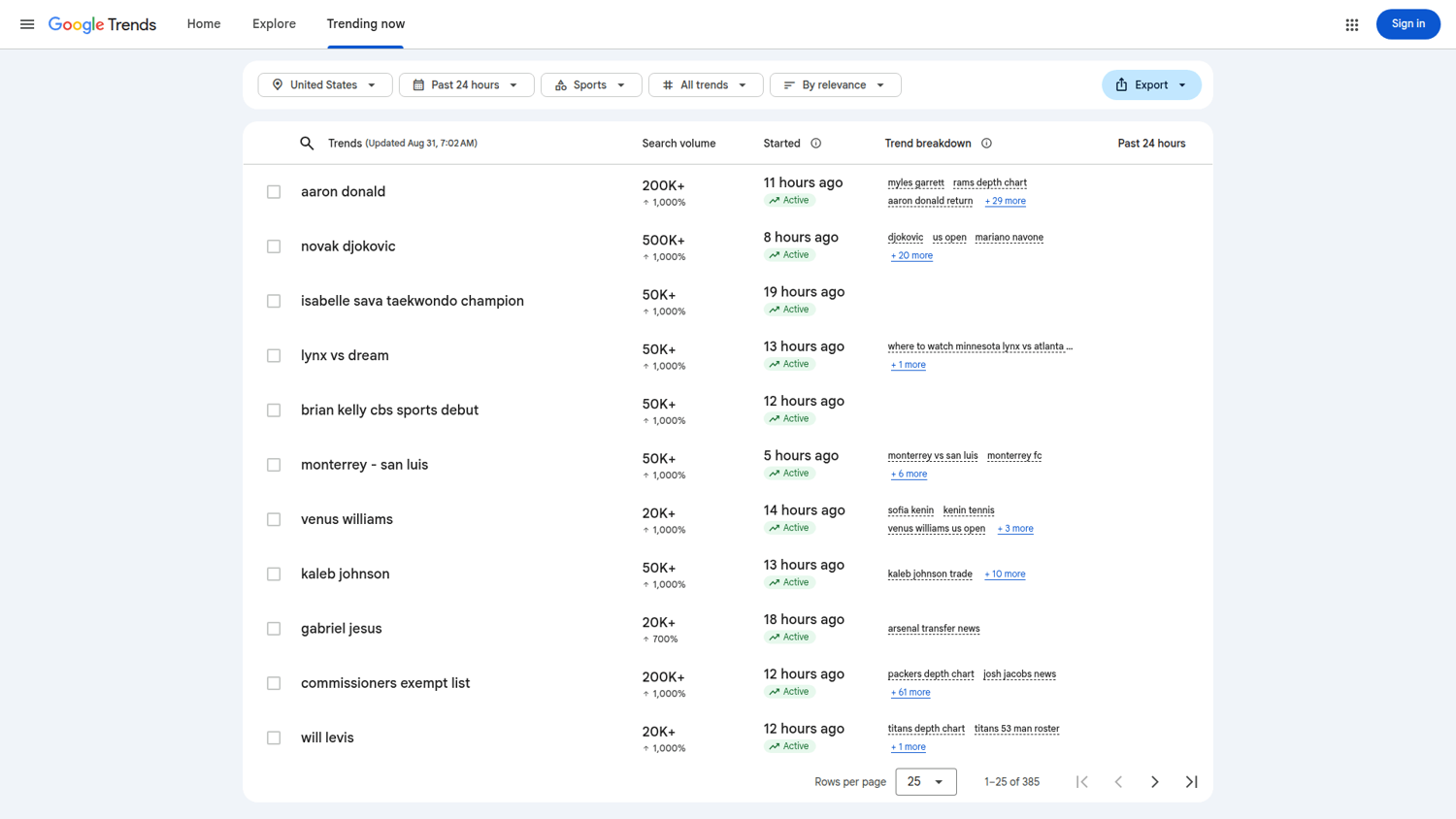
The page carries a volume figure of its own. It is not the feed's ht:approx_traffic. The feed reports the top US terms in the hundreds or low thousands, the page in the hundreds of thousands, so you can't compare a figure from one with a figure from the other. The page's volume is also window-relative: joining hours=24 and hours=168 captures on (term, started) gave 517 shared rows, and 76 reported a different volume, all larger in the wider window, by factors from 2x to 50x.
Scrape related queries
The same explore call that returns the timeseries also carries a related-queries widget, listed as RELATED_QUERIES beside TIMESERIES. Two lines of the CHAIN block change. return w.id === 'TIMESERIES'; becomes RELATED_QUERIES, and var url = '/trends/api/widgetdata/multiline?hl=en-US&tz=0' becomes relatedsearches. Both have to move together, or the token and the endpoint won't match. widget.request and widget.token follow whichever widget was selected, so everything below them stays as it is. The response shape differs, so it gets its own parser, built like parse_timeline with the checks first, and both callers reach ScrapingBee through fetch_widget, so the retry and billing rules are already in place:
# Continues the same module.

RELATED_CHAIN = (CHAIN.replace("'TIMESERIES'", "'RELATED_QUERIES'")
                      .replace("/trends/api/widgetdata/multiline",
                               "/trends/api/widgetdata/relatedsearches"))


def parse_related(raw, keyword_count):
    """Turn the relatedsearches payload into a top list and a rising list."""
    try:
        ranked = json.loads(raw[raw.index("{"):])["default"]["rankedList"]
    except (ValueError, KeyError, TypeError) as exc:
        raise SchemaChanged(f"rankedList missing or unreadable: {exc}") from exc
    if not isinstance(ranked, list):
        raise SchemaChanged(f"rankedList is {type(ranked).__name__}, not a list")
    # One top list and one rising list per keyword, in that order. How many
    # entries land inside each is not fixed, so check the blocks, not the rows.
    if len(ranked) != 2 * keyword_count:
        raise SchemaChanged(f"expected {2 * keyword_count} ranked lists, "
                            f"got {len(ranked)}")

    lists = []
    for block in ranked:
        rows = []
        for entry in block.get("rankedKeyword") or []:
            try:
                # Don't read `hasData`: it is on the top list and absent from
                # the rising one. `value` carries two scales under one name, a
                # 0-100 rank on the top list and a percentage rise on the
                # rising one, which `formatted` shows as "Breakout" past the
                # point where Google stops printing a number.
                rows.append({"query": str(entry["query"]),
                             "value": int(entry["value"]),
                             "formatted": str(entry["formattedValue"])})
            except (KeyError, TypeError, ValueError) as exc:
                raise SchemaChanged(f"unexpected entry shape: {entry!r}") from exc
        lists.append(rows)
    if not any(lists):
        raise DataQuality("both ranked lists came back empty")
    return {"top": lists[0], "rising": lists[1]}


def related_queries(keyword, geo="US", timeframe="today 12-m",
                    retries=2, category=0):
    """Top and rising queries for one keyword, at the cost of one call."""
    items = [{"keyword": keyword, "geo": geo, "time": timeframe}]
    raw, request = fetch_widget(RELATED_CHAIN, items, category, retries)
    check_identity(request, [keyword])
    return parse_related(raw, 1)

# Demo run, not part of the module.
related = related_queries("machine learning", geo="US")
print(len(related["top"]), "top,", len(related["rising"]), "rising")
for row in related["top"][:3]:
    print(f"  top    {row['query']:<25}{row['formatted']:>9}")
for row in related["rising"][:3]:
    print(f"  rising {row['query']:<25}{row['formatted']:>9}")
Two things in that payload will break a parser written from the timeseries. hasData appears on the top list and not on the rising one, so reading it raises on every rising entry. And value carries two different scales under one name: a 0-100 rank on the top list, a percentage rise on the rising one, which Google prints as Breakout once it passes the point where it stops showing a number. The lists move, so this capture won't match yours:
25 top, 25 rising
  top    what is machine learning       100
  top    machine learning models         45
  top    machine learning news           43
  rising lidl near me              Breakout
  rising cook pasta                Breakout
  rising yoga beginners            Breakout
How many entries arrive is not fixed either, which is why the parser counts the lists and leaves the rows alone.
On both seeds we pulled, the two lists were not equally reliable. For machine learning, each list came back with 25 entries, the top list was what you would expect, and 12 of its 25 entries carried the seed words. The rising list, in the same response, put lidl near me first, cook pasta second and walmart near me fourth, and only 6 of its 25 carried the seed words at all.
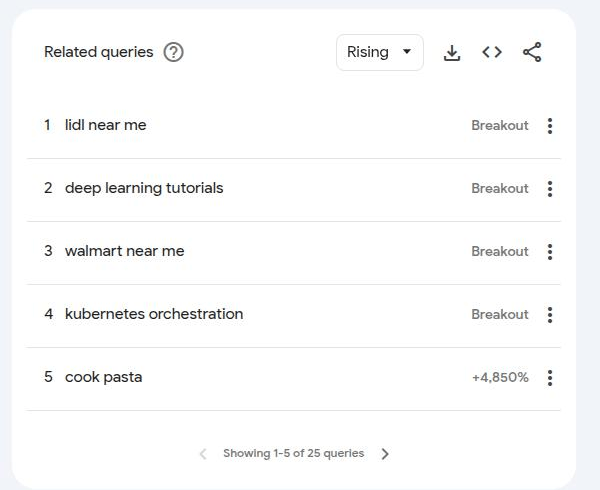
How far it drifts depends on the seed. We pulled ai agents the same day, and it did much better: 20 of 25 top entries and 12 of its 18 rising ones carried the seed words, and its first three rising entries were openclaw, ai agents moltbook and moltbook rather than supermarkets. Top queries were on-topic for every seed we tried. Do not discard the rising list. But verify unexpected rising queries before you use them, because both lists arrive in one response and look identical in shape.
Traps in the request itself
Pin the dates so a scheduled job means the same window every time. A rolling today 12-m is the same query as the absolute range it covers. We fetched today 12-m and 2025-09-07 2026-09-06 one after the other and they returned identical values on all 52 points, while 2 fetches of the same timeframe in that session differed on 34 of 52. Two different timeframe strings agreeing exactly, where one string disagreed with itself, suggests Google resolves both to the same cached window. That window moves: the same today 12-m covered 2025-08-31 onward when we first ran it. Writing absolute dates into a scheduled job costs nothing and removes one ambiguity, namely what "today" meant on the machine that ran it. That string is what you pass as timeframe.
You no longer have to infer the resolution either, because the widget request that comes back beside the payload states it. A today 12-m pull on 14 September 2026 carried "time": "2025-09-14 2026-09-14", and on the related-queries widget that value sits beside "originalTimeRangeForExploreUrl": "today 12-m", the string we sent. Log the resolved value and a scheduled job records the window it actually got.
Watch the timezone boundary. Google's documentation states that ranges of 30 days or more are reported in UTC, while ranges of 7 days or shorter use the viewer's own local timezone. The chain above passes tz=0, and we didn't test whether running a short-range query through a proxy in another region shifts its buckets. Pin the timeframe to 30 days or more when you can, and record the region the request ran from when you can't.
The parameters that actually do something
Not every parameter you can set changes the data that comes back.
| Parameter | Effect | Evidence |
|---|---|---|
category | Real, and large on an ambiguous term. | On python, category 5 (Computers & Electronics) moved the series by a mean of 13.1 points and a maximum of 32. Category 7 (Finance) moved it by a mean of 43.7 and a maximum of 55. |
geo sub-region | Real. State codes and DMA codes, Google's metro-area regions, both work. | On wildfire, national US differed from US-CA by up to 42 points, from US-NY by up to 38, and from US-CA-803 (Los Angeles) by up to 44. |
geo country | Works outside the US. | GB, DE and IN each returned a full 12-month series peaking at 100, 52 points once the partial is dropped, on the same code and the same credit cost as US. |
tz | No effect on the values, on the window we tested. | Across tz 0, -480 and 330, 6 calls returned 3 distinct responses, and the groupings didn't follow tz at all. The variation appears to come from the cache, not from the parameter. |
The Explore screenshots on this page come from the classic interface, the one these endpoints belong to. Google's redesigned Explore looks different and works differently, so what you see may not match.
category is the useful one, and it's how you fix keyword ambiguity: category 5 is Computers & Electronics, and it moved python onto the programming language. To find the ID for any other category, set the dropdown on the Explore page and read the cat= value out of the resulting URL. The call takes it as an argument:
# Demo run, not part of the module.
lang = interest_over_time("python", geo="US", category=5)
lang = [p for p in lang if not p["partial"]]
print(lang[0]["date"], lang[0]["values"][0], "peak", max(p["values"][0] for p in lang))
The opening week came back at 87 on the pull we ran:
Sep 7, 2025 87 peak 100
Here it is with no category filter:
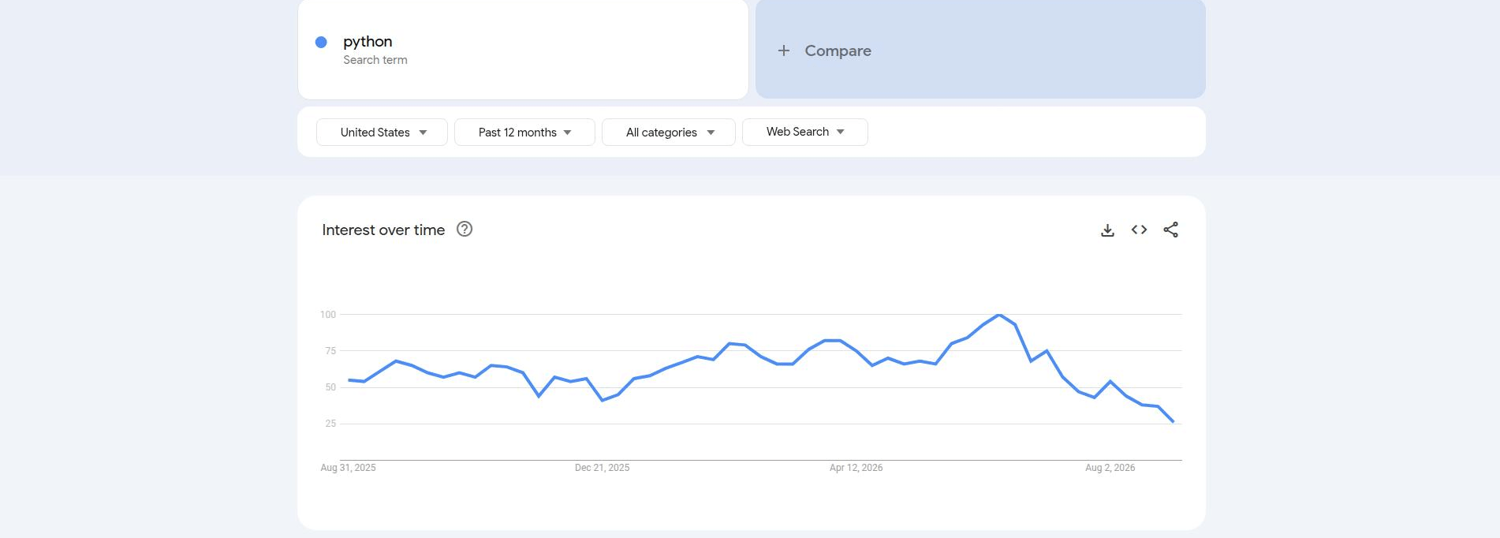
And the same query with the Computers category applied:
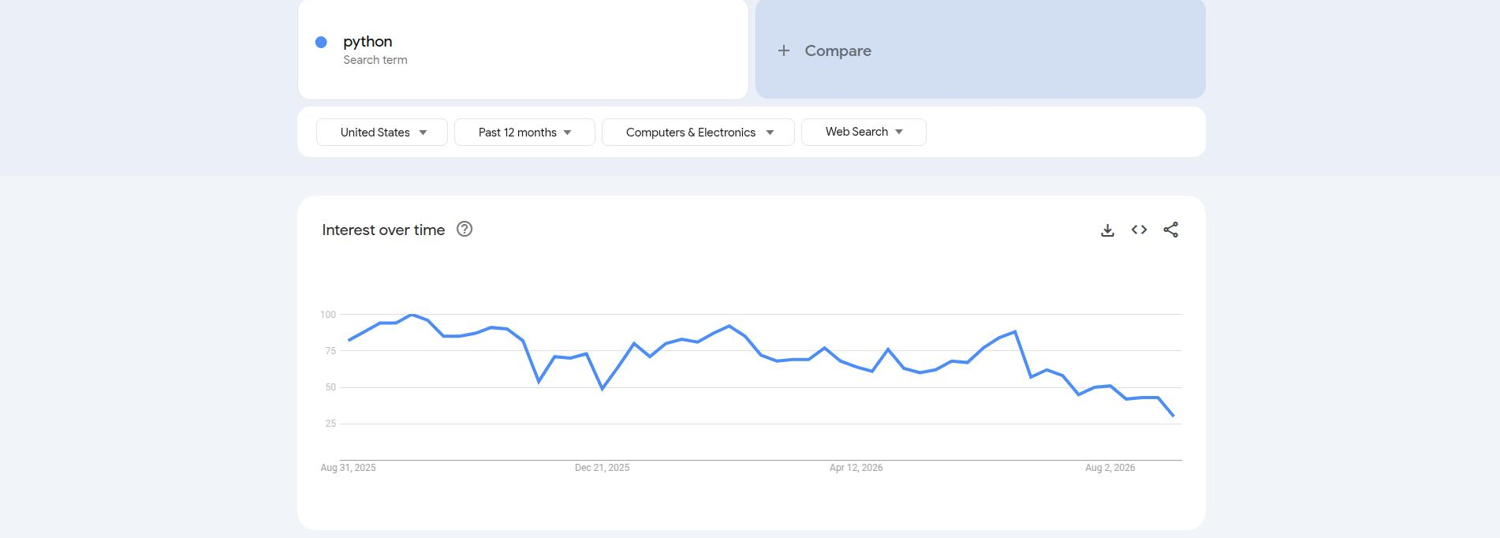
In these captures the peak moves from early summer 2026 to September 2025, and the opening weeks rise from roughly 55 to 82, near the 87 the call above returned.
Reading the numbers
The values are relative, not absolute. Google normalizes each query that has data so that the highest point in the whole request is exactly 100. A value of 50 means "half of the busiest point in this request", which for a single term is its own peak and in a comparison is the busiest term's peak. Two series fetched separately have different peaks, so the terms you compare have to go in one request.
One request put up to 5 items on a single comparable scale. The cap belongs to Google's classic Explore endpoint, so every client calling it shares the limit. A 6-item comparisonItem list came back as HTTP 400 and an HTML error page. A longer list has to split across calls, and each call normalizes to its own peak, so the pieces arrive as separate 0-100 series that no later arithmetic reconciles. Google's redesigned Explore interface compares more groups than the classic endpoint allows, and the Explore help page carries the current number.
A crowded comparison costs resolution. Because Google scales everything to one peak, a large keyword beside a small one pushes the small one into a handful of integers, and the small one's whole year can end up inside two or three values. The series isn't wrong, but it has too little resolution left to answer a question about that keyword; to answer that, run a query of similarly sized terms. Putting more keywords than the cap allows on one scale means running them in batches with one shared term in every batch, then scaling each batch by that term. The technique is called anchoring, and it holds only while the shared term keeps enough resolution in every batch it appears in.
Repeat pulls of the same query don't give you independent samples. They appear to return a small pool of cached variants, so averaging repeated calls weights whichever variant Google happens to serve twice. A separate pair of consecutive pulls differed on 42 of the 52 weekly points, by a median of 2 index points and by no more than 5. A second pair a week later differed on 42 of 52 again, at the same median of 2, and reached 8. Two pairs on one query still set no threshold, so treat a movement in that range as unresolved until repeated pulls of your own query show otherwise.
Limits and maintenance
This workflow runs on Google's own internal endpoints, none of which are documented. /trends/api/explore and /trends/api/widgetdata/multiline are endpoints Google can rename without telling anyone, and Google can reorder the positional array behind the /trending page the same way. Treat the parser as application code with a version and a fixture, not as an API client. The companion repository carries the module exactly as printed here, a timeseries and a related-queries payload to test against, and a test that parses them with no key and no network.
The chain also depends on the JSON endpoints behind the classic Explore page, and we do not know whether those endpoints will outlive the interface. Google was steering users away from it when we captured this:

That's the trade-off for getting the data at all, because the official API was, as of September 2026, still an alpha to which you must be admitted. Applying costs nothing, and it was still application-only more than a year after the announcement, so build as though you will not get in. Re-test the chain before you depend on it, and again whenever your validation starts raising SchemaChanged. Not every limit here is Google's. Delivered failures still bill, on the rule above, and your credit budget and concurrency come from your plan, which /api/v1/usage reports. Rates, plan sizes and the signup grant move on ScrapingBee's schedule, so take them from the pricing page and the Spb-cost header on your own calls.
Collecting this data automatically may also conflict with Google's Terms of Service, which the FAQ below goes into.
Test environment
Every figure on this page that is not linked to a source came from our own runs. Treat these numbers as a snapshot and measure your own.
| Measured | September 2026 |
| Python | 3.12 for the original runs, re-verified on 3.14 |
| Request | ScrapingBee HTML API, custom_google=true, render_js as shown in each sample |
| Target URLs | trends.google.com/trending, /trending/rss, /trends/api/explore, /trends/api/widgetdata/multiline |
| Code version | The functions exactly as printed on this page, and carried as one importable module in the companion repository |
| Caches | Not cleared, and not clearable |
| Concurrency | 1 worker for every sample on this page |
| Plan | 100,000 credits a month and 100 concurrent requests, as /api/v1/usage reported them |
| Proxy region | The default rotating pool, since we left country_code unset and didn't pin the region |
| Comparison library | trendspyg 1.6.0, the current release when the runs were made, from a single residential address |
| Account | One ScrapingBee account |
Alternatives
For a handful of queries from your own machine, the trendspyg library is free and actively released, eight releases between 5 August and 10 September 2026 alone, and already carries a Trends session because it drives a real browser. We tested 1.6.0. Its release history carries the current version and shows whether that pace has held. In our runs its numbers agreed with the ones this workflow returned, within the pull-to-pull variation Trends shows anyway.
Its limit is that every request comes from your own address. We put 12 keywords through it back to back: 3 succeeded and 9 failed. That run gave it no backoff, while collect above sleeps between attempts, so read 3 of 12 as the cost of running flat out at a per-address limit. Google limits fresh sessions per address, at roughly 8 to 10 an hour according to trendspyg 1.6.0's own error message, though we were blocked after 3, and the one cooldown we measured ran for more than 15 minutes. The library has no proxy parameter, so there's no way to avoid this from inside the library.
Calling the endpoints directly with requests fails for a different reason: a bare HTTP call carries no Trends session, and a proxy changes the address rather than supplying one. If you arrived from the free route, the interest-over-time call earlier on this page is the code that replaces it.
Most older tutorials recommend pytrends. Its repository is archived, and 3 of its methods returned 404 when we checked, because Google retired the endpoints behind them.
For trending terms specifically, Google's own Trends dataset in BigQuery is free inside the standard tier and carries the top and rising queries across 210 US metro areas on a rolling five-year window, which is more than the feed above returns. It does not cover interest over time for a keyword you choose. Other hosted APIs sell Google Trends access too, and we didn't benchmark them for this page, though a survey of the Google Trends APIs on offer covers that end of the market. The same custom_google flag carries over to the SERP itself, covered in scraping Google search results in Python.
Where to take it from here
Sign up, export your key, and start with trending_now() for your own country, which is one call and needs no browser. Then run interest_over_time() on a keyword you already care about, and check the result against the Trends website to confirm your setup.
Keep the validation in place when you move it into a job, because on this source the wrong numbers arrive inside a clean 200. Scale the credit arithmetic in the prerequisites against your own keyword count before you schedule anything.
FAQs
Is it legal to scrape Google Trends?
Trends data is public and unauthenticated, but automated collection may conflict with Google's Terms of Service. The version effective 30 July 2026 prohibits using automated means to access content in violation of the machine-readable instructions on a page, and names robots.txt as its example, so the crawler directives sit inside the Terms question. Both hosts publish rules and both are worth reading: trends.google.com/robots.txt disallows /explore? and /trends/explore?, and www.google.com/robots.txt disallows /trends/api among other paths. Whether a particular request is permitted is a question for your own counsel. None of this is legal advice. If you're building a commercial product on this, consult a lawyer.
Is there a dedicated Google Trends endpoint?
The general HTML API covers Trends. You send the Trends URL with custom_google=true, render it, and run the Trends request from inside the page, which is the workflow above. Any tutorial pointing you at a dedicated ScrapingBee Trends endpoint is out of date, including the earlier version of this page. A Trends call bills at the flat Google-domain rate.
Why is my series different from what the website shows?
Trends reports a share of all searching, not a count, and it normalizes to each query's own peak, so a different keyword, timeframe or region produces a different scale. Check that the response contains a 100 somewhere. In a comparison it appears on whichever series is busiest overall, not necessarily the first one that you passed. The same query can also come back as a different cached variant from one pull to the next, so a small gap often comes from the sample, not from your code.
How often does Google Trends update?
The feed returned 10 items on every pull we made, so the window it covers stretches and shrinks with the news cycle. Two of our pulls covered 20 minutes and 110 minutes. Poll it every 15 minutes if you can't afford to miss a spike, which is 96 pulls a day, or use the /trending page with hours for a window that you control. On the timeframes we tested, interest-over-time buckets were daily or weekly for windows longer than a week. On daily buckets one pull a day picks up each new bucket, though partial and previously sampled values can still move. The now 7-d and now 1-H windows came back hourly and per-minute.
Does Google Trends have an API?
Google announced an official Trends API in 2025, and as of September 2026 it remained an alpha you have to apply for, so access still needed acceptance into that alpha. The website itself runs on undocumented JSON endpoints that anyone can call without a key, and the libraries and hosted scrapers we looked at build on those. They work, but they're not a supported product and Google can change them without notice.
Is there a free API for Google Trends?
The undocumented endpoints behind the Trends website are free to call, and Google publishes one official free path: the Trends dataset in BigQuery carries the top and rising queries by region inside BigQuery's standard free tier. It won't return interest over time for a keyword you choose; the workflow above handles those. In our trendspyg test, repeated calls from one residential address were rate-limited, which is the limit a free, single-address library eventually reaches. A paid API is a way around that per-address limit rather than around Google's rules, and a Trends call billed 15 credits in our testing.
Why is pytrends not working?
The project is archived, and its PyPI release history showed no release since 2023 when we checked. Its trending_searches, today_searches and realtime_trending_searches methods returned 404 when we checked, because Google retired the endpoints they call. Nothing you change in your own code fixes those. trendspyg was the maintained alternative we found, and it covers interest over time, trending searches and related queries. Its limit is the same per-address one the alternatives section above measures.