
Google Ads competitor analysis is the process of looking at the advertisers that show up next to you in search results and figuring out how they compete for the same clicks. For PPC marketers and founders, it's one of the best ways to improve campaigns. Instead of guessing what might work, you can look at what other advertisers in the market are already testing and how they frame their offers.
In practice, this means more than glancing at a few ads. You need to spot the companies that keep appearing for the core keywords, review how their ads are written, and check the landing pages they use to turn traffic into leads or sales. After a while, those clues reveal patterns in messaging, positioning, and strategy.
The goal is not to copy competitors blindly. It is to understand the market better and make smarter decisions in your own account.
In this guide, we'll go through Google AdWords competitor research step by step: how to spot the real competitors, review their target terms and ads, track demand signals, and turn those findings into tests that can lift Google Ads performance.
Quick answer (TL;DR)
Start with a small set of core search terms and note which advertisers show up consistently. Review their ad copy, offers, and landing pages to spot repeated patterns and gaps worth testing.
Then widen the view with sources like Google Trends, related searches, and other ad platforms to catch demand shifts, new keyword angles, and positioning changes. The goal is simple: collect useful signals, organize them by theme, and turn them into focused Google Ads tests.
Once the workflow grows beyond a few manual checks, automation starts to make a lot more sense. A Web scraping API can help collect competitor data across many search terms and markets without turning the process into a spreadsheet marathon.
What is Google Ads competitor analysis
Google AdWords competitor analysis is basically taking a look at what other advertisers in your niche are doing in Google Ads and learning from it. Learn which keywords they bid on, how their ads are written, and where they send people after the click. Nothing shady here. You're just trying to understand the playing field before putting your own money into it.
When running ads, you're almost never alone on the search results page. Other companies are bidding on the same queries and competing for the same clicks. A proper Google Ads competitor research helps you see who shows up around your target terms and how they try to win those clicks.
With a bit of digging, it should be possible to answer questions like:
- Which keywords competitors are actively bidding on
- What messaging keeps appearing in ads
- What offers they use to attract clicks
- How competitive certain search terms look
- What kind of landing pages people land on after clicking the ads
It gives a clearer sense of what the market responds to and where the real competition sits.
Why competitor analysis matters for Google Ads performance
Running ads without competitor insight is a bit like sitting down at a poker table halfway through the game. Everyone else already knows the stakes and the players, and you're still figuring out what's going on. Competitor analysis gives you that missing context before you start spending budget.
- First, this research helps with keyword selection. If several advertisers keep bidding on the same keyword, there's a good chance that it actually brings customers.
- Second, you'll be able to write stronger ads. A quick scan of competitor ads usually reveals which angles, benefits, and promises keep showing up, making it easier to craft copy that can compete for clicks.
- Third, you'll stop burning money. Some keywords turn into expensive bidding battles where the cost per click goes through the roof.
- And finally, better insight usually leads to better performance. When choosing smarter search terms and writing more relevant ads, you often see lower cost per click, higher click-through rates, and stronger conversion rates.
How to run a Google Ads competitor analysis step by step
A good Google AdWords analysis isn't some mysterious process. You're really just figuring out who you compete with, which keywords and ads they use, where they send traffic, and how hard they seem to push on budget and bidding.
The workflow looks like this:
- Define the market and identify the real PPC competitors
- Gather competitor keyword and ad copy data
- Review destination pages, offers, and funnels
- Estimate spend, bids, and overall account strategy
- Turn the findings into campaign tests
In the next sections, we'll walk through each step without turning it into some huge research mission.
Step 1: Define your market and real PPC competitors
This step matters more than most people expect, because a lot of teams start by tracking the wrong competitors. Real PPC competitors aren't always the biggest names in the niche. They are the advertisers popping up for the same keywords, speaking to the same audience, and trying to win the same clicks. Sometimes that is a major brand. Sometimes it's a smaller company that keeps popping up for the terms that actually matter.
Start with your core queries. Search the main terms you would realistically bid on and see who keeps appearing. Do not scan one keyword and move on; look across a few keyword groups, because the competitive set often changes depending on the topic.
If you already run Google Ads, examine the Auction Insights report too. That offers a better reality check than "gut feeling". It indicates which advertisers overlap with you in actual auctions, which is far more useful than naming the biggest companies in the market from memory.
Your sales team can assist here as well. They usually know who prospects compare you against, which names keep coming up on calls, and who tends to pop up near the end of the buying journey. Real competition is not just about traffic, it's about fighting for the same customers.
By the end of this step, prepare a short list of actual PPC competitors, not a bloated spreadsheet of every company in the industry. A good way to think about it:
- Big brands are worth noticing
- Actual auction competitors matter more
- Companies with the same audience and offer come first
Get this step wrong, and the rest of the research gets messy fast.
Step 2: Collect competitor keyword and ad copy data
With the competitor set defined, the next step is to gather the signals that matter.
Start by building a keyword list. Look at the terms where competitors appear and group those queries by theme. Some will be branded alternatives, some high-intent service searches, some problem-aware queries, and some feature-specific terms. This part matters more than it seems, because a random keyword list gets messy fast and does not reveal much.
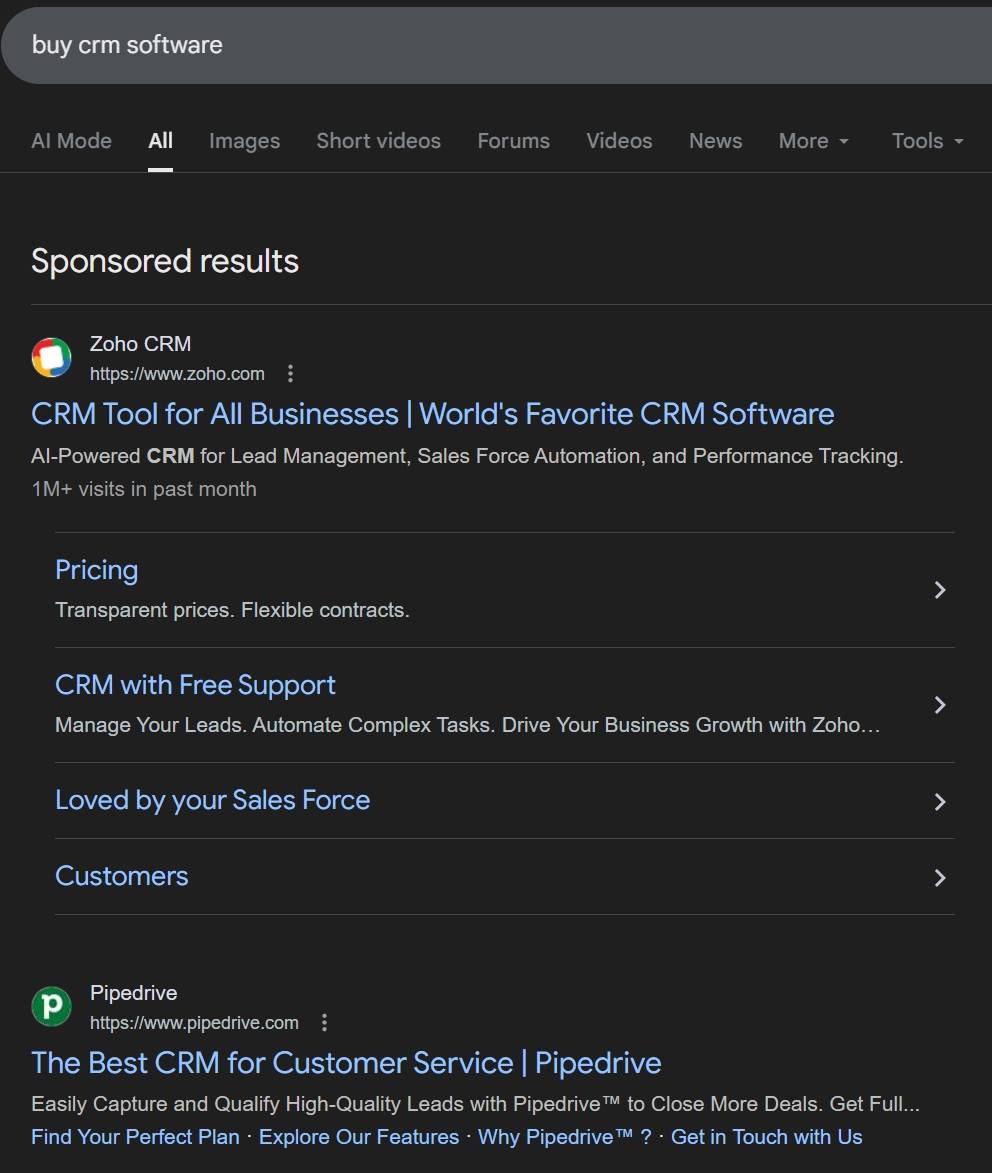
A manual SERP review still works great for this. Search the important keywords and note who shows up, what their headlines say, what offers they highlight, and which angles keep repeating.
The Google Ads Preview and Diagnosis tool is handy too. It lets you check ads without triggering real impressions in normal search. That makes it easier to see what appears for specific queries, devices, or locations.
Third-party services can assist if you want larger exports and longer keyword lists. They're handy for spotting keyword overlap, ad history, and recurring copy themes. Just don't treat those tools like absolute truth: they're estimates, not direct access to ad accounts.
When collecting ad copy, don't stop at the headline. Inspect the whole package:
- Headlines
- Descriptions
- Display paths
- Sitelinks
- Callouts
- Structured snippets
- Promotion language
- Price-related language
- Urgency and trust signals
One competitor leans hard on price. Another pushes a free demo. Someone else keeps repeating speed, support, or results. Put side by side, those ads make the category patterns pretty obvious. The result is a clearer view of the messages that dominate the space and the areas where the same claims keep repeating, leaving room for a sharper angle.
Step 3: Analyze landing pages, offers, and funnels
A lot of people stop at ads, but that's only half the picture. The click is just the handoff. For a proper Google AdWords analysis, you also need to see what happens after the click.
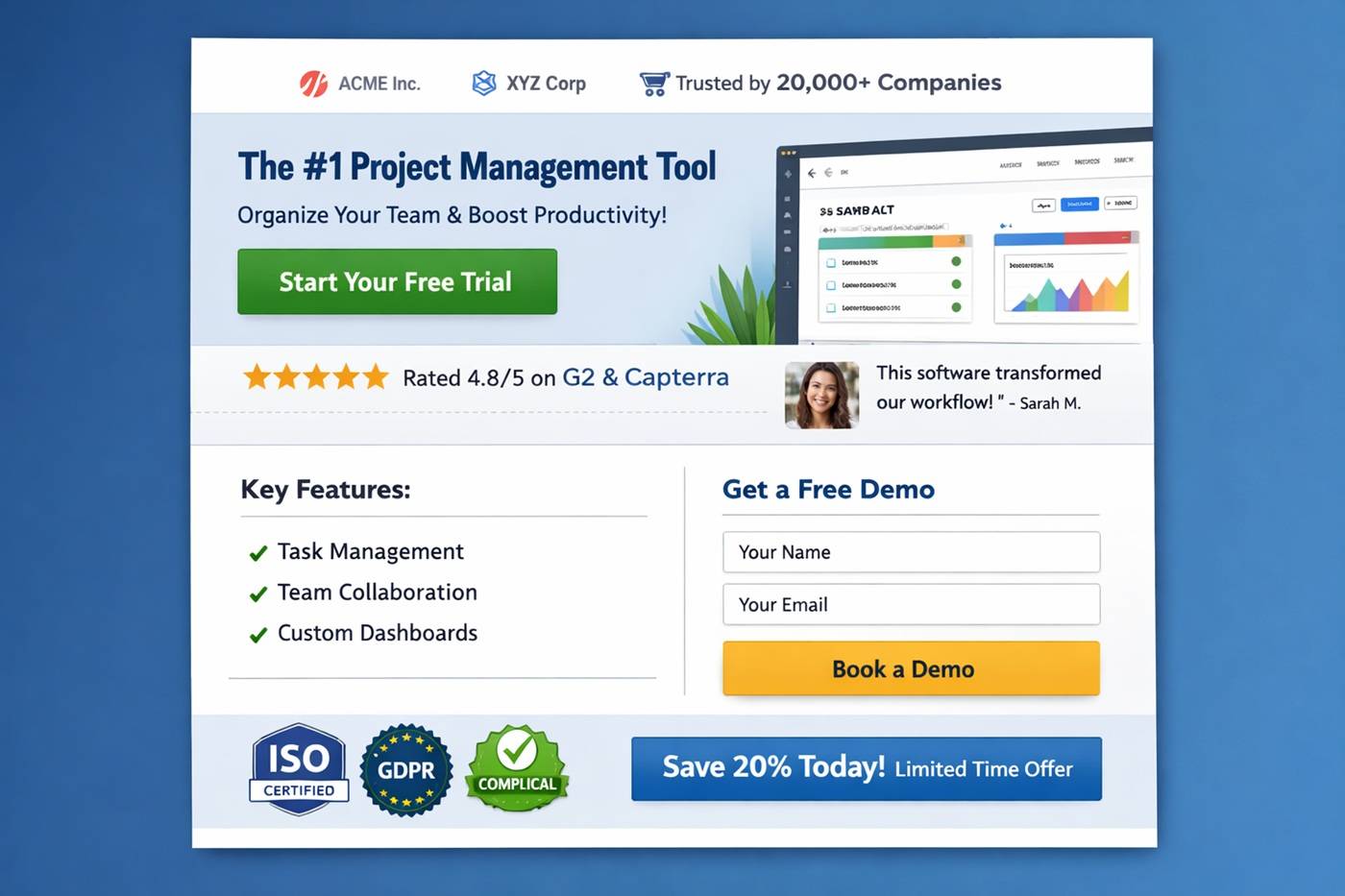
- Open competitor destination pages and review them like a normal buyer. What's the main value proposition right away? Is the page easy to understand, or are you still wondering what they sell after ten seconds?
- Next, look at the offer. Are they pushing a free trial, demo, consultation, discount, or quote request? The offer says how they turn traffic into leads or customers.
- Review the trust elements too. Things like testimonials, review scores, client logos, case studies, guarantees, or certifications. These clues explain why some advertisers can run bold claims in ads and still convert.
- Social proof is another strong clue. If most competitors highlight customer results or success stories, that usually means buyers in that market need reassurance before taking action.
- Also pay attention to pricing and funnel structure. Some companies lead with price, others hide it. Some push straight to checkout, while others start with a softer lead-gen step like a demo request or email capture.
Step 4: Estimate competitor spend, bids, and account strategy
Exact numbers are never really visible unless a competitor somehow hands over the Google Ads account login, which is obviously not happening. Still, rough estimates can be useful enough to guide smart decisions.
This step is about reading signals, not chasing perfect precision.
Look at auction visibility
Impression share and auction insights are a solid starting point. They show how often certain advertisers appear in the same auctions and quickly reveal who stays active consistently versus who only pops up from time to time.
Placement patterns add another useful signal. If the same advertiser keeps landing near the top across important keywords, that usually means serious bidding, strong Quality Scores, or a mix of both.
Check keyword demand and coverage
Search volume gives context. If a keyword gets solid monthly searches and the same advertisers appear there week after week, those clicks are unlikely to be cheap. Someone is clearly investing real budget.
Consistency is one of the strongest clues. If an advertiser is there today, next week, and next month, they likely have a steady strategy and a meaningful budget behind it.
Build rough spend estimates
You can also sketch rough spend ranges with simple math.
Example:
- Keyword search volume: 2,000 searches per month
- Estimated CPC: about $6
- Estimated click share: 15–25%
That leads to something like:
- 2,000 × 15% ≈ 300 clicks → about $1,800/month
- 2,000 × 25% ≈ 500 clicks → about $3,000/month
So a rough estimate for that keyword might land somewhere between $1,800 and $3,000 per month.
No, this won't be exact. But when repeating the exercise across multiple keywords, you start getting a realistic sense of how aggressive that account might be.
Look for strategy signals
Look for clues about the overall approach:
- Do they target many keyword themes or just a few?
- Are the ads direct-response focused or more brand-driven?
- Do you see lots of variation in messaging or mostly the same ads repeating?
- Are they concentrating on high-intent searches or spreading wider?
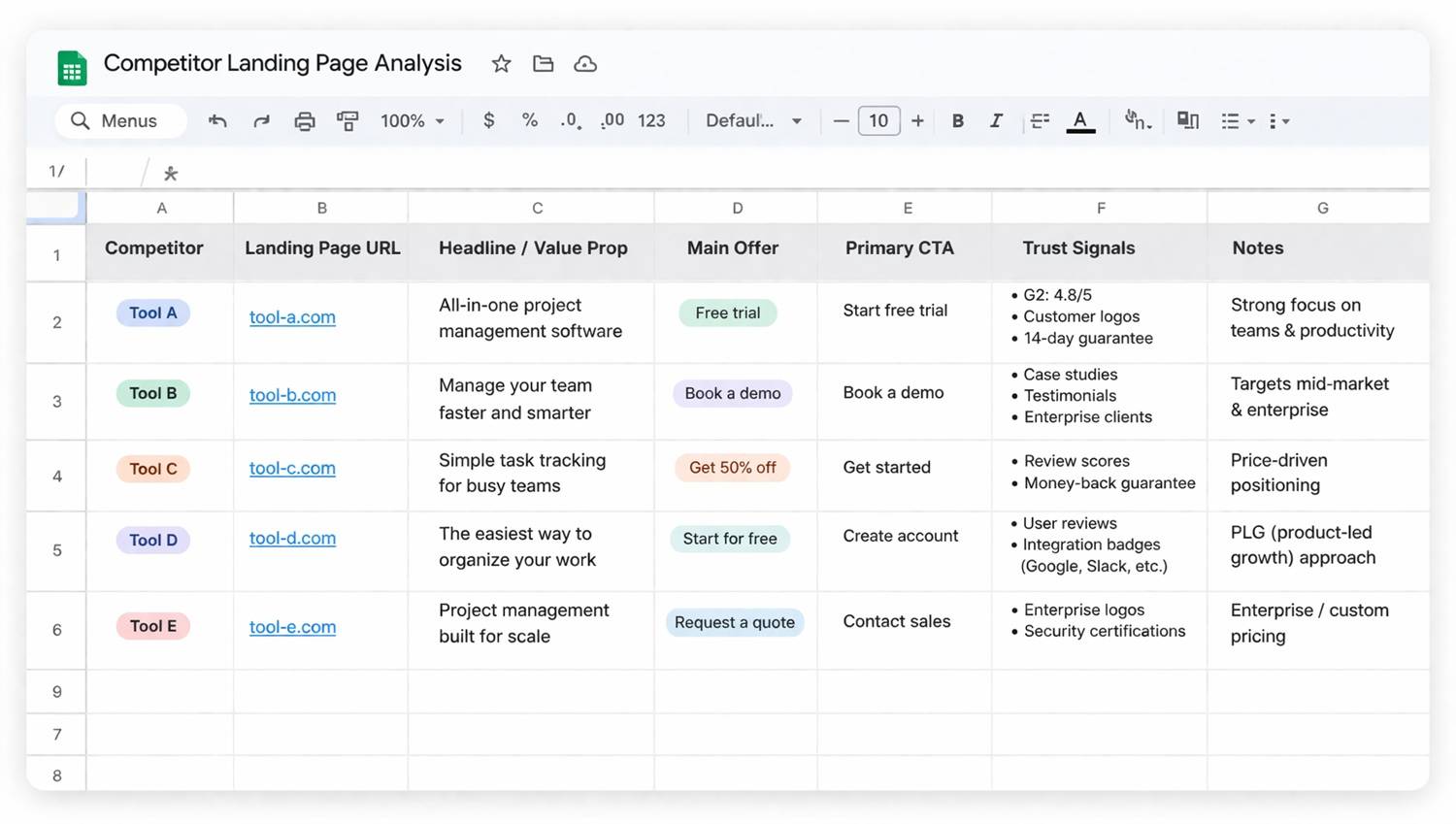
That's where a Google AdWords analysis becomes more than a list of observations. You begin to see how competitors structure their accounts and where they place their bets. The goal is to understand whether a competitor looks light, moderate, or very aggressive, and how that fits into the rest of your breakdown.
Use data sources and APIs to go deeper
Manual checks and standard PPC tools are a solid starting point, but they hit a limit pretty fast. After that, regular data collection starts making more sense than doing the same one-off review over and over. That is where APIs and web scraping come into play.
Rather than opening a dozen tabs and copying things by hand, the process can be automated. That makes it easier to track ads, search demand, offer page changes, and messaging shifts over time instead of working from a single snapshot.
For example, you might collect:
- keyword trends across multiple markets
- changes in competitor ad copy
- landing page updates and new offers
- new search topics appearing in your niche
You’re no longer guessing what happened last week or last month; you can instead see how the landscape evolves. Platforms like ScrapingBee make it easier to collect data from dynamic pages that normally require a browser to load. Instead of building custom proxy setup and headless infrastructure, just send a request, render the page, and extract the clues.
Track search demand with Google Trends
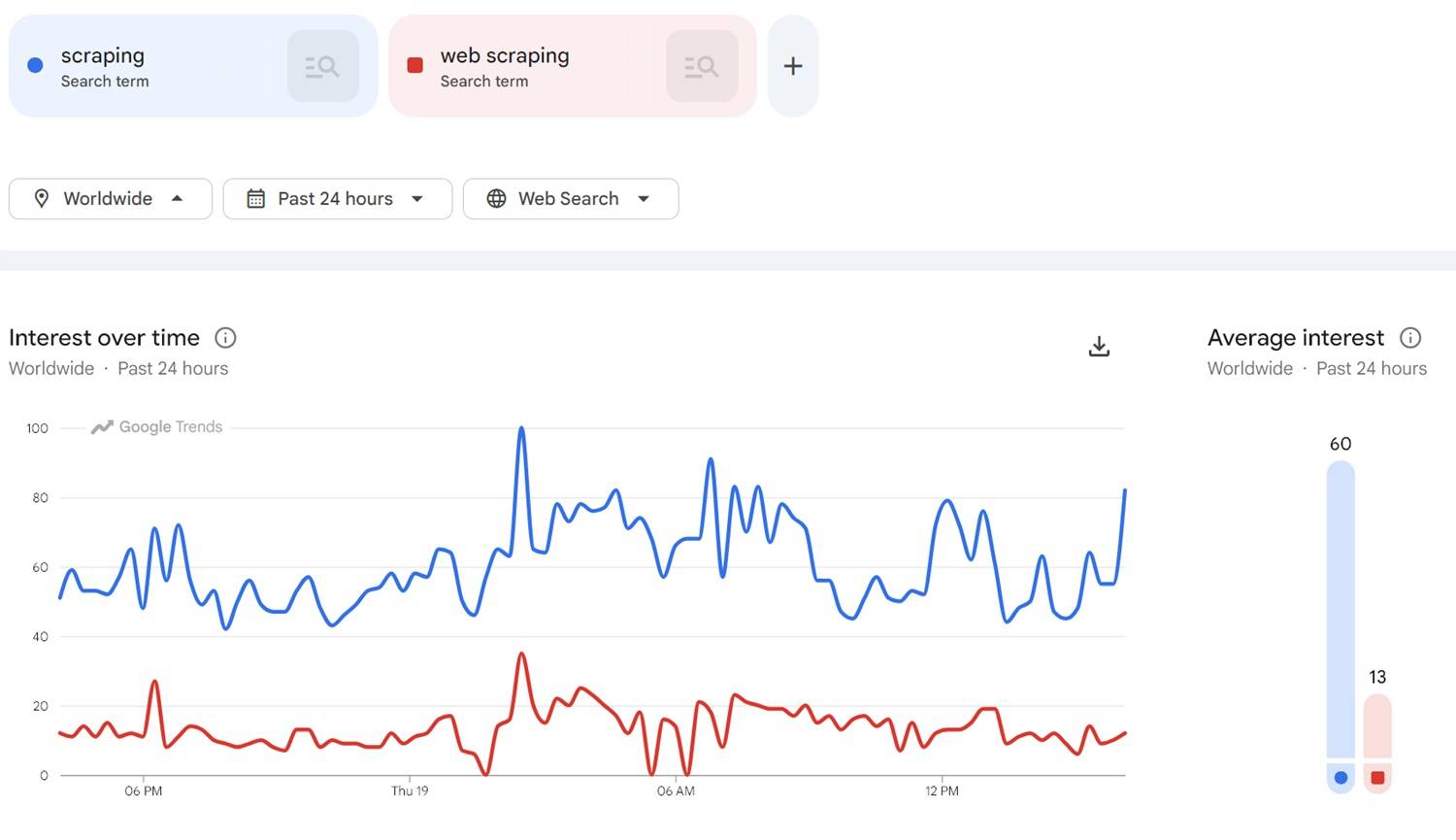
One of the quickest ways to get a read on search demand is Google Trends. Keyword tools in Google Ads provide estimated volumes, but Google Trends shows something else entirely: how interest shifts over time. That makes it useful for spotting seasonality, trending topics, and sudden spikes in attention.
Google Trends shows relative search interest, not absolute search volume.
And that matters for competitor audit. When search interest rises, advertisers usually move in right behind it. More bidders enter the auction, and CPCs often start climbing soon after.
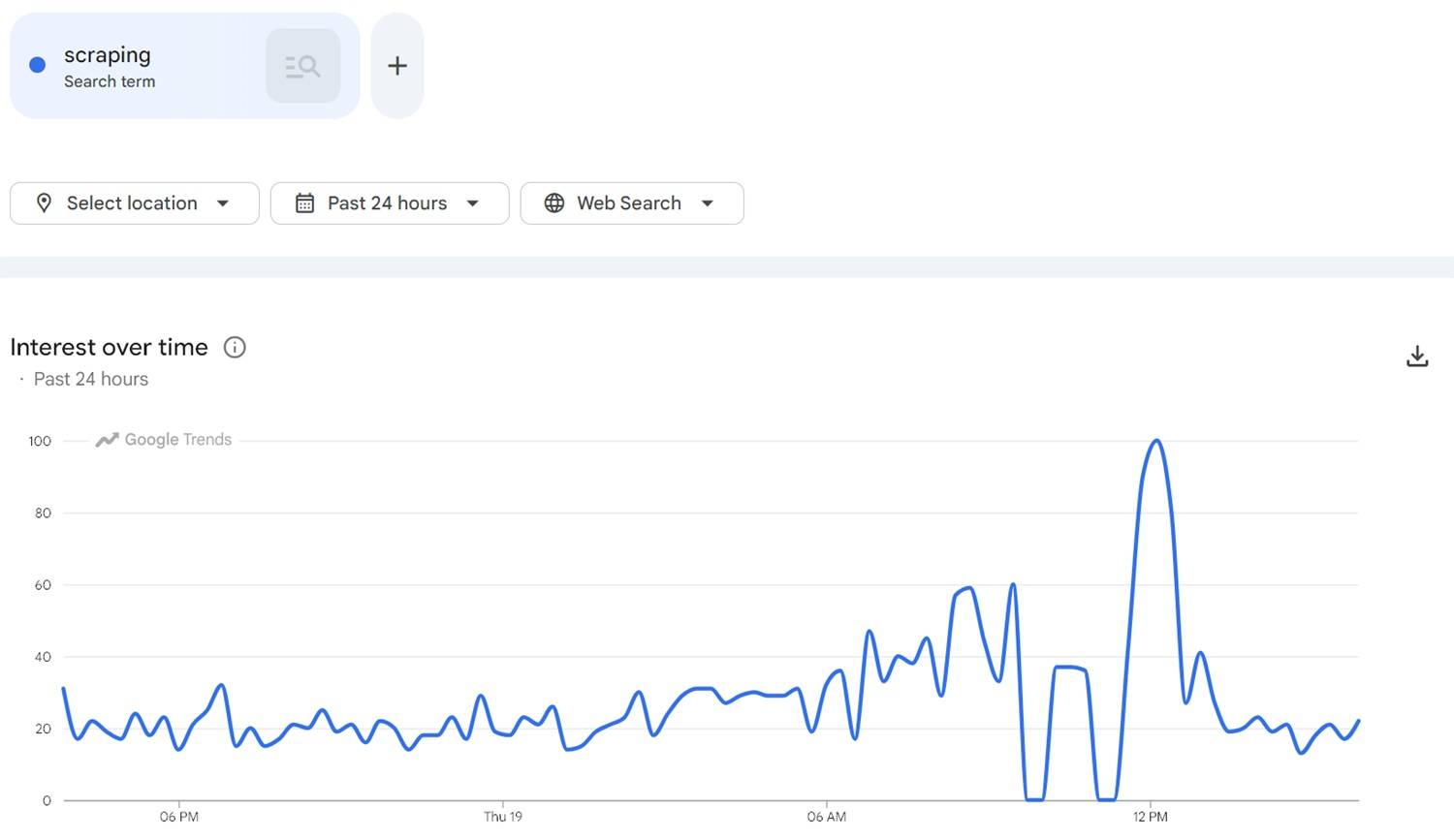
Take a simple example: say the campaign focus is sports gear. If searches suddenly spike around a league, event, or athlete, that is often an early sign that demand is heating up. Catching that shift early opens the door to testing new queries, landing pages, or ad angles before the auction gets crowded.
Trends can also reveal new topics before they turn into expensive keywords. The "rising queries" section is especially relevant here. It might surface fresh angles competitors haven't fully pushed yet.
A quick way to use it:
- Watch trends for your main keyword themes.
- Examine rising queries and sudden spikes.
- Connect those indicators to campaign ideas such as new ad groups, offer pages, or messaging angles.
- Test early while competition is still lighter.
If you want to track this automatically instead of opening the Trends site all the time, collect the data with the Google Trends scraper API.
Example: Automating Google Trends data collection
Checking Google Trends by hand is fine to scan a few queries. Once that turns into dozens or hundreds, it gets old pretty fast.
Therefore, in this section, I want to show the general idea behind a Google Trends scraper workflow. Not some huge production setup, just the basic script: open the Trends page, pull data like top and rising queries, and turn that into something that can be tracked over time.
Prerequisites and overview
To run the example code, you'll need a ScrapingBee account. Create one for free and get 1,000 API credits, which is plenty for testing a few requests and seeing how the workflow behaves.
Also install the requests library for Python:
pip install requests
We'll be using Python 3.12+ for this demo.
Here's what we need to do next:
- Build the Google Trends URL for a keyword and location.
- Send the request through ScrapingBee so the page loads in a browser environment.
- Use ScrapingBee's AI extraction to pull out the fields.
- Print the results in a human-readable format.
A few considerations
But before jumping into the code, there are a couple of practical details that I wanted to mention.
- First, Google Trends is not especially fun to scrape. Important data is loaded with JavaScript and internal API calls, so a plain HTTP request usually will not get you very far.
- In my own tests, the setup that worked best was enabling both
custom_googleandstealth_proxy. Those options allow ScrapingBee deal with Google specifics more reliably, but they also use more credits per request. You might also trypremium_proxy, though in practice it can be a bit hit or miss.
- In my own tests, the setup that worked best was enabling both
- Second, parsing the page by hand is more annoying than it looks. The markup is messy, the class names look like random hashes, and Google can change that structure whenever it wants. That is why this example uses ScrapingBee's AI extraction instead of custom parsing logic.
- Honestly, it's more convenient to ask for fields like top queries and rising queries directly than to untangle the whole thing yourself.
- And one last thing: the code below is intentionally trimmed down. It's here to demonstrate the approach, not to be a full production-ready scraper.
Google Trends scraper: Sample code
With that in mind, here is a basic example of how the workflow might look:
import os
import json
import time
import requests

# Set your ScrapingBee API key as an environment variable:
# export SCRAPINGBEE_API_KEY="your_api_key_here"
SCRAPINGBEE_API_KEY = os.getenv("SCRAPINGBEE_API_KEY", "")

# Pick a keyword and market to analyze
keyword = "nba"
geo = "US"

# Google Trends page for that keyword
trends_url = f"https://trends.google.com/trends/explore?geo={geo}&q={keyword}"

# ScrapingBee API endpoint
endpoint = "https://app.scrapingbee.com/api/v1/"

# Tell ScrapingBee AI what to extract from the page
ai_extract_rules = {
    "keyword": "main keyword being analyzed on the page",
    "top_queries": "top related queries shown on the page as a list",
    "rising_queries": "rising related queries shown on the page as a list",
    "summary": "short summary of what the trends page shows"
}

# Request settings
params = {
    "api_key": SCRAPINGBEE_API_KEY,
    "url": trends_url,
    "render_js": "true",
    "stealth_proxy": "true",
    "custom_google": "true",
    "block_resources": "false",
    "wait_browser": "networkidle2",
    "wait": "5000",
    "json_response": "true",
    "ai_extract_rules": json.dumps(ai_extract_rules),
    "forward_headers": "true",
}

# Forward headers so the page behaves more like a real browser session
headers = {
    "Spb-Referer": trends_url,
    "Spb-Origin": "https://trends.google.com",
    "Spb-Accept-Language": "en-US,en;q=0.9",
}


def has_useful_data(trends_data):
    """Return True if we got at least some real trend data back."""
    if not isinstance(trends_data, dict):
        return False

    top_queries = trends_data.get("top_queries") or []
    rising_queries = trends_data.get("rising_queries") or []

    return bool(top_queries or rising_queries)


def fetch_trends(max_attempts=3, delay=4):
    """
    Try a few times because Google Trends can be inconsistent.
    We accept the result as soon as we get useful data.
    """
    for attempt in range(1, max_attempts + 1):
        print(f"Attempt {attempt}/{max_attempts}...")

        try:
            response = requests.get(endpoint, params=params, headers=headers, timeout=120)
            response.raise_for_status()
        except requests.exceptions.RequestException as e:
            print("Request failed:", e)

            if attempt < max_attempts:
                print(f"Retrying in {delay} seconds...\n")
                time.sleep(delay)
            continue

        try:
            data = response.json()
        except json.JSONDecodeError:
            print("Could not parse the JSON response.")

            if attempt < max_attempts:
                print(f"Retrying in {delay} seconds...\n")
                time.sleep(delay)
            continue

        # ai_response may appear at the top level or inside "body"
        ai_response = data.get("ai_response") or data.get("body", {}).get("ai_response")

        if not ai_response:
            print("No AI response found in the API output.")

            if attempt < max_attempts:
                print(f"Retrying in {delay} seconds...\n")
                time.sleep(delay)
            continue

        try:
            trends_data = json.loads(ai_response)
        except json.JSONDecodeError:
            print("Could not parse the AI response.")

            if attempt < max_attempts:
                print(f"Retrying in {delay} seconds...\n")
                time.sleep(delay)
            continue

        top_queries = trends_data.get("top_queries") or []
        rising_queries = trends_data.get("rising_queries") or []

        print("Top queries found:", len(top_queries))
        print("Rising queries found:", len(rising_queries))

        if has_useful_data(trends_data):
            print("Success: got usable trend data.\n")
            return trends_data

        print("Got a response, but no useful trend data yet.")

        if attempt < max_attempts:
            print(f"Retrying in {delay} seconds...\n")
            time.sleep(delay)

    return None


def print_results(trends_data):
    """Print the extracted data in a reader-friendly format."""
    print(f"Keyword analyzed: {trends_data.get('keyword', 'N/A')}\n")

    print("Top queries:")
    for query in trends_data.get("top_queries") or []:
        print(f" - {query}")

    print("\nRising queries:")
    for query in trends_data.get("rising_queries") or []:
        print(f" - {query}")

    print("\nSummary:")
    print(trends_data.get("summary", "No summary returned"))


if __name__ == "__main__":
    if not SCRAPINGBEE_API_KEY:
        print("Please set your SCRAPINGBEE_API_KEY first.")
        raise SystemExit(1)

    trends_data = fetch_trends()

    if not trends_data:
        print("Could not get usable Google Trends data after several attempts.")
        raise SystemExit(1)

    print_results(trends_data)
And here's the sample response:
Attempt 1/3...
Top queries found: 10
Rising queries found: 10
Success: got usable trend data.

Keyword analyzed: nba

Top queries:
 - nba finals 2024
 - nba live score
 ... other queries ...

Rising queries:
 - espn nba trade tracker
 - nba draft lottery results
 ... other queries ...

Summary:
This page shows trends related to the NBA, including top and rising search queries, as well as general NBA news and information.
Great!
Expand keyword lists with Google related searches
Another underrated source of insight is Google's related searches.
Scroll to the bottom of a results page to see a list of queries connected to the searched keyword. These suggestions come from real user behavior, which makes them a great way to find long-tail keywords and intent variations you might miss at first. This is handy because advertisers rarely target just one obvious keyword. Most campaigns expand into dozens of variations that capture different moments in the search journey. Related searches help surface those variations.
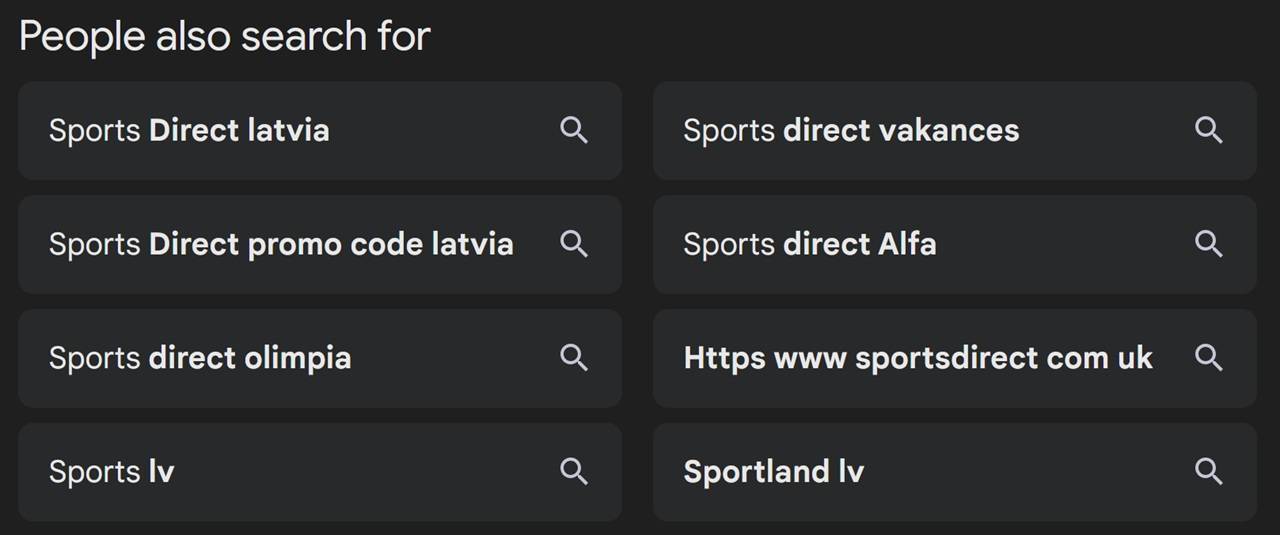
For example, one core keyword can branch into several types of queries:
- Pain point searches — people describing the problem
- Solution-aware searches — people looking for tools, services, or comparisons
- Brand searches — people mentioning specific companies or products
Maybe competitors focus heavily on solution-aware keywords but ignore certain pain-point searches. Or you might notice brand comparison queries where buyers are clearly evaluating options.
Clustering these into themes like pain point, solution-aware, and brand makes it easier to decide where new campaigns or ad groups should exist.
Instead of checking related searches one by one, collect them at scale with scraping tools. For example, the Google Related Searches API lets you pull these suggestions automatically and expand keyword lists across many topics.
Compare performance on Microsoft Advertising too
Most Google Ads competitor analysis focuses only on Google, which makes sense because that's where most search traffic lives. Still, it's worth taking a quick glance at what rivals do on Microsoft Advertising. In some industries, this traffic is smaller but still meaningful, while the competition is typically lighter.
- Some advertisers go hard on Google but barely touch Microsoft Advertising. That leaves room to capture traffic they ignore.
- Messaging sometimes changes between platforms. When comparing ads across both networks, you may notice different value propositions, offers, or pricing angles. Those differences can hint at what messaging works with different audiences.
- Clicks can be cheaper. Lower competition means lower CPC, which makes Microsoft Advertising a good place to test new keyword groups or landing pages before scaling them on Google.
To track this automatically, collect the data through tools like the Bing Ads API and compare it with what you see in Google Ads.
Study video ads on YouTube
Search ads are only part of the picture. Many advertisers also run video campaigns on YouTube, especially when they want to build awareness before capturing demand through search. Watching competitor video ads can reveal how they position their product and guide viewers toward conversion.
- Start with the opening seconds. On YouTube, the hook matters because viewers can skip the ad quickly. Observe how they introduce the problem, what visuals are used, and how clearly they communicate the main benefit.
- Then watch the offer and call to action. Some ads push viewers straight to a free trial or demo. Others lean more on storytelling or brand positioning before showing the product.
Those insights can improve both your YouTube ads and your display campaigns. If multiple competitors highlight the same pain point in the first five seconds, there's a good chance that message resonates with the audience.
Services like the YouTube Ad Results API let you collect video ad results in bulk and analyze how competitors structure their campaigns.
Spot hiring and expansion through Google job search results
One more signal that people might overlook during Google AdWords competitor analysis is hiring activity. Companies sometimes reveal their next marketing moves through job postings. If a competitor suddenly starts hiring PPC specialists or performance marketers, that's usually a sign they plan to scale their advertising.
- Job ads can indicate what skills they care about. A listing might mention specific ad platforms, automation solutions, or international campaigns. That gives you clues about where their strategy might go next.
- Location matters too. If a company posts marketing roles in new cities or countries, it may point to expansion into new markets. That means new campaigns, localized landing pages, and increased ad spend in those regions.
- Even the wording of the job description can tell you something. Some postings focus on scaling existing campaigns, while others talk about launching new acquisition channels or entering new verticals.
The Google Jobs scraper API can collect marketing-related job ads to monitor hiring trends across competitors.
Turn insights into better Google Ads
Collecting competitor data is not the ultimate goal. The real win comes when it's turned into better campaigns. After a proper review, you usually end up with a pile of ideas. New keywords, fresh ad angles, landing page ideas, targeting tweaks. The tricky part is deciding which ones are worth testing first. One easy way to sort your findings is to put them into three buckets:
- Copy and improve means spotting ideas that already seem to work in the market and building a stronger version for the campaign. If several competitors keep leading with a similar benefit, that usually suggests it resonates. From there, the next move is to test a sharper take with tighter wording, a stronger offer, or a destination page that does a better job turning clicks into conversions.
- Counter covers areas where competitors are taking up space that matters. Maybe they keep showing up on high-intent keywords or holding strong positions on the page. In those cases, the response may involve tighter ad groups, better relevance, smarter bidding, or pages built more closely around those searches.
- Differentiate is where a clearer gap starts to appear. If the whole category leans on the same promises, discounts, or tired CTAs, that creates room for a fresher angle. A clearer promise or a more specific message can make the ads feel a lot more convincing.
The point is not to copy what other people are doing, but to understand what the market reacts to and use that to make better calls in your own account.
Build a testing roadmap
Once you have a list of ideas from your Google AdWords competitor analysis, turn it into actual tests. Do not launch everything at once as that usually turns into chaos. Instead, group ideas into small testing rounds. Each round can focus on a few changes, like new keyword groups, ad copy variations, offer page updates, or bidding adjustments.
Before you launch anything, decide what success looks like. That could be a better click-through rate, lower CPC, higher conversion rate, or lower CPA. Define that up front and judge results without falling back on gut feeling.
Also rank ideas by impact and effort:
- High impact, low effort ideas usually go first
- High impact, high effort ideas can be planned for later
- Low impact, low effort ideas are fine when you want smaller experiments
- Low impact, high effort ideas usually are not worth the hassle
Share insights with stakeholders
Competitor assessment gets more useful when you share it in a way people can actually follow. Do not dump raw data on managers, clients, or teammates and hope they connect the dots. Explain what you found, why it matters, and what you want to do next.
- Use screenshots. Real examples of competitor ads, offer pages, and search results make the analysis feel concrete. A few short callouts can quickly highlight the main differences in offers, messaging, or positioning.
- Simple charts can help too, especially when you want to demonstrate shifts in search demand, changes in messaging, or new keyword themes showing up over time.
You need to make the logic behind your next moves easy to understand. Once people can see the competitive context, it gets easier to support new tests, budget changes, or bigger strategy updates in Google Ads.
Start monitoring your Google Ads competitors today
A common mistake with Google AdWords competitor analysis is treating it like a one-time task. People look at the market once, write down a few ideas, and move on. Meanwhile competitors keep launching new ads, expanding keyword lists, and adjusting their offers.
Research works better when it becomes something you review regularly. Pick a few core keywords in your niche and see which advertisers appear consistently. Assess their ads, open their destination pages, and note the benefits and offers they repeat. You need to learn faster.
As the process grows, it's a good idea to automate parts of the research. Manually scanning everything does not scale well once you track many keywords or markets. Platforms like ScrapingBee help with that. Instead of managing proxies, browser automation, and JavaScript rendering yourself, ScrapingBee handles the heavy lifting. As demonstrated in the earlier example, it can load dynamic pages like Google Trends, render them in a browser environment, and extract the data you need.
With even a small monitoring setup in place, rival assessment turns into a continuous feedback loop. You watch what happens in the market, test ideas in your campaigns, and gradually build a stronger Google Ads strategy.
Frequently asked questions (FAQs)
What is the best tool for Google Ads competitor analysis
There isn't a single "best" tool for competitor review. Most advertisers combine several sources, such as PPC platforms, keyword research tools, and web scraping. If you want to work with larger datasets or automate parts of the process, APIs like the Google Ads API make it possible to collect advertising data and analyze competitor activity at scale.
How can I see competitor ads on other search engines
To get a fuller view of the competitive landscape, check ads on other search engines as well. Platforms like Yahoo still run paid search ads in some markets. Tools and APIs such as the Yahoo Ads API allow you to collect ad data and compare messaging across multiple networks.
How do I analyze competitor ads for mobile apps
If competitors promote mobile apps through search or display ads, it's worth looking at their app store listings and user feedback. App descriptions, screenshots, and reviews reveal positioning, feature priorities, and user expectations. Google Play Scraper API can help collect this data for deeper analysis.
Can I use competitor pricing data from ads in my strategy
Yes. Pricing information shown in competitor ads can be a good signal when shaping your own campaigns. You'll be able to understand how others position their offers and promotions. You can also collect pricing hints from product listings using services like the Costco scraper API to compare offers across different retailers.

Ilya is an IT tutor and author, web developer, and ex-Microsoft/Cisco specialist. His primary programming languages are Ruby, JavaScript, Python, and Elixir. He enjoys coding, teaching people and learning new things. In his free time he writes educational posts, participates in OpenSource projects, tweets, goes in for sports and plays music.