Across most teams, GDPR-compliant web scraping usually starts as a legal question for legal: "Are we allowed to scrape this?" And the answer comes back as documents.
For years, those documents have looked the same. A checklist of lawful bases and retention periods. A policy page stating that the pipeline stores only business data. Each is worth doing, and each treats the General Data Protection Regulation (GDPR) as a documentation problem.
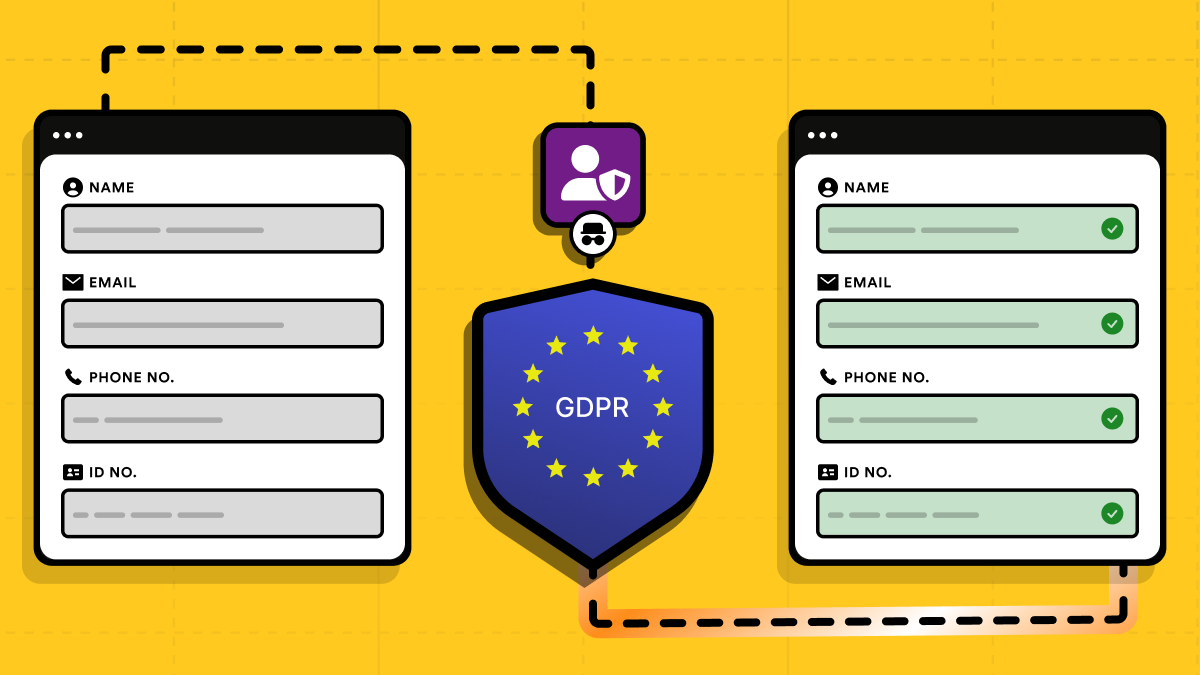
I’d argue it's an engineering problem. GDPR protects personal data even on pages anyone can open without logging in. If you build a parser that grabs a whole listing block, owner's name and phone number, what it writes to the database is what you have to answer for.
So the control has to live in the pipeline. In this guide, we clarify what GDPR means for a scraper and build it in Python. We’ll walk through a personally identifiable information (PII) anonymization middleware that uses Presidio and spaCy and follows a pattern called Detect, Redact/Tokenize, Route (DRR).
Key takeaways
- Public visibility doesn't exempt personal data from GDPR. Identifiability is the legal test, not whether a page needs a login.
- The Detect, Redact/Tokenize, Route (DRR) pattern turns GDPR principles into code that runs between fetching and database writes.
- Regex catches emails and phone-number shapes but not names, so Presidio pairs pattern recognizers with a spaCy named-entity model.
- Each entity type needs its own operator. Presidio's default hash adds a random salt per value, so you can't link its output. Supply your own salt for consistent hashes, and that output is pseudonymized personal data.
- Testing found a valid phone number scored 0.40, a false "Email" person match, and test emails on reserved domains going undetected.
- ScrapingBee fetches the page. Detecting, anonymizing, and storing personal data stays in your pipeline and under your responsibility.
What GDPR-compliant web scraping means
Most arguments about scraping and GDPR stall on the wrong question: "Is scraping legal?"
GDPR doesn't regulate scraping as an activity. It regulates what happens to personal data, and scraping is one way personal data enters your systems.
So the useful question is narrower: does anything in these pages identify a person, and if so, what am I allowed to keep?
Personal data is about identifiability, not visibility
GDPR Article 4(1) defines personal data as "any information relating to an identified or identifiable natural person." Identifiable covers indirect routes too: a name, an identification number, location data, an online identifier, or a combination of details that points to one person.
Notice what the definition doesn't mention: where the data came from or who could see it. A business owner's name and phone number on a public directory is personal data. So is an email in a forum signature, or a membership ID that maps to one individual. "It was public" describes how you got the data. It says nothing about whether you may process it.
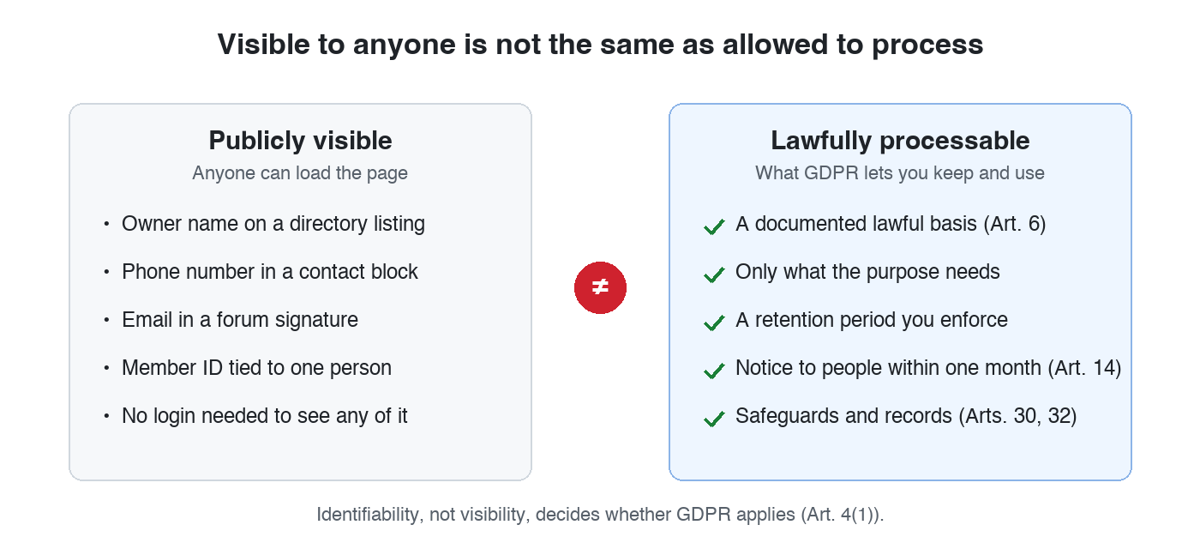
That gap between visible and processable is why this article exists.
Publicly accessible personal data is still protected, and scraping it is a new act of processing that needs its own justification.
GDPR follows the people in your data
GDPR's reach (including its extraterritorial scope) is set by Article 3, and it works in two ways:
- If your company is established in the EU, the regulation applies to your processing regardless of where the people in the data live.
- If you're outside the EU, Article 3(2) still applies when your processing relates to offering goods or services to people in the EU or monitoring their behavior there.
For scrapers, collecting and analyzing people's data to build profiles or searchable databases has repeatedly been treated as monitoring. This is how regulators in Italy, France, and the Netherlands asserted jurisdiction over Clearview AI, a US company.
A non-EU scraper that builds profiles of EU residents shouldn't assume the ocean is a firewall.
The principles that decide what your pipeline keeps
Once personal data is in scope, a handful of GDPR principles shape what a scraping pipeline should even attempt to store.
These are the ones that translate most directly into code:
- Lawful basis (Article 6): Every processing activity needs one. For scrapers, it's usually legitimate interest, which requires a documented balancing test, not an assumption.
- Data minimization (Article 5(1)(c)): Keep only what the purpose needs. If you're tracking business listings, you likely need the business, not the owner's personal email.
- Purpose limitation (Article 5(1)(b)): Data collected for one purpose can't quietly feed an unrelated one later.
- Storage limitation (Article 5(1)(e)): You can't keep scraped personal data indefinitely. Set a retention period and enforce it.
- Transparency (Article 14): When you collect personal data indirectly, you owe the people it describes (data subjects, in GDPR's terms) certain information within a reasonable period, at the latest within one month, unless a narrow exemption such as disproportionate effort applies.
- Accountability and security (Articles 5(2), 30, and 32): You need records showing how you comply, plus technical safeguards like encryption and access control.
Read that list again. Minimization, storage limitation, and security are decided the moment you create a record. The earlier you strip or transform personal data, the less you have to defend.
That's why the CNIL (France's data protection authority) recommends anonymization or pseudonymization "immediately after data collection" in its guidance on scraping for AI development.
What getting it wrong costs
GDPR Article 83 sets two fine tiers, applied as whichever is higher:
| Tier | Maximum fine | Typical scraping failures in this tier |
|---|---|---|
| Lower (Article 83(4)) | €10 million or 2% of worldwide annual turnover | Missing records (Art. 30), weak security (Art. 32), no DPIA (Art. 35) |
| Upper (Article 83(5)) | €20 million or 4% of worldwide annual turnover | No lawful basis (Art. 6), breaching core principles (Art. 5), not informing people (Art. 14) |
For the record, EU authorities fined Clearview AI a combined €90.5 million for scraping facial images: €20 million each in Italy, Greece, and France, and €30.5 million in the Netherlands. France's CNIL fined KASPR €240,000 in December 2024 over contact details collected from LinkedIn profiles, including users who had limited who could see them.
In Poland's first GDPR fine, the regulator penalized Bisnode for failing to notify roughly six million people whose data it took from public business registers. The courts sent the fine back for recalculation, but in 2023 Poland's Supreme Administrative Court confirmed the duty to notify people running a business, which matters here.
None of this means a scraper will draw a nine-figure fine. It means regulations set the cost of getting personal data wrong, and that's a sound reason to spend engineering time on controls.
For how a scraping provider handles its own side of this, see ScrapingBee's own GDPR notice.
The Detect, Redact/Tokenize, Route (DRR) pattern for GDPR-compliant scraping
The DRR pattern is the data anonymization middleware this article builds.
We split Personally Identifiable Information (PII) handling into three stages:
- Detect finds personal data in scraped text
- Redact/Tokenize transforms each detected entity with the operator suited to its type
- Route sends the record to the right storage based on detection confidence.
The tempting shortcut is a single anonymize(text) call that masks anything suspicious. It fails in two opposite directions.
First, it over-redacts. A blanket function that masks every capitalized word or number destroys the data you scraped the page for, like business names, prices, and opening hours. It also hides its own uncertainty.
For instance, when a detector scores a string at only 0.40 as a phone number, a single function has to guess silently, and a silent guess is exactly what you can't defend in an audit.
Splitting the work gives each decision its own place. Detect answers "what is this, and how sure am I?" Redact/Tokenize answers "what should this entity type become?" Route answers "given that confidence, where is this record allowed to go?"
When a reviewer asks why a record was stored, there's a specific stage and a specific score to point at.
Where DRR sits in the pipeline
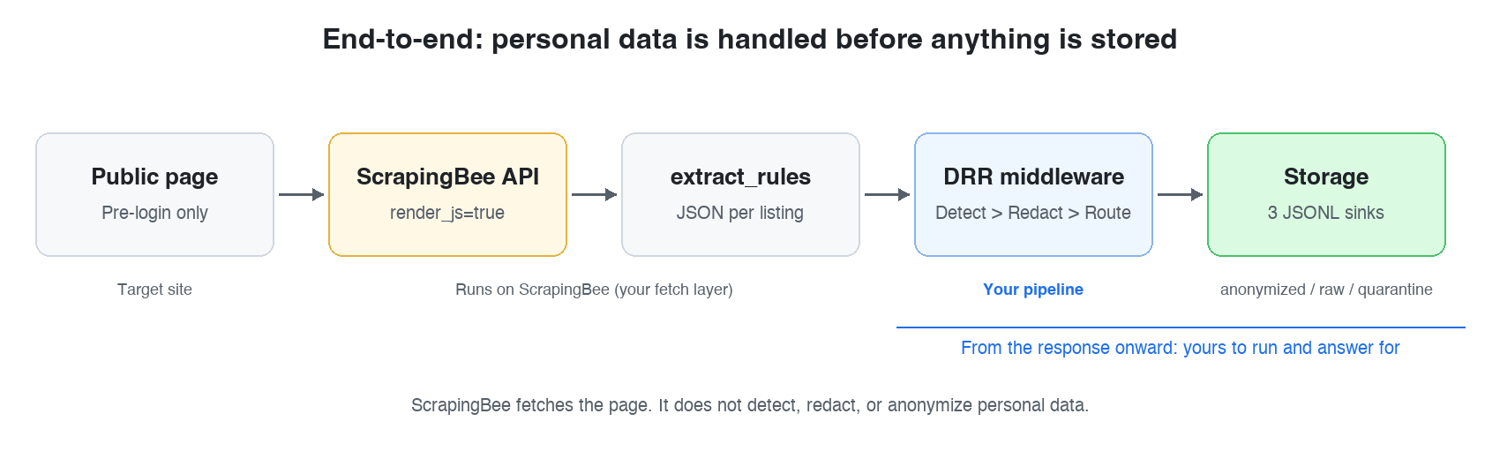
DRR sits after fetch and extraction, and before writing to storage. In that placement, raw personal data exists only in memory, for the milliseconds it takes to process the record, and never lands on disk unless the Route stage decides it may.
The exception is PII the detector misses: a record with no detections goes to the raw store as extracted, which is why the testing section ends with a sampling routine.
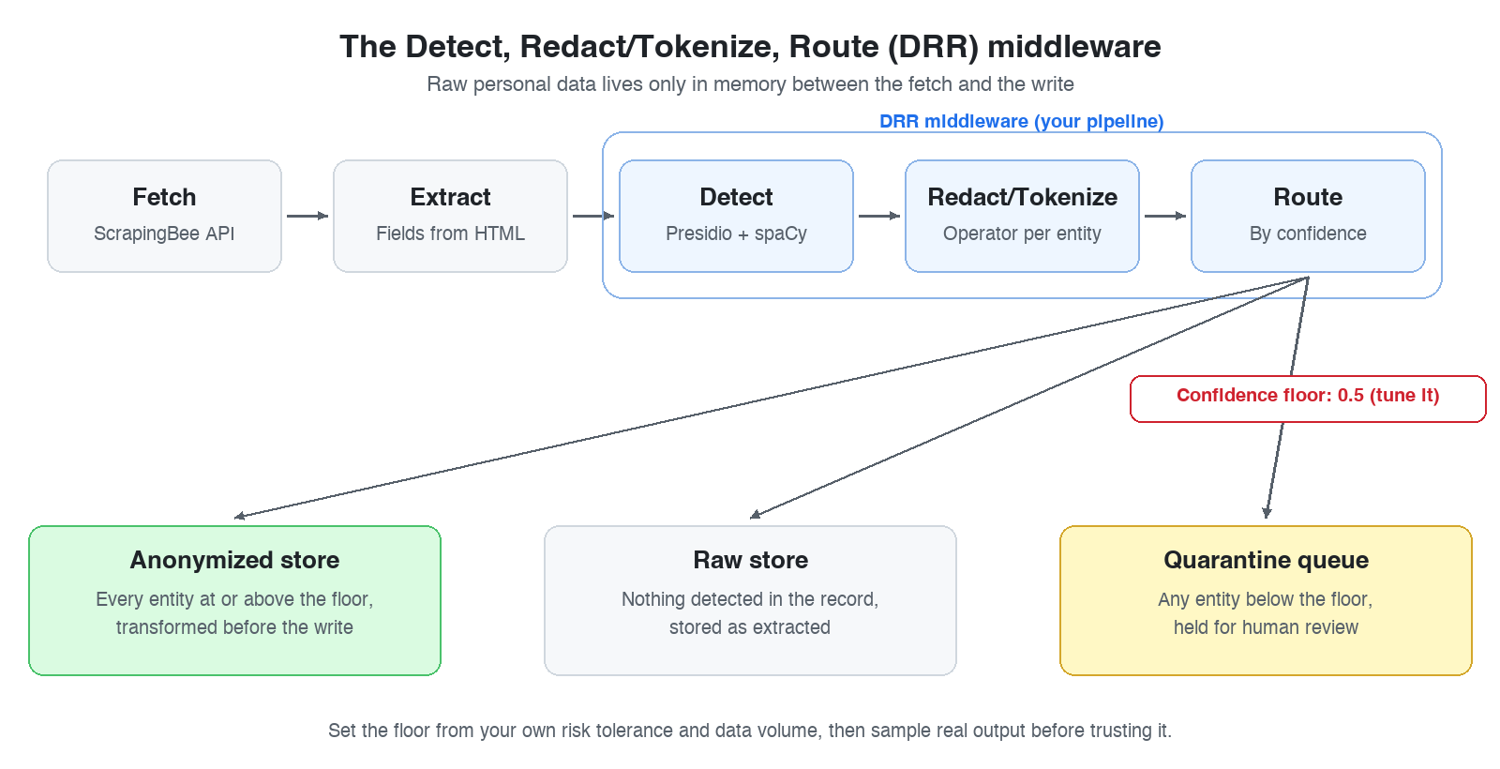
The fetch layer is interchangeable.
In this guide, it's ScrapingBee’s web scraping API, which retrieves public pages and handles JavaScript rendering and anti-bot proxies. But nothing in DRR depends on how the HTML arrived. Everything from the response onward is your own pipeline.
The running example: a synthetic directory listing
Every example in this guide uses one synthetic business-directory listing: a bakery with an owner's name, an email address, a phone number, and a made-up membership ID. No real person's data appears anywhere, and no real directory site does either.
Harbor Street Bakery. Owner: Maria Delgado. Email maria.delgado@example.com
for wholesale orders, or call (415) 555-0142 before noon. Member since 2019,
directory ID HSB-48213.
It's small on purpose. One listing is enough to exercise every stage: a name that only a language model can recognize, an email and phone number that pattern matching handles, and a site-specific ID that no built-in detector knows about.
One number in the Route stage deserves a decision up front: the confidence floor, the score below which a detection is too uncertain to act on automatically. I use 0.5 in the examples, but that's a starting point. Set it based on your own risk tolerance and data volume, and revisit it once you've sampled real output.
How to build a PII anonymization middleware for GDPR-compliant scraping
Now let’s turn the DRR pattern into code (PII detection in Python, then transformation, then routing). We'll build one module, drr.py, in four steps:
- Install the libraries
- Detect PII
- Transform it
- Route each record
Each step adds to the same file, and every snippet below ran on Python 3.14.6 with presidio-analyzer and presidio-anonymizer 2.2.364, and spaCy 3.8.16.
1. Install Presidio, spaCy, and the en_core_web_lg model
Presidio is an open-source PII detection and anonymization toolkit that pairs regex-style pattern recognizers with a spaCy named-entity recognition (NER) model.
Microsoft created it, and in June 2026, it began moving to a community-governed project under the Data Privacy Stack organization on GitHub, still MIT-licensed with the same APIs, so older microsoft/presidio links now redirect there.
Presidio ships as two packages: one to find PII and one to transform it. spaCy provides the language model behind name and location detection:
pip install presidio-analyzer presidio-anonymizer spacy
python -m spacy download en_core_web_lg
On my machine, the en_core_web_lg model was a 400.7 MB download and took 425 MB on disk, so install it once per machine or bake it into your container image instead of pulling it at scraper startup. Presidio 2.2.364 supports Python 3.10 through 3.14.
Presidio's default configuration loads the large model. Smaller spaCy models exist and load faster, but they recognize names less reliably, and names are the one thing regex can't catch.
2. Detect PII with AnalyzerEngine and a custom recognizer
The analyzer runs a set of recognizers over text and returns what it found, where, and how confident it is. Out of the box, it knows dozens of entity types, including PERSON, EMAIL_ADDRESS, PHONE_NUMBER, LOCATION, CREDIT_CARD, IBAN_CODE, IP_ADDRESS, URL, DATE_TIME, CRYPTO, MAC_ADDRESS, and NRP (nationality, religious, or political group). The full list is in Presidio's built-in entity types.
It doesn't know your target site's identifiers. Our directory uses membership IDs like HSB-48213, which point to one business owner, so we teach the analyzer that format with a PatternRecognizer. It's the same idea as writing ScrapingBee's data extraction rules for a site's markup: you describe the shape of what you're after.
So, to start, create drr.py with the detection step:
from presidio_analyzer import AnalyzerEngine, Pattern, PatternRecognizer

LISTING = (
    "Harbor Street Bakery. Owner: Maria Delgado. Email maria.delgado@example.com "
    "for wholesale orders, or call (415) 555-0142 before noon. Member since 2019, "
    "directory ID HSB-48213."
)

# Only the entity types this pipeline acts on. Leaving out DATE_TIME and URL
# keeps "2019" and fragments of the email from being flagged as separate PII.
ENTITIES = ["PERSON", "EMAIL_ADDRESS", "PHONE_NUMBER", "LOCATION", "MEMBER_ID"]

def build_analyzer():
    analyzer = AnalyzerEngine()  # loads spaCy's en_core_web_lg under the hood
    member_id = PatternRecognizer(
        supported_entity="MEMBER_ID",
        patterns=[Pattern(name="directory_member_id", regex=r"\b[A-Z]{3}-\d{5}\b", score=0.85)],
    )
    analyzer.registry.add_recognizer(member_id)
    return analyzer

def detect(analyzer, text):
    return analyzer.analyze(text=text, language="en", entities=ENTITIES)

if __name__ == "__main__":
    analyzer = build_analyzer()
    for r in sorted(detect(analyzer, LISTING), key=lambda r: r.start):
        print(f"{r.entity_type:<14} {r.score:.2f}  {LISTING[r.start:r.end]!r}")
Run it with python drr.py:
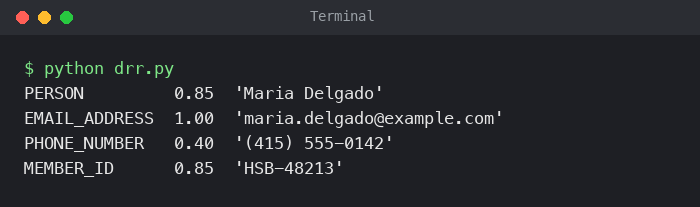
Every detection comes with a confidence score, and those scores aren't equal.
(1) The email scored 1.00 because Presidio's email recognizer validates the full address.
(2) The custom member ID scored the 0.85 we assigned.
(3) The name scored 0.85 from spaCy's NER model, the one thing no regex could have found.
(4) The phone number is the interesting one. A well-formed US number came back at 0.40, low enough that a naive pipeline might ignore it. Hold on to that number. The confidence score is the direct input to the Route stage.
One design decision is in the ENTITIES list. I asked the analyzer for only the five types this pipeline acts on. Without that filter, it also flagged "2019" and "before noon" as DATE_TIME and fragments of the email as URLs, which is accurate but noisy. Decide what counts as PII for your purpose, and ask for exactly that.
3. Redact or tokenize each entity type with the right operator
Detection tells you what's there. Presidio's AnonymizerEngine decides what each entity becomes, whether that's to redact PII outright, apply masking to part of it, or hash it, using an operator per entity type.
Different types deserve different treatment, and this is where a business decision hides inside a technical one:
| Entity type | Operator | Why |
|---|---|---|
| PERSON | Replace with | The name has no analytical value for a business listing. Keep only the fact that a person was named |
| EMAIL_ADDRESS | Hash (SHA-256) | Replaces the address with a token you can't reverse. With the default random salt, you can't count or dedupe on it either. Pass your own salt if you need to |
| PHONE_NUMBER | Mask the last 8 characters | Keeps the area code, which is useful for regional analysis, and hides the rest |
| MEMBER_ID | Mask the last 5 characters | Keeps the directory prefix and hides the part that identifies one member |
Now, let’s add the redaction step to drr.py, below the detection code:
from presidio_anonymizer import AnonymizerEngine
from presidio_anonymizer.entities import OperatorConfig

OPERATORS = {
    "PERSON": OperatorConfig("replace", {"new_value": "<PERSON>"}),
    "EMAIL_ADDRESS": OperatorConfig("hash", {"hash_type": "sha256"}),
    "PHONE_NUMBER": OperatorConfig("mask", {"masking_char": "*", "chars_to_mask": 8, "from_end": True}),
    "LOCATION": OperatorConfig("replace", {"new_value": "<LOCATION>"}),
    "MEMBER_ID": OperatorConfig("mask", {"masking_char": "#", "chars_to_mask": 5, "from_end": True}),
}

anonymizer = AnonymizerEngine()


def redact(text, results):
    return anonymizer.anonymize(text=text, analyzer_results=results, operators=OPERATORS).text


if __name__ == "__main__":
    analyzer = build_analyzer()
    print(redact(LISTING, detect(analyzer, LISTING)))
Running the file now also prints the transformed listing after the detections:
Harbor Street Bakery. Owner: <PERSON>. Email 8ab87e6cc5040acc836dbdf6479099ae83800a9258e41c90d2e6bc1a63829f09 for wholesale orders, or call (415) ******** before noon. Member since 2019, directory ID HSB-#####.
Before you copy that hash operator, know what it does in this version, because I didn't until I checked the source. Presidio's hash operator adds a random 32-byte salt to every value unless you pass your own.
Run the same listing twice, and you get two different hashes. That makes the default output unlinkable. You can't join two records on a hashed email or count how often an address appears, and no one else can either.
Getting consistent hashes with your own salt
If you do need consistent hashes, for deduplication, for example, pass your own salt of at least 16 bytes, kept outside the code.
Generate one and export it:
export PII_HASH_SALT="$(python -c 'import secrets; print(secrets.token_hex(16))')"
Then save this comparison as keyed_hash.py and run it:
import os

from presidio_analyzer import AnalyzerEngine
from presidio_anonymizer import AnonymizerEngine
from presidio_anonymizer.entities import OperatorConfig

text = "Email maria.delgado@example.com for wholesale orders."
results = AnalyzerEngine().analyze(text=text, language="en", entities=["EMAIL_ADDRESS"])
anonymizer = AnonymizerEngine()

default_hash = {"EMAIL_ADDRESS": OperatorConfig("hash", {"hash_type": "sha256"})}
keyed_hash = {"EMAIL_ADDRESS": OperatorConfig("hash", {"hash_type": "sha256", "salt": os.environ["PII_HASH_SALT"]})}

for label, ops in [("default", default_hash), ("keyed", keyed_hash)]:
    first = anonymizer.anonymize(text=text, analyzer_results=results, operators=ops).text
    second = anonymizer.anonymize(text=text, analyzer_results=results, operators=ops).text
    print(f"{label:<8} same hash on both runs: {first == second}  {first.split()[1][:16]}...")
default  same hash on both runs: False  92067fd8ba5f4740...
keyed    same hash on both runs: True  64e234f6b2c392aa...
A shorter salt fails loudly with Salt must be at least 16 bytes (128 bits), which is the right behavior.
Here's the legal catch. A keyed hash is pseudonymized under GDPR Article 4(5). Whoever holds the salt can recompute the hash for a known email and re-link the record. Recital 26 says data that can be attributed to a person with additional information is still personal data, so your hashed column stays within GDPR's scope.
A 2025 ruling from the EU's Court of Justice (EDPS v SRB) added that the same data may not be personal for a recipient with no realistic way to re-identify anyone, but that doesn't help the team holding the key.
Only true anonymization takes data out of scope, and the European Data Protection Board (EDPB) tests for it in its 2026 draft guidelines with three criteria (no record isolation, linkage, or inference).
That turns the trade-off into a business decision. An unsalted-by-you hash means you can never match a scraped contact back to your CRM. A keyed hash means you can, and you're still processing personal data.
4. Route each record by confidence score
Route is the stage that turns "we ran a detector" into a decision your team can defend. It sends each record to one of three sinks based on what Detect found and how sure it was.
Both extremes fail. Storing everything raw ignores the detector entirely. Redacting everything regardless of confidence treats a 0.40 guess and a 1.00 certainty the same way, and gives nobody a reason to ever look at the uncertain cases. A fixed confidence floor sits between them.
So, add the routing step to drr.py:
CONFIDENCE_FLOOR = 0.5  # tune to your own risk tolerance and data volume
def route_record(text, results):
    """Return (sink, payload) for one extracted record."""
    if not results:
        return "raw", {"text": text}
    low = [r for r in results if r.score < CONFIDENCE_FLOOR]
    record = {"text": redact(text, results)}  # every detection is transformed before the write
    if low:
        # Quarantine never holds raw PII: reviewers see the redacted text plus what
        # was uncertain, and re-fetch the public page if they need the original.
        record["review"] = [{"entity": r.entity_type, "score": round(r.score, 2)} for r in low]
        return "quarantine", record
    return "anonymized", record
if __name__ == "__main__":
    analyzer = build_analyzer()
    for text in [LISTING, "Open daily from 7am to 3pm. Sourdough sells out by noon.", "Contact maria.delgado@example.com."]:
        sink, payload = route_record(text, detect(analyzer, text))
        print(f"{sink:<10} {payload}")
Running the file again ends with three test records, one for each path:
quarantine {'text': 'Harbor Street Bakery. Owner: <PERSON>. Email c3d4f9bc732ca48f8e6b72ee9c65de940be744201ffcc57555ba7b16cf00ea13 for wholesale orders, or call (415) ******** before noon. Member since 2019, directory ID HSB-#####.', 'review': [{'entity': 'PHONE_NUMBER', 'score': 0.4}]}
raw        {'text': 'Open daily from 7am to 3pm. Sourdough sells out by noon.'}
anonymized {'text': 'Contact 633a9cc362a78e609dcb079eaed3a478cd26455f0b263bda694b40a47e006bf1.'}
The bakery listing lands in quarantine because of that 0.40 phone score. A record with nothing detected goes to the raw store as extracted, and the email-only record, detected at 1.00, goes to the anonymized store with its address hashed.
How to wire PII anonymization into a ScrapingBee pipeline for GDPR web scraping
The DRR module doesn't care where text comes from. In production, it sits behind a fetch layer, and in this section, we wire it to ScrapingBee’s web scraping API.
We’ll fetch a public page, extract the listings, detect, redact or tokenize, route, and store.
1. Fetch a public page with ScrapingBee
Everything here applies only to pre-login, publicly accessible pages. Anonymizing the output doesn't make it acceptable to scrape behind a login, and nothing in this pipeline should ever send credentials or session cookies.
To keep real people out of the test, I served the synthetic directory page through httpbin's base64 endpoint, which returns whatever HTML you encode into the URL. The page holds three listings. Two are built to reach quarantine and raw. The third names nobody, yet it routes to anonymized, for a reason the testing section unpacks.
First, let’s create make_page.py:
import base64
html = """<html><body><h1>Harbor District Business Directory</h1>
<div class="listing"><h2>Harbor Street Bakery</h2><p>Owner: Maria Delgado. Email maria.delgado@example.com for wholesale orders, or call (415) 555-0142 before noon. Member since 2019, directory ID HSB-48213.</p></div>
<div class="listing"><h2>Rose and Rye Cafe</h2><p>Email us for wholesale orders. Open daily from 7am to 3pm.</p></div>
<div class="listing"><h2>Pier Nine Books</h2><p>Used and rare titles. Open daily from 10am to 8pm.</p></div>
</body></html>"""
print("https://httpbin.org/base64/" + base64.urlsafe_b64encode(html.encode()).decode())
Save its output as the target, export TARGET_URL="$(python make_page.py)", and fetch it through the API. The request uses render_js=true, so a headless browser renders the page, and extract_rules to return each listing as JSON instead of raw HTML.
Using "type": "list" with an output block gives one object per .listing element.
2. Run the full fetch, extract, detect, redact, route, and store flow
Now, let’s build the pipeline. It imports the DRR module from the previous section and appends each record to the sink Route chose.
You can save it as pipeline.py next to drr.py.
import json
import os
from pathlib import Path
import requests
from drr import build_analyzer, detect, route_record

API_URL = "https://app.scrapingbee.com/api/v1/"
TARGET = os.environ["TARGET_URL"]  # a public, pre-login page

EXTRACT_RULES = {
    "listings": {
        "selector": ".listing",
        "type": "list",
        "output": {"business": "h2", "details": "p"},
    }
}

def fetch_listings(url):
    response = requests.get(
        API_URL,
        headers={"Authorization": f"Bearer {os.environ['SCRAPINGBEE_API_KEY']}"},
        params={
            "url": url,
            "render_js": "true",
            "extract_rules": json.dumps(EXTRACT_RULES),
        },
        timeout=90,
    )
    response.raise_for_status()
    print(f"fetched with {response.headers.get('Spb-cost')} credits")
    return response.json()["listings"]
def store(sink, record):
    Path("sinks").mkdir(exist_ok=True)
    with open(f"sinks/{sink}.jsonl", "a", encoding="utf-8") as f:
        f.write(json.dumps(record) + "\n")

if __name__ == "__main__":
    analyzer = build_analyzer()
    for listing in fetch_listings(TARGET):
        results = detect(analyzer, listing["details"])
        sink, payload = route_record(listing["details"], results)
        store(sink, {"business": listing["business"], **payload})
        print(f"{listing['business']:<22} -> {sink}")
Run it with your API key in the environment:
export SCRAPINGBEE_API_KEY="your-api-key"
python pipeline.py
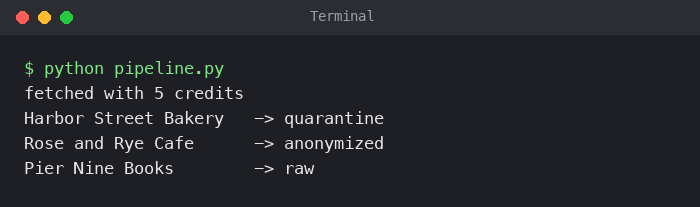
The fetch costs 5 credits, the standard price for a request with JavaScript rendering.
Each listing took a different path, and the sink files show exactly what reached storage:
anonymized.jsonl: {"business": "Rose and Rye Cafe", "text": "<PERSON> us for wholesale orders. Open daily from 7am to 3pm."}
quarantine.jsonl: {"business": "Harbor Street Bakery", "text": "Owner: <PERSON>. Email 04ab61f302a138dbf18550c32c2bc507930976ba377b459feff9900ecb20edf9 for wholesale orders, or call (415) ******** before noon. Member since 2019, directory ID HSB-#####.", "review": [{"entity": "PHONE_NUMBER", "score": 0.4}]}
raw.jsonl:        {"business": "Pier Nine Books", "text": "Used and rare titles. Open daily from 10am to 8pm."}
Look closely at the Rose and Rye Cafe record. Nobody is named in "Email us for wholesale orders," yet the stored text reads "
A confidence floor catches uncertain detections. It can't catch confident mistakes. The testing section covers this.
The pipeline redacts only the listing description and passes the business name through, because for this directory the business name is what the scrape is for. If business names on your target can contain personal names, run them through detect() too.
3. Know what ScrapingBee handles as a processor, and what stays yours
Where the data is fetched from is one input to your own compliance review. It isn't a substitute, and it doesn't make your pipeline compliant.
For the record, here's what ScrapingBee handles:
- Who it is: ScrapingBee is operated by VostokInc, a French company registered in Paris.
- Its role: The Data Processing Agreement names ScrapingBee as the data processor and you as the data controller. It explicitly covers personal data in the pages you retrieve and states that processing occurs primarily in the EU, with US sub-processors covered by the EU's standard contractual clauses.
- What it keeps: The GDPR notice states, "We don't log the response content," and that logs are deleted after fourteen days.
- Fresh on every call: I requested https://httpbin.org/uuid twice through the API and got two different UUIDs, so each call fetched the page live rather than serving a stored copy.
What ScrapingBee doesn't do matters as much. It has no PII detection, redaction, or anonymization feature. It retrieves the page, handles JavaScript rendering and proxies, and returns the content. Everything after that response, the DRR middleware included, is your pipeline and your responsibility as controller.
What testing this GDPR PII anonymization pipeline found
This section separates tested code from a theoretical tutorial. Presidio's own documentation warns that "there is no guarantee that Presidio will find all sensitive information," and running the pipeline on a single synthetic listing was enough to see why.
That's why you should test your own version before you trust it.
A valid phone number scored 0.40 until a custom recognizer raised it to 0.85
The phone number in our listing is well-formed and obviously a phone number to any human reader. Presidio's default recognizer scored 0.40 in every format I tried: (415) 555-0142, 415-555-0142, +1 415 555 0142, and 415.555.0142.
Why? The built-in phone recognizer starts every match at a base score of 0.4 and raises it only when context words such as "phone," "number," "telephone," or "mobile" appear nearby. A listing labeled "Phone: (415) 555-0142" scored 0.75. Ours said "call (415) 555-0142," and it stayed at 0.40.
"Call" is on the recognizer's own context list, but spaCy marks it as a stop word, and Presidio's context enhancer only matches words that aren't stop words, so "call" can never raise the score.
With our 0.5 floor, that low score sent the whole bakery listing to quarantine. That's the floor doing its job. But when you know your target's phone format, you can score it yourself.
Add a US phone recognizer to build_analyzer() in drr.py, next to the member ID recognizer:
   us_phone = PatternRecognizer(
        supported_entity="PHONE_NUMBER",
        patterns=[Pattern(name="us_phone", regex=r"\(?\b\d{3}\)?[\s.-]\d{3}[\s.-]\d{4}\b", score=0.85)],
    )
    analyzer.registry.add_recognizer(us_phone)
Clear sinks/ first, because store() appends.
Rerunning the pipeline against the same page moved the bakery from quarantine to the anonymized store:
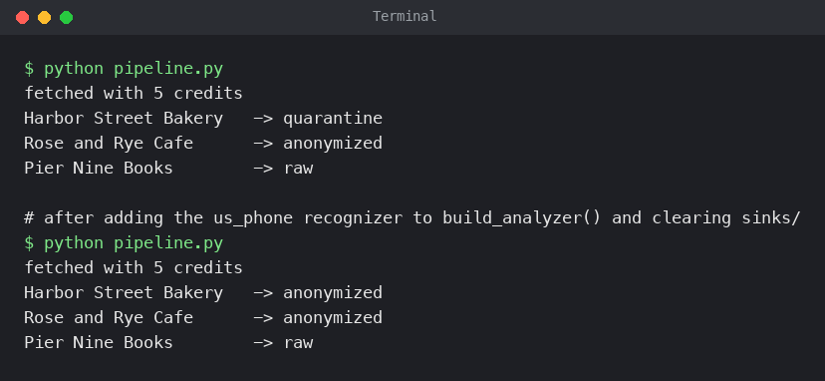
The trade-off is precision. That regex scores any three-three-four digit pattern at 0.85, including order numbers and fax lines that happen to share the shape. On a directory, that's an acceptable cost. On a page full of SKUs, it may not be.
A capitalized word became a person's name
The second finding is the Rose and Rye Cafe record. The listing reads, "Email us for wholesale orders." Nobody is named in it. The stored text reads, "
spaCy's NER model tagged the sentence-initial word "Email" as a person with 0.85 confidence, above the floor, so Route sent it straight to the anonymized store.
What makes this one instructive is that it depends on context. The same word "Email," followed by a valid address instead of "us," wasn't flagged at all. A statistical model reads the whole sentence, so its verdict on a word can change when the surrounding words change.
When you find a false positive like this, Presidio's allow_list parameter tells the analyzer to ignore specific strings:
results = analyzer.analyze(text=text, language="en", entities=ENTITIES, allow_list=["Email"])
With it, the sentence came back with no detections. Use allow lists sparingly, for tokens you've confirmed are never personal data on your target, because every entry is a blind spot.
The honest trade-off is asymmetric. Over-redaction is cheap. You lose a word of a business description. A missed real name is not: it's personal data in storage that shouldn't be there. If your pipeline has to be wrong, this is the direction to be wrong in.
Test emails on reserved domains slipped through
This one caught me while building the example. My first synthetic listing used an address at a .example domain, the kind of placeholder most test fixtures use. Presidio didn't detect it as an email at all.
The only hit was a URL at 0.50 on "maria.de", a fragment of the local part that happens to end in a real country domain. It also didn't detect an address at a .test domain as an email.
The email recognizer validates each match's top-level domain, and reserved test domains don't pass. Switch to example.com and the same address scores 1.00.
The practical lesson is that if your test fixtures use .example, .test, or other reserved domains, the email recognizer never fires on them, so a detection test built on those fixtures can't tell you whether it would catch real addresses. Test detection with realistic formats, or you're testing the fixture, not the detector.
Sample your own detection output before trusting it at scale
NER models are statistical. They were trained on text that isn't your target site, and they'll be confidently wrong in ways a unit test on one listing can't predict.
Budget time for a sampling routine before you scale:
- Pull a random sample of records from each sink every week, with extra weight on quarantine.
- Check both directions: real names or numbers that went undetected, and harmless words that were redacted.
- Feed what you find back into a recognizer, an allow list, or the confidence floor, and note the change in your processing records.
Detection is only one layer of responsible collection. Respect each site's terms of service and its robots.txt, which the CNIL's AI-scraping guidance also lists among its measures: exclude sites that clearly object to being scraped.
Fetch the page safely, then anonymize it, with ScrapingBee
Compliant scraping has two halves: getting the page and deciding what's allowed to survive the write. The DRR pattern handles the second half, and you run it. The first half is where most scrapers lose their week to blocks, rendering, and proxy upkeep, before any personal data has even arrived.
ScrapingBee handles the fetch, so your team can spend its time on the part regulators care about:
- JavaScript rendering: render_js=true loads the page in a headless browser before you extract anything.
- Structured extraction: extract_rules returns only the fields you ask for as JSON, which keeps unneeded text out of your pipeline.
- Proxies and stealth: Premium and stealth proxy tiers reach public pages protected by anti-bot systems.
- No response logging: ScrapingBee's GDPR notice states it doesn't log response content.
- EU-based processor terms: A Data Processing Agreement from a Paris-based company, with you as the controller.
Start with 1,000 free API credits, no credit card required, and have your first public page flowing through your own DRR middleware today.
Frequently asked questions on GDPR-compliant web scraping
Does web scraping violate GDPR?
Not inherently. GDPR regulates processing personal data, not scraping as an activity, so scraping product prices or stock indexes doesn't engage it. Scraping personal data needs a documented lawful basis (Article 6) and respect for principles like data minimization. Scraping for research or in the public interest may have more room under GDPR exemptions, but it still needs a lawful basis and safeguards. Separately, the EU Database Directive protects databases involving substantial investment, and ignoring a site's terms of service can bring legal action.
Does GDPR apply to web scraping if my company isn't based in the EU?
It can. Under Article 3(2), GDPR reaches non-EU companies whose processing relates to offering goods or services to people in the EU or monitoring their behavior there. Building profiles or searchable databases of EU residents from scraped data has repeatedly been treated as monitoring, including in the Clearview AI decisions.
Do I need consent to scrape publicly available personal data under GDPR?
Not necessarily. Consent is one of six lawful bases in Article 6, and scrapers more often rely on legitimate interest. That basis requires a documented three-step test covering the interest, necessity, and a balancing of people's rights. Public visibility alone never implies permission.
Can regex alone handle PII detection, or do I need an NER model like Presidio?
Regex works for rigidly structured PII such as emails, phone numbers, and site-specific IDs. It can't recognize a name in free text because names have no fixed shape. That's why Presidio pairs pattern recognizers with a spaCy named-entity model, and why this pipeline uses both.
Is pseudonymized scraped data still considered personal data under GDPR?
Yes, for you. Under Article 4(5) and Recital 26, pseudonymized data that can be re-linked to a person with additional information, such as a hashing salt, remains personal data. A 2025 EU court ruling found that it may not be personal data for a recipient with no realistic way to re-identify anyone. Only true anonymization leaves GDPR's scope.

Ismail is a Senior Managing Editor and Senior AI Workflow Engineer. For a decade, he has turned the trickiest corners of web scraping, Python, content marketing, and AI infrastructure into guides readers keep open in a second tab. He builds the tools before he documents them, breaks them, and reports back with the scars.