When a scraper breaks, the reflex is to reach for a language model. For zero-shot e-commerce scraping, that reflex is usually the most expensive move you can make: a model call per page cost me about 30 seconds on local hardware. The product data is often already in the page as JSON, and much of the drift that follows a site change heals without a model. The local LLM belongs at the bottom of the cascade, as the fallback you use last.
This guide builds that cascade in 4 tiers with tested code, measures what each tier costs, and ends with a working Scrapy spider that decides which tier to use for each page while it crawls.
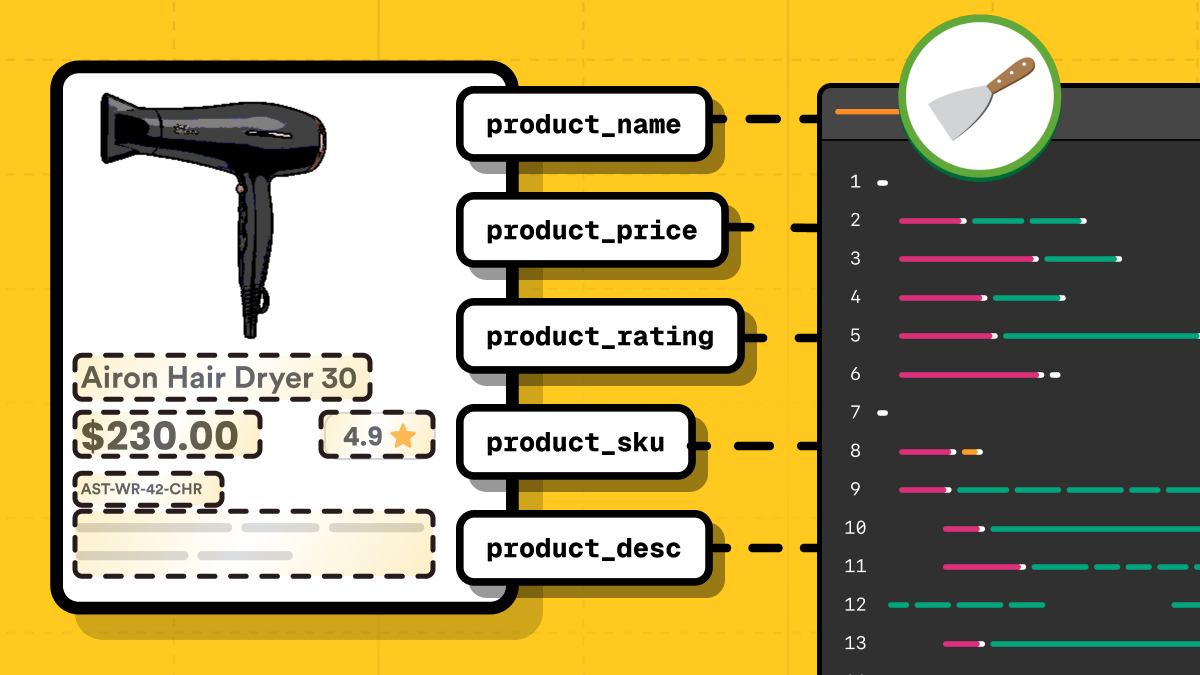
TL;DR
Treat zero-shot e-commerce scraping as a cost cascade, cheapest tier first, and the local LLM last. Each tier answers what the one above it can't. In one cold run of the 2-store crawl, 65 products cost 1 model call, and the second run cost 0 because the cached map still validated.
- Tier 1: extract the structured data already in the page (schema.org JSON-LD, or the framework hydration blob:
__NEXT_DATA__,__NUXT_DATA__,__remixContext). Typed, 0 tokens, and stable across visual redesigns. - Tier 2: replay the internal JSON or GraphQL API when it's reachable.
- Tier 3: when a CSS selector breaks, relocate the element by fingerprint with no model. In one run this relocated the price on 12 of 12 sandbox pages after a simulated class rename, in 78ms and 0 tokens. A rename or a move heals this way; a genuine restructure does not.
- Tier 4: only when all of the above miss, have a local LLM write a selector map once, behind validation, then run it deterministically. If you already know your target is HTML-only and drifting, skip ahead to tier 4.
- None of the 4 tiers decides whether the page arrives. Rendering, anti-bot, and the legal line sit under all of them, and those are fetch problems rather than parser ones.
What zero-shot e-commerce scraping has to solve
The recurring cost this guide attacks is parser maintenance. In a thread on r/webscraping, an engineer running scrapers across 5,000 sites daily was told to expect breakage at that scale. Selector maintenance is not hard work, but it never stops.
The published work I could find points the same way: stop parsing per page with a model, and generate a reusable extractor once instead. A 2025 study on 3,000 food product pages, "Evaluation of LLM-based Strategies for the Extraction of Food Product Information from Online Shops", reports LLM-generated extraction functions averaging 96.48% accuracy while cutting LLM calls by 95.82%. That average sits 1.61 percentage points below sending every page through the model, and the full paper notes accuracy varies between generation runs.
A separate benchmark, WebLists, tested enterprise extraction tasks where direct LLM approaches scored 3% recall and web agents 31%. An agent that built reusable CSS selectors reached 66%, at 3x lower cost per output row. That agent comes from the paper's own authors, so treat the gap as directional; it points the same way as the independent study above.
But "generate the extractor once with an LLM" is still only 1 tier, and for e-commerce it's rarely the tier you should reach first. Three cheaper tiers sit above it, and many tutorials skip straight past them.
The cascade that keeps the model last
The shape that holds up in production is a cascade. You try the cheapest, most reliable method first and fall through only when it can't answer. Each step down costs more but works on more pages.
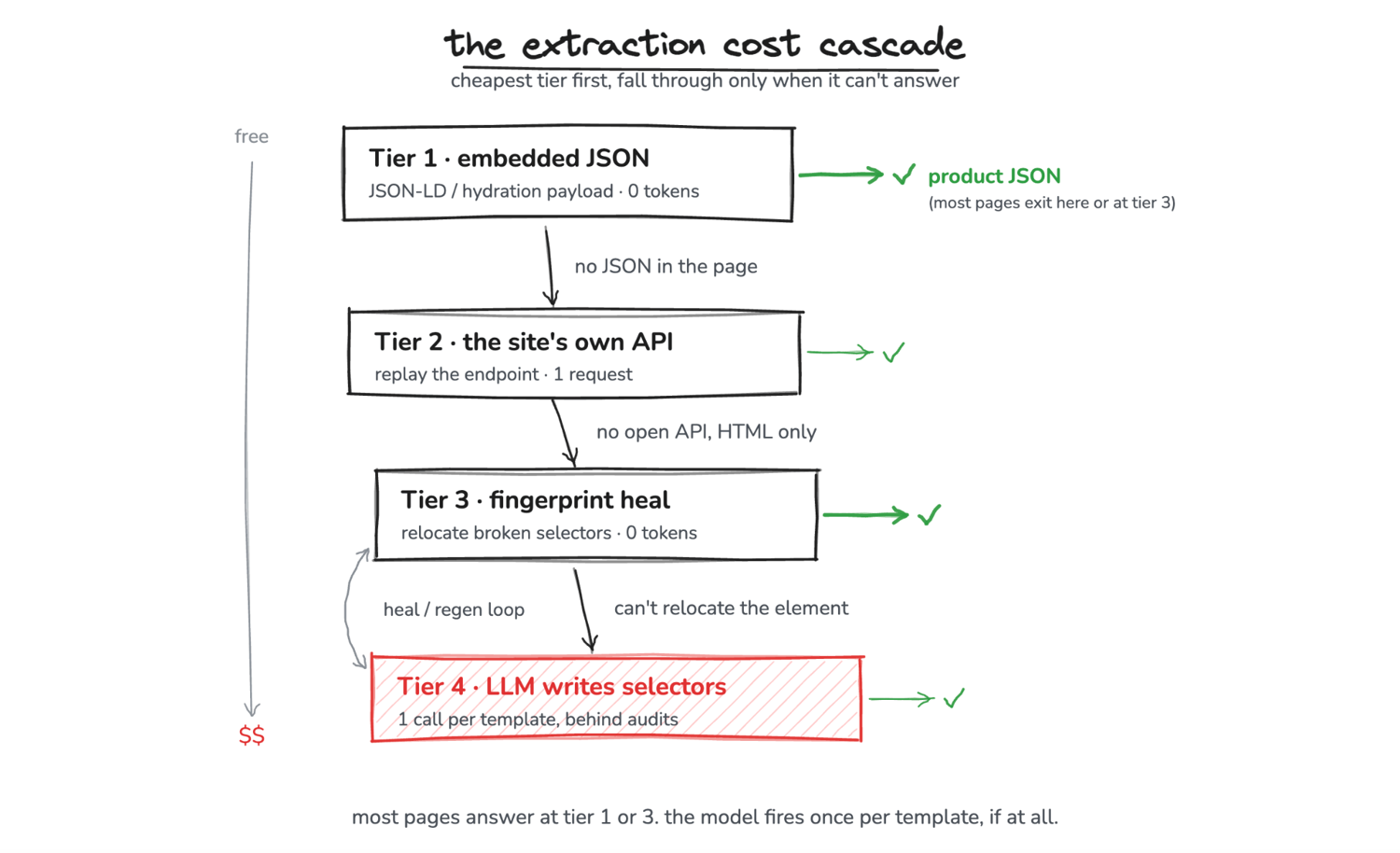
On a target with embedded JSON or a stable template, a scraper built this way reaches the model rarely, if at all.
I took my own measurements on a MacBook with an Apple M3 and 16 GB of RAM. The numbering is a cost ranking, not a strict runtime order: tiers 3 and 4 form a heal-and-regenerate loop, since a selector has to exist before it can drift.
The code below was run as printed, apart from the tier-2 request example, which points at a placeholder host. The outputs shown come from those runs, and the llm_parser.py module the final spider imports assembles from the blocks printed here. Sandboxes and libraries move, so the numbers here may not reproduce exactly; where a measurement depends on hardware, a date, or a library version, it says so. To follow along, install the libraries each tier uses and, for tier 4, pull the local models:
pip install scrapy parsel lxml httpx tiktoken extruct scrapling
ollama pull qwen3.5:9b    # 6.6 GB, selector generation
ollama pull qwen3:4b      # 2.5 GB, the faster baseline that fails the audits
Tier 1: extract the JSON already in the page
Most modern e-commerce frontends are hydration-driven. The rendered DOM is a projection of a JSON object that already sits in the page source. Parsing that object gives you typed data that keeps working after a visual redesign, since a redesign renames CSS classes and moves elements around while leaving pageProps.product.price alone. Page-source product data sits in 2 main places, worth different amounts of work: the schema.org markup a site publishes for search engines and agents, and the framework's own hydration state.
Read the schema.org JSON-LD with extruct
Check schema.org markup first, because when it's complete it's the least work. The extruct library pulls every major embedded metadata format in 1 call. This markup is widespread: the most recent Web Data Commons extraction (October 2024, still the latest published corpus as of July 2026) found Product markup on more than 3.3M hosts across about 280M URLs.
And the incentive behind it flipped since that corpus was collected. Structured product data used to be a side effect of SEO; with agentic commerce it became the storefront itself. Google's Universal Commerce Protocol launched in January 2026 with Shopify, Walmart, Target, Etsy, and Wayfair among the launch partners, and OpenAI's Agentic Commerce Protocol launched Instant Checkout inside ChatGPT in September 2025; OpenAI retired the checkout in March 2026, but the protocol still feeds product discovery there. For extraction that trend works in your favor, at least while the data stays readable by anonymous clients: the top of the cascade is getting richer.
This block runs as-is against scrapeme.live, a WooCommerce scraping sandbox, and returns the complete schema.org product:
import extruct
import httpx

HEADERS = {
    "User-Agent": "Mozilla/5.0 (Macintosh; Intel Mac OS X 10_15_7) "
    "AppleWebKit/537.36 (KHTML, like Gecko) "
    "Chrome/150 Safari/537.36"
}


def json_ld_products(html: str) -> list[dict]:
    """Every schema.org Product, including ones nested inside an @graph.
    Broken markup is common in the wild, so an unparseable page is a miss
    that falls through to the next tier, not an exception in the callback."""
    try:
        objs = extruct.extract(html, syntaxes=["json-ld"], uniform=True)["json-ld"]
    except Exception:
        return []
    flat = []
    for o in objs:
        graph = o.get("@graph") if isinstance(o, dict) else None
        flat.extend(graph if isinstance(graph, list) else [o])
    return [o for o in flat if isinstance(o, dict) and o.get("@type") == "Product"]


resp = httpx.get(
    "https://scrapeme.live/shop/Bulbasaur/",
    headers=HEADERS,
    timeout=30,
    follow_redirects=True,
)
resp.raise_for_status()  # a 403 or a challenge page is a fetch failure, and
html = resp.text  # it looks identical to "this page has no JSON-LD"

for obj in json_ld_products(html):
    offers = obj.get("offers") or {}
    if isinstance(offers, list):
        offers = offers[0] if offers else {}
    print(
        obj["name"],
        offers.get("price"),
        offers.get("priceCurrency"),
        obj.get("sku"),
        str(offers.get("availability", "")).rsplit("/", 1)[-1],
    )
That prints Bulbasaur 63.00 GBP 4391 InStock, each a labeled field rather than scraped text, with 0 selectors and 0 tokens. (The price is still a JSON string here; extract_embedded below casts it to a float.)
The @graph handling in that function is the part worth copying. Yoast SEO wraps its markup in an @graph container, and so do many WordPress and WooCommerce stores. The version you usually see in tutorials is a flat @type == "Product" check over the top-level objects, and it finds nothing on those sites. On the page above it returns 0 products while the @graph-aware version returns 1. That silent miss is easy to mistake for "this site has no structured data".
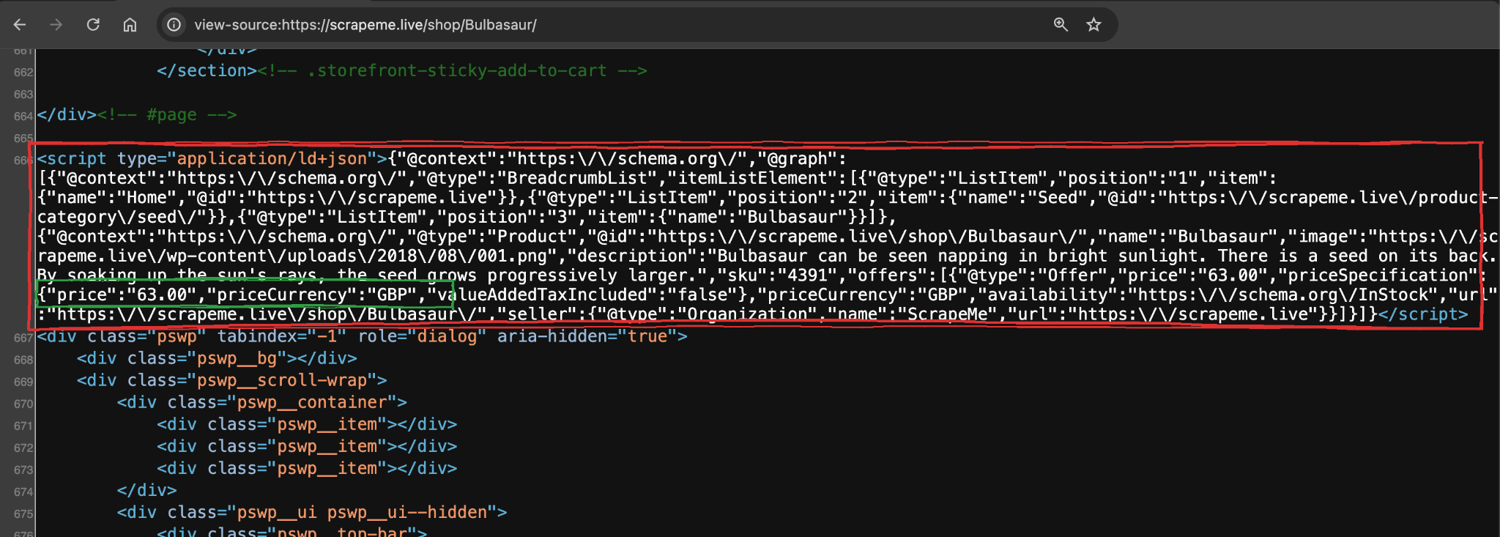
view-source on the WooCommerce sandbox: the whole product sits in one @graph script tag (red), price and currency as labeled fields (green). Line 666 of the source, with no rendering and no selectors.
Not every page renders from schema.org markup. Some render from a plain JavaScript variable, and the data is still in the page source. On quotes.toscrape.com/js, the visible items come from a var data array:
import json
import re
import httpx

html = httpx.get("https://quotes.toscrape.com/js/", timeout=30).text
blob = re.search(r"var data =\s*(\[.*?\]);", html, re.S).group(1)
records = json.loads(blob)
print(len(records), records[0]["author"]["name"])  # 10 Albert Einstein
Read the framework hydration blob when JSON-LD is incomplete
Absence is the easy case. The harder one is that "present" and "complete" are different. On a live Next.js store I tested, extruct found one JSON-LD object of type ProductGroup with no price and no per-variant SKU. That is the moment to fall through to the framework's hydration state, which on that store held the complete product at a fixed dict path.
Frameworks disagree about where they put that state, so read it in 2 steps: find the blob, then walk to the product. Two script-tag payload formats dominate: Next.js ships plain JSON, and Nuxt 3 ships a devalue-encoded array that needs its own small resolver. Devalue is a flat list where every object field holds an index into the list rather than a value. Older frameworks assign a JavaScript object to a window global instead, which needs brace matching rather than a tag regex:
import json
import re


def _balanced_json(text: str, start: int) -> str | None:
    """The JSON object starting at text[start] == '{', brace-matched so it
    can be read out of an inline script. The escape branch matters: product
    titles like 'Arrival 5\" Shorts' contain escaped quotes, and treating
    one as a string terminator makes the scan run past the object and
    silently return nothing."""
    depth, in_str, esc = 0, False, False
    for i in range(start, len(text)):
        c = text[i]
        if in_str:
            if esc:
                esc = False
            elif c == "\\":
                esc = True
            elif c == '"':
                in_str = False
        elif c == '"':
            in_str = True
        elif c == "{":
            depth += 1
        elif c == "}":
            depth -= 1
            if depth == 0:
                return text[start : i + 1]
    return None


NUXT_WRAPPERS = {
    "Reactive",
    "Ref",
    "ShallowRef",
    "ShallowReactive",
    "EmptyRef",
    "EmptyShallowRef",
    "NuxtError",
    "Set",
    "Map",
}


def devalue_parse(arr: list):
    """Resolve Nuxt 3's devalue payload into plain data. Every value position
    is an index into the flat array; objects map field names to indices, and
    reactivity wrappers like ["Ref", 7] point at the value they wrap.
    Negative indices are sentinel codes (undefined, NaN), returned as None."""
    memo = {}

    def resolve(i):
        if not isinstance(i, int) or not 0 <= i < len(arr):
            return None
        if i in memo:
            return memo[i]
        memo[i] = None  # break reference cycles
        node = arr[i]
        if isinstance(node, dict):
            out = {k: resolve(v) for k, v in node.items()}
        elif isinstance(node, list):
            if len(node) == 2 and node[0] in NUXT_WRAPPERS:
                out = resolve(node[1])
            else:
                out = [resolve(x) for x in node]
        else:
            out = node  # str, number, bool, None literal
        memo[i] = out
        return out

    return resolve(0)


def hydration_blob(html: str):
    """Return (name, parsed) for whichever state blob the page carries."""
    for tag_id in ("__NEXT_DATA__", "__NUXT_DATA__"):
        tag = re.search(r'<script[^>]*id="%s"[^>]*>(.*?)</script>' % tag_id, html, re.S)
        if not tag:
            continue
        try:
            data = json.loads(tag.group(1))
        except json.JSONDecodeError:
            continue
        if tag_id == "__NUXT_DATA__":
            data = devalue_parse(data) if isinstance(data, list) else None
        if data:
            return tag_id, data
    for name in (
        "__NUXT__",
        "__APOLLO_STATE__",
        "__PRELOADED_STATE__",
        "__INITIAL_STATE__",
        "__remixContext",
    ):
        assign = re.search(r"window\.%s\s*=\s*" % name, html)
        if not assign:
            continue
        brace = html.find("{", assign.end())
        raw = _balanced_json(html, brace) if brace != -1 else None
        if raw:
            try:
                data = json.loads(raw)
            except json.JSONDecodeError:
                continue
            # Nuxt 3 still assigns an empty window.__NUXT__ shell for
            # compatibility. An empty parse is a miss, not a find.
            if data:
                return name, data
    return None, None


def dig(node, path: list):
    """Walk a path without raising. Blobs change shape between deploys, so a
    missing key returns None instead of killing the crawl. Integer keys index
    lists, because product data is often nested under something like
    pageProps.products[0] rather than a plain dict chain."""
    for key in path:
        if isinstance(node, dict):
            node = node.get(key)
        elif (
            isinstance(node, list)
            and isinstance(key, int)
            and -len(node) <= key < len(node)
        ):
            node = node[key]
        else:
            return None
        if node is None:
            return None
    return node
Together those cover the blobs worth grepping for in 2026: __NEXT_DATA__ (Next.js Pages Router), __NUXT_DATA__ (Nuxt 3), window.__remixContext (Remix, which includes Shopify's Hydrogen storefronts), and the older assignments, window.__NUXT__ (Nuxt 2), __APOLLO_STATE__, __PRELOADED_STATE__, and __INITIAL_STATE__.
The 2 Nuxt entries are where the framework version matters. Nuxt 2 reached end-of-life in mid-2024, and Nuxt 3 moved the payload into the __NUXT_DATA__ script tag while still assigning an empty window.__NUXT__ shell for compatibility. Tutorial code that greps only the assignment parses that empty shell successfully and reports a blob with nothing in it. That false positive is why the function above treats an empty parse as a miss.
I verified both new paths in July 2026: nuxt.com resolves through the devalue branch, and hydrogen.shop, Shopify's own Hydrogen demo, parses through __remixContext with the route data under state.loaderData:
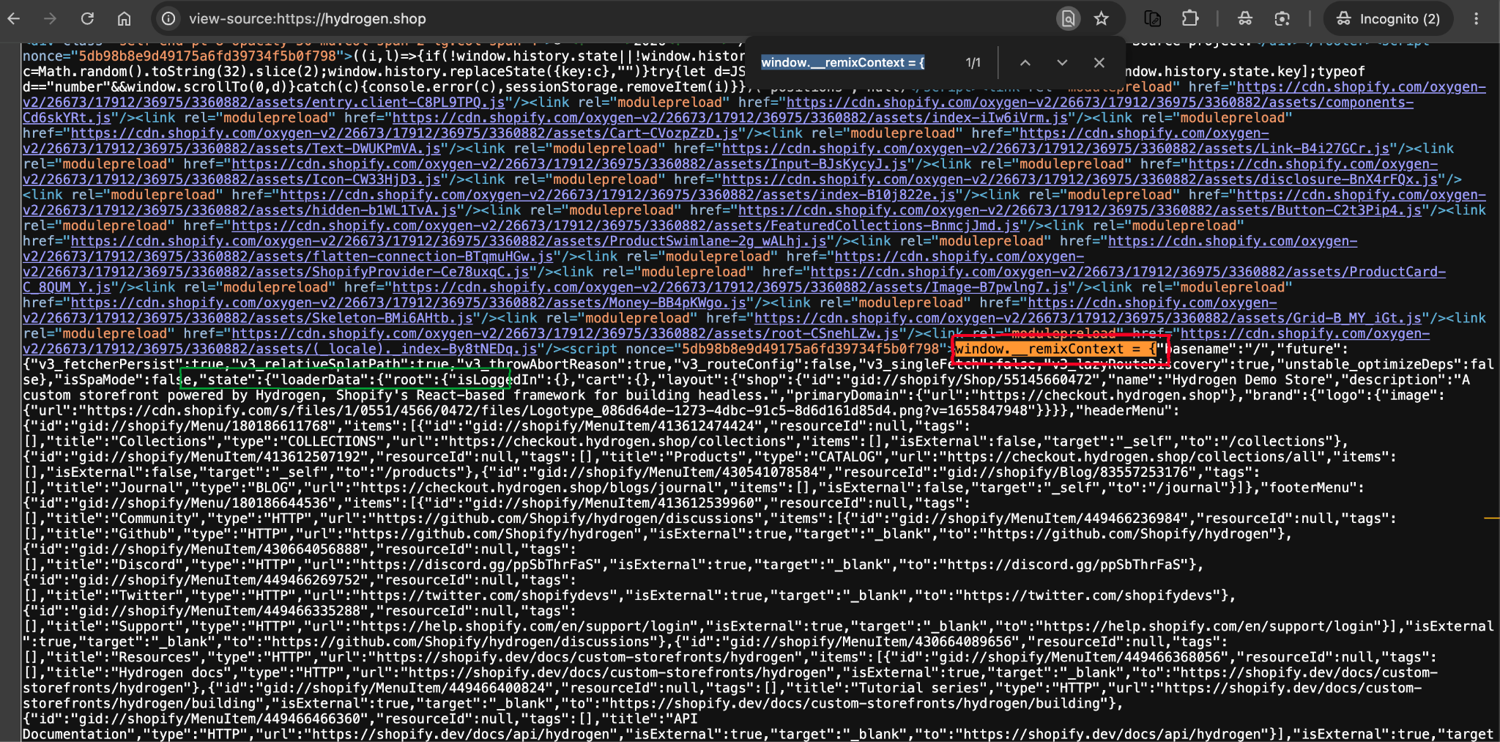
In view-source: the window.__remixContext assignment (red) is 1 brace-match away from state.loaderData (green), where the route's data lives. Hydrogen storefronts are Remix apps, so this is the shape to look for on them.
>>> name, blob = hydration_blob(html)
>>> name
'__NEXT_DATA__'
>>> dig(blob, ["props", "pageProps", "productData", "product"])
{'title': 'Arrival 5" Shorts', 'sku': 'A2A1M', 'price': 26,
 'rating': {'average': 4.26, 'count': 1080}}
That path is site-specific, so you find it once and hard-code it. Parse the blob, search it for a value you can already see on the page (the product title works well), and note where it lives. A short recursive walk that reports the first path whose value contains your search string turns that into 1 function. The format none of this covers is the Nuxt build that wraps its state in a function call; that is JavaScript rather than JSON, and it needs a JS parser or a headless browser.
Both halves belong to the same function, and the second half needs 1 line of configuration. The spider calls a single extract_embedded that tries JSON-LD first and then the hydration paths you register, returning a source field so your output says which half answered:
HYDRATION_PATHS = [
    ["props", "pageProps", "productData", "product"],
]

FIELD_ALIASES = {
    "name": ("title", "name", "productName"),
    "price": ("price", "currentPrice", "salePrice"),
    "sku": ("sku", "id", "productId"),
    "currency": ("currency", "currencyCode", "priceCurrency"),
}


def _from_json_ld(html: str) -> dict | None:
    for o in json_ld_products(html):
        offers = o.get("offers") or {}
        if isinstance(offers, list):
            offers = offers[0] if offers else {}
        if o.get("name") and offers.get("price") is not None:
            return {
                "name": o["name"],
                "price": float(offers["price"]),
                "currency": offers.get("priceCurrency"),
                "sku": o.get("sku"),
                "in_stock": str(offers.get("availability", "")).endswith("InStock"),
                "source": "json-ld",
            }
    return None


def _from_hydration(html: str, paths: list) -> dict | None:
    _, blob = hydration_blob(html)
    if blob is None:
        return None
    for path in paths:
        node = dig(blob, path)
        if not isinstance(node, dict):
            continue
        picked = {
            f: next((node[k] for k in keys if node.get(k) is not None), None)
            for f, keys in FIELD_ALIASES.items()
        }
        if picked["name"] and picked["price"] is not None:
            return {
                "name": picked["name"],
                "price": float(picked["price"]),
                "currency": picked["currency"],
                "sku": str(picked["sku"]) if picked["sku"] is not None else None,
                # absent means unknown, not in stock; a guessed True is
                # the currency mistake again on a different field
                "in_stock": (
                    bool(node["inStock"])
                    if "inStock" in node
                    else bool(node["available"]) if "available" in node else None
                ),
                "source": "hydration",
            }
    return None


def extract_embedded(html: str, hydration_paths: list = None) -> dict | None:
    """Tier 1, both halves. Returns None only when the page carries neither,
    which is when the crawl falls through to the selector tiers."""
    return _from_json_ld(html) or _from_hydration(
        html, HYDRATION_PATHS if hydration_paths is None else hydration_paths
    )
Keep the source field in your output, not in a log. And note in_stock on the hydration item: the blob carried no stock field, so it comes back None rather than a guessed True:
{'name': 'Bulbasaur', 'price': 63.0, 'currency': 'GBP', 'sku': '4391',
 'in_stock': True, 'source': 'json-ld'}

{'name': 'Arrival 5" Shorts', 'price': 26.0, 'currency': None, 'sku': 'A2A1M',
 'in_stock': None, 'source': 'hydration'}
Leaving HYDRATION_PATHS empty is the common shortcut, and it quietly sends every variant-heavy store down to the model tier while looking like it works.
The __NEXT_DATA__ blob on that Next.js page was 1,059,206 tokens, so you never send it to a model; you index into it. That dict-path access costs 0 tokens and runs in microseconds. The extracted object is about 2,500 tokens, if you ever need to pass it downstream.
Two things to know before you rely on hydration state. Next.js App Router (13.4+) stopped emitting __NEXT_DATA__ and now streams React "flight data" through self.__next_f.push(). Older __NEXT_DATA__-only code silently finds nothing on those sites; the njsparser library handles both formats. And the blob's shape changes between deploys, which is what dig above is for: every access is a .get(), a missing key returns None, and you log the miss instead of losing the crawl to a KeyError on somebody else's release day.
Fall through when the JSON-LD and the hydration blob both miss the fields you need, or when the page has no embedded JSON at all.
Tier 2: replay the internal API when you can reach it
Behind the HTML, many product pages fetch their data from an endpoint. Hitting that endpoint directly skips rendering, selectors, and most of the bytes: a page load through a headless browser is typically far larger than the JSON behind it, and one minute in devtools confirms it on any large site. And the JSON side often carries fields the HTML never renders.
Copy the request out of devtools and replay it
The method is manual and per-site: open browser devtools, filter the Network tab to Fetch/XHR, and find the request that returns the product JSON. Right-click it, copy it as cURL, then strip the headers down to the few the endpoint actually requires. GraphQL backends work the same way: copy a query shape from devtools and change the variables.
What you find is whatever the site happens to expose, and sometimes that is nothing: on scrapeme.live the only JSON endpoint is the cart, because its product data lives in tier-1 markup instead. You probe, and the site tells you what it has.
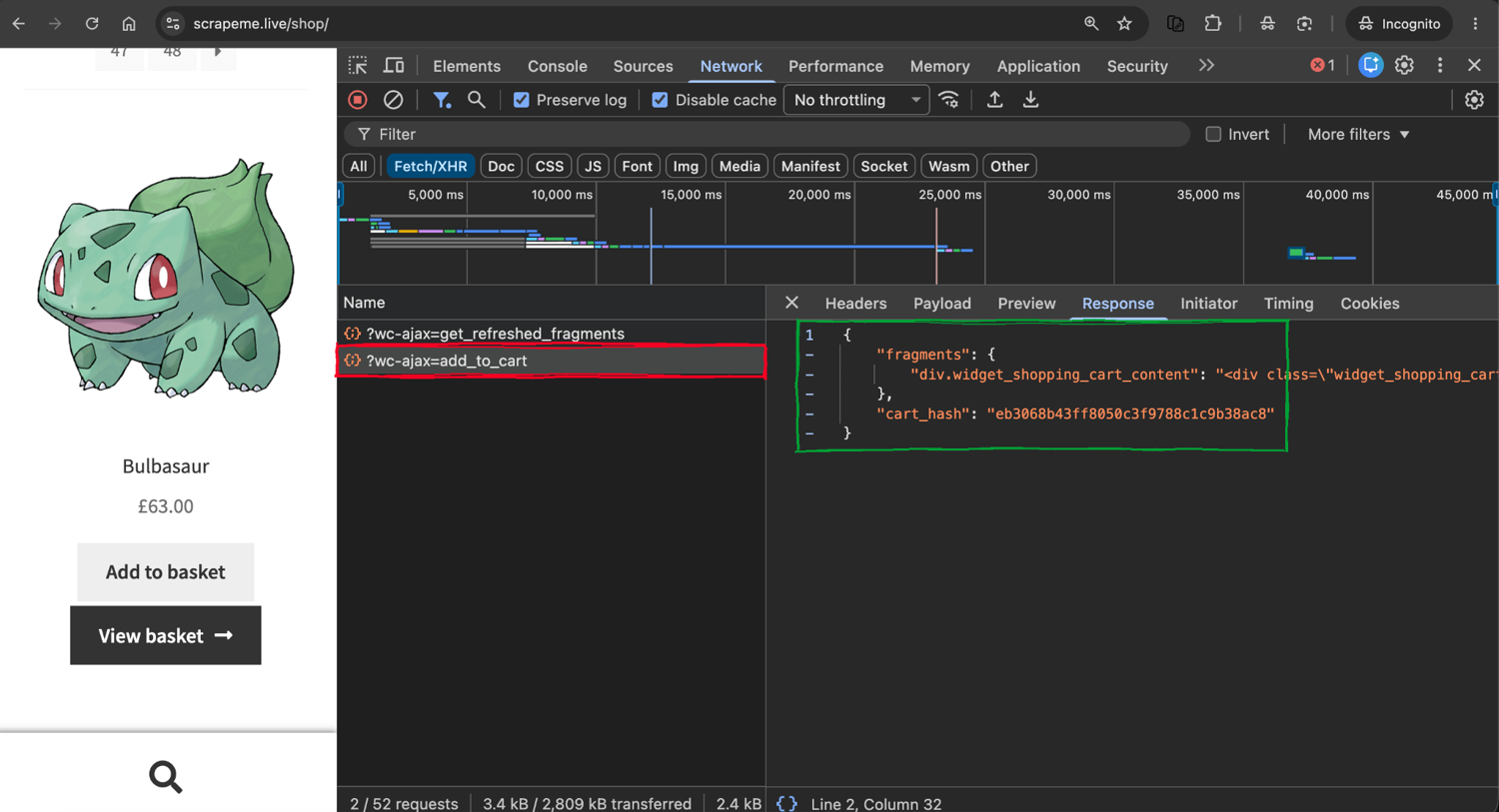
What the probe actually returned here: the cart endpoint, because scrapeme.live has no product API. On a store that does, the same steps end at the product JSON, and Copy as cURL from the right-click menu is the handoff to code.
Why a working endpoint is still tier 2
Shopify's old store.com/products/{handle}.json convention shows why an endpoint is worth re-checking before you depend on it: it was widely treated as the stable route, and it is one of several on a Shopify store, alongside /products.json, the product sitemaps, and the Storefront GraphQL API. Shopify declared its REST Admin API legacy in October 2024 in favor of GraphQL, though that notice covers the Admin side and not this storefront route. When I probed the storefront convention in July 2026, one major store still returned full catalog JSON while another returned 403. It still answers on many stores, but treat it as a probe, not a foundation; our guide to scraping Shopify stores covers the routes that work today.
This is tier 2, not tier 1, because reachability is not guaranteed. Large retailers' JSON endpoints sit behind the same anti-bot layer that guards their HTML, so a direct request comes back 403 rather than product data. A few other things push you back to the browser too. Auth tokens can expire mid-crawl. Some requests are HMAC-signed in frontend JavaScript, and some responses come back encrypted.
Any endpoint stable enough to print in an article is likely to be gated or changed by the time you read it, so the workflow is the part worth handing over. What a site exposes and what it permits are separate questions. Translating a copied cURL into httpx means dropping the roughly 20 browser headers that endpoints ignore and keeping auth and API-version headers, which leaves something like:
HEADERS = {
    "accept": "application/json",
    "authorization": "Bearer eyJhbGciOi...",
    "user-agent": "Mozilla/5.0",
    "x-api-version": "2026-01",
}

resp = httpx.get(
    "https://example-store.test/api/v2/product?sku=A2A1M", headers=HEADERS, timeout=30
)
For the largest retailers, where those endpoints are hardest to reach, a managed scraper API can do the same job without the reverse-engineering, on the sites its vendor covers. ScrapingBee's Amazon Scraper API takes an ASIN or URL and returns the product as JSON, the Walmart Scraping API does the same for Walmart search and product pages, and the Shopify Scraper API is the managed route for stores where that legacy .json endpoint has been retired or gated. When an API answers, it's the best path short of tier 1. What separates the 2 kinds is durability: an internal endpoint is free until the deploy that signs, gates, or renames it, and a managed one absorbs that change on the vendor's side.
Tier 3: heal a renamed or moved selector without a model
You don't reach tier 3 by falling through from the API. You reach it when a selector stops matching, whether you wrote it by hand or generated it in tier 4. A redesign is the usual cause, with A/B tests, regional page variants, and a second template behind some products doing the same thing. Drift is the recurring failure for selector-based tiers, and the most common kind, a rename or a move, heals by relocating the element by similarity, with no model.
Relocate the element by fingerprint with Scrapling
Scrapling is a Python library that does this. On the first scrape it stores a fingerprint of the element (tag, text, attributes, siblings, path, parent) in SQLite. When the selector later matches nothing, it scores every candidate in the new DOM against that fingerprint with difflib.SequenceMatcher and returns the best match above a similarity threshold (40% in the 0.4 releases I used), with no model call.
To measure it, I simulated a redesign, the kind a CSS refactor produces: rename the price class and demote the product title from h1 to h2, then ask Scrapling to relocate the price:
import httpx
from scrapling import Selector

URL = "https://books.toscrape.com/catalogue/a-light-in-the-attic_1000/index.html"
original_html = httpx.get(URL, timeout=30).text
redesigned_html = (
    original_html.replace('class="price_color"', 'class="t-3kq9"')
    .replace("<h1>", "<h2>")
    .replace("</h1>", "</h2>")
)

good = Selector(
    content=original_html,
    url="local://p",
    adaptive=True,
    storage_args={"storage_file": "fingerprints.db"},
)
good.css("p.price_color", auto_save=True)

changed = Selector(
    content=redesigned_html,
    url="local://p",
    adaptive=True,
    storage_args={"storage_file": "fingerprints.db"},
)
print(len(changed.css("p.price_color")))  # 0, the old selector is dead
print(changed.css("p.price_color", adaptive=True)[0].text)  # £51.77, no LLM
Across 12 books-sandbox pages this healed the price on all 12 after the class rename, in 78ms total, with 0 model calls and 0 tokens. The LLM heal in tier 4 took 2 model calls and about 142s on a fuller version of the same redesign, so the 2 numbers are not measured on the same input and the gap between them is not a clean ratio.
Two limits set up the next tier. Relocation finds an existing element; it can't infer a field the site newly added, and because it returns the highest-similarity match above the threshold, it can pick a wrong element when several look alike. A genuine restructure, or a newly added field, is the case where a model is finally worth using.
Patch the selector map, and audit it before caching
Most similar is not the same as right, and that shapes how the spider uses it. Two wrappers turn the raw calls above into something safe to cache:
- save_fingerprints runs auto_save once per selector, the moment a map first validates. This is the arming step, and nothing can heal until it has run.
- heal_with_fingerprints does more than relocate. For each dead selector it relocates the element, then builds a new CSS selector from that element's tag and classes, keeping only a selector that matches exactly 1 element. The result is a patched map, not a one-off extraction, so the repair persists.
import pathlib

FINGERPRINT_DB = str(pathlib.Path(__file__).parent / "fingerprints.db")


def _scrapling_page(html: str, url: str):
    from scrapling import Selector as ScraplingSelector

    return ScraplingSelector(
        content=html,
        url=url,
        adaptive=True,
        storage_args={"storage_file": FINGERPRINT_DB},
    )


def save_fingerprints(html: str, url: str, selmap: dict) -> None:
    """Arm tier 3: store a fingerprint per selector while the map still works."""
    page = _scrapling_page(html, url)
    for css in selmap.values():
        try:
            page.css(css, auto_save=True)
        except Exception:
            continue


def _css_for(element, html: str) -> str | None:
    """Build a selector for a relocated element, keeping only one that matches
    exactly 1 element so a healed map keeps the audits' guarantee."""
    sel = Selector(html)
    classes = (element.attrib.get("class") or "").split()
    candidates = []
    if classes:
        candidates.append(element.tag + "".join(f".{c}" for c in classes))
        candidates += [f"{element.tag}.{c}" for c in classes]
    parent = element.parent
    for pc in (parent.attrib.get("class") or "").split() if parent is not None else []:
        if classes:
            candidates.append(f".{pc} {element.tag}.{classes[0]}")
        candidates.append(f".{pc} {element.tag}")
    for css in candidates:
        try:
            if len(sel.css(css)) == 1:
                return css
        except Exception:
            continue
    return None


def heal_with_fingerprints(
    html: str, url: str, selmap: dict, verify_htmls: list = ()
) -> dict | None:
    """Repair a broken map with no model call. Returns None when the repair
    cannot be trusted, which is the signal to escalate to tier 4."""
    page = _scrapling_page(html, url)
    patched = dict(selmap)
    for field, css in selmap.items():
        try:
            if page.css(css):
                continue  # this selector still works
            found = page.css(css, adaptive=True)
        except Exception:
            return None
        if not found:
            return None
        new_css = _css_for(found[0], html)
        if not new_css:
            return None
        patched[field] = new_css
    problems = (
        audit_map(html, patched)
        + semantic_audit(html, patched)
        + cross_page_audit(html, list(verify_htmls), patched)
    )
    return None if problems else patched
The patched map then goes through the same 3 audits a model-generated map faces, which is why these 2 tiers share code in both directions. The cross-page check runs against held-out pages, and the function returns None if any of the 3 fail. Without that gate, a plausible wrong selector (say a price from the recommendation strip) would pass a range check, get cached, and quietly become the parser for every later page. Falling back to tier 4 is cheaper than that.
One detail that looks cosmetic and is not: the key. Scrapling derives its fingerprint key from the URL you pass, so the spider passes a constant per template (template://books) rather than response.url. Keep that key stable and distinct per template, or a heal can look up the wrong fingerprint set.
Tier 4: generate the selector map with a local LLM
This is the tier many guides start with, and for e-commerce it should be the one you reach last. It reaches the pages the cascade above can't: no usable embedded JSON, no reachable internal API, and drift too structural for relocation. The pattern is still generate-once: the model reads 1 page and writes a selector map, deterministic code runs it on every other page, and the model only re-fires when validation says the map broke.
Why the model runs locally
Extraction is input-heavy. A product page sends thousands of tokens in and gets about 100 tokens of JSON back. With a hosted API you pay for that asymmetry on every page, and on the per-page path the provider's rate limits sit inside your crawl loop. Run the model locally and the marginal cost per page is electricity, throughput is bounded by your hardware rather than a quota, and page content stays on your machine.
I used Ollama, the runtime that serves local models behind an HTTP API, with qwen3:4b (2.5 GB) as a baseline and qwen3.5:9b (6.6 GB) for generation. On a 16 GB machine, keep everyday models under about 6 GB, but the 6.6 GB 9B generator fits fine here because it runs once per template, not once per page. For this narrow task there are also purpose-built small models that beat larger general models at structured extraction in their vendors' benchmarks: Jina's ReaderLM-v2 (1.5B, HTML to Markdown or JSON, but CC BY-NC 4.0 as of July 2026, so commercial use needs a licence from Jina) and NuExtract 3 (4B, Apache-2.0, document-focused).
The 2 Ollama settings behind every failure
Both are defaults you never set, which is what makes them hard to find. In Ollama 0.32, the version I tested in July 2026, the context window defaults to 4,096 tokens and longer prompts are truncated silently rather than refused. Defaults move between versions, so set num_ctx explicitly on every request. Size it to your own pages, not to mine: I used 16,384, which was roomy for the sandbox pages and too small for the largest page I measured. Check the real prompt token count per request with prompt_eval_count.
The second setting is structured outputs. Ollama accepts a JSON schema in the format field and constrains decoding to match it, per the structured outputs docs. Describe the schema in the prompt too, run at temperature 0, and malformed JSON almost disappears. The debate over whether constraints hurt quality has a strong rebuttal: "Let Me Speak Freely?" reported degradation on reasoning tasks, and the "Say What You Mean" rebuttal reproduced those experiments and traced the losses to prompt and parsing choices rather than the constraints. For slot-filling extraction like this, constraints helped in my runs.
Both settings live in one helper that every model call in this tier goes through, with think off because slot-filling needs no reasoning trace:
import json
import httpx

async def _llm_map(messages: list, client: httpx.AsyncClient) -> dict:
    body = {
        "model": "qwen3.5:9b",
        "messages": messages,
        "format": SELECTOR_SCHEMA,  # the JSON schema, defined below
        "options": {"temperature": 0, "num_ctx": 16384},
        "think": False,
        "stream": False,
    }
    resp = await client.post("http://localhost:11434/api/chat", json=body, timeout=600)
    resp.raise_for_status()
    return json.loads(resp.json()["message"]["content"])
The token cost that forces HTML preprocessing
Before any of this, clean the HTML, because raw HTML is mostly boilerplate and markup. On 12 books-sandbox product pages (counted with tiktoken's cl100k_base), raw HTML averaged 3,881 tokens; stripping scripts, styles, head, navigation, and noisy attributes cut that to 2,300 (59%), and markdown conversion to 634 (16%). On the real Next.js page the difference stops being small:
| Version | Tokens (1 real Next.js product page, cl100k_base, estimate) |
|---|---|
| Raw HTML (3.87 MB) | 1,205,853 |
| Cleaned HTML | 16,559 |
| Markdown conversion | 2,851 |
The counting method itself deserves a check: cl100k_base is a convention inherited from another model family, so I re-counted the same pages with Qwen3's own tokenizer, and it ran 3 to 4% higher across all 3 variants. The ratios hold; treat any token table, including this one, as an estimate rather than an exact count.
That page's 423x reduction is an extreme case. ScrapingBee's Markdown Scraper does this conversion as a managed endpoint, with the fetch and rendering handled for you. Token count is not the reason to reach for it. The reasons are the fetch, the rendering, and the cleaner you do not run yourself. For the local cascade, the cleaner is a few lines of lxml:
import re
from lxml import etree, html as lhtml

STRIP_TAGS = [
    "script",
    "style",
    "noscript",
    "svg",
    "iframe",
    "link",
    "meta",
    "header",
    "footer",
    "nav",
]
KEEP_ATTRS = {
    "class",
    "id",
    "href",
    "src",
    "alt",
    "title",
    "content",
    "itemprop",
    "itemtype",
    "datetime",
}


def clean_html(raw: str) -> str:
    tree = lhtml.fromstring(raw)
    etree.strip_elements(tree, *STRIP_TAGS, with_tail=False)
    etree.strip_elements(tree, etree.Comment, with_tail=False)
    for el in tree.iter():
        if isinstance(el.tag, str):
            for attr in list(el.attrib):
                if attr not in KEEP_ATTRS:
                    del el.attrib[attr]
    out = lhtml.tostring(tree, encoding="unicode")
    out = re.sub(r"[ \t]+", " ", out)
    return re.sub(r"\n\s*\n+", "\n", out)
For selector generation the cleaner keeps class, id, and the microdata attributes, because those are what selectors anchor to.
Why direct per-page LLM extraction is the wrong default
Cleaning makes the direct path cheap enough to test properly, so I sent each cleaned page to the model with a JSON schema and asked for the fields directly. That scored 87 of 96 fields (90.6%) on the 12 pages, at 14 to 55 seconds per page. The number hides where it breaks: every miss was the rating, where the model answered 5 stars on 9 of 12 books. The rating lived in a class attribute (star-rating Three) while the page rendered 5 star icons, and the model read the icons. A JSON schema constrains the shape, and only the value patterns you spell out in it, so on its own it does not catch a confidently wrong value of the right type.
A February 2026 benchmark, LLMStructBench, generalizes the same trap across models: prompting strategy improves structural validity more than model size does, and the structural gains come with more semantic errors, so well-formed output is weak evidence of correct output. At 30 seconds per page on local hardware, per-page extraction does not scale to a full catalog, even when it works fine on a handful of pages. Faster inference fixes the throughput half of that and none of the accuracy half, because the semantic errors belong to the model rather than to the machine.
Generate the selector map once
Moving the model off the per-page path fixes the throughput half outright: it reads 1 page, writes selectors, and never sees page 2. It does nothing for the accuracy half, which is what the audit gate below is for. Getting the audit gate right took 3 iterations, one per failure mode. The generation call itself is a single round once the gate is in place. The schema asks for a selector per leaf field, plus container selectors for the spec table and breadcrumb:
SELECTOR_SCHEMA = {
    "type": "object",
    "properties": {
        "name": {"type": "string"},
        "price": {"type": "string"},
        "availability": {"type": "string"},
        "rating": {"type": "string"},
        "spec_table": {"type": "string"},
        "breadcrumb": {"type": "string"},
    },
    "required": ["name", "price", "availability", "rating", "spec_table", "breadcrumb"],
}

BASE_PROMPT = """You write CSS selectors for a web scraper.
Below is the HTML of one product page from an e-commerce site.
Return a JSON object mapping each field to ONE CSS selector:

- name: product title text
- price: the product price text (the main product only, not related items)
- availability: the stock availability text
- rating: the element whose class attribute encodes the star rating
- spec_table: the table that lists product specifications (UPC, type, taxes)
- breadcrumb: the breadcrumb navigation list

Rules:
- Selectors must use stable structural anchors (semantic classes, table
  position, element hierarchy). Avoid brittle auto-generated class names.
- Each selector must match exactly one element on the page.
- Selectors must work on every product page of this site. Never anchor to
  values that change per product (a specific rating class, a product name).
- Use standard CSS only (no :contains(), no XPath).

HTML:
{html}"""

REPAIR_PROMPT = """The selector map you returned has problems when tested
against the page:

{problems}

Return a corrected JSON map for ALL fields (repeat the working selectors
unchanged). Scope selectors to the main product container when a selector
matches more than 1 element.

HTML:
(same page as above)"""
Three of those rules exist because the model broke them. "Exactly one element" came from a price selector that also matched the recommendation strip, "never anchor to values that change per product" from the rating-in-the-class-attribute trap above, and "standard CSS only" from a model that kept reaching for :contains(), which is not part of the CSS standard.
The first map, trusted blindly, broke the parser: the model hallucinated a name class that matched nothing and a price selector that matched 4 elements. That early parser joined every match, so the price came back with 3 values from the recommendation strip glued to it. (The strip varies between 0 and 6 items across pages, so that count depends on the sample page.) The first helper printed later takes only the leading match, which makes the same bug quiet instead of loud. The "exactly 1" rule is what removes it. So nothing gets cached without passing audits, and the 3 of them catch different failures.
Audit the map before anything gets cached
A structural audit checks every selector matches exactly 1 element. A value audit parses the page and checks the results look like the fields they claim to be, because a selector can match 1 element and still be the wrong one: the model's UPC selector matches the "Product Type" cell, giving every book the UPC "Books". A cross-page audit runs the map against held-out pages, 2 in this spider, because the model wrote .star-rating.Three, hard-coding the sample page's own rating; on other pages it matched a 3-star item in the recommendation strip.
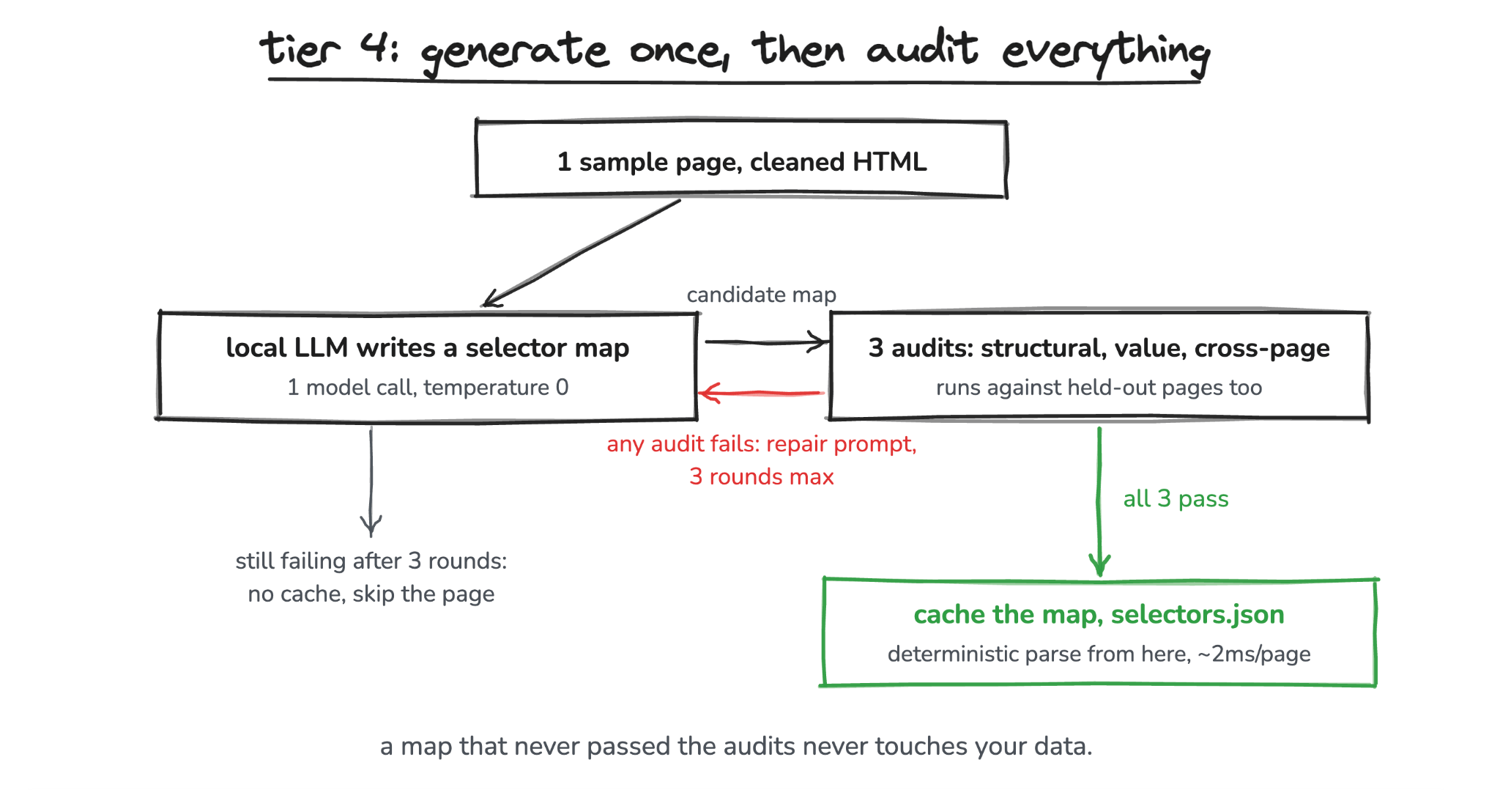
The gate, not the generator, is what makes tier 4 usable. What the checks do not test can still reach your data.
from parsel import Selector

def audit_map(html: str, selmap: dict) -> list[str]:
    """Structural: every selector matches exactly 1 element."""
    sel, problems = Selector(html), []
    for field, css in selmap.items():
        try:
            n = len(sel.css(css))
        except Exception as exc:
            problems.append(f"- {field}: `{css}` is invalid CSS ({exc})")
            continue
        if n != 1:
            problems.append(f"- {field}: `{css}` matches {n} elements, must match 1")
    return problems

def semantic_audit(html: str, selmap: dict) -> list[str]:
    """Value: do the extracted values look like the fields they claim to be."""
    item, problems = parse_with_map(html, selmap), []
    if not item.get("name"):
        problems.append("- name: extracted nothing")
    if item.get("price") is None or not 0 < item["price"] < 10000:
        problems.append(f"- price: extracted {item.get('price')!r}, expected a number")
    if item.get("rating") is None:
        problems.append("- rating: matched element's class has no star-rating word")
    if not re.fullmatch(r"[A-Za-z0-9]{8,}", item.get("upc") or ""):
        problems.append(f"- upc: extracted {item.get('upc')!r}, not a product code")
    cat, name = item.get("category") or "", item.get("name") or ""
    if not cat or cat.strip().lower() == name.strip().lower():
        problems.append(f"- category: extracted {cat!r}, which is the product name")
    return problems

def path_signature(node) -> tuple:
    """Ancestor chain (tag + classes) of a matched element. On a templated
    site the same field sits at the same path on every product page."""
    return tuple(
        (a.tag, tuple(sorted((a.get("class") or "").split())))
        for a in reversed(list(node.root.iterancestors()))
    )

def cross_page_audit(sample_html: str, verify_htmls: list, selmap: dict) -> list[str]:
    """Cross-page: a selector that resolves elsewhere on other pages has
    overfit to a value that only exists on the sample page."""
    ref, sel, problems = {}, Selector(sample_html), []
    for field, css in selmap.items():
        nodes = sel.css(css)
        if nodes:
            ref[field] = path_signature(nodes[0])
    for i, html in enumerate(verify_htmls, 2):
        s = Selector(html)
        for field, css in selmap.items():
            nodes = s.css(css)
            if not nodes:
                problems.append(f"- {field}: `{css}` matches 0 elements on page {i}")
            elif field in ref and path_signature(nodes[0]) != ref[field]:
                problems.append(
                    f"- {field}: on page {i}, `{css}` matches a different "
                    "page region than on page 1; it likely encodes a "
                    "value specific to page 1"
                )
    return problems
The audits run against the first map the 4B model returned and print the problems that get fed back. The 3 decisive lines:
- name: `h1.product_page` matches 0 elements, must match 1
- price: `p.price_color` matches 4 elements, must match 1
- rating: on page 2, `.star-rating.Three` matches a different page region
  than on page 1; it likely encodes a value specific to page 1
Those strings are the repair prompt's payload. A message like "invalid selector" gives the model nothing to work with. Failures go back as a multi-turn exchange, with the model's previous answer in context:
def _all_audits(raw_html: str, verify_htmls: list, selmap: dict) -> list[str]:
    return (
        audit_map(raw_html, selmap)
        + semantic_audit(raw_html, selmap)
        + cross_page_audit(raw_html, list(verify_htmls), selmap)
    )

async def generate_selector_map(
    raw_html: str,
    client: httpx.AsyncClient,
    verify_htmls: list = (),
    max_repairs: int = 3,
) -> dict:
    cleaned = clean_html(raw_html)
    messages = [{"role": "user", "content": BASE_PROMPT.format(html=cleaned)}]
    selmap = await _llm_map(messages, client) # POSTs to /api/chat
    for _ in range(max_repairs):
        problems = _all_audits(raw_html, verify_htmls, selmap)
        if not problems:
            return selmap
        messages += [
            {"role": "assistant", "content": json.dumps(selmap)},
            {
                "role": "user",
                "content": REPAIR_PROMPT.format(problems="\n".join(problems)),
            },
        ]
        selmap = await _llm_map(messages, client)
    # Audit the last repair as well. Skipping it throws away a call you have
    # already paid for, and names the failing field when it really is broken.
    problems = _all_audits(raw_html, verify_htmls, selmap)
    if problems:
        raise ValueError(f"selector map failed audits after repairs: {problems}")
    return selmap
The map that passed, and what each audit bought
With all 3 audits active, the 9B model returned this map in 1 call and 16.4s in that run:
{
  "name": ".product_main h1",
  "price": ".product_main .price_color",
  "availability": ".product_main p.availability",
  "rating": ".product_main .star-rating",
  "spec_table": "#content_inner table.table-striped",
  "breadcrumb": ".page ul.breadcrumb"
}
Every selector is scoped to a container (.product_main, #content_inner, or .page), which is what keeps the price away from the recommendation strip. None of them encode a value: the rating selector is .star-rating, not .star-rating.Three. The map is 6 lines of JSON you can review, diff, and check into version control.
The map is also portable, because CSS selectors are one of the few things almost every scraping stack already supports. I sent this exact map as the extract_rules parameter of ScrapingBee's CSS extraction rules and diffed the response against the local parsel run: 6 of 6 fields came back identical, including the rating read from the class attribute (the one field that needs an @class output hint on both engines).
Through parsel (the selector engine Scrapy uses), deterministic parsing with that map scored all 96 fields across the 12 pages at 2.0ms per page. Each audit is in the pipeline because removing it costs accuracy:
| Generator version | Field accuracy (96 fields, 12 books-sandbox pages, 1 run each) | What still failed |
|---|---|---|
| First map, trusted blindly | crash (unscorable) | hallucinated class, price selector matched 4 elements |
| + structural audit | 75% | "Books" as every UPC, product name as category |
| + value audit, container schema | 89.6% | rating selector encoded the sample page's own value |
| + cross-page audit | 100% (96/96) | nothing, converged in 1 call |
On this task, with these 2 models, model choice mattered less than the gate. The 4B model kept resubmitting its hallucinated selector through every repair round, and the audits rejected its final map rather than caching it: a weak generator costs a failed regeneration, not corrupted data.
Parse and validate every page with the map
validate is what the spider calls on every parsed item; it repeats 3 of the value audit's checks, the ones worth paying for on every page, so generation-time and run-time stay in sync:
import re


def validate(item: dict) -> list[str]:
    problems = []
    if not item.get("name"):
        problems.append("name is empty")
    if item.get("price") is None or not 0 < item["price"] < 10000:
        problems.append(f"price failed range check: {item.get('price')}")
    if not re.fullmatch(r"[A-Za-z0-9]{8,}", item.get("upc") or ""):
        problems.append(f"upc failed format check: {item.get('upc')!r}")
    return problems
An empty list means the item ships. On a page where a redesign has moved the spec table, it returns the reason instead, and that string is what lands in your logs with the page URL:
['upc failed format check: None']
The same broken map returned a price of 20.0, read from the wrong element, and 20.0 is a plausible book price inside the range check. Non-empty and in-range is a weak test; it stops crashes and obvious nulls, not confident wrong values.
Both the audits and the spider run the map through one parser. Leaf fields get their selector directly; the spec table and breadcrumb are containers, so label and position logic lives here in code where it is testable, rather than in a CSS selector the model has to invent:
RATING_WORDS = {"One": 1, "Two": 2, "Three": 3, "Four": 4, "Five": 5}
CURRENCY_SYMBOLS = {"£": "GBP", "$": "USD", "€": "EUR", "¥": "JPY", "₹": "INR"}


def currency_of(price_text: str) -> str | None:
    """Read the currency off the price string. JSON-LD and API responses
    carry priceCurrency; selector text and some hydration blobs do not, and
    hard-coding one is how a scraper silently labels a EUR store as GBP."""
    for symbol, code in CURRENCY_SYMBOLS.items():
        if symbol in price_text:
            return code
    match = re.search(r"\b(GBP|USD|EUR|JPY|INR|AUD|CAD)\b", price_text)
    return match.group(1) if match else None


def parse_with_map(html: str, selmap: dict) -> dict:
    sel = Selector(html)

    def first(css):
        nodes = sel.css(css)
        return nodes[0] if nodes else None

    def text(css):
        node = first(css)
        return (
            " ".join(t.strip() for t in node.css("::text").getall() if t.strip())
            if node is not None
            else ""
        )

    price_txt = text(selmap["price"])
    stock_m = re.search(r"(\d+) available", text(selmap["availability"]))
    rating_node = first(selmap["rating"])
    rating_cls = rating_node.attrib.get("class", "") if rating_node is not None else ""

    spec = {}  # spec table -> {label: value}
    table = first(selmap["spec_table"])
    if table is not None:
        for row in table.css("tr"):
            label = " ".join(
                row.css("th ::text, td:first-child ::text").getall()
            ).strip()
            value = " ".join(row.css("td:last-child ::text").getall()).strip()
            if label:
                spec[label.lower()] = value

    crumbs = first(selmap["breadcrumb"])  # last item is the product itself
    items = (
        [" ".join(li.css("::text").getall()).strip() for li in crumbs.css("li")]
        if crumbs is not None
        else []
    )
    items = [c for c in items if c]

    stock = int(stock_m.group(1)) if stock_m else 0
    return {
        "name": text(selmap["name"]) or None,
        "price": float(re.sub(r"[^\d.]", "", price_txt)) if price_txt else None,
        "currency": currency_of(price_txt),
        "in_stock": stock > 0,
        "stock_count": stock,
        "rating": next((v for w, v in RATING_WORDS.items() if w in rating_cls), None),
        "upc": spec.get("upc") or None,
        "category": items[-2] if len(items) >= 2 else None,
    }
On a sandbox product page, that map returns:
{
  "name": "A Light in the Attic",
  "price": 51.77,
  "currency": "GBP",
  "in_stock": true,
  "stock_count": 22,
  "rating": 3,
  "upc": "a897fe39b1053632",
  "category": "Poetry"
}
Typed values, not strings: rating is the integer the class attribute encoded rather than the 5 icons the page renders. That typing is what makes the validation gate possible.
What the validation gate cannot catch is a value that is well-formed and wrong. That failure needs an alarm rather than a gate, and the alarms arrive with the spider.
Assemble the module the spider imports
Every function the module needs is printed in this guide: paste the definition blocks (the ones made of defs, constants, and prompts) into one file, add the imports at the top of the file, and you have llm_parser.py. The cache functions the spider calls are printed further down, with the multi-template discussion, and belong in the same file.
Three blocks need care, because they fire live requests on import. The JSON-LD block near the top is a mixed one: keep its imports, HEADERS, and json_ld_products, which the rest of tier 1 calls, and drop only the httpx.get and the for loop printed under them. Leave out the var data example and the Scrapling redesign demo entirely. The demo has a second reason to go: its from scrapling import Selector would shadow the parse Selector the audits use. Tier 1's extract_embedded, the 3 audits, parse_with_map, tier 3's fingerprint healing, the generator, and the cache all run from the article as written.
Wire the cascade into a Scrapy spider
Scrapy orchestrates the tiers. Since 2.13 the asyncio reactor is the default and spiders define an async def start() method, with the old start_requests() removed in later releases; callbacks can be coroutines, which is what lets a callback await a model call mid-crawl. Our web scraping with Scrapy tutorial covers the basics.
The spider crawls 2 stores in one run, on purpose. A cascade demonstrated on a single site shows one tier working, not the routing between tiers, because every page lands on the same one. These 2 differ exactly where it matters: scrapeme.live runs a live WooCommerce install that publishes JSON-LD into every product page, so tier 1 answered every product in my runs for 0 tokens; books.toscrape.com carries no JSON-LD, no hydration state, and no internal API, so it is the page type the model tier exists for. Same code, and each page takes the cheapest tier its markup allows. The spider also respects robots.txt and rate-limits itself; before the first crawl I checked both stores, and neither restricts the paths it visits. Tested on Scrapy 2.17.0:
"""Adaptive e-commerce spider: embedded JSON first, cached selectors next,
local LLM only when validation says the parser broke.

Run:  scrapy runspider adaptive_spider.py -O products.json
"""

import asyncio
from collections import deque

import httpx
import scrapy

import llm_parser  # extract_embedded, generate_selector_map, parse_with_map, validate

SITES = [
    {  # Real WooCommerce: Yoast JSON-LD on every page, tier 1 territory.
        "start": "https://scrapeme.live/shop/",
        "template": "template://scrapeme",
        "product": "li.product a.woocommerce-LoopProduct-link::attr(href)",
        "next": "a.next.page-numbers::attr(href)",
    },
    {  # No embedded JSON anywhere: the page type tier 4 exists for.
        "start": "https://books.toscrape.com/",
        "template": "template://books",
        "product": "article.product_pod h3 a::attr(href)",
        "next": "li.next a::attr(href)",
    },
]


class AdaptiveShopSpider(scrapy.Spider):
    name = "adaptive_shop"
    allowed_domains = ["books.toscrape.com", "scrapeme.live"]

    custom_settings = {
        "CONCURRENT_REQUESTS": 8,
        "DOWNLOAD_DELAY": 0.25,
        "ROBOTSTXT_OBEY": True,
        "CLOSESPIDER_PAGECOUNT": 80,
    }

    async def start(self):
        self.llm_client = httpx.AsyncClient()
        self.regen_lock = asyncio.Lock()
        self.recent_pages = {}  # held-out pages for audits, per template
        self.fingerprinted = set()  # templates already fingerprinted
        self.requeued = set()  # URLs sent back once for a fuller holdout
        self.llm_calls = 0
        self.heals = 0
        self.by_tier = {}
        for site in SITES:
            # 3, not 2: each page is excluded from its own holdout below,
            # so a 2-slot deque would never leave 2 pages to verify against.
            self.recent_pages[site["template"]] = deque(maxlen=3)
            yield scrapy.Request(
                site["start"], self.parse_listing, cb_kwargs={"site": site}
            )

    def parse_listing(self, response, site):
        for href in response.css(site["product"]).getall():
            yield response.follow(href, self.parse_product, cb_kwargs={"site": site})
        next_page = response.css(site["next"]).get()
        if next_page:
            yield response.follow(
                next_page, self.parse_listing, cb_kwargs={"site": site}
            )

    async def parse_product(self, response, site):
        template = site["template"]
        recent = self.recent_pages[template]
        # Hold pages by URL. A requeued page was already appended on its
        # first pass, so without this check it ends up in its own holdout
        # and the cross-page audit passes for free on the page it generated
        # from, which is the one page it was supposed to exclude.
        verify_pages = [html for url, html in recent if url != response.url]
        if all(url != response.url for url, _ in recent):
            recent.append((response.url, response.text))

        # Tier 1: JSON-LD, then the hydration blob when JSON-LD is incomplete.
        embedded = llm_parser.extract_embedded(response.text)
        if embedded:
            self._count("1-embedded")
            yield embedded | {"url": response.url}
            return

        # Fast path: the cached map that validates on this page.
        selmap = llm_parser.load_cached_map(response.text)
        if selmap:
            item = llm_parser.parse_with_map(response.text, selmap)
            problems = llm_parser.validate(item)
            if not problems:
                self._fingerprint_once(response, template, selmap)
                self._count("4-cached-map")
                yield item | {"url": response.url}
                return
            self.logger.warning("validation failed on %s: %s", response.url, problems)

        # The cross-page audit needs 2 held-out pages, and the first
        # callbacks arrive before the deque has them. Send those back once
        # rather than generate against an empty holdout. Once per URL only:
        # a template with fewer than 3 product pages can never fill the
        # holdout, and an unbounded requeue would spin on it until the page
        # cap stopped the crawl.
        if len(verify_pages) < 2 and response.url not in self.requeued:
            self.requeued.add(response.url)
            yield response.request.replace(dont_filter=True)
            return
        if len(verify_pages) < 2:
            self.logger.info(
                "generating against %d held-out page(s) on %s",
                len(verify_pages),
                response.url,
            )

        # Repair path, tier 3 then tier 4. The lock serializes the whole thing:
        # a redesign that breaks 8 callbacks at once produces 1 repair rather
        # than 8, and one writer to selectors.json rather than a race on it.
        async with self.regen_lock:
            selmap = llm_parser.load_cached_map(response.text)
            if selmap is not None:
                # Repaired by whoever held the lock first; we just read it.
                tier = "4-cached-map"
            else:
                selmap, tier = await self._repair(response, template, verify_pages)
                if selmap is None:
                    return
                llm_parser.save_map(selmap)

        item = llm_parser.parse_with_map(response.text, selmap)
        problems = llm_parser.validate(item)
        if problems:
            self.logger.error("unrecoverable page %s: %s", response.url, problems)
            return
        self._fingerprint_once(response, template, selmap)
        self._count(tier)
        yield item | {"url": response.url}
The rest of the class is the repair path, plus the bookkeeping the tiers need. It continues in the same file:
    async def _repair(self, response, template, verify_pages):
        """Tier 3 relocation first, tier 4 regeneration only if that fails.
        Called with regen_lock held, so it runs once per redesign. Returns the
        map plus which tier produced it, so the tally counts the work that
        happened rather than the branch the code passed through."""
        for broken in llm_parser.load_cache():
            healed = llm_parser.heal_with_fingerprints(
                response.text, template, broken, verify_pages)
            if healed:
                self.logger.info("healed without a model on %s", response.url)
                self.heals += 1
                return healed, "3-healed"
        self.logger.info("regenerating selector map from %s", response.url)
        try:
            selmap = await llm_parser.generate_selector_map(
                response.text, self.llm_client, verify_pages)
        except (ValueError, httpx.HTTPError) as exc:
            self.logger.error("regeneration failed on %s: %s", response.url, exc)
            return None, None
        self.llm_calls += 1
        return selmap, "4-generated"

    def _fingerprint_once(self, response, template, selmap) -> None:
        """Arm tier 3: store a fingerprint per selector the first time a map
        works for this template. Both paths call this, because on a cold crawl
        most callbacks read the cache before the first map exists and so never
        touch the fast path."""
        if template in self.fingerprinted:
            return
        self.fingerprinted.add(template)
        llm_parser.save_fingerprints(response.text, template, selmap)

    def _count(self, tier: str) -> None:
        self.by_tier[tier] = self.by_tier.get(tier, 0) + 1

    async def closed(self, reason):
        await self.llm_client.aclose()
        self.logger.info("items by tier: %s", dict(sorted(self.by_tier.items())))
        self.logger.info("LLM calls: %s | non-model heals: %s",
                         self.llm_calls, self.heals)
5 design points that are easy to miss
Each of these cost me a debugging session, and none of them is visible from reading the class top to bottom.
- The asyncio.Lock makes regeneration single-flight, and it is also the only writer to selectors.json, so a burst of broken callbacks cannot race on the cache file.
- The spider does not yield items that fail validation. If it emits nothing, the failure shows in the logs. If it emits a wrong price, only a later audit will find it.
- Arming runs from both the fast and slow paths. The call to
_fingerprint_onceon each is less redundant than it looks, for the reason its docstring gives. Put it only on the fast path and it never fires, and that bug stays invisible until a redesign arrives and nothing heals. - Each page is excluded from its own holdout. When the holdout is still short after the one retry, the spider generates anyway and logs how many pages it had, rather than spinning on a template that can never fill it.
- The tier return value in _repair exists because my first version got it wrong. Every callback that queued behind the lock during the one regeneration took the same code path and got counted as "generated", so the tally read 39 generations next to 1 model call. The number was right and the label was a lie. Count what happened, not which branch the code left through, and reconcile the tally against the call counter.
The listing selectors in SITES discover product URLs, and they sit outside the whole healing story. They are hand-written, and nothing relocates them. When a redesign breaks one, the crawl does not error; it silently discovers nothing. A per-run item-count check is the cheap alarm for that, and it belongs next to the canary fields below.
What a cold run costs: 65 products, 1 model call
A cold run tells the routing story in 3 lines:
INFO: regenerating selector map from https://books.toscrape.com/catalogue/
      libertarianism-for-beginners_982/index.html
INFO: items by tier: {'1-embedded': 31, '4-cached-map': 33, '4-generated': 1}
INFO: LLM calls: 1 | non-model heals: 0
Every WooCommerce product came through tier 1 at 0 tokens, because the JSON-LD was already in the page. Every books page fell through to tier 4, and even there the model ran once. The exact split shifts by a few pages between runs, since the page cap lands mid-listing; the shape does not. Run it again with selectors.json on disk and, as long as the cached map still validates, the model does not run at all: my second crawl logged items by tier: {'1-embedded': 31, '4-cached-map': 36} and LLM calls: 0, with every books item on the cached map. The items come out typed and ready to load, from both stores:
{
  "name": "Pidgey",
  "price": 159.0,
  "currency": "GBP",
  "sku": "9452",
  "in_stock": true,
  "source": "json-ld",
  "url": "https://scrapeme.live/shop/Pidgey/"
}
The tier-4 item from the same run carries the richer schema the selector map extracts, category and stock count included:
{
  "name": "Mesaerion: The Best Science Fiction Stories 1800-1849",
  "price": 37.59,
  "currency": "GBP",
  "in_stock": true,
  "stock_count": 19,
  "rating": 1,
  "upc": "e30f54cea9b38190",
  "category": "Science Fiction",
  "url": "https://books.toscrape.com/catalogue/mesaerion-the-best-science-fiction-stories-1800-1849_983/index.html"
}
Tier 3 then absorbs the next redesign. Renaming the price and availability classes broke the cached map, and healing it against the stored fingerprints patched both selectors (p.t-3kq9, p.stk-a1) on 1 page in a median 8ms across 10 runs, with 0 model calls, after which the item validated with the right price and stock count. Both healed selectors came back unscoped: _css_for tries the bare tag.class form first and keeps it as soon as it matches once, so a heal can drop the container scoping a generated map had. That is why a healed map faces the same 3 audits before it is cached.
Those audits run against the holdout, and the holdout lags a redesign. The first pages after one are checked against pages fetched before it, so a patched selector matches 0 elements there and the audit refuses it. Tier 3 then falls through to tier 4, which generates a map that is correct and has the same stale comparison reject it: 4 model calls, about a minute of inference, and the page dropped anyway. That repeats until the deque has rolled over to post-redesign pages, so budget a few dropped pages and a few wasted generations per redesign. Clearing the holdout whenever validation fails would remove the cross-page check at the moment drift makes it most valuable, which is the trade being made.
Alarms for what validation misses
Start with the field the gate is worst at, the currency that currency_of reads off the price string. Every value the parser returns comes off the page, but currency_of only knows the symbols and codes in CURRENCY_SYMBOLS, and it cannot resolve an ambiguous one: a bare $ comes back USD on a CAD, AUD, SGD, or MXN store, and ¥ comes back JPY on a CNY one. A page that prints a symbol and no code needs a per-site override. It is tempting to hard-code the currency, since a given store rarely changes it. But it is the field most likely to be silently wrong when you point the same parser at a second market. A EUR store that reports GBP passes every check in validate, and most field-level checks like those.
That same EUR store also gets past the float cast in parse_with_map: a decimal comma (24,50) strips to 2450, which is 100x too high and still inside the range check, so it ships. A price printed as a span fails outright instead, since a value like £51.77 to £75.00 strips to one unparseable number and raises. A second market means re-checking the number parsing, not only the currency code.
Neither failure has a gate that catches it, so both need an alarm instead: compare across runs, and flag any item whose currency code differs from the one that store returned last time, or whose price moves by a factor of 100.
A write-up on competitive-intelligence scraping also suggests a structural tripwire alongside validation: hash the page's tags and classes rather than its content, and halt for review when the hash moves, so price changes never raise a false alarm. Treat it as a coarse signal rather than a gate.
The related idea from that write-up is the one I kept: canary fields, values that should change on every fetch. On a product page that means a stock count, a "last updated" stamp, or a rotating recommendation strip: assert across runs that at least one of them differs, and alert when the whole page comes back byte-identical for days. A canary that stops changing exposes a soft block serving cached pages, and the same alarm catches a CDN edge cache in front of you, your own HTTP cache, and a field the site has simply stopped updating, and nothing about your parser would have told you, because every selector still matches and every value still validates.
Serve more than 1 template from one cache
The 2-store crawl also forces a question a single site never asks: what happens when the cache has to serve more than 1 template? Many real catalogs run several: a standard product page, a variant-heavy one, a bundle, a marketplace-seller listing. A single stored map lets the second template fail validation and regenerate over the first, and the two then take turns evicting each other on every alternating page, burning a repair on each switch and a model call whenever relocation cannot cover it.
The obvious fix is to key the cache by a structural fingerprint, and it breaks on real pages. I built one, hashing tag names plus class names while ignoring text, and measured it on the 12 sandbox product pages. They produced 12 different hashes despite being one template, and 2 separate things caused it. Drop the per-product rating class (star-rating Three) from the signature and the 12 collapse to 7, which is also the number of distinct element counts in the set: the recommendation strip varies from 0 to 6 items and moves the structure on its own. The rating class then splits those 7 back into 12. That second cause is the same value-in-the-class-attribute trap that broke the model's selector earlier, showing up again in the cache key. Worse, a deliberately redesigned page was more similar to the original (0.945 Jaccard on the same signature) than that original was to its own siblings (0.750). A fingerprint that can't tell a sibling from a redesign is not a cache key.
Validation is the more reliable way to tell the templates apart, and it's already built. Keep a list of maps and use the first one whose output passes the checks:
import json
import pathlib

CACHE_FILE = pathlib.Path(__file__).parent / "selectors.json"


def load_cache() -> list[dict]:
    """Every known map, one per template."""
    return json.loads(CACHE_FILE.read_text()) if CACHE_FILE.exists() else []


def load_cached_map(html: str) -> dict | None:
    """Pick the cached map that works on this page. Each try is a
    deterministic parse of about 2ms, so trying a handful is free."""
    for selmap in load_cache():
        try:
            if not validate(parse_with_map(html, selmap)):
                return selmap
        except Exception:
            continue
    return None


def save_map(selmap: dict) -> None:
    """Append a new map, leaving the other templates' maps alone."""
    cache = load_cache()
    if selmap not in cache:
        cache.append(selmap)
    CACHE_FILE.write_text(json.dumps(cache, indent=2))
On the books-sandbox pages this picks the right map 12 times out of 12 and correctly returns None on a redesigned page, which is what routes that page to repair. A 4-template catalog then costs 4 generation calls at best, 1 per template, rather than 1 per template switch, plus whatever later drift forces a regeneration.
The selection is only as sharp as validate, and that matters once you have several templates. A bundle page parsed with the standard-product map can produce a plausible name, a plausible price (the first component's), and a well-formed UPC, and still be accepted. Give validate at least 1 field that differs between your templates, a required attribute or an expected field count, so it discriminates rather than just sanity-checks.
When the local stack stops: rendering, legal, and anti-bot
Everything above assumes the page arrived. Nothing in the cascade decides whether it does, and 3 boundaries sit under all of it that no tier crosses alone. Two of the 3 announce themselves in the response: a 403 or a challenge page means the parser is no longer the thing to fix. The legal one never shows up in a status code.
JavaScript rendering breaks the fetch, not the parse
The Scrapy downloader returns server-rendered HTML. Data injected client-side isn't there for any tier to read, though tier 1 often recovers it anyway, because the hydration blob behind that rendering sits in the initial HTML. When it doesn't, you drive a browser from the crawl (scrapy-playwright keeps it inside Scrapy) or hand the fetch to a rendering endpoint, which on ScrapingBee is the render_js parameter, with JavaScript scenarios for pages that only reveal the data after a click or a scroll. Both return a hydrated page that re-enters the cascade at tier 1, where the blob usually is, so the choice is not about the HTML you get back. It's about what the fetch carries: a browser you drive yourself still goes out from your own IP with your own fingerprint, which is where the anti-bot boundary below picks up.
The legal boundary moves with the data, not the parser
Everything runnable in this guide targets public scraping sandboxes. The live-store checks behind the measurements read public product pages and probed the endpoints those pages call, with no accounts and no logins. The risk rises when a crawl bypasses access controls, ignores a site's terms of service, collects personal data, or copies content covered by copyright or database rights, among other exposures, and no tier in the cascade changes how you got the page, which is where most of that risk sits. None of this is legal advice; our guide to web scraping legality covers where the lines sit per jurisdiction.
Anti-bot systems block you regardless of parser
Protected retail sites score requests on several signals at once: TLS handshake fingerprints, IP reputation, header order, cookies, and behavior across a session. JA4 is an open fingerprint of that handshake, and Cloudflare exposes it as a bot signal. A Chrome User-Agent sent over the Python TLS stack is a contradiction those systems detect directly, which is one reason raw Scrapy gets blocked on hardened targets, and why the internal APIs in tier 2 often return 403. The common fix for that specific mismatch is curl_cffi, a client that impersonates real browsers, matching their TLS and HTTP/2 fingerprints; our curl_cffi guide shows the setup. It fixes the handshake, not the other signals, so on a hardened target it is one part of the answer.
Access also stopped being a purely technical question. In July 2026, Cloudflare announced that from September 15, 2026 its defaults would block mixed-use crawlers from ad-supported pages. Mixed-use means a crawler that blends search, agent traffic, and training. The change covers new customers, new sites from existing customers, and existing free customers, with a pay-per-crawl marketplace as one route back in and site settings as another. The Web Bot Auth drafts were by then moving through the IETF, with Google testing support. That route lets declared bots sign their requests cryptographically instead of imitating browsers. Both moves point the same way: authenticated and sometimes paid access for bots that identify themselves, heavier fingerprinting for everything that doesn't. Mitigations from browser impersonation to residential proxies are their own topic, covered in our guide to scraping without getting blocked.
Choose where to start on a given site
The cascade tells you the order; the site tells you where you'll actually land.
| What you see on the page | Start at |
|---|---|
Complete JSON-LD or microdata, or a hydration blob (__NEXT_DATA__, self.__next_f, __NUXT_DATA__, __remixContext, or an older window.__*_STATE__ assignment) with the fields you need | Tier 1, embedded JSON |
| A clean product JSON/GraphQL request in the Network tab | Tier 2, internal API |
| Server-rendered HTML, fields only in the markup | Tier 4 selectors, with tier 3 healing on drift |
| Fields only after JavaScript runs | Render first, then tier 1 on the hydrated blob, which usually carries the data |
| 403, 429, a CAPTCHA or JS challenge, or a stub page before any real HTML | Anti-bot layer first, then the cascade |
In my experience many e-commerce pages never need a model call at all: tier 1 answers them, or a cached selector map does. The LLM tier exists for the long tail of pages that are HTML-only and drift structurally, and its cost is bounded because it fires once per template, not once per page, while the cached map keeps validating.
To argue for either path with your manager, put both in the same units. Using my measurements, direct per-page extraction on 100K cleaned pages sends somewhere between 230M and 1.7B input tokens through a model, depending on whether your pages look like the 2,300-token sandbox pages or the 16,559-token real storefront. The cascade spends a few thousand tokens per template and parses the rest at 2.0ms per page and 0 tokens. Measure your own cleaned-page average before you quote a number, then multiply it by whatever your provider charges per million input tokens.
Run it locally instead and the same gap arrives as time. At the 30.1s per page I averaged over 12 sandbox pages, where the range was 14 to 55s, 100K pages is about a month of inference, against a cascade crawl bounded by your politeness delay and the site's tolerance.
Next steps for zero-shot e-commerce scraping
On your next target, look before you build. Open the page source and search for:
- application/ld+json, and itemtype for microdata, which extruct reads in the same call
__NEXT_DATA__, orself.__next_fon the Next.js App Router__NUXT_DATA__for Nuxt 3, and__remixContextfor Remix and Hydrogen storefronts- the older assignments:
window.__NUXT__,__APOLLO_STATE__,__PRELOADED_STATE__,__INITIAL_STATE__
If the fields you need are all there, you are done at tier 1 and no selector or model is involved. If they are not, look for a product request in the Network tab.
When both come back empty, the site is HTML-only, and 2 defaults are worth setting from that first run:
- Put a fingerprint healer in front of the model, so renames and moves heal without a model call.
- Gate every generated map behind validation, with the page URL logged, so drift shows up in your logs before it shows up in your data.
The audits do not care who wrote the selector: point the same structural, value, and cross-page checks at the hand-written maps you already run. Then re-audit a sample of items through the direct per-page path on a schedule. That is the one place the expensive method is worth its cost.
Take one habit from building this pipeline: audit it with a second parser that shares nothing with the first. Everything above validates the crawl against its own selectors and its own audits, which means a shared wrong assumption passes every gate; this pipeline shipped a hard-coded currency for exactly that reason, and every check stayed green.
The second parser caught it. It re-derives each field with raw regex against the raw HTML and diffs the result against the crawl output, and after the currency fix that diff covered 362 values across both stores with 0 mismatches. It had 2 bugs of its own, comparing encoded entities against decoded text and matching the header cart total instead of the product price. Expect yours to have its own.
When the blocker moves from parsing to access, that's an infrastructure decision, not a parser rewrite. The ScrapingBee AI Web Scraping API handles the rendering and the anti-bot layer and returns the fields as JSON, collapsing the fetch and the extraction into one call. That is still per-page extraction, carrying the per-page cost, and the trade is the point: you pay it for the proxy pool, the browser fleet, and the fingerprint upkeep that a local stack has to reproduce and keep reproducing.
Run the cascade where you control the fetch, and buy the fetch where you don't. To measure that boundary on your own targets, ScrapingBee's free tier is 1,000 credits with no credit card, enough to run the comparison against your own pages.
Either way, the tier that keeps working while the site changes underneath it is the one that reads the data the page already gives you.
Frequently asked questions
What is zero-shot web scraping?
Zero-shot web scraping extracts structured data from pages without site-specific training, hand-written selectors, or labeled examples. In practice it means reading the JSON already embedded in a page, or having a model generate the extraction logic once from a single sample page.
Should I use an LLM to scrape e-commerce sites?
Only as a fallback. Many product pages already carry the data as JSON-LD or a hydration blob, which is typed and needs no model. Reach for an LLM when a page is HTML-only, has no reachable API, and drifts too structurally for a non-LLM healer. Our AI web scraping guide lands in the same place.
How much does LLM web scraping cost?
Two ways to pay. Hosted models bill per input token, and extraction is input-heavy: on my measurements, 100K cleaned pages runs 230M input tokens at sandbox page sizes and over 1B at storefront sizes. Running locally costs hardware and time instead. The cascade keeps both small: tier 1 and a cached map cost 0 tokens.
How do I stop an LLM scraper from calling the model on every page?
Generate the extraction logic once per template, cache it, and validate its output on every page. In one cold crawl of 65 products that meant 1 model call, and the second crawl made 0 because the cached map still validated. The model runs again only when validation fails and a non-LLM healer can't fix it.
How do self-healing web scrapers work?
Mainly 2 ways. A non-LLM healer stores an element fingerprint and relocates it by similarity when a selector breaks, with no model call. An LLM healer regenerates the selector map from the changed page. Both must pass validation before their output is trusted.
Which local LLM is best for web scraping?
For selector generation, qwen3.5:9b (6.6 GB) converged in my runs where qwen3:4b did not, which is 2 models on 1 task rather than a ranking. It fits a 16 GB machine, and it only runs once per template. ReaderLM-v2 and NuExtract 3 report strong results in their vendors' benchmarks, untested here. Set temperature to 0.