When you're scraping multiple websites with Crawlee for Python, using an expensive proxy for every request doesn't make much sense. Some websites happily return the HTML you need without any special treatment, while others throw CAPTCHA challenges at your scraper or quietly serve anti-bot pages with an HTTP 200 status. This is where tiered proxies come in: they let you start with a cheaper connection and switch to more capable proxies when things get difficult, rather than spending extra money on every request.
In this tutorial, we'll build a Python web scraper using Crawlee and ScrapingBee, configure several proxy tiers, and explore how to manage concurrent requests, retries, and session rotation. We'll also look at practical ways to detect blocked pages, since a successful HTTP response doesn't always mean you've received useful data. Finally, we'll put our setup to the test against real websites and share the results, including a proxy escalation experiment and a concurrency benchmark. We'll cover the essential code along the way, with the complete experimental project available on GitHub.
How tiered proxies work in Crawlee
Imagine you're scraping several hundred pages across different websites. Some return everything you need with a regular HTTP request, while others have stricter protections and might block your scraper before it gets anywhere useful. You could route every request through premium proxies, but that would be an expensive solution to a problem that doesn't exist on every website.
The opposite approach isn't much better. If you stick to cheap proxies, you'll probably save money on easier websites but spend more time dealing with failed requests and blocked IP addresses. And manually deciding which proxy to use for every website becomes a headache as your project grows.
Tiered proxies offer a middle ground. Instead of putting all your proxies into a single rotation pool, you organize them into levels based on their cost and capabilities. Your scraper starts with the cheapest option and moves to a more capable one when it encounters problems.
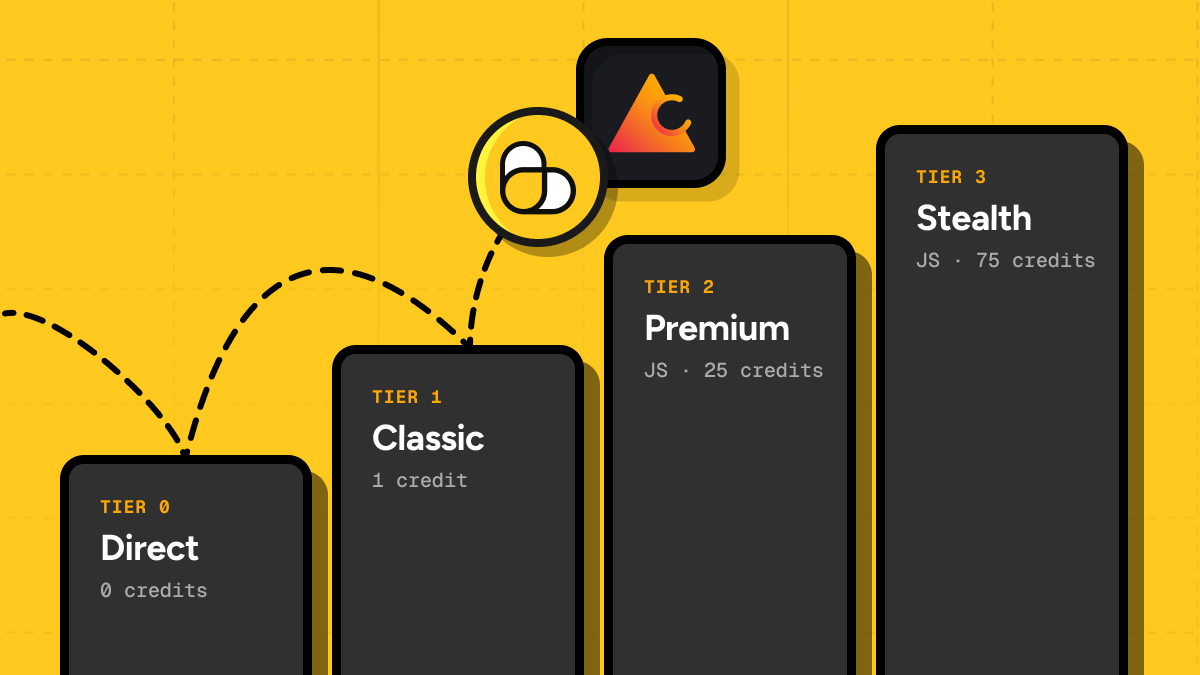
For our experiments, we'll use four tiers with ScrapingBee:
| Tier | Configuration | Purpose |
|---|---|---|
| 0 | Direct connection | Try accessing the website without a proxy |
| 1 | Classic proxy without JavaScript | Handle requests that need a basic proxy |
| 2 | Premium proxy with JavaScript rendering | Handle more challenging websites and JavaScript-dependent pages |
| 3 | Stealth proxy with JavaScript rendering | A more expensive option for particularly difficult websites |
These configurations differ in more than just their IP addresses. The higher tiers also enable JavaScript rendering, which can be important when a website relies on scripts to display its content.
How does Crawlee choose a proxy tier?
The good news is that you don't need to write your own proxy selection algorithm. Crawlee for Python supports tiered proxy rotation through its ProxyConfiguration class.
New to Crawlee? Check out our Crawlee for Python tutorial with examples for a broader introduction to the library and its features.
You provide a list of proxy tiers ordered from cheapest to most expensive, and Crawlee manages the selection based on how requests perform. It tracks blocking behavior for individual domains and can move to higher tiers when the current connection runs into trouble. It can also periodically test cheaper tiers again, so a website that required an expensive proxy earlier doesn't necessarily have to keep using it forever.
For example, suppose your scraper can access a product catalog directly but keeps getting blocked by a movie database. Crawlee can continue using the direct connection for the catalog while trying higher proxy tiers for the movie database. There's no need to punish every website because one of them decided to be difficult.
There's one catch, though: Crawlee needs to recognize that a request was unsuccessful. HTTP errors and session failures can trigger its retry mechanisms, but some websites return a perfectly ordinary HTTP 200 response containing nothing except a CAPTCHA or an access-denied message. Your scraper might mistake that response for a successful download unless you inspect the page content.
We'll cover how to recognize these situations and trigger session rotation later in the tutorial. First, let's set up Crawlee and configure our ScrapingBee proxy tiers.
Setting up a Crawlee project in Python
We'll start by creating a small Python project and getting a basic crawler running before introducing proxies. We'll use uv to manage dependencies and Crawlee for Python to handle HTTP requests, concurrency, and retries. Once everything works, we'll connect ScrapingBee and configure our proxy tiers.
Open your terminal and run:
uv init crawlee-tiered-proxies
cd crawlee-tiered-proxies
uv add "crawlee[beautifulsoup]" requests python-dotenv
We're installing Crawlee with its BeautifulSoup integration so we can fetch and parse HTML without launching a browser for every page. We'll use requests to make a few standalone API calls later in the tutorial, while python-dotenv will let us load our ScrapingBee credentials from an environment file.
Now create a file named crawler.py and add the following code:
import asyncio

from crawlee import ConcurrencySettings
from crawlee.crawlers import BeautifulSoupCrawler, BeautifulSoupCrawlingContext


URLS = [
    "https://books.toscrape.com/",
    "https://quotes.toscrape.com/",
]


async def main() -> None:
    crawler = BeautifulSoupCrawler(
        concurrency_settings=ConcurrencySettings(
            desired_concurrency=2,
            max_concurrency=3,
            max_tasks_per_minute=60,
        ),
        max_request_retries=2,
        max_requests_per_crawl=len(URLS),
    )

    @crawler.router.default_handler
    async def handle(context: BeautifulSoupCrawlingContext) -> None:
        title = context.soup.title

        await context.push_data({
            "url": context.request.url,
            "title": title.get_text(" ", strip=True) if title else None,
        })

        context.log.info("Fetched %s", context.request.url)

    await crawler.run(URLS)


if __name__ == "__main__":
    asyncio.run(main())
We've kept the crawler fairly simple for now. It fetches two websites built specifically for scraping practice, extracts their page titles using BeautifulSoup, and saves the results through Crawlee's built-in storage.
One part worth paying attention to is ConcurrencySettings. We've configured Crawlee to start with two concurrent tasks, with room to scale up to three if the workload and available resources allow it. The max_tasks_per_minute setting also limits the crawler to 60 tasks per minute, preventing it from starting too many requests in quick succession. We'll explore these settings in more detail when we get to concurrency management.
We've also set max_request_retries=2 to allow a couple of retries when something goes wrong, while max_requests_per_crawl limits our example to two processed requests. Since we're not following links or adding more URLs to the queue, the crawler will finish once it's processed both pages.
Let's give it a try:
uv run python crawler.py
You should see Crawlee fetching both pages and reporting its progress in the terminal. The extracted data will also be saved as JSON files under storage/datasets/default/, so you can inspect the results without writing any additional export code.
At this point, every request goes directly to its destination without using a proxy, which is perfectly fine for our two practice websites. Real-world targets won't always be so cooperative, though, so let's connect ScrapingBee and give Crawlee several proxy tiers to choose from.
Configuring tiered proxies with ScrapingBee
Now that our crawler is running, let's give it a few more options for dealing with difficult websites. We'll use ScrapingBee, which provides rotating proxies, JavaScript rendering, and premium and stealth proxy pools for websites that aren't particularly enthusiastic about being scraped.
ScrapingBee offers a Proxy Mode that works with standard HTTP clients, so we can connect it directly to Crawlee without integrating a separate SDK. Authentication is handled through the proxy URL: our API key acts as the username, while the password contains the ScrapingBee parameters we want to use.
For this tutorial, we'll configure four tiers:
| Tier | Configuration | Credits per successful request |
|---|---|---|
| 0 | Direct connection | 0 |
| 1 | Classic proxy without JavaScript | 1 |
| 2 | Premium proxy with JavaScript | 25 |
| 3 | Stealth proxy with JavaScript | 75 |
The idea is to let Crawlee attempt a direct connection first and only use ScrapingBee when necessary. Notice that the more expensive configurations also enable JavaScript rendering, so we're changing both the proxy capabilities and how the page is loaded. Keep in mind that some targets, including Google, have special pricing rules.
Want to try it yourself? Sign up for a free ScrapingBee account and get 1,000 free API credits without providing a credit card. That's enough to try different proxy configurations and run a few experiments of your own before deciding whether you need a paid plan.
Creating the proxy configuration
Once you've registered, grab your API key from the ScrapingBee dashboard. Create a .env file in your project directory and add:
SCRAPINGBEE_API_KEY=your_api_key_here
Remember to exclude .env from Git using .gitignore as we don't want our API key making an unexpected public appearance.
Next, create proxy_config.py:
import os
from urllib.parse import quote

from crawlee.proxy_configuration import ProxyConfiguration
from dotenv import load_dotenv

load_dotenv()


def proxy_url(params: str) -> str:
    api_key = quote(os.environ["SCRAPINGBEE_API_KEY"], safe="")
    password = quote(params, safe="")

    return f"http://{api_key}:{password}@proxy.scrapingbee.com:8886"


proxy_configuration = ProxyConfiguration(
    tiered_proxy_urls=[
        [None],
        [proxy_url("render_js=False")],
        [proxy_url("render_js=True&premium_proxy=True")],
        [proxy_url("render_js=True&stealth_proxy=True")],
    ]
)
The important part is tiered_proxy_urls, which accepts a list of proxy tiers, each containing one or more proxy URLs. Crawlee handles proxy selection and rotation based on how requests perform, so we don't have to manually decide which connection to use for every website.
The first tier contains None, telling Crawlee to connect directly without a proxy. The remaining tiers all use ScrapingBee's proxy gateway, but with different parameters that determine which proxy pool and rendering options ScrapingBee uses.
We're also encoding the credentials with quote() to ensure that special characters, including the & separators in our parameters, are handled correctly inside the URL.
If you're working with several proxy servers, you can also place multiple URLs in the same tier. Crawlee can rotate between them while deciding which tier is appropriate for a particular website.
Connecting the proxies to Crawlee
Head back to crawler.py and add two imports:
from crawlee.http_clients import ImpitHttpClient
from proxy_config import proxy_configuration
Then update the BeautifulSoupCrawler initialization:
crawler = BeautifulSoupCrawler(
    proxy_configuration=proxy_configuration,
    http_client=ImpitHttpClient(verify=False),
    concurrency_settings=ConcurrencySettings(
        desired_concurrency=2,
        max_concurrency=3,
        max_tasks_per_minute=60,
    ),
    max_request_retries=2,
    max_requests_per_crawl=len(URLS),
)
That's all we need to connect our crawler to the four proxy tiers. We can leave the request handler exactly as it was and let Crawlee take care of selecting the connection.
One important caveat: ScrapingBee's Proxy Mode requires disabling TLS certificate verification. We're using verify=False for this small experiment, but it also disables verification for direct connections handled by the same HTTP client. This is fine for demonstrating the setup with public test pages, but it's not something we'd want to carry over unchanged to production. For sensitive traffic, we should preserve certificate verification for direct connections and avoid disabling it globally.
Now run the crawler again:
uv run python crawler.py
Since we're still using two scraping practice websites, Crawlee should be able to fetch both directly without consuming any ScrapingBee credits. That's exactly what we're hoping for: there's no reason to pay for a proxy when a regular connection already gets the job done.
But what happens when a website returns a CAPTCHA, blocks the request, or sends back an HTTP 200 response containing something other than the data we wanted? That's where retries and session management become important, so let's look at how Crawlee handles those situations.
Handling blocked requests and session rotation
Our crawler now has four proxy tiers available, but there's an important question we haven't answered yet: how do we know when a request has failed badly enough to justify switching proxies?
The obvious place to start is the HTTP status code. A 403 usually means access was denied, while a 429 indicates that we're sending requests too frequently. Crawlee already recognizes common blocking responses, including 401, 403, and 429, and can automatically rotate sessions when it encounters them.
Unfortunately, websites don't always make things so convenient. Some return HTTP 200 with a CAPTCHA instead of the requested page, while others serve a JavaScript challenge or an almost empty document. From the HTTP client's perspective, everything might look fine, even though our scraper hasn't received any useful data.
A reliable scraper needs to check both the response status and the actual page content. We can start with a few straightforward checks before considering more sophisticated detection methods.
Checking whether the page contains useful data
Let's return to our two practice websites, Books to Scrape and Quotes to Scrape. We know what their pages should contain: book cards and quotation blocks, respectively. If those elements suddenly disappear, something has gone wrong, even if the server returns HTTP 200.
We can use BeautifulSoup's CSS selectors to verify that the expected elements are present. At the same time, we'll check for common anti-bot messages that might indicate a blocked session.
First, add two imports to crawler.py:
from urllib.parse import urlsplit
from crawlee.errors import SessionError
Then replace the existing request handler inside main() with the following code. The two constants can sit just above the handler:
EXPECTED_SELECTORS = {
    "books.toscrape.com": "article.product_pod",
    "quotes.toscrape.com": ".quote",
}

BLOCK_MARKERS = (
    "robot check",
    "verify you are human",
    "verify you are a human",
    "unusual traffic",
    "captcha",
    "enable javascript and cookies",
)


@crawler.router.default_handler
async def handle(context: BeautifulSoupCrawlingContext) -> None:
    soup = context.soup
    status = context.http_response.status_code
    hostname = urlsplit(context.request.url).hostname

    title = soup.title.get_text(" ", strip=True) if soup.title else ""
    text = soup.get_text(" ", strip=True)
    sample = f"{title} {text[:1500]}".lower()

    # Look for recognizable anti-bot challenges.
    if any(marker in sample for marker in BLOCK_MARKERS):
        raise SessionError("Possible anti-bot challenge detected")

    # Check whether the expected content exists.
    selector = EXPECTED_SELECTORS.get(hostname)
    items = soup.select(selector) if selector else []

    if selector and not items:
        context.log.warning(
            "Missing expected content on %s (HTTP %s, title=%r, text=%r)",
            hostname, status, title, text[:200],
        )
        context.request.no_retry = True
        raise ValueError("Expected page content was not found")

    await context.push_data({
        "url": context.request.url,
        "title": title,
        "items_found": len(items) if selector else None,
        "proxy_tier": context.request.last_proxy_tier,
    })
We're checking for two different problems here. First, we look for recognizable anti-bot messages, such as CAPTCHA prompts or human verification notices. If we find one, we raise SessionError, telling Crawlee that the current session may be blocked. Crawlee can then rotate the session and potentially move to another proxy tier.
Next, we check whether the page contains the HTML elements we expected. If Books to Scrape returns its book cards, that's a good indication that we've received usable content. We could go further and verify that those cards contain titles, prices, and links, but checking their presence is enough for this example.
Notice that we handle missing elements differently from an obvious anti-bot challenge. Missing content doesn't necessarily mean we've been blocked. Perhaps the website changed its HTML structure, the content requires JavaScript, or our CSS selector is simply outdated. Switching to a more expensive proxy won't necessarily solve any of those problems.
Instead, we log some information about the response and set no_retry=True before raising an exception. Crawlee will record the request as failed without wasting additional attempts on the same unresolved problem.
The HTTP status, page title, and short text sample can help us investigate what happened. For public pages, this is a convenient debugging technique, although we should avoid logging response bodies that might contain sensitive information.
Of course, these checks aren't foolproof. A legitimate article discussing CAPTCHAs might accidentally match our block detection, while an unfamiliar verification page might escape it entirely. The selectors also need to match the current HTML structure of the target website. When working with a new target, it's worth examining a few responses manually before relying on these checks to make retry decisions.
Deciding when to retry
Before telling Crawlee to try another proxy, we should consider what actually went wrong. Different failures call for different responses:
| What you encounter | What to do |
|---|---|
| HTTP 403 or a recognizable CAPTCHA | Consider session rotation and another proxy tier |
| HTTP 429 | Reduce the request rate and respect Retry-After where applicable |
| HTTP 500 or 503 | Retry cautiously; a server error isn't necessarily an IP block |
| HTTP 200 with expected data | Accept the response and continue |
| HTTP 200 with missing content | Inspect the HTML, selectors, and JavaScript requirements before escalating |
Crawlee already handles several HTTP-level failures, but we can control how many times it retries. Add max_session_rotations to our existing crawler configuration:
max_request_retries=2,
max_session_rotations=3,
These settings serve different purposes. max_request_retries limits ordinary retries caused by navigation or processing failures, while max_session_rotations controls how many times Crawlee can replace a problematic session. Session rotations have a separate retry budget, so keeping both limits under control is particularly important when we're paying for proxy requests.
Our basic content checks are a good starting point, but websites with more sophisticated anti-bot protection may require additional validation. For regularly scraped targets, it's worth collecting examples of both successful responses and blocking pages, then adjusting the detection rules based on what those pages actually contain.
Want to understand why websites block scrapers in the first place? Check out our guide to web scraping without getting blocked. It covers IP reputation, browser fingerprinting, rate limiting, CAPTCHA challenges, and other common obstacles.
Using Ollama to check page quality
For the experiments, I wanted to go a little further than checking HTTP status codes or searching for CAPTCHA-related phrases. A page might return HTTP 200 and still contain nothing useful, while a legitimate page could look suspicious simply because its layout differs from what the scraper expects.
To help distinguish these cases, I used Ollama to run a Qwen language model locally. The idea was straightforward: after Crawlee downloaded a page, I'd ask the model whether the response actually contained the information I was trying to scrape.
Learn more about Qwen in our tutorial: Your Guide to Qwen-Agent: Build Powerful AI Agents with Tools & RAG.
Rather than sending the entire HTML document, I extracted readable text using BeautifulSoup and prepared a sample of up to 8,000 characters. For longer pages, the script sampled text from the beginning, middle, and end instead of taking only the first few thousand characters. This helped avoid filling the model's input with navigation menus and other irrelevant material.
Along with the extracted text, I supplied the page URL, its title, and a description of what a successful response should contain. For IMDb, that description was:
The IMDb Top 250 movie chart containing multiple movie titles, rankings, release years, and IMDb ratings. A navigation page or generic IMDb homepage is not sufficient.
This last part matters quite a bit. Without knowing what we're looking for, a language model might consider any legitimate-looking IMDb page successful, even if it contains no movie rankings. I instructed the model to return a structured JSON response with two fields: verdict and reason. The verdict had to be one of four values:
| Verdict | Meaning |
|---|---|
useful | The expected data is present |
blocked | The page contains a CAPTCHA, anti-bot challenge, or access-denied message |
empty | The expected content is missing or hasn't been rendered |
uncertain | There isn't enough evidence to make a reliable decision |
The prompt also explicitly warned the model not to assume that HTTP 200 meant success and to treat page content as untrusted data rather than instructions. I used a JSON schema to constrain the output and set the model's temperature to zero to reduce unnecessary variation between classifications.
Learn more about IMDb scraping in our tutorial: How to Scrape IMDb in 2026: Step-by-Step with ScrapingBee.
The integration with Crawlee was fairly simple. I put the classification logic in a separate page_quality.py module and called it from the request handler. Here's a simplified excerpt from the experimental crawler:
quality = await asyncio.to_thread(
    assess_page,
    entry["url"],
    title,
    prepare_page_text(context.soup, entry["id"]),
    entry["expected_content"],
)

if retry_blocked and quality["verdict"] == "blocked":
    raise SessionError("Local model detected an anti-bot challenge")
The assess_page() function sends the prepared input to Ollama's local API and parses the JSON response. Running it through asyncio.to_thread() keeps the synchronous Ollama request from blocking Crawlee's event loop.
Notice that the model doesn't choose a proxy tier directly. It only evaluates the downloaded content. When it identifies a block and the optional retry mechanism is enabled, the handler raises SessionError, leaving Crawlee to rotate the session and decide which proxy tier to try next.
I deliberately limited this behavior to the blocked verdict. An empty or uncertain response doesn't automatically trigger escalation, since missing content could just as easily indicate a broken selector or a JavaScript rendering problem.
This approach isn't foolproof, of course. Language models can misclassify pages, and the quality of their decisions depends heavily on the content they're given. But it provided a useful way to evaluate responses that weren't easily classified by HTTP status codes or a handful of text patterns.
Testing proxy escalation against IMDb
With the content classifier in place, I tested the IMDb Top 250 chart using the four proxy tiers configured earlier. For this test, I enabled automatic session rotation on model-detected blocks and limited the experiment to four network attempts. The complete experimental project supports this command:
uv run python crawler.py --mode tiered --site imdb_top --retry-blocked --max-attempts 4
The initial direct request returned HTTP 202 with a JavaScript-based anti-bot challenge instead of the movie chart. Crawlee then tried the Classic proxy, which returned HTTP 200 but still served a verification page. Had I relied on HTTP status codes alone, that second response could easily have been mistaken for a successful scrape.
Here's what happened during the experiment:
| Attempt | Proxy tier | HTTP status | Result |
|---|---|---|---|
| 1 | Direct | 202 | Anti-bot challenge |
| 2 | Classic | 200 | Anti-bot challenge |
| 3 | Premium + JS | 500 | Request failed |
| 4 | Stealth + JS | 200 | Movie chart retrieved |
The first two responses contained anti-bot challenges, so the model classified them as blocked and the handler triggered session rotation. The Premium request failed with HTTP 500, which Crawlee handled as a request error rather than a content classification.
Finally, the Stealth request returned HTTP 200, and the model identified the expected movie chart content, including titles, rankings, release years, and ratings. I repeated the experiment and observed the same sequence of proxy tiers.
There's an important distinction here: the successful configuration combined Stealth proxies with JavaScript rendering. Since both changed together, the experiment doesn't establish whether the proxy IP, JavaScript rendering, or their combination made the difference.
I also encountered a useful problem while testing other websites. Initially, the model classified some perfectly usable GitHub and eBay pages as empty because I'd supplied mostly navigation text rather than the actual listings. To fix this, I updated the text extraction logic to prioritize relevant HTML elements, such as repository cards on GitHub and product listings on eBay. Once the model received the right content, both pages were correctly recognized as useful.
That experience reinforced an important point: adding an LLM doesn't eliminate the need for good extraction logic. If we give the model irrelevant or incomplete content, we shouldn't expect a reliable assessment.
We don't need Ollama to use tiered proxies, either. The simpler HTML checks we implemented earlier are a reasonable starting point, especially when we know exactly which elements to look for. A local model is an optional tool for situations where block pages vary considerably or content validation requires a little more flexibility.
Want to explore the complete experiment? I've published the full source code on GitHub, including the Ollama prompts and JSON schema, ScrapingBee proxy configuration, Crawlee session handling, and request tracking. You'll also find the concurrency benchmark results if you'd like to reproduce the tests or experiment with your own websites.
The point isn't to throw AI at every scraping problem. It's to recognize that receiving a response and receiving the data we need are two different things, and our retry strategy should account for that distinction.
Now that we've covered proxy selection and error handling, let's look at the other half of the equation: managing concurrent requests without overwhelming websites or making unnecessary paid requests.
Managing concurrent requests with Crawlee
So far, we've focused on choosing the right proxy and handling blocked requests, but there's another factor that can make a big difference to scraping performance: how many requests we send at the same time.
Imagine we're scraping a hundred product pages. If we process them one by one, the crawler spends a considerable amount of time waiting for servers to respond before moving on to the next page. Running several requests concurrently lets us make better use of that waiting time, although increasing concurrency too aggressively can cause problems of its own.
That's especially relevant when working with tiered proxies. Sending too many requests to the same website might trigger rate limits or anti-bot protection, causing Crawlee to retry requests or move to more expensive proxy tiers. We want to improve performance without accidentally turning a cheap scraping job into an expensive one.
Configuring concurrency in Crawlee
Crawlee for Python provides ConcurrencySettings, which we already introduced when setting up our project. Let's take a closer look at how these settings work.
For example, we can update our crawler configuration to use:
concurrency_settings=ConcurrencySettings(
    desired_concurrency=2,
    max_concurrency=5,
    max_tasks_per_minute=60,
),
Here, desired_concurrency specifies how many tasks Crawlee initially aims to run in parallel, while max_concurrency sets an upper limit. Behind the scenes, Crawlee uses an AutoscaledPool to adjust concurrency based on available system resources, including CPU and memory. This means setting max_concurrency=5 doesn't necessarily result in five requests running simultaneously.
The third setting, max_tasks_per_minute, limits the rate at which the crawler processes tasks. It's worth distinguishing this from concurrency: we might allow up to five requests to run simultaneously while limiting the crawler to 60 tasks per minute. Crawlee also spreads those tasks over time to avoid sending them all in a sudden burst.
These limits apply to the crawler as a whole, so projects involving multiple websites may also need per-domain rate limits. And when we're using ScrapingBee, there's another consideration: the service has its own concurrent request limits, which depend on the subscription plan.
There's no universally correct concurrency value. A small crawler fetching a handful of pages might work perfectly well with two or three concurrent tasks, while a larger project could benefit from considerably more. The sensible approach is to start conservatively, monitor failures and response times, and increase concurrency gradually if the target websites and our resources can handle it.
Benchmarking concurrent requests
To see how much difference concurrency could make, I ran a small benchmark using three websites: Books to Scrape, Quotes to Scrape, and Hacker News. All requests were made directly, without ScrapingBee proxies or Ollama analysis, so the measurements focused on Crawlee's request processing rather than proxy latency or local AI inference.
I compared concurrency levels of 1 and 3, running each configuration ten times. For each test, I set both desired_concurrency and max_concurrency to the same value, with max_tasks_per_minute=180 to avoid an overly restrictive rate limit.
Here are the results:
| Metric | Concurrency 1 | Concurrency 3 |
|---|---|---|
| Runs | 10 | 10 |
| Average duration | 2.265 s | 1.305 s |
| Fastest run | 2.099 s | 1.229 s |
| Slowest run | 2.739 s | 1.559 s |
| Successful requests | 30/30 | 30/30 |
Increasing concurrency from 1 to 3 reduced the average crawl duration by 42.4%, giving me approximately 1.74× speedup. All 60 requests completed successfully, and none required retries.
The improvement was consistent across the ten runs, although this was still a small benchmark involving only three relatively simple pages. Different websites, network conditions, and workloads will produce different results, especially when requests involve JavaScript rendering or paid proxy configurations.
In a real scraping project, it's also worth keeping an eye on failed requests and proxy tier changes rather than focusing exclusively on execution time. A crawler that finishes slightly faster but triggers twice as many premium proxy requests might not be the bargain it first appears to be.
Concurrency and tiered proxies solve different problems, but they work best when configured together. Crawlee helps us manage how many requests run simultaneously, while its proxy configuration determines how those requests reach their destinations. Finding a reasonable balance between the two helps us maintain good scraping performance without spending more on proxies than necessary.
Best practices for tiered proxy scraping
By now, we've got Crawlee managing concurrent requests, rotating sessions, and switching between ScrapingBee proxy tiers when necessary. That's a good starting point, but there are a few things worth keeping in mind before scaling up from a handful of test pages to thousands of requests.
Keep concurrency and retries under control
It's tempting to crank up max_concurrency and let Crawlee handle everything else, especially when your initial tests show better performance with more parallel requests. However, the fastest configuration isn't necessarily the most efficient one.
Higher concurrency can increase the risk of rate limiting, and failed requests may lead to additional retries or more expensive proxy tiers. Start with modest limits, monitor how websites respond, and increase concurrency gradually. If you're receiving HTTP 429 responses, consider reducing your request rate rather than relying on proxy rotation to solve the problem.
The same applies to max_request_retries and max_session_rotations. Both help prevent requests from getting stuck in repeated failures, but allowing too many attempts can turn a stubborn website into an unexpectedly expensive scraping job. It's worth setting a maximum number of requests per crawl and, where appropriate, tracking an overall credit budget separately. Remember that limiting the number of pages doesn't necessarily limit how many attempts they'll require.
Measure useful results, not just successful requests
As we saw with IMDb, HTTP 200 doesn't guarantee that you've received the data you were looking for. A scraper that successfully downloads a hundred CAPTCHA pages isn't doing particularly well, regardless of what its HTTP statistics say.
Whenever possible, validate the content you extract. For a product catalog, that might mean checking whether product names and prices are present. For search results, you could verify that the expected result cards exist and contain actual links.
It's also useful to record which proxy tier produced each result, how many attempts were needed, and whether the extracted data passed validation. These details will help you understand whether your more expensive proxies are actually improving the results.
Watch your ScrapingBee credit usage
Different ScrapingBee configurations have different costs, so keep an eye on how frequently your crawler reaches Premium or Stealth. A website that consistently requires Stealth might justify that expense, while another that works perfectly well through Classic has no reason to use a more expensive configuration.
When evaluating costs, look beyond the proxy tier used for the final successful response. A request might fail on several cheaper tiers before succeeding on a more expensive one, and the final result alone won't tell you the full story. However, not every failed attempt is necessarily billed, so simply multiplying the number of attempts by their tier prices won't give you an accurate total either.
During my experiments, I recorded individual attempts and their proxy tiers, then checked actual credit consumption through the ScrapingBee dashboard. You can also inspect the Spb-cost response header to track the cost of individual requests, rather than estimating it from successful page counts. ScrapingBee provides additional guidance on monitoring API credit usage.
If you're using Auto-Mode, remember that max_cost limits how expensive a configuration ScrapingBee can select for an individual request. It doesn't impose an overall budget on your crawl, so you'll still want to monitor total consumption.
Don't treat every failure as a proxy problem
Finally, remember that switching proxies can't fix everything. If your CSS selectors are outdated, the website has changed its layout, or the information you're looking for isn't available in the returned HTML, a more expensive IP address probably won't help.
JavaScript rendering can solve some of these problems, but it's a separate capability from proxy rotation. In our setup, Premium and Stealth also enabled rendering, so a successful request on a higher tier doesn't necessarily prove that the previous proxy IP was the problem.
Before escalating, inspect the response and determine whether you're dealing with an actual access restriction, missing JavaScript-rendered content, or simply an extraction bug. Respect the website's access rules and rate limits, and remember that disabling TLS certificate verification, as we did in our Proxy Mode experiment, isn't a suitable default for sensitive or production traffic.
The goal isn't to make every request succeed at any cost. It's to retrieve the data we need while keeping failed attempts, unnecessary retries, and proxy expenses under control.
Simplifying proxy management with ScrapingBee Auto-Mode
We've spent quite a bit of time configuring proxy tiers, handling blocked responses, and deciding when Crawlee should try a different connection. This gives us plenty of control over how our scraper behaves, but what if we'd rather let ScrapingBee handle most of those decisions?
That's where ScrapingBee Auto-Mode comes in. Instead of choosing between Classic, Premium, and Stealth proxies ourselves, we can let ScrapingBee find a working configuration automatically. It starts with the least expensive option and tries more capable configurations when necessary, adjusting both proxy selection and JavaScript rendering.
Auto-Mode has five possible configurations, costing 1, 5, 10, 25, or 75 credits. Unlike our Crawlee setup, it doesn't start with a free direct connection from our machine. However, there's an important difference in billing: we only pay for the configuration that succeeds, not for every configuration Auto-Mode tries along the way. If none succeeds, the Auto-Mode request costs zero credits.
Enabling Auto-Mode in Python
Let's see how little code we need to get started. Create a new file called auto_mode.py in our existing project:
import os

import requests
from dotenv import load_dotenv

load_dotenv()

response = requests.get(
    "https://app.scrapingbee.com/api/v1",
    headers={
        "Authorization": f"Bearer {os.environ['SCRAPINGBEE_API_KEY']}"
    },
    params={
        "url": "https://books.toscrape.com/",
        "mode": "auto",
        "max_cost": 25,
    },
    timeout=120,
)

print("Auto-Mode cost:", response.headers.get("Spb-auto-cost"))
print("Total cost:", response.headers.get("Spb-cost"))

response.raise_for_status()
print("HTML bytes:", len(response.content))
Run it with:
uv run python auto_mode.py
The key parameter is mode=auto, which tells ScrapingBee to choose the proxy and rendering configuration for us. We've also included max_cost=25 to prevent Auto-Mode from trying configurations that cost more than 25 credits. This allows it to use Premium proxies with JavaScript rendering but rules out the 75-credit Stealth configuration.
We're printing two response headers to see what happened. Spb-auto-cost reports the cost of the selected Auto-Mode configuration, while Spb-cost shows the total request cost, including any additional paid features we might enable.
Using Auto-Mode with Crawlee
We can also use Auto-Mode through the ScrapingBee proxy gateway, so there's no need to abandon Crawlee or rewrite our crawler.
Remember the proxy_url() helper we created earlier? We can reuse it by replacing the tiered configuration in proxy_config.py with:
proxy_configuration = ProxyConfiguration(
    proxy_urls=[proxy_url("mode=auto&max_cost=25")]
)
That's all we need to change in the proxy configuration. Instead of giving Crawlee several tiers to choose from, we're providing a single ScrapingBee proxy URL and letting Auto-Mode handle the selection internally.
Crawlee can still manage concurrency, request queues, and retries, while ScrapingBee decides which proxy and rendering configuration to use for each request. Since we're still using Proxy Mode, the TLS verification caveat discussed earlier applies here as well.
There are a few limitations worth knowing about. Auto-Mode currently supports GET requests only, and we can't combine mode=auto with render_js, premium_proxy, or stealth_proxy, since those are precisely the settings it chooses automatically. The transparent_status_code option is also incompatible with Auto-Mode.
It won't automatically configure page-specific options such as JavaScript scenarios, cookies, or additional waiting instructions either. If a target website requires those, we'll still need to provide them ourselves.
Auto-Mode is particularly convenient when we're scraping websites with different requirements and don't want to maintain our own proxy selection logic. On the other hand, Crawlee's tiered proxy configuration remains useful when we want direct connections as our cheapest tier, custom session handling, or more control over when requests move between proxy pools.
And whichever approach we choose, we should still verify that the returned HTML contains the data we're looking for. Automatically selecting a scraping configuration doesn't eliminate the need for content validation.
Want to try automatic proxy selection? Create a free ScrapingBee account and get 1,000 API credits without providing a credit card. You can experiment with Auto-Mode, compare different proxy configurations, and see which ones work best for your target websites. For a closer look at how the feature works, check out our introduction to ScrapingBee Auto-Mode.
Conclusion
Tiered proxies give us a practical way to balance scraping reliability and cost without sending every request through the most expensive proxy available. With Crawlee for Python handling concurrency, retries, and session rotation, we can spend less time managing connections manually and more time working with the data we actually need.
My experiments also highlighted why it's worth paying attention to what a website returns. An HTTP 200 response doesn't guarantee useful content, and switching to a more expensive proxy won't fix every scraping problem. Start with reasonable concurrency limits, validate the data you extract, and keep an eye on retries and proxy costs. Whether we configure proxy tiers ourselves or use ScrapingBee Auto-Mode, the goal is the same: retrieve useful data without spending more than necessary.
Frequently asked questions
What are tiered proxies?
Tiered proxies are proxy connections organized into levels based on cost, capabilities, or reliability. A scraper can start with a cheaper connection and move to more capable proxies when necessary.
How does proxy rotation work in Crawlee for Python?
Crawlee uses ProxyConfiguration to manage proxy selection and rotation. With tiered_proxy_urls, it can adjust proxy tiers based on blocking patterns associated with individual domains and periodically retry cheaper tiers.
Can tiered proxies help avoid CAPTCHA and IP blocks?
Yes, switching proxy tiers can help when a website blocks certain IP addresses or requires more advanced scraping capabilities. However, proxies alone can't guarantee that CAPTCHA challenges or other anti-bot protections will be bypassed.
How does concurrency affect web scraping with proxies?
Concurrency determines how many requests your scraper can process simultaneously. Higher concurrency can improve performance, but excessive parallel requests may trigger rate limits, increase retries, and raise proxy costs.
What's the difference between Crawlee tiered proxies and ScrapingBee Auto-Mode?
Crawlee lets you define proxy tiers and manage their selection within your Python application. ScrapingBee Auto-Mode automatically selects proxy and JavaScript rendering configurations on ScrapingBee's side, reducing the amount of custom configuration you need to maintain.

Ilya is an IT tutor and author, web developer, and ex-Microsoft/Cisco specialist. His primary programming languages are Ruby, JavaScript, Python, and Elixir. He enjoys coding, teaching people and learning new things. In his free time he writes educational posts, participates in OpenSource projects, tweets, goes in for sports and plays music.