Computer vision web scraping starts with what the browser displays rather than the page's markup. This tutorial uses Playwright to capture a page, a UI-trained YOLO model to locate visible regions, optical character recognition (OCR) to read them, and Python to validate the records. It tests the pipeline on two controlled layouts and a spacing variant, then compares it with two selector approaches. The results include a missed detection and show when a locator is simpler.
The example uses a local fixture so its products and layouts stay fixed while you debug the detector. The companion archive supplied with this draft contains the complete script, fixture, screenshots, and raw results. The code blocks below are excerpts from that tested script.
TL;DR: from rendered pixels to JSON
Playwright renders the fixture at a fixed viewport and saves a screenshot. ScreenParser, a detector built on the You Only Look Once (YOLO) architecture and trained on user-interface elements, returns boxes, class names, and confidence scores. OCR reads selected boxes. Python pairs names with prices, rejects incomplete records, clicks the detected Next button, and repeats extraction on page two.
Here, selector-free means the scraper does not use CSS or XPath selectors to find the product text or Next button. It still uses a DOM locator to check that the fixture is loaded, and it depends on a fixed viewport, model detections, OCR, and validation rules. The test also shows that a shared DOM selector extracts all the records with less machinery.
When visual web scraping helps
CSS selectors identify nodes in a page's document object model (DOM). They are usually the simplest way to scrape a site with meaningful HTML, stable attributes, and accessible controls. Playwright locators also support roles and visible text, which can survive class-name changes. A new CSS class alone is therefore not a reason to add a detector.
Rendered pixels become a useful fallback when the relevant content is drawn into a canvas, sits inside an image, or appears in repeated layouts whose DOM structure differs but whose visual relationships remain recognizable. A coordinate click may also help when a visible control has no dependable semantic locator. These are narrower cases than “all sites with JavaScript.” Playwright already renders JavaScript without YOLO.
The cost is real: the browser must render the page; the model must detect the right region; OCR must read it; and your grouping rules must assign it to the right record. A visual scraper can survive one kind of HTML change while failing on a new font, an overlay, or an unexpected mobile breakpoint. Treat the screenshot and intermediate detections as test artifacts, not disposable implementation details.
What Playwright, YOLO, and OCR actually do
| Component | Role in this example | Does not do |
|---|---|---|
| Playwright | Render the page, capture its visible viewport, and click coordinates | Decide which pixels represent a product |
| UI-trained YOLO | Locate visual regions and assign UI classes | Read a price or understand a product schema |
| OCR | Turn a selected image crop into text | Know which product owns a price |
| Validation code | Pair fields by row position and reject bad records | Repair a missed detection automatically |
The model choice matters. A standard YOLO checkpoint trained on everyday objects should not be expected to recognize buttons or pagination. ScreenParser is trained for interface elements, but its model card warns that results can vary outside its training distribution. This test saves confidence scores and annotated screenshots so you can inspect what it actually found.
Set up the reproducible example
The test ran on macOS 27.0 (arm64) with Python 3.12.14, Chrome 154.0.8037.57, and Tesseract 5.5.3. The companion requirements.txt pins Playwright 1.55.0, Ultralytics 8.3.203, PyTorch 2.14.0, Pillow 12.3.0, and pytesseract 0.3.13. The script checks the SHA-256 of the ScreenParser checkpoint before starting. Its full revision and checksum are in the setup command and companion README.
From the companion directory, after installing Python 3.12, Chrome, and Tesseract, run:
python3.12 -m venv .venv
.venv/bin/python -m pip install -r requirements.txt
mkdir -p models
MODEL_REV="f029e565f1206577402e43206454522075be3f72"
MODEL_BASE="https://huggingface.co/docling-project/ScreenParser/resolve"
curl -L --fail --silent --show-error \
  "$MODEL_BASE/$MODEL_REV/best.pt" \
  -o models/screenparser-best.pt
shasum -a 256 models/screenparser-best.pt
.venv/bin/python scraper.py --layout a --output-dir runs/a
.venv/bin/python scraper.py --layout b --output-dir runs/b
.venv/bin/python scraper.py --layout b-compact --output-dir runs/b-compact
The checksum must read dbcb4f583ccfdb8100a68e606525c247890a2de4c1a54b14741e0ee29ce0ab88. The pinned download was verified against that value. The compact B command exits with status 1 because it misses one record. Use --chrome if Chrome is installed elsewhere. The model card lists Apache-2.0 for the checkpoint; Ultralytics has separate AGPL-3.0 or enterprise terms for its software.
The fixture serves the same records through two layouts. Layout B changes the parent class, card layout and spacing, and visual name/price order without changing the expected JSON or the DOM order of the child fields. It does not simulate a responsive breakpoint or every production redesign. Keeping the data fixed lets us see which failures belong to perception or grouping rather than the source.
Page one contains Cedar Lamp, Linen Basket, and Stone Mug. Page two contains Oak Desk, Glass Vase, and Wool Throw. The evaluator reads these six records from fixture/expected.json after extraction; the visual scraper does not read that file to find products. The compact variant changes only B's card spacing, so a changed result points to the detector or grouping rather than a different catalog.
Capture a viewport screenshot with Playwright
The capture step in scraper.py creates a 1280 by 960 viewport and asks Playwright for a viewport-only PNG:
context = browser.new_context(viewport=VIEWPORT, device_scale_factor=1,
                              locale="en-US", color_scheme="light")
page = context.new_page()
page.goto(FIXTURE.as_uri() + f"?layout={layout}&page=1", wait_until="load")
page.locator("	#catalog article").first.wait_for(state="visible")
page.screenshot(path=str(screenshot), full_page=False, scale="css")
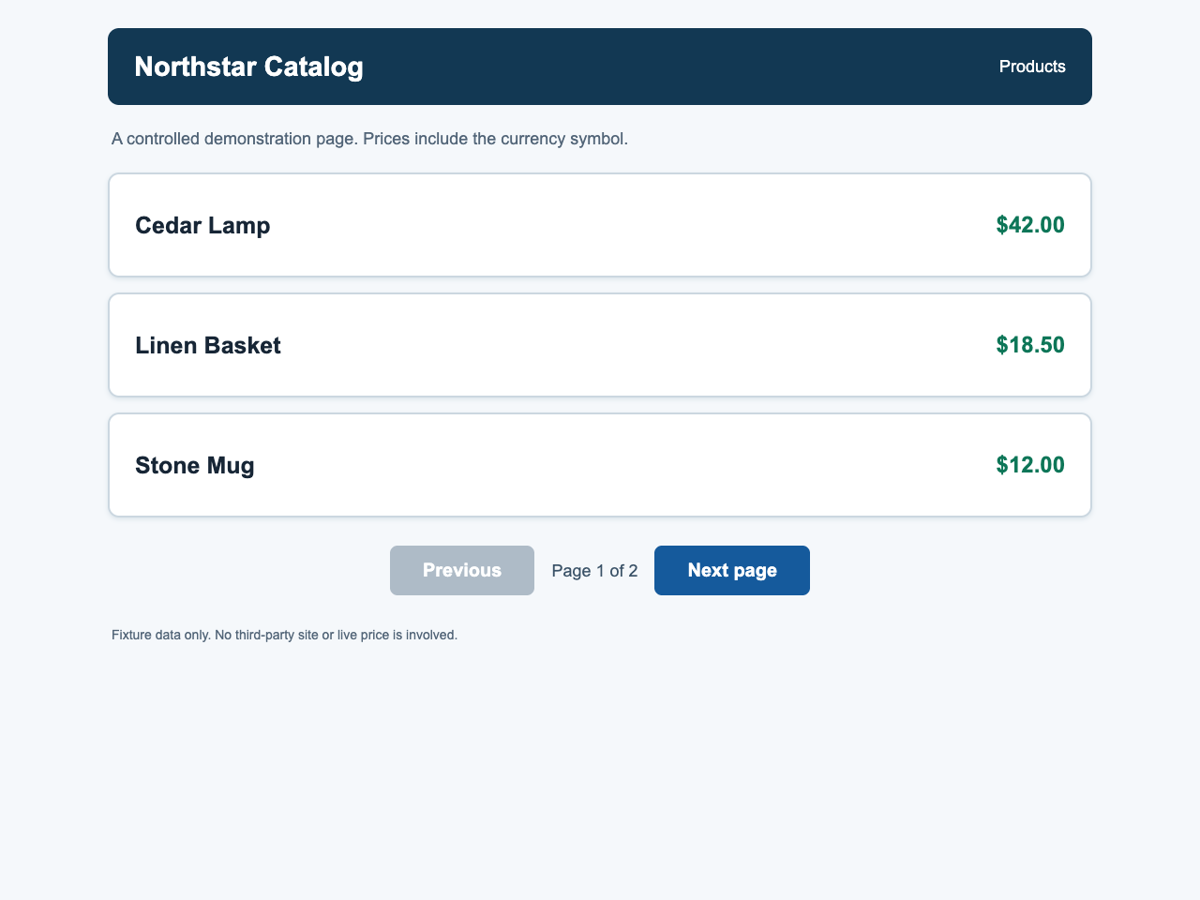
The saved viewport image shows three product rows and the Next button. This is the input passed to ScreenParser; the next figure shows what the model detected.
The DOM locator only confirms that the fixture is loaded; it does not locate a product or the button. Without this check, a slow page load could look like a detection failure.
With device_scale_factor=1 and scale="css", each screenshot pixel maps to one CSS pixel. Playwright's page.mouse.click(x, y) uses viewport-relative CSS coordinates, so the script can click the center of a detected box without scaling. A full-page image would also include content outside the viewport; you would need to scroll and convert its coordinates before clicking. See the Playwright screenshot reference and mouse reference.
The script saves the exact screenshot it passes to YOLO, which lets you inspect any missed detection later. For other sites, replace the fixture-ready locator with a condition that shows the data you need has loaded; Playwright discourages using networkidle as a general readiness test.
Detect interface regions with UI-trained YOLO
The detect() function runs the UI model and saves an annotated screenshot. It also records OCR text for predicted Text and Button boxes:
result = model.predict(str(screenshot), imgsz=1280, conf=0.10, iou=0.10,
                       device="cpu", verbose=False)[0]
result.save(filename=str(annotated))
for raw in result.boxes:
    label = model.names[int(raw.cls[0])]
    box = [round(float(value), 2) for value in raw.xyxy[0]]
    confidence = round(float(raw.conf[0]), 4)
The 0.10 confidence threshold retains weak text candidates for this fixture; it is not a general recommendation. Each page-*-detections.json file records predictions above that threshold with their class, box, confidence, and OCR text. The record builder later discards boxes that do not form valid product rows.
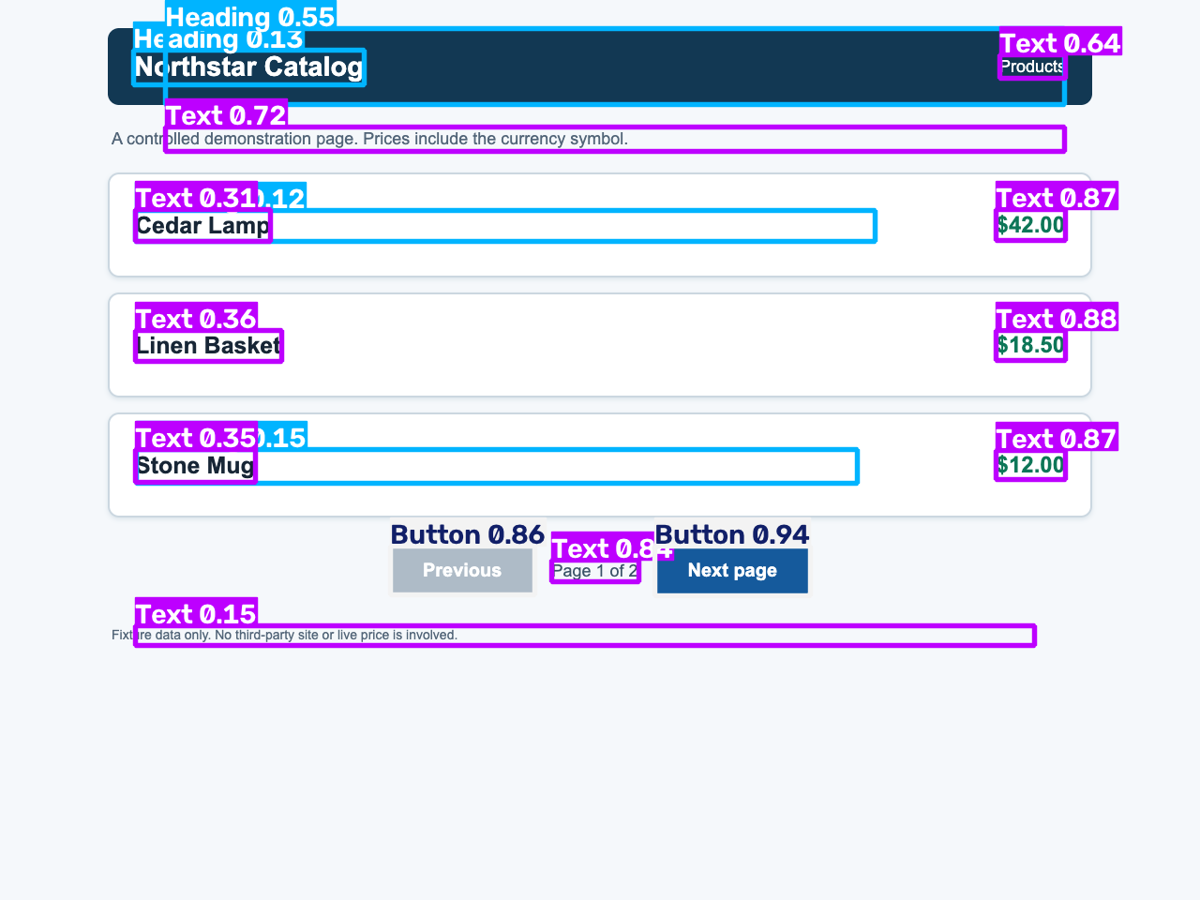
The detector finds names, prices, and the Next button on layout A. It also marks header and footer text, which the record builder discards.
The screenshot shows boxes around names, prices, the Next button, and some unrelated header and footer text. ScreenParser did not find a reliable product-card boundary, so the script pairs text boxes by row position. A Text label alone does not tell it whether a crop contains a name, a price, or page furniture. Compact B later shows a different failure: the visible name has no box at all.
Read detected text and validate records
The OCR stage enlarges each selected crop to three times its size and reads it with Tesseract's --psm 6 setting. The record builder looks for a price-shaped string, then pairs it with the nearest non-price text box whose vertical center is within 26 pixels. The tested core is:
prices = [item for item in texts if PRICE_RE.search(item.ocr)]
names = [item for item in texts if not PRICE_RE.search(item.ocr)]
for price in sorted(prices, key=lambda item: item.center[1]):
    candidates = [(abs(price.center[1] - name.center[1]), idx, name)
                  for idx, name in enumerate(names)
                  if idx not in paired_ids and abs(price.center[1] - name.center[1]) <= 26]
    if not candidates:
        continue
The full function normalizes the price, accepts names matching the fixture's two-to-four-word pattern, and writes page, name, and price. For example, OCR produced Cedar Lamp and $42.00 in layout A; the JSON record is {"page": 1, "name": "Cedar Lamp", "price": "$42.00"}. A real site needs its own price formats, name rules, and representative test pages.
The 26-pixel row tolerance belongs to this fixed viewport. A different font size or zoom level could break pairing even if YOLO detects both fields correctly.
The script saves unpaired text and rejected prices with reasons in run-summary.json. This makes an OCR or grouping error visible instead of silently adding a bad record. In compact B, page two, OCR read $65.00, but the record builder rejected it because YOLO did not detect a name in the same row.
Tesseract is a separate executable, not just a Python import. Its installation guide covers the engine and language data; its quality guide explains why crop size, borders, and page segmentation affect short text.
Click a detected control without a selector
The model labeled the page-one Next control as Button, and OCR read Next page. The script requires exactly one such button before clicking its box center:
def next_button(detections: list[Detection]) -> Detection:
    buttons = [item for item in detections
               if item.label == "Button" and item.confidence >= 0.50
               and "next" in item.ocr.lower()]
    if len(buttons) != 1:
        raise RuntimeError(f"Expected one confident OCR-labeled Next button; found {len(buttons)}")
    button = buttons[0]
    x, y = button.center
    if not (0 <= x < VIEWPORT["width"] and 0 <= y < VIEWPORT["height"]):
        raise RuntimeError(f"Next button center outside viewport: {(x, y)}")
    return button

button = next_button(detections)
page.mouse.click(*button.center)
page.wait_for_url("**/index.html?layout=" + layout + "&page=2")
The URL check passed in all three runs. The script then takes a fresh screenshot because navigation invalidates the old boxes. Coordinate clicks lack Playwright locator actionability checks, and an overlay could intercept one on a live site. Use a role or text locator when it reliably identifies the control.
Compare visual extraction with selectors
The test uses six expected records on two pages. The A-specific CSS baseline begins at .product-card and is intentionally left unchanged on B. A second, shared selector uses article plus the .name and .price children, which remain present in both layouts. This second selector is the fairer comparison for the fixture.
| Layout | Visual records | A-specific CSS | Shared selector | Run wall time |
|---|---|---|---|---|
| A | 6/6 | 6/6 | 6/6 | 4.338 s |
| B | 6/6 | 0/6 | 6/6 | 3.426 s |
| B compact | 5/6 | 0/6 | 6/6 | 3.495 s |
The shared baseline uses the structure that all fixture versions retain:
for card in page.locator("article").all():
    result.append({"page": page_number,
                   "name": card.locator(".name").inner_text(),
                   "price": card.locator(".price").inner_text()})
Those selectors are enough here. The A-specific baseline fails because it insists on .product-card, a class that B replaces. Keeping both baselines in the test matters: showing only the fragile one would make vision look necessary when a small selector change solves the fixture.
These are exact record matches against fixture/expected.json. Compact B missed one record; none of the runs produced a false record. The wall clock starts at browser launch and ends after both page captures, model and OCR passes, both selector reads, the coordinate click, and browser close. It excludes model loading and setup. Each case was run once, and the selectors were not timed separately, so these numbers do not compare method speed.
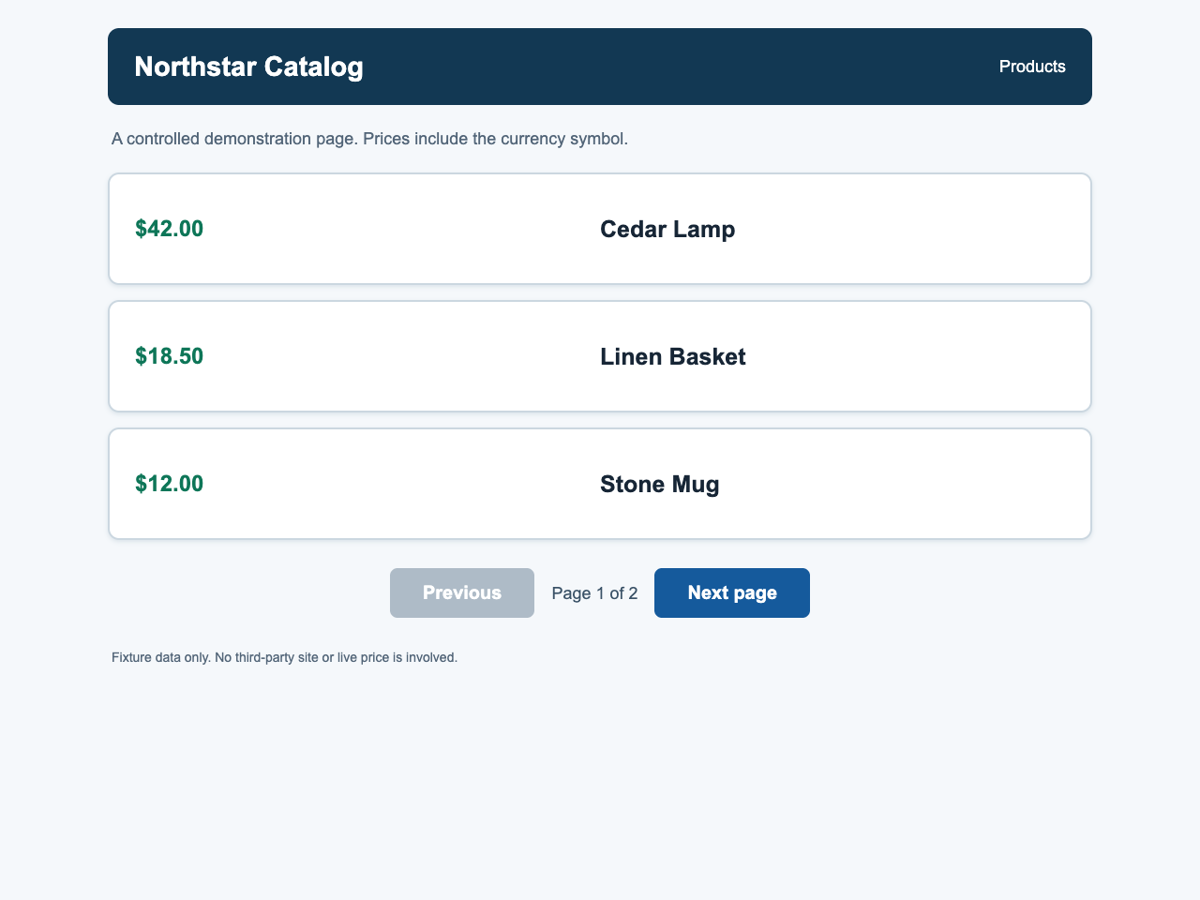
Layout B keeps the same products but puts the prices on the left and changes the card container. The shared selector still reads the unchanged name and price fields.
The compact variant changes only B's card height from 120 to 112 pixels and its vertical padding from 24 to 21 pixels. On its second page, ScreenParser detected $65.00 but did not draw a box around the adjacent Wool Throw text. The record builder saved the reason “no name text detected in the same row” for the orphan price. OCR did not get a chance to read the missing name, so changing the price parser would not fix it. Across both compact pages, the visual path read all six prices and five of six names used for records.
The shared selector returns all six records in every case, including compact B, with no model or OCR. On this fixture, selectors are simpler and more reliable. The visual approach is useful when the DOM has no equally dependable target.
This small controlled test cannot establish a general accuracy rate or a speed advantage on real sites.
The compact run's annotated screenshot shows the missing detection:
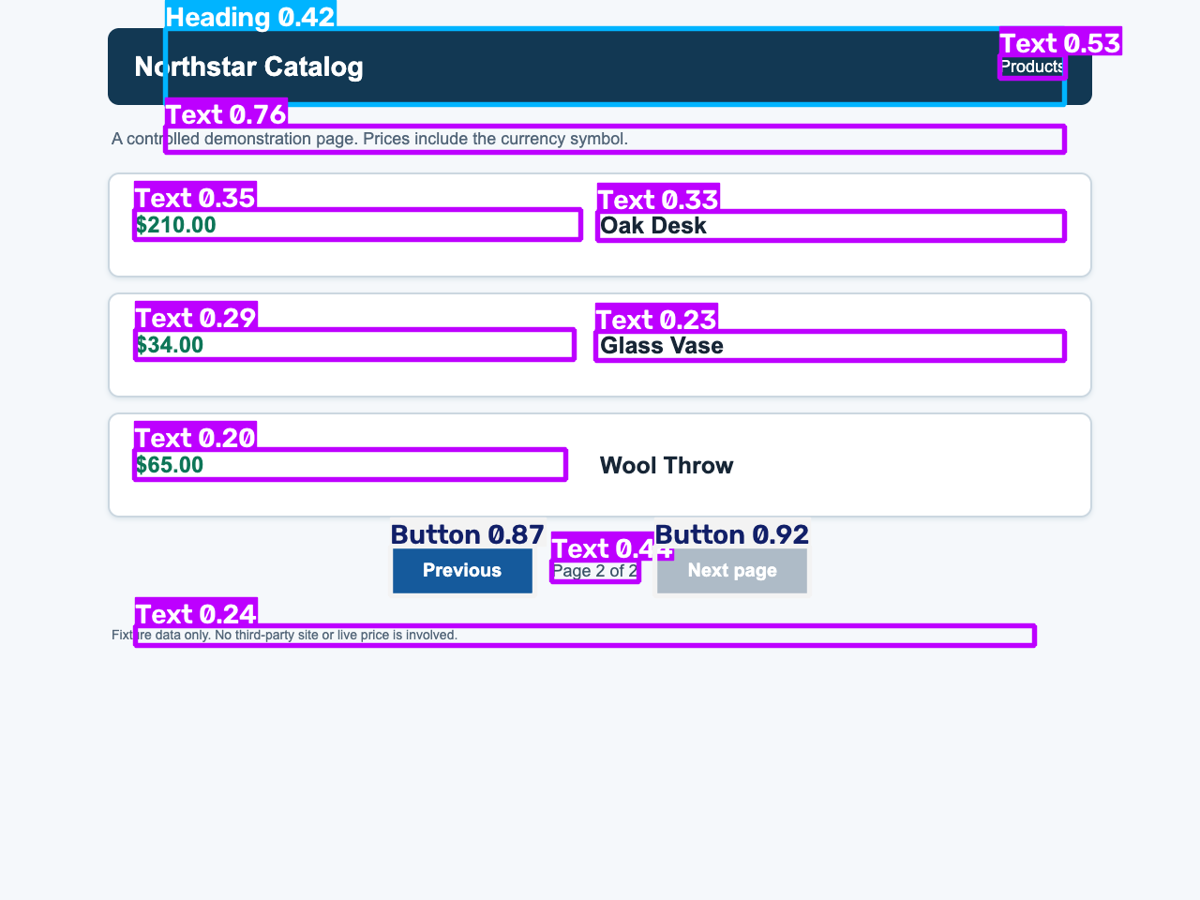
Compact layout B, page two: the price has a purple Text box, but the visible Wool Throw label has no detection box. The resulting record is absent from JSON.
Diagnose visual scraper failures
If every box looks shifted, check the screenshot scale, viewport size, and scroll offset before changing the model. If boxes are correct but names or prices are wrong, inspect the actual crops and raw OCR text. A tight crop can remove characters, while an oversized crop can pull text from the next card. If detections disappear after a page transition, check whether an overlay, lazy-loading state, or animation changed the rendered image.
Localization adds a separate problem: a price parser that accepts €19.99 may mishandle 19,99 €. Change normalization and schema checks only after looking at the source text. When a site-specific detector requires frequent retraining to follow modest design changes, compare that maintenance cost with a locator or an available API. “Self-healing” should be a measured behavior, not a label for using AI.
Where ScrapingBee fits
The local tutorial uses Playwright because it needs an interactive browser page for the coordinate click. Visual detection solves a different problem from page access. It does not provide proxy rotation, remove rate limits, bypass authorization, or resolve a site's terms.
If managed page access and screenshot capture are the bottleneck, ScrapingBee's screenshot API can return a JavaScript-rendered image with render_js=true; the API also exposes viewport-size and full-page options. That image could be passed to the same detector and OCR stages. It is an image response, not the live Playwright page used by this example's page.mouse.click(). ScrapingBee's AI extraction options are another route to structured page data and should not be described as running YOLO on screenshots unless that behavior is documented.
Choose the least complicated extraction method
Start with a direct API if the site exposes the needed data and you are authorized to use it. Otherwise, try semantic Playwright locators or stable attributes. Add screenshot detection when the pixels are the most dependable interface you can access and you can test the model, OCR, and validation rules on representative pages. Keep diagnostics and a review path for rejected records. A visual pipeline is justified by its measured success on your pages, not by the word “AI.”
FAQ
Can a standard YOLO model detect web buttons?
Only if it was trained for the relevant interface classes. A general object-recognition checkpoint is not a drop-in UI detector. This example uses the UI-trained ScreenParser checkpoint and still verifies its predictions.
Why is OCR needed if YOLO found the box?
The box says where a region is and what visual class it resembles. OCR reads the characters in that region. Validation code then decides whether those characters form a usable field.
Are image coordinates the same as Playwright click coordinates?
In this example they align because the screenshot is limited to the viewport and uses scale="css" at a fixed viewport. Device-scale screenshots or full-page images require an explicit scale and scroll conversion before clicking.
Is visual scraping more reliable than CSS selectors?
That depends on the page. Selectors can survive visual redesigns, while a visual detector may survive HTML refactoring. Test both against the changes you expect, including OCR mistakes and missing boxes, rather than assuming one always wins.
Is web scraping legal?
The answer depends on the jurisdiction, data, access method, terms, privacy obligations, and intended use. Public visibility alone is not blanket permission. robots.txt is a crawler instruction standard, not an access authorization system. Review the site's conditions and applicable law before collecting data, especially personal data. See RFC 9309 and GDPR Article 6.
Can ScrapingBee replace Playwright in this example?
It can supply a rendered screenshot for downstream detection when that fits the task. The coordinate-click stage needs a live browser session, so the tutorial keeps Playwright for that interaction.

Pablo del Arco is a cloud engineer and technical writer based in Valencia, Spain. He builds Kubernetes and edge infrastructure for EU innovation projects and writes hands-on guides on web DevOps, automation, and AI agents.