LLM-driven browsers are browsers and fetchers that a language model operates on a person's behalf. Examples include Perplexity's Comet, ChatGPT's browsing, Claude computer use, and your own Playwright MCP agent. Anti-bot systems from Cloudflare, DataDome, Akamai, and HUMAN inspect and classify that traffic.
Bots block bots when legitimate agents look like scrapers, with datacenter IPs, headless fingerprints, machine-like input, and User-Agent strings that a site can't verify. Other blocks are the site owner's policy toward agents.
This guide measures those signals across common agent stacks and shows where legitimate fixes end and evasion begins.
TL;DR
- Production changes agent signals. Playwright MCP and Browser Use run headless by default on Linux servers without a display, so cloud deployments often combine HeadlessChrome with a datacenter IP.
- Impersonating another agent failed. Akamai's and HUMAN's sites refused OpenAI's ChatGPT-User string from our machine 6 of 6 times.
- Some blocks are policy. Since September 15, 2026, Cloudflare's preset for new ad-supported sites blocks agents on pages with ads, and verified agents aren't exempt.
- Managed infrastructure passed the challenge. Every headless stack we tested failed a Cloudflare challenge, but ScrapingBee's Stealth proxy returned the real page 3 of 3 times.
What "bots block bots" means for LLM-driven browsers
An anti-bot system sits in front of a website and classifies each request as a person, allowed automation, or unwanted automation. It then serves, challenges, or blocks the request. LLM-driven browsers are one more kind of traffic to classify, and the browser-based ones run JavaScript and store cookies like any other browser.
Agent traffic comes from fetchers that an AI provider runs, browsers that a user runs, and agent stacks that you build. Most providers document how their fetchers identify themselves, and we captured the Claude-User string from a live request:
| Agent | What it sends | How a site can verify it | robots.txt, per the vendor |
|---|---|---|---|
| ChatGPT-User (OpenAI) | ChatGPT-User/1.0 token | Published IP list | May not apply to user-initiated visits |
| ChatGPT Work cloud browser (OpenAI's successor to Operator and ChatGPT agent) | A Web Bot Auth signature for chatgpt.com | Signature check | Not stated |
| Claude-User (Anthropic) | Claude-User/1.0 token | Published IP list | Honored |
| Perplexity-User | Perplexity-User/1.0 token | Published IP list | Generally ignored |
| Google-Agent | Google-Agent token | Published IP list, plus signatures on some requests | Generally ignored for user-triggered fetches |
| Comet, Claude in Chrome | A Chrome identity with no documented agent token | No documented method | Not stated |
| Your Playwright MCP or Browser Use agent | Whatever your Chromium build and host send | Nothing, unless you sign | Your decision |
An anti-bot system can't see intent directly. A scraper farm and a helpful agent can send identical signals:
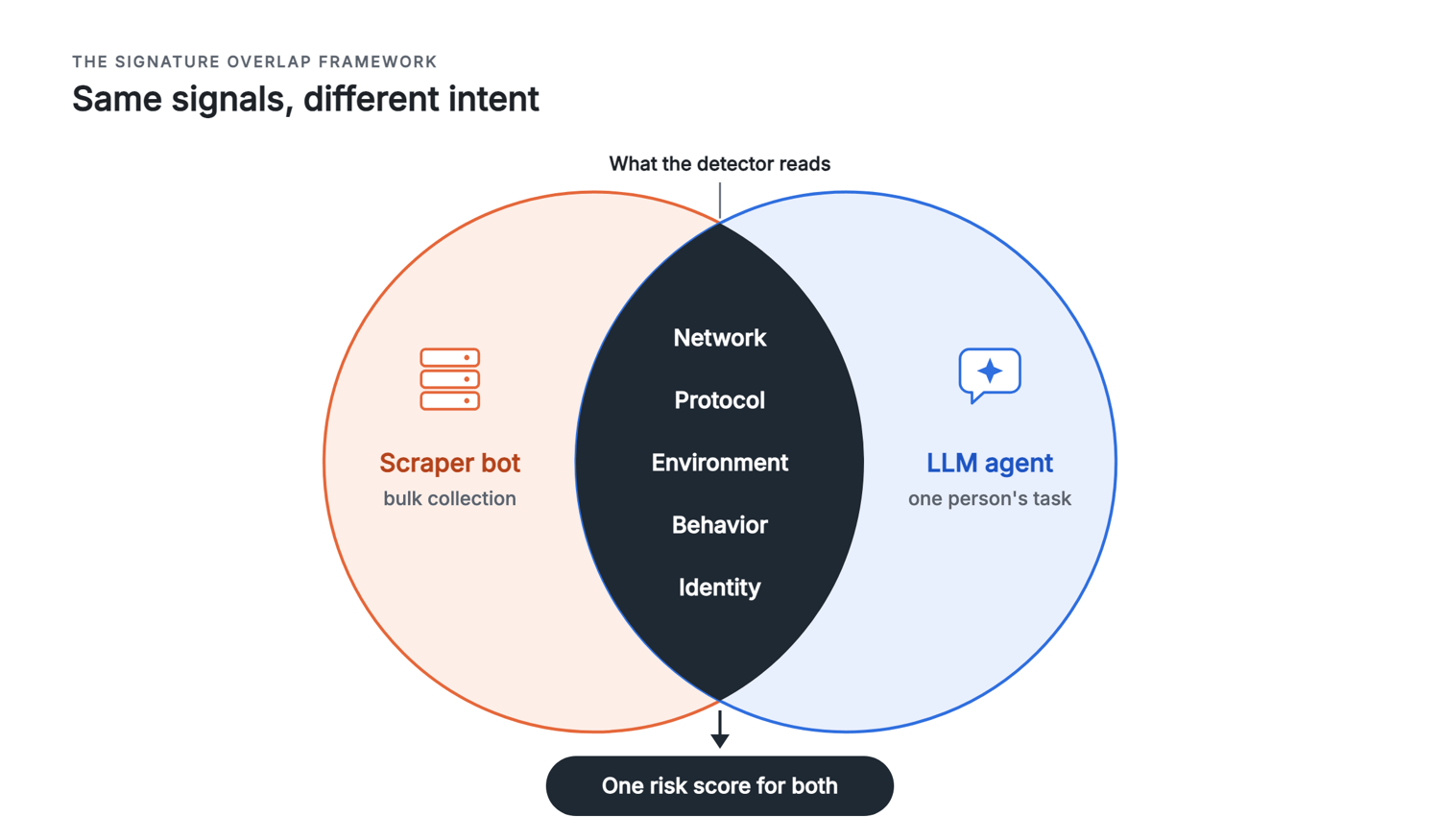
Matching inputs produce a matching risk score.
Antoine Vastel of Castle argues the same in a bot-detection researcher's analysis of AI agents. Intent is hard to verify, so detection still depends on client, automation, infrastructure, and behavior signals.
The Signature Overlap Framework: five layers where agents look like scrapers
The Signature Overlap Framework groups what an anti-bot system reads into five layers, each with a fix that doesn't spoof an identity:
| Layer | What detectors check | What default agent stacks sent | Legitimate fix |
|---|---|---|---|
| Network | IP type, autonomous system number (ASN) reputation, geolocation | An IP address in a datacenter ASN, even from Claude's web fetch tool | Residential or ISP exit IPs, with rate limits you'd accept on your own site |
| Protocol | TLS ClientHello (JA4), HTTP/2 settings, Client Hints | Library TLS stacks, HTTP/1.1, a Chrome User-Agent string over non-Chrome TLS | A full browser engine throughout the request path |
| Environment | navigator.webdriver, Chrome DevTools Protocol (CDP) traces, headless brands, WebGL | webdriver set to true, HeadlessChrome, a SwiftShader software renderer | Headed, full browsers, plus the network fix. Do-it-yourself patches can add inconsistencies |
| Behavior | Pointer paths, key timing, isTrusted, pacing | One direct pointer movement per click, keystrokes about 8 ms apart, synthetic events | Fewer UI actions, caching, and pacing, never faked mouse movement |
| Identity | User-Agent tokens, IP lists, reverse DNS, signatures | A default Chrome User-Agent string or an unsigned token | Your own token plus Web Bot Auth, never another company's token |
Our measurements come from one Mac on a residential connection and one cloud server. Each result is an observation of a named configuration, not a rate, so you can rerun it on your own stack.
Network layer
A laptop test on a home connection doesn't reproduce the network of a typical cloud deployment, because its traffic comes from a residential IP. An agent deployed in a cloud region sends a datacenter IP unless it routes through a proxy. Even Claude's web fetch tool reached us from AS396982, Google Cloud's network.
We ran our agents on a GitHub Actions server in Microsoft's Azure network. Every cloud-server run stopped at a Cloudflare challenge. From a residential connection, headed Browser Use passed the same challenge.
A University of Bamberg crawl of the Tranco top 10,000 sites ran from a Hetzner datacenter. It measured how often default Playwright browsers received status codes associated with blocking. Headless Chromium received a 403, 429, or 503 on 15.2% of sites, and headed Chromium and Firefox received one on 6.8% to 7.2%.
Protocol layer
The TLS handshake fingerprints the HTTP client before any page loads. Its JA4 fingerprint, a short code built from the handshake, was t13d1812h1 for Python's requests and t13d1517h2 for Chromium 153. Chromium 153 also negotiated the post-quantum key exchange X25519MLKEM768, which Cloudflare's /cdn-cgi/trace shows in an undocumented kex field, while requests and curl used plain X25519.
Playwright's headless shell changes the handshake as well. The chromium-headless-shell build that Playwright uses for headless=True sent 16 TLS extensions, and full Chromium sent 17. It was missing 0xca34, BoringSSL's trust anchors extension.
A detector can compare each value with the browser that the User-Agent string claims. A Chrome User-Agent string sent over a Python handshake fails that comparison.
Environment layer
Playwright 1.63 keeps navigator.webdriver set to true in all three modes we tested, and its own test suite asserts that value. Playwright MCP 0.0.82 and Browser Use 0.13.10 add --disable-blink-features=AutomationControlled by default to hide that flag.
A comment in the Browser Use launch profile states the goal as "we mask the automation fingerprint via JS and other flags." When you don't set a headless option, both frameworks switch to headless on a Linux server without a display, which is a common production setup. The Playwright MCP config sets this default in code, and Browser Use does the same.
The fingerprint test on deviceandbrowserinfo.com produced different results for two default stacks:
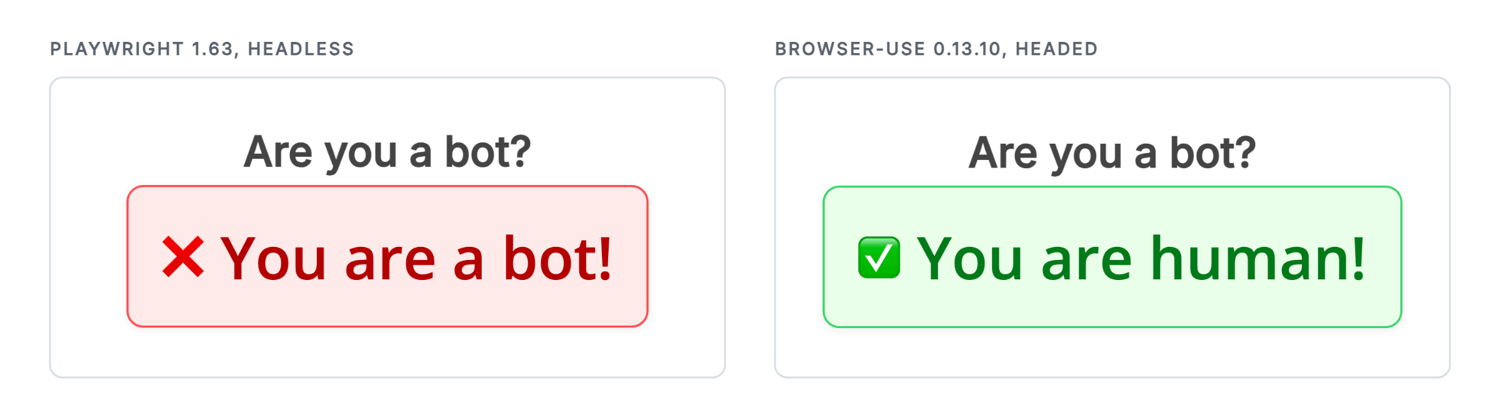
Same page, same machine, one visit each.
The test also reports which checks triggered for each stack:
| Stack and mode | Classified as | Checks that triggered |
|---|---|---|
| Playwright 1.63, headless shell | Bot | HeadlessChrome User-Agent, webdriver, CDP control, timing |
| Playwright 1.63, headed | Bot | webdriver, CDP control, timing |
| Playwright MCP 0.0.82, headless | Bot | HeadlessChrome User-Agent, CDP control, timing |
| Playwright MCP 0.0.82, headed (default) | Bot | CDP control |
| Browser Use 0.13.10, headless | Bot | HeadlessChrome User-Agent |
| Browser Use 0.13.10, headed (default) | Human | None |
The masking frameworks hide webdriver but keep HeadlessChrome in the User-Agent string, so a headless run sends inconsistent signals. The headless shell also sends HeadlessChrome in its sec-ch-ua header and renders WebGL through SwiftShader. An Inria study found that stealth and anti-detection add-ons often make agents easier to detect. For background on these modes, read what a headless browser is.
The Bamberg crawl found that 34% of sites read navigator.webdriver. Of 784 re-crawled sites that sent a 403 only to headless Chromium, 590 served the page without HeadlessChrome in the User-Agent string and Client Hints.
Behavior layer
We asked Browser Use, the framework from our AI browser automation tutorial, to type a phrase into a search box and press a button. The page logged every input event:
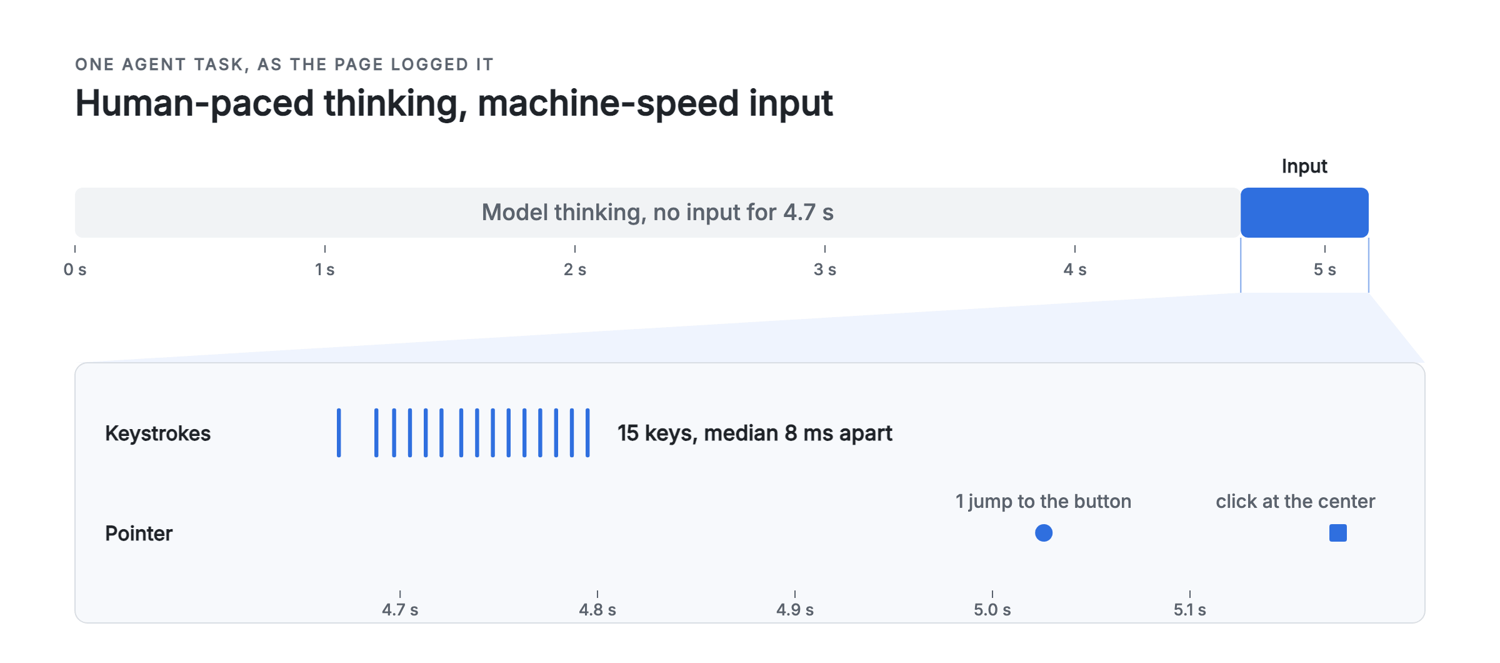
The model's thinking time looks human, but the input events after it look machine-like.
We ran the task headless three times with Claude Sonnet 5 and twice with GPT-5 mini. Every run produced one mousemove and a click at the same sub-pixel offset from the button's center. Median inter-keystroke intervals were 8 to 9 ms, and each run fired the same three untrusted events, two input and one blur. Only the idle time before the first action varied, from 4.7 to 6.8 s.
The model picks the action, and the framework produces the input events. We recorded these traces on our own test page, so they show exactly what the agent sends, without any site's defenses affecting them.
We set up Playwright MCP as in our tutorial on using Playwright with an MCP server, and it left a different but also machine-like trace. Its default browser_type call fired one insertText input event that contained the whole phrase, and no keystroke events. With slowly: true, it typed at a median of 0.5 ms per key.
Detection research has measured this pattern, and DataDome's own block page lists clicking faster than a human as one possible cause. Akamai's researchers found that more than 98% of requests from agentic browsers such as Comet and Atlas carried little or no mouse movement. Akamai's legacy mouse models flagged under 1% of those requests, because there was almost nothing to evaluate. The FP-Agent study used behavior alone to distinguish seven agents from people, with an F1 score of 0.9994.
Cloudflare launched Precursor in July 2026 for Enterprise Bot Management. It collects behavioral signals across a whole session to separate human from agentic traffic.
Identity layer
Identity is the one layer that you declare, and a declaration matters most when a site can check it. Cloudflare's managed rules flag a request as a fake bot when its User-Agent string matches a known bot but its source can't be verified. Akamai's Bot Manager has a detection category named Impersonators of Known Bots. Our guide on how websites use User-Agent strings to detect bots covers the basics.
Why Cloudflare blocks AI agents: the Search, Agent, and Training controls
In July 2026, Cloudflare split AI traffic into three behaviors. Search collects content to answer questions later, and Training uses content to train a model. Agent acts in real time for a person, and Cloudflare's examples include ChatGPT-User and browser-using agents such as Gemini or Claude driving Chrome.
On September 15, 2026, Cloudflare changed the defaults for new domains. Onboarding offers one of two presets, depending on whether the site earns money from ads:
| Setting | Site without ads | Site with ads |
|---|---|---|
| Search | Allow | Allow |
| Training | Allow | Disallow AI Training |
| Agent | Allow | Block on pages with ads |
Cloudflare also changed settings for existing domains. If a domain had the older Block AI Bots toggle enabled, Cloudflare migrated it to block the Agent category on pages with ads. Cloudflare's reasoning is that an agent fetches a page with nobody there to see the ads. Owners can change the controls on any plan at any time.
The older controls were already widely used. Cloudflare told WIRED that it blocked 416 billion AI bot requests between July 1 and early December 2025.
On Cloudflare, verification no longer means permission. Since July 2026, Cloudflare allows verified-bot traffic only when the site's settings permit its category. So a verified agent is still blocked on a page where the Agent category is blocked. The block comes from the site's settings, so ask the owner to allow your agent instead of bypassing the block.
First-hand test: what protected pages return to AI agents
We sent default agent stacks to a page behind a Cloudflare Managed Challenge, and we varied the User-Agent string. We also fetched the page through ScrapingBee's Stealth proxy, a proxy pool built for the hardest sites to scrape.
Our stacks were Playwright 1.63 and Browser Use 0.13.10, both on Chromium 153, on one residential connection and one Azure cloud server. We made one attempt with each browser configuration per run and waited 15 s for the managed challenge to complete by itself. ScrapingBee ran in its default mode, which retries a failed request on other proxies for up to 140 s. To keep the comparison fair, every stack that failed got a rerun with the same 140-second timeout, and no run clicked or solved a challenge.
What a Cloudflare Managed Challenge returned to each stack
The target was a public practice page whose operator runs a Cloudflare Managed Challenge for testing scrapers. Every Playwright and Python client got the challenge interstitial as its first response:
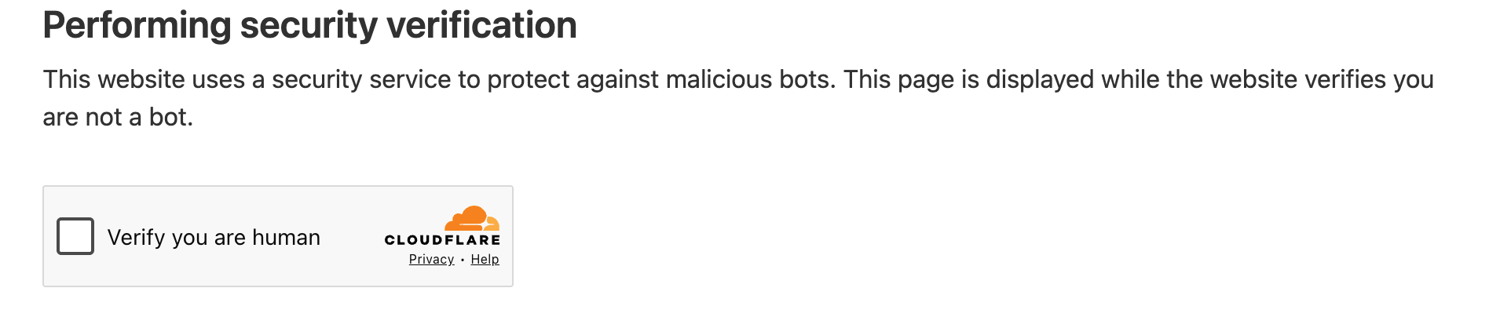
Headed Playwright got an interactive checkbox, which we left unclicked. The site's domain is cropped out.
The first response contained Cloudflare's challenge headers. Its Critical-CH header asks for 17 client hints, including the browser's full version list, architecture, and platform version, shortened here:
HTTP/2 403
server: cloudflare
cf-mitigated: challenge
critical-ch: Sec-CH-UA-Bitness, Sec-CH-UA-Arch, Sec-CH-UA-Full-Version,
             Sec-CH-UA-Mobile, Sec-CH-UA-Model, Sec-CH-UA-Platform-Version,
             Sec-CH-UA-Full-Version-List
server-timing: chlray;desc="a40a6f86fb34a55f"
cf-ray: a40a6f86fb34a55f-MRS
The page's window._cf_chl_opt object sets cType: 'managed', which confirms the challenge type. The number of attempts varied by configuration, from one to twelve, so read each row as a count, not a rate:
| Client | Page served | What came back |
|---|---|---|
| Python requests, default or Chrome User-Agent string | 0 of 3 each | 403 with cf-mitigated: challenge |
| Playwright headless shell or new headless | 0 of 3 each | The interstitial stayed |
| Playwright headed, with any of 3 User-Agent strings | 0 of 12 | The interstitial stayed |
| Browser Use, headless | 0 of 3 | The interstitial stayed |
| Browser Use, headed, home connection | 5 of 6 | The real page within 15 s, first response not recorded |
| Playwright or Browser Use, headed, on an Azure cloud server | 0 of 3 each | The interstitial stayed for 140 s |
| Claude's web fetch tool (Claude-User, Google Cloud IP) | 0 of 1 | Tool error url_not_accessible, inconclusive |
| ScrapingBee Stealth proxy | 3 of 3 | The real page |
In this small test, changing the User-Agent string did not change the result, but the outcome varied by browser setup. On the home connection, headed Browser Use reached the real page 5 of 6 times, including runs where it went first. Headed Playwright never passed the interstitial, even in 140 s.
From the cloud server, headed Browser Use failed too, so a result from home may not hold in production. Each setup differs in several signals at once, so these runs show which setups passed, not which signal decided the result.
We also tested a second Cloudflare-fronted page that did not apply a challenge to our requests. It served Python requests, curl, and headless Playwright with HTTP 200. The result depends on each site's rules and each client's signals, not on one Cloudflare rule against agents.
Impersonated, declared, and default identities
The User-Agent string didn't change the managed challenge result, so we tested identity against the anti-bot vendors' own public homepages. DataDome's homepage refused each local stack in its single test attempt, including headed Browser Use, so the table covers Akamai and HUMAN. In September 2026, the same headed Playwright browser sent each of three User-Agent strings three times, rotating their order:
| User-Agent string | Akamai homepage | HUMAN homepage |
|---|---|---|
| Default Chromium string | 3 of 3 served | 2 of 3 served |
| Default string plus a declared agent token | 0 of 3 | 3 of 3 |
| OpenAI's ChatGPT-User string | 0 of 3 | 0 of 3 |
The impersonated identity failed every time, even from a browser that both sites served with its default string. Requests using OpenAI's string gained no access, whether a fake-bot rule or a policy against AI agents refused them.
Sent from outside OpenAI's published IP ranges, that string is exactly the claim that verification is designed to catch. We used it only to measure that outcome.
The declared token got different results. Akamai's site refused it 3 of 3 times, and HUMAN's site accepted it 3 of 3 times. Treat Akamai's refusal as a policy to respect. HUMAN's homepage also runs behind Cloudflare's CDN, and a vendor's own site shows one configuration, so test the sites your agent actually visits.
How to identify the block
The response can show the type of block and sometimes suggest which layer contributed to it. Check it before you change anything:
| What you see | Vendor | What it means | What to do |
|---|---|---|---|
| 403, cf-mitigated: challenge, cType: 'managed' | Cloudflare | A rule or bot score triggered a browser check | Confirm robots.txt and terms permit access, then use supported browser and network infrastructure, or stop |
| Error 1020, or a "you have been blocked" page | Cloudflare | A firewall rule matched | Respect it, or ask the owner |
| 402 with a crawler-price header | Cloudflare | Pay per crawl sets a price for the page | Pay, or skip the page |
| 403 "You have been blocked", with an x-datadome header | DataDome | Bot protection refused the request | Confirm robots.txt and terms permit access, then use supported browser and network infrastructure, or stop |
| 403 "Access Denied" with a reference number | Akamai | Bot Manager refused the request | Confirm robots.txt and terms permit access, then use supported browser and network infrastructure, or stop |
| 403 "Access to this page has been denied", with a press-and-hold check | HUMAN (PerimeterX) | Bot protection refused the request | Confirm robots.txt and terms permit access, then use supported browser and network infrastructure, or stop |
In a browser, HUMAN and DataDome also show a page that's easy to recognize in your agent's screenshots:
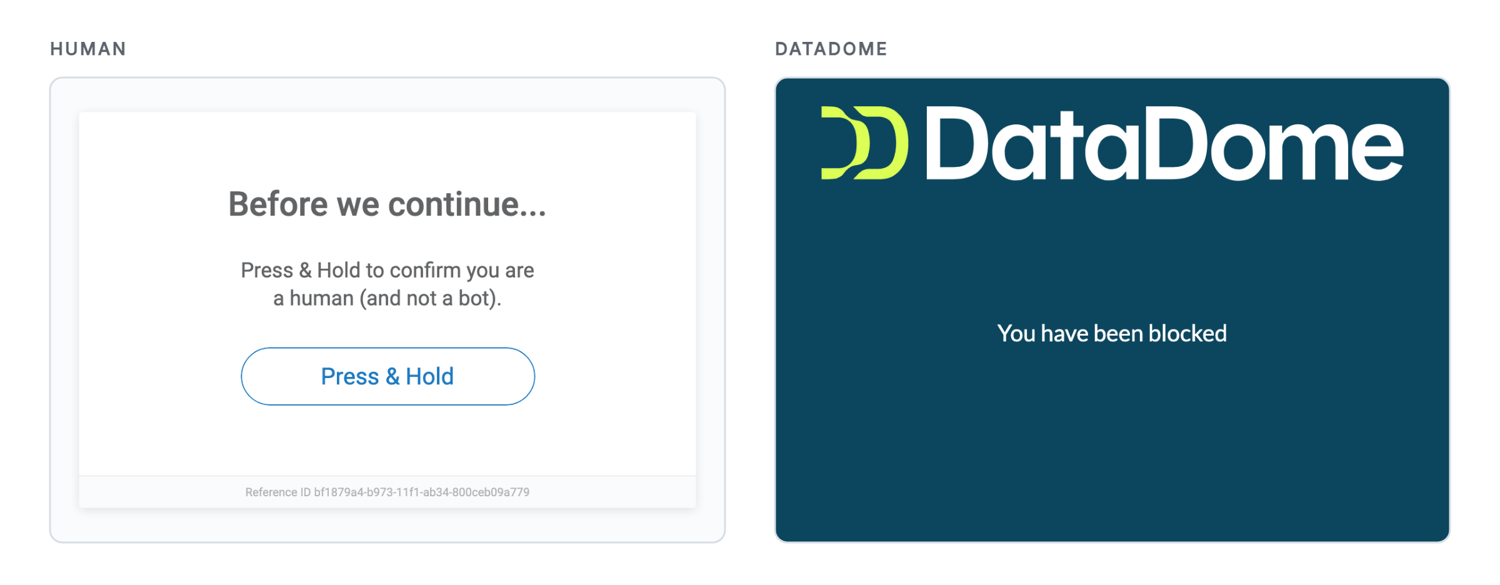
Default headless Playwright got these pages on HUMAN's and DataDome's own homepages in September 2026.
Cloudflare documents how to detect a challenge response through the cf-mitigated header, which is a check to add to your fetch code.
When the response doesn't name the layer, change one thing at a time. Rerun the same request through a residential exit IP, then in a headed browser. If one change alters the result, that layer likely contributed to the block. Do this for a heuristic challenge, never for a policy block.
The legitimate-use line: what counts as a fair fix and what counts as evasion
The line separates signals that a site owner sets from signals that a detector infers. Owners set policy with robots.txt, Content Signals, TDMRep and AI.txt, Cloudflare's Agent and Training controls, pay-per-crawl prices, login walls, and terms of use. Detectors infer automation from datacenter ranges, headless traces, protocol mismatches, and machine timing.
Some policies apply only to agents that a detector can classify. In the FP-Agent study, Cloudflare's free AI bot controls fully blocked only 1 of 7 agents, the one that identifies itself as a verified bot. An agent that looks like an ordinary browser may never receive the owner's decision. Masking your agent's signals can therefore hide it from the policies a detector enforces, which is a strong reason to declare who you are.
These rules hold at every layer:
- Never automate CAPTCHA solving. A CAPTCHA is a check for a human, and Anthropic says its bots don't bypass CAPTCHAs.
- Never impersonate another company's bot. Googlebot and ChatGPT-User strings belong to their owners, and fake-bot rules flag them when the source can't be verified.
- Never collect content behind a login. ScrapingBee's acceptable use policy forbids collecting non-public information and names data behind a login as an example.
- Check visible policy before each fetch. Read robots.txt for your own token and for the default * rules, and skip pages whose Content-Signal line sets ai-input=no.
- Treat an explicit refusal as final. Do not retry a policy 403, an Agent block, or a robots.txt Disallow under another identity or proxy.
Robots.txt is less clear for agents than for crawlers. OpenAI's docs say of ChatGPT-User, "Because these actions are initiated by a user, robots.txt rules may not apply." Perplexity and Google say their user-triggered fetchers generally ignore it, while Anthropic says Claude-User honors it. Cloudflare's September post adds that no established directive exists yet for stating preferences to agents.
The closest signal is ai-input in Content Signals, which covers content given to AI models for real-time answers. Cloudflare's own robots.txt sets it like this:
Content-Signal: ai-train=yes, search=yes, ai-input=yes
The reference MCP fetch server is cautious. It checks robots.txt before autonomous fetches and sends a declared ModelContextProtocol/1.0 token. Our guide to robots.txt for scrapers covers the parsing.
Web Bot Auth: identity that a site can verify
Web Bot Auth replaces a claimed identity with a signed one. The agent signs each request with an Ed25519 key under HTTP Message Signatures, defined in RFC 9421. A Signature-Agent header points to a public key directory at /.well-known/http-message-signatures-directory. ChatGPT Work's cloud browser signs this way, and Google signs part of its Google-Agent traffic.
For Cloudflare, you generate a key, host the signed directory, and register the bot through the dashboard's Bot Submission Form. This example requires the requests and cryptography packages. It uses the RFC 9421 test key and gets a valid result from Cloudflare's research verifier:
import base64
import hashlib
import json
import os
import time
from urllib.parse import urlparse

import requests
from cryptography.hazmat.primitives.asymmetric.ed25519 import Ed25519PrivateKey

# RFC 9421 test key, as published in cloudflare/web-bot-auth. Never use it in production.
JWK = {"kty": "OKP", "crv": "Ed25519",
       "d": "n4Ni-HpISpVObnQMW0wOhCKROaIKqKtW_2ZYb2p9KcU",
       "x": "JrQLj5P_89iXES9-vFgrIy29clF9CC_oPPsw3c5D0bs"}
AGENT = "https://http-message-signatures-example.research.cloudflare.com"


def b64url(data: bytes) -> str:
    return base64.urlsafe_b64encode(data).rstrip(b"=").decode()


def sign(url: str) -> dict:
    key = Ed25519PrivateKey.from_private_bytes(
        base64.urlsafe_b64decode(JWK["d"] + "="))
    # keyid is the RFC 7638 thumbprint of the public key
    canon = json.dumps({k: JWK[k] for k in ("crv", "kty", "x")},
                       separators=(",", ":"))
    keyid = b64url(hashlib.sha256(canon.encode()).digest())
    now = int(time.time())
    params = (f'("@authority" "signature-agent");created={now};'
              f'expires={now + 60};keyid="{keyid}";alg="ed25519";'
              f'nonce="{b64url(os.urandom(32))}";tag="web-bot-auth"')
    # Signature base: one line per covered component, then the parameters
    base = (f'"@authority": {urlparse(url).netloc}\n'
            f'"signature-agent": "{AGENT}"\n'
            f'"@signature-params": {params}')
    signature = base64.b64encode(key.sign(base.encode())).decode()
    return {"Signature-Agent": f'"{AGENT}"',
            "Signature-Input": f"sig1={params}",
            "Signature": f"sig1=:{signature}:"}


url = f"{AGENT}/v0/api/verify"
print("unsigned:", requests.get(url, timeout=30).text)
print("signed:  ", requests.get(url, headers=sign(url), timeout=30).text)
The verifier returns neutral without a signature and valid with one:
unsigned: neutral
signed:   valid
The IETF Internet-Draft draft-ietf-webbotauth-httpsig-protocol-00 specifies Signature-Agent as a dictionary. Cloudflare's July 2026 docs and its verifier reject that form, so send Cloudflare the quoted-string form.
Cloudflare's docs also say it is experimenting with the Forwarded header from RFC 7239. With it, an operator's identity can stay attached when requests pass through intermediaries that Cloudflare trusts.
On Cloudflare, a signature lets a site that checks signatures apply its policy to you, not to every unverified bot. It doesn't remove a category block.
Managed infrastructure that reduces false-positive blocks
ScrapingBee's HTML API changes the network, protocol, and environment layers for you. It runs JavaScript rendering in its own Chromium browsers and sends requests through rotating proxy pools. It returns a rendered page per request, which works well for agents that read and extract.
To try the Stealth proxy before writing code, select it in the dashboard's HTML Playground:
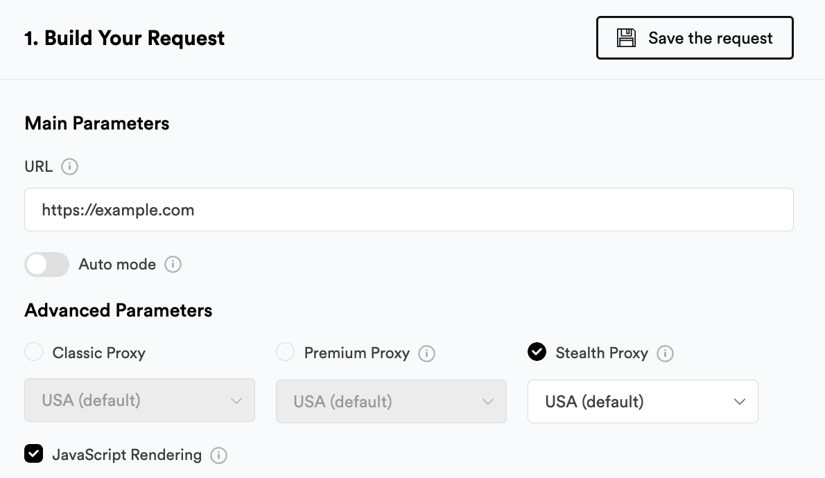
You pay 75 credits only when a Stealth request succeeds.
In 12 JavaScript-rendered samples, every request had a Chromium TLS fingerprint and Chrome's exact HTTP/2 fingerprint under a Chromium-family User-Agent string. All three Premium samples came from ISP networks, including Comcast. This result matches the network-layer fix in the Signature Overlap Framework.
Auto-Mode picks the cheapest configuration that works and bills only that one. Use it with a policy check, so your agent skips pages where the site's stated policy says no.
ScrapingBee fetches the page with its own browser identity. The preflight below is conservative. It requires the rules for your agent's token and the default * rules to permit access. It can't verify which rules apply to the browser identity that fetches the page.
The fetch limits the escalation to the Stealth proxy and requires Python 3.10+, the requests package, and your API key in SCRAPINGBEE_API_KEY:
import os
from urllib.parse import urlparse
from urllib.robotparser import RobotFileParser

import requests

API = "https://app.scrapingbee.com/api/v1/"
AGENT = "ExampleResearchAgent"  # your own product token


def policy_allows(url: str) -> bool:
    origin = "{0.scheme}://{0.netloc}".format(urlparse(url))
    try:
        robots = requests.get(f"{origin}/robots.txt", timeout=15,
                              headers={"User-Agent": f"{AGENT}/1.0"})
    except requests.RequestException:
        return False  # can't read the policy, so don't fetch
    if robots.status_code in (404, 410):
        return True  # no robots.txt file is published
    if robots.status_code >= 400:
        return False  # 401, 403, 429, 451, 5xx: policy unknown, so don't fetch
    lines = robots.text.splitlines()
    parser = RobotFileParser()
    parser.parse(lines)
    opted_out = any(line.lower().replace(" ", "").startswith("content-signal:")
                    and "ai-input=no" in line.lower().replace(" ", "")
                    for line in lines)
    # Conservative: also require the default rules, since ScrapingBee uses its own browser identity
    return (parser.can_fetch(AGENT, url) and parser.can_fetch("*", url)
            and not opted_out)


def fetch(url: str) -> str | None:
    if not policy_allows(url):
        print(url, "skipped: the site's stated policy says no")
        return None
    response = requests.get(
        API,
        headers={"Authorization": f"Bearer {os.environ['SCRAPINGBEE_API_KEY']}"},
        params={"url": url, "mode": "auto", "max_cost": "75"},
        timeout=180,
    )
    response.raise_for_status()  # a 500 means every configuration failed, unbilled
    print(url, "Spb-auto-cost:", response.headers.get("Spb-auto-cost"))
    return response.text


for page in ("https://www.scrapingbee.com/blog/",
             "https://www.google.com/search?q=web+bot+auth"):
    fetch(page)
The blog page stopped at the cheapest configuration, and robots.txt disallowed the search page:
https://www.scrapingbee.com/blog/ Spb-auto-cost: 1
https://www.google.com/search?q=web+bot+auth skipped: the site's stated policy says no
On the Cloudflare practice page, Auto-Mode escalated to the Stealth proxy and returned the real page at 75 credits. If your agent's fetch tool accepts an HTTP proxy, Proxy Mode gives the same access through a standard proxy setting, without HTML API calls.
For agents that support MCP, ScrapingBee's MCP server exposes the same fetches as tools. In September 2026, the live endpoint listed 18 tools, from page fetches to Amazon and YouTube data. It accepts the API key as a Bearer header, which keeps the key out of the URL, as in this Cursor mcp.json entry:
{
  "mcpServers": {
    "scrapingbee": {
      "url": "https://mcp.scrapingbee.com/mcp",
      "headers": { "Authorization": "Bearer YOUR_SCRAPINGBEE_API_KEY" }
    }
  }
}
Each tool call costs the same as the endpoint it wraps. The page tools use Auto-Mode by default, and max_cost sets a credit limit per call. Run your policy check before the agent calls them.
Extraction can reduce the returned payload. In our comparison of MCP servers for web scraping, ScrapingBee's extract_rules returned 623 tokens for one catalog page, compared with 9,673 tokens of raw HTML. Both calls cost 1 credit.
Reading fetched pages also reduces behavior signals, because your agent performs fewer UI actions for a detector to measure. The identity layer is your agent's responsibility. If a site accepts only verified agents, use Web Bot Auth through a request path that preserves the signed headers and components.
Cache fetched pages where freshness allows, so your agent avoids repeat requests.
What it costs: credits per request and a cost example
ScrapingBee bills credits per successful request, and the proxy option sets the rate:
| Proxy | Without JavaScript | With JavaScript |
|---|---|---|
| Classic | 1 | 5 |
| Premium | 10 | 25 |
| Stealth | Runs with JavaScript | 75 |
AI extraction adds 5 credits to each request that uses it. Even if every page needs the Stealth proxy with extraction, 10,000 pages a month use 800,000 credits. The 800,000 total is within the Startup plan's 1 million monthly credits, which ScrapingBee's pricing page listed at $99 in September 2026. Per agent task, 20 such pages cost 1,600 credits.
Auto-Mode lowers those totals when some pages succeed on Classic at 1 or 5 credits. Failed requests that return 500 cost nothing.
Final thoughts
"Bots block bots" starts as a signal problem, because the agent stacks we tested looked like scrapers on several of the five layers. Test from the network you deploy on, because a fix that passed at home failed from our cloud server. You can handle a heuristic challenge with an infrastructure fix, but a policy block such as Cloudflare's Agent setting is the owner's decision.
Masking your agent can also hide it from that policy, so check robots.txt and Content Signals first, and sign requests where sites accept signatures. ScrapingBee's free trial includes 1,000 credits, enough to test your blocked URL with a policy-checked Auto-Mode fetch.
Bots block bots FAQs
Are AI agents considered bots?
Yes. Anti-bot systems usually treat AI agents as automated traffic, then apply the site's rules to them. Declared agents such as ChatGPT-User and Claude-User can be checked against published IP lists or signatures. An agent that impersonates another company's bot fails that check.
Does Cloudflare block AI bots?
Yes, when the site's Cloudflare settings block that traffic category. Cloudflare's controls treat Search, Agent, and Training traffic separately. Since September 15, 2026, its preset for new ad-supported domains blocks agents on pages with ads. Verified agents are blocked too when the site blocks their category.
GPTBot vs. ChatGPT-User: what's the difference?
GPTBot is OpenAI's crawler for training data, and ChatGPT-User makes visits that a person starts in ChatGPT. The two have separate tokens. OpenAI documents robots.txt controls for GPTBot. For ChatGPT-User, it says the agent doesn't crawl automatically and that robots.txt rules may not apply.
Does robots.txt stop AI crawlers and agents?
Only the ones that honor it, because robots.txt is a published request, not access control. Crawlers such as GPTBot say they follow it. For user-triggered agents, Anthropic says Claude-User honors it, OpenAI says it may not apply to ChatGPT-User, and Perplexity and Google say theirs generally ignore it.
Can AI agents solve CAPTCHAs?
A legitimate agent shouldn't try. A CAPTCHA exists to confirm that a human is present, so automated solving is an evasion technique. When an agent meets a CAPTCHA, it should stop, ask its user to take over where appropriate, or skip the page. Anthropic, for example, says its bots don't try to bypass CAPTCHAs.
Is AI scraping legal?
It depends on jurisdiction, the site's terms, and the data. This isn't legal advice. Public pages carry less risk than logged-in accounts, which were key in Amazon's case against Perplexity. In August 2026, the Ninth Circuit vacated the preliminary injunction and remanded the case without a final ruling on legality.
How much does ScrapingBee cost?
ScrapingBee bills credits per successful request, from 1 credit for a Classic request without JavaScript to 75 for the Stealth proxy. Failed requests that return 500 cost nothing. In September 2026, the Startup plan listed 1 million monthly credits at $99, and the free trial includes 1,000 credits.