A scraper can break without an error. On Selenium's GitHub page, selectors written in 2019 matched a year later but returned "16.5k" instead of exact counts.
AutoQALLMs, a research framework, uses a large language model (LLM) to write Selenium tests from HTML, and regenerates them after a page change.
This guide tests whether regeneration works as self-healing for scrapers. Then it builds an auto-repairing scraping workflow with Selenium and ScrapingBee. The workflow detects a broken field and saves a new selector only after a second page confirms it. ScrapingBee handles blocked requests, and its AI extraction finds the values.

TL;DR
- AutoQALLMs repairs by regenerating its tests, which doesn't fix a blocked fetch. Of 14 tested production pages, 11 blocked its fetcher, and ScrapingBee returned all 14.
- Trigger repairs on value checks, not on errors. On GitHub, selectors written in 2019 silently returned abbreviated counts like "16.5k" for 2 years before returning null.
- Let the model find values, and let code write the selectors. AI extraction runs only when a field fails validation, and in 15 runs with a second-page check, no run saved a wrong rule.
- If maintaining selectors costs more than AI credits, use ScrapingBee's AI extraction on every page. On a list page, 1 request returned all 20 titles and prices.
What AutoQALLMs does, according to its code
AutoQALLMs comes from a 2025 paper in the journal Computers. Across 30 practice websites, the paper reports 96% test coverage with Claude Sonnet 4.5 and 91% with GPT-4, the default model. It lists self-healing as future work. Every code detail here comes from commit aefc083 of the AutoQALLMs repository.
The pipeline downloads the page with requests.get() and uses BeautifulSoup to list its links, headings, images, and form controls. It asks the model for 30 Selenium tests, and os.system() runs the generated file. The coverage figure counts the page elements that the tests used, not whether a test can fail.
For scraping, 4 details in the code matter more:
The model sees only the first 2,000 characters. The list puts links first, so a page with many links can fill those characters before the first form control. On 14 production pages from sites that scraping teams target, the first 2,000 characters covered a median of about 3% of the list.
The element list is designed for test generation. Text in a span, div, p, or td enters the list only when it's inside a heading, a button, or a select option. On Selenium's GitHub page, the list contained more than 300 link URLs and no star, fork, or watcher count.
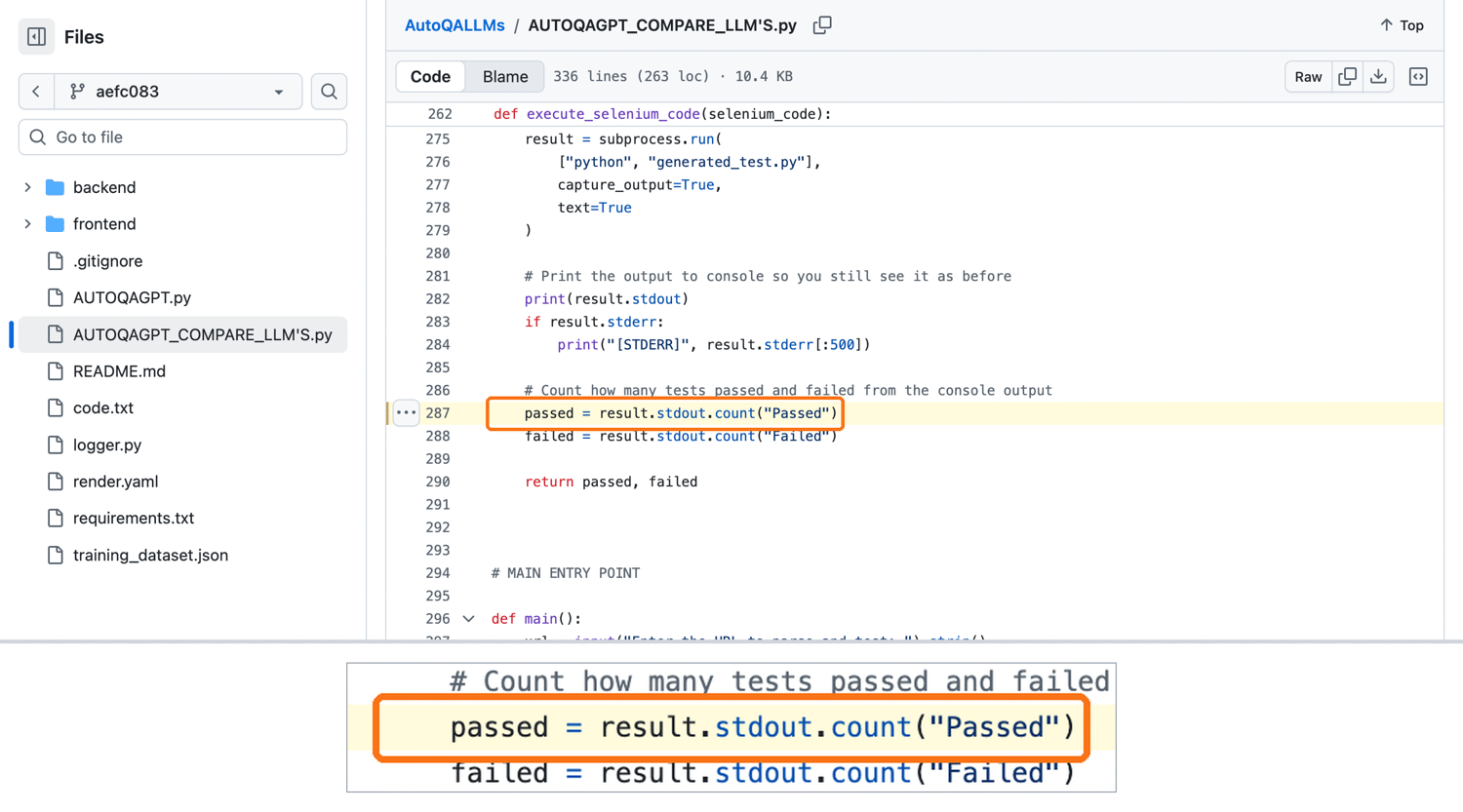
Repair means regeneration, and the pass rate counts the word "Passed". In the paper's expert reviews, repair after a UI change means regenerating the broken tests. The comparison script counts passes with result.stdout.count("Passed"), so any test that prints "Passed" counts as a pass:
Model output runs on the host. Both scripts execute the generated file directly, and the prompt contains untrusted page content. Plan for indirect prompt injection.
To reuse the code, check OpenAI's and Anthropic's deprecation pages for its default models. With no license file at that commit, ask the authors before you copy the code into a product.
Where scrapers need more than script regeneration
Besides the 2,000-character limit, a scraper needs 2 checks that AutoQALLMs' pipeline doesn't include. The first confirms that the fetch returned the real page, and the second confirms that a passing test means the data is right.
11 of 14 production pages blocked AutoQALLMs' fetcher
The paper's practice sites are built to be tested, and a plain requests.get() works there. Production pages often add bot protection. From a single residential IP address in India, we sent the comparison script's request to 14 pages from sites that scraping teams target. We then sent the same URLs through curl_cffi, which impersonates Chrome's TLS handshake, and through the ScrapingBee HTML API:
| Target page | AutoQALLMs fetcher received | curl_cffi with Chrome impersonation | ScrapingBee returned |
|---|---|---|---|
| MDPI article (the AutoQALLMs paper) | 403, "Access Denied" | 200, empty 2 KB page | Article page |
| Amazon search | 503, "Sorry! Something went wrong!" | 200, empty 2 KB page | Results page |
| Walmart product | 200, "Robot or human?" challenge | 200, "Robot or human?" challenge | Product page |
| Best Buy product | No response within 30 seconds | Request error | Product page |
| Home Depot search | 403 | 200, empty 3 KB page | Results page |
| Zillow listing | 403 | Listing page | Listing page |
| eBay search | 403 | 403 | Results page |
| Etsy search | 403 | 403 | Results page |
| G2 reviews | 403 | 403 | Reviews page |
| Indeed jobs | 403 | Results page | Results page |
| Booking.com search | 202, JavaScript check page | Results page | Results page |
| Nike listing | 200, real page | Real page | Real page |
| Costco home page | 200, real page | Real page | Real page |
| GitHub repository | 200, real page | Real page | Real page |
ScrapingBee returned the requested page on all 14 targets. AutoQALLMs' fetcher got real content from 3, and curl_cffi from 6.
ScrapingBee's Auto-Mode tries configurations from cheapest to most expensive and charges only for the one that succeeds, and 13 of the 14 requests used it. The MDPI page loads its article with JavaScript. That request enabled JavaScript rendering and a premium proxy, and waited for the article heading.
The Walmart and Booking.com rows matter most for automated repair. A challenge page with a 2xx status passes the fetcher's raise_for_status() check, so the model receives it as if it were the product page. A model repairs the page it receives. Before each repair, confirm it's the right page.
Server headers and block pages in the table identified Akamai, Cloudflare, DataDome, HUMAN's PerimeterX, and AWS WAF. These services check more than the user agent, including the TLS handshake, HTTP version, IP reputation, and request rate. The TLS fingerprinting service at tls.peet.ws shows what each client sent, including its JA4 fingerprint:
| Client | User agent claims | HTTP version | JA4 TLS fingerprint |
|---|---|---|---|
| AutoQALLMs comparison fetcher (requests) | Chrome 120 | HTTP/1.1 | t13d1812h1_85036bcba153_b26ce05bbdd6 |
| Selenium 4.51.0, headless Chrome 154 | HeadlessChrome 154 | HTTP/2 | t13d1517h2_8daaf6152771_cb7bf5808d99 |
| curl_cffi, Chrome impersonation | Chrome 150 | HTTP/2 | t13d1516h2_8daaf6152771_806a8c22fdea |
Python's requests claimed to be Chrome but offered a different handshake (18 ciphers and 12 extensions over HTTP/1.1, against Chrome's 15 and 17 over HTTP/2). Headless Selenium sent Chrome's real handshake, but its user agent identified it as HeadlessChrome. The curl_cffi client sent Chrome's cipher list over HTTP/2 and still got only 3 more pages than the plain fetcher.
The ScrapingBee API handles headless browsers and rotates proxies for you. The repair then starts from the page a visitor sees.
Generated tests can pass even on a bot challenge page
We sent the comparison script's exact prompt, filled with the element list from Walmart's "Robot or human?" page, to the Claude model. It returned 30 tests, and none checks for content that only the real product page has:
- Always true, 18 tests. Each checks that a length is >= 0, which is always true.
- No condition, 4 tests. Each prints "Passed" after scrolling, without checking anything.
- True on any loaded page, 7 tests. Each checks for something every page has, such as a title, a body, or non-empty page source.
- Content check, 1 test. It looks for an h1 element, and the challenge page has one.
AutoQALLMs' string count would count all 30 as passed. This result comes from 1 generated set. It shows that the problem can happen, not how often.
A check that can't fail can't trigger a repair. A scraper needs checks on the values it extracts.
How a selector breaks: 8 years of Selenium's GitHub page
A selector can keep matching after a redesign and return data in the wrong format, with no error. Yearly Wayback Machine captures of Selenium's GitHub page show how this happens. For GitHub itself, a production job would get the star, fork, and watcher counts from the REST API. The page works as an example because its markup history is public, and the same kind of break can affect pages that offer no API.
A scraper in January 2019 might have used these selectors. We ran each one against every capture from 2019 to 2026, and against the page at test time:
SELECTORS_2019 = {
    "description": "span[itemprop='about']::text",
    "stars": "a.social-count.js-social-count::text",
    "forks": "a.social-count[href$='/network/members']::text",
    "watchers": "a.social-count[href$='/watchers']::text",
}
Each capture returned these values:
| Capture | description | stars | forks | watchers |
|---|---|---|---|---|
| January 2019 | correct | 13,005 | 4,530 | 1,266 |
| January 2020 | correct | 16.5k | 5.4k | 1.3k |
| February 2021 | null | 19.8k | 6.2k | 1.3k |
| January 2022 to January 2026 | null | null | null | null |
| Page when tested | null | null | null | null |
The first 2 rows come from GitHub's counter buttons, as the Wayback Machine saved them:
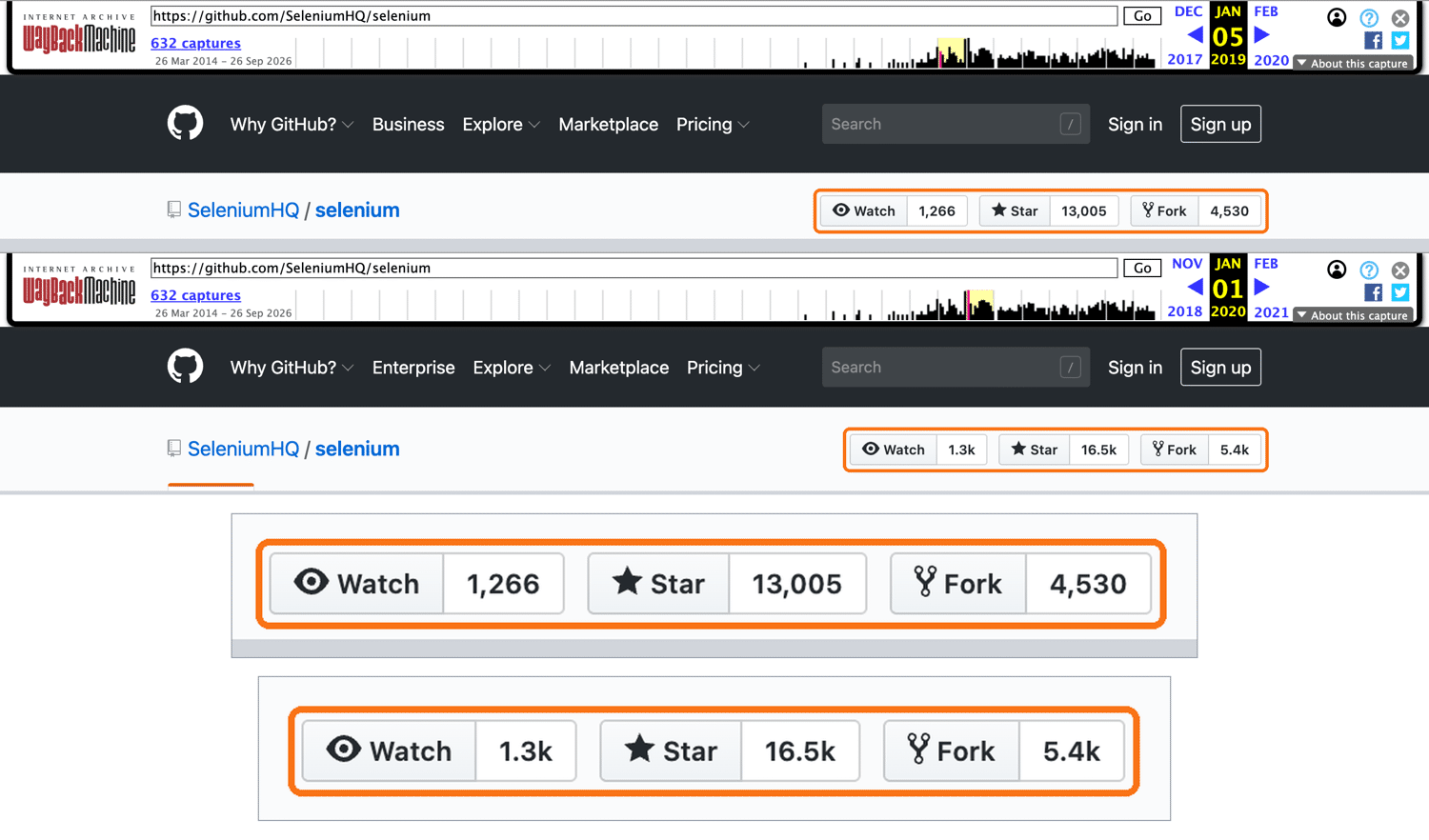
The first break raised no error and produced no null. A strict integer parse rejects "16.5k". A common cleanup such as re.sub(r"\D", "", text) converts it to 165, and a database accepts 165. A natural first repair, the broader selector .js-social-count, matched every capture from 2020 to January 2026 and returned the abbreviated count each time.
The exact star and fork counts stayed in the HTML. From 2022 to January 2026, they were in title and aria-label attributes on the counter elements. When tested, the sidebar showed only rounded counts, and the exact numbers were in a JSON payload inside a script element:
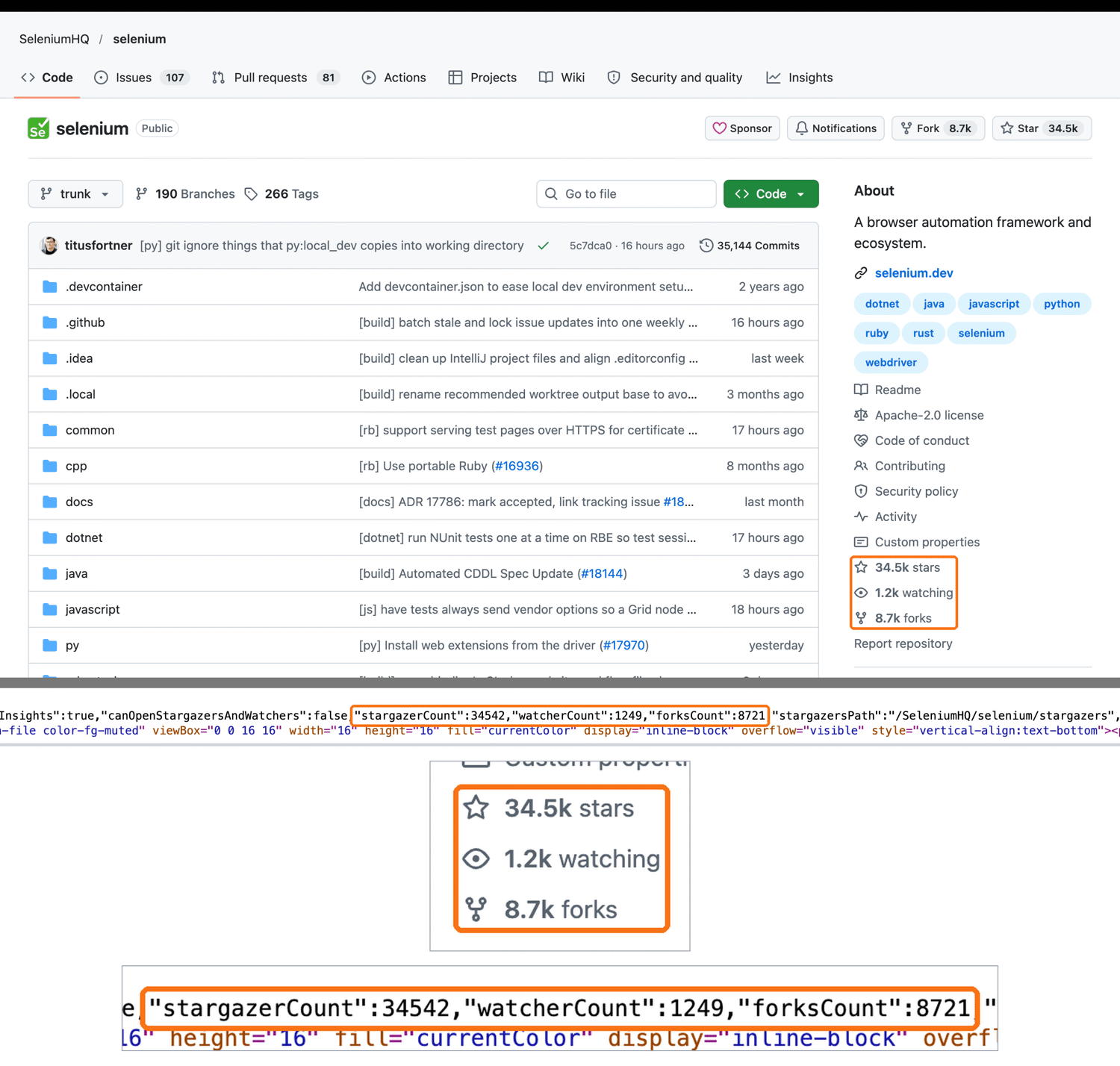
So a reliable repair trigger checks values, and a reliable repair searches attributes and embedded JSON too.
Build an auto-repairing scraping workflow with Selenium and ScrapingBee
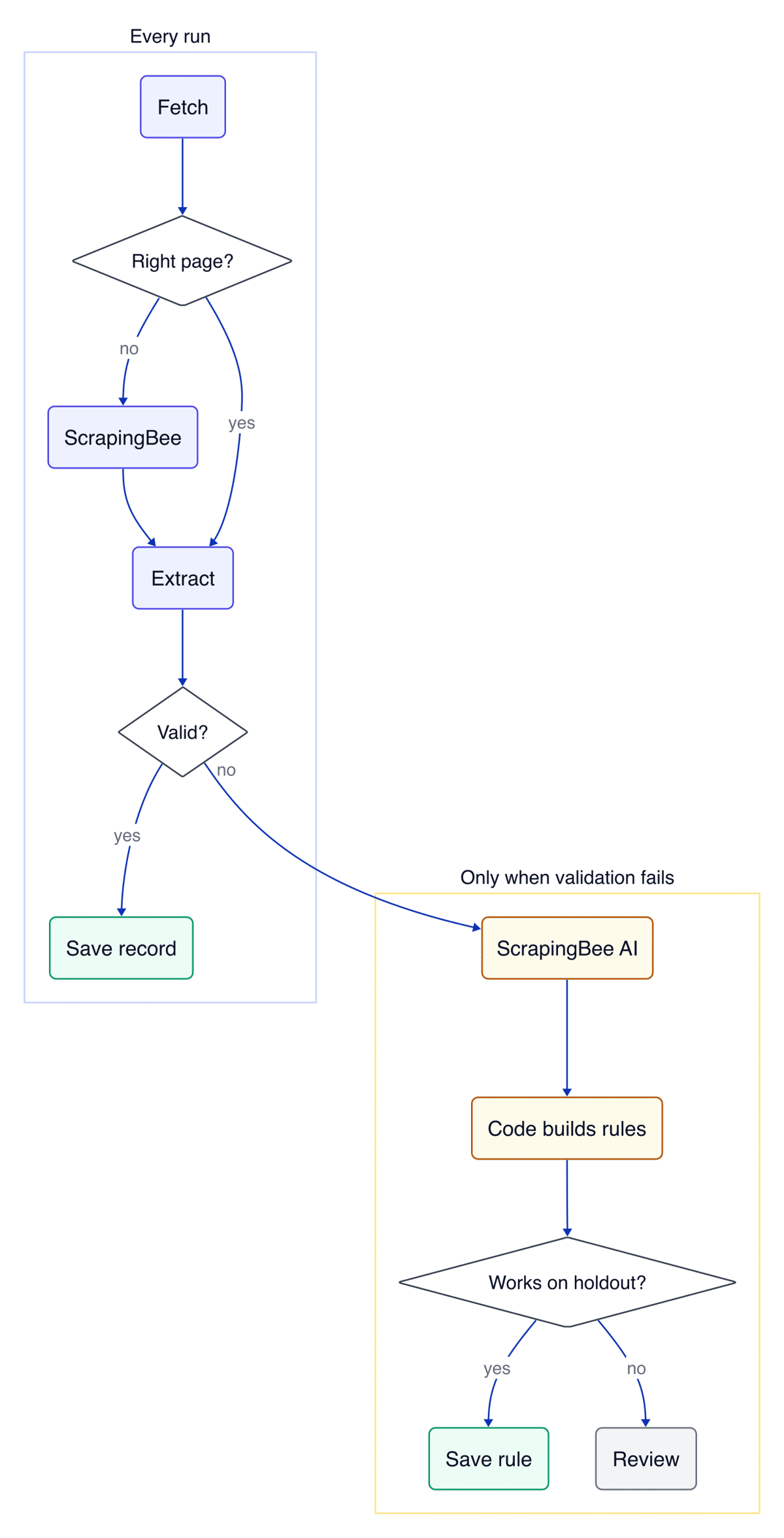
The workflow keeps AutoQALLMs' core idea of a model that reads the page. It changes what the model returns, values instead of code, and adds a second page that checks every repair. Selenium fetches every run, ScrapingBee handles the request when a site blocks Selenium, and ScrapingBee's AI extraction runs only when a field fails validation.
Your code finds where the returned values are in the page and writes the extraction rules, so no AI-generated code runs. Each new rule is saved only if it also works on a second page, called the holdout.
Every run follows the left column. A field that fails validation continues to the repair steps at the lower right:
You need:
- Python 3.10 or later
- Google Chrome
- A ScrapingBee API key from your dashboard. New accounts start with free API credits, and the same key works for fetching and AI extraction.
Selenium Manager, included since Selenium 4.6, downloads a matching ChromeDriver when it can't find one on your system. The tutorial was tested with Python 3.13 and 3.14, Selenium 4.51.0, and scrapingbee 2.2.0. It ran on Chrome 154 for macOS and Chrome 155 for Debian Linux in Docker.
Create a project folder and a virtual environment, so python runs the same interpreter on every system:
mkdir autorepair
cd autorepair
python3 -m venv .venv
source .venv/bin/activate
On Debian or Ubuntu, install the python3-venv package first. On Windows, run py -m venv .venv and then .venv\Scripts\activate instead. If PowerShell blocks the activation script, run Set-ExecutionPolicy -Scope Process RemoteSigned, which applies only to that window. Install the packages:
python -m pip install selenium "scrapingbee>=2.2" parsel lxml cssselect
Then set your API key as an environment variable. On Windows PowerShell, use $env:SCRAPINGBEE_API_KEY = "YOUR-API-KEY" instead:
export SCRAPINGBEE_API_KEY="YOUR-API-KEY"
Run every script from the autorepair folder. By the end of Step 5, the folder contains the workflow's 6 files:
autorepair/
├── rules.json       # Step 1: rules as data
├── last_good.json   # Step 1: last valid record
├── autorepair.py    # Steps 1 and 2: parse and validate
├── fetch.py         # Step 3: content check and ScrapingBee fallback
├── repair.py        # Steps 4 and 5: AI extraction, rules, holdout
└── run.py           # Step 5: connects the steps
The complete code, including the batch and coding-agent scripts, is in this article's GitHub repository. For browser setup beyond this, see our guide to Selenium with Python.
Step 1: Store selectors as data and parse strictly
Store each field's extraction rule in rules.json. A repair then edits that file and never changes the code. These are the 2019 selectors, which no longer match the page:
{
  "version": 1,
  "rules": {
    "description": {"css": "span[itemprop='about']",
                    "attr": null, "type": "str"},
    "stars": {"css": "a.social-count.js-social-count",
              "attr": null, "type": "int"},
    "forks": {"css": "a.social-count[href$='/network/members']",
              "attr": null, "type": "int"},
    "watchers": {"css": "a.social-count[href$='/watchers']",
                 "attr": null, "type": "int"}
  },
  "history": []
}
Then save the last valid record in the same folder as last_good.json:
{
  "date": "2019-01-05",
  "values": {
    "description": "A browser automation framework and ecosystem.",
    "stars": 13005,
    "forks": 4530,
    "watchers": 1266
  }
}
Step 2 uses the date to decide whether these values are recent enough to compare against. A run rewrites both files. Keep copies for running the tutorial again:
cp rules.json rules.v1.json
cp last_good.json last_good.v1.json
On Windows PowerShell, use Copy-Item with the same file names.
The parser in autorepair.py uses a rule's css or xpath key to find an element. It then reads the element's text, one of its attributes, or a value inside its JSON.
The parser returns None for abbreviated numbers, and it keeps the cents on decimal fields. Use int for counts and decimal for prices and ratings, because an int field rounds 4.5 to 4. Now create autorepair.py:
import json
import re
from datetime import date

from parsel import Selector

NUM_RE = re.compile(r"(\d[\d,]*(?:\.\d+)?)\s*([kKmM])?(?![\w])")
NUMERIC = ("int", "decimal")


def numbers_in(text, ftype="int"):
    """'33,853' -> [(33853, True)]. '33.9k' -> [(33900, False)].

    The flag says whether the number has full precision. Decimal fields
    keep the fraction: '$1,299.99' -> [(1299.99, True)].
    """
    found = []
    for digits, suffix in NUM_RE.findall(text or ""):
        n = float(digits.replace(",", ""))
        if suffix:
            n *= 1_000 if suffix in "kK" else 1_000_000
        found.append((round(n) if ftype == "int" else n, not suffix))
    return found


def walk_json(data, path):
    for key in path:
        try:
            data = data[key]
        except (KeyError, IndexError, TypeError):
            return None
    return data


def apply_rule(sel, rule):
    if rule.get("xpath"):
        nodes = sel.xpath(rule["xpath"])
    else:
        nodes = sel.css(rule["css"])
    if not nodes:
        return None
    if rule.get("json_path"):
        try:
            payload = json.loads(nodes[0].css("::text").get() or "")
        except json.JSONDecodeError:
            return None
        raw = walk_json(payload, rule["json_path"])
        if isinstance(raw, (int, float)) and not isinstance(raw, bool):
            raw = str(raw)  # parse it like page text
        raw = raw if isinstance(raw, str) else None
    elif rule.get("attr"):
        raw = nodes[0].attrib.get(rule["attr"])
    else:
        raw = " ".join(t.strip() for t in nodes[0].css("::text").getall())
    if not raw:
        return None
    if rule["type"] in NUMERIC:
        exact = [n for n, full in numbers_in(raw, rule["type"]) if full]
        return exact[0] if exact else None  # reject "33.9k"
    return " ".join(raw.split()) or None


def extract(html, rules):
    sel = Selector(text=html)
    return {field: apply_rule(sel, rule) for field, rule in rules.items()}
Save this check as check_strict.py and run it with python check_strict.py:
from parsel import Selector

from autorepair import apply_rule

html = '<a class="social-count js-social-count">16.5k</a>'
rule = {"css": "a.js-social-count", "attr": None, "type": "int"}
print(apply_rule(Selector(text=html), rule))

html = '<p class="price">Now $1,299.99</p>'
rule = {"xpath": "//p[@class='price']", "attr": None, "type": "decimal"}
print(apply_rule(Selector(text=html), rule))
The parse rejects the abbreviation and keeps the price exact:
None
1299.99
The strict parse converts a silent wrong value into a visible None that validation can catch. Without it, 165 would reach your database with no error. For more selector patterns in this library, see our Parsel tutorial.
numbers_in() treats a period as the decimal mark. For a site that writes 1.299,99, swap . and , in the text first.
Step 2: Validate every record against the last valid one
Validation decides when to repair. Append this function to autorepair.py. It flags a field that's null. It also flags a number that changed by more than 50% since the last valid record, if that record is at most 7 days old:
def validate(record, last_good, optional=(), max_jump=0.5, max_age_days=7):
    """Return the fields that need repair: nulls and implausible jumps.

    A null in an optional field is a missing value, not a broken rule. A
    baseline older than max_age_days cannot judge a jump, so only nulls
    count there.
    """
    since = date.fromisoformat(last_good.get("date", "1970-01-01"))
    fresh = (date.today() - since).days <= max_age_days
    baseline = last_good.get("values", {}) if fresh else {}
    broken = []
    for field, value in record.items():
        prev = baseline.get(field)
        if value is None:
            if field not in optional:
                broken.append(field)
        elif isinstance(value, (int, float)) and prev:
            if abs(value - prev) / prev > max_jump:
                broken.append(field)
    return broken
The age limit matters on the first run. The 2019 baseline is years old, so only the nulls trigger a repair. On daily runs, this 50% change check catches a rule that starts reading a different number, such as forks instead of stars. Set max_age_days longer than the interval between your runs, so the change check always has a recent baseline.
Some fields are empty on some pages, such as a sale price or a repository without a description. Pass those fields as optional, so a missing value doesn't trigger a repair. With the flag, a repository without a description, such as SeleniumHQ/.github, passes validation instead of triggering a repair on every run.
Step 3: Confirm the page before you repair anything
A repair is safe when it runs on the page you asked for. fetch.py loads the page with headless Chrome and checks for expected text that only the requested page contains. In the code, this text is the target's anchor. If the text is missing, fetch.py requests the URL again through ScrapingBee:
from selenium import webdriver
from selenium.common.exceptions import TimeoutException
from selenium.webdriver.common.by import By
from selenium.webdriver.support import expected_conditions as EC
from selenium.webdriver.support.wait import WebDriverWait


def fetch_selenium(url, wait_css):
    options = webdriver.ChromeOptions()
    options.add_argument("--headless=new")
    driver = webdriver.Chrome(options=options)
    try:
        driver.get(url)
        try:
            WebDriverWait(driver, 15).until(
                EC.presence_of_element_located((By.CSS_SELECTOR, wait_css)))
        except TimeoutException:
            pass  # the content check in fetch() decides what this page is
        return driver.page_source
    finally:
        driver.quit()


def fetch(client, target):
    """Selenium first. If it is not the requested page, use ScrapingBee."""
    html = fetch_selenium(target["url"], target["wait_css"])
    if target["anchor"] in html:
        return html, "selenium"
    params = dict(target.get("escalate_params", {"mode": "auto"}))
    response = client.html_api(target["url"], params=params)
    if response.ok and target["anchor"] in response.text:
        return response.text, "scrapingbee"
    raise RuntimeError(f"anchor not found: {target['url']}")
The content check looks for text from the real page, not for block-page wording. So it also catches blocks from sites that never blocked you before. On Walmart's product page, headless Chrome got the "Robot or human?" challenge when tested. Save this test as check_gate.py and run it with python check_gate.py:
import os
import re

from scrapingbee import ScrapingBeeClient

from fetch import fetch, fetch_selenium

url = "https://www.walmart.com/ip/5113175776"
title = re.search(r"<title>(.*?)</title>", fetch_selenium(url, "h1"))
print("selenium alone:", title.group(1))

client = ScrapingBeeClient(api_key=os.environ["SCRAPINGBEE_API_KEY"])
target = {"url": url, "anchor": "Chromebook", "wait_css": "h1"}
html, source = fetch(client, target)
title = re.search(r"<title>(.*?)</title>", html).group(1)
print(f"fetch(): {source}, {title[:50]}")
The content check caught the challenge page and sent the request to ScrapingBee:
selenium alone: Robot or human?
fetch(): scrapingbee, Acer Chromebook 315 15.6 inch Laptop Intel Process
Screenshots of the same URL show what each fetch received:
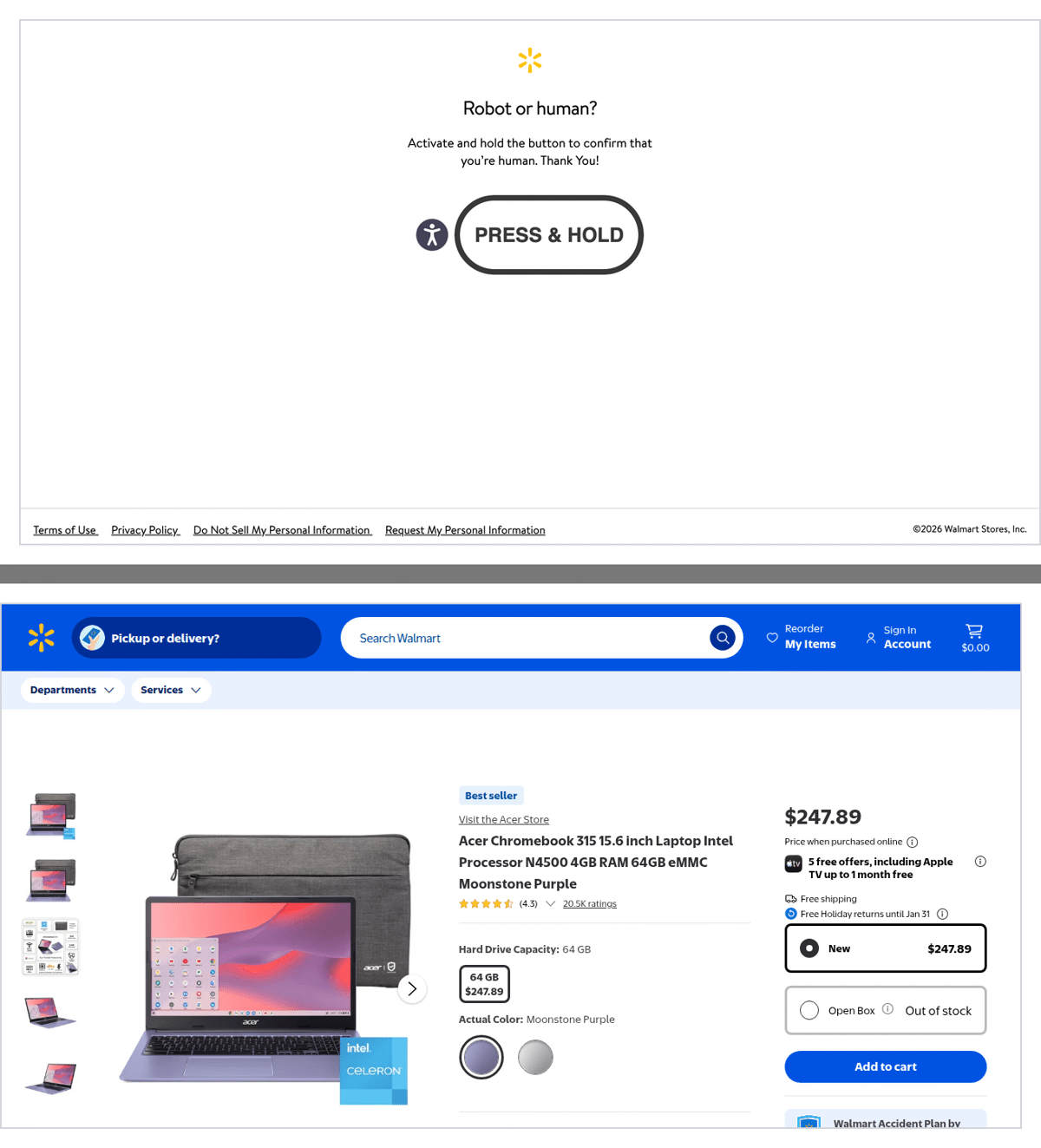
Headless Selenium (top) and ScrapingBee (bottom).
If Walmart serves the product page to your connection, the first line shows the product title, and fetch() reports selenium. Choose expected text that a block, login, or error page from the same site wouldn't show, such as the product name in the page body.
By default, the ScrapingBee fallback uses Auto-Mode, which charges only for the configuration that succeeds. To cap the credits per request, add max_cost next to "mode": "auto" in the target's escalate_params. Set it at or above the cost of the configuration your target needs, which ScrapingBee's Auto-Mode documentation lists.
To make a request wait for a specific element, such as data that JavaScript builds, set escalate_params to {"render_js": True, "wait_for": "
Chrome inside a Docker or CI container can exit at startup, because the container blocks its sandbox and gives it little shared memory. In a Debian container, adding 2 options after --headless=new in fetch_selenium() fixed a SessionNotCreatedException:
options.add_argument("--no-sandbox")
options.add_argument("--disable-dev-shm-usage")
Use them only there, because --no-sandbox disables Chrome's sandbox. Requests sent to ScrapingBee run on its servers and need no local Chrome setup.
Step 4: Ask the model for values, then build the selectors
A repair starts by asking for the values. ai_values() sends the page URL to the ScrapingBee AI Web Scraping API with ai_extract_rules. The model reads the page and returns JSON values. Create repair.py with the value request and the functions that compare values:
import json
import re

from cssselect import SelectorError
from lxml import html as lxml_html
from parsel import Selector

from autorepair import NUMERIC, apply_rule, numbers_in

VALUE_ATTRS = ("title", "aria-label", "content", "value", "datetime")
SKIP_TAGS = {"script", "style", "noscript", "svg", "path"}
JSON_SCRIPTS = ('script[type="application/json"], '
                'script[type="application/ld+json"]')
# Generated IDs and CSS-module hashes (Sidebar__description__xTkIP) change
# with every deploy.
UNSTABLE = re.compile(
    r"[0-9a-f]{8,}|\d{4,}|^(ember|react|:r)"
    r"|(__|-)(?=\w*[A-Z0-9])(?=\w*[a-z])[A-Za-z0-9]{5}$")
# Tailwind classes such as hover:underline are not plain CSS names.
CSS_NAME = re.compile(r"-?[A-Za-z_][\w-]*")


def ai_values(client, url, fields, fetch_params, tries=2):
    """Ask ScrapingBee AI extraction for the value of each field."""
    values, missing = {}, list(fields)
    for _ in range(tries):
        rules = {
            name: {"description": fields[name]["description"],
                   "type": ("number" if fields[name]["type"] in NUMERIC
                            else "string")}
            for name in missing
        }
        params = {"ai_extract_rules": rules, **fetch_params}
        response = client.html_api(url, params=params)
        response.raise_for_status()
        got = json.loads(response.text)
        values.update({k: v for k, v in got.items() if v is not None})
        missing = [name for name in fields if values.get(name) is None]
        if not missing:  # the next request asks only for missing fields
            break
    return values


def coerce(value, ftype):
    """Read a number field with the same parser as page text."""
    if ftype not in NUMERIC or value is None:
        return value
    found = numbers_in(str(value), ftype)
    return found[0][0] if found else None


def tolerance(value):
    """33900 came from '33.9k', so the true count is in 33850..33949."""
    digits = str(int(value))
    zeros = len(digits) - len(digits.rstrip("0"))
    return 10 ** zeros // 2 if zeros else 0


def matches(got, want, ftype):
    if got is None or want is None:
        return False
    if ftype == "int":
        tol = tolerance(want)
        return got == want or -tol <= got - want < tol
    if ftype == "decimal":
        return got == want  # a price must match to the cent
    return " ".join(str(got).split()) == " ".join(str(want).split())
A repair requests AI extraction on 2 pages, the target and the holdout. Each call is billed as the page request plus AI extraction.
AI extraction reads the value a visitor sees. On the January 2026 capture, the visible text showed stars as "33.9k". That made 33,900 the value to find.
tolerance() converts the trailing zeros into a range, and for 33,900 the range is 33,850 to 33,949. On that capture, a fixed 1% window would also accept 33,768, the commit count shown on the page.
A decimal value must match to the cent, so a price of 19.99 never matches 20.00.
Many React-based pages, such as GitHub's, include their data as JSON in a script tag, which the browser uses to build the page. Exact values can be there even when the visible text rounds them.
To find where each value is, candidates() searches embedded JSON first, and then each element's own text and value attributes. Matching an element's own text keeps rules precise. Text split by a child tag, such as a bold word inside a heading, is skipped.
induce_rule() builds a rule for each match, closest first, and keeps the first rule that returns the same value. Append these functions to repair.py:
def css_path(el, root):
    """Shortest selector whose first match is `el`. Stable attributes first."""
    def first_is_el(css):
        try:
            return root.cssselect(css)[:1] == [el]
        except SelectorError:  # an id such as "a:b" is not valid CSS
            return False

    if el.get("id") and not UNSTABLE.search(el.get("id")):
        if first_is_el(f"#{el.get('id')}"):
            return f"#{el.get('id')}"
    for attr in ("itemprop", "data-testid", "data-test", "data-target",
                 "name"):
        css = f'{el.tag}[{attr}="{el.get(attr)}"]'
        if el.get(attr) and first_is_el(css):
            return css
    classes = [c for c in (el.get("class") or "").split()
               if CSS_NAME.fullmatch(c) and not UNSTABLE.search(c)]
    for n in range(1, len(classes) + 1):
        css = el.tag + "".join(f".{c}" for c in classes[:n])
        if first_is_el(css):
            return css
    if el.tag == "script" and el.get("type"):  # JSON-LD has no id or class
        css = f'{el.tag}[type="{el.get("type")}"]'
        if first_is_el(css):
            return css
    parent = el.getparent()
    if parent is None or parent.tag in ("html", "body"):
        return None
    prefix = css_path(parent, root)
    if prefix and first_is_el(f"{prefix} > {el.tag}"):
        return f"{prefix} > {el.tag}"
    return None


def json_leaves(data, path=()):
    if isinstance(data, dict):
        for key, child in data.items():
            yield from json_leaves(child, path + (key,))
    elif isinstance(data, list):
        for i, child in enumerate(data):
            yield from json_leaves(child, path + (i,))
    else:
        yield path, data


def candidates(root, value, ftype):
    """Yield (distance, element, attr, json_path) wherever `value` appears."""
    for script in root.cssselect(JSON_SCRIPTS):
        try:
            payload = json.loads(script.text or "")
        except json.JSONDecodeError:
            continue
        for path, leaf in json_leaves(payload):
            is_int = isinstance(leaf, int) and not isinstance(leaf, bool)
            if ftype == "int" and is_int and matches(leaf, value, "int"):
                yield abs(leaf - value), script, None, list(path)
            elif ftype == "str" and isinstance(leaf, str):
                if matches(leaf, value, "str"):
                    yield 0, script, None, list(path)
            elif ftype == "decimal" and coerce(leaf, ftype) == value:
                yield 0, script, None, list(path)  # 19.99 or "19.99"
    for el in root.iter():
        if not isinstance(el.tag, str) or el.tag in SKIP_TAGS:
            continue
        sources = [(None, el.text)]
        sources += [(a, el.get(a)) for a in VALUE_ATTRS if el.get(a)]
        for attr, raw in sources:
            if ftype in NUMERIC:
                for n, full in numbers_in(raw, ftype):
                    if full and matches(n, value, ftype):
                        yield abs(n - value), el, attr, None
            elif matches(raw, value, "str"):
                yield 0, el, attr, None


def induce_rule(html, value, ftype):
    """Find where `value` appears. Return a rule that reads it exactly."""
    if value is None:
        return None
    root = lxml_html.fromstring(html)
    found = sorted(candidates(root, value, ftype), key=lambda c: c[0])
    for _, el, attr, json_path in found:
        css = css_path(el, root)
        rule = {"css": css, "attr": attr, "type": ftype}
        if json_path is not None:
            rule["json_path"] = json_path
        got = apply_rule(Selector(text=html), rule) if css else None
        if matches(got, value, ftype):
            return rule
    return None
On the January 2026 capture, this code started from the extracted value 33,900 and built the rule #repo-stars-counter-star with the title attribute. That rule returns 33,853, the full number that the visible text rounds to 33.9k.
css_path() also skips auto-generated class names, such as the CSS-module class SidebarAbout-module__description__xTkIP on GitHub's page when tested. It skips Tailwind classes such as hover:underline too, because a selector reads the colon as a pseudo-class. On an Allbirds product page, that filter prevented a breadcrumb class from stopping the repair with a selector error.
On the Allbirds page, the class is on a breadcrumb link:
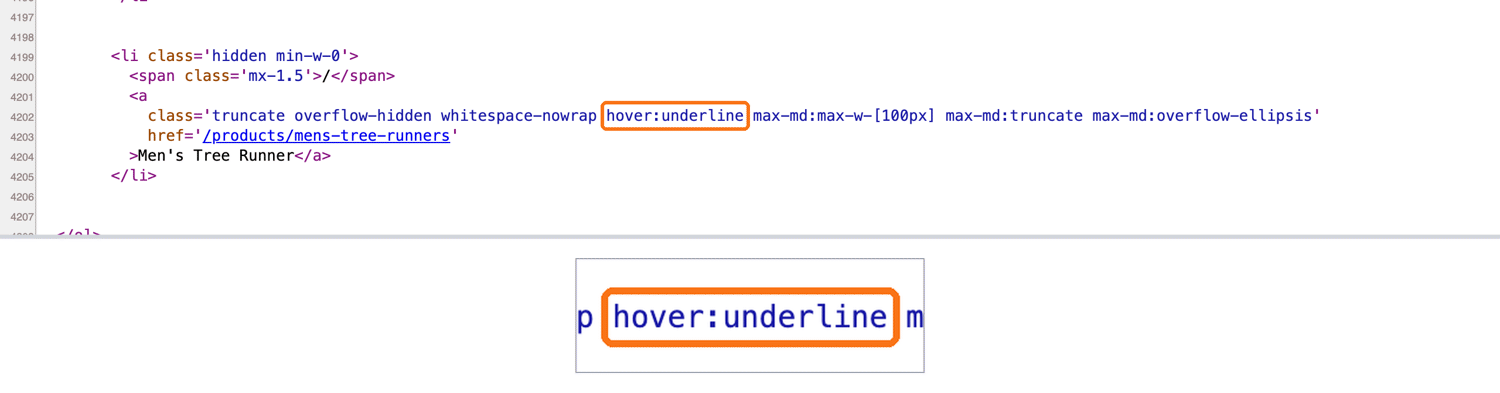
Any other selector that can't be parsed, such as an id with a colon, counts as no match.
Step 5: Save a rule only when it also works on a second page
A rule that reads the right value on one page can still point at the wrong element. repair() also requests AI extraction on a second page built from the same template. It saves a rule to rules.json only if the rule also reads that page's value. Append it to repair.py:
def repair(client, fields, broken, page, holdout):
    """Propose rules for broken fields. Keep the ones a holdout confirms.

    page and holdout are dicts with "url", "html" and "fetch_params".
    """
    want = ai_values(client, page["url"], fields, page["fetch_params"])
    check = ai_values(client, holdout["url"], fields, holdout["fetch_params"])
    promoted, report = {}, {}
    for field in broken:
        ftype = fields[field]["type"]
        value = coerce(want.get(field), ftype)
        expected = coerce(check.get(field), ftype)
        rule = induce_rule(page["html"], value, ftype)
        if rule is None:
            report[field] = f"no exact match on page: {value!r}"
            continue
        got = apply_rule(Selector(text=holdout["html"]), rule)
        if matches(got, expected, ftype):
            promoted[field] = rule
            path = rule.get("json_path") or []
            where = ".".join(map(str, path)) or rule["css"]
            report[field] = f"promoted {where}"
        else:
            report[field] = f"holdout: {got!r} != {expected!r}"
    return promoted, report
run.py connects the steps. AI extraction uses the description you write. So each field's description names where the field is, such as the About sidebar rather than the README:
import json
import os
import sys
from datetime import date
from pathlib import Path

from scrapingbee import ScrapingBeeClient

from autorepair import extract, validate
from fetch import fetch
from repair import repair

FIELDS = {
    "description": {"type": "str",
                    "description": "short description in the About sidebar,"
                                   " not the README"},
    "stars": {"type": "int",
              "description": "number of stars in the About sidebar"},
    "forks": {"type": "int",
              "description": "number of forks in the About sidebar"},
    "watchers": {"type": "int",
                 "description": "number of watchers in the About sidebar"},
}
TARGET = {"url": "https://github.com/SeleniumHQ/selenium",
          "anchor": "SeleniumHQ/selenium", "wait_css": "main",
          "fetch_params": {"render_js": False}}
HOLDOUT = {"url": "https://github.com/SeleniumHQ/seleniumhq.github.io",
           "anchor": "SeleniumHQ/seleniumhq.github.io", "wait_css": "main",
           "fetch_params": {"render_js": False}}
OPTIONAL = [name for name, spec in FIELDS.items() if spec.get("optional")]
RULES, LAST_GOOD = Path("rules.json"), Path("last_good.json")


def main():
    client = ScrapingBeeClient(api_key=os.environ["SCRAPINGBEE_API_KEY"])
    store = json.loads(RULES.read_text())
    last_good = json.loads(LAST_GOOD.read_text())

    html, source = fetch(client, TARGET)
    record = extract(html, store["rules"])
    broken = validate(record, last_good, OPTIONAL)
    print(f"fetched via {source}, broken fields: {broken}")

    if broken:
        hold_html, _ = fetch(client, HOLDOUT)
        promoted, report = repair(
            client, FIELDS, broken,
            page={**TARGET, "html": html},
            holdout={**HOLDOUT, "html": hold_html})
        for field, outcome in report.items():
            print(f"  {field}: {outcome}")
        if promoted:
            store["history"].append({"version": store["version"],
                                     "rules": dict(store["rules"])})
            store["rules"].update(promoted)
            store["version"] += 1
            RULES.write_text(json.dumps(store, indent=2))
            record = extract(html, store["rules"])
            broken = validate(record, last_good, OPTIONAL)

    print(json.dumps(record, indent=2))
    if broken:
        Path("needs_review.json").write_text(json.dumps(
            {"url": TARGET["url"], "fields": broken, "record": record},
            indent=2))
        sys.exit(f"needs human review: {broken}")
    LAST_GOOD.write_text(json.dumps(
        {"date": date.today().isoformat(), "values": record}, indent=2))


if __name__ == "__main__":
    main()
render_js is off for both pages because GitHub sent the repository data in the HTML when tested.
The holdout here is the repository for Selenium's website, whose counts and description differ from the target's. Different values make a coincidental match much less likely to pass. For your own scraper, pick another URL from the same template, such as another product that you already scrape. Each field description names its location, so the request asks for the same element on both pages.
Run the workflow
Start from the 2019 rules and run the script:
python run.py
The first run repairs every field. On the page as tested, all 4 came from the embedded JSON:
fetched via selenium, broken fields: ['description', 'stars', 'forks', 'watchers']
  description: promoted payload.codeViewRepoRoute.overview.sidebarAboutData.description
  stars: promoted payload.codeViewRepoRoute.overview.sidebarAboutData.stargazerCount
  forks: promoted payload.codeViewRepoRoute.overview.sidebarAboutData.forksCount
  watchers: promoted payload.codeViewRepoRoute.overview.sidebarAboutData.watcherCount
{
  "description": "A browser automation framework and ecosystem.",
  "stars": 34539,
  "forks": 8719,
  "watchers": 1249
}
In the output, "promoted" means the rule was saved to rules.json. The watchers field returned exactly 1,249, and the visible page showed this number only as 1.2k. Your output will show newer counts, and different paths if GitHub has changed its page since. When GitHub changes its front end again, the next failed validation starts a new repair.
rules.json moved to version 2, and the 2019 rules moved into history. Here is the new stars rule:
"stars": {
  "css": "script[data-target=\"react-app.embeddedData\"]",
  "attr": null,
  "type": "int",
  "json_path": [
    "payload",
    "codeViewRepoRoute",
    "overview",
    "sidebarAboutData",
    "stargazerCount"
  ]
}
Run the script a second time. Every field passes validation, so the run makes no AI calls:
fetched via selenium, broken fields: []
{
  "description": "A browser automation framework and ecosystem.",
  "stars": 34539,
  "forks": 8719,
  "watchers": 1249
}
We ran the workflow 15 times on the GitHub page from the 2019 rules, and no run saved a wrong rule. A field that the holdout can't confirm goes to needs_review.json for a person to check. AI extraction runs only when validation fails, not on every page.
To run the tutorial again, copy rules.v1.json to rules.json and last_good.v1.json to last_good.json.
Beyond GitHub, the same code repaired names and prices on books.toscrape.com, Allbirds, Death Wish Coffee, and Best Buy. On Best Buy, every fetch went through ScrapingBee's Auto-Mode. On Death Wish Coffee, selectors from an older Shopify theme returned null. There, 2 AI extraction calls produced rules that read the right name and price on 6 other products.
Adapt the workflow to your own scraper
If you already run a Selenium scraper, move its selectors into rules.json the way Step 1 shows. A rule can use an xpath key instead of css, so a call such as driver.find_element(By.XPATH, "//p[@class='price']").text becomes this rule:
"price": {"xpath": "//p[@class='price']", "attr": null, "type": "decimal"}
Keep your login and navigation code, and pass driver.page_source to extract() after the last step. Rules read the HTML that page_source returns, not the rendered text. So they also see hidden text, and the original letter case where CSS shows it in uppercase. Compare each converted rule with the old value once.
To read an attribute with XPath, select the element and put the attribute name in attr, instead of ending the path with /@title. Repairs write CSS rules, which run together with your XPath rules.
Then add each field to FIELDS in run.py, and set TARGET and HOLDOUT to 2 of your URLs. If some pages leave a field empty, add "optional": True to its spec. Start with an empty last_good.json that contains {}.
For pages behind a login, save the HTML that your scraper sees. Then give it to a coding agent, as "Let a coding agent fix the rules" shows.
If a target needs fallback settings such as {"mode": "auto"}, put them in both escalate_params and fetch_params. The first is for the fetch, and the second is for the AI call.
ScrapingBee can also return the page HTML with the extracted values. Add add_html and json_response to the AI call, and the JSON response includes the page HTML in its html field. Pass that HTML to repair() as the page's html. The extracted values and the new rules then come from the same copy of the page.
That helps with values that can change between requests, such as a stock count or a price set by location. Set country_code in fetch_params to your scraper's country as well.
Model-written rules vs. rules built from extracted values
A model can repair selectors in 2 ways. It can return only the field values and leave code to find and check the rules. It can also write the new rules itself from the page HTML.
On the same GitHub page, we had Claude Sonnet 5.5 and Claude Haiku 5.5 write rules through the Claude Code CLI. Each prompt contained about 151K tokens of trimmed HTML, including the embedded JSON:
| Approach | Runs | Wrong values written | Second-page check in the test |
|---|---|---|---|
| AutoQALLMs element list, first 2,000 characters | n/a | No counts in the input | No |
| Sonnet 5.5, CSS-only rule format | 2 | Stars, forks, and watchers read 0 in both runs | No |
| Sonnet 5.5, rules with JSON paths | 3 | None | No |
| Haiku 5.5, rules with JSON paths | 3 | None, but 1 run read null on every field | No |
| Rules built from values extracted by ScrapingBee (this workflow) | 15 | None | Yes, every rule |
When the rule format allowed a JSON path, the model-written rules returned the right values. The January 2026 capture contained no exact watcher count. There, Sonnet 5.5 wrote a selector for the abbreviated "1.3k" in all 3 runs. This workflow sent watchers to review instead of saving a rounded number.
Repairs run only after a validation failure. Whether a rule is right matters more than what a repair costs. This workflow runs no model-written code, needs no separate model key, and checks every rule on a second page. Because its rules come from deterministic code, you can rerun each one, diff it in git, and audit why it passed.
For a design where the model writes and revises the extractor code itself, see our guide to self-reviewing code-generation loops. Tools that find moved elements by saved fingerprints, such as Scrapling, are another approach, and our Scrapling walkthrough shows how they work. Whichever approach writes the rules, put them through the same holdout check before you save them.
Let a coding agent fix the rules
Fields that the workflow sends to review are saved in needs_review.json, and a coding agent can fix rules.json from there. It reads files with tools and doesn't need the whole page in one prompt. Through ScrapingBee's Remote MCP server, it can also load live pages, and each call costs the same credits as the matching API request. Send your API key in an Authorization: Bearer header, as the MCP server's setup page recommends. A key in the ?api_key= query parameter still works, but that method is deprecated.
Give the agent a test it must pass. save_fixtures.py saves the target and holdout pages with their expected values, and verify.py applies rules.json to those saved pages without network calls or credits. It printed FAIL on the 2019 rules and PASS on the repaired ones. Both scripts, the task prompt, and the Claude Code command are in this article's GitHub repository.
The command lets the agent read the folder, edit rules.json, run verify.py, and call 2 ScrapingBee tools, and nothing else. In testing, its flags blocked writes outside rules.json, one-off scripts, and a task line asking for the file with the API key. Check that they still do after each Claude Code update.
In 3 runs on Sonnet 5.5 from the 2019 rules, the agent found all 4 fields in the embedded JSON, and verify.py printed PASS. Each run took 90 to 110 seconds and cost about $0.24 to $0.40 at Sonnet 5.5 list prices. Use the agent for breaks that need judgment, such as a new template or a field that moved to another part of the page. Use this workflow's repair for routine selector breaks, which took 16 to 56 seconds in 3 timed runs.
When to skip selectors and extract every page with AI
ScrapingBee's AI extraction reads the fields from every page directly, so a template has no selector rules to maintain. Each page is billed as the page request plus AI extraction. Pass render_js=False when the page doesn't need JavaScript rendering.
To estimate the monthly cost, multiply your pages per template by the per-request credits in ScrapingBee's documentation. Then find what those credits cost on your plan on the pricing page. Larger plans typically lower the price per credit. The selector approach adds AI extraction only when a repair runs, but each template needs fields, expected text, a holdout, and fixtures.
Count cost per usable page rather than per request, because a cheap request that returns a block page still needs another attempt. Compare the monthly credits with the engineering time needed to maintain a template's rules. If the credits cost less, extract every page with ScrapingBee's AI extraction, and keep the Step 2 checks in the pipeline. If you want rules you can diff and audit in git, or maintaining selectors costs less, keep selectors and this workflow's repair.
Some sites need neither. ScrapingBee's Amazon API and Walmart API fetch search results and structured product details, so those pages need no selectors.
A runtime browser agent controls the browser with a model on every run, and every page costs a model session. Use one to explore a new site. For repeatable clicks and scrolls, use ScrapingBee's JavaScript Scenario, and use selectors or AI extraction for the data.
Running self-healing scrapers in production
An automated repair process needs the same safety checks as any automated change to production data.
Automate repairs in stages. At first, write needs_review.json or open a pull request with the rule diff for every repair. Save the HTML of each page that a repair used, commit it with rules.json, and test new rules against it in CI. Let a field's repairs save automatically only after those tests would catch a bad rule on it.
Watch null rates and row counts per batch. A field that's null on every page of a template needs 1 repair. A field that's null on a few pages usually means a different page layout, so use one of those pages as the holdout. Append check_batch() to autorepair.py, and run it on each batch of records:
def check_batch(records, fields, expected_rows, max_null_rate=0.05,
                min_share=0.5):
    """Catch what one record cannot show: lost rows and rising null rates."""
    problems = []
    if len(records) < expected_rows * min_share:
        problems.append(f"rows: {len(records)} of about {expected_rows}")
    for field in fields:
        nulls = sum(r.get(field) is None for r in records)
        if records and nulls / len(records) > max_null_rate:
            problems.append(f"{field}: {nulls} of {len(records)} null")
    return problems
With a broken price rule on 20 books.toscrape.com product pages, it reported price: 20 of 20 null.
Audit a sample with AI extraction. A repaired rule can point to a nearby element that returns a believable value, which validation can miss. spot_check() compares the saved rules with ScrapingBee's AI extraction, which reads the page on its own, on a few random pages. Save it as spot_check.py:
"""Audit saved rules: compare them with AI extraction on a sample of pages."""
import random

from autorepair import extract
from repair import ai_values, coerce, matches


def spot_check(client, pages, fields, rules, sample=3):
    """Return (url, field, rule value, AI value) for every disagreement."""
    problems = []
    for page in random.sample(pages, min(sample, len(pages))):
        got = extract(page["html"], rules)
        want = ai_values(client, page["url"], fields, page["fetch_params"])
        for field, spec in fields.items():
            ai = coerce(want.get(field), spec["type"])
            if ai is not None and not matches(got[field], ai, spec["type"]):
                problems.append((page["url"], field, got[field], ai))
    return problems
On the GitHub target and holdout, the saved rules agreed with AI extraction. With the stars rule changed to read the forks count, it flagged both pages. The target read 8,721 against 34,500, and the holdout read 1,580 against 1,400. Run it on a small sample of each batch, and send every disagreement to review.
Repair once per template. If you loop run.py over every URL, a template change triggers 1 repair per page, and parallel runs can overwrite each other's rules.json. run_batch() in this article's GitHub repository fetches a template's pages and makes 1 repair for each broken field. On those 20 product pages, it made 2 AI extraction calls instead of 20 repairs, and all 20 prices were then correct.
Extract list pages with AI. To build a rule for a list page, a repair needs known values for 2 or more items. AI extraction on every page usually works better for these pages. On the first books.toscrape.com catalog page, these 2 rules in ai_extract_rules returned all 20 titles and prices in 1 request, without JavaScript rendering:
{
  "titles": {
    "description": "full title of every book in the product grid, in page order",
    "type": "list"
  },
  "prices": {
    "description": "price of every book in the product grid, in page order, as numbers",
    "type": "list"
  }
}
Combine the 2 lists into rows with zip(), and check that their lengths match. Then pass each price through coerce(price, "decimal") to get a decimal whatever its JSON type. Run check_batch() on the rows with expected_rows set to the item count the page shows and min_share=1, so even 1 missing row gets flagged.
Send rounded values to review. When the HTML contains a value only in rounded form, such as "1.3k", review keeps a guess out of your data.
Final thoughts
AutoQALLMs shows that an LLM can write Selenium tests from page HTML, and its paper tested this on practice sites built for testing. For a scraper, regenerated tests don't repair the extraction, because production pages often add bot protection and change formats without an error. A safe repair starts with the right page and a failed value check, and saves only a selector that also works on a second page.
ScrapingBee handles the requests that a site blocks, and if maintaining selectors costs more than AI credits, its AI extraction can read every page instead. Get free ScrapingBee API credits, then pick a scraper that often breaks and run its next broken field through the holdout check.
FAQ
Can you web scrape with AI?
Yes, an LLM can read a page and return the fields you describe as JSON. ScrapingBee's AI extraction does this in 1 API call, with no selectors to maintain, as its AI web scraping guide shows. If maintaining selectors costs more than AI credits, extract every page this way. Otherwise, let AI repair your selectors only when one breaks.
Can ChatGPT do web scraping?
For small, one-off tasks, yes, especially with web search enabled. For repeatable scraping, use ChatGPT to help write the scraper, and check every value it extracts, because it can return wrong data with confidence. ScrapingBee's AI extraction returns fields as JSON in 1 API call, and ScrapingBee's ChatGPT scraping guide shows what ChatGPT can and can't do.
How does Healenium work?
Healenium saves the DOM path of each element a Selenium test finds. When a locator fails, it compares the saved path with the current DOM tree. It switches to the most similar element if its score passes a threshold you can set. For a scraper, a healed locator still needs a value check, because it can match the wrong element.
How do you scrape without getting blocked?
Make every layer look like a browser, including the TLS fingerprint, HTTP version, headers, IP reputation, and request rate. Python's requests usually sends a TLS fingerprint that differs from a browser's, even with a Chrome user agent. ScrapingBee handles headless browsers and rotates proxies, and Auto-Mode picks the cheapest configuration that succeeds. See ScrapingBee's guide to scraping without getting blocked.
Is Selenium outdated?
No. Selenium is actively maintained, and since version 4.6, Selenium Manager downloads a missing browser driver. It remains a good choice for scripted browser runs. At scale, let ScrapingBee handle blocks and JavaScript rendering, and validate values to catch selector breaks.