AI web scraping with Python means using a large language model to pull structured data out of a web page by describing what you want in plain English, instead of writing and maintaining brittle CSS or XPath selectors. You point it at a page, say "return every product with its name and price," and get back clean JSON. There are three ways to do this: as a parameter on a managed scraping API, with an AI-native open-source framework you run yourself, or by gluing an LLM onto a scraper you already have.
TL;DR
- AI web scraping replaces hardcoded CSS/XPath selectors with an LLM that reads the page and returns structured JSON based on a schema or a plain-English query.
- There are three patterns: AI as a parameter on a managed API (ScrapingBee's
ai_extract_rules, +5 credits per call), an AI-native OSS framework (ScrapeGraphAI, Crawl4AI), or a DIY pipeline (Playwright/Requests + OpenAI + Pydantic). The OSS path is free if you self-host the LLM. - ScrapingBee bundles AI extraction with proxy rotation and JavaScript rendering in one HTTP call, so you skip the infrastructure glue.
- For free local prototyping or on-prem requirements, ScrapeGraphAI and Crawl4AI run against Ollama models at no per-call cost.
- LLM extractors hallucinate. Treat schema validation with Pydantic, plus a retry on failure, as non-negotiable in production. It's not an optional nice-to-have.
- Credit math (as of May 2026):
ai_extract_rules+ JS rendering runs 10 credits/page on Classic, 30 on Premium, 80 on Stealth. 1,000 pages a month on Premium is 30,000 credits, which is about 12% of the Freelance plan's monthly allowance. - Skip AI extraction when the data already sits in a stable CSS class at high volume. A plain selector is roughly 10x cheaper and faster. For agentic workflows, ScrapingBee's MCP server lets Claude, Cursor, or ChatGPT call the scraper directly.
This guide covers all three patterns, building data for AI applications like RAG systems and agents, and when AI extraction is worth its cost over traditional selectors. It is written for developers building AI products who need reliable, structured web data and are tired of rewriting selectors every time a site changes its layout.
What AI Web Scraping with Python Actually Means
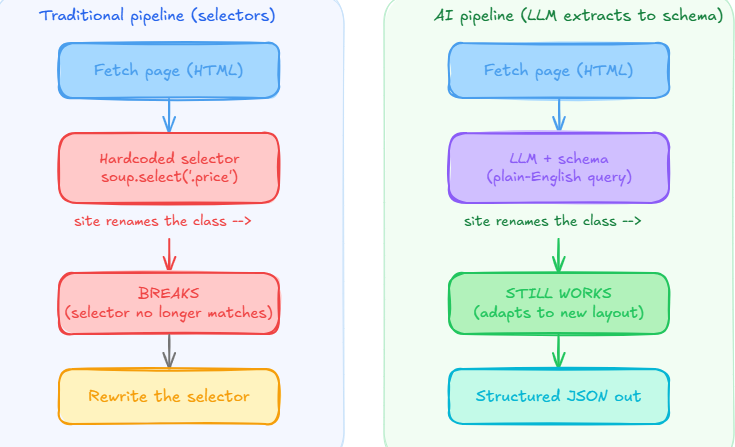
Traditional web scraping is selector-driven. You inspect the page, find that the price lives in span.price-current, and write code that breaks the moment the site renames that class.
AI web scraping replaces that fragile step with a natural-language instruction. Instead of:
price = soup.select_one("span.price-current").text
you describe the data:
"Extract each product's name, price, and availability."
The LLM reads the page content and returns structured data that matches your description, even when the underlying HTML changes. That is the core shift: extraction logic moves from hardcoded selectors to a prompt plus a schema.
It is not magic, and it does not remove the rest of the pipeline. You still fetch the page (with Requests, Playwright, or an API), and you still deal with JavaScript rendering and anti-bot systems. AI changes the parsing and extraction step, not the access layer underneath it.
An AI scraper needs three inputs regardless of which pattern builds it: page content (HTML or rendered text), an extraction spec (a natural-language query, a JSON schema, or a Pydantic model), and an LLM endpoint. What it buys you over selectors: resilience to layout changes and one extraction path across sites with different structures. What it costs you that selectors don't have: token spend per page, and the risk that the model invents a field that isn't actually on the page.
That points to the two places AI shows up in web scraping:
- Extraction — an LLM turns raw, messy HTML into structured JSON.
- Consumption — scraped data feeds an AI application, such as a retrieval-augmented generation (RAG) system or an agent.
This guide covers both, starting with the three ways to build the extraction step.
Three Architectural Patterns for AI Web Scraping in Python
Every AI scraping setup in Python boils down to one of three patterns:
- Pattern 1 — AI as a parameter. You pass
ai_extract_rulesorai_queryto a managed scraping API — ScrapingBee, Firecrawl — that already handles proxies and JavaScript rendering. You get structured JSON back in one HTTP call. - Pattern 2 — AI-native OSS framework. You run ScrapeGraphAI or Crawl4AI yourself, pointed at a local Ollama model or your own API key. Free if you self-host the LLM, but you own the setup.
- Pattern 3 — DIY pipeline. You fetch the page with your own Playwright or Requests code, then call an LLM directly and validate the output with Pydantic. Full control, full maintenance burden.
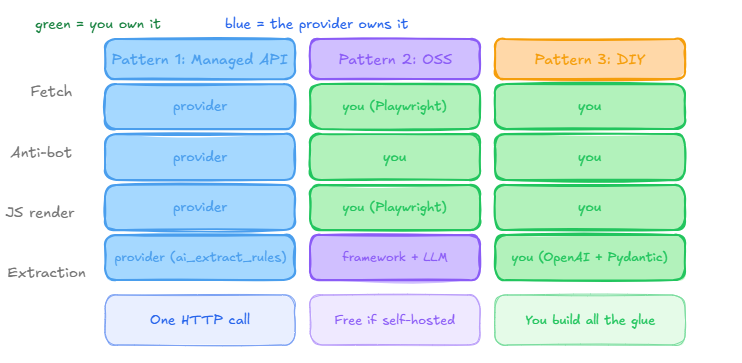
Pattern 1 is the right call for production pipelines on sites with anti-bot defenses, when the team doesn't want to manage browser or proxy infrastructure. Pattern 2 fits free local prototyping, on-prem data residency, and teams that want full control over the model. Pattern 3 makes sense when you already have a Playwright or Scrapy codebase and want custom orchestration — multiple model calls per page, confidence-based routing — without adopting a new framework.
| Factor | Pattern 1: Managed API + AI | Pattern 2: AI-native OSS | Pattern 3: DIY + LLM |
|---|---|---|---|
| Best for | Production, anti-bot-heavy sites | Free local prototyping, on-prem | Custom orchestration on existing code |
| Cost per page | API credits (proxy + AI) | Free if self-hosted LLM | LLM tokens + your own proxy cost |
| Setup time | Minutes | Moderate (local LLM serving) | Highest — you build the glue |
| Anti-bot handling | Built in | You handle it yourself | You handle it yourself |
| JS rendering | Built in | Built in (Playwright underneath) | You wire it in |
| Maintenance owner | The API provider | You | You |
ScrapingBee occupies Pattern 1 cleanly, with Firecrawl as the closest direct analog. The rest of this guide walks through each pattern with working code, starting with the environment setup that all three share.
Set Up Your Python Environment for AI Web Scraping
Use a virtual environment and install the fetching, parsing, and LLM packages:
python -m venv venv
source venv/bin/activate        # Windows: venv\Scripts\activate
pip install requests beautifulsoup4 lxml openai pydantic scrapingbee
requestsandbeautifulsoup4fetch and clean the page for Pattern 3.openaicalls a language model for the DIY extraction example (any provider's SDK works).pydanticenforces the structure of the model's output across all three patterns.scrapingbeeis the Python SDK for Pattern 1.
You will also need an LLM API key set as an environment variable, and a ScrapingBee key for the API section. ScrapeGraphAI and Crawl4AI (Pattern 2) get their own install commands in that section, since they pull in Playwright as a dependency.
Pattern 1: AI as a Parameter — ScrapingBee's Managed API
A web scraping API collapses the fetch and the extraction into one call. ScrapingBee's AI Web Scraping API handles the proxies, JavaScript rendering, and anti-bot layer, then runs AI extraction on the result and returns structured JSON.
There are three AI parameters: ai_query (a one-shot natural-language instruction, returns a string), ai_extract_rules (a JSON schema, returns parsed JSON), and ai_selector (an optional CSS anchor that scopes extraction to one part of the page, which also speeds up the request). Each adds +5 credits on top of the regular scraping cost.
You describe the data with ai_query and define its shape with ai_extract_rules:
import os
import json
from scrapingbee import ScrapingBeeClient
from pydantic import BaseModel


class Book(BaseModel):
    title: str
    price: str | float          # accept text ("£51.77") or numeric prices


class BookList(BaseModel):
    books: list[Book]


def scrape_books(url: str) -> list[Book]:
    api_key = os.environ.get("SCRAPINGBEE_API_KEY")
    if not api_key:
        raise EnvironmentError("SCRAPINGBEE_API_KEY not set in environment variables")


    client = ScrapingBeeClient(api_key=api_key)
    response = client.get(
        url,
        params={
            "ai_query": "Return every book on the page with its title and price",
            "ai_extract_rules": {
                "books": {
                    "type": "list",
                    "description": "all books on the page",
                    "output": {
                        "title": "the book title",
                        "price": "the book price",
                    },
                },
            },
        },
    )
    if not response.ok:
        raise RuntimeError(f"Request failed with status {response.status_code}: {response.text}")


    raw = json.loads(response.content)
    return BookList.model_validate(raw).books


if __name__ == "__main__":
    books = scrape_books("https://books.toscrape.com/")
    for i, book in enumerate(books, 1):
        print(f"{i:>3}. {book.title} | {book.price}")
One call does what a DIY pipeline needs five libraries and an LLM key for. Note the schema accepts str | float: ScrapingBee can return a price as text or as a number, and Pydantic v2 will not coerce one type into the other, so accepting both keeps the parser from failing on a numeric value.
Hallucination caveat: even with server-side schema constraints, ai_extract_rules can still return an invented field on a malformed or thin page. Validate every response downstream with Pydantic the same way the DIY pipeline does — don't treat the managed API as exempt from that step.
Credit cost by proxy tier (as of June 2026)
AI extraction cost stacks on top of the proxy tier and JS rendering you choose:
| Tier | Credits per page (with JS + AI) | Typical use case |
|---|---|---|
| Classic | 10 | Lenient targets, no anti-bot |
| Premium | 30 | Most production scrapes |
| Stealth | 80 | Cloudflare, DataDome, PerimeterX |
Batch extraction with the ScrapingBee CLI
For enriching a list of URLs without writing a loop, the ScrapingBee CLI (pip install scrapingbee-cli) reads a CSV, scrapes each row, and writes the extracted fields back in place:
scrapingbee scrape \
  --input-file product_urls.csv \
  --update-csv \
  --render-js \
  --premium-proxy \
  --ai-extract-rules '{"product_name": "name of the product", "price": "product price", "rating": "star rating", "review_count": "number of reviews", "in_stock": "stock availability"}'
The CLI ships as a separate package from the Python SDK — don't conflate pip install scrapingbee (SDK) with pip install scrapingbee-cli (CLI). --ai-extract-rules takes the JSON schema directly on the command line; --ai-query is the natural-language equivalent if you'd rather describe the fields in plain English. Check the CLI documentation for the current flag surface before you script against it — it's actively developed.
When Pattern 1 is the wrong call: very high-volume scraping of identical-template pages, where a fixed CSS selector would run roughly 10x cheaper. AI extraction earns its cost when the schema or the layout varies — not on a single stable site at scale.
Extract structured data without managing browsers or selectors
ScrapingBee's AI Web Scraping API handles proxies, JavaScript rendering, and anti-bot challenges, then returns clean JSON from a plain-English query. Start with 1,000 free API credits — no credit card required.
Pattern 2: AI-Native OSS Frameworks (ScrapeGraphAI, Crawl4AI)
If you want AI extraction without a managed API — for free local prototyping, on-prem data residency, or full control over which model runs — ScrapeGraphAI and Crawl4AI build the prompt-to-schema pattern into the framework itself.
ScrapeGraphAI with a local model
ScrapeGraphAI's SmartScraperGraph takes a prompt, a source URL, and an LLM config. Pointed at a local Ollama model, the whole pipeline runs without an API key:
from scrapegraphai.graphs import SmartScraperGraph


graph_config = {
    "llm": {
        "model": "ollama/llama3.1",
        "base_url": "http://localhost:11434",
    },
    "verbose": False,
}


scraper = SmartScraperGraph(
    prompt="Extract every book title and price from this page",
    source="https://books.toscrape.com/",
    config=graph_config,
)


result = scraper.run()
print(result)
Swap "model": "ollama/llama3.1" for "openai/gpt-4o-mini" plus an api_key field to use a hosted model instead — the rest of the pipeline doesn't change. ScrapingBee's own ScrapeGraphAI tutorial covers the full walkthrough, including more complex schemas.
Crawl4AI for Markdown-first extraction
Crawl4AI's AsyncWebCrawler is built around a different idea: instead of returning JSON directly, it returns clean Markdown that's meant to be piped into any LLM you choose.
import asyncio
from crawl4ai import AsyncWebCrawler


async def main():
    async with AsyncWebCrawler() as crawler:
        result = await crawler.arun(url="https://books.toscrape.com/")
        print(result.markdown[:2000])


asyncio.run(main())
That Markdown output is intentionally LLM-friendly — strip navigation and boilerplate first, then pass it to GPT, Claude, or a local Llama model for the actual extraction step, the same way the DIY pattern does in the next section. ScrapingBee's Crawl4AI guide walks through the full setup.
Self-hosted vs. a paid API key
| Factor | Self-hosted LLM (Ollama) | Hosted API key (OpenAI/Anthropic) |
|---|---|---|
| Cost per call | Free (your own compute) | Per-token, billed |
| Setup time | Higher — model serving, GPU/CPU sizing | Lower — drop in an API key |
| Data residency | Stays on your infrastructure | Leaves your network |
| Extraction quality | Depends on local model size | Generally stronger on messy pages |
Both frameworks run Playwright underneath, so you inherit its setup overhead, proxy plumbing, and anti-bot handling either way — neither framework removes that layer, it just wraps it. Pattern 2 is the right call for free local prototyping, OSS preference, or on-prem requirements. It hits its limit on production traffic against anti-bot-heavy sites, where you end up rebuilding most of what Pattern 1 already handles.
Pattern 3: DIY — Glue an LLM onto Your Existing Scraper
The DIY approach has three moving parts: fetch the page, reduce it to clean text, then ask an LLM to return data that matches a schema you define. It's the pattern to reach for when you already have a Playwright or Scrapy codebase and want custom orchestration — multiple model calls per page, or routing cheap models first and escalating on low confidence.
The schema matters more than the prompt. Without it, LLM extraction returns inconsistent structure across pages. A Pydantic model gives the output a shape you can validate.
import requests
from bs4 import BeautifulSoup
from openai import OpenAI
from pydantic import BaseModel


# 1. Fetch the page
url = "https://books.toscrape.com/"
html = requests.get(url, timeout=10).text


# 2. Reduce noise: send clean text, not raw HTML, to cut tokens and hallucinations
soup = BeautifulSoup(html, "lxml")
content = soup.select_one("section").get_text(" ", strip=True)


# 3. Define the structure you expect back
class Book(BaseModel):
    title: str
    price: str


class BookList(BaseModel):
    books: list[Book]


# 4. Ask the LLM to extract it as JSON
client = OpenAI()  # reads OPENAI_API_KEY from the environment
response = client.chat.completions.create(
    model="gpt-4o-mini",                       # any capable model works
    temperature=0,                              # reduce hallucination variance
    response_format={"type": "json_object"},
    messages=[
        {"role": "system", "content": "Extract data and return only valid JSON."},
        {"role": "user", "content": (
            "Extract every book title and price from this page "
            "as JSON with a 'books' array.\n\n" + content
        )},
    ],
)
data = BookList.model_validate_json(response.choices[0].message.content)
for book in data.books:
    print(f"{book.title} | {book.price}")
Three details make or break this:
- Send clean text, not raw HTML. Stripping navigation, scripts, and layout markup cuts token cost and reduces the chance the model hallucinates fields from boilerplate.
- Set temperature to 0. It won't make output fully deterministic, but it narrows the variance in how the model fills ambiguous fields.
- Validate the output.
BookList.model_validate_json(...)rejects responses that don't match the schema, so a malformed answer fails loudly instead of poisoning your data downstream.
Anti-hallucination tactics, in order
- Temperature 0 (or as close to it as the model allows).
- Constrain output with a schema — OpenAI structured outputs, Anthropic tool use, or
response_format={"type": "json_object"}. - Validate parsed JSON against a Pydantic model; on
ValidationError, retry once with a stricter prompt. - On a second failure, log the URL and skip the record rather than writing bad data.
Cost math for GPT-4o-mini
As of May 2026, GPT-4o-mini runs $0.15 per million input tokens and $0.60 per million output tokens. A typical product-page extraction (clean text input, a short JSON response) lands somewhere around $0.0005–$0.002 per page depending on how much you strip before sending it — plus whatever proxy or browser infrastructure you're running underneath to fetch the page in the first place. Verify current pricing against OpenAI's pricing page before budgeting at volume; per-token rates move.
This works, but notice how much you're now responsible for: fetching past anti-bot systems, rendering JavaScript, cleaning HTML, budgeting tokens, enforcing a schema, retrying failures, and paying for both proxies and LLM calls. That glue is where most of the time goes — and it's exactly what Pattern 1 collapses into one call.
Comparing AI Scraping Tools: A Decision Matrix
| Tool | Pattern | Pricing model | Anti-bot | JS rendering | LLM model |
|---|---|---|---|---|---|
| ScrapingBee | 1 — Managed API + AI | Credit-based, free 1,000-credit trial | Built in (Classic/Premium/Stealth) | Built in | Provider-side, configurable via params |
| Firecrawl | 1 — Managed API + AI | Credit-based subscription tiers | Built in | Built in | Provider-side |
| ScrapeGraphAI | 2 — AI-native OSS | Free (self-hosted) or BYO key | Not included — you add it | Via Playwright, you configure | Any (Ollama, OpenAI, etc.) |
| Crawl4AI | 2 — AI-native OSS | Free (self-hosted) or BYO key | Not included — you add it | Via Playwright, you configure | Any |
| Browse.AI | No-code visual scraper | Subscription | Limited | Built in | N/A (rule-based) |
| DIY (Playwright + OpenAI) | 3 — DIY + LLM | Pay-as-you-go tokens + your own infra | You build it | You wire it in | Any |
ScrapingBee works well when you need anti-bot handling and AI extraction in one call without managing browser or proxy infrastructure yourself. Firecrawl is a good fit when the job is crawling many pages into a normalized Markdown/JSON output rather than precise, per-field schema extraction. ScrapeGraphAI and Crawl4AI work for free local prototyping or on-prem requirements where you're willing to own the infrastructure. Browse.AI serves a different buyer — non-developers who want a visual, no-code scraper rather than a Python-first AI extraction pipeline.
Pricing and tier details above are current as of May 2026 — check each provider's pricing page before committing to a volume estimate.
Compare AI extraction in one call, no infrastructure to manage
ScrapingBee's free trial gives you 1,000 credits, no credit card required, to test
ai_extract_rulesagainst your own targets.
Anti-Bot Reality: Why AI Extraction Doesn't Replace Proxies
AI extraction solves the parsing problem. It does not solve anti-bot. The production sequence is still proxy rotation → JavaScript rendering → AI extraction, in that order — AI sits on top of the access layer, not in place of it.
ScrapingBee's three proxy tiers (as of May 2026):
- Classic (datacenter, 1–5 credits) — fine for lenient targets with no real bot detection.
- Premium (residential, 10–25 credits) — the production default for most sites.
- Stealth (anti-bot grade, 75 credits, requires JS rendering) — Cloudflare, DataDome, PerimeterX.
Stacked with AI extraction (+5 credits), the combined cost per page lands at 10 credits on Classic, 30 on Premium, and 80 on Stealth — restating the table from the Pattern 1 section above.
Rolling your own anti-bot layer for a DIY pipeline means TLS fingerprinting (curl_cffi or similar), a residential proxy provider, and Playwright stealth configuration — engineering time, a per-IP cost, and ongoing monitoring as detection methods change. That tax exists whether or not you're using AI for extraction.
One billing detail worth knowing: only HTTP 200 and 404 responses are billed on ScrapingBee. A 500 or other failure isn't charged, so retrying on a 500 doesn't cost you twice.
Post-login scraping is out of scope, full stop. AI extraction does not grant permission to bypass authentication — that's prohibited by ScrapingBee's terms and, almost always, by the target site's terms as well. Nothing in this guide applies to logged-in or member-only content.
Credit-Cost Math: AI Extraction at Scale
Here's the credit math worked out at three volumes (pricing as of May 2026, exclusive of VAT):
| Pages/month | Tier | Credits/page | Total credits | Plan that covers it | Plan cost |
|---|---|---|---|---|---|
| 1,000 | Classic + JS + AI | 10 | 10,000 | Freelance | $49.99 |
| 1,000 | Premium + JS + AI | 30 | 30,000 | Freelance | $49.99 |
| 1,000 | Stealth + AI | 80 | 80,000 | Freelance | $49.99 |
| 10,000 | Premium + JS + AI | 30 | 300,000 | Startup | $99.99 |
| 100,000 | Premium + JS + AI | 30 | 3,000,000 | Business or Business+ | $249.99–$599.99 |
At 100,000 pages, the Business plan's 3M credits meet the requirement with no buffer for retries or traffic growth — Business+ at 8M credits is the more comfortable choice if you expect to scale further.
Only HTTP 200 and 404 responses are billed, so retries on transient 500s don't double your cost. Auto-renewal triggers at 98% credit usage, with 2% rollover, as of May 2026.
For Pattern 2's OSS path, the framing is different: extraction is free per request if you self-host the LLM, but you're sizing and paying for the GPU/CPU and latency budget yourself rather than per-call credits. There's no single per-token number to compare against — it depends entirely on the model and hardware you choose.
Handling Hallucinations and Validating LLM Output
LLMs extracting from a page fail in three recognizable ways:
- Invented values — the model guesses a price or field that isn't actually on the page.
- Missing fields — it returns partial data when the schema asked for more.
- Structural drift — it returns a string where the schema expects a number, or vice versa.
The defense, in order: set temperature to 0 (or as close as the model allows), constrain the output shape with a schema — OpenAI structured outputs, Anthropic tool use, or response_format={"type": "json_object"} — and validate the parsed JSON against a Pydantic model. On a ValidationError, retry once with a stricter prompt; on a second failure, log the URL and skip the record rather than writing bad data downstream.
import logging


try:
    data = BookList.model_validate_json(raw_response)
except ValidationError as e:
    logging.warning(f"Extraction failed for {url}: {e}")
    # retry with a stricter prompt, or skip and move on
One edge case worth checking before you blame the model: if the LLM correctly says "I don't see this data," the page genuinely might not have it. Check the source HTML first — a missing field isn't always a hallucination.
ScrapingBee's ai_extract_rules constrains the output shape server-side, which removes a lot of structural drift, but downstream validation with Pydantic is still the right call regardless of which pattern produced the JSON.
Build a RAG-Ready Pipeline: From Scrape to LLM Context
The second half of AI web scraping is feeding scraped data into an AI application. This is one of the most common reasons to scrape in 2026: giving an LLM live, current information instead of relying on its training cutoff.
A retrieval-augmented generation (RAG) pipeline looks like this:
- Scrape the source pages.
- Clean the content to Markdown or plain text, dropping navigation and boilerplate.
- Chunk the text into passages small enough to embed.
- Embed each chunk into a vector and store it in a vector database.
- Retrieve the most relevant chunks at query time and pass them to the LLM as context.
The cleaning step is where scraping quality decides AI quality. Raw HTML full of menus and scripts wastes tokens and pushes models toward hallucination, so LLM-ready output matters. ScrapingBee's Markdown Scraper returns pages as clean Markdown for exactly this reason.
Chunking is straightforward Python:
def chunk_text(text, size=1000, overlap=100):
    if size <= overlap:
        raise ValueError("size must be greater than overlap")
    chunks = []
    start = 0
    while start < len(text):
        chunks.append(text[start:start + size])
        start += size - overlap
    return chunks
From there, frameworks like LangChain and LlamaIndex handle the embedding, storage, and retrieval steps so you don't write that plumbing by hand.
Agentic / MCP Integration for AI Scrapers
The Model Context Protocol (MCP) is Anthropic's open standard for connecting AI agents to external tools — filesystems, databases, and scrapers among them. Instead of writing code that calls a scraping API, an agent calls the scraper as a tool mid-conversation.
ScrapingBee's MCP server is hosted at https://mcp.scrapingbee.com/mcp and exposes tools including get_page_html, get_screenshot, and get_file, plus specialized scrapers for sites like Amazon, Walmart, Google Shopping, Expedia, Google Search, and Google Jobs. The tool surface is actively developed, so check the live ScrapingBee MCP documentation for the current list before wiring it into a project.
A typical client configuration (Claude Desktop or Cursor format) looks like this:
{
  "mcpServers": {
    "scrapingbee": {
      "url": "https://mcp.scrapingbee.com/mcp",
      "headers": {
        "Authorization": "Bearer YOUR_SCRAPINGBEE_API_KEY"
      }
    }
  }
}
This fits research agents that pull a source mid-conversation, data agents that enrich a list of URLs without leaving the LLM's context, and agentic SERP-tracking flows that need fresh search results on demand.
One security note: avoid sharing a raw API key with a multi-user agent environment — a key embedded in an agent's config can end up exposed to other users of that agent. Use environment variables and a secrets manager rather than hardcoding the key into a shared config file.
When AI Extraction Is the Wrong Tool
AI extraction is not the default choice. Skip it when the data already sits in a stable CSS class at high volume — a requests.get() plus soup.select(".price") is roughly 10x cheaper, faster, and uses zero tokens compared to an LLM call doing the same job.
Selectors win on every metric in two cases:
- High-volume, identical-template scraping — price monitoring on one e-commerce site where the layout doesn't change week to week.
- Sites that ship stable, semantic HTML — the kind where the same selector has worked for months.
AI wins in the opposite cases:
- Many sites with different structures — lead enrichment across a hundred company sites, where writing a hundred selector sets isn't realistic.
- One site with frequently rotating class names — consumer SPAs that ship a new build with renamed classes on a regular cadence.
A hybrid pattern often beats picking one or the other: selectors for the common 80% of pages that match a known structure, with an AI fallback for the 20% that don't. The rule of thumb is simple — if the page HTML already contains the data in a selector that's held for a while, don't reach for AI. Burning LLM tokens on a workload a selector already handles for free doesn't make the pipeline better, just slower and more expensive.
AI Web Scraping Tradeoffs: Cost, Latency, and Reliability
Plan for these before you put any of the three patterns into production.
Cost. Every page run through an LLM costs tokens, and a managed AI extraction request consumes more credits than a plain fetch. Check current pricing against your expected volume, and reserve AI extraction for pages that genuinely need it — the credit-cost tables above give you the starting math.
Latency. An LLM call adds seconds compared to a CSS selector that runs in milliseconds. For large crawls, split the work: discover and map URLs first with cheap requests, then run AI extraction only on the filtered subset that matters.
Reliability and hallucination. Covered in detail above — the short version is schema, clean input, validation, and retries.
Used with those guardrails, AI extraction is reliable enough for production across any of the three patterns. Used without them, it quietly fills your dataset with plausible-looking errors.
Best Practices and Legal Considerations
AI doesn't change the rules of responsible scraping. The basics still apply:
- Read
robots.txtathttps://example.com/robots.txtand respect the paths a site asks crawlers to avoid. - Rate-limit yourself. Add delays and cap concurrency. A managed API handles this for you, but your own scripts won't unless you tell them to.
- Set a realistic user-agent and handle errors with retries and backoff.
- Be careful what you feed third-party LLMs. Avoid sending personal or sensitive data to an external model without a clear basis, and check where that data is processed.
On the legal side: scraping publicly available data is broadly permitted in many jurisdictions, and US courts — notably hiQ Labs v. LinkedIn — have supported access to public data. But this varies by country and by the type of data, and a site's terms of service still matter, particularly around post-login content, which is excluded from everything in this guide. This is not legal advice; check the terms of a specific target, account for GDPR if personal data is involved, and consult a professional when in doubt.
Common errors and quick fixes
- 403 Forbidden — the site blocked the request. Set a realistic user-agent, or route through a scraping API that manages proxies.
- 429 Too Many Requests — you're scraping too fast. Add delays and rotate IPs.
- Empty results — the content is JavaScript-rendered. Use Playwright or enable JavaScript rendering in your API call.
- Inconsistent JSON from the LLM — enforce a strict schema and validate the output before using it.
FAQs
What is AI web scraping in Python?
It's using a large language model to extract structured data from a rendered page instead of writing CSS or XPath selectors. The model takes page content, a schema or natural-language query, and an LLM endpoint, and returns structured JSON — trading more resilience to layout changes for more cost per page.
What's the best library for AI web scraping with Python?
It depends on the pattern. ScrapingBee covers Pattern 1 (managed API, bundled with proxy and JS rendering). ScrapeGraphAI and Crawl4AI cover Pattern 2 (prompt-driven and Markdown-first OSS frameworks, respectively). For Pattern 3, it's Playwright or Requests plus an LLM SDK and Pydantic.
Can I do AI web scraping with Python for free?
Yes — run Crawl4AI or ScrapeGraphAI against a local Ollama model (Llama 3, Mistral, Phi) for a fully free OSS path. On the managed side, ScrapingBee's free tier includes 1,000 credits with no credit card required.
How do I prevent an AI scraper from hallucinating fields?
Three defenses, in order: set temperature to 0, constrain the output with a JSON schema (OpenAI structured outputs, Anthropic tool use, or response_format), and validate the parsed result against a Pydantic model with a retry on ValidationError.
Can ChatGPT scrape websites in Python?
Not on its own — ChatGPT writes scraping code, it doesn't fetch live pages itself. Live scraping inside an agent conversation needs a tool integration, typically via MCP. ScrapingBee's MCP server at https://mcp.scrapingbee.com/mcp is one way to wire that up.
Is AI web scraping legal?
Scraping publicly available data is broadly permitted in many jurisdictions, and hiQ Labs v. LinkedIn supported that position in the US. Post-login scraping is a different matter — it's excluded by both target-site terms of service and ScrapingBee's own terms. If personal data is involved, GDPR considerations apply. This isn't legal advice; consult counsel for production-scale decisions.
When should I not use AI for web scraping?
When the page HTML already contains the data in a stable selector. At high volume on a stable template, a CSS selector is roughly 10x cheaper and faster than an LLM call doing the same extraction.
AI web scraping with Python is less about a single library and more about picking the right pattern for the job: a managed API when you don't want to run infrastructure, an OSS framework when you want free local control, or a DIY pipeline when you're extending code you already have. Use selectors where pages are stable, AI where they're not, and validate everything the model returns.
When the fetching, anti-bot handling, and extraction all become maintenance, hand that layer to an API and keep your code focused on the data your AI product actually needs.
Build AI-ready data pipelines without the scraping overhead
ScrapingBee renders JavaScript, rotates proxies, gets past anti-bot walls, and returns clean structured JSON through one AI-powered API call.