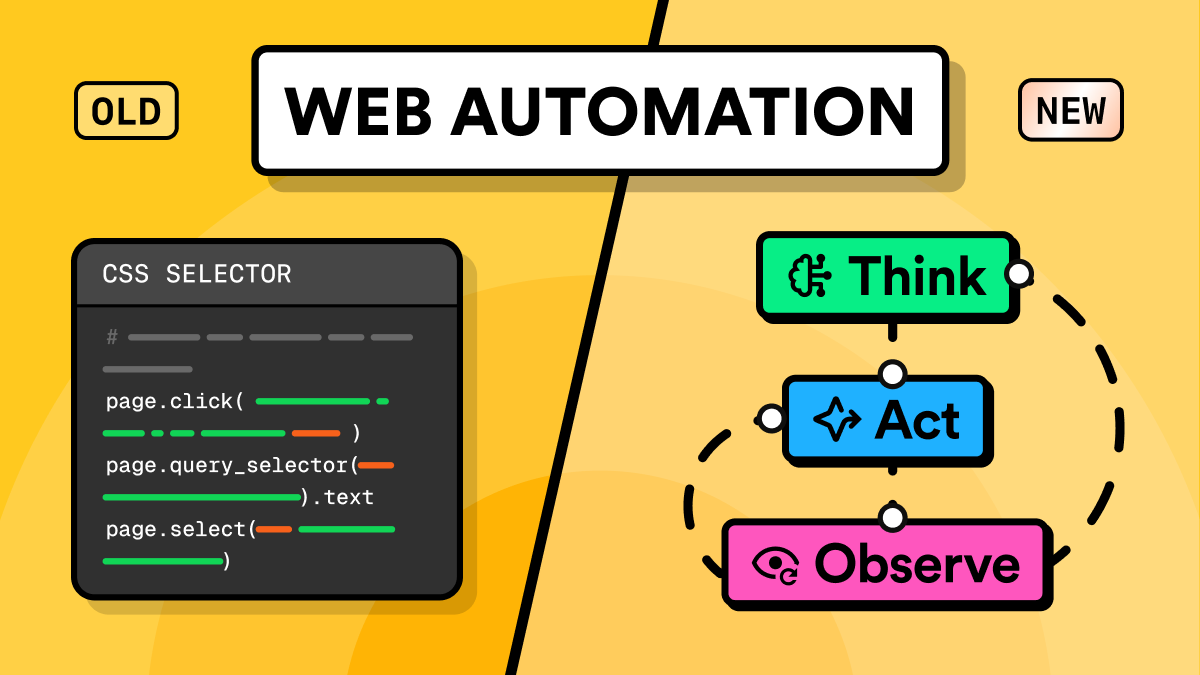
For years, web automation meant writing CSS selectors by hand and repairing them on every redesign. The declarative alternative flips that: you describe the goal and the shape of the data, then let a ReAct loop plan the steps. This is the shift behind AI web automation, and it is real. It pays off in a narrower band than the demos suggest.
TL;DR
The shift from CSS selectors to ReAct agent loops pays off by layer, not by letting a model read every page.
- The 2026 pattern is a split by layer, not an LLM reading every page live.
- A ReAct loop is Thought, Action, Observation, repeated until the goal is met.
- Hand-written CSS selectors break on redesigns because they bind to structure, not the data.
- Raw HTML costs about 35 times the tokens of the text you actually need, measured across 40 real pages.
- Agents build and heal scrapers, while deterministic code runs them, and the fetch layer stays the hard part.
What a ReAct agent loop does
A ReAct loop alternates reasoning and action. The name comes from "ReAct: Synergizing Reasoning and Acting in Language Models", a 2022 paper by Yao and co-authors. The model writes a short thought, picks an action from a fixed set, runs it, reads the result, and reasons again. It repeats until the task is done.
For web automation, the action set is small: navigate, find something on the page, extract a value, click an element, or return the result. The observation is whatever the page returns after each action. This is the loop behind browser agents and computer-use models, the core of both AI browser automation and AI agent web automation.
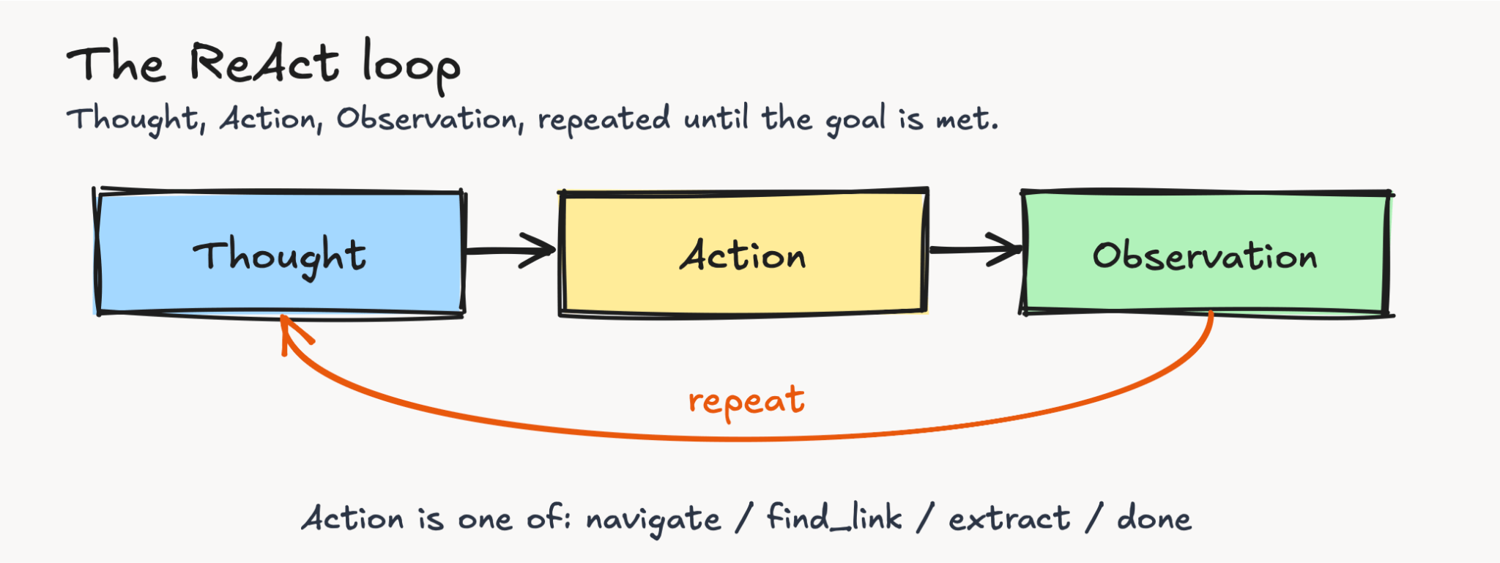
Here is the shape of that loop, running against a real documentation site. The actions are real, but the policy that picks the next action is a placeholder. In production you replace that placeholder with a per-step model call that returns the next action as JSON. And you point it at less cooperative targets, where a plain request draws a challenge instead of a page:
# ReAct loop over a real site (Real Python). Structure + JSON-LD verified July 2026.
import requests, json
from bs4 import BeautifulSoup

GOAL = "Get the title, author, and date of Real Python's web-scraping tutorial."
START = "https://realpython.com/tutorials/web-scraping/"
HDRS = {
    "User-Agent": "Mozilla/5.0 (Macintosh; Intel Mac OS X 10_15_7) "
    "AppleWebKit/537.36 (KHTML, like Gecko) Chrome/126 Safari/537.36"
}


class WebEnv:
    def __init__(self):
        self.session = requests.Session()
        self.session.headers.update(HDRS)
        self.soup = self.url = None

    def navigate(self, url):
        r = self.session.get(url, timeout=30)
        r.raise_for_status()
        self.url, self.soup = r.url, BeautifulSoup(r.text, "lxml")
        title = self.soup.title.get_text(strip=True) if self.soup.title else ""
        return f"loaded '{title[:38]}'"

    def find_link(self, text):
        for a in self.soup.select("a[href]"):
            if text.lower() in a.get_text(strip=True).lower():
                return requests.compat.urljoin(self.url, a["href"])
        return ""

    def extract(self):  # read the page's own JSON-LD
        for t in self.soup.select('script[type="application/ld+json"]'):
            try:
                data = json.loads(t.string or "{}")
            except Exception:
                continue
            for d in data if isinstance(data, list) else [data]:
                if isinstance(d, dict) and d.get("headline"):
                    au = d.get("author")
                    au = au.get("name") if isinstance(au, dict) else au
                    return {
                        "title": d["headline"],
                        "author": au,
                        "date": d.get("datePublished"),
                    }
        return {}


# The policy is where a real LLM call goes: one call per step, given the
# goal, the action space, and the latest observation, returning the next action.
def policy(state):
    return [
        ("Start on the web-scraping topic page.", ("navigate", START)),
        (
            "Find the practical-introduction tutorial.",
            ("find_link", "A Practical Introduction to Web Scraping"),
        ),
        ("Open the tutorial.", ("navigate", state["link"])),
        ("Pull its metadata from the page's JSON-LD.", ("extract", None)),
        ("I have the fields. Stop.", ("done", state["data"])),
    ][state["step"]]


def run(max_steps=6):
    env, state = WebEnv(), {"step": 0, "link": None, "data": None}
    for _ in range(max_steps):
        thought, (action, arg) = policy(state)
        print(f"Thought: {thought}\nAction: {action}")
        if action == "navigate":
            obs = env.navigate(arg)
        elif action == "find_link":
            state["link"] = env.find_link(arg)
            obs = f"matched: {state['link']}"
        elif action == "extract":
            state["data"] = env.extract()
            obs = str(state["data"])
        elif action == "done":
            print(f"Result: {arg}")
            return arg
        print(f"Observation: {obs}\n")
        state["step"] += 1


if __name__ == "__main__":
    run()
Running it prints the trace, one Thought, Action, and Observation per step:
Thought: Start on the web-scraping topic page.
Action: navigate
Observation: loaded 'Python Web Scraping Tutorials – Real P'

Thought: Find the practical-introduction tutorial.
Action: find_link
Observation: matched: https://realpython.com/python-web-scraping-practical-introduction/

Thought: Open the tutorial.
Action: navigate
Observation: loaded 'A Practical Introduction to Web Scrapi'

Thought: Pull its metadata from the page's JSON-LD.
Action: extract
Observation: {'title': 'A Practical Introduction to Web Scraping in Python', 'author': 'David Amos', 'date': '2024-12-21T14:00:00+00:00'}

Thought: I have the fields. Stop.
Action: done
Result: {'title': 'A Practical Introduction to Web Scraping in Python', 'author': 'David Amos', 'date': '2024-12-21T14:00:00+00:00'}
That trace is scripted. The real test is a live model, so I used GPT-5.5 as the policy, choosing each action from the history. Here are the first two steps of a real run, where its first guess misses:
Thought: The topic page is loaded; the next step is to locate the specific practical web-scraping tutorial link before navigating to it.
Action: find_link('Python Web Scraping: Practical Introduction')
Observation: no match; nearby links: ['Python Web Scraping', 'Python Web Scraping', 'Introduction to Web Scraping With Python', 'A Practical Introduction to Web Scraping in Python', 'Beautiful Soup: Build a Web Scraper With Python']

Thought: The exact link text wasn't found, but a nearby link matches the intended practical web-scraping tutorial. Follow that link to obtain its URL before navigating and extracting.
Action: find_link('A Practical Introduction to Web Scraping in Python')
Observation: url: https://realpython.com/python-web-scraping-practical-introduction/
It guessed a link text that did not exist, read the miss, and corrected itself. Two more steps, navigate and extract, returned the same fields as the scripted run. That self-correction is the ReAct behavior a script cannot fake.
It came with friction. The model wrote actions as extract() and navigate(url), so the harness normalizes them. The endpoint returned nothing on some calls, so the policy retries. The reasoning is real, and so is the mess.
You gave the loop a goal and a data shape, and it planned the steps. That is the declarative shift, and the source of its appeal.
The extract action here reads the page's own JSON-LD. A real agent might use a model call instead, but the JSON is cheaper and steadier when it exists.
The loop still needs a real fetcher, a defined action set, a stopping rule, and a way to check the result. Swap the placeholder policy for a live model, and every step adds token cost, latency, and non-determinism. The loop is worth that cost only where its alternative fails, and hand-written selectors fail often.
Why hand-written CSS selectors keep breaking
A CSS selector binds to structure, not data. div.main-content h1 assumes the headline sits under a div.main-content. A redesign ends that: the selector returns nothing, and the pipeline writes a null where the data used to be.
I checked this against a real redesign, using the Wayback Machine. Real Python's web-scraping tutorial changed its wrapper from a div to a main element between 2018 and now. A 2018-era selector and the page's JSON-LD, run against both the archived and the live versions:
# Selector brittleness on a REAL page, checked against the Wayback Machine.
# A 2018 CSS path breaks on the 2026 page (<div class="main-content"> became
# <main class="main-content">); the JSON-LD headline survives the redesign.
import requests, json
from bs4 import BeautifulSoup

URL = "https://realpython.com/python-web-scraping-practical-introduction/"
V2018 = "http://web.archive.org/web/20180607222537id_/" + URL  # permanent archive
HDRS = {
    "User-Agent": "Mozilla/5.0 (Macintosh; Intel Mac OS X 10_15_7) "
    "AppleWebKit/537.36 (KHTML, like Gecko) Chrome/126 Safari/537.36"
}


def soup(url):
    return BeautifulSoup(requests.get(url, headers=HDRS, timeout=30).text, "lxml")


def by_selector(s):  # a path written against the 2018 markup
    node = s.select_one("div.main-content h1")
    return node.get_text(strip=True) if node else None


def by_jsonld(s):  # the data the page publishes about itself
    for tag in s.select('script[type="application/ld+json"]'):
        try:
            data = json.loads(tag.string or "{}")
        except Exception:
            continue
        for d in data if isinstance(data, list) else [data]:
            if isinstance(d, dict) and d.get("headline"):
                return d["headline"]
    return None


for label, url in [("2018 (archived)", V2018), ("2026 (live)", URL)]:
    s = soup(url)
    print(f"{label:<17} selector={str(by_selector(s)):<50} json-ld={by_jsonld(s)}")
Output:
2018 (archived)   selector=Practical Introduction to Web Scraping in Python   json-ld=Practical Introduction to Web Scraping in Python
2026 (live)       selector=None                                               json-ld=A Practical Introduction to Web Scraping in Python
The 2018 selector returns the headline on the archived page and nothing on the live one. The JSON-LD survives the redesign, because it reads the data the site publishes about itself, not a route through the markup.
I got one thing wrong at first. I checked this across 40 real pages. Of the ones that came back, about 60% had some JSON-LD, but under 20% carried the page's own article or product data. The rest was boilerplate, Organization and WebSite schema, not the content you want.
When the real thing is there, parsing it beats a DOM path for stability and a model for cost. Look in a <script type="application/ld+json"> tag or a hydration blob like __NEXT_DATA__. But it depends on the page type: article and product pages carry it more often than homepages. So check for a main-content entity first, and keep a fallback, because usually it is not there.
When the JSON is not there, people describe the field and let a model read the page. That works across layouts, but it is not free either.
It trades structural brittleness for semantic ambiguity. On a page with a list price, a sale price, and a shipping fee, it can return the wrong one. A confident wrong value is worse than an empty one.
The bigger cost is not one broken selector. Hand-written selectors break as their targets change, so the maintenance load scales with how many sites you track, not how much data you pull. A renamed class here, a new wrapper element there, across dozens of sites, means steady patching.
The drawback of the model route is what it costs, every page and every run.
What it costs to send a full page to an LLM
The direct version of AI extraction is one line of intent: fetch the HTML, hand it to a model, ask for the fields. It gets expensive in production, because HTML is far larger than the data inside it.
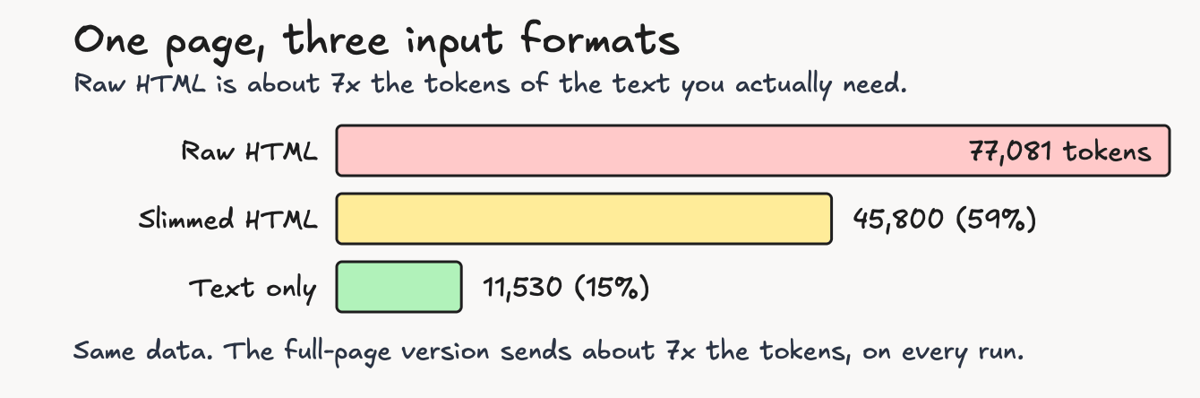
I measured this with o200k_base, a widely used OpenAI tokenizer (other families tokenize a bit differently but stay close). Real Python's web-scraping tutorial, a normal article page, came to 77,081 tokens of raw HTML. The visible text was 11,530 tokens, about a seventh of that. A slimmed version, with scripts, styles, SVG, comments, and most attributes stripped, still ran to 45,800 tokens, more than half the raw size:
Real Python is text-dense, so its bloat sits on the low end. I tokenized the same 40 pages, across news, docs, reference, and commerce. Of the ones that came back, the median was about 35 times heavier in tokens than its useful text, near 120,000 tokens of raw HTML. The heaviest overran the context window of many models before I had asked a question.
The cost follows the tokens. At an input price of $5 per million tokens, sending raw HTML for that one page costs about $385 per 1,000 pages. Sending the text only costs about $58. Same data, and sending the full page is roughly 7 times more expensive per page, on every run.
That is Real Python, the low end. On the median page, at 35 times the text, the gap is far wider.
The fix is preprocessing. A 2025 web-extraction benchmark ran the same model over the same pages in different input formats. The format alone moved the F1 score from 0.10 with slimmed HTML to 0.96 with a flattened JSON that keys each value by its path. The hallucination rate fell from 91% of pages to 3%.
HTML-based input, even slimmed, hallucinated the most, and full HTML was too large to feed at all. And the most accurate format was also the largest in tokens, so you choose the representation on purpose, per target.
The absolute cost keeps falling. A small model runs the same extraction for cents per 1,000 pages, and trimming the page to the part you need cuts it further. On price alone, per-page extraction in 2026 is cheap.
There is another input entirely: a screenshot. Computer-use agents skip the HTML and read the rendered page as an image, which can cost fewer tokens than a bloated DOM. It trades that saving for lower precision on structured fields and slower runs. It is a different tool with its own costs.
So the cost case is not what it was in 2024. But price was never the whole point.
Per-page extraction is still a recurring cost on every run, and it is still non-deterministic. For a stable, high-volume target, code you compile once wins. That is what pushes the winning pattern away from live extraction at scale.
Where AI agents win in 2026
The win from agent loops is not a model reading every page on every run. That version is expensive at scale. The real win is using the reasoning layer where reasoning is scarce, and deterministic code where volume is high.
The work splits across two layers, each with its own job:
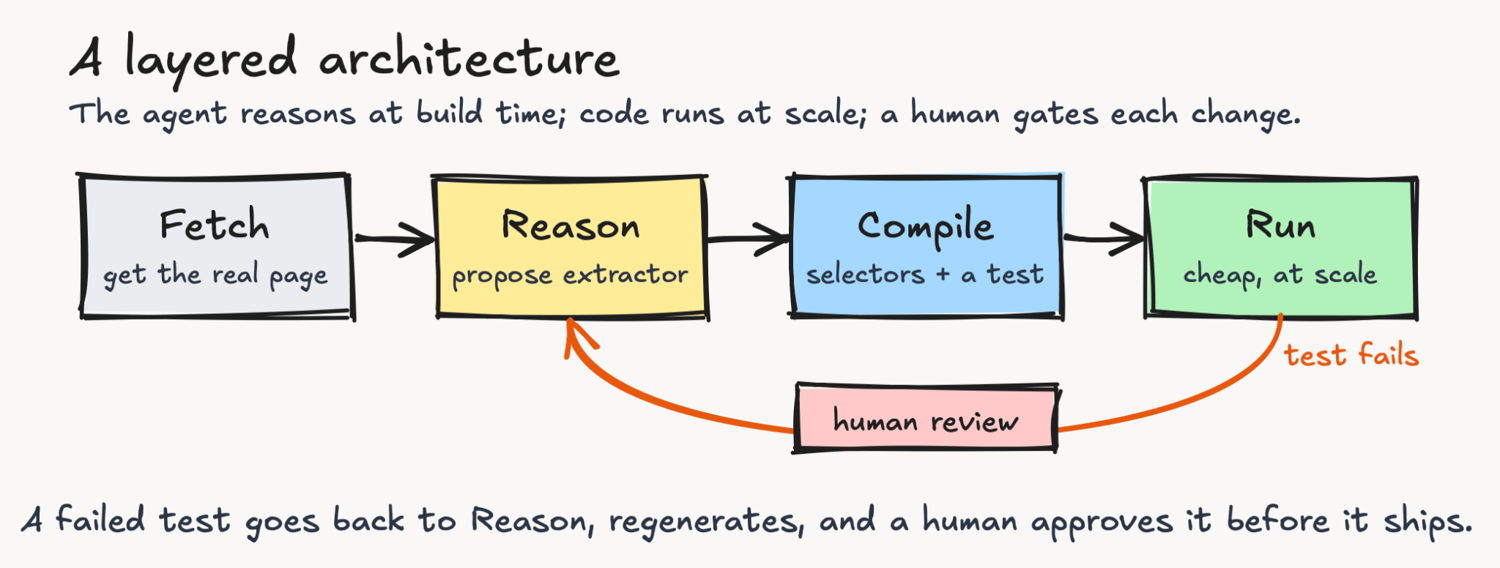
- Build time: let the agent write and heal the scraper. Point a ReAct loop at a new site. It explores the page, generates extraction code plus a test, and the code runs cheaply after that. When the site changes and the test fails, the same loop regenerates the code and opens a change for a human. This is smooth on cooperative sites and rough on hard, defended ones, so the human review is not optional.
- Run time: let deterministic code do the extraction. Compiled selectors or a small parser run in milliseconds, cost almost nothing per call, and return the same output every time. For a stable, high-volume target, parsing a page you already fetched is cheaper and faster than a model call, and it doesn't hallucinate.
The healing half is easier to claim than to run. Detecting drift is not the hard part: a test fails when a selector returns nothing. Trusting the regenerated selector is the hard part, because for live data you have no ground truth to check it against. You cannot pin an expected price the way you can pin a headline, since the price changes.
And the dangerous case is not a failed test. It is a redesign where the new selector returns a wrong but plausible value, the null check passes, and the pipeline ships confidently wrong data. Catching that needs invariants, a value that looks like a price and agrees with the page's JSON-LD, not an exact-match fixture. So the loop is detect, propose, and gate on a human, and the human is there because the regeneration is not trustworthy alone.
Here is that loop run against the same break from earlier. The 2018 selector returns nothing on the live page. A model proposes a replacement, and the page's own JSON-LD is the check on whether it ships. The demo calls ScrapingBee's ai_query, but any model can do that job.
# Self-healing extractor: a broken selector, regenerated by a model, then gated.
# The model proposes a new selector; the page's own JSON-LD is the check on whether
# it ships. Real run vs Real Python, July 2026. The proposal varies from run to run.
import requests, json
from bs4 import BeautifulSoup

URL = "https://realpython.com/python-web-scraping-practical-introduction/"
API = "https://app.scrapingbee.com/api/v1/"
KEY = "YOUR_SCRAPINGBEE_KEY"
HDRS = {
    "User-Agent": "Mozilla/5.0 (Macintosh; Intel Mac OS X 10_15_7) "
    "AppleWebKit/537.36 (KHTML, like Gecko) Chrome/126 Safari/537.36"
}
soup = BeautifulSoup(requests.get(URL, headers=HDRS, timeout=30).text, "lxml")


def jsonld_headline(s):  # a second, independent source of truth
    for t in s.select('script[type="application/ld+json"]'):
        try:
            data = json.loads(t.string or "{}")
        except Exception:
            continue
        for d in data if isinstance(data, list) else [data]:
            if isinstance(d, dict) and d.get("headline"):
                return d["headline"]
    return None


def propose_selector(feedback):  # the model regenerates durable code
    q = (
        "Return ONLY one CSS selector, no prose, that selects "
        "the main article headline element." + feedback
    )
    r = requests.get(
        API, params={"api_key": KEY, "url": URL, "ai_query": q}, timeout=120
    )
    try:
        return str(r.json()).strip().strip("`\"'")  # ai_query is not always JSON
    except Exception:
        return r.text.strip().strip("`\"'")


anchor = jsonld_headline(soup)
assert soup.select_one("div.main-content h1") is None  # detect: the old selector broke

healed, feedback = None, ""
for _ in range(3):  # propose -> run -> gate -> retry on failure
    sel = propose_selector(feedback)
    try:
        node = soup.select_one(sel) if sel else None
    except Exception:
        node = None
    value = node.get_text(strip=True) if node else None
    ok = bool(value) and value.strip() == anchor.strip()
    print(
        f"propose {sel[:18]!r:<20} -> {(value[:22] if value else None)!r:<24} {'PASS' if ok else 'REJECT'}"
    )
    if ok:
        healed = sel
        break  # only a selector that reproduces truth ships
    feedback = (
        f" Your last answer {sel!r} returned {value!r}, wrong. The headline is an <h1>."
    )

print("healed:", healed or "NONE - escalate to a human")
Output:
propose 'A.main-title'       -> None                     REJECT
propose 'h1'                 -> 'A Practical Introducti' PASS
healed: h1
The model reads the visible headline without trouble, but guesses at class names it cannot verify, and guesses wrong often enough to matter. Across repeated runs it proposed a class that is not on the page, or a sentence instead of a selector, before landing on h1.
The gate is the whole safety mechanism. A regenerated selector ships only when it reproduces a value a second source already confirms. Without that check, the first bad guess writes silent nulls into your database. Healing costs a model call or two per break, and the promoted selector then runs without one.
That anchor works because the headline is stable. A price or a stock count changes between fetches, so it gives you no fixed value to check against. Volatile fields need an invariant that tests the shape, which is the harder half of healing.
This division isn't new in machine learning. To build the FineWeb-Edu dataset, its authors labeled a sample of web pages with a slow model, then distilled those labels into a cheap classifier. That classifier scored the whole corpus. Web extraction is following the same pattern: the agent is the expensive judgment, and the generated extractor is the cheap code.
Live LLM extraction is still worth it, in a narrow band. It fits when layouts change faster than you can maintain selectors, or when you pull many different sites into a single schema at low volume. A one-time research pull across 200 unrelated sites is a good fit. Scraping a single retailer 50,000 times a day is not.
The reliability gap the demos do not show
Benchmarks explain the gap between how agents look and how they run. In short, single-site benchmarks like WebVoyager, the best 2026 agents are near saturation, in the mid-90s.
Real work is longer and spans several sites. Odysseys, a 2026 benchmark of long-horizon web tasks built from real browsing sessions, puts the strongest model at a 44.5% success rate. The next frontier model sits at 33.5%. Both reach even those scores with wasted steps.
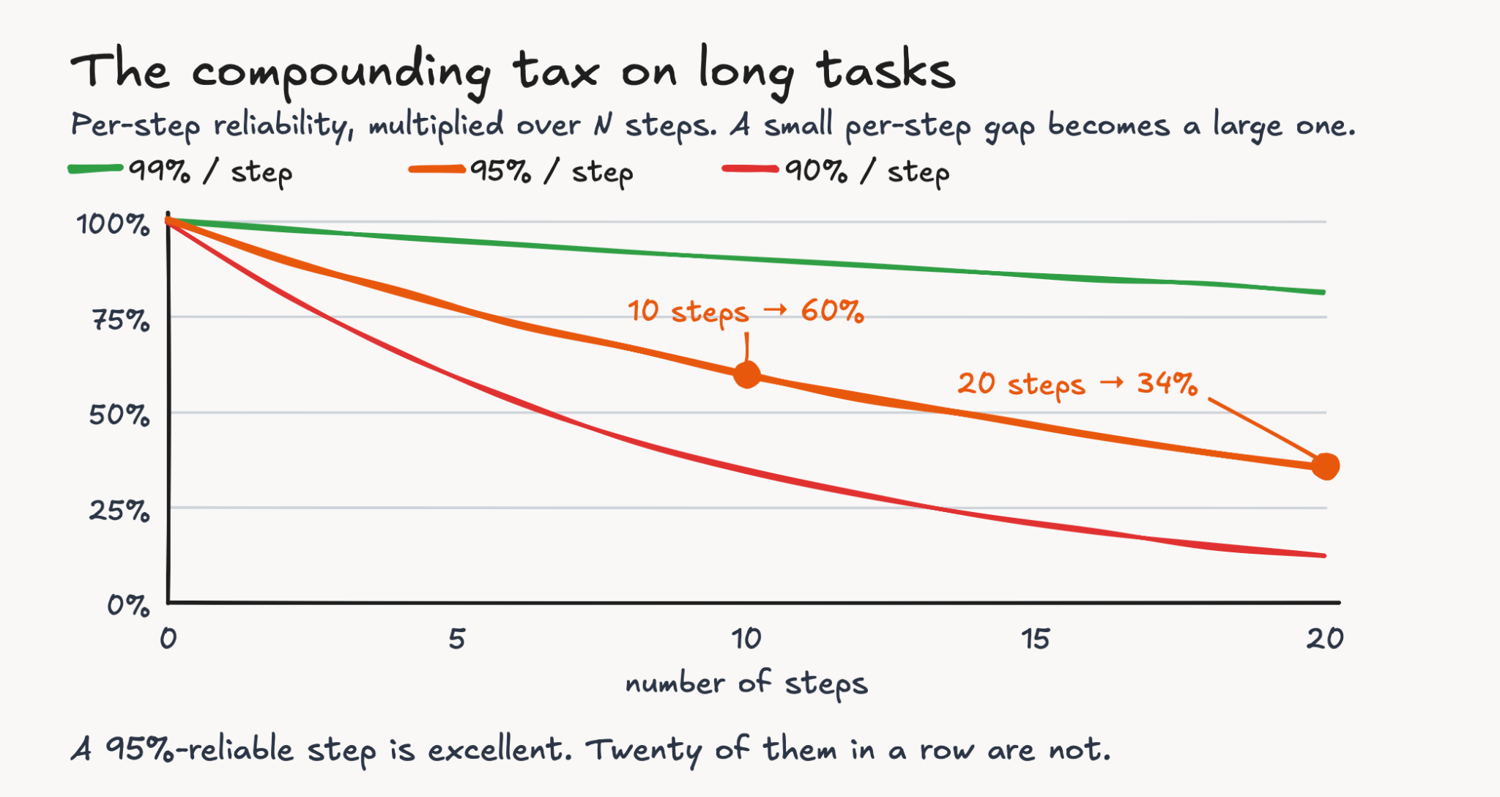
The arithmetic is the story. Give each step a 95% chance of success, and ten steps compound to about 60%. Twenty steps fall to about a third. A short task hides the per-step error that a long, multi-site chain exposes.
Two failure modes hide inside those averages. The first is that status codes lie. A response can return HTTP 200 with a body that is actually a challenge page or a soft block. An agent that trusts the 200 will reason over an error page and emit confident nonsense.
The second failure mode is hallucination on structured values. A model can produce a clean, plausible number that is not on the page. It can invent a total that no line item supports.
Loading the page is the harder problem
An agent that can't load the page can't reason about it, and this limit sits below extraction entirely. Modern anti-bot systems fingerprint the TLS handshake and the browser itself. A standard HTTP client has a fingerprint that matches no real browser, so it gets a challenge instead of HTML.
The fingerprint problem has a DIY answer. Libraries like curl_cffi impersonate a browser's TLS handshake, and stealth browsers like nodriver and camoufox drive a real engine. I checked one: a plain request advertises a python-requests JA3 fingerprint, and curl_cffi in Chrome mode presents Chrome's instead.
That closes the gap until the vendor changes the test. Self-hosted stealth is endless maintenance against a moving target. For a few undefended targets, that maintenance is light. It grows with every defended site you add and every time they change the test. That, not the absence of a DIY path, is the real argument for a fetch service.
The wall is also getting taller on purpose, aimed at agents specifically. From September 2026, Cloudflare blocks AI crawlers by default on many ad-supported pages, and its pay-per-crawl scheme charges bots for access instead. So the question is shifting from whether you can fetch the page to whether you are allowed to.
A growing share of pages are also client-side rendered, so the first fetch returns an empty shell. Getting a real page back comes first, before the extraction method matters.
I sent a plain request to those same 40 pages. About 1 in 5 defeated it: some blocked or challenged the request, one timed out, and a few returned an empty JavaScript shell. The full script and its 40-URL list are on GitHub, spanning news, docs, reference, and commerce, so you can reproduce these numbers yourself. The results move run to run as different pages block or shell.
Take one hard target end to end. A plain request to a big retailer's product page returns HTTP 200, but the title and price are stripped out. A residential proxy gets the real page, and one call extracts the fields and validates them:
# End to end on a defended product page. A plain request returns HTTP 200 with the
# product data stripped out; through a residential proxy the real page comes back.
import requests, json
from bs4 import BeautifulSoup
from pydantic import BaseModel, ValidationError, field_validator

API = "https://app.scrapingbee.com/api/v1/"
KEY = "YOUR_SCRAPINGBEE_KEY"
URL = "https://www.amazon.com/dp/1593279280"
HDRS = {
    "User-Agent": "Mozilla/5.0 (Macintosh; Intel Mac OS X 10_15_7) "
    "AppleWebKit/537.36 (KHTML, like Gecko) Chrome/126 Safari/537.36"
}


class Product(BaseModel):
    title: str
    price: str

    @field_validator("price")
    @classmethod
    def looks_like_price(cls, v):
        if not v or v[0] not in "£$€":
            raise ValueError(f"not a grounded price: {v!r}")
        return v


# 1. plain datacenter request: a 200, but the product data is not there
plain = BeautifulSoup(requests.get(URL, headers=HDRS, timeout=20).text, "lxml")
print(
    "plain request:",
    "product found" if plain.select_one("#productTitle") else "200, no title or price",
)

# 2. fetch through a residential proxy and extract in one call
r = requests.get(
    API,
    params={
        "api_key": KEY,
        "url": URL,
        "premium_proxy": "true",
        "country_code": "us",
        "ai_query": 'Return JSON with exactly these keys: "title" and "price".',
    },
    timeout=150,
)
# 3. gate the values before trusting them; ai_query is not always clean JSON
try:
    print("fetch layer  :", Product(**json.loads(r.text)))
except (json.JSONDecodeError, ValidationError) as e:
    print("fetch layer  : rejected, re-fetch:", e)
Output:
plain request: 200, no title or price
fetch layer  : title='Python Crash Course, 2nd Edition: A Hands-On, Project-Based Introduction to Programming' price='$15.33'
The plain 200 is the earlier failure mode: a real status code with no data behind it. The proxy call costs more, 30 credits and about ten seconds here, and it took a couple of tries to find settings that worked. That is normal for defended targets.
The extraction looks trivial but is not. This page carries dozens of prices, other editions, used copies, and related titles, so a naive selector grabs the first one, a different book. A model has a better chance at the right product's price, and the guard is there because it can still miss.

Whatever fetches the page, verify the body before you trust it, because a 200 is not proof. A real content page is mostly text; a challenge or a JavaScript shell is almost all markup:
# A 200 is not proof you got the page. A real content page is mostly text; a
# challenge or a JavaScript shell is almost all markup. Verified July 2026.
import requests
from bs4 import BeautifulSoup

MARKERS = [
    "just a moment",
    "checking your browser",
    "captcha",
    "enable javascript and cookies",
    "are you a robot",
]


def page_check(html, status):
    if status in (401, 403, 429, 503):
        return "blocked", f"HTTP {status}"
    soup = BeautifulSoup(html, "lxml")
    title = soup.title.get_text(" ", strip=True).lower() if soup.title else ""
    for tag in soup(["script", "style", "noscript"]):
        tag.decompose()
    text = " ".join(soup.get_text(" ").split())
    ratio = len(text) / max(len(html), 1)
    if "just a moment" in title or (
        len(text) < 1500 and any(m in html.lower() for m in MARKERS)
    ):
        return "challenge", f"{len(text)} chars of text"
    if len(text) < 500 or ratio < 0.02:
        return "shell", f"{len(text)} chars, text/html={ratio:.1%}"
    return "ok", f"{len(text):,} chars, text/html={ratio:.0%}"


HDRS = {
    "User-Agent": "Mozilla/5.0 (Macintosh; Intel Mac OS X 10_15_7) "
    "AppleWebKit/537.36 (KHTML, like Gecko) Chrome/126 Safari/537.36"
}
for url in [
    "https://realpython.com/python-web-scraping-practical-introduction/",
    "https://en.wikipedia.org/wiki/Web_scraping",
    "https://www.reddit.com/r/webscraping/",
    "https://www.espn.com/",
]:
    r = requests.get(url, headers=HDRS, timeout=15)
    verdict, why = page_check(r.text, r.status_code)
    print(f"{url.split('/')[2]:<20} HTTP {r.status_code} -> {verdict:<10} ({why})")
Output:
realpython.com       HTTP 200 -> ok         (52,740 chars, text/html=19%)
en.wikipedia.org     HTTP 200 -> ok         (29,898 chars, text/html=13%)
www.reddit.com       HTTP 200 -> shell      (37 chars, text/html=0.4%)
www.espn.com         HTTP 202 -> shell      (0 chars, text/html=0.0%)
The text-to-HTML ratio does most of the work. Two of these returned a 2xx status with no page behind it.
None of that is a model problem. Model capability keeps rising, but it is not the whole story. METR's time-horizon work shows the best models finishing roughly 12-hour tasks at 50% reliability by mid-2026, doubling every few months. Those are software, machine-learning, and security tasks, though. Web work is a different, harder distribution, and no capability curve erases anti-bot walls, page size, or the per-page cost of a model.
A practical architecture that reasons, then runs
Put the pieces together, and the architecture has four layers, not a single clever agent. Each layer does the job it's cheapest at.
- Fetch. Get past anti-bot and render JavaScript so a real page reaches you. This is the unavoidable layer, and it is the same whether extraction is deterministic or model-driven.
- Reason. Point an agent loop at a new or changed target. It explores, plans, and proposes an extractor. This is where declarative, describe-the-data automation belongs.
- Compile. Turn the agent's plan into durable output: selectors or a small parser, plus a schema and a test that pins expected values.
- Run and heal. Execute the compiled extractor at scale, cheaply and deterministically. Monitor it. When the test fails, send the target back to the reason layer, regenerate, and route the change through a human.
Assume scraping is necessary and allowed. The decision of which method to run then reduces to two questions. How much does the layout vary, and how much volume do you push? Match the method to the pair:
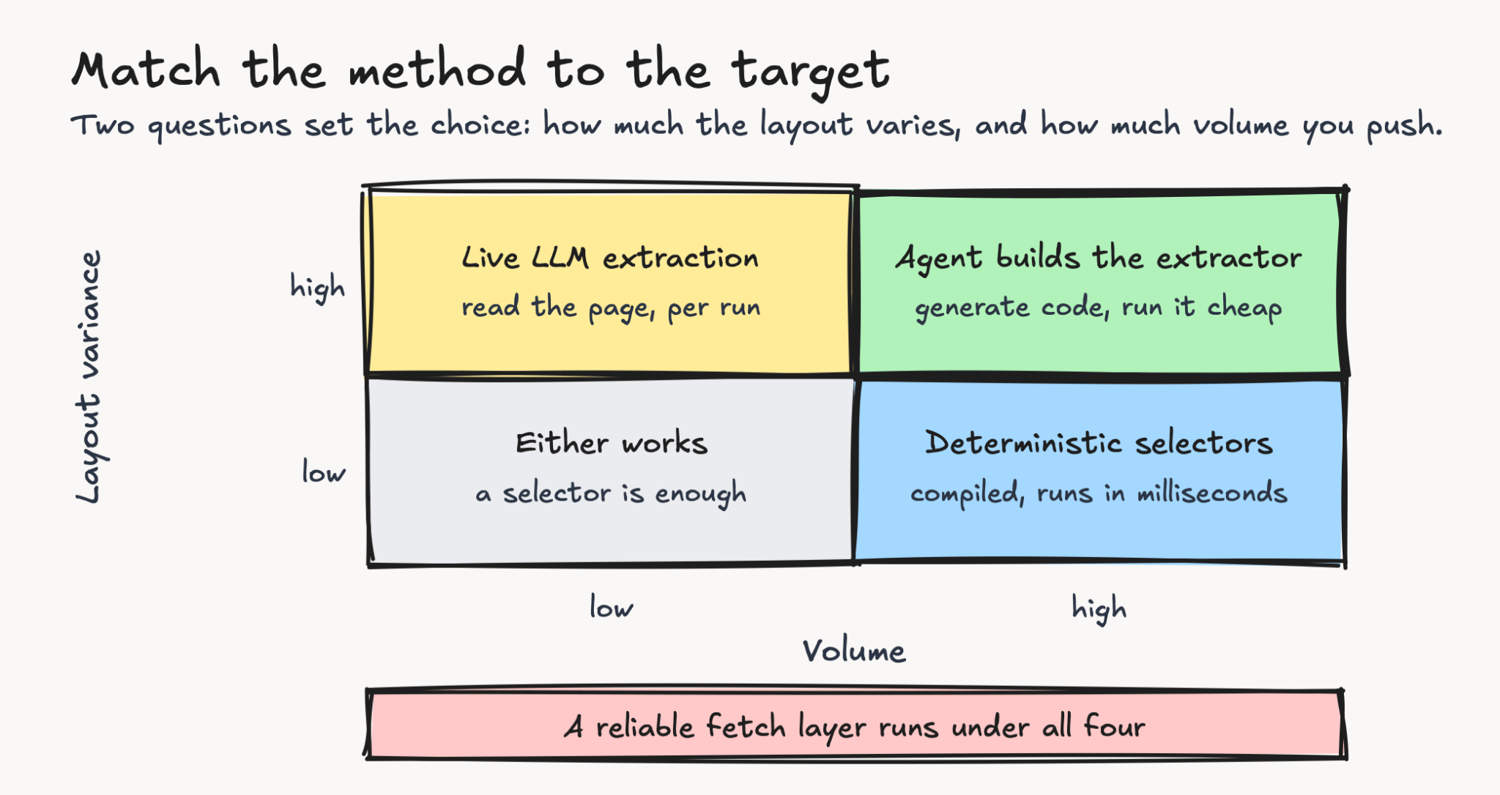
The matrix hides a sharper question: where is the line? I measured the two costs that set it. Live extraction adds about 5 credits per page over a plain fetch, on every run. Regenerating a broken selector costs about 10 credits per model call, and a break can take a call or two.
So compiled code saves 5 credits per page and pays 10 to 20 per heal. Those are machine costs; each heal also routes through a human review, the larger and unpriced one.
It wins once a template serves more than a few page-fetches between redesigns. A one-time build moves the line to roughly ten fetches. Most targets sit far above that, so compiling is cheaper, and it does not hallucinate.
Whatever you choose above the fetch layer, the fetch layer still has to work. This is what a scraping API is for, and where ScrapingBee fits into an agentic stack. It handles the proxy rotation, headless browser, and anti-bot layer, so you don't build that yourself.
When you want the declarative path, its AI extraction takes a natural-language instruction through the ai_query parameter, or a JSON schema through ai_extract_rules. I pointed it at a film page and asked for the title, year, and rating, and it returned The Shawshank Redemption, 1994, and 9.3/10. When an agent is in control, it calls tools over MCP, an open standard for connecting agents to tools. The ScrapingBee MCP server exposes fetch and extract as two of them.
A single rule holds across every layer that touches a model: validate the output before you trust it. If a value informs a decision, check it against a schema and against the page, then retry on failure rather than accept a confident guess. A guard with a typed model catches a bad value before it reaches your database:
from pydantic import BaseModel, ValidationError, field_validator

class Product(BaseModel):
    title: str
    price: str

    @field_validator("price")
    @classmethod
    def looks_like_price(cls, v):
        if not v or v[0] not in "£$€":
            raise ValueError(f"not a grounded price: {v!r}")
        return v

def safe_extract(raw: dict) -> Product | None:
    try:
        return Product(**raw)  # rejects missing or malformed values
    except ValidationError as e:
        print(f"rejected: {e.errors()[0]['msg']}")
        return None

# Two real ai_query outputs, July 2026: one product page, one page with no price.
print(safe_extract({"title": "Python Crash Course, 2nd Edition", "price": "$15.33"}))
print(
    safe_extract(
        {
            "title": "A Practical Introduction to Web Scraping in Python",
            "price": "EMPTY_RESPONSE: couldn't find an answer to your query",
        }
    )
)
Output:
title='Python Crash Course, 2nd Edition' price='$15.33'
rejected: Value error, not a grounded price: "EMPTY_RESPONSE: couldn't find an answer to your query"
None
The first record is a real extraction from a product page and passes. The second came from asking for a price on a page that has none. The extractor did not invent a number; it returned a sentinel string, which is honest but still not a price. The guard rejects it, so that string never lands in your database as a value.
A real price validator also handles currency codes, trailing symbols, and ranges, so treat this as a pattern, not a drop-in.
Set the temperature to 0 to cut variance. It does not make the model deterministic or correct, which is the reason you validate at all. Keep the schema strict, and treat a validation failure as a signal to re-fetch, not a value to store.
Putting it into practice
The move from CSS selectors to ReAct agent loops is not a one-for-one tool swap. It is a split of labor. Let the reasoning layer do what reasoning is for: explore unknown pages, plan extraction, and repair scrapers when sites change.
Let deterministic code do what it is for: run at scale, cheaply, with the same output every time. And keep a real fetch layer under both, because a page you can't load is a page you can't extract.
If you're building this, first check whether an official API or dataset already offers the data. The cheapest scraper is the one you never write. Then determine whether the target even permits scraping, because robots rules, terms, and pay-per-crawl are now part of the build.
Classify each target on two axes, variance and volume, and pick the method that fits. Put a validation guard on anything a model touches. The split of labor holds whether you build the fetch layer or buy it. If you would rather not build it, you can try the declarative path without setting up proxies and a headless browser yourself.
ScrapingBee's AI web scraping API bundles the fetch layer and AI extraction in a single call. To try it now, get a free API key and point one of these examples at your own hardest target.
FAQ
Can AI agents replace web scrapers?
Not for high-volume, stable targets in 2026. A fully autonomous scraping agent that handles anti-bot, huge pages, and constant site changes on its own doesn't exist yet. Agents are strong at building and repairing scrapers. Deterministic code still runs the extraction at scale.
Is LLM extraction cheaper than CSS selectors?
It depends on the model and the scale. A small model on cleaned text can cost cents per 1,000 pages, but you pay it on every page and every run. A compiled selector wins on stable, high-volume targets. LLM extraction is worth it when layouts vary or you cover many different sites.
Can AI scrape data without CSS selectors?
Yes. You describe the fields in natural language or a schema, and a model returns them, so you skip hand-written selectors. Often better: when a page embeds its data as JSON-LD, you parse that directly. Both still need a fetch layer to load the page past anti-bot.
Do AI agents get past anti-bot systems?
Not by themselves. Anti-bot systems fingerprint the connection below the page, and an agent that can't load the page can't act on it. Getting a real page back is a separate fetch problem. A browser and proxy layer handles it before any extraction runs.
When should I use AI extraction over selectors?
Use AI extraction when layouts change often, when you pull many sites into a single schema, or when per-page volume is low. Use selectors for stable, high-volume targets. For high variance at high volume, let an agent generate the extractor and run that code.