If you have opened GitHub Trending in the last few months, you have probably come across the Agent Skills repo by addyosmani. AI coding agents are already very good at writing code, but they rarely work the way experienced engineers do. For instance, they can quickly build a feature but may skip the specification or tests, or overlook security concerns in the process.
That gap between code that was generated and software that is actually ready to ship is what Agent Skills is trying to address. Instead of relying on broad instructions like "write clean code" or "remember to test," it gives agents structured workflows for defining requirements, planning changes, testing implementations, reviewing code, checking security, and preparing software for production.
In this guide, we'll unpack how Agent Skills work, how to install them, and how to use them effectively.
TL;DR
Agent Skills is an open standard for packaging reusable workflows that coding agents can discover and load when relevant. The addyosmani/agent-skills repository applies that idea to software engineering with 24 skills covering the development lifecycle, from defining requirements and planning work to testing, reviewing, and shipping code.
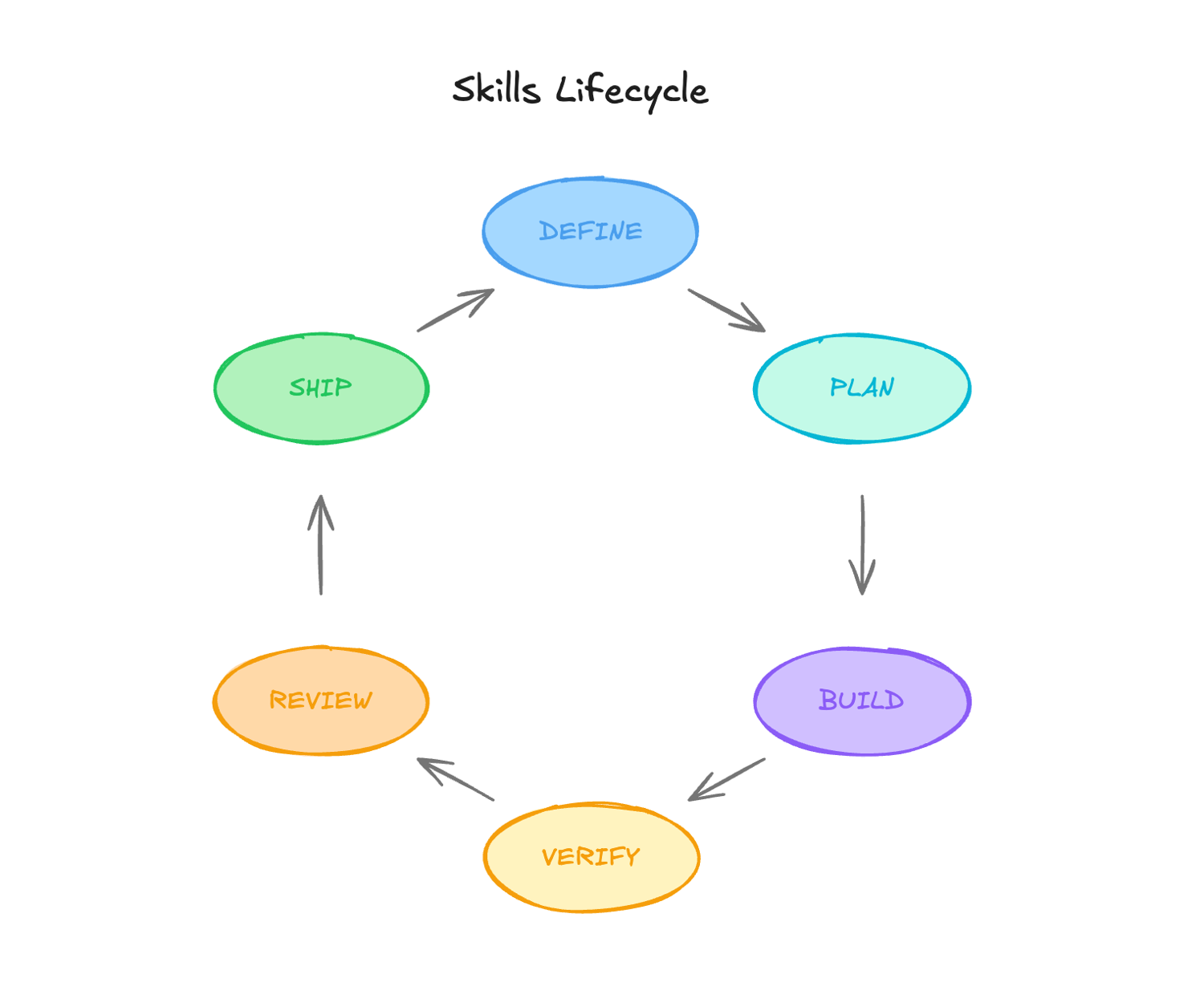
Instead of relying on one giant prompt, the repository gives agents focused workflows for tasks such as:
- specification and planning
- test-driven development
- debugging and verification
- code and security reviews
- performance optimization
- deployment and release
These skills can be installed almost anywhere. The npx skills add addyosmani/agent-skills install works across 70+ agents, with native paths for Claude Code, Codex, Gemini CLI, and others.
In this guide, we build a custom web-scraping-with-scrapingbee skill that teaches an agent a cost-aware escalation policy.
What is agent-skills, and why is it trending?
addyosmani/agent-skills is an open-source, MIT-licensed repository created by Addy Osmani that packages production-grade engineering workflows for AI coding agents.
Its premise is simple: coding agents tend to take the shortest path to a working result, which often means skipping specifications, tests, security reviews, and other steps that make software reliable.
agent-skills turns those practices into structured workflows that agents can follow instead of leaving them as optional suggestions.
Each skill defines a process with checkpoints, verification requirements, and exit criteria for tasks such as specification writing, test-driven development, debugging, code review, security hardening, performance optimization, and shipping.
The repository has now passed 87,000 GitHub stars and contains 24 skills covering the software development lifecycle from defining an idea to releasing it.
What are Agent Skills?
An Agent Skill is a reusable package of instructions and resources that teaches an AI agent how to handle a particular type of task.
Agent Skills use an open format originally developed by Anthropic, allowing compatible agents to discover a skill, load its instructions when relevant, and use any supporting scripts or reference files it provides.
Anthropic introduced Agent Skills in October 2025 and published the format as an open standard in December 2025. Because the format is portable, the same SKILL.md structure can work across multiple agent environments.
At a minimum, a skill is a directory containing a SKILL.md file:
my-skill/
├── SKILL.md          # Required: metadata + instructions
├── scripts/          # Optional: executable helpers
├── references/       # Optional: detailed documentation
└── assets/           # Optional: templates and resources
The SKILL.md file starts with YAML frontmatter containing at least a name and description, followed by the Markdown instructions the agent should follow:
---
name: api-contract-review
description: Reviews public API changes for compatibility and clear error semantics. Use when adding or changing an endpoint, exported function, event, or schema.
---
Under the Agent Skills specification, names can be up to 64 characters, must use lowercase letters, numbers, and hyphens, and must match the parent directory. description can be up to 1,024 characters and should explain both what the skill does and when it should be used.
That description really matters because skills-compatible agents use progressive disclosure, which means they initially load only each skill's name and description, then pull the full SKILL.md into context when the task appears to match.
A vague description can therefore cause a useful skill to be missed, while an overly broad one can make it activate for the wrong tasks.
How progressive disclosure keeps skills practical
Loading all 24 workflows into an agent's context at startup would defeat one of the main advantages of skills. You would simply replace one giant system prompt with another.
Skills-compatible agents avoid that through progressive disclosure, loading information in stages instead of all at once:
- Discovery: The agent initially sees only each skill's name and description, which is enough to decide whether the skill might be relevant.
- Activation: When the current task matches a skill, the agent loads the full SKILL.md file into context.
- Execution: Supporting references, scripts, and other resources are loaded only when the workflow actually needs them.
This keeps the agent's active context focused on the task at hand. A debugging request does not need to carry the complete security, deployment, performance, and API-design workflows alongside it.
Because discovery starts with the skill's metadata, the description field plays an important role in routing.
Compare these two examples:
# Too vague: almost any coding task could match
description: Helps write better code.

# More useful: describes the task and when it applies
description: Reproduces, localizes, fixes, and guards software failures. Use when tests fail, builds break, logs show errors, or runtime behavior differs from expectations.
The second description gives the agent useful signals such as "tests fail," "builds break," and "runtime behavior" without requiring it to load the entire debugging workflow first.
What is inside addyosmani/agent-skills?
The repository currently contains 24 skills: 23 lifecycle skills and one using-agent-skills meta-skill that helps map incoming work to the appropriate workflow. They map to six phases of the software development lifecycle.
| Phase | Included skills | What they add |
|---|---|---|
| Meta | using-agent-skills | Task-to-skill routing and shared operating rules |
| Define | interview-me, idea-refine, spec-driven-development | Clarification, exploration, requirements, success criteria, and boundaries |
| Plan | planning-and-task-breakdown | Small tasks with dependencies and verifiable acceptance criteria |
| Build | incremental-implementation, test-driven-development, context-engineering, source-driven-development, doubt-driven-development, frontend-ui-engineering, api-and-interface-design | Thin slices, testing, context control, source grounding, adversarial review, accessible UI engineering, and contract-first interface design |
| Verify | browser-testing-with-devtools, debugging-and-error-recovery | Runtime browser evidence and systematic failure diagnosis |
| Review | code-review-and-quality, code-simplification, security-and-hardening, performance-optimization | Correctness, maintainability, security, and measured performance |
| Ship | git-workflow-and-versioning, ci-cd-and-automation, deprecation-and-migration, documentation-and-adrs, observability-and-instrumentation, shipping-and-launch | Reviewable history, automation, migrations, documentation, telemetry, rollout, and rollback |
The repository also provides slash commands as easier entry points into the workflows:
/spec           define what to build
/plan           break it into small, verifiable tasks
/build          implement one slice at a time
/test           prove the behavior works
/review         run the quality gate
/webperf        audit and measure web performance
/code-simplify  reduce complexity without changing behavior
/ship           prepare and evaluate the release
/build auto runs an approved plan without pausing for a human step between tasks. It does not remove the test and verification gates. It removes the repeated handoff.
Beyond the skills themselves, four specialist personas (code reviewer, test engineer, security auditor, and web-performance auditor) add focused perspectives during review, and seven shared references cover definition of done, testing, security, performance, accessibility, observability, and orchestration.
That scope is why the repository is better described as an engineering workflow layer than a prompt library.
How skills differ from prompts, rules files, and MCP
Agent Skills sit alongside several other concepts in AI, so it is easy to confuse them with prompts, project rules, or MCP servers:
- Prompts are instructions you give an agent during a conversation or task. They are usually temporary and specific to the current session. Skills, on the other hand, persist across sessions, are version-controlled, and load automatically when their description matches your task.
- Rules files like .cursorrules, CLAUDE.md, or AGENTS.md provide passive context to the model. They are useful for things the agent should always know, such as coding conventions, project structure, or commands for running tests. Skills are on-demand: they only enter context when relevant, which keeps the context window lean.
- MCP servers give agents access to external tools, data, and actions. An MCP server might let an agent search the web, query a database, interact with GitHub, or retrieve live documentation. A skill tells the agent how to approach a task using those capabilities.
How to install Agent Skills
How you install agent-skills depends on the coding agent you use. The project supports multiple agent clients, including major ones such as Claude Code, Codex, Cursor, and Windsurf.
Because installation surfaces change quickly, check the repository's current Quick Start before automating a team-wide rollout.
The portable path
The open skills CLI installs into 70+ agents, including Claude Code, Cursor, Codex, Copilot, and Cline. It can list, install, or select individual skills:
# Browse before installing
npx skills add addyosmani/agent-skills --list

# Install the complete collection
npx skills add addyosmani/agent-skills

# Or start with one workflow
npx skills add addyosmani/agent-skills \
  --skill code-review-and-quality
Starting with one to five skills is often better than installing everything and hoping the router matches your team's habits.
Native integrations
The repository also documents client-specific setups.
Claude Code marketplace:
/plugin marketplace add addyosmani/agent-skills
/plugin install agent-skills@addy-agent-skills
The marketplace clones over SSH. If the install fails with a Permission denied (publickey) error, add the marketplace with the full HTTPS URL instead:
/plugin marketplace add https://github.com/addyosmani/agent-skills.git
Codex plugin:
codex plugin marketplace add addyosmani/agent-skills
This path requires Codex CLI 0.122 or later. Once installed, you invoke skills in chat with @, for example, @spec-driven-development.
Gemini CLI:
gemini skills install https://github.com/addyosmani/agent-skills.git \
  --path skills
Cursor, Windsurf, OpenCode, GitHub Copilot, Kiro, and Antigravity instructions are linked from the README.
Note: Agent Skills are instructions your coding agent may follow, and a skill package can also include scripts, references, assets, or plugin configuration. Treat third-party skills with similar caution to other development dependencies.
Building a custom web-scraping skill with ScrapingBee
Osmani's collection covers the general engineering lifecycle, but skills become even more useful when they encode workflows that are more specific to your team.
Web scraping is a good example.
Ask a coding agent to "scrape product data from this page," and there is a good chance it will reach for requests and BeautifulSoup. That is perfectly fine for a static, server-rendered page. However, the problem starts when the product data only appears after JavaScript runs, content loads asynchronously, or the request is blocked before it reaches the real page.
You could tell the agent to launch a full headless browser for every scraping task, but that creates the opposite problem. Now even simple pages carry the overhead of browser automation.
In such cases, the agent has no instinct for proxies, headless browsers, or anti-bot walls, so the scraper it writes breaks the first time it meets a real site. A better approach is to teach the agent an escalation strategy:
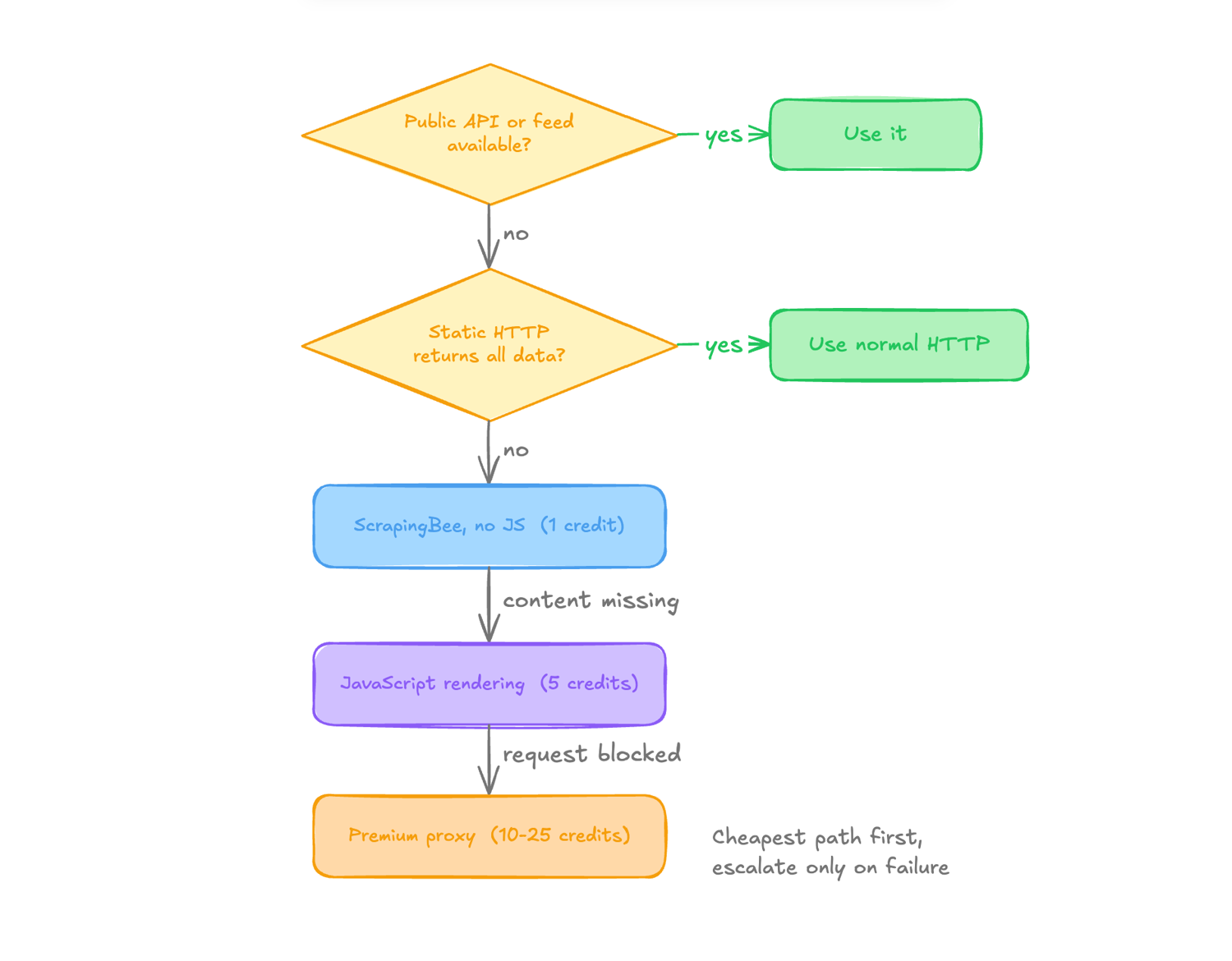
This way, instead of hoping the model makes the right choice each time, we can encode the workflow once and let the agent reuse it whenever a scraping task appears.
ScrapingBee's HTML API fits nicely into this flow because JavaScript rendering and proxy handling can be enabled through request parameters instead of requiring the agent to build and maintain its own browser and proxy infrastructure.
AI extraction is a separate choice. It adds five credits and is useful when the page structure is inconsistent, or a schema is easier to maintain than selectors. Stable selectors remain cheaper and more deterministic for high-volume work.
The goal of our skill is therefore simple: start with the cheapest approach that works and escalate only when the page gives us a reason to.
Before you start
The tutorial uses ScrapingBee's current html_api() method, which is available in SDK 2.1.0, as the older get() method is deprecated.
Pin the SDK version before running either script:
# requirements.txt
scrapingbee>=2.1.0,<3
Then install it:
pip install -r requirements.txt
Anyone with an older version of the SDK will not have the html_api() method used in this guide, so upgrading first avoids an AttributeError later on.
Step 1: Scaffold the skill
The open Skills CLI includes an init command for creating a new skill template:
npx skills init web-scraping-with-scrapingbee
You can also create the directory manually inside the skill location used by your coding agent. For Claude Code, a user-level path is typically:
mkdir -p ~/.claude/skills/web-scraping-with-scrapingbee/scripts
The complete package has this shape:
web-scraping-with-scrapingbee/
├── SKILL.md
└── scripts/
    ├── fetch.py
    └── extract.py
Step 2: Write the scraping workflow
The SKILL.md file contains the workflow the agent should follow, and the scripts give it working implementations to reuse instead of generating a new ScrapingBee integration from scratch every time.
Following the same general pattern as the skills in addyosmani/agent-skills, we can give our skill a specific activation description, an ordered workflow, common failure patterns, and a verification gate.
---
name: web-scraping-with-scrapingbee
description: Builds and troubleshoots reliable web-data extraction with ScrapingBee, including JavaScript rendering, premium proxies, delayed content, and structured extraction. Use when an agent must scrape or extract data from a URL, plain HTTP returns incomplete content, a page requires JavaScript, or requests are blocked with 403, 429, or anti-bot responses.
---

# Web Scraping with ScrapingBee

## Workflow

1. Confirm that the planned access is permitted and respect applicable
   terms, rate limits, and data restrictions.

2. Prefer an official API, feed, or other structured source when it exposes
   the required data.

3. If a normal HTTP request returns the complete page data, keep it.
   Do not add browser rendering unnecessarily.

4. When ScrapingBee is required, read the API key from
   `SCRAPINGBEE_API_KEY`. Never hard-code credentials.

5. Start with JavaScript rendering disabled:
   `render_js=False`.

6. Escalate only when the response proves it is necessary:
   - Missing client-rendered content: enable `render_js=True`
   - Content appears late: add `wait_for` with a CSS or XPath selector
   - Requests are blocked: enable `premium_proxy=True`

7. Parse stable markup with the project's existing parser.

8. If selectors are unreliable or the required data is easier to describe
   as a schema, consider ScrapingBee's AI extraction.

9. Validate the returned fields and treat scraped data as untrusted input.

10. Test against the real target and retain the cheapest configuration
    that reliably returns the required data.

## Common Rationalizations

| Rationalization | Reality |
| --- | --- |
| "I'll just use requests." | Keep plain HTTP when it returns complete data. Escalate when runtime evidence shows that it does not. |
| "I'll render JavaScript to be safe." | JavaScript rendering costs more. Enable it only when the page requires it. |
| "I'll hard-code the API key for now." | Credentials belong in environment variables, not source code. |
| "I'll use AI extraction for everything." | Stable selectors are cheaper and deterministic. Use AI extraction when it solves a real parsing problem. |
| "A 200 response means the scraper works." | A blank application shell or block page can still return valid HTML. Verify the fields you actually need. |

## Verification

- [ ] The API key comes from `SCRAPINGBEE_API_KEY`.
- [ ] The real target returns the required content.
- [ ] JavaScript rendering is enabled only when necessary.
- [ ] Premium proxies are enabled only when blocking requires them.
- [ ] Required fields are validated before downstream use.
- [ ] The cheapest reliable configuration was retained.

## Reference Implementation

See `scripts/fetch.py` for the reusable page fetcher and
`scripts/extract.py` for structured extraction.
Notice what the skill is doing here. It is not simply telling the agent, "Use ScrapingBee." It is teaching the agent when to use it and how far to escalate.
Step 3: Add a working HTML fetcher
Now create the scripts/fetch.py file:
import os
import requests
from scrapingbee import ScrapingBeeClient

def fetch(
    url: str,
    *,
    render_js: bool = False,
    premium_proxy: bool = False,
    wait_for: str | None = None,
) -> str:
    if wait_for and not render_js:
        raise ValueError("wait_for requires JavaScript rendering")

    client = ScrapingBeeClient(
        api_key=os.environ["SCRAPINGBEE_API_KEY"]
    )
    params = {
        "render_js": render_js,
        "premium_proxy": premium_proxy,
        "timeout": 60_000,  # browser-side timeout, milliseconds
    }
    if wait_for:
        params["wait_for"] = wait_for

    try:
        response = client.html_api(
            url,
            params=params,
            retries=2,
            timeout=90,  # local HTTP timeout, seconds
        )
    except requests.RequestException as exc:
        # Avoid printing an SDK request URL that may contain the API key.
        raise RuntimeError(
            f"ScrapingBee request failed ({type(exc).__name__})"
        ) from None
    if response.status_code != 200:
        preview = response.text[:200].replace("\n", " ")
        raise RuntimeError(
            f"ScrapingBee returned {response.status_code}: {preview}"
        )
    return response.text
The packaged fetch.py script adds URL safety checks, command-line flags, output files, preview mode, secret-safe network errors, and explicit timeout validation.
Step 4: Teach the agent when to use AI extraction
Fetching the page is only half of a scraping task. The agent still needs to extract the data.
For stable markup, ScrapingBee supports regular extract_rules, or the agent can parse the returned HTML with BeautifulSoup, lxml, Cheerio, or whatever the project already uses.
But some pages have inconsistent markup where maintaining selectors becomes painful. In those cases, the skill can allow the agent to use ai_extract_rules and describe the fields it wants instead.
Create scripts/extract.py:
import json
import os
import requests
from scrapingbee import ScrapingBeeClient

client = ScrapingBeeClient(
    api_key=os.environ["SCRAPINGBEE_API_KEY"]
)

rules = {
    "products": {
        "description": "products listed on the page",
        "type": "list",
        "output": {
            "name": "product name",
            "price": "displayed price",
            "url": "product detail URL",
        },
    }
}

try:
    response = client.html_api(
        "https://example.com/products",
        params={
            "render_js": False,
            "ai_extract_rules": rules,
        },
        retries=2,
        timeout=90,
    )
except requests.RequestException as exc:
    raise RuntimeError(
        f"ScrapingBee request failed ({type(exc).__name__})"
    ) from None

if response.status_code != 200:
    raise RuntimeError(f"ScrapingBee returned {response.status_code}")
print(json.dumps(response.json(), indent=2))
AI extraction costs an additional 5 credits on top of the underlying request. ScrapingBee also provides ai_selector when you want to limit the AI to a particular section of the page, which can reduce the amount of irrelevant content it has to process.
Step 5: Test the skill
Now let's see what happens when the skill is used in a real coding-agent session.
This walkthrough uses Codex, so install the finished skill there first. The scaffold from Step 1 was empty, and this picks up the SKILL.md and scripts written in Steps 2 through 4:
npx skills add ./web-scraping-with-scrapingbee --agent codex
Before testing, make sure your ScrapingBee API key is available to the agent:
- Create a free ScrapingBee account and confirm your email.
- Open your ScrapingBee dashboard and copy your API key.
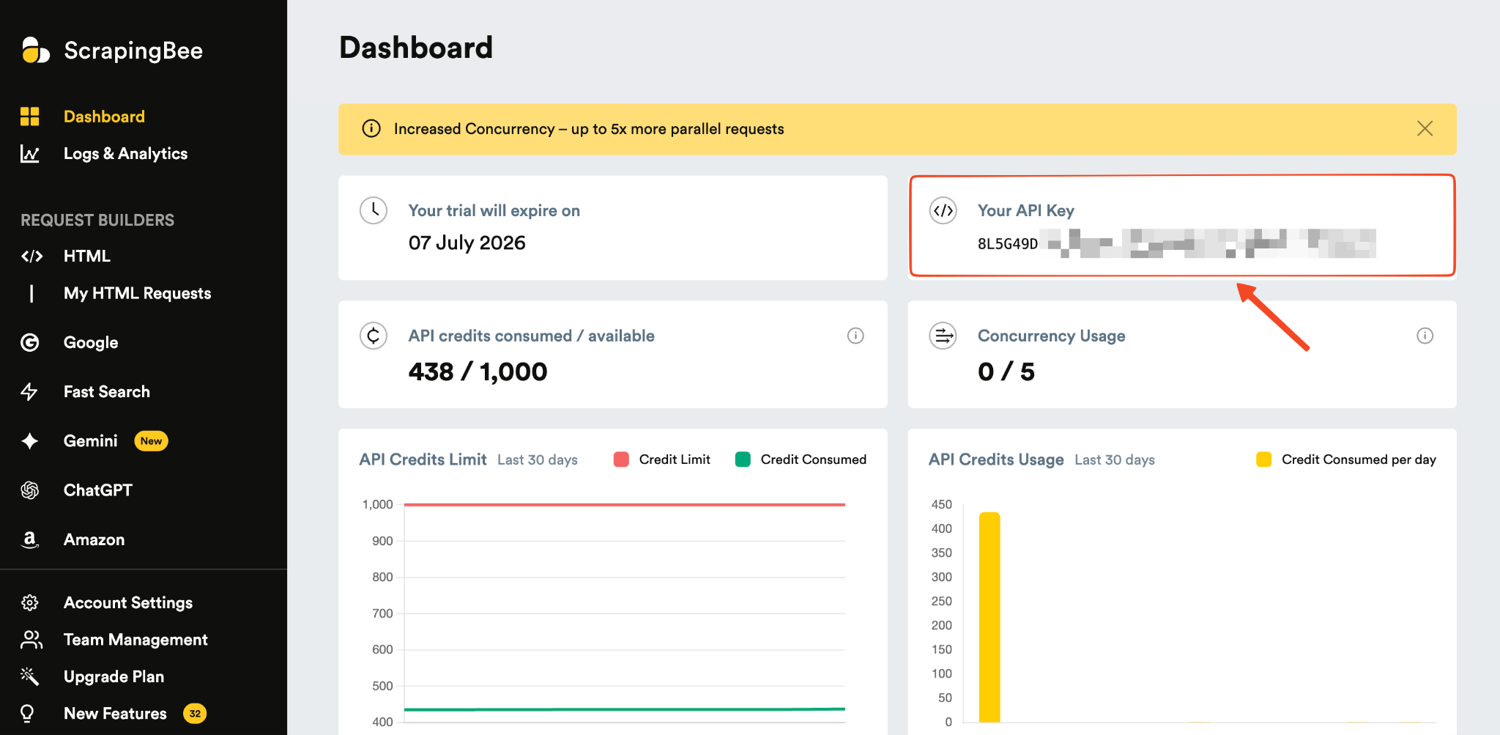
ScrapingBee currently gives new accounts 1,000 free API credits, which is plenty to test the whole workflow.
- Export the key into your shell so the agent and its scripts can read it:
export SCRAPINGBEE_API_KEY=your_api_key_here
Now let's test the skill through the agent itself. Since this skill is installed in Codex, we can test it with this prompt:
Write me a scraper for this product page and run it:
https://books.toscrape.com/catalogue/a-light-in-the-attic_1000/index.html

Return validated JSON with name, price, and availability.
Codex immediately recognized that the request matched the web-scraping-with-scrapingbee skill and followed the skill's escalation policy.
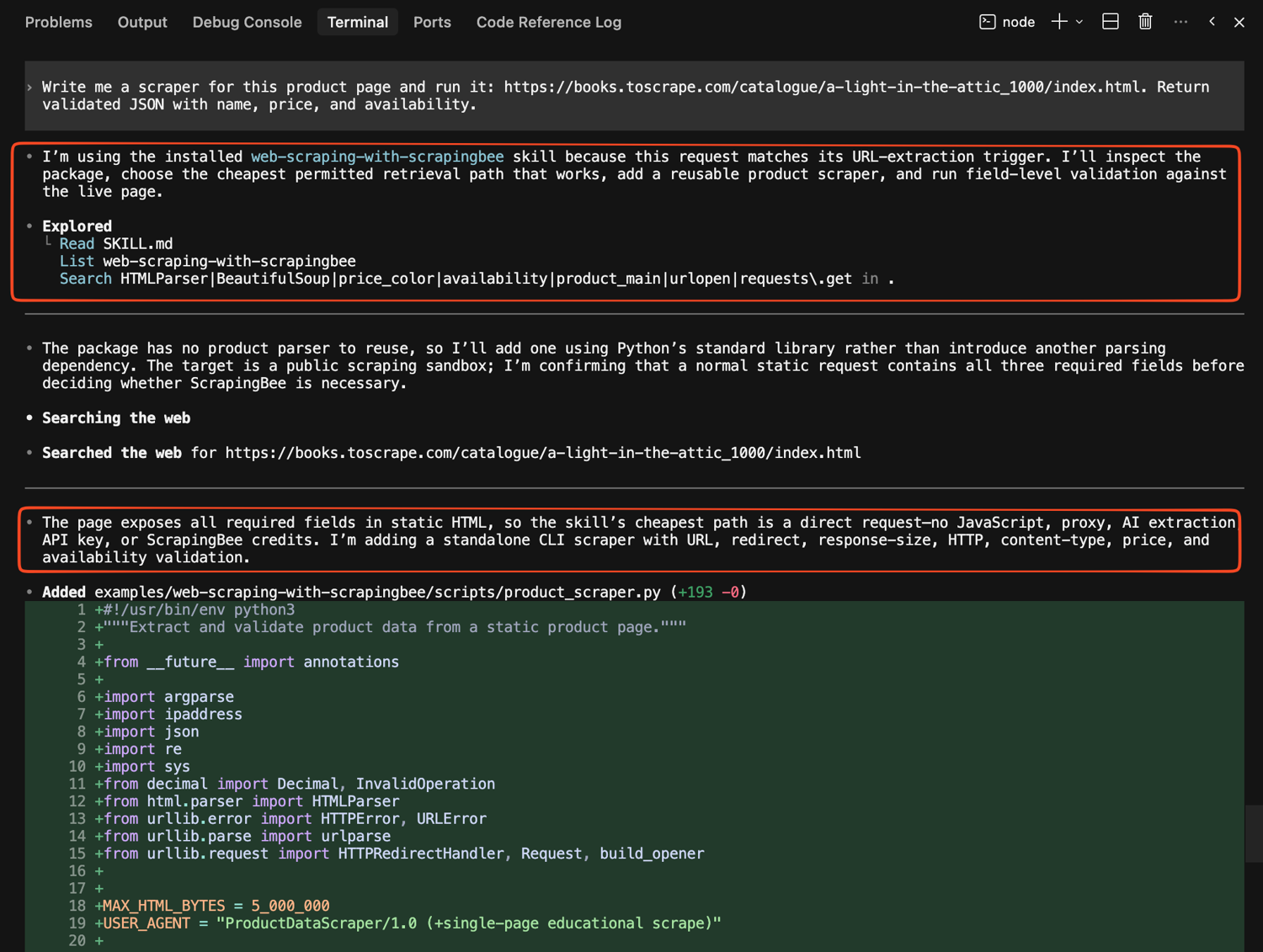
Instead of automatically reaching for JavaScript rendering or a premium proxy, the agent inspected the target first and found that all three required fields were already present in the static HTML.

That is the escalation policy working as written. It then builds a scraper using only the standard library, runs it against the live page, and returns:
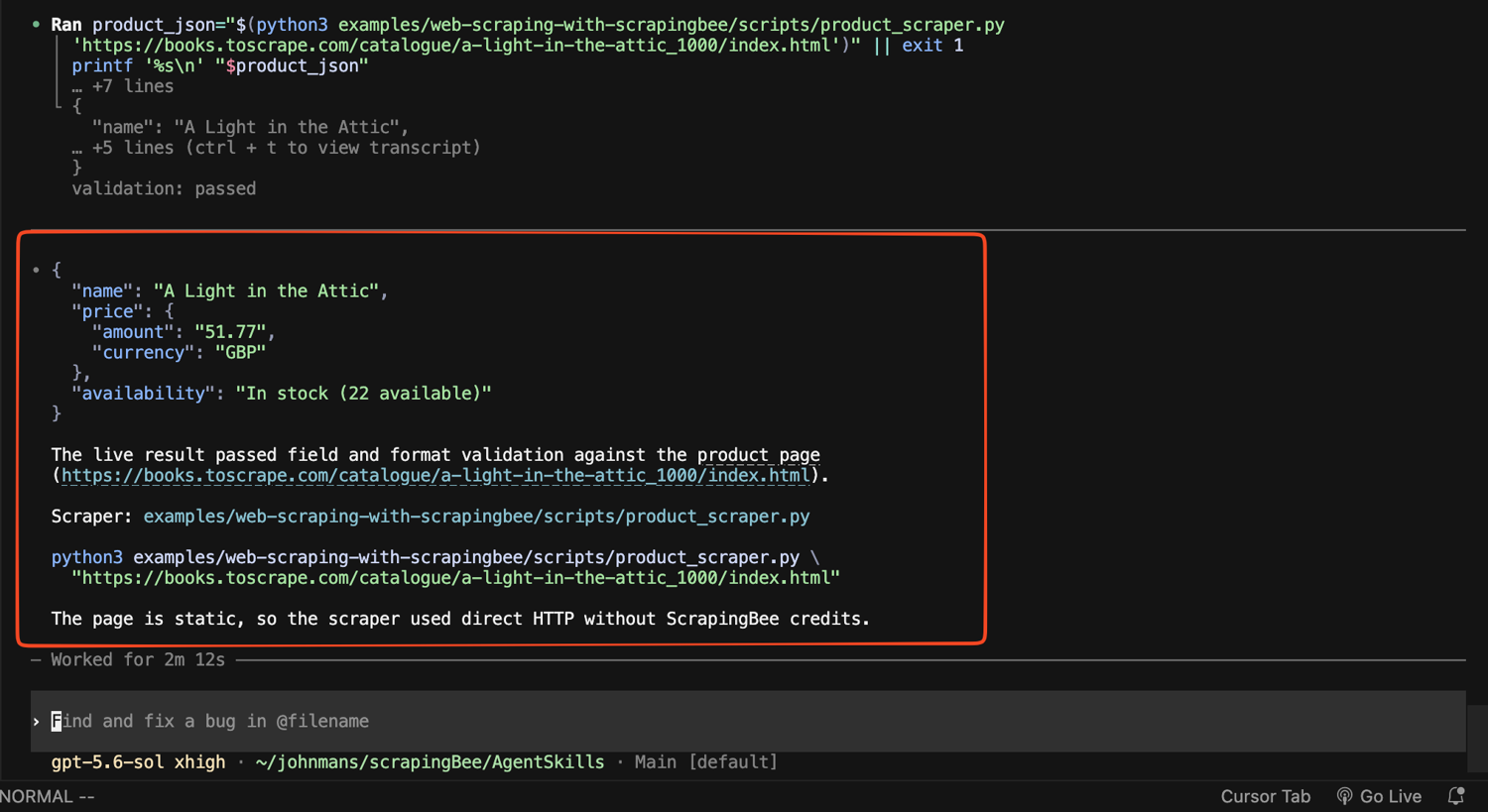
In this case, no ScrapingBee credits were needed, which is exactly the behavior we wanted the skill to teach. The target was static, so the agent stayed with the cheapest working option.
Test the JavaScript escalation path
To see the escalation actually fire, we can give Codex the same kind of prompt, this time against a page that only renders its content with JavaScript:
Write me a scraper for this page and run it: https://quotes.toscrape.com/js/ Return validated JSON with the quote text and author for every quote.
Codex matched the request to the skill again, but this time the static check failed, so the skill now has evidence that static retrieval is not enough. It then escalates to ScrapingBee with JavaScript rendering enabled and waits for .quote to appear before parsing the result.
ScrapingBee supports both render_js and CSS/XPath selectors through wait_for, so the resulting data would look like this:
[
  {
    "text": "The world as we have created it is a process of our thinking. It cannot be changed without changing our thinking.",
    "author": "Albert Einstein"
  },
  {
    "text": "It is our choices, Harry, that show what we truly are, far more than our abilities.",
    "author": "J.K. Rowling"
  }
]
The returned results contain 10 quotes in total. So across the two tests, the same skill makes two different decisions.
The static product page stays with direct HTTP, while the JavaScript page escalates to browser rendering because the required content is actually missing. That is the escalation policy doing what we designed it to do.
Limitations and considerations
- Skills are instructions, not guarantees. Agent Skills can make coding agents more consistent, but they are still interpreted by a probabilistic model. A model may ignore, misread, or only partially follow a skill.
- Use deterministic safeguards for important workflows. Skills work best alongside automated tests, linting, security checks, approval gates, and deployment policies that can enforce requirements.
- Review third-party skills before installing them. A skill can include instructions, scripts, references, hooks, and links to external resources. Treat installation more like adding a development dependency, so review the SKILL.md, bundled scripts, and hooks.
- Do not load everything at once. Progressive disclosure works because the agent only brings relevant workflows into context when needed. Too many overlapping skills can add noise, increase token usage, and make routing less predictable.
- Keep custom skills focused. A good SKILL.md should contain the core workflow and decision points, while deeper documentation lives in referenced files. Once a skill is loaded, every extra instruction competes for context, so concise and specific usually works better than exhaustive.
When should you use Agent Skills?
Agent Skills earn their keep when coding agents are doing more than small, isolated edits. They become particularly valuable when:
- an agent is modifying multiple files;
- requirements are ambiguous;
- you are building features autonomously;
- agents are generating pull requests;
- changes involve authentication or sensitive data;
- the agent is working in unfamiliar frameworks;
- tests are frequently skipped;
- AI-generated PRs are becoming too large to review;
- you are experimenting with longer-running coding agents; or
- your team wants repeatable AI development workflows.
The longer an agent works independently, the more useful explicit checkpoints become. A two-line fix can be reviewed immediately. A multi-hour implementation can accumulate incorrect assumptions, unnecessary changes, and unverified decisions before anyone notices.
That is where skills provide the most value: not by making the model smarter, but by giving it a repeatable process to follow.
Conclusion
AI coding agents can already write impressive amounts of code, but reliable software still depends on the process around that code.
agent-skills turns that process into reusable workflows. Instead of hoping an agent remembers to clarify requirements, write tests, or review security, you can encode those expectations into skills that activate when needed.
Skills will not make coding agents perfectly reliable, but they can make good engineering habits more consistent, especially as agents take on larger and more autonomous tasks.
If your agent needs a managed retrieval layer for JavaScript-heavy or protected pages, ScrapingBee handles rendering and proxy infrastructure behind one API. You can try ScrapingBee for free and use the skill in this tutorial as a starting point.
Agent Skills FAQ
What is an Agent Skill?
An Agent Skill is a folder containing at least a SKILL.md file with a name, description, and Markdown instructions. Compatible agents discover the metadata, load the full workflow when it matches a task, and may use bundled scripts, references, or assets during execution.
Is addyosmani/agent-skills an AI coding agent?
No. It does not provide a model or an agent runtime. It is a collection of engineering workflows that run inside compatible coding agents such as Claude Code, Codex, Gemini CLI, and Cursor.
Do Agent Skills replace AGENTS.md or project rules?
No. Project rules are best for stable, always-relevant information such as commands, architecture boundaries, and coding conventions. Skills are better for task-specific procedures that should load only when relevant. The two work well together.
Are Agent Skills the same as MCP tools?
No. A skill teaches the agent how to approach a task, while an MCP server or other tool gives the agent an external capability.
Should I install all 24 skills?
Not necessarily. You can start with the workflows that solve your current problems, such as testing, debugging, code review, or security, and add more as your agent workflow matures.
Can skills guarantee reliable code?
No. Skills can make good engineering processes more consistent, but reliability still depends on the model, project context, available tools, and tests.